
WLS8600 - Barcode Printer Wasp - Free user manual and instructions
Find the device manual for free WLS8600 Wasp in PDF.


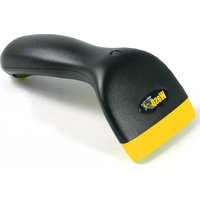
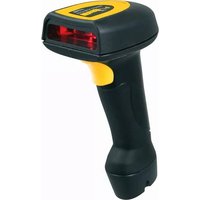
| Product Type | Handheld Barcode Scanner |
| Model | WLS8600 |
| Brand | Wasp Barcode Technologies |
| Dimensions (without cable) | Approximately 17.5 cm x 9.5 cm x 7.0 cm (estimated) |
| Weight (without cable) | 295 g (10.4 oz) |
| Cable Length | 2 m (6 ft 6 in) |
| Power Supply | 4 to 30 VDC |
| Max Consumption (at 5V) | 310 mA |
| Sleep Mode Consumption | 4 mA |
| Scan Rate | 35 ± 5 scans/sec |
| Maximum Resolution | 0.076 mm (3 mils) |
| Laser Power (max) | 0.9 mW |
| Laser Safety Class | Class 2 (EN 60825-1/CDRH) |
| Scan Angle | 42° |
| Reading Indicators | Good Read LED (green), Good Read Spot (green), Beeper |
| Working Temperature | -30 °C to +50 °C (-22 °F to +122 °F) |
| Storage Temperature | -30 °C to +70 °C (-22 °F to +158 °F) |
| Humidity | 90% non-condensing |
| Drop Resistance | 2 m (IEC 68-2-32 Test Ed) |
| Protection Class | IP65 |
| Interface Options | USB, RS-232, Keyboard Wedge, Pen Emulation |
| Decode Capabilities | EAN 8/13, UPC A/E, Code 39, Code 128, Interleaved 2/5, and more |
| Radio Protocol | Proprietary (one-way, 2 sec timeout) |
| Battery (if applicable) | Not applicable; powered via cable |
| Maintenance | Clean upper window regularly with a soft cloth |
| Safety Compliance | Laser Class 2, CE, FCC Class A, RoHS |
| Warranty | One year limited factory warranty |
Frequently Asked Questions - WLS8600 Wasp
User questions about WLS8600 Wasp
0 question about this device. Answer the ones you know or ask your own.
Ask a new question about this device
Download the instructions for your Barcode Printer in PDF format for free! Find your manual WLS8600 - Wasp and take your electronic device back in hand. On this page are published all the documents necessary for the use of your device. WLS8600 by Wasp.
USER MANUAL WLS8600 Wasp
natural_image
Yellow and black barcode scanner with a circular lens (no text or symbols visible)Quick Reference Guide
Wasp Barcode Technologies
1400 10th Street
Plano, Texas USA 75074
Tel. 214-547-4100
Tel. 214-547-4101
©2005-2013 Wasp Barcode Technologies, Inc. (an unpublished work provided under license).
Patents
This product may be covered by one or more of the following patents:
Design Pat. AU 310201; AU 310202; CN 693980; CN735959; HK 0602013.5M001; HK 0602013.5M002; JP 1305693; KR 30-0460940; US D570,843 S; USD588,596 S.
US Pat. 5,992,740; 6,305,606 B1; 6,517,003; 6,808,114 B1; 6,997,385 B2; 7,387,246 B2; 5,367,151; 5,449,893; 5,545,889; 6,098,877; 6,220,514 B1; 6,412,698 B2; 6,607,132 B1; 6,817,529 B2; 6,834,805 B2; 7,948,214 B2.
European Pat. 789,315 B1; 895,175 B1; 1,128,314 B1; 1,128,315 B1; 1,396,811 B1; 1,413,971 B1; 1,816,585 B1; 1,942,442 B1.
Additional patents pending.
Table of Contents
Updates and Language Availability ....1
Using the WLS8600 2
Aiming System 2
Setting Up the Reader ....3
Connecting the Cable ....3
Connecting to the Host Interface ....4
Selecting the Interface Type ....5
Interface Selection ....5
Keyboard Nationality ....7
PowerScan™ M8300 Default Configuration 9
Programming 10
Restore Default 10
Data Format Terminators 10
Operating Test 10
Technical Features 11
Default Values 12
Compliance 13
Laser Safety Compliance 13
LED CLASS 14
CE Compliance ....14
FCC Compliance ....14
Power Supply 14
Wasp Barcode Technologies Limited Factory Warranty ....15
Service and Support 16
NOTES
Updates and Language Availability
UK/US
The latest drivers and documentation updates for this product are available.
Contact WASP Technical Support.
|
Contactez le support technique WASP.
D
WLS8600 readers automatically scan barcodes at a distance. Simply aim and pull the trigger. Code scanning is performed along the scan line emitted from the reading window. This line must cross the entire code. The best reading angles are indicated in the figure below.:


Aiming System
①

②

The WLS8600 provides an aiming system. If enabled, a partial trigger press produces a red spot, which should be aimed over the code center to get the best reading performance, see figure (1) above. By completely pressing the trigger the scan line appears to start code scanning (2).
After setting up the reader, you can enable or disable the aiming system by reading the codes below:
Disable Aiming System (Default)

Enable Aiming System

Setting Up the Reader
Follow the steps below to connect and get your reader up and communicating with its host.
- Connect the Cable to the reader and the Host.
- Configure the Interface (see page 5).
- Program the Reader starting on page 10 (optional, as needed).
Connecting the Cable

A. Rubber gasket
B. Plastic boot
C. Cable spacer
D. Cover
E. Strain relief
- Slip the cover over the cable.
- Push the plastic boot into the rubber gasket. Take care that the tab on the plastic boot is aligned with the notch in the rubber gasket.
- Push the plastic boot and gasket into the handle. Ensure that the "Front" marking on the plastic boot is facing out, with the arrow pointing towards the front of the scanner.
- Insert the cable into the socket of the plastic boot.
- Insert the cable spacer into the cable wire and slide it towards the handle.
- Push the cover along the cable towards the reader, and hook it over the yellow "tooth".
- Insert the strain relief into the cover and tighten the screw to fix the whole assembly to the reader handle.


Connecting to the Host Interface
USB
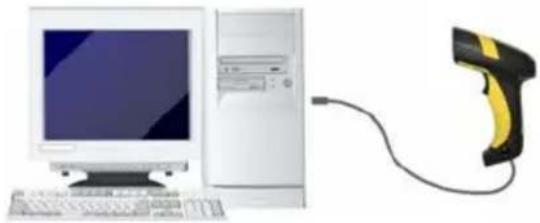
natural_image
Illustration of a desktop computer with monitor, tower, keyboard, and handheld scanner (no text or symbols)WEDGE
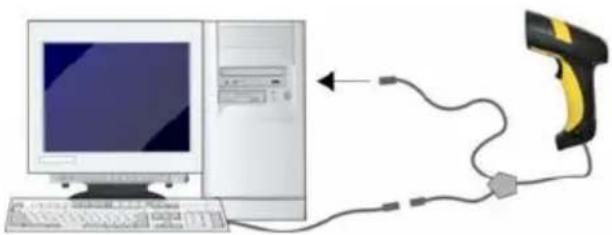
natural_image
Illustration of a desktop computer connected to a handheld device via cable (no text or symbols present)RS-232
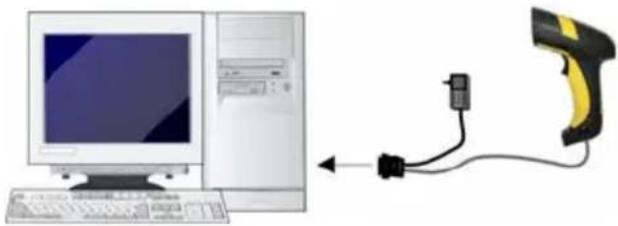
natural_image
Illustration of a desktop computer connected to a handheld device via cable (no text or symbols visible)PEN
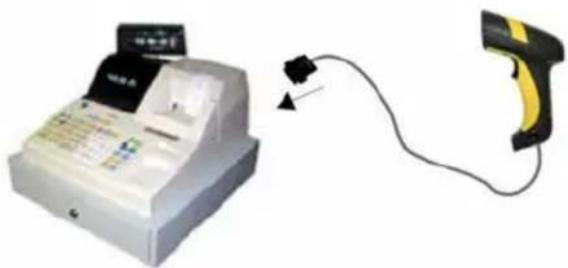
natural_image
Illustration of a white electronic cash register with a black connector and a yellow handheld device connected by a cable (no text or symbols visible)Selecting the Interface Type
Upon completing the physical connection between the reader and its host, proceed directly to Interface Selection below for information and programming for the interface type the reader is connected to (for example: RS-232, Keyboard Wedge, USB, etc.) and scan the appropriate barcode to select your system's correct interface type.
Interface Selection
Select one of the interface codes according to your application.
USB Interface Selection

* When configuring USB-COM, the relevant files and drivers must be installed from the USB Device Installation software. Contact Wasp Technical Support for information.
Pen Emulation Interface Selection
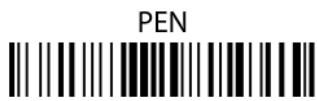
RS-232 Interface Selection
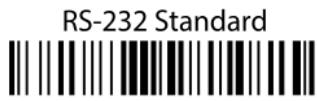
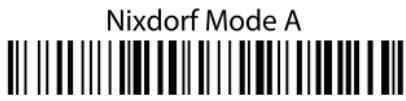

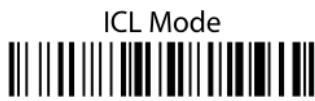
Wedge Interface Selection
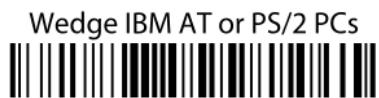
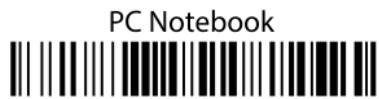
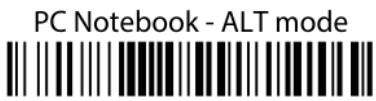
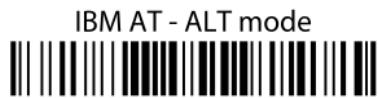
The Interface for IBM XT and IBM Terminals 3151, 347X and 348X can be selected from the WLS8600 Reference Manual available online at www.waspbar-code.com
Keyboard Nationality
USB-KBD and Wedge users should select one of the following wedge keyboard nationality codes according to the keyboard.
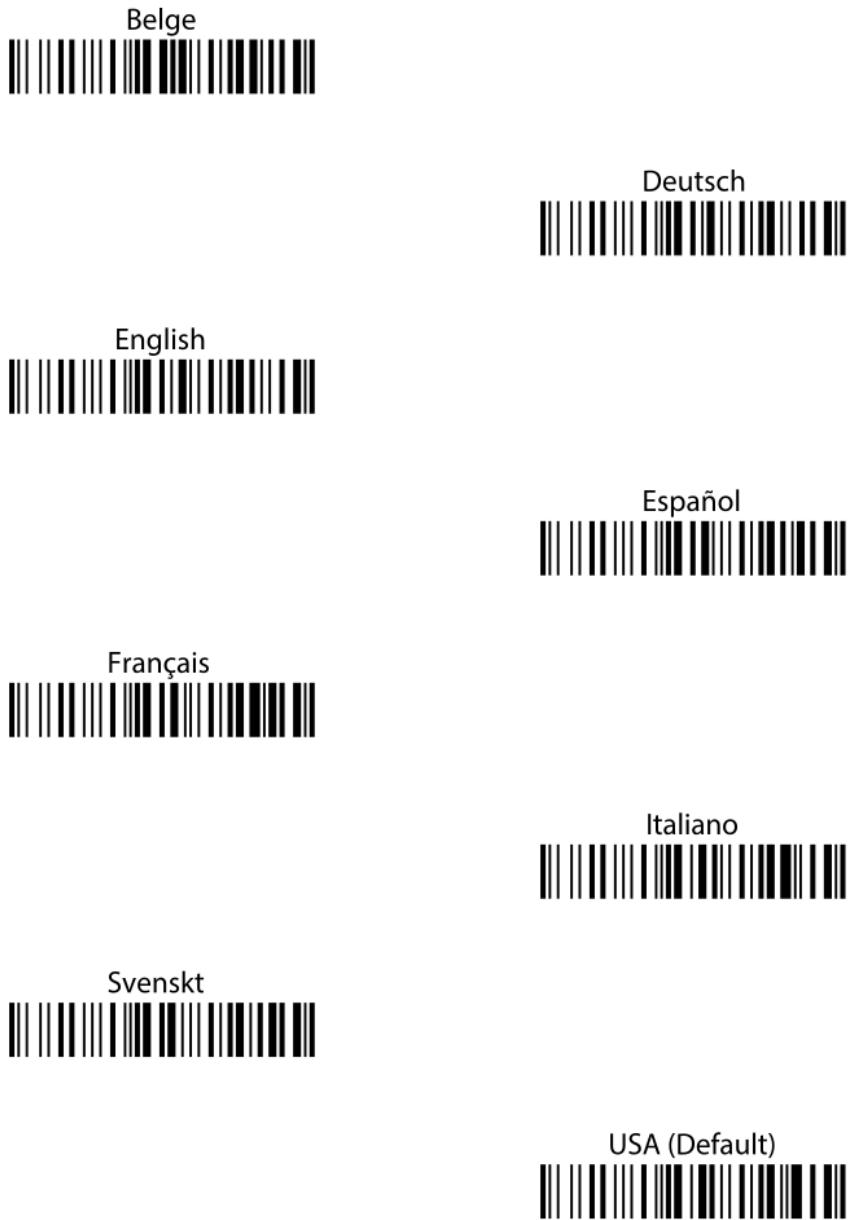
bar
| Language Pair | Frequency | | ------------- | --------- | | Belge | 100 | | Deutsch | 80 | | English | 70 | | Español | 60 | | Français | 50 | | Italiano | 40 | | Svenskt | 30 | | USA (Default) | 20 |Keyboard Nationality (continued)
The following Keyboard Nationality selections are only valid for IBM AT compatible PCs:
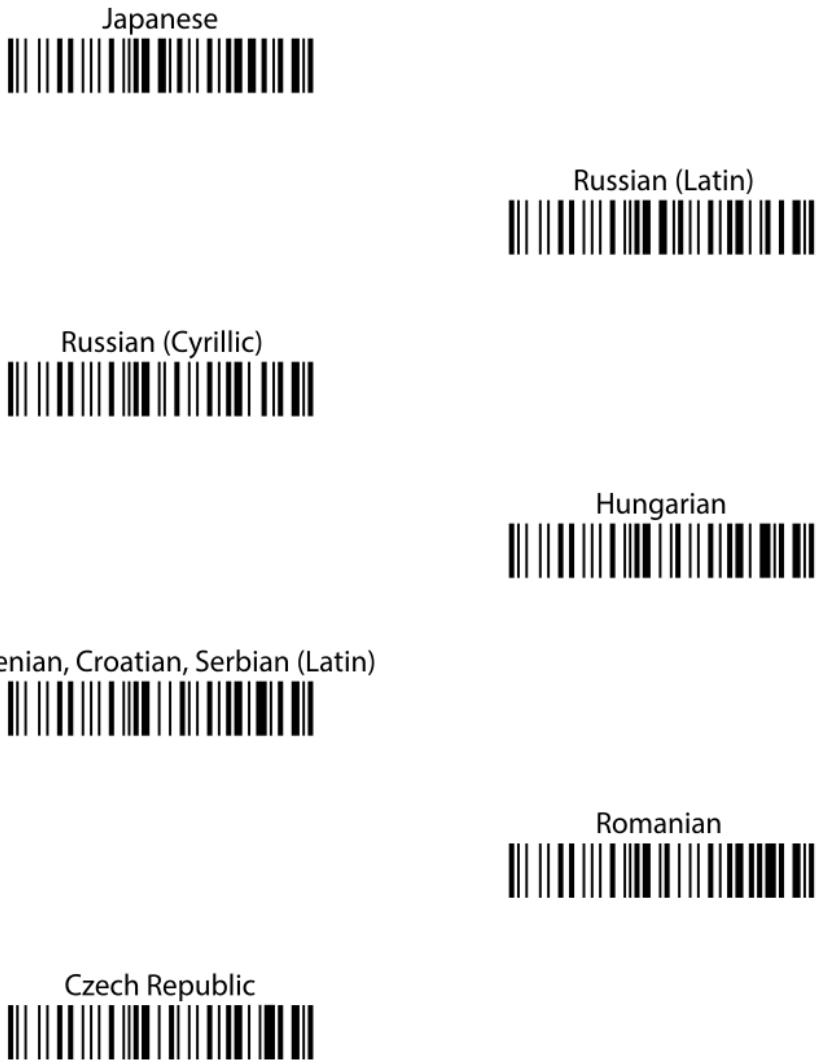
Slovenian, Croatian, Serbian (Latin)
PowerScan™ M8300 Default Configuration
| DATA FORMAT |
| code identifier disabled, field adjustment disabled, code length not transmitted, character replacement disabled |
| CODE SELECTION |
| Enabled codes |
| EAN 8/EAN 13 / UPC A/UPC E without ADD ON check digit transmitted, no conversionsInterleaved 2/5 check digit control and transmission, variable length code; 4-99 charactersStandard Code 39 no check digit control, variable length code; 1-99 charactersCode 128 variable length code; 1-99 characters |
| Disabled codes |
| EAN 128, ISBT128, Code 93, Codabar, pharmaceutical codes, MSI, Code 11, Code 16K, Code 49, GS1 DataBarTM (GS1 DataBarTM includes the following symbologies: GS1 DataBar Omnidirectional, GS1 DataBar Stacked, GS1 DataBar Expanded and GS1 DataBar Limited). |
| RADIO PARAMETERS |
| radio protocol timeout = 2 seconds, power-off timeout = 4 hours, transmission mode = one-way, beeper control for radio response = normal, single store disabled, batch mode disabled, find me enabled, radio RX timeout = disabled |
Programming
The reader is factory-configured with a set of standard default features. After scanning the interface barcode from the Interfaces section, select other options and customize your reader through use of the programming barcodes available in the WLS8600 Reference Manual. Check the corresponding features section for your interface, and also the Data Editing and Symbologies chapters of the PRG.
Restore Default
Restore Default
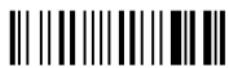
To change the settings refer to the WLS8600 Reference Manual.
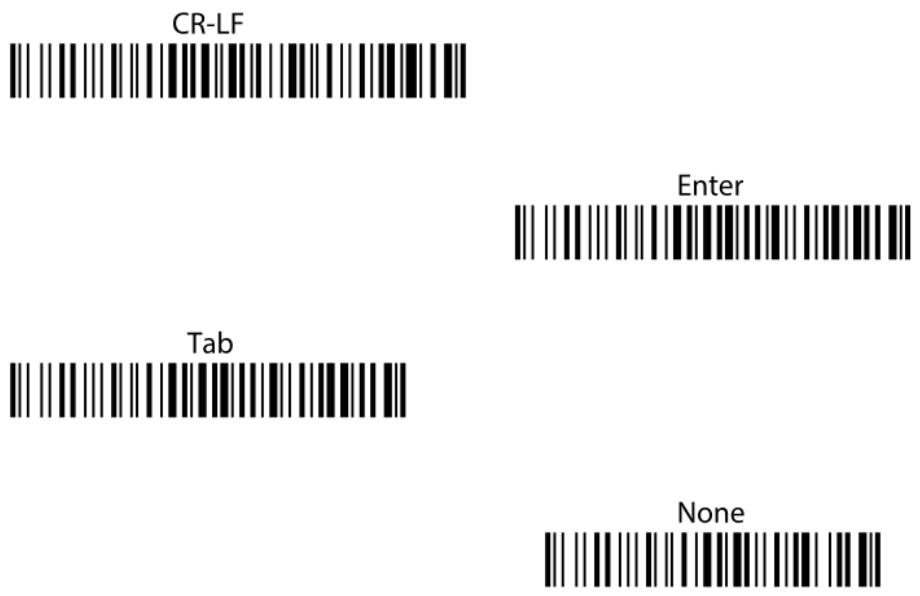
Data Format Terminators
For your convenience, some common Terminators are given below. For other Header/Terminator selections, Data Format and Advanced Data Format parameters, see the WLS8600 Reference Manual.
Operating Test
Read the TEST code below.

Technical Features
WLS8600
| Electrical Features | WLS8600 |
| Power Supply | 4 to 30 VDC |
| Max. Consumption: 0.076 mm (3 mils) | |
| @ 4V | 420 mA |
| @5V | 310 mA |
| @30V | 62 mA |
| Sleep mode | 4 mA |
| Scan Rat 35 ± 5 scans/sec | |
| Reading Indicators | Good Read LED (green)Good Read Spot (green), Beeper |
| Optical Features | |
| Reading Field(Typical performance at 20°C /68°F on high quality barcodes) | 97.8 cm (38.5 in)@ 40 mils |
| Max. Resolution 0.076 mm (3 mils) | |
| PCS 15% | |
| Laser Features | |
| Power (max) 0.9 mW | |
| Scan Angle 42° | |
| Laser Safety Class Class 2 EN 60825-1/CDRH | |
| Environmental Features | |
| Working Temperature -30 °C to + 50 °C / -22° to +122 °F | |
| Storage Temperature -30 °C to + 70 °C / -22° to +158 °F | |
| Humidity 90% non condensing | |
| Drop Resistance IEC 68-2-32 Test ED 2 m | |
| Protection Class IP65 | |
| Mechanical Features | |
| Weight (without cable) | about 295 g (10.4 oz) |
| Cable Length 2 m (6 ft 6 in) | |
Default Values
| USB-KBD DEFAULT SETTINGS |
| USA keyboard, FIFO enabled, inter-character and inter-code delays disabled, USB keyboard speed normal. |
| DATA FORMAT: code identifier disabled, no field adjustment, code length not transmitted, no header, terminator = ENTER, character replacement disabled. |
| RS-232 Standard DEFAULT SETTINGS |
| 9600 baud, no parity, 8 data bits, 1 stop bit, no handshaking, delay disabled, rx timeout 5 sec., ack/nack disabled, FIFO enabled, inter-character delay disabled, serial trigger lock disabled. |
| DATA FORMAT: code identifier disabled, no field adjustment, code length not transmitted, no header, terminator = CR-LF, character replacement disabled. |
| WEDGE DEFAULT SETTINGS |
| USA keyboard, caps lock off, caps lock auto-recognition enabled, num lock unchanged, inter-character and inter-code delays disabled, control character emulation = ctrl+shift+key. |
| DATA FORMAT: code identifier disabled, no field adjustment, code length not transmitted, no header, terminator = ENTER, character replacement disabled. |
| PEN DEFAULT SETTINGS |
| interpret operating mode, conversion to code 39 disabled, output level normal, idle level normal, minimum output pulse 600 μs, overflow medium, inter-block delay disabled. |
| CODE SELECTION |
| Enabled codes |
| · EAN 8/EAN 13 / UPC A/UPC E without ADD ON check digit transmitted, no conversions |
| · Interleaved 2/5 check digit control and transmission, variable length code; 4-99 characters |
| · Standard Code 39 no check digit control, variable length code; 1-99 characters |
| · C o d e 1 2 8 variable length code; 1-99 characters |
| Disabled codes |
| EAN 128, ISBT128, Code 93, Codabar, pharmaceutical codes, MSI, Code 11, Code 16K, Code 49, GS1 DataBarTM Codes |
Compliance
Laser Safety Compliance
The laser scanner conforms to the applicable requirements of both CDRH 21 CFR 1040 and EN60825-1 at the date of manufacture.
The laser light is visible to the human eye and is emitted from the output window (1).
Laser warning and classification label (2).

Use of controls or adjustments or performance of procedures other than those specified herein may result in exposure to hazardous visible laser light.
The laser scanner utilizes a low-power laser diode. Although staring directly at the laser beam momentarily causes no known biological damage, avoid staring at the beam as one would with any very strong light source, such as the sun. Avoid that the laser beam hits the eye of an observer, even through reflective surfaces such as mirrors, etc.
The following information is shown on the laser scanner device class label:
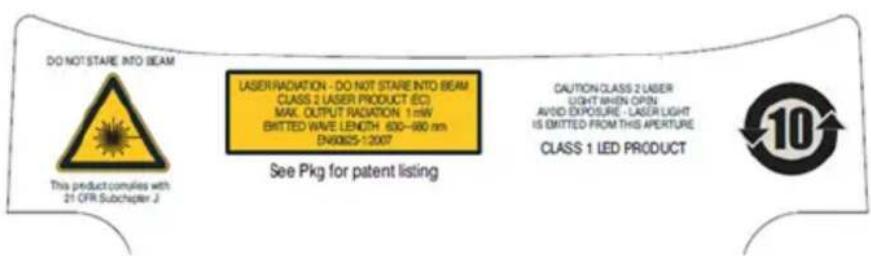
| LUCE LASER | |
| ITALIANO | NON FISSARE IL RAGGIOAPPARECCHIO LASER DI CLASSE 2 |
| RAYON LASER | |
| FRANÇAIS | EVITER DE REGARDER LE RAYONAPPAREIL LASER DE CLASSE 2 |
| LASERSTRAHLUNG | |
| DEUTSCH | NICHT IN DEN STRAHL BLICKENPRODUKT DER LASERKLASSE 2 |
| RAYO LÁSER | |
| ESPAÑOL | NO MIRAR FIJO EL RAYOAPARATO LÁSERDE CLASE 2 |
LED CLASS
Class 1 LED product.
CE Compliance

This is a Class A product. In a domestic environment this product may cause radio interference in which case the user may be required to take adequate measures.
FCC Compliance
Modifications or changes to this equipment without the expressed written approval of Datalogic could void the authority to use the equipment.
This device complies with PART 15 of the FCC Rules. Operation is subject to the following two conditions: (1) This device may not cause harmful interference, and (2) this device must accept any interference received, including interference which may cause undesired operation.
This equipment has been tested and found to comply with the limits for a Class A digital device, pursuant to part 15 of the FCC Rules. These limits are designed to provide reasonable protection against harmful interference when the equipment is operated in a commercial environment. This equipment generates, uses, and can radiate radio frequency energy and, if not installed and used in accordance with the instruction manual, may cause harmful interference to radio communications. Operation of this equipment in a residential area is likely to cause harmful interference in which case the user will be required to correct the interference at his own expense.
Power Supply
This device is intended to be connected to a UL Listed/CSA Certified computer which supplies power directly to the reader or else be supplied by a UL Listed/CSA Certified Power Unit marked “Class 2” or LPS power source rated 4 - 30 V, minimum 420 mA, which supplies power directly to the reader via the power connector of the cable.
Wasp Barcode Technologies Limited Factory Warranty
Warranty Coverage
Wasp warrants to Customer that Wasp's products will be free from defects in materials and workmanship for a period of one year from product shipment. Wasp Barcode Technologies ("Wasp") hardware products are warranted against defects in material and workmanship under normal and proper use. The liability of Wasp under this warranty is limited to furnishing the labor and parts necessary to remedy any defect covered by this warranty and restore the product to its normal operating condition. Repair or replacement of product during the warranty does not extend the original warranty term. Products are sold on the basis of specifications applicable at the time of manufacture and Wasp has no obligation to modify or update products once sold.
If Wasp determines that a product has defects in material or workmanship, Wasp shall, at its sole option repair or replace the product without additional charge for parts and labor, or credit or refund the defective products duly returned to Wasp. To perform repairs, Wasp may use new or reconditioned parts, components, subassemblies or products that have been tested as meeting applicable specifications for equivalent new material and products. Customer will allow Wasp to scrap all parts removed from the repaired product. The warranty period shall extend from the date of shipment from Wasp for the duration published by Wasp for the product at the time of purchase (Warranty period). Wasp warrants repaired hardware devices against defects in workmanship and materials on the repaired assembly for a 90 day period starting from the date of shipment of the repaired product from Wasp or until the expiration of the original warranty period, whichever is longer. Wasp does not guarantee, and it is not responsible for, the maintenance of, damage to, or loss of configurations, data, and applications on the repaired units and at its sole discretion can return the units in the "factory default" configuration or with any software or firmware update available at the time of the repair (other than the firmware or software installed during the manufacture of the product). Customer accepts responsibility to maintain a back up copy of its software and data. Refer to:
http://www.waspbarcode.com/Corporate/warrenty_periods_claims.asp
Warranty Claims Process
Refer to http://www.waspbarcode.com/Corporate/return_policy.asp.
Warranty Exclusions
The Wasp Factory Warranty shall not apply to:
(i) any product which has been damaged, modified, altered, repaired or upgraded by other than Wasp service personnel or its authorized representatives;
(ii) any claimed defect, failure or damage which Wasp determines was caused by faulty operations, improper use, abuse, misuse, wear and tear, negligence, improper storage or use of parts or accessories not approved or supplied by Wasp;
(iii) any claimed defect or damage caused by the use of product with any other instrument, equipment or apparatus;
(iv) any claimed defect or damage caused by the failure to provide proper maintenance, including but not limited to cleaning the upper window in accordance with product manual;
(v) any defect or damage caused by natural or man-made disaster such as but not limited to fire, water damage, floods, other natural disasters, vandalism or abusive events that would cause internal and external component damage or destruction of the whole unit, consumable items;
(vi) any damage or malfunctioning caused by non-restoring action as for example firmware or software upgrades, software or hardware reconfigurations etc.;
(vii) the replacement of upper window/cartridge due to scratching, stains or other degradation and/or
(viii) any consumable or equivalent (e.g., cables, power supply, batteries, keypads, touch screen, triggers etc.).
No Assignment
Customer may not assign or otherwise transfer its rights or obligations under this warranty except to a purchaser or transferee of product. No attempted assignment or transfer in violation of this provision shall be valid or binding upon Wasp.
WASP'S LIMITED WARRANTY IS IN LIEU OF ALL OTHER WARRANTIES, EXPRESS OR IMPLIED, ORAL OR WRITTEN, STATUTORY OR OTHERWISE, INCLUDING, WITHOUT LIMITATION, ANY IMPLIED WARRANTIES OF MERCHANTABILITY, FITNESS FOR A PARTICULAR PURPOSE, OR NONINFRINGEMENT. WASP SHALL NOT BE LIABLE FOR ANY DAMAGES SUSTAINED BY CUSTOMER ARISING FROM DELAYS IN THE REPLACEMENT OR REPAIR OF PRODUCTS UNDER THE ABOVE. THE REMEDY SET FORTH IN THIS WARRANTY STATEMENT IS THE CUSTOMER'S SOLE AND EXCLUSIVE REMEDY FOR WARRANTY CLAIMS. UNDER NO CIRCUMSTANCES WILL WASP BE LIABLE TO CUSTOMER OR ANY THIRD PARTY FOR ANY LOST PROFITS, OR ANY INCIDENTAL, CONSEQUENTIAL IN-DIRECT, SPECIAL OR CONTINGENT DAMAGES REGARDLESS OF WHETHER WASP HAD ADVANCE NOTICE OF THE POSSIBILITY OF SUCH DAMAGES.
Risk of Loss
Customer shall bear risk of loss or damage for product in transit to Wasp. Wasp shall assume risk of loss or damage for product in Wasp's possession. In the absence of specific written instructions for the return of product to Customer, Wasp will select the carrier, but Wasp shall not thereby assume any liability in connection with the return shipment.
Service and Support
Log on to www.waspbarcode.com and click on the links indicated for information.
NOTES
NOTES

Wasp Barcode Technologies 1400 10th St Plano, Texas
La presente dichiarazione di conformità è rilasciata sotto la responsabilità esclusiva di Wasp Barcode Technologies. per: This Declaration of Conformity is issued under the sole responsibility of Wasp Barcode Technologies for: Cette déclaration de conformité est établie sous la seule responsabilité de Wasp Barcode Technologies: Diese Konformitätserklärung wird unter der alleinigen Verantwortung des Wasp Barcode Technologies erteilt für: Esta declaración de conformidad se expide bajo la exclusiva responsabilidad de Wasp Barcode Technologies para:
WLS8600; Barcode Reader
e tutti i suoi modelli and all its models et tous ses modèles und seine Modelle y todos sus modelos
sono conformi alle Direttive del Consiglio Europeo sottoelencate: are in conformity with the requirements of the European Council Directives listed below: sont conformes aux spécifications des Directives de l'Union Européenne ci-dessous: den nachstehenden angeführten Direktiven des Europäischen Rats: cumple con los requisitos de las Directivas del Consejo Europeo, según la lista siguiente:
2004/108/EC EMC Directive
2011/65/EU - RoHS Directive
Basate sulle legislazioni degli Stati membri in relazione alla compatibilità elettromagnetica ed alla sicurezza dei prodotti. On the approximation of the laws of Member States relating to electromagnetic compatibility and product safety. Basée sur la législation des Etats membres relative à la compatibilité électromagnétique et à la sécurité des produits. Über die Annäherung der Gesetze der Mitgliedsstaaten in bezug auf elektromagnetische Verträglichkeit und Produktsicherheit entsprechen. Basado en la aproximación de las leyes de los Países Miembros respecto a la compatibilidad electromagnética y las Medidas de seguridad relativas al producto.
Questa dichiarazione è basata sulla conformità dei prodotti alle norme seguenti: This declaration is based upon compliance of the products to the following standards: Cette déclaration repose sur la conformité des produits aux normes suivantes: Diese Erklärung basiert darauf, daß das Produkt den folgenden Normen entspricht: Esta declaración se basa en el cumplimiento de los productos con las siguientes normas:
EN 55022 (CLASS A ITE), SEPTEMBER 2006: AMENDMENT A1 (CLASS A ITE), OCTOBER 2007
LIMITS AND METHODS OF MEASUREMENTS OF RADIO DIS- TURBANCE CHARACTERISTICS OF INFORMATION TECHNOLOGY EQUIPMENTS
EN 55024, SEPTEMBER 1998 : AMENDMENT A1:2001+A2:2003
INFORMATION TECHNOLOGY EQUIPMENT IMMUNITY CHARACTERISTICS
LIMITS AND METHODS OF MEASUREMENT
TECHNICAL DOCUMENTATION FOR THE ASSESSMENT OF
EN 50581, SEPTEMBER 2012:
ELECTRICAL AND ELECTRONIC PRODUCTS WITH RESPECT TO THE RESTRICTION OF HAZARDOUS SUBSTANCES
Plano, Texas, Updates September 2013 Jeff Schmeling
Vice President of Product Development
Jeff Schmelchis
Wasp®
BARCODE TECHNOLOGIES
www.waspbarcode.com
Wasp Barcode Technologies
1400 10th Street
Plano, Texas USA 75074

- Wasp Barcode Technologies
- Patents
- Table of Contents
- NOTES
- Updates and Language Availability
- UK/US
- |
- D
- Aiming System
- Setting Up the Reader
- Connecting the Cable
- Connecting to the Host Interface
- Selecting the Interface Type
- Interface Selection
- Keyboard Nationality
- Keyboard Nationality (continued)
- PowerScan™ M8300 Default Configuration
- Programming
- Restore Default
- Data Format Terminators
- Operating Test
- Compliance
- Laser Safety Compliance
- LED CLASS
- CE Compliance
- FCC Compliance
- Power Supply
- Wasp Barcode Technologies Limited Factory Warranty
- Warranty Coverage
- Warranty Claims Process
- Warranty Exclusions
- No Assignment
- Risk of Loss
- Service and Support
- Wasp Barcode Technologies 1400 10th St Plano, Texas
- WLS8600; Barcode Reader
- 2004/108/EC EMC Directive
- 2011/65/EU - RoHS Directive
- Wasp®
- BARCODE TECHNOLOGIES
Brand : Wasp
Model : WLS8600
Category : Barcode Printer