Dental Assistant - Software LEXMARK - Free user manual and instructions
Find the device manual for free Dental Assistant LEXMARK in PDF.


User questions about Dental Assistant LEXMARK
0 question about this device. Answer the ones you know or ask your own.
Ask a new question about this device
Download the instructions for your Software in PDF format for free! Find your manual Dental Assistant - LEXMARK and take your electronic device back in hand. On this page are published all the documents necessary for the use of your device. Dental Assistant by LEXMARK.
USER MANUAL Dental Assistant LEXMARK
May 2011 www.lexmark.com
Edition notice
May 2011
The following paragraph does not apply to any country where such provisions are inconsistent with local law: LEXMARK INTERNATIONAL, INC., PROVIDES THIS PUBLICATION "AS IS" WITHOUT WARRANTY OF ANY KIND, EITHER EXPRESS OR IMPLIED, INCLUDING, BUT NOT LIMITED TO, THE IMPLIED WARRANTIES OF MERCHANTABILITY OR FITNESS FOR A PARTICULAR PURPOSE. Some states do not allow disclaimer of express or implied warranties in certain transactions; therefore, this statement may not apply to you.
This publication could include technical inaccuracies or typographical errors. Changes are periodically made to the information herein; these changes will be incorporated in later editions. Improvements or changes in the products or the programs described may be made at any time.
References in this publication to products, programs, or services do not imply that the manufacturer intends to make these available in all countries in which it operates. Any reference to a product, program, or service is not intended to state or imply that only that product, program, or service may be used. Any functionally equivalent product, program, or service that does not infringe any existing intellectual property right may be used instead. Evaluation and verification of operation in conjunction with other products, programs, or services, except those expressly designated by the manufacturer, are the user's responsibility.
For Lexmark technical support, visit support.lexmark.com.
For information on supplies and downloads, visit www.lexmark.com.
If you don't have access to the Internet, you can contact Lexmark by mail:
Lexmark International, Inc.
Bldg 004-2/CSC
740 New Circle Road NW
Lexington, KY 40550
USA
© 2011 Lexmark International, Inc.
All rights reserved.
UNITED STATES GOVERNMENT RIGHTS
This software and any accompanying documentation provided under this agreement are commercial computer software and documentation developed exclusively at private expense.
Trademarks
Lexmark and Lexmark with diamond design are trademarks of Lexmark International, Inc., registered in the United States and/or other countries.
All other trademarks are the property of their respective owners.
Contents
Edition notice....2
Using the applications....5
Using Scan to Patient Records....5
Scanning documents at the printer ....5
Using Dental Forms....6
Bookmarking forms....6
Configuring folders for bookmarks....7
Printing bookmarks....7
Searching for bookmarks and folders 8
Saving bookmarks as shortcuts....8
Using Card Copy....8
Loading cards on the scanner glass 8
Copying and e-mailing scanned cards....10
Using Remote Copy....10
Using the copy station ....10
Using Background and Idle Screen....11
Changing the background image using the printer control panel ....11
Notices....12
Index....19
Contents
Using the applications
Lexmark ^™ Dental Assistant is a collection of applications used to customize your multifunction printer (MFP) for your work environment. Several applications have been installed on the MFP to help make frequently performed tasks faster and more efficient. This allows you to do the following directly from the printer:
- Scan documents at the printer, and then send the scanned documents to a network destination. From the network destination, the documents can be either stored or rerouted.
- Easily access frequently used forms and other regularly printed information.
- Print both sides of a scanned card on a single page, saving paper and displaying the information on the card in a more convenient manner.
- Scan documents at the printer, and then send the scanned documents to another printer on the network.
- Quickly make copies using a one-button custom copy icon on the printer home screen.
Using Scan to Patient Records
Scanning documents at the printer
1 Load the document into the scanner.
Note: Documents may be loaded into the scanner in multiple ways. For information on the different methods of loading documents into the scanner, see the User's Guide that came with the printer.
2 Touch the application icon. If prompted, enter the user name and password used to access the printer. Contact your system support person for login information.
3 Select the destination where you want to receive the scanned document. If prompted, enter the user name and password required to access the destination. Contact your system support person for login information.
4 Some additional job options may be available depending on how the application has been configured. Follow the instructions on the screen to update the options. Contact your system support person for more information on each option.
5 Touch Scan It. Depending on how the application has been configured, you may have the option to preview and make adjustments to scanned pages.
6 To scan additional documents, load the next document into the scanner and select one of the following from the confirmation screen:
- Touch Yes, to same destination to scan the document to the previous destination.
- Touch Yes, to a different destination to scan the document to a different destination.
- Touch No to finish the operation and return to the printer Home screen.
Using Dental Forms
Bookmarking forms
Adding a bookmark using the printer control panel
1 From the printer home screen, touch the application icon.
2 If necessary, touch Options.
3 Touch .
4 Type a name for the new bookmark. This name will be displayed when selecting a form to print.
5 If you want to use a PIN to limit access to the bookmark, then touch Confidential, select On, and then touch
6 Touch .
7 If prompted, enter a four-digit PIN, and then touch

8 Touch the location of the file you want to bookmark, and then touch →.
•Network—The form is on a network share.
- FTP—The form is on an FTP site.
- HTTP—The form is on a Web page.
- HTTPS—The form is on a secure Web page.
9 If you selected HTTP or HTTPS, then enter the URL of the bookmark.
10 If you selected Network or FTP, then select an authentication option, and then touch →.
Authentication options include the following:
- Guest(Network Folder)/Anonymous—This does not require users to be authenticated.
- Use device authentication credential—This requires users to enter the authentication credentials as specified on the printer.
- Prompt for username and password—This requires users to enter their system user name and password.
- Use static username and password—This requires administrators to specify a static user name and password when they configure the bookmark. Users will not be prompted to enter these credentials at the printer.
11 Follow the instructions on the touch screen to enter the location of the file you want to bookmark. Use progress through the screens.
Editing or deleting a bookmark using the printer control panel
1 From the printer home screen, touch the application icon.
2 Touch the bookmark you want to edit or delete.
Note: You can delete multiple bookmarks at one time.
3 If necessary, touch Options.
4 Touch ✅ to edit a bookmark or 🔊 to delete a bookmark.
5 Follow the instructions on the touch screen to edit or delete the bookmark or bookmarks. Use → to progress through the screens.
Note: If the bookmark is confidential, then you will be prompted for the four-digit PIN.
Configuring folders for bookmarks
Adding a folder using the printer control panel
1 From the home screen of the printer control panel, touch the application icon.
2 If necessary, touch Options.
3 Touch .+
4 Enter a name for the folder, and then touch . The folder will appear in the list of bookmarks.
Adding a bookmark to a folder using the printer control panel
1 From the home screen of the printer control panel, touch the application icon.
2 Touch the folder you want to use.
3 Touch .
4 If necessary, touch Options.
5 Touch .
6 Enter the information for the new bookmark. For more information, see "Adding a bookmark using the printer control panel" on page 6.
Editing or deleting a folder
1 From the home screen of the printer control panel, touch the application icon.
2 Touch the folder you want to edit or delete.
3 If necessary, touch Options.
4 To edit the folder, touch .
To delete the folder, touch 📄.
5 Follow the instructions on the screen to edit or delete the folder.
Printing bookmarks
1 From the home screen of the printer control panel, touch the application icon.
2 Touch the name of the bookmark you want to print, and then touch
3 Follow the instructions on the screen to print the bookmark.
Searching for bookmarks and folders
1 From the printer home screen, touch the application icon.
2 Touch .
3 Enter a keyword in the Search For field, and then touch
The results of your search are displayed.
Saving bookmarks as shortcuts
You can turn frequently accessed bookmarks into shortcuts that show up on the printer home screen. Instead of touching the application to access the list of bookmarks, users can touch the shortcut to access the bookmark immediately.
1 From the home screen of the printer control panel, touch the application icon.
2 Touch the name of the bookmark you want to save, and then touch
3 Touch .
4 Enter the name for the shortcut as you want it to appear on the printer home screen, and then touch
5 Select an icon graphic for the shortcut, and then touch
6 From the confirmation screen, touch .
7 Touch 📋 to print the shortcut, or touch ✗.
Note: The icon appears on the printer home screen. Because of space constraints, users may need to scroll through the printer home screen to access all of the available icons.
Using Card Copy
Loading cards on the scanner glass
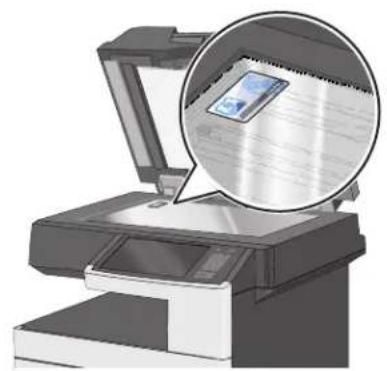
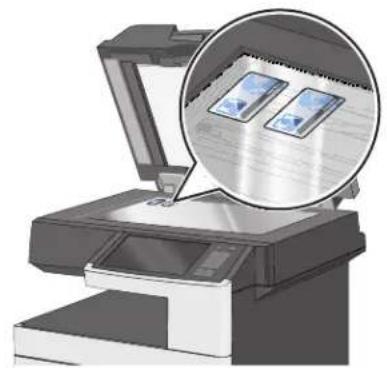
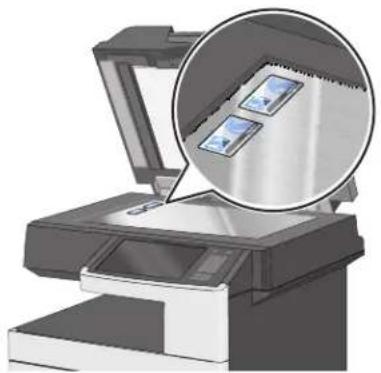
Place the cards facedown on the scanner glass, and then flip them over when prompted by the application.
Note: When loading multiple cards, make sure to leave at least 3 cm space between the cards, and at least 1 cm at the edges of the scanner glass to prevent images from being clipped when copying.
For a single card:
natural_image
Illustration of a printer with an open lid and a magnified inset showing a CD or DVD (no text or symbols present)
natural_image
Illustration of a printer with an open lid and magnified view showing the paper inside (no text or symbols)For two cards:
You can load the cards horizontally on the scanner glass.
natural_image
Illustration of a printer with an open lid and two circular insets showing two screens (no text or symbols present)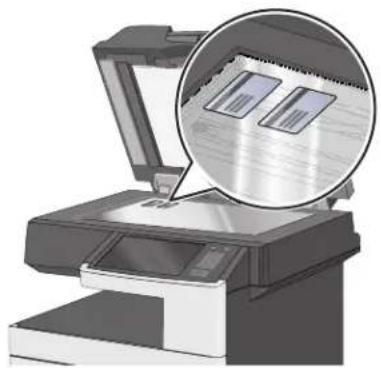
natural_image
Illustration of a printer with an open lid and a magnified inset showing two documents (no text or symbols visible)You can also load the cards vertically on the scanner glass.
natural_image
Illustration of a printer with an open lid and a magnified inset showing two small images (no text or symbols present)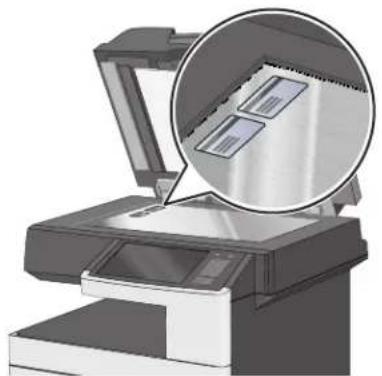
natural_image
Illustration of a printer with an open lid and magnified inset showing two documents (no text or symbols visible)For three or more cards:
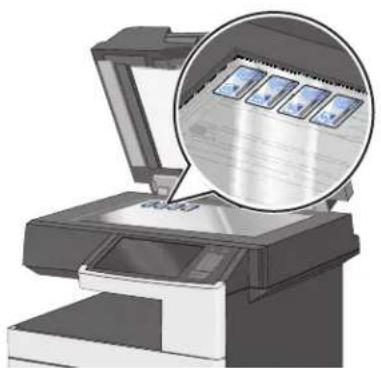
natural_image
Illustration of a printer with an open lid and a magnified inset showing a close-up of printed images (no text or symbols present)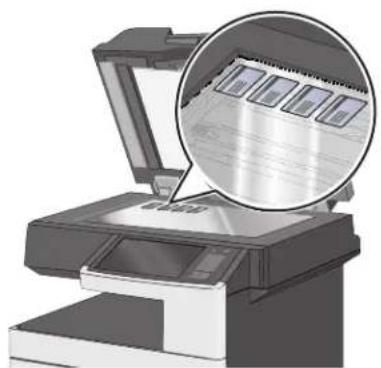
natural_image
Illustration of a printer with an open lid and a magnified inset showing a close-up of the paper (no text or symbols visible)Note: For printers that support the Embedded Solutions Framework (eSF) 2.0, you can scan only up to four cards at one time.
Copying and e-mailing scanned cards
1 From the printer home screen, touch the application icon.
2 Load the cards on the scanner glass.
Note: For printers that support eSF 2.0, you can scan only up to four cards at one time.
3 Adjust the settings as necessary.
If your printer supports eSF 2.0, then touch Multi Card to copy more than one card.
4 Touch Scan.
5 If the printer is configured to send the scanned cards as an e-mail attachment, then set the e-mail destination:
a Enter the recipient e-mail address or verify the default e-mail address.
b To add additional recipients, touch Next Address. You can also select an address from the list to edit it. For more information about entering e-mail addresses, see the printer User's Guide.
c Touch E-mail It.
6 When the first scan completes, turn the cards over and then select Scan.
7 When the second scan completes, remove the cards, and then touch OK.
The printer prints a copy of the scanned cards if the application is configured to create a printed output.
Using Remote Copy
Using the copy station
1 Load the document into the scanner.
Note: Documents may be loaded into the scanner in multiple ways. For information on the different methods for loading documents into the scanner, see the printer User's Guide.
2 From the printer home screen, touch the application icon.
Using the applications
3 If multiple remote printers have been configured, then select a remote printer to send the scanned documents to.
4 Adjust the copy settings as necessary.
Notes:
- For more information on the copy settings, see the printer User's Guide.
- Some copy settings may not be supported by the remote printer and will not be available for use with the application. Copy settings that are not supported are grayed out on the printer display.
5 Touch Copy It.
Using Background and Idle Screen
Changing the background image using the printer control panel
1 From the home screen, touch Change Background.
2 Select the background you want to use, and then touch OK.
Notices
This product includes software developed by the Apache Software Foundation (http://www.apache.org).
The Apache Software License, Version 1.1
Copyright (c) 2000-2002 The Apache Software Foundation. All rights reserved.
Redistribution and use in source and binary forms, with or without modification, are permitted provided that the following conditions are met:
1 Redistributions of source code must retain the above copyright notice, this list of conditions and the following disclaimer.
2 Redistributions in binary form must reproduce the above copyright notice, this list of conditions and the following disclaimer in the documentation and/or other materials provided with the distribution.
3 The end-user documentation included with the redistribution, if any, must include the following acknowledgment:
"This product includes software developed by the Apache Software Foundation (http://www.apache.org/)."
Alternately, this acknowledgment may appear in the software itself, if and wherever such third-party acknowledgments normally appear.
4 The names "Apache" and "Apache Software Foundation", "Jakarta-Oro" must not be used to endorse or promote products derived from this software without prior written permission. For written permission, please contact apache@apache.org.
5 Products derived from this software may not be called "Apache" or "Jakarta-Oro", nor may "Apache" or "Jakarta-Oro" appear in their name, without prior written permission of the Apache Software Foundation.
THIS SOFTWARE IS PROVIDED ``AS IS'' AND ANY EXPRESSED OR IMPLIED WARRANTIES, INCLUDING, BUT NOT LIMITED TO, THE IMPLIED WARRANTIES OF MERCHANTABILITY AND FITNESS FOR A PARTICULAR PURPOSE ARE DISCLAIMED. IN NO EVENT SHALL THE APACHE SOFTWARE FOUNDATION OR ITS CONTRIBUTORS BE LIABLE FOR ANY DIRECT, INDIRECT, INCIDENTAL, SPECIAL, EXEMPLARY, OR CONSEQUENTIAL DAMAGES (INCLUDING, BUT NOT LIMITED TO, PROCUREMENT OF SUBSTITUTE GOODS OR SERVICES; LOSS OF USE, DATA, OR PROFITS; OR BUSINESS INTERRUPTION) HOWEVER CAUSED AND ON ANY THEORY OF LIABILITY, WHETHER IN CONTRACT, STRICT LIABILITY, OR TORT (INCLUDING NEGLIGENCE OR OTHERWISE) ARISING IN ANY WAY OUT OF THE USE OF THIS SOFTWARE, EVEN IF ADVISED OF THE POSSIBILITY OF SUCH DAMAGE.
This software consists of voluntary contributions made by many individuals on behalf of the Apache Software Foundation. For more information on the Apache Software Foundation, please see http://www.apache.org/
Apache License Version 2.0, January 2004
http://www.apache.org/licenses/
TERMS AND CONDITIONS FOR USE, REPRODUCTION, AND DISTRIBUTION
1 Definitions.
"License" shall mean the terms and conditions for use, reproduction, and distribution as defined by Sections 1 through 9 of this document.
"Licensor" shall mean the copyright owner or entity authorized by the copyright owner that is granting the License.
"Legal Entity" shall mean the union of the acting entity and all other entities that control, are controlled by, or are under common control with that entity. For the purposes of this definition, "control" means (i) the power, direct or indirect, to cause the direction or management of such entity, whether by contract or otherwise, or (ii) ownership of fifty percent (50%) or more of the outstanding shares, or (iii) beneficial ownership of such entity.
"You" (or "Your") shall mean an individual or Legal Entity exercising permissions granted by this License.
"Source" form shall mean the preferred form for making modifications, including but not limited to software source code, documentation source, and configuration files.
"Object" form shall mean any form resulting from mechanical transformation or translation of a Source form, including but not limited to compiled object code, generated documentation, and conversions to other media types.
"Work" shall mean the work of authorship, whether in Source or Object form, made available under the License, as indicated by a copyright notice that is included in or attached to the work (an example is provided in the Appendix below).
"Derivative Works" shall mean any work, whether in Source or Object form, that is based on (or derived from) the Work and for which the editorial revisions, annotations, elaborations, or other modifications represent, as a whole, an original work of authorship. For the purposes of this License, Derivative Works shall not include works that remain separable from, or merely link (or bind by name) to the interfaces of, the Work and Derivative Works thereof.
"Contribution" shall mean any work of authorship, including the original version of the Work and any modifications or additions to that Work or Derivative Works thereof, that is intentionally submitted to Licensor for inclusion in the Work by the copyright owner or by an individual or Legal Entity authorized to submit on behalf of the copyright owner. For the purposes of this definition, "submitted" means any form of electronic, verbal, or written communication sent to the Licensor or its representatives, including but not limited to communication on electronic mailing lists, source code control systems, and issue tracking systems that are managed by, or on behalf of, the Licensor for the purpose of discussing and improving the Work, but excluding communication that is conspicuously marked or otherwise designated in writing by the copyright owner as "Not a Contribution."
"Contributor" shall mean Licensor and any individual or Legal Entity on behalf of whom a Contribution has been received by Licensor and subsequently incorporated within the Work.
2 Grant of Copyright License. Subject to the terms and conditions of this License, each Contributor hereby grants to You a perpetual, worldwide, non-exclusive, no-charge, royalty-free, irrevocable copyright license to reproduce, prepare Derivative Works of, publicly display, publicly perform, sublicense, and distribute the Work and such Derivative Works in Source or Object form.
3 Grant of Patent License. Subject to the terms and conditions of this License, each Contributor hereby grants to You a perpetual, worldwide, non-exclusive, no-charge, royalty-free, irrevocable (except as stated in this section) patent license to make, have made, use, offer to sell, sell, import, and otherwise transfer the Work, where such license applies only to those patent claims licensable by such Contributor that are necessarily infringed by their Contribution (s) alone or by combination of their Contribution(s) with the Work to which such Contribution(s) was submitted. If You institute patent litigation against any entity (including a cross-claim or counterclaim in a lawsuit) alleging that the Work or a Contribution incorporated within the Work constitutes direct or contributory patent infringement, then any patent licenses granted to You under this License for that Work shall terminate as of the date such litigation is filed.
4 Redistribution. You may reproduce and distribute copies of the Work or Derivative Works thereof in any medium, with or without modifications, and in Source or Object form, provided that You meet the following conditions:
a (a) You must give any other recipients of the Work or Derivative Works a copy of this License; and
b (b) You must cause any modified files to carry prominent notices stating that You changed the files; and
c (c) You must retain, in the Source form of any Derivative Works that You distribute, all copyright, patent, trademark, and attribution notices from the Source form of the Work, excluding those notices that do not pertain to any part of the Derivative Works; and
d (d) If the Work includes a "NOTICE" text file as part of its distribution, then any Derivative Works that You distribute must include a readable copy of the attribution notices contained within such NOTICE file, excluding
those notices that do not pertain to any part of the Derivative Works, in at least one of the following places: within a NOTICE text file distributed as part of the Derivative Works; within the Source form or documentation, if provided along with the Derivative Works; or, within a display generated by the Derivative Works, if and wherever such third-party notices normally appear. The contents of the NOTICE file are for informational purposes only and do not modify the License. You may add Your own attribution notices within Derivative Works that You distribute, alongside or as an addendum to the NOTICE text from the Work, provided that such additional attribution notices cannot be construed as modifying the License.
You may add Your own copyright statement to Your modifications and may provide additional or different license terms and conditions for use, reproduction, or distribution of Your modifications, or for any such Derivative Works as a whole, provided Your use, reproduction, and distribution of the Work otherwise complies with the conditions stated in this License.
5 Submission of Contributions. Unless You explicitly state otherwise, any Contribution intentionally submitted for inclusion in the Work by You to the Licensor shall be under the terms and conditions of this License, without any additional terms or conditions. Notwithstanding the above, nothing herein shall supersede or modify the terms of any separate license agreement you may have executed with Licensor regarding such Contributions.
6 Trademarks. This License does not grant permission to use the trade names, trademarks, service marks, or product names of the Licensor, except as required for reasonable and customary use in describing the origin of the Work and reproducing the content of the NOTICE file.
7 Disclaimer of Warranty. Unless required by applicable law or agreed to in writing, Licensor provides the Work (and each Contributor provides its Contributions) on an "AS IS" BASIS, WITHOUT WARRANTIES OR CONDITIONS OF ANY KIND, either express or implied, including, without limitation, any warranties or conditions of TITLE, NON-INFRINGEMENT, MERCHANTABILITY, or FITNESS FOR A PARTICULAR PURPOSE. You are solely responsible for determining the appropriateness of using or redistributing the Work and assume any risks associated with Your exercise of permissions under this License.
8 Limitation of Liability. In no event and under no legal theory, whether in tort (including negligence), contract, or otherwise, unless required by applicable law (such as deliberate and grossly negligent acts) or agreed to in writing, shall any Contributor be liable to You for damages, including any direct, indirect, special, incidental, or consequential damages of any character arising as a result of this License or out of the use or inability to use the Work (including but not limited to damages for loss of goodwill, work stoppage, computer failure or malfunction, or any and all other commercial damages or losses), even if such Contributor has been advised of the possibility of such damages.
9 Accepting Warranty or Additional Liability. While redistributing the Work or Derivative Works thereof, You may choose to offer, and charge a fee for, acceptance of support, warranty, indemnity, or other liability obligations and/or rights consistent with this License. However, in accepting such obligations, You may act only on Your own behalf and on Your sole responsibility, not on behalf of any other Contributor, and only if You agree to indemnify, defend, and hold each Contributor harmless for any liability incurred by, or claims asserted against, such Contributor by reason of your accepting any such warranty or additional liability.
END OF TERMS AND CONDITIONS
APPENDIX: How to apply the Apache License to your work.
To apply the Apache License to your work, attach the following boilerplate notice, with the fields enclosed by brackets "[]" replaced with your own identifying information. (Don't include the brackets!) The text should be enclosed in the appropriate comment syntax for the file format. We also recommend that a file or class name and description of purpose be included on the same "printed page" as the copyright notice for easier identification within third-party archives.
Copyright [yyyy] [name of copyright owner]
Licensed under the Apache License, Version 2.0 (the "License"); you may not use this file except in compliance with the License. You may obtain a copy of the License at
http://www.apache.org/licenses/LICENSE-2.0
Unless required by applicable law or agreed to in writing, software distributed under the License is distributed on an "AS IS" BASIS, WITHOUT WARRANTIES OR CONDITIONS OF ANY KIND, either express or implied. See the License for the specific language governing permissions and limitations under the License.
GNU Lesser General Public License
View the GNU Lesser General Public License online at http://www.gnu.org/licenses/lgpl.html.
View the LGPL licensed source code online at ftp.lemark.com/eSF/source.zip.
LEXMARK SOFTWARE LIMITED WARRANTY AND LICENSE AGREEMENTS
PLEASE READ CAREFULLY BEFORE SELECTING THE "Agree" OR "I accept" BUTTON ON THIS PAGE: BY SELECTING THE "Agree" OR "I accept" BUTTON, YOU AGREE TO BE BOUND BY ALL THE TERMS AND CONDITIONS OF THIS SOFTWARE LIMITED WARRANTY AND LICENSE AGREEMENTS. IF YOU DO NOT SO AGREE, SELECT THE "Disagree" OR "I do not accept" BUTTON ON THIS PAGE AND DO NOT INSTALL, COPY, DOWNLOAD, OR OTHERWISE USE THE SOFTWARE PROGRAM. IF YOU ARE INSTALLING THIS SOFTWARE PROGRAM FOR USE BY OTHER PARTIES, YOU AGREE TO INFORM THE USERS THAT USE OF THE SOFTWARE PROGRAM INDICATES ACCEPTANCE OF THESE TERMS.
LEXMARK SOFTWARE LICENSE AGREEMENT
This Software License Agreement (“Software License Agreement”) is a legal agreement between you (either an individual or a single entity) and Lexmark International, Inc. (“Lexmark”) that, to the extent your Lexmark product or Software Program is not otherwise subject to a written software license agreement between you and Lexmark or its suppliers, governs your use of any Software Program installed on or provided by Lexmark for use in connection with your Lexmark product. The term “Software Program” includes machine-readable instructions, audio/visual content (such as images and recordings), and associated media, printed materials and electronic documentation, whether incorporated into, distributed with or for use with your Lexmark product.
1 DISCLAIMER AND LIMITATION OF WARRANTIES. EXCEPT AS PROVIDED IN THIS SOFTWARE LICENSE AGREEMENT AND TO THE MAXIMUM EXTENT PERMITTED BY APPLICABLE LAW, LEXMARK AND ITS SUPPLIERS PROVIDE THE SOFTWARE PROGRAM "AS IS" AND HEREBY DISCLAIM ALL OTHER WARRANTIES AND CONDITIONS, EITHER EXPRESS OR IMPLIED, INCLUDING, BUT NOT LIMITED TO, TITLE, NON-INFRINGEMENT, MERCHANTABILITY AND FITNESS FOR A PARTICULAR PURPOSE, AND ABSENCE OF VIRUSES, ALL WITH REGARD TO THE SOFTWARE PROGRAM. TO THE EXTENT LEXMARK CANNOT BY LAW DISCLAIM ANY COMPONENT OF THE IMPLIED WARRANTIES OF MERCHANTABILITY OR FITNESS FOR A PARTICULAR PURPOSE, LEXMARK LIMITS THE DURATION OF SUCH WARRANTIES TO THE 90-DAY TERM OF THE EXPRESS SOFTWARE LIMITED WARRANTY.
This Agreement is to be read in conjunction with certain statutory provisions, as that may be in force from time to time, that imply warranties or conditions or impose obligations on Lexmark that cannot be excluded or modified. If any such provisions apply, then to the extent Lexmark is able, Lexmark hereby limits its liability for breach of those provisions to one of the following: providing you a replacement copy of the Software Program or reimbursement of the price paid for the Software Program.
The Software Program may include internet links to other software applications and/or internet web pages hosted and operated by third parties unaffiliated with Lexmark. You acknowledge and agree that Lexmark is not responsible in any way for the hosting, performance, operation, maintenance, or content of, such software applications and/or internet web pages.
2 LIMITATION OF REMEDY. TO THE MAXIMUM EXTENT PERMITTED BY APPLICABLE LAW, ANY AND ALL LIABILITY OF LEXMARK UNDER THIS SOFTWARE LICENSE AGREEMENT IS EXPRESSLY LIMITED TO THE GREATER OF THE PRICE PAID FOR THE SOFTWARE PROGRAM AND FIVE U.S. DOLLARS (OR THE EQUIVALENT IN LOCAL CURRENCY). YOUR SOLE REMEDY AGAINST LEXMARK IN ANY DISPUTE UNDER THIS SOFTWARE LICENSE AGREEMENT SHALL BE TO SEEK TO
RECOVER ONE OF THESE AMOUNTS, UPON PAYMENT OF WHICH LEXMARK SHALL BE RELEASED AND DISCHARGED OF ALL FURTHER OBLIGATIONS AND LIABILITY TO YOU.
IN NO EVENT WILL LEXMARK, ITS SUPPLIERS, SUBSIDIARIES, OR RESELLERS BE LIABLE FOR ANY SPECIAL, INCIDENTAL, INDIRECT, EXEMPLARY, PUNITIVE, OR CONSEQUENTIAL DAMAGES (INCLUDING BUT NOT LIMITED TO LOST PROFITS OR REVENUES, LOST SAVINGS, INTERRUPTION OF USE OR ANY LOSS OF, INACCURACY IN, OR DAMAGE TO, DATA OR RECORDS, FOR CLAIMS OF THIRD PARTIES, OR DAMAGE TO REAL OR TANGIBLE PROPERTY, FOR LOSS OF PRIVACY ARISING OUT OR IN ANY WAY RELATED TO THE USE OF OR INABILITY TO USE THE SOFTWARE PROGRAM, OR OTHERWISE IN CONNECTION WITH ANY PROVISION OF THIS SOFTWARE LICENCE AGREEMENT), REGARDLESS OF THE NATURE OF THE CLAIM, INCLUDING BUT NOT LIMITED TO BREACH OF WARRANTY OR CONTRACT, TORT (INCLUDING NEGLIGENCE OR STRICT LIABILITY), AND EVEN IF LEXMARK, OR ITS SUPPLIERS, AFFILIATES, OR REMARKETERS HAVE BEEN ADVISED OF THE POSSIBILITY OF SUCH DAMAGES, OR FOR ANY CLAIM BY YOU BASED ON A THIRD-PARTY CLAIM, EXCEPT TO THE EXTENT THIS EXCLUSION OF DAMAGES IS DETERMINED LEGALLY INVALID. THE FOREGOING LIMITATIONS APPLY EVEN IF THE ABOVE-STATED REMEDIES FAIL OF THEIR ESSENTIAL PURPOSE.
3 U.S.A. STATE LAWS. This Software Limited Warranty gives you specific legal rights. You may also have other rights that vary from state to state. Some states do not allow limitations on how long an implied warranty lasts or the exclusion of limitation of incidental or consequential damages, so the above limitations may not apply to you.
4 LICENSE GRANT. Lexmark grants you the following rights provided you comply with all terms and conditions of this Software License Agreement:
a Use. You may Use one (1) copy of the Software Program. The term "Use" means storing, loading, installing, executing, or displaying the Software Program. If Lexmark has licensed the Software Program to you for concurrent use, you must limit the number of authorized users to the number specified in your agreement with Lexmark. You may not separate the components of the Software Program for use on more than one computer. You agree that you will not Use the Software Program, in whole or in part, in any manner that has the effect of overriding, modifying, eliminating, obscuring, altering or de-emphasizing the visual appearance of any trademark, trade name, trade dress or intellectual property notice that appears on any computer display screens normally generated by, or as a result of, the Software Program.
b Copying. You may make one (1) copy of the Software Program solely for purposes of backup, archiving, or installation, provided the copy contains all of the original Software Program's proprietary notices. You may not copy the Software Program to any public or distributed network.
c Reservation of Rights. The Software Program, including all fonts, is copyrighted and owned by Lexmark International, Inc. and/or its suppliers. Lexmark reserves all rights not expressly granted to you in this Software License Agreement.
d Freeware. Notwithstanding the terms and conditions of this Software License Agreement, all or any portion of the Software Program that constitutes software provided under public license by third parties ("Freeware") is licensed to you subject to the terms and conditions of the software license agreement accompanying such Freeware, whether in the form of a discrete agreement, shrink-wrap license, or electronic license terms at the time of download or installation. Use of the Freeware by you shall be governed entirely by the terms and conditions of such license.
5 TRANSFER. You may transfer the Software Program to another end-user. Any transfer must include all software components, media, printed materials, and this Software License Agreement and you may not retain copies of the Software Program or components thereof. The transfer may not be an indirect transfer, such as a consignment. Prior to the transfer, the end-user receiving the transferred Software Program must agree to all these Software License Agreement terms. Upon transfer of the Software Program, your license is automatically terminated. You may not rent, sublicense, or assign the Software Program except to the extent provided in this Software License Agreement.
6 UPGRADES. To Use a Software Program identified as an upgrade, you must first be licensed to the original Software Program identified by Lexmark as eligible for the upgrade. After upgrading, you may no longer use the original Software Program that formed the basis for your upgrade eligibility.
7 LIMITATION ON REVERSE ENGINEERING. You may not alter, decrypt, reverse engineer, reverse assemble, reverse compile or otherwise translate the Software Program or assist or otherwise facilitate others to do so, except as and to the extent expressly permitted to do so by applicable law for the purposes of inter-operability, error correction, and security testing. If you have such statutory rights, you will notify Lexmark in writing of any intended reverse engineering, reverse assembly, or reverse compilation. You may not decrypt the Software Program unless necessary for the legitimate Use of the Software Program.
8 ADDITIONAL SOFTWARE. This Software License Agreement applies to updates or supplements to the original Software Program provided by Lexmark unless Lexmark provides other terms along with the update or supplement.
9 TERM. This Software License Agreement is effective unless terminated or rejected. You may reject or terminate this license at any time by destroying all copies of the Software Program, together with all modifications, documentation, and merged portions in any form, or as otherwise described herein. Lexmark may terminate your license upon notice if you fail to comply with any of the terms of this Software License Agreement. Upon such termination, you agree to destroy all copies of the Software Program together with all modifications, documentation, and merged portions in any form.
10 TAXES. You agree that you are responsible for payment of any taxes including, without limitation, any goods and services and personal property taxes, resulting from this Software License Agreement or your Use of the Software Program.
11 LIMITATION ON ACTIONS. No action, regardless of form, arising out of this Software License Agreement may be brought by either party more than two years after the cause of action has arisen, except as provided under applicable law.
12 APPLICABLE LAW. This Software License Agreement is governed by the laws of the Commonwealth of Kentucky, United States of America. No choice of law rules in any jurisdiction shall apply. The UN Convention on Contracts for the International Sale of Goods shall not apply.
13 UNITED STATES GOVERNMENT RESTRICTED RIGHTS. The Software Program has been developed entirely at private expense. Rights of the United States Government to use the Software Program are as set forth in this Software License Agreement and as restricted in DFARS 252.227-7014 and in similar FAR provisions (or any equivalent agency regulation or contract clause).
14 CONSENT TO USE OF DATA. You agree that Lexmark, its affiliates, and agents may collect and use information you provide in relation to support services performed with respect to the Software Program and requested by you. Lexmark agrees not to use this information in a form that personally identifies you except to the extent necessary to provide such services.
15 EXPORT RESTRICTIONS. You may not (a) acquire, ship, transfer, or reexport, directly or indirectly, the Software Program or any direct product therefrom, in violation of any applicable export laws or (b) permit the Software Program to be used for any purpose prohibited by such export laws, including, without limitation, nuclear, chemical, or biological weapons proliferation.
16 AGREEMENT TO CONTRACT ELECTRONICALLY. You and Lexmark agree to form this Software License Agreement electronically. This means that when you click the "Agree" or "I accept" button on this page, you acknowledge your agreement to these Software License Agreement terms and conditions and that you are doing so with the intent to "sign" a contract with Lexmark.
17 CAPACITY AND AUTHORITY TO CONTRACT. You represent that you are of the legal age of majority in the place you sign this Software License Agreement and, if applicable, you are duly authorized by your employer or principal to enter into this contract.
18 ENTIRE AGREEMENT. This Software License Agreement (including any addendum or amendment to this Software License Agreement that is included with the Software Program) is the entire agreement between you and Lexmark relating to the Software Program. Except as otherwise provided for herein, these terms and conditions supersede all prior or contemporaneous oral or written communications, proposals, and representations with respect to the Software Program or any other subject matter covered by this Software License Agreement (except to the extent such extraneous terms do not conflict with the terms of this Software License Agreement, any other written agreement signed by you and Lexmark relating to your Use of the Software Program). To the extent any Lexmark
policies or programs for support services conflict with the terms of this Software License Agreement, the terms of this Software License Agreement shall control.
EU5-0020
Index
B
background image changing 11
bookmarks
adding to folder using the printer control panel 7
adding using the printer control panel 6
creating folders using the printer control panel 7
deleting using the printer control panel 6
editing using the printer control panel 6
printing 7
saving as shortcuts 8
searching for 8
C
Card Copy
copying cards 10
e-mailing scanned cards 10
cards
loading on scanner glass 8
changing the background image 11
using the printer control panel 11
configuring the application
adding bookmarks from the printer control panel 6
deleting bookmarks using the printer control panel 6
editing bookmarks using the printer control panel 6
copy station
using 10
copying cards 10
E
e-mailing scanned cards 10
F
folder
deleting 7
editing 7
folders
adding using the printer control panel 7
searching for 8
L
loading cards on scanner glass 8
N
notices 2
P
printing bookmarks 7
S
scanning documents at the
printer 5
searching for bookmarks 8
searching for folders 8
shortcuts
creating 8
U
using the copy station 10