ElectrikBroom APU255 - Vacuum Cleaner Oreck - Free user manual and instructions
Find the device manual for free ElectrikBroom APU255 Oreck in PDF.


User questions about ElectrikBroom APU255 Oreck
0 question about this device. Answer the ones you know or ask your own.
Ask a new question about this device
Download the instructions for your Vacuum Cleaner in PDF format for free! Find your manual ElectrikBroom APU255 - Oreck and take your electronic device back in hand. On this page are published all the documents necessary for the use of your device. ElectrikBroom APU255 by Oreck.
USER MANUAL ElectrikBroom APU255 Oreck
text_image
-989-3535 888-676-7325 CK.COM OF OUR LOCATIONS ORECKUSER'S GUIDE
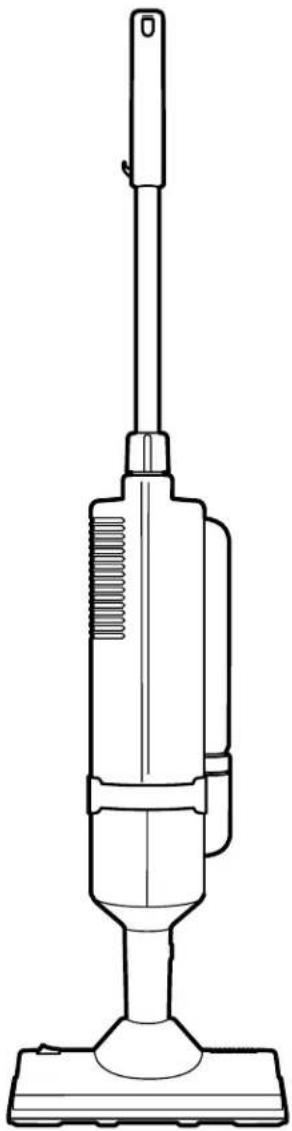
ElectrikBroom®
APU255
• IMPORTANT •
SAVE THIS BOOKLET!
Includes:
- Safety Warnings
- Warranty
- Operating Instructions
- Trouble Diagnosis
- Accessories
BEFORE OPERATING CLEANER, READ ALL INSTRUCTIONS IN THIS MANUAL CAREFULLY.
Table of Contents
Table of Contents,
Maintenance and Customer Service,
Important Safety Instructions .... page 2
Warranty,
Troubleshooting Guide .... page 3
Operating Instructions,
To Store the Cleaner .... page 4
To Replace Filter Bag .... page 5
To Replace Belt .... page 6
To Clean Clogged Power Nozzle ..... page 7
Accessories ...... page 8
Maintenance and Customer Service
Your ORECK vacuum cleaner is a product of precise engineering. The motor bearings are permanently lubricated and should not be oiled. If you require additional information or have problems with your ORECK appliance, you may call ORECK customer service at:
US: 1-800-989-3535
Canada: 1-888-676-7325
Please specify the model number and serial/code number which can be found on the data plate on the back of the vacuum.
Save your sales or purchase slip. Should your ORECK appliance require warranty service in the U.S.A., present this slip to the Authorized Service Center as your proof of purchase date or, in Canada, call customer service.
IMPORTANT SAFETY INSTRUCTIONS
When using an electrical appliance, basic precautions should always be followed, including the following:
READ ALL INSTRUCTIONS BEFORE USING THIS VACUUM CLEANER

WARNING
To reduce the risk of fire, electric shock, or injury:
- Do not leave appliance unattended when plugged in. Unplug from outlet when not in use and before servicing.
- Do not use outdoors or on wet surfaces.
- Do not allow to be used as a toy. Close attention is necessary when used by or near children.
- Use only as described in this manual.
- Do not use with damaged cord or plug. If appliance is not working as it should, has been dropped, damaged, left outdoors, or dropped into water, return it to a service center or call customer service at US: 1-800-989-3535
Canada: 1-888-676-7325 - Do not pull or carry by cord, use cord as a handle, close door on cord, or pull cord around sharp edges or corners. Keep cord away from heated surfaces.
- Do not run appliance over cord.
- Do not unplug by pulling on cord. To unplug, grasp the plug, not the cord.
- Do not handle plug or appliance with wet hands.
- Do not put any object into openings. Do not use with any opening blocked; keep free of dust, lint, hair and anything that may reduce air flow.
- Keep hair, loose clothing, fingers and all parts of body away from openings and moving parts.
- Do not use to pick up anything that is burning or smoking, such as cigarettes, matches, or hot ashes.
- Do not use without filter bag assembly in place.
- Turn off all controls before unplugging.
- Use extra care when cleaning on stairs.
- Do not use to pick up flammable or combustible liquids, such as gasoline or lighter fluid, or use in areas where they may be present.
- Do not use appliance in an enclosed space where flammable, explosive or toxic vapors are given off by oil base paint, paint thinner, some mothproofing substances, or in an area where flammable dust is present.
- Do not pick up toxic material such as chlorine bleach, drain cleaner, gasoline, etc. with this appliance.
SAVE THESE INSTRUCTIONS Household Use Only
Polarized Plug Notice
This product is equipped with a polarized alternating current line plug (a plug having one blade wider than the other). This plug will fit into the power outlet only one way. This is a safety feature. If you are unable to insert the plug fully into the outlet, try reversing the plug. If the plug should still fail to fit, contact an electrician to replace the obsolete outlet. Do not defeat the purpose of the polarized plug.
Warranty
ORECK MANUFACTURING COMPANY: (ORECK gives you the following limited warranty for this product only if it was originally purchased for use, not resale, from ORECK or an ORECK Authorized Retail Dealer.)
ORECK will repair or replace, free of charge, to the original purchaser, any part that is found to be defective in material or workmanship within two (2) years of the date of purchase. This limited warranty applies to normal domestic use. Any commercial use of this product will void this limited warranty.
Drive belts, revolving brushes, bulbs, disposable bags, and other parts subject to normal wear are not covered by this limited warranty.
This limited warranty does not apply to any part subjected to accident, abuse, commercial use, alteration, misuse, damage caused by fire or act of God, the use of voltages other than indicated on the serial number plate of this product or service of this product by other than ORECK or an ORECK Factory Authorized Service Center.
ORECK does not authorize any person or representative to assume or grant any other warranty obligation with the sale of this product.
ORECK'S limited warranty is valid only if you retain proof of purchase from ORECK or an ORECK Authorized Retail Dealer for this product. If you purchase this product from any other source, your purchase is "AS IS," which means ORECK grants you no warranty, and that you, not ORECK, assume the entire risk of the quality and performance of this product, including the entire cost of any necessary servicing or repairs of any defects.
ORECK'S liability for damages to you for any costs whatsoever arising out of this statement of limited warranty shall be limited to the amount paid for this product at the time of original purchase, and ORECK shall not be liable for any direct, indirect, consequential or incidental damages arising out of the use or inability to use this product.
Some states do not allow the exclusion or limitation of incidental or consequential damages, so the above limitation or exclusion may not apply to you.
ALL EXPRESS AND IMPLIED WARRANTIES FOR THIS PRODUCT, INCLUDING IMPLIED WARRANTIES OF MERCHANTABILITY AND FITNESS FOR A PARTICULAR PURPOSE, ARE LIMITED IN DURATION TO THE WARRANTY PERIOD, AND NO WARRANTIES, WHETHER EXPRESS OR IMPLIED, WILL APPLY AFTER THIS PERIOD.
Some states do not allow limitations on the duration of implied warranties, so the above limitation may not apply to you.
This warranty gives you specific legal rights, and you may also have other rights which vary from state to state.
Troubleshooting Guide

WARNING: Unplug cord from electrical outlet before servicing.
SAVE SERVICE CALLS...CHECK THESE FIRST:
• Is the disposable filter dust bag full?
- Are pores of filter dust bag clogged with powder or fine dust?
• Is anything clogging the revolving brush, intake opening?
• Is the belt in place and turning the brush?
- Does the brush turn freely? Are hair, string or rug fibers wound around the brush?
| PROBLEM | POSSIBLE SOURCE | AREAS TO CHECK |
| CLEANER WILL NOT RUN | Not plugged in properly.No electricity in wall outlet. | Be sure cleaner is firmly plugged into wall outlet.Check electrical source-fuse or circuit breaker. |
| CLEANER SUCTION LOW | Filter bag is full.Nozzle is clogged. | Replace filter bag.See “To Install Paper Filter Dust Bag.”Clear obstruction. |
| POWER NOZZLE DOES NOT PICK UP | Belt is broken or stretched.Brush roll is jammed.Powerbrush nozzle is not turning. | Replace belt.Remove debris from nozzle brush roll.Ensure power-brush nozzle cord is plugged in. |
| FILTER BAG ASSEMBLY DIFFICULT TO INSTALL AND REMOVE | Debris in bottom of filter bag housing opening.Filter bag not in place. | Clean seal area at bottom of filter bag housing opening.Install filter bag properly. |
| CLEANER NOZZLE WILL NOT SWIVEL | Swivel ring posts not in correct position.orDebris around swivel ring. | Remove swivel clamp screws from bottom of nozzle carefully.Reassemble nozzle to unit, making certain swivel ring posts are seated correctly. |
| HANDLE WILL NOT STAY IN POSITION | Handle collar lock not tightened securely. | Firmly tighten handle collar lock in clockwise direction. |
ALL OTHER SERVICING SHOULD BE DONE BY AN ORECK AUTHORIZED SERVICE CENTER.
CALL CUSTOMER SERVICE HOT LINE US: 1-800-989-3535 CANADA: 1-888-676-7325
Whenever calling, please be sure to have your model and serial number from data plate.
Operating Instructions
Plug cord into electrical outlet.
Power Switch
Push power switch to "ON" (I) position.

text_image
ELECTRIKBROOM POWER SWITCHPower Nozzle Operation
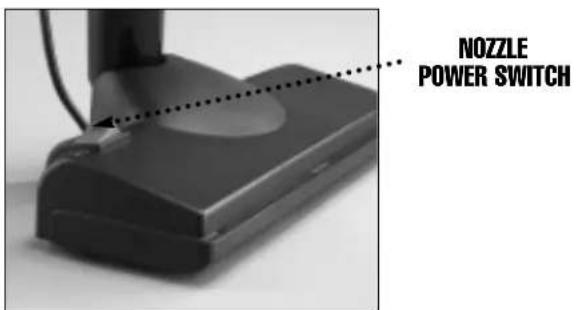
Your ORECK ELECTRIKBROOM cleaner features a power brush nozzle designed for effective cleaning on all types of carpets or bare floors.
When cleaning rugs or floors, glide the nozzle with slow, easy strokes.
For deep cleaning carpets, depress the powerbrush switch to "ON" (I) position, then glide the nozzle with slow, easy strokes. For bare floors and light rugs, you may stop the powerbrush roll by switching back to the "OFF" (O) position.
text_image
NOZZLE POWER SWITCHSwivel Nozzle
The swivel nozzle feature allows you to clean under furniture easily. Simply twist cleaner to side until the unit lies flat and parallel to the floor. Then guide the nozzle into hard to reach places.

text_image
SWIVEL NOZZLE OPERATIONCord Restraint
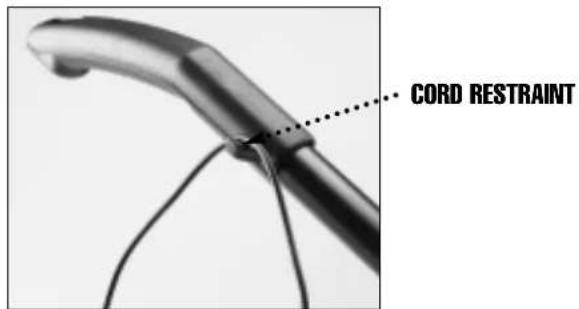
A cord restraint clip is conveniently molded into the handle to lift cord out of your way while vacuuming.
text_image
CORD RESTRAINTTelescopic Handle
To adjust the handle height, simply grasp handle grip and rotate collar lock at lower end of handle counterclockwise to loosen. Then slide handle up or down to desired height. Gently tighten collar lock down clockwise onto threads to lock handle into place.

text_image
COLLAR LOCKTo Store the Cleaner
Wrap the power cord around rear of unit. For compact storage, retract telescoping handle down. Hang cleaner on a hook from the opening located at the top of the handle.
The convenient ORECK ELECTRIKBROOM vacuum cleaner is always at your fingertips for quick clean-ups anywhere.
NOTE: These cleaners do not stand upright alone. Make sure the cleaner is properly supported when not in use or unattended.
To Replace Filter Bag

WARNING: Unplug cord from electrical outlet before servicing.
To ensure that your ORECK ELECTRIKBROOM Powerbrush cleaner provides you with optimal performance, use only ORECK brand bags. Replace the filter bag more frequently when picking up fine materials such as powders, plaster dust, ashes and soot. These materials may seal the filter bag before it appears full.
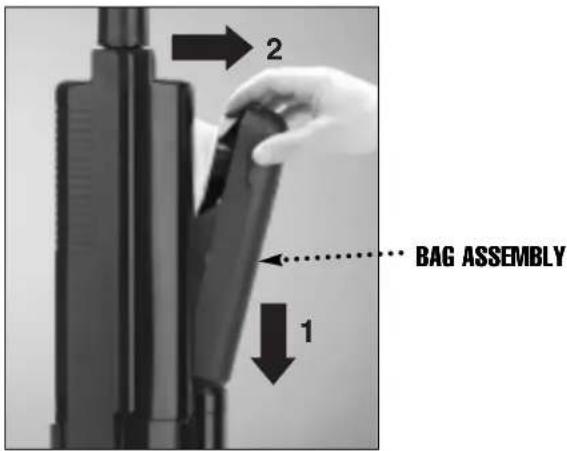
STEP 1: Remove Filter Bag Assembly
Remove the filter bag assembly by:
A) Grasping its top and pushing down.
B) Pulling top of filter bag assembly out and away from the cleaner.
text_image
2 1 BAG ASSEMBLYSTEP 2: Remove Used Filter Bag
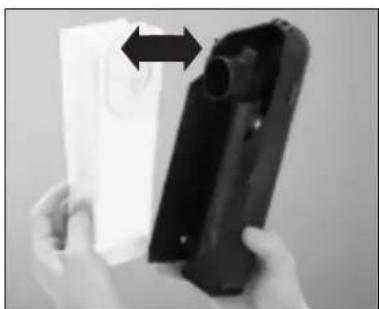
Remove used filter bag by grasping the cardboard collar and pulling it past the raised locking tabs on the dirt tube. Discard used bag.
natural_image
Close-up of hands holding a device with a black plastic housing and an arrow indicating direction (no visible text or symbols)STEP 3: Install New Filter Bag
Install new filter bag by pushing cardboard collar past locking tabs on the dirt tube. Make sure the filter bag is fully extended and tucked into the filter bag assembly.
STEP 4: Replace Filter Bag Assembly
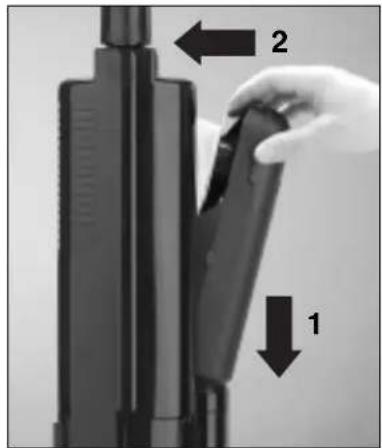
Replace bottom of the filter bag assembly into the side of the cleaner. While pressing down, pivot top of filter bag assembly in until to catch snaps into place.
text_image
Diagram showing a hand holding a device with labeled parts 1 and 2, indicating directional movement or assembly.IMPORTANT: Do not operate cleaner without filter bag in place. Damage to the motor will occur.
To order:
Replacement Filter Bags
Part No. OR162
Call your authorized ORECK Service Center, your authorized ORECK dealer, or the Service Center Hotline toll free at: US: 1-800-989-3535
CANADA: 1-888-676-7325
To Replace Belt

WARNING: Unplug cord from electrical outlet before servicing.
STEP 1: Remove Power Nozzle Assembly
Lay cleaner on flat surface with bottom side of nozzle (brush side) facing you then:
A) Remove swivel clamp screws and clamp.
B) Remove the two screws at the outer rear corners of the nozzle base plate only.
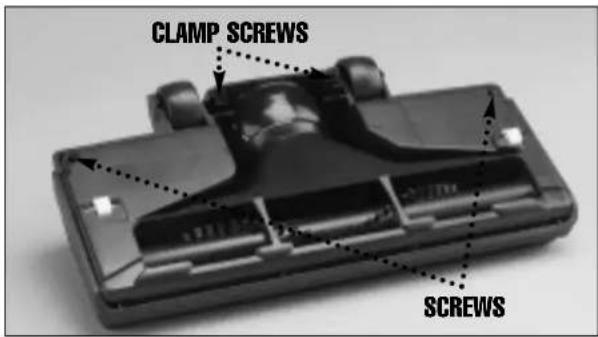
text_image
CLAMP SCREWS SCREWSSTEP 2: Remove Belt
Gently rock rear wheels and base plate up and out of nozzle. Lift brush roll from holder. Remove old belt and debris. (Dirt and debris may have been the cause of a broken belt.)

natural_image
Close-up of a hand inserting a battery into a black case (no visible text or symbols)STEP 3: Install New Belt
Place new belt over end of motor shaft and brush roll. Be Sure Belt Is Not Twisted.
Place brush roll back into its holder. Be sure flat side of metal brush roll ends are up.

natural_image
Close-up of hands operating a mechanical device with a cylindrical component and cable (no visible text or symbols)STEP 4: Replace Power Nozzle Assembly
Line up tabs in front of base plate with slots in nozzle cover. Press down on front while rocking base back into place. Be sure front tabs are in lock position. Replace screws at rear corners. Reattach swivel clamp to nozzle base.

natural_image
Close-up of a hand adjusting a black mechanical component (no visible text or symbols)To order: Replacement Belts Part No. OR114
Call your authorized ORECK Service Center, your authorized ORECK dealer, or the ORECK Service Center Hotline toll free at: US: 1-800-989-3535
CANADA: 1-888-676-7325
To Clean Clogged Power Nozzle

WARNING: Unplug cord from electrical outlet before servicing.
STEP 1: Remove Power Nozzle Assembly
Lay cleaner on flat surface with bottom side of nozzle (brush side) facing you then:
A) Remove swivel clamp screws and clamp.
B) Remove the two screws at the outer rear corners of the nozzle base plate only.
C) Lift unit body inlet section out of power nozzle base.

text_image
CLAMP SCREWS SCREWSSTEP 2: Inspect
Inspect nozzle and cleaner inlet for clogs and debris.
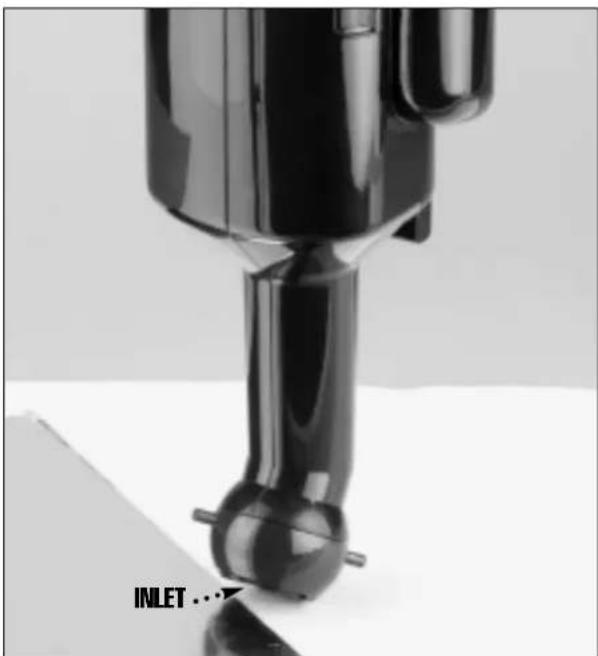
text_image
INLET ...STEP 3: Replace Power Nozzle Assembly
After cleaning, replace unit body inlet section into power nozzle base. Line up tabs in front of base plate with slots in nozzle cover. Press down on front while rocking base back into place. Be sure front tabs are in lock position. Replace screws at rear corners. Reattach swivel clamp to nozzle base.
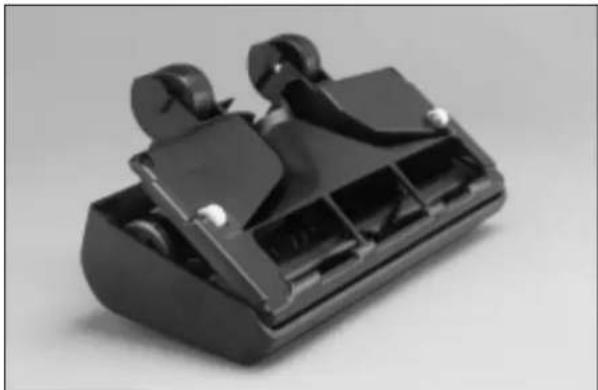
natural_image
Black plastic mechanical component with multiple slots and mounting holes (no visible text or symbols)ACCESSORIES SOLD SEPARATELY
USA: 1-800-989-3535 CANADA: 1-888-676-7325
ITEM PART NUMBER
- Filter Dust Bag, 3 Pack OR162
- Belts, 2 Pack OR114
natural_image
Line drawing of a vacuum cleaner with handle and base (no text or symbols)ElectrikBroom®