Profile JP969CHCC - Cooker GE - Free user manual and instructions
Find the device manual for free Profile JP969CHCC GE in PDF.


User questions about Profile JP969CHCC GE
0 question about this device. Answer the ones you know or ask your own.
Ask a new question about this device
Download the instructions for your Cooker in PDF format for free! Find your manual Profile JP969CHCC - GE and take your electronic device back in hand. On this page are published all the documents necessary for the use of your device. Profile JP969CHCC by GE.
USER MANUAL Profile JP969CHCC GE
Electronic Touch Control Cooktop
Safety Instructions ..... 2-4
Operating Instructions
Cookware Tips .....10, 11
Dual Surface Unit ..... 7
Features of Your Cooktop ....5
Kitchen Timer 9
Locking the Cooktop .....9
Pan Detection Feature .....9
Pan Sizing Feature .....9
Surface Units 6–9
Warmer Surface Unit .....8
Care and Cleaning
Control Lock Pad ..... 13
Glass Cooktop ..... 13, 14
Packaging Tape ..... 12
Troubleshooting Tips .. 15, 16
Consumer Support
Consumer Support ..... 20
Product Registration .... 17, 18
Warranty 19
Write the model and serial numbers here:
Model # ____
Serial # ____
You can find them on a label under the cooktop.
Owner's Manual
JP939
JP969

natural_image
Abstract logo design with stylized white letters on a gray circular background (no text or symbols)164D4290P119 49-80162 09-02 JR
IMPORTANT SAFETY INFORMATION. READ ALL INSTRUCTIONS BEFORE USING.
⚠ WARNING!
For your safety, the information in this manual must be followed to minimize the risk of fire or explosion, electric shock, or to prevent property damage, personal injury, or loss of life.
SAFETY PRECAUTIONS

When using electrical appliances, basic safety precautions should be followed, including the following:
■ Use this appliance only for its intended use as described in this manual.
Do not attempt to repair or replace any part of your cooktop unless it is specifically recommended in this manual. All other servicing should be referred to a qualified technician.
Before performing any service, disconnect the cooktop power supply at the household distribution panel by removing the fuse or switching off the circuit breaker.
- Be sure your appliance is properly installed and grounded by a qualified technician in accordance with the provided installation instructions.
■Have the installer show you the location of the circuit breaker or fuse. Mark it for easy reference.
Do not leave children alone—children should not be left alone or unattended in an area where an appliance is in use. They should never be allowed to sit or stand on any part of the appliance.
■ Teach children not to play with the controls or any other part of the cooktop.
Do not allow anyone to climb, stand or hang on the cooktop.
■ CAUTION: Items of interest to children should not be stored in cabinets above a cooktop—children climbing on the cooktop to reach items could be seriously injured.
■Always keep combustible wall coverings, curtains or drapes a safe distance from your cooktop.
■ Always keep dish towels, dishcloths, pot holders and other linens a safe distance away from your cooktop.
■ Always keep wooden and plastic utensils and canned food a safe distance away from your cooktop. They may become hot and could cause burns.
■ Never wear loose-fitting or hanging garments while using the appliance. Flammable material could be ignited if brought in contact with hot surface units and may cause severe burns.
Use only dry pot holders—moist or damp pot holders on hot surfaces may result in burns from steam. Do not let pot holders touch hot surface units. Do not use a towel or other bulky cloth. Such cloths can catch fire on a hot surface unit.
Do not use water on grease fires. Never pick up a flaming pan. Turn the controls off. Smother a flaming pan on a surface unit by covering the pan completely with a well-fitting lid, cookie sheet or flat tray. Use a multi-purpose dry chemical or foam-type extinguisher.
Flaming grease outside a pan can be put out by covering with baking soda or, if available, by using a multi-purpose dry chemical or foam-type fire extinguisher.
When preparing flaming foods under the hood, turn the fan on.

COOK MEAT AND POULTRY THOROUGHLY...
Cook meat and poultry thoroughly—meat to at least an INTERNAL temperature of 160^ F and poultry to at least an INTERNAL temperature of 180^ F. Cooking to these temperatures usually protects against foodborne illness.

▲WARNING!
SAFETY PRECAUTIONS
Do not touch glass ceramic surface units while cooking. This surface may be hot enough to burn even though it may appear dark in color. During and after use, do not touch, or let clothing or other flammable materials contact the cooking surface. Note the hot indicator lights and allow sufficient time for cooling first.
Hot surfaces may include both the cooktop and areas facing the cooktop.
To minimize the possibility of burns, ignition of flammable materials and spillage, the handle of a container should be turned toward the center of the cooktop without extending over any nearby surface units.
■ Always turn off the surface unit control before removing the cookware.
Use proper pan size—select cookware having flat bottoms large enough to cover the surface unit heating element. The use of undersized cookware will expose a portion of the surface unit to direct contact and may result in ignition of clothing. Proper relationship of cookware to surface unit will also improve efficiency.
■ Never leave surface units unattended at high heat settings. Boilovers may cause smoking and greasy spillovers may ignite.
Glass and ceramic cookware is not recommended for use with your radiant ceramic glass cooktop.
- Keep an eye on foods being fried at high or medium-high heat settings.
■ Foods for frying should be as dry as possible. Frost on frozen foods or moisture on fresh foods can cause hot fat to bubble up and over the sides of the pan.
■ Avoid placing any objects on or near the keypads in order to prevent accidental activation of the cooktop controls.
■ Use little fat for effective shallow or deep-fat frying. Filling the pan too full of fat can cause spillovers when food is added.
If a combination of oils or fats will be used in frying, stir together before heating, or as fats melt slowly.
■Always heat fat slowly, and watch as it heats.
■ Use a deep-fat thermometer whenever possible to prevent overheating fat beyond the smoking point.
■Never try to move a pan of hot fat, especially a deep-fat fryer. Wait until the fat is cool.
- Do not store flammable materials near the cooktop.
- Keep the hood and grease filters clean to maintain good venting and to avoid grease fires.
Do not store or use combustible materials, gasoline or other flammable vapors and liquids in the vicinity of this or any appliance.
Clean only parts listed in this Owner's Manual.
Do not leave paper products, cooking utensils or food on the cooktop when not in use.
- Keep cooktop clean and free of accumulation of grease or spillovers which may ignite.
■ Never heat unopened food containers. Pressure buildup may make container burst and cause injury.
■ Never leave jars or cans of fat drippings on or near your cooktop.
■Never use your appliance for warming or heating the room.
IMPORTANT SAFETY INFORMATION. READ ALL INSTRUCTIONS BEFORE USING.
▲WARNING!
RADIANT SURFACE UNITS

Use care when touching the cooktop. The glass surface of the cooktop will retain heat after the controls have been turned off.
- Avoid scratching the glass cooktop. The cooktop can be scratched with items such as sharp instruments, rings or other jewelry.
■Never use the glass cooktop surface as a cutting board.
- Do not place or store items on top of the glass cooktop surface when it is not in use.
Be careful when placing spoons or other stirring utensils on glass cooktop surface when it is in use. They may become hot and could cause burns.
■Avoid heating an empty pan. Doing so may damage the cooktop and the pan.
- Do not allow water, other liquids or grease to remain on the cooktop.
Do not operate the glass surface units if the glass is broken. Spillovers or cleaning solution may penetrate a broken cooktop and create a risk of electrical shock. Contact a qualified technician immediately should your glass cooktop become broken.
■Spilled or burnt-on foods may cause accidental activation or deactivation of the keypad. Clean the keypad thoroughly, and controls will resume normal operation.
To prevent accidental activation of the cooktop, do not place any objects on or near the keypad.
■ Clean the cooktop with caution. Always lock the control panel using the control lock feature and wait until the entire glass surface is cool before attempting to clean
the cooktop. See the Locking the Cooktop section for details. If a wet sponge or cloth is used to wipe spills on a hot surface unit, be careful to avoid steam burns. Some cleansers can produce noxious fumes if applied to a hot surface.
NOTE: We recommend that you avoid wiping any surface unit areas until they have cooled and the indicator light has gone off. Sugar spills are the exception to this. Please see the Cleaning the glass cooktop section.
When the cooktop is cool, use only CERAMA BRYTE® Ceramic Cooktop Cleaner and the CERAMA BRYTE® Cleaning Pad to clean the cooktop.
To avoid possible damage to the cooking surface, do not apply the cleaning cream to the glass surface when it is hot.
■ After cleaning, use a dry cloth or paper towel to remove all the cleaning cream residue.
Read and follow all instructions and warnings on the cleaning cream labels.
Large scratches or impacts to cooktops can lead to broken or shattered glass.
Use care when touching the cooktop. The glass surface of the cooktop will retain heat after the controls have been turned OFF.
Do not stand on the glass cooktop.

READ AND FOLLOW THIS SAFETY INFORMATION CAREFULLY.
SAVE THESE INSTRUCTIONS
Features of your cooktop. www.GEAppliances.com
Throughout this manual, features and appearance may vary from your model.

text_image
JP969
text_image
Diagram of a device control panel with labeled components and connections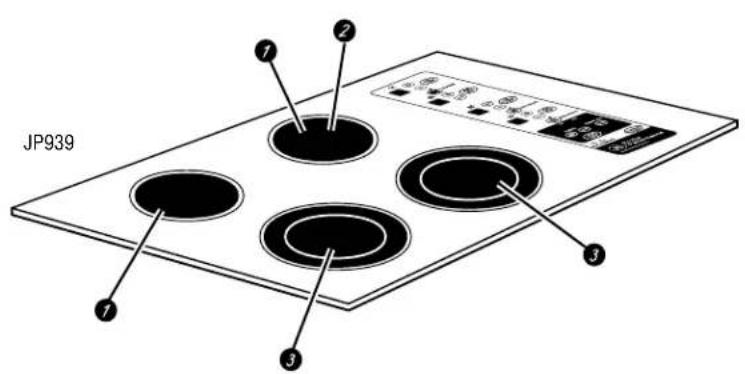
text_image
JP939 ① ② ③ ④
text_image
Diagram of a device panel with numbered labels pointing to various function buttons and indicators.| Feature Index (Features and appearances may vary.) Explained on page | |
| 1 Single Surface Unit 6 | |
| 2 Warmer Surface Unit 8 | |
| 3 Dual Surface Unit 7 | |
| 4 Single Surface Unit Control Pad 6 | |
| 5 Dual Surface Unit Control Pad 7 | |
| 6 Warmer Surface Unit Control Pad 8 | |
| 7 Kitchen Timer Control Pad 9 | |
| 8 Pan Sensor Control Pad 9 | |
| 9 Control Lock Pad | 9 |
| 10 Hot Surface Indicator Lights (one for each surface unit) | 9 |
Using the surface units.
Your new Profile Cooktop makes an eloquent statement of style, convenience, and kitchen planning flexibility. Whether you chose it for its purity of design, assiduous attention to detail, or for both of these reasons—you'll find that your Profile cooktop's superior blend of form and function will delight you for years to come.
This cooktop contains several new features such as pan detection and pan sizing. The touch controls give you precise control of the surface units. You can quickly switch between a steady low heat and full power or any setting in between. The information on the following pages will help you operate and maintain your cooktop properly.
NOTE: Throughout this manual, features and appearance may vary from your model.

text_image
SURFACE COOKINGNever cook directly on the glass. Always use cookware.
text_image
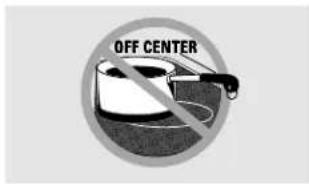
OFF CENTERAlways place the pan in the center of the surface unit you are cooking on.
text_image
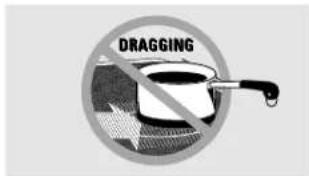
DRAGGINGDo not slide cookware across the control or cooktop surface because it can scratch the glass. The glass is scratch-resistant, not scratchproof.
About the radiant surface units...
The radiant cooktop features heating units beneath a smooth glass surface.
Cooktop temperatures increase with the number of surface units that are on. With 3 or 4 units turned on, surface temperatures are high. Always use caution when touching the cooktop.
The ON/OFF indicator lights will come on next to the Warmer and Dual burners when activated. Lights also activate for the Pan Detect and Control Lock features when they are turned on. The indicator lights will go off when the surface unit or feature is turned off.
The appropriate HOT SURFACE indicator light will glow when its corresponding radiant element is turned on and will remain on until the surface has cooled below 150°F.
NOTE:
Hot surface indicator light will:
■ Come on when the surface unit is turned on.
■ Stay on even after the unit is turned off.
Glow brightly until the unit has cooled below 150°F.
NOTE: A slight odor is normal when a new cooktop is used for the first time. It is caused by the heating of new parts and insulating materials and will disappear in a short time.
It is safe to place hot cookware from the oven or surface on the glass cooktop when the surface is cool. Never place cookware on the control area.
Even after the surface units are turned off, the glass cooktop retains enough heat to continue cooking. To avoid overcooking, remove pans from the surface units when the food is cooked. Avoid placing anything on the surface unit until it has cooled completely.
Water stains (mineral deposits) are removable using the cleaning cream or full strength white vinegar.
■Use of window cleaner may leave an iridescent film on the cooktop. The cleaning cream will remove this discoloration.
- Don't store heavy items above the cooktop. If they drop onto the cooktop, they can cause damage.
Do not use the surface as a cutting board.
Radiant Surface Units
The controls for the radiant surface units allow for 11 different heat settings: Low, 1–9 and High. The heating element may not visibly glow at low heat settings.
NOTE: This cooktop has a rapid heat-up feature. If the cooktop is cool when turned on, it will glow red for a short period of time until the desired power setting is reached. If the cooktop is already warm, the rapid heat-up feature may not activate.

text_image
ON OFF + OR -Single Surface Unit
To turn on a single surface unit:
1 Touch the ON/OFF pad, then touch the (+)/(-) pad. The surface unit will turn on to power setting 5.
2 Use the (+)/(−) pad to choose the desired power setting. The control will beep each time a pad is touched.
To turn off a standard surface unit, touch the ON/OFF pad again.
Cooking Guide for Using Heat Settings
High (H) - Quick start for cooking; bring water to a boil.
Medium High (7–9) – Fast fry, pan broil; maintains a fast boil on large amounts of food.
Medium (4–6) – Sauté and brown; maintains a slow boil on large amounts of food.
Medium Low (2–3) – Cook after starting at high; cooks with little water in covered pan.
Low (1) – Steam rice, cereal; maintains serving temperature of most foods. Slow cooking and simmering.
Lowest (L) – Keeps food warm, melts chocolate and butter.
At high or medium-high settings, never leave food unattended. Boilovers cause smoking; greasy spillovers may catch on fire.
It is safe to place hot cookware from the oven or surface units on the glass-ceramic surface when it is cool. Never place cookware on the control area.
NOTE: Cooktop temperatures increase with the number of surface units that are on. With 3 or more units turned on, surface temperatures are high so be careful when touching the cooktop. The hot surface indicator light(s) will remain lit after the surface unit is off until the surface has cooled below 150^ F.
Fault Code
If an error occurs in the control operation, a fault code will flash and the control will signal.
To correct:
1 Touch the CONTROL LOCK pad to reset the control.
2 Attempt to set the control to the desired cooking setting.
3 If the error is not cleared, allow the cooktop to cool completely.
4 After cooling, touch the CONTROL LOCK pad again to reset the control. Again attempt to set the control to the desired cooking setting.
5 If the error is still not cleared, turn off the cooktop power at the circuit breaker or fuse box for one minute.
6 If the error reappears, call for service.
3 Touch the SIZE SELECT pad once to turn on the large surface unit. Touch the pad again to turn on the small surface unit.
When the indicator light next to the SIZE SELECT pad is on, the large surface unit is on. When it is off, the small surface unit is on.
To turn the dual surface unit off, touch the ON/OFF pad.

Dual Surface Unit
The dual surface unit has a pan sizing sensor which will automatically set the small or large surface unit to match the size of your pan (see the Using Pan Sizing section). To override the automatic pan sizing sensor and select the small or large surface unit:
1 Touch the dual surface unit ON/OFF pad.
2 Use the (+) /(-) pad to set the desired power setting.
Using the surface units.


Warmer Surface Unit
To turn on the warmer surface unit:
1 Touch the ON/OFF pad, then touch the WARMER pad. The surface unit will turn on to warmer power setting W1 (low).
2 Use the (+)/(-) pad to choose additional settings of W2(medium) and W3 (high).
To turn off the warmer power settings, touch the ON/OFF pad. To change from the warmer settings to regular cooking settings, press the WARMER pad. The surface unit will be on power setting L (low). The surface unit may then be set to the desired setting using the (+)/(-) pads. To turn off the surface unit, touch the ON/OFF pad again.
Food Type Control Setting
| Breads/Pastries W1 (LOW) | ||
| Sauces W2 (Medium) | ||
| Soups (cream) W2 (Medium) | ||
| Stews W2 (Medium) | ||
| Vegetables | W2 | (Medium) |
| Hot Beverages | W3 | (HIGH) |
| Soups (liquid) | W3 | (HIGH) |
The chart above shows initial suggested settings only. The temperature, type and amount of food, and the time held will affect the quality of the food.
CAUTION: Do not warm food on the WARMER for more than two hours.
Do not use plastic wrap to cover food. Plastic may melt onto the surface and be very difficult to remove.
Use only cookware recommended for top-of-range cooking.
The WARMER will keep hot, cooked food at serving temperature. Always start with hot food. Do not use to heat cold food. Placing uncooked or cold food on surface warmer could result in foodborne illness.
For best results, all food on the WARMER should be covered with a lid or aluminum foil. When warming pastries or breads, the cover should be vented to allow moisture to escape.
Always use potholders or oven mitts when removing food from the WARMER as cookware and plates will be hot.
A hot surface indicator light will glow when the glass surface is hot and will remain on until the surface has cooled below 150^ F.

How to Lock the Cooktop
IMPORTANT: As a convenience, you can lock the entire cooktop at any time when it is not in use or before cleaning. Locking the cooktop will prevent surface units from being turned on accidentally.
To lock the cooktop:
Touch and hold the CONTROL LOCK pad for 3 seconds.
A two-beep signal will sound, the word "LOCK" will appear in the TIMER display, and the Control Lock light will turn on,
indicating that the cooktop is locked. If the cooktop is locked while the surface units or timer are in use, they will automatically turn off.
To unlock:
Touch and hold the CONTROL LOCK pad again for 3 seconds.
A two-beep signal will sound, and the Control Lock light will go out, indicating that the cooktop is unlocked.

TIMER

How to Operate the Kitchen Timer
NOTE: The kitchen timer will NOT turn off the surface units when the time reaches 00:00.
To operate the kitchen timer, use the pads below the TIMER display.
Touch the ON/OFF pad and then touch the (+)/(-) pad to choose the desired time setting. If the (+)/(-) pad is held for several seconds, the timer will increase or decrease at a faster rate.
After you have chosen your desired time, the timer will automatically start to count down from the hours/minutes that you have selected. When the timer counts down to the last minute, the control will beep once and the timer will count down in seconds until 00:00. Then the control will beep twice every five seconds until the timer is turned off. Touch the ON/OFF pad to turn the timer off.

Using the Pan Detection Feature
This feature automatically turns off a surface unit after 60 seconds if a pan is absent from the surface unit. The power level display will flash until the surface unit is turned off when the control detects the absence of a pan.
To activate and deactivate pan detection for all surface units:
Touch the PAN pad. (At least one surface unit must be on.) The display will flash "PAN ON" when the pan detection feature is on.
A signal will sound and a light next to the PAN pad will indicate whether the feature is active. If the light is on, pan detection is on, and if the light is off,
pan detection is off. When the pan detection feature is disabled, the pan sizing feature is also disabled.
NOTES:
For this feature to work properly, the pan diameter must be greater than 4.0 inches and centered on the surface unit.
This feature may not operate properly with rounded, curved or warped pan bottoms (see the Types of Cookware section).
This feature will not work with glass cookware (see the Types of Cookware section).

Using Pan Sizing
This feature is only used on the dual surface unit when the pan detection feature is enabled. When a small pan is placed on the surface unit, the small surface unit will activate. When a pan larger than 6.0 inches is placed on the surface unit, the large surface unit will automatically activate. This feature may be overridden for a single cooking session while leaving the pan detection feature active (see Dual Surface Unit section).
To turn off this feature and the pan detection feature:
Touch the PAN pad.
The light next to the pad will go out, indicating that pan features are turned off. NOTE: The pan must be centered over the surface unit for this feature to work properly.
Selecting types of cookware.
The following information will help you choose cookware which will give good performance on glass cooktops.

natural_image
Simple line drawing of a hand pressing down on a flat surface with a 'PAN' label (no text or symbols on the diagram itself)Check pans for flat bottoms by using a straight edge.
Stainless Steel:
recommended

Porcelain Enamel-Covered Cookware:

not recommended
Some porcelain-covered cookware can bond to the hot cooking surface.
text_image
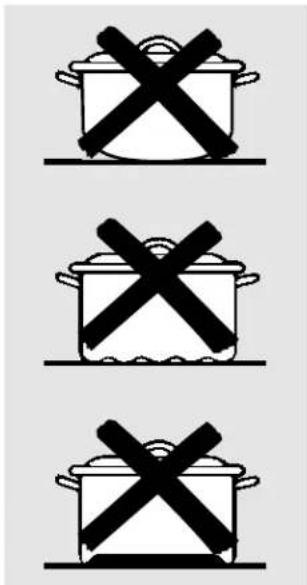
Three identical cooking pots with crossed X marks, likely indicating prohibition or resistance.Pans with rounded, curved, ridged or warped bottoms are not recommended. Pan Detection/Sizing may not work properly with these types of pans.
Aluminum:

Glass-Ceramic/Stoneware:

not recommended
Poor performance. May scratch the surface.
Use pans that match the diameter of the surface unit. Cooking performance will not be as good if the cookware is either smaller or larger than the surface unit.

text_image
Do not place wet pans on the glass cooktop. Do not use woks with support rings on the glass cooktop. Use flat-bottomed woks on the glass cooktop.Copper Bottom:

recommended
Copper may leave residues which can appear as scratches. The residues can be removed, as long as the cooktop is cleaned immediately. However, do not let these pots boil dry. Overheated metal can bond to glass cooktops. An overheated copper-bottom pot will leave a residue that will permanently stain the cooktop if not removed immediately.

Pan Detection/Sizing will work properly with these types of cookware.

Pan Detection/Sizing will not work with these types of pans.
For Best Results
Place only dry pans on the surface units. Do not place lids on the surface units, particularly wet lids.
Do not use woks that have support rings. This type of wok will not heat on glass surface units.
Use only a flat-bottomed wok, available from many popular cookware manufacturers. The bottom of the wok should have the same diameter as the surface unit to insure proper contact.
Some special cooking procedures require specific cookware such as pressure cookers, deep-fat fryers, etc. All cookware must have flat bottoms that match the size of the surface units.
text_image
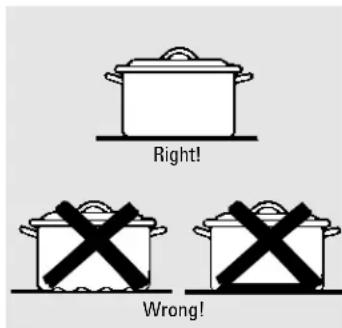
Right! Wrong!Note: Flat-bottomed canners are required for glass cooktops.
Observe the Following Points in Canning
When canning with water-bath or pressure canner, larger-diameter pots may be used. This is because boiling water temperatures (even under pressure) are not harmful to the cooktop surfaces surrounding the surface units.
HOWEVER, DO NOT USE LARGE-DIAMETER CANNERS OR OTHER LARGE-DIAMETER POTS FOR FRYING OR BOILING FOODS OTHER THAN WATER. Most syrup or sauce mixtures—and all types of frying—cook at temperatures much higher than boiling water. Such temperatures could eventually harm the glass cooktop surfaces.
7 Be sure the canner fits over the center of the surface unit. If your cooktop or its location does not allow the canner to be centered on the surface unit, use smaller-diameter pots for good canning results.
2 Flat-bottomed canners must be used. Do not use canners with flanged or rippled bottoms (often found in enamelware) because they don't make enough contact with the surface units and take a long time to boil water.
3 When canning, use recipes and procedures from reputable sources. Reliable recipes and procedures are available from the manufacturer of your canner; manufacturers of glass jars for canning, such as Ball and Kerr brand; and the United States Department of Agriculture Extension Service.
4 Remember that canning is a process that generates large amounts of steam. To avoid burns from steam or heat, be careful when canning.
NOTE: If your house has low voltage, canning may take longer than expected, even though directions have been carefully followed. The process time will be shortened by:
(1) using a pressure canner, and
(2) starting with HOT tap water for fastest heating of large quantities of water.
CAUTION:
■ Safe canning requires that harmful microorganisms are destroyed and that the jars are sealed completely. When canning foods in a water-bath canner, a gentle but steady boil must be maintained for the required time. When canning foods in a pressure canner, the pressure must be maintained for the required time.
■ After you have adjusted the controls, it is very important to make sure the prescribed boil or pressure levels are maintained for the required time.
■ Since you must make sure to process the canning jars for the prescribed time, with no interruption in processing time, do not can on any cooktop surface unit if your canner is not flat.
Care and cleaning of the cooktop.
Be sure electrical power is off and all surfaces are cool before cleaning any part of the cooktop.
How to Remove Packaging Tape
To assure no damage is done to the finish of the product, the safest way to remove the adhesive left from packaging tape and cooktop labels on the new appliances is an application of a household liquid dishwashing detergent, mineral oil or cooking oil.
Apply with a soft cloth and allow to soak. Wipe dry and then apply an appliance polish to thoroughly clean and protect the surface.
NOTE: The adhesive must be removed from all parts before using the cooktop. It cannot be removed if it is baked on.
Cleaning the glass cooktop. www.GEAppliances.com
Control Lock Pad
Begin by locking the cooktop; see the Locking the Cooktop section. Use the same cleaning methods as those described for the glass-ceramic top.
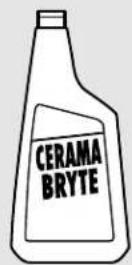
Clean your cooktop after each spill. Use CERAMA BRYTE® Ceramic Cooktop Cleaner.
Normal Daily Use Cleaning
ONLY use CERAMA BRYTE® Ceramic Cooktop Cleaner on the glass cooktop. Other creams may not be as effective.
To maintain and protect the surface of your glass cooktop, follow these steps:
Before using the cooktop for the first time, clean it with CERAMA BRYTE® Ceramic Cooktop Cleaner. This helps protect the top and makes cleanup easier.
2 Daily use of CERAMA BRYTE® Ceramic Cooktop Cleaner will help keep the cooktop looking new.
3 Shake the cleaning cream well. Apply a few drops of CERAMA BRYTE® Ceramic Cooktop Cleaner directly to the cooktop.
4 Use a paper towel or CERAMA BRYTE® Cleaning Pad for Ceramic Cooktops to clean the entire cooktop surface.
5 Use a dry cloth or paper towel to remove all cleaning residue. No need to rinse.
NOTE: It is very important that you DO NOT heat the cooktop until it has been cleaned thoroughly.
natural_image
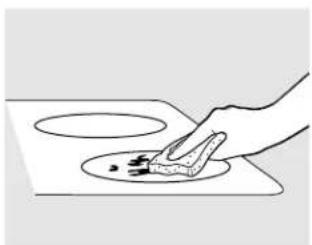
Hand using a power tool to clean or store food items on a flat surface (no text or symbols visible)Use a CERAMA BRYTE® Cleaning Pad for Ceramic Cooktops or a Scotch-Brite® Multi-Purpose No Scratch blue scrub pad.
Burned-On Residue
WARNING: DAMAGE to your glass surface may occur if you use scrub pads other than the pad included with your cooktop.
1 Allow the cooktop to cool.
2 Spread a few drops of CERAMA BRYTE® Ceramic Cooktop Cleaner on the entire burned residue area.
3 Using the included CERAMA BRYTE® Cleaning Pad for Ceramic Cooktops, rub the residue area, applying pressure as needed.
4 If any residue remains, repeat the steps listed above as needed.
For additional protection, after all residue has been removed, polish the entire surface with CERAMA BRYTE® Ceramic Cooktop Cleaner and a paper towel.
natural_image
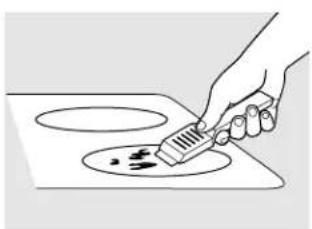
Hand using a tool to clean or store food on a stove (no text or symbols visible)The CERAMA BRYTE® Ceramic Cooktop Scraper and all recommended supplies are available through our Parts Center. See instructions under "To Order Parts" section on next page.
NOTE: Do not use a dull or nicked blade.
Heavy, Burned-On Residue
1 Allow the cooktop to cool.
2 Use a single-edge razor blade scraper at approximately a 45^ angle against the glass surface and scrape the soil. It will be necessary to apply pressure to the razor scraper in order to remove the residue.
3 After scraping with the razor scraper, spread a few drops of CERAMA BRYTE® Ceramic Cooktop Cleaner on the entire burned residue area. Use the CERAMA BRYTE® Cleaning Pad to remove any remaining residue.
4 For additional protection, after all residue has been removed, polish the entire surface with CERAMA BRYTE® Ceramic Cooktop Cleaner and a paper towel.
Cleaning the glass cooktop.
Metal Marks and Scratches
1 Be careful not to slide pots and pans across your cooktop. It will leave metal markings on the cooktop surface. These marks are removable using the CERAMA BRYTE® Ceramic Cooktop Cleaner with the CERAMA BRYTE® Cleaning Pad for Ceramic Cooktops.
2 If pots with a thin overlay of aluminum or copper are allowed to boil dry, the overlay may leave black discoloration on the cooktop. This should be removed immediately before heating again or the discoloration may be permanent.
WARNING: Carefully check the bottom of pans for roughness that would scratch the cooktop.
Glass surface—potential for permanent damage.
Our testing shows that if you are cooking high sugar mixtures such as jelly or fudge and have a spillover, it can cause permanent damage to the glass surface unless the spillover is immediately removed.
Damage from Sugary Spills and Melted Plastic
1 Turn off all surface units. Remove hot pans.
2 Wearing an oven mitt: a. Use a single-edge razor blade scraper (CERAMA BRYTE® Ceramic Cooktop Scraper) to move the spill to a cool area on the cooktop.
b. Remove the spill with paper towels.
3 Any remaining spillover should be left until the surface of the cooktop has cooled.
4 Don't use the surface units again until all of the residue has been completely removed.
NOTE: If pitting or indentation in the glass surface has already occurred, the cooktop glass will have to be replaced. In this case, service will be necessary.
To Order Parts
To order CERAMA BRYTE® Ceramic Cooktop Cleaner and the cooktop scraper, please call our toll-free number:
National Parts Center 800.626.2002.
CERAMA BRYTE® Ceramic Cooktop Cleaner ....# WX10X300
CERAMA BRYTE® Ceramic Cooktop Scraper ....# WX10X0302
Kit ....# WB64X5027
(Kit includes cream and cooktop scraper)
CERAMA BRYTE® Cleaning Pads for Ceramic Cooktops ....# WX10X350

Troubleshooting Tips
Save time and money! Review the charts on the following pages first and you may not need to call for service.
| Problem Possible Causes What To Do | ||
| Surface units will not maintain a rolling boil or cooking is slow | Improper cookware being used. | ·Use pans which are absolutely flat and match the diameter of the surface unit selected. |
| Surface units do not work properly blown or the circuit breaker tripped. | A fuse in your home may be | ·Replace the fuse or reset the circuit breaker. |
| Cooktop controls improperly set. | ·Check to see the correct control is set for the surface unit you are using. | |
| Scratches (may appear as cracks) on cooktop glass surface | Incorrect cleaning methods being used. | ·Scratches are not removable. Tiny scratches will become less visible in time as a result of cleaning. |
| Cookware with rough bottoms being used or coarse particles (salt or sand) were between the cookware and the surface of the cooktop. | ·To avoid scratches, use the recommended cleaning procedures. Make sure bottoms of cookware are clean before use, and use cookware with smooth bottoms. | |
| Cookware has been slid across the cooktop surface. | ||
| Areas of discoloration on the cooktop | Food spillovers not cleaned before next use. | ·See the Cleaning the glass cooktop section. |
| Hot surface on a model with a light-colored glass cooktop. | ·This is normal. The surface may appear discolored when it is hot. This is temporary and will disappear as the glass cools. | |
| Plastic melted to the surface | Hot cooktop came into contact with plastic placed on the hot cooktop. | ·See the Glass surface – potential for permanent damage section in the Cleaning the glass cooktop section. |
| Pitting (or indentation) of the cooktop | Hot sugar mixture spilled on the cooktop. | ·Call a qualified technician for replacement. |
| Frequent cycling off and on of surface units | Improper cookware being used. | ·Use only flat cookware to minimize cycling. |
| Cooktop feels hot | Improper cookware being used. are used to. This is normal. Use pans which are absolutely flat. | ·The glass cooktop surface may seem hotter than you |
| Unresponsive keypad | Keypad is contaminated. | ·Clean the keypad. |
| Pan detection/sizing not working properly | Improper cookware being used. | ·Use a flat, metallic pan that is 4.0" or larger. |
| Pan is improperly placed. | ·Make sure the pan is centered on the corresponding surface unit. | |
Before You Call For Service...

Troubleshooting Tips
Save time and money! Review the charts on the following
pages first and you may not need to call for service.
Problem Possible Causes What To Do
| TEMP LTD appears in the display before using again. | Time-Out feature activated. | • Allow the surface unit(s) to cool for 1/2 to 1 hour |
| Surface unit is glowing hot when it designed to do this. should be on a low power setting | Cooktop feature activated. | • The cooktop has a rapid heat-up feature and is |
| “F” and a number appear in the display and the cooktop beeps | You have a function error code. | • Write down the “F:- -” and touch the CONTROL LOCK pad. Disconnect the power to the cooktop and then reconnect. If an F-code appears again, call for service. |
GE Service Protection Plus™
GE, a name recognized worldwide for quality and dependability, offers you Service Protection Plus™—comprehensive protection on all your appliances—No Matter What Brand!
Benefits Include:
- Backed by GE
- All brands covered
- Unlimited service calls
• All parts and labor costs included
• No out-of-pocket expenses
• No hidden deductibles
• One 800 number to call
We'll Cover Any Appliance. Anywhere. Anytime.\*
You will be completely satisfied with our service protection or you may request your money back on the remaining value of your contract. No questions asked. It's that simple.
Protect your refrigerator, dishwasher, washer and dryer, range, TV, VCR and much more—any brand! Plus there's no extra charge for emergency service and low monthly financing is available. Even icemaker coverage and food spoilage protection is offered. You can rest easy, knowing that all your valuable household products are protected against expensive repairs.
Place your confidence in GE and call us in the U.S. toll-free at 800.626.2224 for more information.
*All brands covered, up to 20 years old, in the continental U.S.

Cut here
Please place in envelope and mail to:
General Electric Company
Warranty Registration Department
P.O. Box 32150
Louisville, KY 40232-2150
Consumer Product Ownership Registration
Dear Customer:
Thank you for purchasing our product and thank you for placing your confidence in us.
We are proud to have you as a customer!
Follow these three steps to protect your new appliance investment:
1
Complete and mail
your Consumer
Product Ownership
Registration today.
Have the peace of
mind of knowing we
can contact you in
the unlikely event of a
safety modification.
2
After mailing the
registration below,
store this document
in a safe place. It
contains information
you will need should
you require service.
Our service number is
800.GE.CARES
(800.432.2737).
3
Read your Owner's
Manual carefully.
It will help you
operate your new
appliance properly.
Model Number Serial Number

natural_image
Two identical horizontal lines with tick marks, no text or symbols presentImportant: If you did not get a registration card with your product, detach and return the form below to ensure that your product is registered, or register online at www.GEAppliances.com.

Consumer Product Ownership Registration

Model Number Serial Number

natural_image
Two identical horizontal lines with tick marks, no text or symbols presentMr. Ms. Mrs. Miss
First
Name

Last
Name
Street
Address


Apt. #

E-mail Address*

Zip
Code
Date Placed
In Use Month



Phone
Number

* Please provide your e-mail address to receive, via e-mail, discounts, special offers and other important communications from GE Appliances (GEA).
□ Check here if you do not want to receive communications from GEA's carefully selected partners.

GE Appliances
General Electric Company
Louisville, Kentucky
www.GEAppliances.com
GE Electric Cooktop Warranty.
All warranty service provided by our Factory Service
Centers, or an authorized Customer Care® technician.
To schedule service, on-line, 24 hours a day, visit us
at www.GEAppliances.com, or call 800.GE.CARES (800.432.2737).
Staple your receipt here.
Proof of the original purchase
date is needed to obtain service
under the warranty.
For The Period Of: GE Will Replace:
| One YearFrom the date of the original purchase and in-home service to replace the defective part. | Any part of the cooktop which fails due to a defect in materials or workmanship.During this full one-year warranty, GE will also provide, free of charge, all labor |
| Five YearsFrom the date of the or if the pattern wears off.original purchase | A replacement glass cooktop if it should crack due to thermal shock, discolor,A replacement radiant surface unit if it should burn out.During this limited additional four-year warranty, you will be responsible for any labor or in-home service. |
What GE Will Not Cover:
| Service trips to your home to teach you how to use the product.Improper installation.Failure of the product if it is abused, misused, or used for other than the intended purpose or used commercially.Damage to the glass cooktop caused by use of cleaners other than the recommended cleaning creams and pads. | Damage to the glass cooktop caused by hardened spills of sugary materials or melted plastic that are not cleaned according to the directions in the Owner’s Manual.Replacement of house fuses or resetting of circuit breakers.Damage to the product caused by accident, fire, floods or acts of God.Incidental or consequential damage caused by possible defects with this appliance. |
This warranty is extended to the original purchaser and any succeeding owner for products purchased for home use within the USA. In Alaska, the warranty excludes the cost of shipping or service calls to your home.
Some states do not allow the exclusion or limitation of incidental or consequential damages. This warranty gives you specific legal rights, and you may also have other rights which vary from state to state. To know what your legal rights are, consult your local or state consumer affairs office or your state's Attorney General.
GE Appliances Website
www.GEAppliances.com
Have a question or need assistance with your appliance? Try the GE Appliances Website 24 hours a day, any day of the year! For greater convenience and faster service, you can now download Owner's Manuals, order parts, catalogs, or even schedule service on-line. You can also "Ask Our Team of Experts" your questions, and so much more...
Schedule Service www.GEAppliances.com
Expert GE repair service is only one step away from your door. Get on-line and schedule your service at your convenience 24 hours any day of the year! Or call 800.GE.CARES (800.432.2737) during normal business hours.

Real Life Design Studio www.GEAppliances.com
GE supports the Universal Design concept—products, services and environments that can be used by people of all ages, sizes and capabilities. We recognize the need to design for a wide range of physical and mental abilities and impairments. For details of GE's Universal Design applications, including kitchen design ideas for people with disabilities, check out our Website today. For the hearing impaired, please call 800.TDD.GEAC (800.833.4322).

Extended Warranties www.GEAppliances.com
Purchase a GE extended warranty and learn about special discounts that are available while your warranty is still in effect. You can purchase it on-line anytime, or call 800.626.2224 during normal business hours. GE Consumer Home Services will still be there after your warranty expires.
Parts and Accessories www.GEAppliances.com
Individuals qualified to service their own appliances can have parts or accessories sent directly to their homes (VISÄ, MasterCard and Discover cards are accepted). Order on-line today, 24 hours every day or by phone at 800.626.2002 during normal business hours.
Instructions contained in this manual cover procedures to be performed by any user. Other servicing generally should be referred to qualified service personnel. Caution must be exercised, since improper servicing may cause unsafe operation.

Contact Us www.GEAppliances.com
If you are not satisfied with the service you receive from GE, contact us on our Website with all the details including your phone number, or write to: General Manager, Customer Relations
GE Appliances, Appliance Park
Louisville, KY 40225

Register Your Appliance www.GEAppliances.com
Register your new appliance on-line—at your convenience! Timely product registration will allow for enhanced communication and prompt service under the terms of your warranty, should the need arise. You may also mail in the preprinted registration card included in the packing material.
natural_image
Abstract decorative swirl design with no text or symbolstext_image
Diagram of a device control panel with labeled components and connections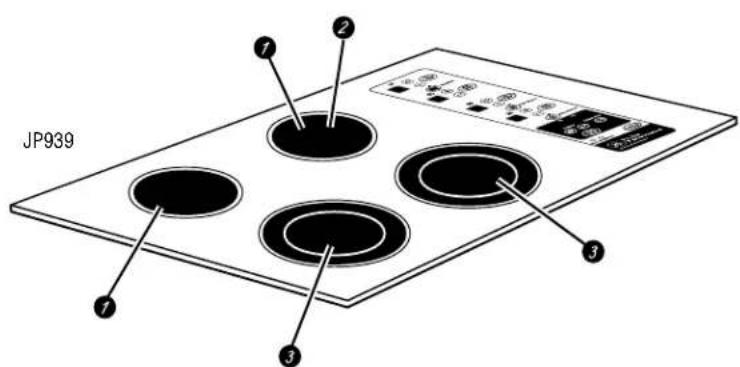
text_image
JP939 ① ② ③ ④ ⑦
text_image
Diagram of a multi-panel electronic device with numbered labels pointing to various components and indicators.natural_image
Simple line drawing of a hand pressing down on a flat surface with a 'PAN' label (no text or symbols on the diagram itself)text_image
Diagram showing two hands holding a device with a black X symbol crossed out, indicating prohibition or prohibition.natural_image
Simple line drawing of a frying pan with a crossed X mark, no text or symbols presentnatural_image
Hand placing a small object onto a circular surface, no text or symbols visiblenatural_image
Line drawing of a hand using a brush to apply paint on a circular stove (no text or symbols)General Manager, Customer Relations
GE Appliances, Appliance Park
Louisville, KY 40225