AHG25LA - Air purifier GE - Free user manual and instructions
Find the device manual for free AHG25LA GE in PDF.


User questions about AHG25LA GE
0 question about this device. Answer the ones you know or ask your own.
Ask a new question about this device
Download the instructions for your Air purifier in PDF format for free! Find your manual AHG25LA - GE and take your electronic device back in hand. On this page are published all the documents necessary for the use of your device. AHG25LA by GE.
USER MANUAL AHG25LA GE
Safety Precautions....3
How to Connect Electricity .....3
Use of Extension Cords .....4
Use of Adapter Plugs ....4
Operating Instructions
Controls 5
How the Dehumidifier Operates .....6
Choosing a Location ....6
Removing Collected Water .....6
Installing the Water Bucket .....7
Adjusting the Water Level....7
Care and Cleaning
Grille and Case 8
Air Filter 8
Cleaning Inside the Unit ....8
Troubleshooting Tips
Before You
Call For Service 9
Customer Service
Product Registration .....13, 14
Warranty 15
GE Answer Center®
800 Number....2, Back Cover
Service Telephone
Numbers .....2, Back Cover
Owner's Manual & Installation Instructions
AHG25
AHG40
AHG50

natural_image
Abstract decorative swirl design with no text or symbolsGE & You, A Service Partnership.

IMPORTANT!
Fill out the Consumer Product Registration Card.
Two easy ways to register your appliance!
■ Through the internet at www.geappliances.com
■ Complete and mail the enclosed Product Registration Card

FOR YOUR RECORDS
Write the model and serial numbers here:
#
#
You can find them on a label on the back of the dehumidifier behind the bucket.
Staple sales slip or cancelled check here.
Proof of the original purchase date is needed to obtain service under the warranty.
READ THIS MANUAL
Inside you will find many helpful hints on how to use and maintain your dehumidifier properly. Just a little preventive care on your part can save you a great deal of time and money over the life of your dehumidifier.

IF YOU NEED SERVICE
You'll find many answers to common problems in the Before You Call For Service section. If you review our chart of Troubleshooting Tips first, you may not need to call for service at all.
If you do need service, you can relax knowing help is only a phone call away. A list of toll-free customer service numbers is included in the back section. Or, you can always call the GE Answer Center ^® at 800.626.2000, 24 hours a day, 7 days a week.

SAFETY PRECAUTIONS
When using this dehumidifier, always follow basic safety precautions, including the following:
- Use this appliance only for its intended purpose as described in this Owner's Manual.
■ This dehumidifier must be properly installed and grounded as described in this manual before it is used.
■ Never operate this dehumidifier in an area that is likely to accumulate standing water. If this condition develops, for your safety disconnect the power supply before stepping into the water.
■ Never unplug your dehumidifier by pulling on the power cord. Always grip plug firmly and pull straight out from the receptacle.
■ Repair or replace immediately all electric service cords that have become frayed or otherwise damaged. Do not use a cord that shows cracks or abrasion damage along its length or at either the plug or connector end.
■ Turn the humidity control to OFF and unplug your dehumidifier before making any repairs or cleaning.
NOTE: We strongly recommend that any servicing be performed by a qualified individual.
■ For your safety, do not store or use combustible materials, gasoline or other flammable vapors or liquids in the vicinity of this or any other appliance.

HOW TO CONNECT ELECTRICITY
Do not, under any circumstances, cut or remove the third (ground) prong from the power cord. For personal safety, this appliance must be properly grounded.
The power cord of this appliance is equipped with a 3-prong (grounding) plug which mates with a standard 3-prong (grounding) wall outlet to minimize the possibility of electric shock hazard from this appliance.
Have the wall outlet and circuit checked by a qualified electrician to make sure the outlet is properly grounded.
Where a 2-prong wall outlet is encountered, it is your personal responsibility and obligation to have it replaced with a properly grounded 3-prong wall outlet.
The dehumidifier should always be plugged into its own individual electrical outlet which has a voltage rating that matches the rating plate.
This provides the best performance and also prevents overloading house wiring circuits which could cause a fire hazard from overheated wires.
IMPORTANT SAFETY INFORMATION. READ ALL INSTRUCTIONS BEFORE USING.
WARNING!
USE OF EXTENSION CORDS
Because of potential safety hazards under certain conditions, we strongly recommend against the use of an extension cord.
However, if you must use an extension cord, it is absolutely necessary that it be a UL-listed, 14 gauge, 3-wire grounding type appliance extension cord having a grounding type plug and outlet and that the electrical rating of the cord be 15 amperes (minimum) and 125 volts.

USE OF ADAPTER PLUGS
Because of potential safety hazards under certain conditions, we strongly recommend against the use of an adapter plug.
However, if you must use an adapter, where local codes permit, a temporary connection may be made to a properly grounded 2-prong wall outlet by use of a UI-listed adapter available at most local hardware stores.
The larger slot in the adapter must be aligned with the larger slot in the wall outlet to provide proper polarity in the connection of the power cord.
When disconnecting the power cord from the adapter, always hold the adapter in place with one hand while pulling the power cord plug with the other hand. If this is not done, the adapter ground terminal is very likely to break with repeated use.
If the adapter ground terminal breaks, DO NOT USE the dehumidifier until a proper ground has been established.
Attaching the adapter ground terminal to a wall outlet cover screw does not ground the appliance unless the cover screw is metal, and not insulated, and the wall outlet is grounded through the house wiring. You should have the circuit checked by a qualified electrician to make sure the outlet is properly grounded.

Read and follow this Safety Information carefully.
SAVE THESE INSTRUCTIONS
text_image
DRYER HUMIDITY CONTROL CONTINUOUS OFF 1 2 3 4 5 6 7 8 9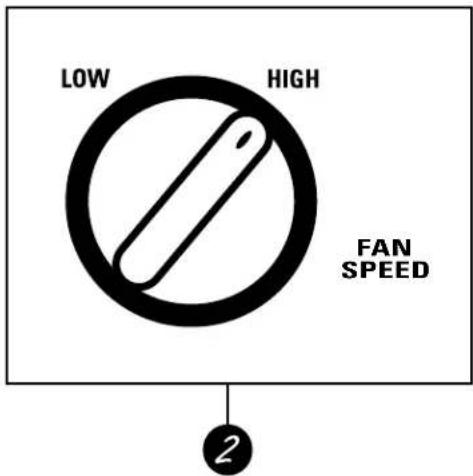
text_image
LOW HIGH FAN SPEED 2
Controls
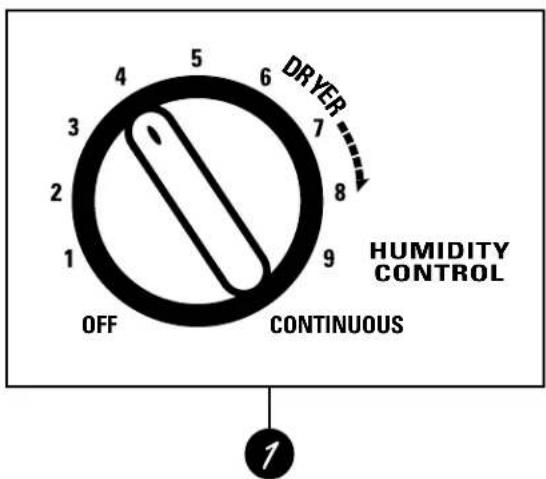
1 Humidity Control
When you first use the dehumidifier, turn the humidity control to CONTINUOUS, the highest setting. At this setting, the unit will operate continuously. Keep it at this setting for three to four days.
When the excess moisture and dampness odors are gone, adjust the control to a lower setting. Use the dehumidifier as long as excess moisture is present.
2 Fan Speed (on some models)
Set the fan control to HIGH for maximum moisture removal. When the humidity has been reduced and quiet operation is preferred, set the fan control to LOW.
Other Features
BUCKET FULL Light
Glows when the bucket is ready to be emptied.
Auto Shut Off
The Water Level Control Switch shuts off the dehumidifier when the bucket is full.
Auto Defrost
When frost builds up on the cooling coils, the compressor will cycle off until the frost disappears. The fan continues to run.
Using the dehumidifier.
When first using the dehumidifier, operate the unit continuously 3 to 4 days.
How the Dehumidifier Operates
Moist, humid air is drawn over a cold refrigerated dehumidifying coil. Moisture in the air condenses on this coil and drains into a bucket (or through the bucket into a hose and drain).
Dry, clean air is drawn over the condenser where it is actually heated several degrees and discharged out the front grille into the room.
It is normal for the surrounding air to become slightly warmer as the dehumidifier operates.
This warming effect further reduces the relative humidity of the surrounding air.

text_image
Humid air in Evaporator Condenser Fan Humidistat Drain pan Drain connector Bucket Compressor Dry air outChoosing a Location
■ The dehumidifier must be operated in an enclosed area to be most effective.
■ Close all doors, windows and other outside openings to the room.
Place the dehumidifier in a location that does not restrict air flow into the rear coil or out the front grille.
A dehumidifier operating in a basement will have little or no effect in drying an adjacent enclosed storage area, such as a closet, unless there is adequate circulation of air in and out of the area.

natural_image
Line drawing of a cozy living room with bookshelves, armchairs, and a refrigerator (no text or symbols)Removing Collected Water
There are 3 ways to remove collected water:
1 Use the bucket. Turn the control to OFF before removing the bucket.
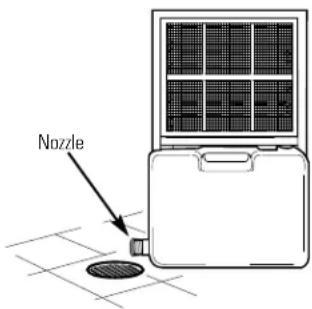
2 Use a hose. Water can be automatically emptied into a floor drain by attaching a water hose to the bucket. Using a drill, make a hole at the end of the nozzle located on the lower left side of the bucket. Attach a water hose to the bucket nozzle.
1 Use the bucket. Turn the control to OFF before removing the bucket.
2 Use a hose. Water can be automatically emptied into a floor drain by attaching a water hose to the bucket. Using a drill, make a hole at the end of the nozzle located on the lower left side of the bucket. Attach a water hose to the bucket nozzle.
3 Use a floor drain. The unit can also be placed over a floor drain. Using a drill, make a hole at the end of the nozzle located on the lower left side of the bucket.
text_image
Nozzle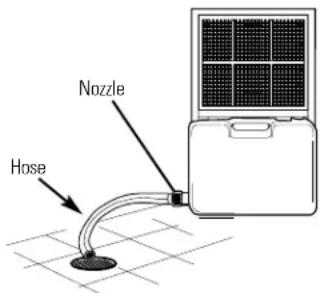
text_image
Nozzle HoseAlways make sure the water bucket is in place.
Installing the Water Bucket
Lift the bucket and place it in the dehumidifier, making sure the slots on both sides of the bucket are positioned correctly.

natural_image
Technical line drawing of a mechanical assembly with no visible text or symbolsAdjusting the Water Level
The dehumidifier has two settings that turn it off automatically when the bucket is full. This prevents the danger of overflow.
The bucket must be in the proper position for the Water Level Control Switch to work.
The Water Level Control Switch will automatically turn off the dehumidifier at the fill level you have selected.
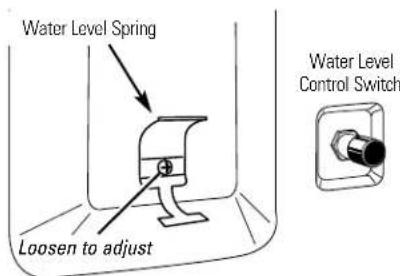
Loosen the screw to change position of the Water Level Spring.
Be careful not to bend or break the spring.
Maximum Fill Position:
Set the Water Level Spring as shown:

text_image
Water Level Spring Loosen to adjust Water Level Control SwitchThe dehumidifier will turn off automatically when the bucket is 3/4 full.
Normal Fill Position:
Set the Water Level Spring as shown:
text_image
Water Level Spring Loosen to adjust Water Level Control SwitchThe dehumidifier will turn off automatically when the bucket is 1/2 full.
Care and cleaning of the dehumidifier.
Turn the dehumidifier off and remove the plug from the wall outlet before cleaning.
Grille and Case
To clean the case:
Use water and a mild detergent. Do not use bleach or abrasives.
To clean the grille:
Use a vacuum attachment or brush.
Air Filter
The air filter is on the back of the dehumidifier. It should be checked and cleaned at least every 30 days or more often if necessary.
To remove:
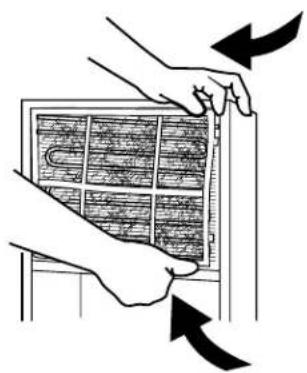
Flex the filter at the lower right corner and slide the upper right side to the left. Release all of the tabs and remove the filter. Wash it in warm soapy water. Rinse and let the filter dry before replacing it.
natural_image
Illustration of hands installing or adjusting a wall-mounted grid panel with directional arrows (no text or symbols)Cleaning Inside the Unit
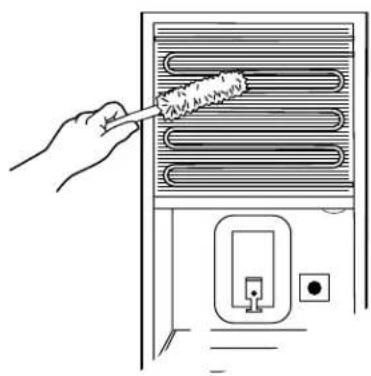
After removing the air filter, clean the coil on the inside with a soft brush when the soil is soft and wet.
NOTE: Do not allow water to enter the electrical/machine compartment through the circular opening behind the coil.
Do not spray the coil with a hose.
natural_image
Line drawing of a hand using a brush to clean or store air from a refrigerant appliance (no text or symbols)Before you call for service...

Troubleshooting Tips
Save time and money! Review the chart below first and you may not need to call for service.
| Problem Possible Causes | What To Do | |
| Dehumidifier does not start | The dehumidifier is unplugged. completely into the outlet. | Make sure the dehumidifier plug is pushed |
| The fuse is blown/circuit breaker is tripped. the fuse or reset the breaker. | Check the house fuse/circuit breaker box and replace | |
| Water has reached its preset level. occurs. Empty the bucket. | The dehumidifier automatically turns off when this | |
| Dehumidifier does not dry the air as it should | Did not allow enough time to remove the moisture. the desired dryness. | When first installed, allow at least 3 or 4 days to maintain |
| Airflow is restricted. | Make sure there are no curtains, blinds or furniture blocking the front or back of the dehumidifier. | |
| The control may not be set high enough. | Turn the Humidity Control knob to a higher number. | |
| Doors and windows may not be closed tightly. | Check that all doors, windows and other openings are securely closed. | |
| Clothes dryer may be blowing moisture-laden air into the room. | Install the dehumidifier away from the dryer. The dryer should be vented to the outside. | |
| Room temperature is too low. | The unit will not operate satisfactorily if the room temperature is below 65°F. (18°C.). | |
| Dehumidifier runs too much | Area to be dehumidified is too large. | Check with your dealer to see if the capacity is adequate. |
| Doors and windows are open. | Close all doors and windows to the outside. | |
| Frost appears on the coils | Dehumidifier has been recently turned on or room temperature is below 65°F. (18°C.). | This is normal. Frost will usually disappear within 60 minutes. |
| Fan noise | Air is moving through the dehumidifier. | This is normal. |
| Water on floor | Connection may be loose. | Check the hose if one is attached. |
| Bucket is not all the way in. | See the Installing the Water Bucket section. | |
| Customer Service Troubleshooting Tips Safety Instructions | Operating Instructions | Safety InstructionsCare and |
Notes
| Operating Instructions | Teaching Designing | Troubleshooting Tips | Customer Service |
| Customer Service | Troubleshooting Tips | Care and Cleaning | Operating Instructions | Safety Instructions |
Notes
GE Service Protection Plus™
GE, a name recognized worldwide for quality and dependability, offers you Service Protection Plus™—comprehensive protection on all your appliances—No Matter What Brand!
Benefits Include:
- Backed by GE
- All brands covered
• Unlimited service calls - All parts and labor costs included
• No out-of-pocket expenses - No hidden deductibles
• One 800 number to call
We'll Cover Any Appliance. Anywhere. Anytime.\*
You will be completely satisfied with our service protection or you may request your money back on the remaining value of your contract. No questions asked. It's that simple.
Protect your refrigerator, dishwasher, washer and dryer, range, TV, VCR and much more—any brand! Plus there’s no extra charge for emergency service and low monthly financing is available. Even icemaker coverage and food spoilage protection is offered. You can rest easy, knowing that all your valuable household products are protected against expensive repairs.
Place your confidence in GE and call us in the U.S. toll-free at 800-626-2224 for more information.
*All brands covered, up to 20 years old, in the continental U.S.
Please place in envelope and mail to:
General Electric Company
Warranty Registration Department
P.O. Box 32150
Louisville, KY 40232-2150
Consumer Product Ownership Registration
Dear Customer:
Thank you for purchasing our product and thank you for placing your confidence in us.
We are proud to have you as a customer!
Follow these three steps to protect your new appliance investment:
1
Complete and mail
your Consumer
Product Ownership
Registration today.
Have the peace of
mind of knowing we
can contact you in the
unlikely event of a
safety modification.
2
After mailing the
registration below,
store this document
in a safe place. It
contains information
you will need should
you require service.
Our service number is
800 GE CARES
(800-432-2737).
3
Read your Owner's
Manual carefully.
It will help you
operate your new
appliance properly.
If you have questions,
or need more
information, call the
GE Answer Center®
800.626.2000.
Model Number Serial Number

natural_image
Two identical horizontal lines with tick marks, no text or symbols presentImportant: If you did not get a registration card with your product, detach and return the form below to ensure that your product is registered, or register online at www.geappliances.com.

Cut here
Consumer Product Ownership Registration

Model Number Serial Number

natural_image
Two identical horizontal lines with tick marks, no text or symbols presentMr. □ Ms. □ Mrs. □ Miss □
First
Name
Last
Name
Street
Address

Apt.#

E-mail Address

text_image
City State Zip CodeDate Placed
In Use Month


Phone
Number

Occasionally, we may allow selected companies to send you information.
□ Check here if you do not want this information.

GE Appliances
General Electric Company
Louisville, Kentucky
www.geappliances.com
Dehumidifier Warranty

All warranty service provided by our Factory Service Centers, or an authorized Customer Care® technician. For service, call 800-GE-CARES.
For The Period Of: GE Will Replace:
| One Year Any partFrom the date of the original purchase | of the dehumidifier which fails due to a defect in materials or workmanship.During thisfull one-year warranty, GE will also provide,free of charge, all labor and in-home service to replace the defective part. |
| Five Years The compressorFrom the date of the original purchase | if it should fail due to a defect in materials or workmanship.During thisfive-year warranty, GE will also provide,free of charge, all labor and in-home service to repair or replace the compressor. |
What GE Will Not Cover:
■ Service trips to your home to teach you how to use the product.
■ Improper installation. If you have an installation problem, or if the dehumidifier is of improper dehumidifying capacity, contact your dealer or installer. You are responsible for providing adequate electrical, plumbing and other connecting facilities.
■ Failure of the product resulting from modifications to the product or due to unreasonable use including failure to provide reasonable and necessary maintenance.
■ In commercial locations labor necessary to move the unit to a location where it is accessible for service by an individual technician.
■ Replacement of house fuses or resetting of circuit breakers.
■ Failure due to corrosion on models not corrosion-protected.
■ Damage to the product caused by improper power supply voltage, accident, fire, floods or acts of God.
■ Incidental or consequential damage to personal property caused by possible defects with this dehumidifier.
This warranty is extended to the original purchaser and any succeeding owner for products purchased for home use within the USA. In Alaska, the warranty excludes the cost of shipping or service calls to your home.
Some states do not allow the exclusion or limitation of incidental or consequential damages. This warranty gives you specific legal rights, and you may also have other rights which vary from state to state. To know what your legal rights are, consult your local or state consumer affairs office or your state's Attorney General.
Warrantor: General Electric Company. Louisville, KY 40225
Service Telephone Numbers.

GE Answer Center ^® 800.626.2000
The GE Answer Center ^® is open 24 hours a day, 7 days a week.

In-Home Repair Service 800-GE-CARES (800-432-2737)
Expert GE repair service is only a phone call away.

Special Needs Service 800.626.2000
800-TDD-GEAC (800-833-4322)
GE offers, free of charge, a brochure to assist in planning a barrier-free kitchen for persons with limited mobility.

Service Contracts 800-626-2224
Purchase a GE service contract while your warranty is still in effect and you'll receive a substantial discount. GE Consumer Service will still be there after your warranty expires.
Parts and Accessories 800-626-2002
Individuals qualified to service their own appliances can have parts or accessories sent directly to their homes (VISA, MasterCard and Discover cards are accepted).
Instructions contained in this manual cover procedures to be performed by any user. Other servicing generally should be referred to qualified service personnel. Caution must be exercised, since improper servicing may cause unsafe operation.

Service Satisfaction
If you are not satisfied with the service you receive from GE:
First, contact the people who serviced your appliance.
Next, if you are still not pleased, write all the details—including your phone number—to:
Manager, Customer Relations
GE Appliances
Appliance Park
Louisville, KY 40225