ZBD6605GSS - Washing machine GE - Free user manual and instructions
Find the device manual for free ZBD6605GSS GE in PDF.


User questions about ZBD6605GSS GE
0 question about this device. Answer the ones you know or ask your own.
Ask a new question about this device
Download the instructions for your Washing machine in PDF format for free! Find your manual ZBD6605GSS - GE and take your electronic device back in hand. On this page are published all the documents necessary for the use of your device. ZBD6605GSS by GE.
USER MANUAL ZBD6605GSS GE
natural_image
Simple line icon of a mortar and cup on black background (no text or symbols)Introduction
Your new Monogram Chef's Washer makes an eloquent statement of style, convenience and kitchen planning flexibility. Whether you chose it for its purity of design, practical features or assiduous attention to detail—or for all of these reasons—you'll find that your Monogram Chef's Washer's superior blend of form and function will delight you for years to come.
The information on the following pages will help you operate and maintain your Chef's Washer properly.
If you have any other questions, visit our Website at: monogram.com
Contents
Appliance Registration ....3, 31, 32
Care and Cleaning .....18–21
Consumer Services ....3, 26
Model and Serial Number Location .....3
Operating Instructions ....8-17
Control Panel and Settings for ZBD6605 8,9
Control Panel and Settings for ZBD6905 ....10, 11
Control Panel and settings for ZBD7005 and ZBD7105 .....12, 13
Tone Silencing ....14
Clean Sensor ....14
Auto Memory ....14
Child Lockout Mode .....14
Water Temperature .....15
Rinse Agent ....15
Detergents 15
Dishwasher Racks .....16, 17
Problem Solver .....22-25
Safety Instructions ....4-7
USA Warranty....27
Canada Warranty 28
Consumer Information
| Chef's Washer | ||
| Before using your Chef's Washer | Read this manual carefully. It is intended to help you operate and maintain your new Chef's Washer properly.Keep it handy for answers to your questions. | If you don't understand something or need more help, there is a list of toll-free consumer service numbers included in the back section of this manual.ORVisit our Website at: monogram.com |
| Write down the model & serial numbers | You can find the model and serial numbers at the inside upper left tub flange. | Before sending in this card, please write these numbers here:Model NumberSerial NumberUse these numbers in any correspondence or service calls concerning your Chef's Washer. |
| If you received a damaged Chef's Washer | Immediately contact the dealer (or builder) that sold you the Chef's Washer. | |
| Save time & money | Before you request service, check the Problem Solver in the back of this manual. | It lists causes of minor operating problems that you can correct yourself. |
| If you need service | To obtain service, see the Consumer Services page in the back of this manual.We're proud of our service and want you to be pleased. If for some reason you are not happy with the service you receive, here are steps to follow for further help.For customers in the USA:FIRST, contact the people who serviced your appliance. Explain why you are not pleased.In most cases, this will solve the problem.NEXT, if you are still not pleased, write all the details-including your phone number-to:Manager, Customer RelationsGE AppliancesAppliance ParkLouisville, KY 40225 | For customers in Canada:FIRST, contact the people who serviced your appliance. Explain why you are not pleased.In most cases, this will solve the problem.NEXT, if you are still not pleased, write all the details-including your phone number-to:Manager, Consumer RelationsCamco Inc.1 Factory Lane, Suite 310Moncton, N.B. E1C 9M3 |
IMPORTANT SAFETY INSTRUCTIONS MESURES DE SÉCURITÉ IMPORTANTES
▲ WARNING!
For your safety, the information in this manual must be followed to minimize the risk of fire, explosion, electric shock, or to prevent property damage, personal injury or loss of life.
- Do not tamper with controls.
- Do not abuse, sit on, or stand on the door or dish rack of the Chef's Washer.
-
Do not discard a Chef's Washer without first removing the door or removing the door latch.
-
Do not store or use combustible materials, gasoline or other flammable vapors and liquids in the vicinity of this or any other appliance.
- Do not allow children to play inside, on or with this appliance or any discarded appliance.
- Do not allow children to play around the Chef's Washer when opening and closing the door due to possibility of small fingers being pinched in the door.
▲ AVERTISSEMENT!
A junked or abandoned Chef's Washer is dangerous...even if it will sit for "just a few days." If you are getting rid of your old Chef's Washer, please follow the instructions below to help prevent accidents.
Before You Throw Away Your Old Chef's Washer:
• Take off the door of the washing compartment or remove the door latch keeper (as shown).

text_image
Door latch keeper▲ AVERTISSEMENT! RISQUE D'ENFANT MIS AU PIÈGE
BONNE DISPOSITION DU LAVE-VAISSELLE DU CHEF
▲ WATER HEATER SAFETY
Under certain conditions hydrogen gas may be produced in a water heater that has not been used for two weeks or more. HYDROGEN GAS IS EXPLOSIVE.
If the hot water has not been used for two weeks or more, prevent the possibility of damage or injury by turning on all hot water faucets and allowing them to run for several minutes. Do this before using any electrical appliance which is connected to the hot water system. This simple procedure will allow any built-up hydrogen gas to escape. Since the gas is flammable, do not smoke or use an open flame or appliance during this process.
▲ SÉCURITÉ DU CHAUFFE-EAU
This Chef's Washer must be properly installed and located in accordance with the Installation Instructions before it is used. If you did not receive an Installation Instructions sheet with your Chef's Washer, you can receive one by visiting our Website at monogram.com.
- Connect to a grounded metal, permanent wiring system; or run an equipment-grounding conductor with the circuit conductors and connect to the equipment-grounding terminal or lead of the appliance.
-
Improper connection of the equipment-grounding conductor can result in a risk of electric shock. Check with a qualified electrician or service representative if you are in doubt whether the appliance is properly grounded.
-
Dispose of discarded appliances and shipping or packing material properly.
- Do not attempt to repair or replace any part of your Chef's Washer unless it is specifically recommended in this manual. All other servicing should be referred to a qualified technician.
- To minimize the possibility of electric shock, disconnect this appliance from the power supply before attempting any maintenance.
NOTE: Turning the Chef's Washer off does not disconnect the appliance from the power supply. We recommend having a qualified technician service your appliance.
INSTALLATION ET ENTRETIEN APPROPRIÉS
WHEN USING YOUR CHEF'S WASHER
Use this appliance only for its intended purpose as described in this Owner's Manual.
▲ CAUTION: Contents washed in the Sanitization cycle may be hot to the touch. Use care before unloading.
- Use only powder, tabs or liquid detergents or wetting agents recommended for use in a Chef's Washer and keep them out of the reach of children.
- Locate sharp items so that they are not likely to damage the door seal.
- Load sharp knives with the handles up to reduce the risk of cut-type injuries.
-
Do not wash cookware unless marked dishwasher safe or the equivalent. For plastic items not so marked, check the manufacturer's recommendations.
-
Non-Dishware Items: Do not wash items such as electronic air cleaner filters, furnace filters and paint brushes in your Chef's Washer. Damage to Chef's Washer and discoloration or staining of Chef's Washer may result.
- Do not touch the heating element during or immediately after use.
- Do not operate your Chef's Washer unless all enclosure panels are properly in place.
- Close supervision is necessary if this appliance is used by or near children.
- Load light plastic items so they will not become dislodged and drop to the bottom of the Chef's Washer—they might come into contact with the heating element and be damaged.
READ AND FOLLOW THIS SAFETY INFORMATION CAREFULLY. SAVE THESE INSTRUCTIONS
LORSQUE VOUS UTILISEZ VOTRE LAVE-VAISSELLE DU CHEF
You can locate your model number on the inside upper tub flange. Throughout this manual, features and appearance may vary from your model.
ZBD6605

text_image
WASH CYCLES RINSE ONLY HEAVY DUTY SPEED WASH NORMAL WASH LIGHT WASH HEAT OPTIONS HIGH TEMP. NORMAL HIGH TEMP. & HEAT DRY NORMAL & HEAT DRY SANITIZE START CANCEL-HOLD 3 SEC.1
2
Control Settings
- WASH CYCLES Knob-Use to select the desired wash cycle based on dishware and soil level.
HEAVY DUTY For pans or cookware with dried-on or baked-on soils. This cycle may not remove some burned-on foods.
NORMAL WASH For loads of everyday cookware with medium soils. NOTE: For heavily soiled cookware, choose NORMAL WASH plus HIGH TEMP water temperature option.
LIGHT WASH For lightly soiled cookware.
SPEED WASH For recently used, lightly soiled cookware to be washed in a short time. Provides a wash with temperatures of up to 125^ F ( 51^ C).
RINSE ONLY For rinsing partial loads that will be washed later. Do not use detergent with this cycle.
- HEAT OPTIONS Knob-Used to select water temperature and drying options.
NORMAL Provides a wash and rinse with water temperatures up to 125^ F ( 51^ C) in LIGHT WASH, 135^ F ( 57^ C) in the NORMAL WASH cycle and 155^ F ( 68^ C) in HEAVY DUTY.
HIGH TEMP. Provides a wash and rinse with water temperatures up to 160^ F ( 71^ C) in LIGHT WASH, NORMAL WASH and HEAVY DUTY. Not available for SPEED WASH, LIGHT WASH or RINSE ONLY cycles.
SANITIZE Provides a sanitizing wash and rinse with water temperatures up to 160°F (71°C) in LIGHT WASH and 171°F (77°C) in NORMAL WASH and HEAVY DUTY. Not available for SPEED WASH or RINSE ONLY cycles. At the end of the cycle, the HEAT OPTIONS light will illuminate to indicate that the sanitization conditions have been met.

NSF INTERNATIONAL
Meets NSF Protocol for Performance of Domestic Spray-Type Pots and Pans Washing Machines (NSF Protocol P180) Requirements for cleaning and sanitization of cookware.
NOTE: NSF certified residential dishwashers are not intended for licensed food establishments.
HEAT DRY When selected, turns the drying heater on for fast drying. The option will extend the cycle by 30 minutes. When this option is NOT selected, the fan will turn on to dry your dishes without added heat-energy is saved. HEAT DRY is not available on RINSE ONLY.
Start a wash load
To start the Chef's Washer, close the door until it locks in place. To start the last selected cycles, press the START button. To select a different cycle, turn the knobs to the desired WASH CYCLE and HEAT OPTIONS and press the START button.
NOTE: Not all heat options are available for all cycles. If a combination that is not available is selected, the lights will flash when the START button is pressed, and the cycle will not start.
| HEAT OPTIONS | |||||
| Wash Cycles | NORMAL | NORMAL & HEAT DRY | HIGH TEMP | HIGH TEMP & HEAT DRY | SANITIZE (includes HEAT DRY) |
| HEAVY DUTY | √ | √ | √ | √ | √ |
| NORMAL WASH | √ | √ | √ | √ | √ |
| LIGHT WASH | √ | √ | √ | √ | √ |
| SPEED WASH | √ | √ | — | — | — |
| RINSE ONLY | √ | — | — | — | — |
To interrupt/pause a cycle, gently open the door just enough to turn off the wash motor. Do not fully open the door until the wash action ceases.
To restart the wash process, close the door until it locks in place. There may be a time delay of up to a few minutes because the temperature inside your Chef's Washer needs to stabilize before it restarts the wash cycle.
To cancel the cycle after it has started, press and hold the START/CANCEL button for 3 seconds. The Chef's Washer will start to drain and the cycle indicator lights will flash. At this point a new wash cycle can be selected. If a new cycle is not selected, all the Cycle Indicator lights will go out after the Chef's Washer drains completely. If you have selected a new wash cycle, remember to add more detergent to the detergent compartment if required.
You can locate your model number on the inside upper tub flange. Throughout this manual, features and appearance may vary from your model.
ZBD6905

flowchart
graph LR
    A["SENSING ○"] --> B["HEAVY DUTY"]
    C["WASHING ○"] --> D["NORMAL WASH"]
    E["RINSING ○"] --> F["LIGHT WASH"]
    G["DRYING ○"] --> H["RINSE ONLY"]
    I["CLEAN ○"] --> J["SMART DRY"]
    K["CYCLE SELECTION"] --> L["WATER TEMP HIGH ZANI"]
    M["DELAY START 2 4 ○"] --> N["CANCEL HOLD 3 SECS"]
    O["START"] --> P["STOP"]
    Q["Start"] --> R["STOP"]
Control Settings
- Cycle Status Indicators—This display tells you what is happening while the Chef's Washer is in operation. All of the Cycle Status Indicators will flash on and off if either the door is opened during a cycle or if the cycle has been paused. Your wash is complete when the CLEAN light is illuminated.
SENSING Displayed when the dishwasher is monitoring temperature and water level during fill and drain.
WASHING Displayed during the prewash and main wash periods.
RINSING Displayed during rinse periods.
DRYING Displayed during the dry period (if SMART DRY is selected).
CLEAN Displayed when cycle is complete. Light remains ON until the door is opened.
- Cycle Selections—The light on the selected pad will illuminate to indicate which cycle has been selected.
HEAVY DUTY For pans or cookware with dried-on or baked-on soils. This cycle may not remove some burned-on foods.
NORMAL WASH For loads of everyday cookware with medium soils. NOTE: For heavily soiled cookware, choose NORMAL WASII plus HIGH water temperature option.
LIGHT WASH For lightly soiled cookware or recently used, lightly soiled cooking utensils and cookware to be washed in a short time.
RINSE ONLY For rinsing partial loads that will be washed later. Do not use detergent with this cycle.
-
SMART DRY-When selected, sensors detect the presence of rinse aid and the final rinse temperature. The drying heater and fan are then turned on for the minimum time to achieve optimum drying results, saving energy over conventional heated dry and time over non-heated dry. SMART DRY is not available on RINSE ONLY.
-
WATER TEMP-This button provides extra heat options to increase water temperature for optimum performance.
NORMAL This is the default setting—provides a wash and rinse with water temperatures up to 125°F (51°C) in the LIGHT WASH, 135°F (57°C) in the NORMAL WASH cycle and 155°F (68°C) in HEAVY DUTY.
HIGH This water temp selection provides a wash and rinse with water temperatures up to 160°F (71°C) in LIGHT WASH, NORMAL WASH and HEAVY DUTY. Use this option for heavily soiled dishes. Cannot be used with RINSE ONLY.
SANI This water temp selection provides a sanitizing wash and rinse with water temperatures up to 160^ F ( 71^ C) in LIGHT WASH and 171^ F ( 77^ C) in NORMAL WASH and HEAVY DUTY. Cannot be used with RINSE ONLY. At the end of the WASH cycle, the SANI OPTION light will remain illuminated to indicate that the sanitization conditions have been met.

NSF INTERNATIONAL
Meets NSF Protocol for Performance of Domestic Spray-Type Pots and Pans Washing Machines (NSF Protocol P180) Requirements for cleaning and sanitization of cookware.
NOTE: NSF certified residential dishwashers are not intended for licensed food establishments.
-
DELAY START-This option will allow you to delay the start time of any wash cycle except RINSE ONLY for up to 6 hours.
-
Select the delay start time you want by pressing the DELAY START button. Multiple pressing will alternate the delay time between 2, 4 or 6 hours and OFF.
- The last programmed cycle will automatically be selected. A new cycle and options can also be selected. The DELAY START light/lights will flash to indicate time selected.
- The flashing Delay Start Indicators show how many hours will elapse before washing begins.
Start a wash load
To start the Chef's Washer, close the door until it locks in place. The last used cycle will be displayed. To begin this cycle, push the START button. To select a different cycle, push the desired Cycle Selection and Option buttons, and then press the START button.
The door must be closed and latched into place to select a cycle or an option.
To interrupt/pause a cycle, press the selected cycle button. The Status Indicators will flash.
⚠️ CAUTION: Be careful when opening the door; the hot steam that escapes when the door is opened may cause injuries. Stand back as you open the door and allow the steam to escape.
To restart the wash process, close the door until it locks in place. Re-press the cycle button. There may be a time delay of up to a few minutes, because the temperature inside the Chef's Washer needs to stabilize before it restarts the wash cycle. During this time the SENSING light will be on.
To cancel the cycle after it has started, press and hold the START/CANCEL button for 3 seconds. The Chef's Washer will then drain and the cycle indicator lights will flash. At this point a new wash cycle can be selected. If a new cycle is not selected, all the Cycle Indicator lights will go out after the Chef's Washer drains. If you have selected a new wash cycle, remember to add more detergent to the detergent compartment if required.
You can locate your model number on the inside upper tub flange. Throughout this manual, features and appearance may vary from your model.
Control Settings
ZBD7005 & ZBD7105

flowchart
graph LR
    A["HEAVY DUTY"] --> B["NORMAL WASH"]
    B --> C["LIGHT WASH"]
    C --> D["RINSE ONLY"]
    D --> E["WATER TEMP"]
    E --> F["SMART DRY"]
    F --> G["DELAY"]
    G --> H["START CANCEL HOLD 3 SECS"]
    style A fill:#fff,stroke:#000
    style B fill:#fff,stroke:#000
    style C fill:#fff,stroke:#000
    style D fill:#fff,stroke:#000
    style E fill:#fff,stroke:#000
    style F fill:#fff,stroke:#000
    style G fill:#fff,stroke:#000
    style H fill:#fff,stroke:#000
    subgraph Cycle Selections
        direction LR
        A -->|1| B -->|2| C -->|3| D -->|4| E -->|5| F -->|6| G -->|7| H
    end
- Cycle Selections—The light on the selected pad will illuminate to indicate which cycle has been selected.
HEAVY DUTY For pans or cookware with dried-on or baked-on soils. This cycle may not remove some burned-on foods.
NORMAL WASH For loads of everyday cookware with medium soils. NOTE: For heavily soiled cookware, choose NORMAL WASH plus HIGH water temperature option.
LIGHT WASH For lightly soiled cookware or recently used, lightly soiled cooking utensils and cookware to be washed in a short time.
RINSE ONLY For rinsing partial loads that will be washed later. Do not use detergent with this cycle.
- WATER TEMP-This button provides extra heat options to increase water temperature for optimum performance.
NORMAL This is the default setting—provides a wash and rinse with water temperatures up to 125^ F ( 51^ C) in LIGHT WASH, 135^ F ( 57^ C) in the NORMAL WASH cycle and 155^ F ( 68^ C) in HEAVY DUTY.
HI TEMP This water temp selection provides a wash and rinse with water temperatures up to 160^ F ( 71^ C) in LIGHT WASH, NORMAL WASH and HEAVY DUTY.
SANITIZE This water temp selection provides a sanitizing wash and rinse with water temperatures up to 160°F (71°C) in LIGHT WASH and 171°F (77°C) in NORMAL WASH and HEAVY DUTY. This selection cannot be used with RINSE ONLY. At the end of the wash cycle, the SANITIZE OPTION light will remain illuminated to indicate that the sanitization conditions have been met.

NSF INTERNATIONAL
Meets NSF Protocol for Performance of Domestic Spray-Type Pots and Pans Washing Machines (NSF Protocol P180) Requirements for cleaning and sanitization of cookware.
NOTE: NSF certified residential dishwashers are not intended for licensed food establishments.
- SMART DRY-When selected, sensors detect the presence of rinse aid and the final rinse temperature. The drying heater and fan are then turned on for the minimum time to achieve optimum drying results, saving energy over conventional heated dry and time over non-heated dry. SMART DRY is not available on RINSE ONLY.
Control Settings
- DELAY START-This option will allow you to delay the start time of any wash cycle except RINSE ONLY for up to 6 hours.
- Select the delay start time you want by pressing the DELAY START button. Multiple pressing will alternate the delay time between 2, 4 or 6 hours and OFF.
Start a Wash Load
To start the Chef's Washer, open the Chef's Washer door so that the top-of-door controls are visible. The last used cycle will be displayed. To begin this cycle, press the START button. To select a different cycle, press the desired Cycle Selection and Option buttons, and then press the START button. After the door is closed and latched, the selected cycle will begin.
To interrupt/pause a cycle, gently open the door just enough to turn off the wash motor. Do not fully open the door until the wash action ceases.
⚠ WARNING: Do not fully open door while the Chef's Washer is in operation. Quickly opening the door while the Chef's Washer is operating could result in serious scalding. Be careful when opening the door; the hot steam that escapes when the door is opened may cause injuries. Stand back as you open the door and allow the steam to escape.
To restart the wash process, close the door until it locks in place. There may be a time delay of up to a few minutes because the temperature inside the Chef's Washer needs to stabilize before it restarts the wash cycle.
To cancel the cycle after it has started, press and hold the START/CANCEL button for 3 seconds. The Chef's Washer will start to drain and the cycle indicator lights will flash. At this point a new wash cycle can be selected. If a new cycle is not selected, all the Cycle Indicator lights will go out after the Chef's Washer drains completely. If you have selected a new wash cycle, remember to add more detergent to the detergent compartment if required.
Chef's Washer
| Tone Silencing (on some models) | You can prevent the beep from sounding when selecting control settings.1. Press the START/CANCEL and NORMAL WASH buttons together prior to selecting settings.2. To have sound again, simply press the START/CANCEL and NORMAL WASH buttons together again. | |||||||
| Auto Memory | Your Chef's Washer has the ability to remember what options you like with NORMAL WASH and HEAVY DUTY wash cycle. This means that if you select NORMAL WASII, your Chef's Washer will automatically select the options that you selected last time you washed with the NORMAL WASII cycle. You can change the options that have been remembered with a particular wash cycle if you desire. | |||||||
| Child Lockout Mode (on some models) | To reduce the possibility of children starting the Chef's Washer when unattended, a child lockout feature can be enabled. Once enabled, each button must be pressed and held for two seconds until you hear a BEEP, before the Chef's Washer will respond. While in this mode, the SENSING and CLEAN light will illuminate while the button is pressed.This feature can be enabled by pressing both the START/CANCEL and HEAVY DUTY buttons together and holding both for two seconds. You will hear three BEEPS when the child lockout is enabled.The child lockout can be cancelled by pressing the START/CANCEL and HEAVY DUTY together and holding both pressed for two seconds until a single BEEP is heard.NOTE: Child lockout overrides tone silencing. | |||||||
| Cycle Chart | TEMPERATURE (°F) | WATER USAGE (Gallons) | APPROXIMATE CYCLE TIME With 120°F Water (excluding drying time) | |||||
| CYCLES | Normal | High | Sani (on some models) | Normal | High | Sani | ||
| HEAVY DUTY | 155 | 160 | 171 | 7.4 | 70 | 77 | 84 | |
| NORMAL WASH | 135 | 145-160 | 160-171 | 5.0-11.2 | 50 | 94 | 80 | |
| LIGHT WASH | 125 | 135-160 | 160 | 5.0 | 30 | 50 | 63 | |
| SPEED WASH | 115-125 | — | — | 3.8 | 23 | — | — | |
| RINSE ONLY | — | — | — | 1.2 | 11 | — | — | |
| Detergent Usage Guide (Powder or Liquid) | SOFT WATER MEDIUM WATER HARD WATER 0-3 grains 3-7 grains 7-12 grains* | |||||||
| CYCLES Main Cup | Auxiliary Cup | Main Cup Auxiliary Cup | Auxiliary Cup | |||||
| HEAVY DUTY | Full | None | Full | Full | Full | Full | Full | |
| NORMAL WASH | 1⁄2 Full | None | Full | None | Full | Full | Full | |
| LIGHT WASII | 1⁄2 Full | None | Full | Nonc | Full | Full | Full | |
| SPEED WASH | 1⁄2 Full | None | Full | Full | Full | Full | Full | |
| RINSE ONLY | Use no detergent | Use no detergent | Use no detergent | |||||
| *12 grains and up is extremely hard water. A water softener is recommended. Without it, lime can build up in the water valve. The water valve may stick and flooding could occur. NOTE: The above chart is a general guide. Detergent amounts should be adjusted depending on the amount and type of soil until satisfactory results are achieved. | ||||||||
Chef's Washer
Water Temperature
The entering water must be at least 120^ F ( 49^ C) and not more than 150^ F ( 66^ C), for effective cleaning and to prevent dish damage. Check the water temperature with a candy or meat thermometer. Turn on the hot water
faucet nearest the Chef's Washer, place the thermometer in a glass and let the water run continuously into the glass until the temperature stops rising.
Use a Rinse Agent
A rinse agent improves dry performance, reduces spots and prevents new film buildup on your dishes, glasses, flatware, cookware and plastic.
Fill the rinse agent chamber by rotating the round cap counterclockwise and remove. Fill chamber to maximum level. Replace and lock the cap into place.
To check if rinse agent is needed: a solid black indicator indicates sufficient rinse agent; a clear indicator indicates a low level and requires adding more rinse agent.
- A full dispenser should last about one month.

natural_image
Illustration of a hand using a tool to apply material to a small container (no text or symbols visible)- If rinse agent spills, wipe it up immediately. It can keep your detergent from working. - If after washing you notice cloudy spots, streaks or water marks on the glassware, and the rinse agent dispenser is not empty, it may be necessary to increase the dispenser settings. To do so, remove the cap and using a butter knife, rotate the indicator arrow to a higher number. Replace the cap when done.
- If glasses appear smeared or there is foam present on the bottom of the glasses or the bottom of the machine, select a lower dosage number.
- For softened water, reduce dispenser setting.

text_image
Light level indicator 45 41 271 MAX Adjust to higher or lower numberDetergents
Use only detergent specifically made for use in dishwashers. Keep your powdered detergent fresh and dry. Don't put powder detergent into the dispenser until you're ready to wash dishes.
The amount of detergent to use depends on whether your water is hard or soft. With hard water, you need extra detergent. With soft water, you need less detergent.
Protect your dishes and Chef's Washer by contacting your water department and asking how hard your water is. Twelve or more grains is extremely hard water. A water softener is recommended. Without it, lime can build up in the water valve, which could stick while open and cause flooding. Too much detergent with soft water can cause a permanent cloudiness of glassware, called etching.
To open the detergent compartment, push the lever latch inward.
When using automatic dishwashing detergent tabs, place one tab in the main cup and close.
Be sure the Cycle Status Indicators (on some models) are not lit before adding detergent. Otherwise, the detergent cup will not close and latch properly. Add detergent, then close the main cup.
NOTE: To open detergent cup after it has been closed, push the lever latch inward.

text_image
Main compartment Auxiliary compartment LeverThis Chef's Washer is designed for dishwasher-safe gourmet cookware.
Upper Rack
The upper rack is for small bowls and pans. This is also a secure place for dishwasher-safe plastics.
Because bowls and casserole dishes come in various sizes, after loading, slowly push in the rack to make sure they will clear the top of the Chef's Washer.
The upper rack is also good for all kinds of oddly-shaped utensils. Saucepans, mixing bowls and other items should be placed face down.
Make sure small plastic items are secure so they can't fall onto the heating element.

natural_image
Line drawing of a basket filled with various kitchenware (no text or symbols)Adjusting Upper Rack Height
The upper rack can be raised or lowered to provide extra room for different sized items. Empty the upper rack. Remove the rail pegs in the front of the rack runners by squeezing and lifting the top of the peg, then slide the rack out.

text_image
2 Lift peg from rack runner 4 SqueezeRe-insert the rack in the chosen position and replace the pegs. Check that the spray arm is free to rotate.

text_image
Re-adjust upper rackUpper Wash Tower
Take care not to obstruct the rotation of the spray arm under the upper rack or cover the water collector in the center of the upper rack.

natural_image
Diagram of a container with a handle and a cross mark, no text or symbols presentSilverware and Utensil Basket
Put flatware in the removable basket with fork and knife handles up to protect your hands. Place spoons in the basket with handles down. Mix knives, forks and spoons so they don't nest together. Distribute evenly. Small plastic items, such as measuring spoons and lids from small containers, should go in the bottom of the silverware basket with silverware on top.
Flip-down covers can be lowered to secure lightweight items from the effects of the vigorous wash action. The slots in the covers can be used to separate silverware.

natural_image
Line drawings of two household food containers: one with a spatula and spoon, the other with a grid-patterned tray (no text or symbols)Don't let any item extend through bottom
Lower Rack
When loading the lower rack, do not load tall platters or trays in the front left corner. They may prevent detergent cup from opening during the wash cycle.
The lower rack is best used for large trays, saucepans and cookware. There is 15" clearance for tall items. Large items such as broiler pans and racks should go along the sides. Load platters, pots and bowls along the sides, in corners or in the back. The soiled side of items should face down or the center of the rack.
Fold-down tray dividers provide flexibility for extra large and hard-to-fit items.
The tray dividers may be left in the up position or folded down to customize the lower rack.

text_image
Tray DividerCare and Cleaning
| Chef's Washer | |
| Exterior | To clean the control panel, use a lightly dampened cloth, then dry thoroughly. To clean the exterior painted panels, use a good appliance polish wax.Never use sharp objects, scouring pads or harsh cleaners on any part of the Chef's Washer.Use stainless steel cleaner on stainless steel panel. You can order Stainless Steel Magic # WX10X15 through GE Parts in the USA, by calling 800.626.2002. In Canada, call 1.888.880.3030. |
| Interior | The stainless steel tub can be cleaned with Stainless Steel Magic or a similar product using a clean, soft cloth.Use stainless steel cleaner on stainless steel panel. You can order Stainless Steel Magic # WX10X15 through GE Parts in the USA, by calling 800.626.2002. In Canada, call 1.888.880.3030.Wipe the rubber door seals occasionally, including the seal at the bottom of the door. |
| Protect Against Freezing | If your Chef's Washer is left in an unheated place during the winter, ask a service technician to:1. Cut off electrical power to the Chef's Washer. Remove fuses or trip circuit breaker.2. Turn off the water supply and disconnect the water inlet line from the water valve.3. Drain water from the water inlet line and water valve. (Use a pan to catch the water.)4. Reconnect the water inlet line to the water valve.5. Remove the filters from the tub bottom and use a sponge to soak up water. |
| The Air Gap | An air gap protects your Chef's Washer against water backing up into it if a drain clogs. The air gap is not a part of the Chef's Washer. It is not covered by your warranty. Not all plumbing codes require air gaps, so you may not have one.The air gap is easy to clean.1. Turn off the Chef's Washer and lift off the chrome cover.2. Unscrew the plastic cap and clean with a toothpick. 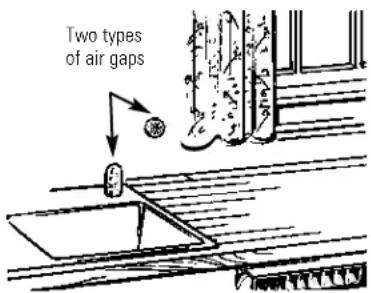 Check the air gap any time your Chef's Washer isn't draining well. Check the air gap any time your Chef's Washer isn't draining well. |
Removing and Cleaning the Spray Arms and Glass Trap
Periodically, remove and clean the spray arms to make sure that none of the nozzles have become blocked.
To remove the lower spray arm, grasp the center of the spray arm and pull upward; it will unclip. When replacing, make sure the spray arm is fully seated and spins.
The plastic cone on the underside of the spray arm can be detached by unscrewing it counterclockwise.
To remove the upper spray arm, carefully unscrew the spray arm from the plastic tower. To achieve this, hold the inner tower steady and unscrew the spray arm clockwise. To replace the spray arm, carefully screw the spray arm counterclockwise onto the inner tower.
To clean the upper and lower spray arms, rinse them under running water and make sure spray nozzles are clear.
The glass trap is located in the stainless steel filter at the base of your Chef's Washer. The glass trap is used to collect larger food items and other foreign objects, which may be too big to pass through the drain pump. For best wash performance, check the glass trap occasionally.
To remove the glass trap, twist counterclockwise, rotate the glass trap and lift. To clean the glass trap, empty and rinse thoroughly. To replace, reverse these steps, making sure the glass trap locks into place.

The Wash Filters
In addition to the glass trap, your Chef's Washer has three fine filters—
- a two piece round perforated stainless steel filter located in the base of the Chef's Washer.
- a finer micro-mesh filter located under the stainless steel filter.
- a super fine filter located below the lower spray arm.
Remove the stainless steel filter by first twisting and removing the glass trap. Lift out the stainless steel filter.
Attached to the underside of this filter is the micro-mesh filter. To remove the micro-mesh filter, squeeze the two clips above the stainless steel filter to release the micro-mesh.
To remove the super fine filter, remove the lower spray arm. Grasp the super fine filter around the outer edges. Remove by pulling upward; it will unclip. Unscrew the tower counterclockwise. The right half of the stainless steel filter can now be removed.
To clean filters, place under running water and gently brush with a soft bristled brush. Be careful not to deform filters while cleaning, as this may prevent them from being properly re-installed.
The super fine filter is self-cleaning; there is no need to clean it. This filter need only be removed if you want to remove the right half of the stainless steel filter.
Replace your filters in the reverse order, starting with the right half of the stainless steel filter. Then screw in the tower. Replace the super fine filter over the tower by pressing firmly on the outer edge until it clips into place and reposition the lower spray arm. Reconnect the micro-mesh filter to the left half of the stainless steel filter prior to replacing it back into the Chef's Washer. Then replace the glass trap. Ensure that all filters are replaced correctly for best results.

text_image
Grip filter and lift to remove Perforated stainless steel filter Micro-mesh filter Squeeze clips to remove micro-mesh filter Pull super fine filter up to remove Lift stainless steel filter to removeWater Fill Level
For best performance, check the water fill level of your Chef's Washer.
Once the Chef's Washer is fully connected, run it through a complete RINSE ONLY (on some models) cycle to ensure it is emptying and filling correctly. For low water pressure situations, run the RINSE ONLY (on some models) cycle 3 times. Halfway through the final RINSE ONLY (on some models) cycle, pause the Chef's Washer and check the water level inside the Chef's Washer. If the water level is not above the minimum water level (marked on the lower spray support tower), increase the fill level.
- Ensure the Chef's Washer is not running through a cycle. Depress the WATER TEMP button for ten seconds until the second buzzer sounds.
- Press the START/CANCEL button to select fill time, as per chart (65 seconds is the factory setting).
- To test time, press DELAY START. The Chef's Washer will start filling. Listen for the Chef's Washer to complete filling. Once filled, the fill level must be checked to ensure fill time is correct.
- Once complete, press the WATER TEMP button to exit fill time mode.

text_image
Maximum level Minimum levelContinue to press the START/CANCEL button until the desired indicator is illuminated.
| Cycle StatusIndicators Fill time | |
| SENSING 55 secondsWASHING 60 secondsRINSING 65 secondsDRYING 75 secondsCLEAN 85 seconds |
Questions?
Use this problem solver
PROBLEM POSSIBLE CAUSE WHAT TO DO
| Chef's Washer Door not will not run closed | properly • Press door until it clicks shut. | |
| Door is opened during • Relatch door. Wait a few minutes; Chef's the cycle when the water Washer will start automatically after the is hot temperature stabilizes. | ||
| Child Lockout Mode • Press and hold desired button for two is selected seconds to activate. See Child Lockout Mode section for more details. | ||
| Fuse is blown, or the • Reset the circuit breaker.circuit breaker tripped • Replace fuse or reset circuit breaker.Remove any other appliances from the circuit. | ||
| Power supply not • Check that the Chef's Washer is plugged in connected and the switch is on. | ||
| Unusual noises Some of the sounds you will hear are normal:• Detergent cup opening• Water draining out of the tub after touching a keypad or starting a cycle | ||
| Detergent left in dispenser cups | Dishes are blocking the detergent cups | • Reposition the dishes. |
| Water will not pump out of the tub | Disposer knock-out plug has not been removed | • Remove knock-out plug. |
| Drain is clogged | • Clean air gap (if applicable).• If the Chef's Washer drains into a disposer, run disposer to assure it is draining properly.• Check to see if your kitchen sink is draining well. If not, you may need a plumber. | |
| Suds in the tub | Correct detergent was not used | • Use only automatic dishwasher detergents to avoid sudsing.• To remove suds from the tub, open the Chef's Washer and let suds evaporate. Add 1 gallon of cold water to the tub.For 7000 series models:• Pump out water by pressing the NORMAL WASH button, then press start.• Close the door until it locks into place.• Wait for one minute, then carefully open the door and hold down the START/CANCEL button for three seconds. |
Questions?
Use this problem solver
PROBLEM POSSIBLE CAUSE WHAT TO DO
| Suds in the tub (cont.) | For all other models:Pump out water by closing the door until it locks into place.Press the NORMAL WASH button, then press start.Wait for one minute, then press and hold down the START/CANCEL button for three seconds. Repeat if necessary. | |
| Too much rinse agent used | Remove any spilled rinse aid.Reduce rinse aid setting.For soft water, rinse aid may be unnecessary. | |
| Dishes and flatware Improper rack loading • Make sure large dishware does not block not clean the detergent dispenser or the wash arm. | ||
Questions?
Use this problem solver
PROBLEM POSSIBLE CAUSE WHAT TO DO
| Black or gray marks Aluminum utensils have Remove marks with a mild, abrasive cleaner.on dishes rubbed against dishes | |
| Dishes do not dry HEAT/ | SMART DRY • Depending on model, select HEAT DRYnot selected or SMART DRY. |
| Rinse agent dispenser • Check the rinse agent dispenser.is empty | |
| Chef's Washer is paused • To restart the wash cycle, press the selectedwash button. | |
| Low inlet water • Run tap until water is hot prior to startingChef's Washer cycle.• Assure inlet water temperature is atleast 120°F.• Depending on your model, select WATERTEMP HIGH & HEAT DRY or WATERTEMP SANI and HEAT DRY options. | |
| Chef's Washer won't start | Door not properly closed • Press door until it clicks shut. |
| Door opened during cycle when water is hot • Re-latch door. Wait a few minutes; Chef'sWasher will restart automatically. | |
| Child Lockout mode is selected • Press and hold desired button for twoseconds. See Child Lockout mode sectionfor models ZBD6905, ZBD 7005 and ZBD 7105. | |
| Power supply not connected • Check that Chef's Washer is plugged in andswitch is on. | |
| All cycle status indicatorsflashing or beeping every30 seconds (on ZBD6905,ZBD 7005 and ZBD 7105) | Door not properly closed • Press door until it clicks shut. |
| Chef's Washer is paused • To restart the wash cycle, press the selectedwash button. | |
| Motor starts but waterdoesn't enter Chef'sWasher (flashing POTSLIGHT) (on modelsZBD 6905, ZBD 7005and ZBD 7105) | Water supply valveturned off • Open water supply valve. |
| Program taking too long or not advancingproperly | Low inlet water temperature • Run tap until water is hot prior to startingChef's Washer cycle.• Allow time to heat water (up to one hour).• Check inlet water temperature.• Connect to hot water supply. |
Questions?
Use this problem solver
PROBLEM POSSIBLE CAUSE WHAT TO DO
| Water does not empty out of Chef's Washer for (flashing RINSE ONLY light) (on models ZBD6905, ZBD7005 and ZBD7105) | Outlet blocked blockage. | ·Check garbage disposal and air gap·Check outlet hose for kinks and sharp bends. |
| Chef's Washer continues to drain indefinitely off circuit breaker and call for service. | Faulty fill valve | ·First, turn off water supply valve, then turn |
| Yellow color on dishes and glassware mineral content the only way to correct this problem.Contact a water softener company. | Water has iron or other | ·A special filter in the water supply line is |
| White film on glasses; Hard water ·Try progressively increasing the Rinse Aid tea and coffee stains setting to 6. See the Rinse Agent section. | ||
| Repeated use of Sani | ·Discontinue use of Sani option. | |
| Brown spots or pitting of stainless steel; tarnishing of silver | Consistently low water level in Chef's Washer | ·Check that operating water level is between the MIN. and MAX. indicators on lower spray arm support tower. See Care and Cleaning section. |
| Electrolysis following contact with other metals | ·Wash scratched or worn pieces by hand. Polish silverware with a silver-plate cleaner. | |
| Detergent thrown over the cutlery or saucepans | ·Load detergent properly. See Using the Chef's Washer section. | |
| Light goes out | ·Call for service. | |
With the purchase of your new Monogram appliance, receive the assurance that if you ever need information or assistance from GE, we'll be there. All you have to do is call-toll-free!
GE Answer Center®
In the USA: 800.626.2000
Whatever your question about any Monogram major appliance, GE Answer Center® information service is available to help. Your call-and your question-will be answered promptly and courteously. And you can call any time. GE Answer Center® service is open 24 hours a day, 7 days a week.
OR
Visit our Website at: monogram.com
In Canada, call 1.888.880.3030.
In-Home Repair Service
In the USA: 800.444.1845
In Canada: 1.888.880.3030
A GE consumer service professional will provide expert repair service, scheduled at a time that's convenient for you. Many GE Consumer Service company-operated locations offer you service today or tomorrow, or at your convenience (7:00 a.m. to 7:00 p.m. weekdays, 9:00 a.m. to 2:00 p.m. Saturdays). Our factory-trained technicians know your appliance inside and out-so most repairs can be handled in just one visit.
For Customers With Special Needs...
In the USA: 800.626.2000

text_image
SINGLE-CONTROL FAUDET "TICKELIFE ON WALL 1/2" FLUORESCENT FEATURE THIS LIGHT CAN BEET HAZED IN BOTTOM OF WALL ACCESS SECTION A-A A SHALLOW-OPTH-SINHA (3) WITH THEAN STRAIN, SINH SHOULD ALSO BE UNDECRATED SCALE 1:1-1GE offers Braille controls for a variety of GE appliances, and a brochure to assist in planning a barrier-free kitchen for persons with limited mobility.
Consumers with impaired hearing or speech who have access to a TDD or a conventional teletypewriter may call 800.TDD.GEAC (800.833.4322) to request information or service.
Service Contracts
In the USA: 800.626.2224
In Canada: 1.888.880.3030
You can have the secure feeling that GE Consumer Service will still be there after your warranty expires. Purchase a GE contract while your warranty is still in effect and you'll receive a substantial discount. With a multiple-year contract, you're assured of future service at today's prices.
Parts and Accessories
In the USA: 800.626.2002
In Canada: 1.888.880.3030
Individuals qualified to service their own appliances can have parts or accessories sent directly to their home. The GE parts system provides access to over 47,000 parts...and all GE Genuine Renewal Parts are fully warranted.
User maintenance instructions contained in this manual cover procedures intended to be performed by any user. Other servicing generally should be referred to qualified service personnel. Caution must be exercised, since improper servicing may cause unsafe operation.
YOUR MONOGRAM CHEF'S WASHER WARRANTY
Staple sales slip or cancelled check here. Proof of original purchase date is needed to obtain service under warranty.
WHAT IS COVERED
From the Date of the Original Purchase
ONE-YEAR
Any part of the Chef's Washer which fails due to a defect in materials or workmanship. During this full one-year warranty, GE will also provide, free of charge, all labor and in-home service to replace the defective part.
Second Year
Any part of the Chef's Washer which fails due to a defect in materials or workmanship. During this second-year limited warranty, you will be responsible for any labor or in-home service costs.
Five Years
The Chef's Washer rack, if it should rust, or the electronic control module, if it should fail due to a defect in materials or workmanship. During this five-year limited warranty, you will be responsible for any labor or in-home service costs.
Lifetime
The stainless steel tub or door liner, if it fails to contain water due to a defect in materials or workmanship. During this full lifetime warranty, GE will also provide, free of charge, all labor and in-home service to replace the defective part.
This warranty is extended to the original purchaser and any succeeding owner for products purchased for ordinary home use in the 48 mainland states, Alaska, Hawaii and Washington, D.C. Proof of original purchase date is needed to obtain service under the warranty.
All warranty service will be provided by our Factory Service Centers or by our authorized Customer Care ^® servicers during normal working hours.
Should your appliance need service, during warranty period or beyond, call 800.444.1845.
WHAT IS NOT COVERED
- Service trips to your home to teach you how to use the product.
- Improper installation, delivery or maintenance.
- Replacement of house fuses or resetting of circuit breakers.
-
Failure of the product if it is abused, misused, or used for other than the intended purpose or used commercially.
-
Damage to the product caused by accident, fire, floods or acts of God.
- Incidental or consequential damage caused by possible defects with this appliance.
- Cleaning or servicing of the air gap device in the drain line.
- Damage after delivery.
Some states do not allow the exclusion or limitation of incidental or consequential damages, so the above limitation or exclusion may not apply to you. This warranty gives you specific legal rights, and you may also have other rights which vary from state to state. To know what your legal rights are in your state, consult your local or state consumer affairs office or your state's Attorney General.
Warrantor: General Electric Company, Louisville, KY 40225.
YOUR MONOGRAM CHEF'S WASHER WARRANTY
Staple sales slip or cancelled check here. Proof of original purchase date is needed to obtain service under warranty.
WHAT IS COVERED
From the Date of the Original Purchase
ONE-YEAR
Any part of the Chef's Washer which fails due to a defect in materials or workmanship. During this full one-year warranty, GE will also provide, free of charge, all labor and in-home service to replace the defective part.
Second Year
Any part of the Chef's Washer which fails due to a defect in materials or workmanship. During this second-year limited warranty, you will be responsible for any labor or in-home service costs.
Five Years
The Chef's Washer rack, if it should rust, or the electronic control module, if it should fail due to a defect in materials or workmanship. During this five-year limited warranty, you will be responsible for any labor or in-home service costs.
Lifetime
The stainless steel tub or door liner, if it fails to contain water due to a defect in materials or workmanship. During this full lifetime warranty, GE will also provide, free of charge, all labor and in-home service to replace the defective part.
This warranty is extended to the original purchaser and any succeeding owner for products purchased for ordinary home use in Canada. Proof of original purchase date is needed to obtain service under the warranty.
All warranty service will be provided by our Factory Service Centers or by our authorized Customer Care ^® servicers during normal working hours.
Should your appliance need service, during warranty period or beyond, call 1.888.880.3030.
WHAT IS NOT COVERED
- Service trips to your home to teach you how to use the product.
- Improper installation, delivery or maintenance.
- Replacement of house fuses or resetting of circuit breakers.
-
Failure of the product if it is abused, misused, or used for other than the intended purpose or used commercially.
-
Damage to the product caused by accident, fire, floods or acts of God.
- Incidental or consequential damage caused by possible defects with this appliance.
- Cleaning or servicing of the air gap device in the drain line.
- Damage after delivery.
Some provinces do not allow the exclusion or limitation of incidental or consequential damages, so the above limitation or exclusion may not apply to you. This warranty gives you specific legal rights, and you may also have other rights which vary from province to province. To know what your legal rights are in your province, consult your local or provincial consumer affairs office.
Warrantor: Camco Inc., 1 Factory Lane, Suite 310, Moncton, N.B. E1C 9M3.
Chef's Washer
Chef's Washer
Important Mail Today
Ownership Registration Consumer Product
GE Appliances

Place 1st Class Letter Stamp Here
General Electric Company
Warranty Registration Department
P.O. Box 32150
Louisville, KY 40232-2150
Consumer Product Ownership Registration
Dear Customer:
Thank you for purchasing our product and thank you for placing your confidence in us. We are proud to have you as a customer!
Follow these three steps to protect your new appliance investment:

Complete and mail your Consumer Product Ownership Registration today. Have the peace of mind of knowing we can contact you in the unlikely event of a safety modification.
$$ 2 $$
After completing this registration, write your model and serial numbers in this manual. You will need this information should you require service. The service number in the USA: 800.444.1845. In Canada: 1.888.880.3030.
$$ 3 $$
Read your "Owner's Manual" carefully. It will help you operate your new appliance properly.
Important: To ensure that your product is registered, mail the separate product registration card. If the separate product registration card is missing, fold and mail the form below. No envelope is needed.
FOLD HERE
Consumer Product Ownership Registration

Product Model Serial Dishwasher
Mr. □Ms. □Mrs. □
Miss □

text_image
First Name Last Name Street Address Apt. # City Zip CodeState Date Placed In Use Month Day Year Phone Number
Monogram®
General Electric Company Louisville, KY 40225
www.monogram.com

TAPE CLOSED

Monogram. We bring good things to life.
165D4700P239 49-5913-2
0616400354 01-03 JR
Printed in Australia
General Electric Company Louisville, KY 40225