GTL12HBDBS - Fridge GE - Free user manual and instructions
Find the device manual for free GTL12HBDBS GE in PDF.


User questions about GTL12HBDBS GE
0 question about this device. Answer the ones you know or ask your own.
Ask a new question about this device
Download the instructions for your Fridge in PDF format for free! Find your manual GTL12HBDBS - GE and take your electronic device back in hand. On this page are published all the documents necessary for the use of your device. GTL12HBDBS by GE.
USER MANUAL GTL12HBDBS GE
Safety Instructions 2,3
Operating Instructions
Care and Cleaning 6,7
Control Settings 4
Ice Service 5
Storage Drawers 4
Installation Instructions
Preparing to Install
the Refrigerator 8
Reversing the Door Swing ..... 9-12
Troubleshooting Tips....13-15
Normal Operating Sounds .... 13
Consumer Support
Consumer Support 18
Warranty (U.S.) 17
Owner's Manual and Installation Instructions
GTL12
GTR10
GTR12
Write the model and serial numbers here:
Model # ____
Serial # ____
You can find them on a label inside the refrigerator.
WARNING!
Use this appliance only for its intended purpose as described in this Owner's Manual.

SAFETY PRECAUTIONS
When using electrical appliances, basic safety precautions should be followed, including the following:
This refrigerator must be properly installed and located in accordance with the Installation Instructions before it is used.
Do not allow children to climb, stand or hang on the shelves in the refrigerator. They could damage the refrigerator and seriously injure themselves.
Do not touch the cold surfaces in the freezer compartment, particularly when hands are damp or wet. Skin may stick to these extremely cold surfaces.
Do not store or use gasoline or other flammable vapors and liquids in the vicinity of this or any other appliance.
In refrigerators with automatic icemakers, avoid contact with the moving parts of the ejector mechanism, or with the heating element that releases the cubes. Do not place fingers or hands on the automatic icemaking mechanism while the refrigerator is plugged in.
- Keep fingers out of the "pinch point" areas; clearances between the doors and between the doors and cabinet are necessarily small. Be careful closing doors when children are in the area.
■ Unplug the refrigerator before cleaning and making repairs.
NOTE: We strongly recommend that any servicing be performed by a qualified individual.
■ Turning the control to the COLD position does not remove power to the light circuit.
Do not refreeze frozen foods which have thawed completely.
Before replacing a burned-out light bulb, the refrigerator should be unplugged in order to avoid contact with a live wire filament. (A burned-out light bulb may break when being replaced.)
⚠ DANGER! RISK OF CHILD ENTRAPMENT
PROPER DISPOSAL OF THE REFRIGERATOR
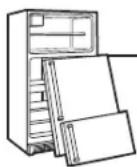
Child entrapment and suffocation are not problems of the past. Junked or abandoned refrigerators are still dangerous...even if they will sit for "just a few days." If you are getting rid of your old refrigerator, please follow the instructions below to help prevent accidents.
Before You Throw Away Your Old Refrigerator or Freezer:
Take off the doors.
Leave the shelves in place so that children may not easily climb inside.
Refrigerants
All refrigeration products contain refrigerants, which must be removed prior to product disposal. If you are getting rid of an old refrigeration product, check with the company handling the disposal about what to do.
USE OF EXTENSION CORDS
Because of potential safety hazards under certain conditions, we strongly recommend against the use of an extension cord.
However, if you must use an extension cord, it is absolutely necessary that it be a UL-listed, 3-wire, grounding-type appliance extension cord having a grounding-type plug and outlet and that the electrical rating of the cord be 15 amperes (minimum) and 120 volts.
WARNING!

HOW TO CONNECT ELECTRICITY
Do not, under any circumstances, cut or remove the third (ground) prong from the power cord. For personal safety, this appliance must be properly grounded.
The power cord of this appliance is equipped with a 3-prong (grounding) plug which mates with a standard 3-prong (grounding) wall outlet to minimize the possibility of electric shock hazard from this appliance.
Have the wall outlet and circuit checked by a qualified electrician to make sure the outlet is properly grounded.
Where a standard 2-prong wall outlet is encountered, it is your personal responsibility and obligation to have it replaced with a properly grounded 3-prong wall outlet.
The refrigerator should always be plugged into its own individual electrical outlet which has a voltage rating that matches the rating plate.
This provides the best performance and also prevents overloading house wiring circuits which could cause a fire hazard from overheated wires.
Never unplug your refrigerator by pulling on the power cord. Always grip plug firmly and pull straight out from the outlet.
Repair or replace immediately all power cords that have become frayed or otherwise damaged. Do not use a cord that shows cracks or abrasion damage along its length or at either end.
When moving the refrigerator away from the wall, be careful not to roll over or damage the power cord.

READ AND FOLLOW THIS SAFETY INFORMATION CAREFULLY.
SAVE THESE INSTRUCTIONS
About the control on the refrigerator.

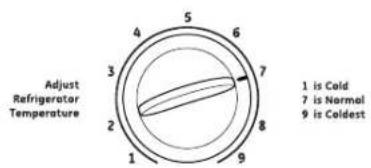
There is a temperature control in the fresh food compartment as well as the freezer compartment. Initially set the control to Normal in the fresh food and freezer compartments. Allow 24 hours for the temperature to stabilize.
text_image
Adjust Refrigerator Temperature 1 is Cold 7 is Normal 9 is Coldest
Control Settings
Adjust the fresh food control one increment at a time. Allow 12 hours after each adjustment for the refrigerator to reach the temperature you have set.
Adjust the freezer control one increment at a time. Allow 12 hours after each adjustment for the freezer to reach the temperature you have set.
After each adjustment, check both the freezer and the fresh food compartments. Changing the fresh food control will affect the temperature of the freezer compartment. Likewise, changing the freezer control can affect the temperature of the fresh food compartment.
Control settings will vary based on personal preferences, usage and operating conditions and may require more than one adjustment. Factors that affect temperature include the amount of food in the fresh food and freezer compartments, frequency of door opening, and temperature of food when placed in either compartment.
About the storage drawers.
Fruit and Vegetable Drawers
These storage drawers provide space to store fruits, vegetables and meats.
To replace the drawers and the cover above them, the door must be fully opened. In some installations, the refrigerator may have to be moved away from the wall for the door to be fully opened.

natural_image
Illustration of hands holding a tray with scattered cubes (no text or symbols)Ice Trays
To release ice cubes, turn the tray upside down, hold it over a container and twist both ends.
For only one or two ice cubes, leave the tray right-side up, twist both ends slightly and remove as many cubes as you want.
Wash ice trays in lukewarm water only—do not put them in an automatic dishwasher.
Icemaker Accessory Kit (Models GTR12 and GTL12 only)
An icemaker accessory kit is available from your dealer. The IM-4A, IM-6 or equivalent accessory kit will work with your refrigerator.
The water valve cover that came with the Owner's Manual must be installed when installing the optional icemaker kit.
Water Supply Kits (Models GTR12 and GTL12 only)
Kits containing copper tubing, shutoff valve, fittings and instructions needed to connect the icemaker to your cold water line are available at extra cost from your dealer or from Parts and Accessories. In the U.S., call 800.626.2002.
Care and cleaning of the refrigerator.
Cleaning the Outside
Keep the outside clean. Wipe with a clean cloth lightly dampened with mild liquid dish detergent. Dry with a clean, soft cloth.
Do not wipe the refrigerator with a soiled dish cloth or wet towel. These may leave a residue that can erode the paint. Do not use scouring pads, powdered cleaners, bleach or cleaners containing bleach because these products can scratch and weaken the paint finish.
Protect the paint finish. The finish on the outside of the refrigerator is a high quality, baked-on paint finish. With proper care, it will stay new-looking and rust free for years. Apply a coat of kitchen/appliance wax when the refrigerator is new, and then at least twice a year.
Cleaning the Inside
To help prevent odors, leave an open box of baking soda in the fresh food and freezer compartments.
Unplug the refrigerator before cleaning.
If this is not practical, wring excess moisture out of sponge or cloth when cleaning around switches, lights or controls.
Use warm water and baking soda solution—about a tablespoon (15 ml) of baking soda to a quart (1 liter) of water. This both cleans and neutralizes odors. Rinse and wipe dry.
Other parts of the refrigerator—including door gaskets, fruit and vegetable drawers, and all plastic parts—can be cleaned the same way.
After cleaning the door gaskets, apply a thin layer of petroleum jelly to the door gaskets at the hinge side. This helps keep the gaskets from sticking and bending out of shape. Do not use cleansing powders or other abrasive cleaners.
Do not wash any plastic refrigerator parts in the dishwasher.
Avoid cleaning cold glass shelves (on some models) with hot water because the extreme temperature difference may cause them to break. Handle glass shelves carefully. Bumping tempered glass can cause it to shatter.
Behind the Refrigerator
Once a year, move the refrigerator out and vacuum the back coils. Be careful when moving the refrigerator away from the wall. All types of floor coverings can be damaged, particularly cushioned coverings and those with embossed surfaces.
Pull the refrigerator straight out and return it to position by pushing it straight in. Moving the refrigerator in a side direction may result in damage to the floor covering or refrigerator.
When pushing the refrigerator back, make sure you don't roll over the power cord. Also be sure to leave a minimum of 3" between the wall and the condenser coils
text_image
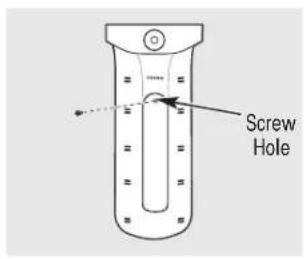
Screw HoleReplacing the Light Bulb
Moving the control to COLD does not remove power to the light circuit.
The bulb is located behind the shield in the back wall.
1 Unplug the refrigerator.
2 Remove the shelves (if necessary).
3 Remove the screw.
4 Gently remove the light shield by inserting a flat head screwdriver into the slot at the top of the shield and pop it off.
5 Replace the bulb with a 25W appliance bulb with an E12 candelabra base.
NOTE: If the bulb is not available at your local hardware store, contact GE customer service.
6 Insert the tab at the bottom of the light shield into the light bulb housing and snap into place.
7 Replace the screw.
8 Replace the shelves if removed.
9 Plug in the refrigerator.
Preparing for Vacation
For long vacations or absences, remove food and unplug the refrigerator. Clean the interior with a baking soda solution of one tablespoon (15 ml) of baking soda to one quart (1 liter) of water. Leave the doors open.
Preparing to Move
Secure all loose items such as shelves and drawers by taping them securely in place to prevent damage.
Be sure the refrigerator stays in an upright position during moving.
Installation Instructions
Refrigerator
Models GTL12, GTR10, GTR12
If you have questions, call 1.800.GE.CARES or visit our Website at: GEAppliances.com
BEFORE YOU BEGIN
Read these instructions completely and carefully.
- IMPORTANT —Save these instructions for local inspector's use.
- IMPORTANT —Observe all governing codes and ordinances.
- Note to Installer – Be sure to leave these instructions with the Consumer.
- Note to Consumer – Keep these instructions for future reference.
- Skill level – Installation of this appliance requires basic mechanical skills.
- Completion time – Refrigerator Installation 15 minutes Reversing the Door Swir 1 hour
- Proper installation is the responsibility of the installer.
- Product failure due to improper installation is not covered under the Warranty.
REFRIGERATOR LOCATION
- Do not install the refrigerator where the temperature will go below 55^ (13°C) because it will not run often enough to maintain proper temperatures.
• Install it on a floor strong enough to support it fully loaded. - Do not install it closer than 5" (13 cm) next to a range.
CLEARANCES
Free-standing installation only.
Minimum Clearances: Back – 3" from the condenser coils
LEVELING LEGS
Adjustable legs at the front corners of the refrigerator should be set so the refrigerator is firmly positioned on the floor, and the front is raised just enough that the door closes easily when opened about halfway.
To adjust the leveling legs, turn the legs clockwise to raise the refrigerator, counterclockwise to lower it.

natural_image
Pure mechanical diagram showing a bolt and curved component without any text or symbolsTo raise the refrigerator
REVERSING THE DOOR SWING
IMPORTANT NOTES
When reversing the door swing:
- Read the instructions all the way through before starting.
- Handle parts carefully to avoid scratching paint.
- Set screws down by their related parts to avoid using them in the wrong places.
- Provide a non-scratching work surface for the doors.
IMPORTANT: Once you begin, do not move the cabinet until door-swing reversal is completed.
These instructions are for changing the hinges from the right side to the left side—if you ever want to change the hinges back to the right side, follow these same instructions and reverse all references to left and right.
Unplug the refrigerator from its electrical outlet.
Empty all door shelves.
1 REMOVE THE FREEZER DOOR
Remove the hinge cover screws (some models have lock washers with each screw), top hinge and shim.
Set the door on a non-scratching surface with the outside up.

natural_image
Technical line drawing of a mechanical bracket assembly with mounting holes and a triangular component (no text or symbols)NOTE: When removing the door, watch for washer(s) between the center hinge and the bottom of the freezer door that may stick to the door. Do not lose.
⚠️ CAUTION: Do not let door drop to the floor. To do so could damage the door stop.
TOOLS YOU WILL NEED

8 mm Socket driver

Phillips screwdriver
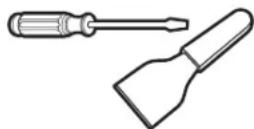
Putty knife or thin-blade screwdriver
Masking tape
REVERSING THE DOOR SWING (CONT.)
2 REMOVE THE FRESH FOOD DOOR
Tape the door shut with masking tape.
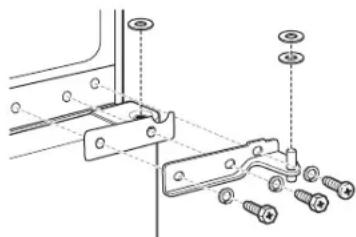
Remove the center hinge and shim by removing the screws (some models have lock washers with each screw). Lift up the hinge to remove it.
NOTE: Some models have a washer between the center hinge and the top of the fresh food door. Do not lose.
natural_image
Technical diagram of a mechanical bracket assembly with screws and bolts (no text or labels)Remove the tape holding the door shut.
Lift the fresh food door up and off the bottom hinge.
Set the door outside-up on a non-scratching surface.
NOTE: When removing the door, watch for washer(s) between the bottom hinge and the bottom of the fresh food door that may stick to the door. Do not lose.
▲ CAUTION: Do not let door drop to the floor. To do so could damage the door stop.
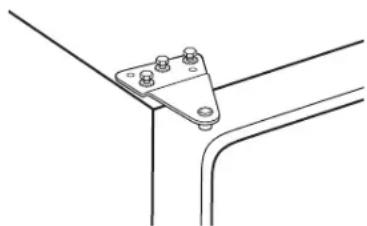
3 TRANSFER TOP HINGE TO THE LEFT
Using a putty knife with the edge covered with masking tape, remove the plug buttons. Be careful of the paint finish.
Reinstall the plug button on the right side by inserting it into the holes vacated by the top hinge screws.

natural_image
Line drawing of a metal tool with a handle and lever, no text or symbols presentReassemble the top hinge and shim on the left side, turning the screws just enough to hold the hinge in place.
natural_image
Technical line drawing of a metal bracket with mounting holes (no text or symbols)4 TRANSFER BOTTOM HINGE TO THE LEFT
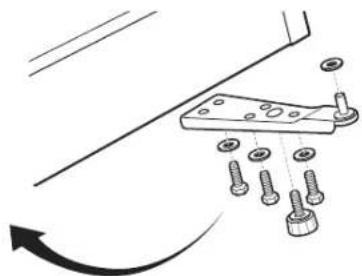
To access the bottom hinge, move the refrigerator so it is 301 from a wall. Then carefully tip the refrigerator back until it rests against the wall.
▲ CAUTION: Be sure that the coils on the back of the refrigerator do not rest against the wall. Doing so could damage the coils.

text_image
30"Remove the screws (some models have washers with each screw), leveling leg and bottom hinge from the right side. Remove the leveling leg from the left side of the cabinet and install it in the right side.
Reassemble the bottom hinge on the left side.
NOTE: The leveling legs are not interchangeable.
natural_image
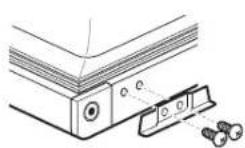
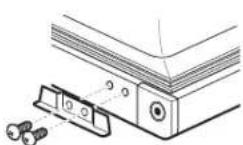
Mechanical assembly diagram showing a bracket with bolts and a rotating arrow (no text or symbols)5 TRANSFER FRESH FOOD DOOR STOP TO THE LEFT
Remove the door stop from the bottom of the right side of the door. Transfer the plug buttons from the bottom left side to the right side.
Install the door stop on the left side.
6 REHANG THE FRESH FOOD DOOR
Make sure the washer(s) are in place on the bottom hinge pin. Place the fresh food door on the bottom hinge, close the door and tape it in place with masking tape.
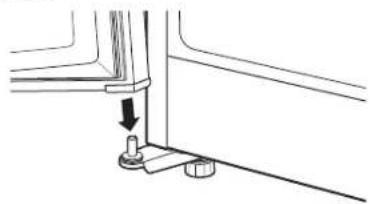
natural_image
Pure mechanical assembly diagram showing a lever and pivot point without any text or symbolsRemove the plug button from the left edge of the door and insert it into the hole on the opposite side.

text_image
Plug button7 INSTALL CENTER HINGE ON THE LEFT
Remove the three plug buttons on the left side and install them on the right.

natural_image
Technical line drawing of a mechanical bracket with mounting holes and connecting rods (no text or symbols)Install the center hinge designed for the left side that came with the refrigerator, with the screws, spacer and washer(s) (on some models) that you removed in Step 2.
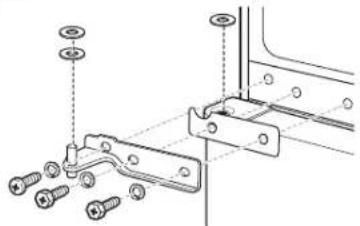
natural_image
Technical diagram of a mechanical assembly with screws and bracket (no text or labels)Remove the tape holding the door shut.
⚠️ CAUTION: When assembled correctly, the hinge is tight against the cabinet.
ATTENTION: The screws must be properly tightened. Turn the screws until snug. Then tighten the screws a minimum of 1/2 turn using both hands.
REVERSING THE DOOR SWING (CONT.)
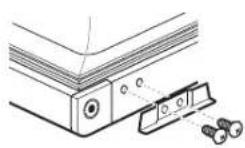
8 TRANSFER FREEZER DOOR STOP TO THE LEFT
Remove the door stop from the bottom of the right side of the door. Transfer the plug buttons from the bottom left side to the right side.
Install the door stop on the left side.

9 REHANG THE FREEZER DOOR
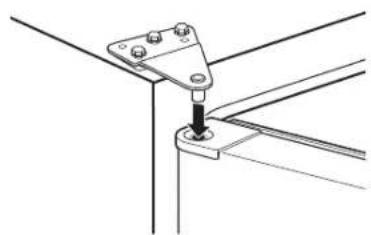
Place the freezer door on the center hinge over the pin.
Raise the top hinge by hand and insert the top hinge pin into the hole in the door. Then swing the door shut.
natural_image
Technical line drawing of a mechanical bracket assembly (no text or symbols)Transfer the plug button on top of the door to the opposite side.
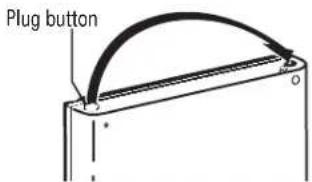
text_image
Plug button10 ALIGN THE DOORS
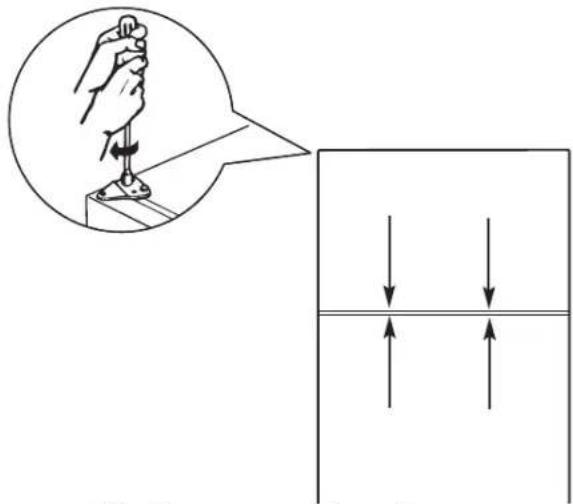
Align the freezer door with the fresh food door so that the gap between the doors is even.
Tighten the top hinge screws by turning them until snug. Then turn the screws a minimum of 1/2 turn using both hands.
text_image
Diagram illustrating a hand operating a tool with an inset showing the tip of the tool, alongside a schematic diagram showing force or pressure distribution.Install the hinge cover over the top hinge.

Newer refrigerators sound different from older refrigerators. Modern refrigerators have more features and use newer technology.
Do you hear what I hear? These sounds are normal.
HUMMM... WHOOSH...
The new high efficiency compressor may run faster and longer than your old refrigerator and you may hear a high-pitched hum or pulsating sound while it is operating.
You may hear a whooshing sound when the doors close. This is due to pressure equalizing within the refrigerator.
WHIR!

You may hear the fans spinning at high speeds. This happens when the refrigerator is first plugged in, when the doors are opened frequently or when a large amount of food is added to the refrigerator or freezer compartments. The fans are helping to maintain the correct temperatures.
CLICKS, POPS, CRACKS and CHIRPS
- You may hear cracking or popping sounds when the refrigerator is first plugged in. This happens as the refrigerator cools to the correct temperature.
The compressor may cause a clicking or chirping sound when attempting to restart (this could take up to 5 minutes).
■ Expansion and contraction of cooling coils during and after defrost can cause a cracking or popping sound.
On models with an icemaker, after an icemaking cycle, you may hear the ice cubes dropping into the ice bucket.
WATERSOUNDS

The flow of refrigerant through the freezer cooling coils may make a gurgling noise like boiling water.
Water dropping on the defrost heater can cause a sizzling, popping or buzzing sound during the defrost cycle.
A water dripping noise may occur during the defrost cycle as ice melts from the evaporator and flows into the drain pan.
- Closing the door may cause a gurgling sound due to pressure equalization.
Before you call for service...

Troubleshooting Tips
Save time and money! Review the charts on the following
pages first and you may not need to call for service.
| Problem Possible Causes What To Do | ||
| Refrigerator does not operate | Refrigerator in defrost cycle. | ·Wait about 30 minutes for defrost cycle to end. |
| Refrigerator is unplugged. | ·Push the plug completely into the outlet. | |
| The fuse is blown/circuit breaker is tripped. | ·Replace fuse or reset the breaker. | |
| Vibration or rattling (slight vibration adjusting. is normal) | Front leveling legs need | ·See Leveling Legs. |
| Motor operates for long periods or cycles on and off frequently. (Modern refrigerators with more storage space and a larger freezer require more operating time. They start and stop often to maintain even temperatures.) | Normal when refrigerator is first plugged in. | ·Wait 24 hours for the refrigerator to completely cool down. |
| Often occurs when large amounts of food are placed in refrigerator. | ·This is normal. | |
| Door left open. | ·Check to see if package is holding door open. | |
| Hot weather or frequent door openings. | ·This is normal. | |
| Temperature control set at the coldest setting. | ·See About the control. | |
| Fresh food or freezer compartment too warm | Temperature control not set cold enough. | ·See About the control. |
| Warm weather or frequent door openings. | ·Set the temperature control one step colder. See About the control. | |
| Door left open. | ·Check to see if package is holding door open. | |
| Frost or ice crystals on frozen food (frost within package is normal) | Door left open. | ·Check to see if package is holding door open. |
| Too frequent or too long door openings. | ||
| Ice cubes have odor/taste | Food transmitting odor/taste to ice cubes. | ·Wrap foods well. |
| Interior of refrigerator needs cleaning. | ·See Care and cleaning. | |
| Slow ice cube freezing | Door left open. | ·Check to see if package is holding door open. |
| Temperature control not set cold enough. | ·See About the control. | |
| Refrigerator has odor | Foods transmitting odor to refrigerator. | · Foods with strong odors should be tightly wrapped. · Keep an open box of baking soda in the refrigerator; replace every three months. |
| Interior needs cleaning. | · See Care and cleaning. | |
| Moisture forms on outside of refrigerator of high humidity. | Not unusual during periods | · Wipe surface dry. |
| Moisture collects inside Too frequent or too long (in humid weather, air door openings. carries moisture into refrigerator when doors are opened) | ||
| Interior light does not work | No power at outlet. | · Replace fuse or reset the breaker. |
| Light bulb burned out. | · See Replacing the light bulb. | |
| Food is freezing in the refrigerator | Food too close to the air vent at the back of the refrigerator. | · Move the food away from the air vent. |
| Refrigerator control is set too cold. | · Move the refrigerator control to a warmer temperature setting one increment at a time. | |
Refrigerator Warranty.
All warranty service provided by our Factory Service Centers, or an authorized Customer Care® technician. To schedule service on-line, visit us at GEAppliances.com, or call 800.GE.CARES (800.432.2737). Please have serial number and model number available when calling for service.
Staple your receipt here. Proof of the original purchase date is needed to obtain service under the warranty.
For The Period Of: GE Will Replace:
One Year Any part of the refrigerator which fails due to a defect in materials or workmanship. From the date of During this limited one-year warranty, GE will also provide, free of charge, all labor and the original purchase related service to replace the defective part.
What GE Will Not Cover:
■ Service trips to your home to teach you how to use the product.
- Improper installation, delivery or maintenance.
Failure of the product if it is abused, misused, or used for other than the intended purpose or used commercially.
Loss of food due to spoilage.
- Replacement of house fuses or resetting of circuit breakers.
■ Damage caused after delivery.
Replacement of the water filter cartridge, if included, due to water pressure that is outside the specified operating range or due to excessive sediment in the water supply.
Replacement of the light bulbs, if included, or water filter cartridge, if included, other than as noted above.
■ Damage to the product caused by accident, fire, floods or acts of God.
■ Incidental or consequential damage caused by possible defects with this appliance.
■ Product not accessible to provide required service.
EXCLUSION OF IMPLIED WARRANTIES—Your sole and exclusive remedy is product repair as provided in this Limited Warranty. Any implied warranties, including the implied warranties of merchantability or fitness for a particular purpose, are limited to one year or the shortest period allowed by law.
This warranty is extended to the original purchaser and any succeeding owner for products purchased for home use within the USA. If the product is located in an area where service by a GE Authorized Servicer is not available, you may be responsible for a trip charge or you may be required to bring the product to an Authorized GE Service location for service. In Alaska, the warranty excludes the cost of shipping or service calls to your home.
Some states do not allow the exclusion or limitation of incidental or consequential damages. This warranty gives you specific legal rights, and you may also have other rights which vary from state to state. To know what your legal rights are, consult your local or state consumer affairs office or your state's Attorney General.
Warrantor: General Electric Company. Louisville, KY 40225
Consumer Support.
GE Appliances Website
GEAppliances.com
Have a question or need assistance with your appliance? Try the GE Appliances Website, 24 hours a day, any day of the year! For greater convenience and faster service, you can now download Owner's Manuals, order parts or even schedule service on-line.

Schedule Service GEAppliances.com
Expert GE repair service is only one step away from your door. Get on-line and schedule your service at your convenience any day of the year! Or call 800.GE.CARES (800.432.2737) during normal business hours.

Real Life Design Studio GEAppliances.com
GE supports the Universal Design concept—products, services and environments that can be used by people of all ages, sizes and capabilities. We recognize the need to design for a wide range of physical and mental abilities and impairments. For details of GE's Universal Design applications, including kitchen design ideas for people with disabilities, check out our Website today. For the hearing impaired, please call 800.TDD.GEAC (800.833.4322).

Extended Warranties GEAppliances.com
Purchase a GE extended warranty and learn about special discounts that are available while your warranty is still in effect. You can purchase it on-line anytime, or call 800.626.2224 during normal business hours. GE Consumer Home Services will still be there after your warranty expires.

Parts and Accessories GEAppliances.com
Individuals qualified to service their own appliances can have parts or accessories sent directly to their homes (VISA, MasterCard and Discover cards are accepted). Order on-line today, 24 hours every day or by phone at 800.626.2002 during normal business hours.
Instructions contained in this manual cover procedures to be performed by any user. Other servicing generally should be referred to qualified service personnel. Caution must be exercised, since improper servicing may cause unsafe operation.

Contact Us GEAppliances.com
If you are not satisfied with the service you receive from GE, contact us on our Website with all the details including your phone number, or write to: General Manager, Customer Relations
GE Appliances, Appliance Park
Louisville, KY 40225
Register Your Appliance GEAppliances.com
Register your new appliance on-line—at your convenience! Timely product registration will allow for enhanced communication and prompt service under the terms of your warranty, should the need arise. You may also mail in the pre-printed registration card included in the packing material.
Congelador superior Refrigeradores
text_image
Adjust Freezer Temperature 1 2 3 4 5 1 is Coldest 1 is Normal 5 is Cold Adjust Refrigerator Temperature 4 5 6 7 3 2 1 8 9 1 is Cold 7 is Normal 9 is Coldestnatural_image
Illustration of hands holding a tray with various cubes, some scattered and others placed below (no text or symbols)natural_image
Pure mechanical diagram showing a bolt and curved base with no text or symbolsnatural_image
Technical line drawing of a mechanical assembly with mounting brackets and a triangular component (no text or symbols)natural_image
Technical diagram of a mechanical bracket assembly with screws and bolts (no text or labels)natural_image
Line drawing of a tool handle and bracket (no text or symbols)natural_image
Technical line drawing of a metal bracket with mounting holes (no text or symbols)4 TRANSFIERA LA BISAGRA INFERIOR A LA IZQUIERDA
text_image
30" (76.2cm)natural_image
Mechanical assembly diagram showing a bracket with bolts and a rotating arrow (no text or symbols)5 TRANSFIERA LA TRABA DE LA PUERTA DE ALIMENTOS FRESCOS A LA IZQUIERDA
natural_image
Technical line drawing of two mechanical components with bolts and fasteners (no text or symbols)6 VUELVA A COLGAR LA PUERTA DE ALIMENTOS FRESCOS
natural_image
Technical line drawing of a mechanical assembly with a downward arrow indicating a component (no text or symbols present)natural_image
Technical line drawing of a mechanical bracket with mounting holes and alignment lines (no text or symbols)natural_image
Technical line drawing of a mechanical bracket assembly with screws and mounting holes (no text or symbols)natural_image
Technical line drawing of a mechanical bracket assembly with mounting holes (no text or symbols)natural_image
Simple line drawing of a mechanical component with a curved arc and labeled 'dor' (no text or symbols beyond label)text_image
Diagram illustrating a hand operating a tool with an inset showing the tip of the tool, alongside a schematic diagram showing force or pressure distribution.Garante: General Electric Company. Louisville, KY 40225

General Manager, Customer Relations
GE Appliances, Appliance Park
Louisville, KY 40225