BHI660BE - Cooker BAUMATIC - Free user manual and instructions
Find the device manual for free BHI660BE BAUMATIC in PDF.


User questions about BHI660BE BAUMATIC
0 question about this device. Answer the ones you know or ask your own.
Ask a new question about this device
Download the instructions for your Cooker in PDF format for free! Find your manual BHI660BE - BAUMATIC and take your electronic device back in hand. On this page are published all the documents necessary for the use of your device. BHI660BE by BAUMATIC.
USER MANUAL BHI660BE BAUMATIC
Induction hob with slider control
INSTRUCTION MANUAL

natural_image
Simple line drawing of a fish with fins and tail, no text or symbols presentBHI 660BE
60 cm Flexi-Zone Induction hob with slider
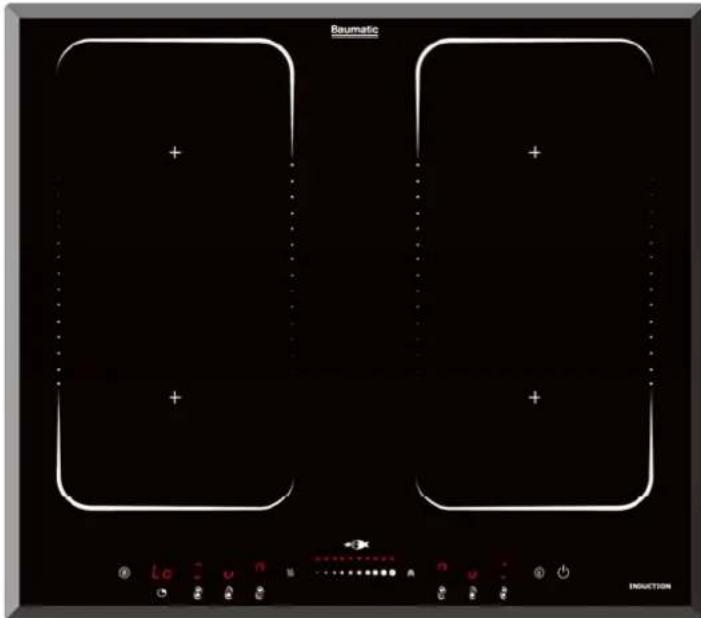
NOTE: This User Instruction Manual contains important information, including safety & installation points, which will enable you to get the most out of your appliance. Please keep it in a safe place so that it is easily available for future reference; for you or any person not familiar with the operation of the appliance.
JW 01/08/13
Contents
Environmental note 4
Important safety information 5 - 8
Specifications 9 - 11
Product and aperture dimensions 9
Product specifications 9
Electrical details 10
Ceramic hob surface layout 10
Control panel layout 11
Using the ceramic hob 11 - 22
Before first use 11
Touch controls 12
Switching the hob on 12
Switching on a zone and setting a power level 13
Power levels 14
Switching off a zone 14
Switching the hob off 15
Residual heat indicator 15
Pan sensor 15
Cookware that is suitable for an induction hob 16
The boost function 16
The dual zone function 17
The keep warm function 18
The hob timer (minute minder) 19
The hob timer (linked to a cooking zone) 20-21
Cancelling a timer function 21
Locking the hob top 22
Safety cut-off 22
High temperature protection 22
Detection of unknown items 23
The stop/start function 23
Hob guidelines 23 - 24
Cleaning and maintenance 25 - 26
Cleaning the ceramic hob top 25
After each use 25
Cleaning table 25
Using a ceramic hob scraper 26
Using a specialist ceramic hob cleaner 26
Installation 26 - 32
Positioning 27
Unpacking the appliance 28
Installing the appliance 28-29
Electrical connection 29-30
Connecting the mains supply cable 30
Replacing the mains supply cable 31
My appliance isn't working correctly 31-33
Error codes 32
Baumatic consumables 34
Contact details 35
Environmental note
This appliance is marked according to the European directive 2002/96/EC on Waste electrical and Electronic Equipment (WEEE). By ensuring this product is disposed of correctly, you will help prevent potential negative consequences for the environment and human health, which could otherwise be caused by inappropriate waste handling of this product.
The symbol

on the product, or on the documents accompanying the product, indicates that this appliance may not be treated as household waste. Instead it shall be handed over to the applicable collection point for the recycling of electrical and electronic equipment.
Disposal must be carried out in accordance with local environmental regulations for waste disposal.
For more detailed information about treatment, recovery and recycling of this product, please contact your local city office, your household waste disposal service or the shop where you purchased the product.
natural_image
Symbol of a trash bin crossed with diagonal lines, no text or labels present- The packaging materials that Baumatic uses are environmentally friendly and can be recycled.
- Please discard all packaging material with due regard for the environment.
Important safety information

text_image
Warning symbol with exclamation mark inside triangleYour safety is of the utmost importance to Baumatic. Please make sure that you read this instruction booklet before attempting to install or use the appliance. If you are unsure of any of the information contained in this booklet, please contact the Baumatic Advice Line.
General Information
- This appliance is designed for domestic household use and for the cooking and frying of domestic foodstuffs.
- IMPORTANT: The adjacent furniture and all materials used in the installation must be able to withstand a minimum temperature of 85°C above the ambient temperature of the room it is located in, whilst in use.
- Certain types of vinyl or laminate kitchen furniture are particularly prone to heat damage or discolouration at temperatures below the guidelines given above.
- Any damage caused by the appliance being installed in contravention of this temperature limit, will be the liability of the owner.
- Your new appliance is guaranteed against electrical or mechanical defects, subject to certain exclusions that are noted in Baumatic's Conditions Of Guarantee. The foregoing does not affect your statutory rights.
- The use of this appliance for any other purpose or in any other environment without the express agreement of Baumatic Ltd. will invalidate any warranty or liability claim.
- You should not use this appliance to store items on or as a work surface.
- Nomodifications to the appliance are permitted by Baumatic Ltd.
- You should not store or place flammable or highly flammable liquids/materials on top of or near the appliance. Items made from aluminium, plastic or plastic film should also be kept away from the appliance, as they may fuse to the surface.
- Repairs may only be carried out by Baumatic service engineers or their authorised service agent.
Child Safety
○ Baumatic strongly recommend that babies and young children are prevented from being near to the appliance and not allowed to touch the appliance at any time. During and after use, all surfaces will be hot.
- If it is necessary for younger family members to be in the kitchen, please ensure that they are kept under close supervision at all times.
- Older children should only be allowed to utilise the appliance when supervised.
General Safety
- The appliance should only be installed and connected by a suitably qualified person.
o Care should be taken to ensure that the units and work surfaces that you build the appliance into, meet with the relevant standards. - If you notice any scratches, splits or cracks in the ceramic glass, you should immediately switch off the appliance and disconnect it from your mains supply. Otherwise there is the risk of electric shock occurring.
- This appliance is not intended for use by persons (including children) with reduced physical, sensory or mental capabilities, or lack of experience and knowledge, unless they have been given supervision or instruction concerning use of the appliance by a person responsible for their safety.
During use
○ Any film or stickers that are present on the is hob surface when it delivered should be removed before use.
o Care should be taken when utilising the appliance, otherwise there is a risk of burns being caused.
- You should not allow the electrical connection cables to come into contact with the hob surface when it is hot or any hot cookware.
○ If fat and oil overheats, then it can ignite extremely quickly. For this reason, when cooking with fat and oil the appliance should not be left unattended.
○ Make sure that all of the cooking zones are switched off after use.
- IMPORTANT: This ceramic induction hob fully complies with current legislation regarding electro-magnetic interference and is designed not to interfere with other electronic appliances providing these comply with the same legislation.
As the hob generates magnetic fields in its immediate vicinity, pacemakers and active heart implants must be designed to comply with relevant regulations. If in doubt, you should consult the manufacturer of your device or your doctor. In this respect, Baumatic can only guarantee the conformity of our own product.
- If an object made of metal, (e.g. saucepan lid, knife, fork or spoon) is placed on a cooking zone that is switched on, it can get hot.
Cleaning
- Cleaning of the hob should be carried out on a regular basis.
- IMPORTANT: Before attempting to clean the appliance, it should be disconnected from the mains and allowed to cool.
- Great care should be taken whilst using this appliance and when following the cleaning procedure.
- You should not use a steam jet or any other high pressure cleaning equipment to clean the appliance.
Installation

text_image
Warning symbol with exclamation mark inside triangleThis appliance must be correctly installed by a suitably qualified person, strictly in accordance with the manufacturer's instructions. Please see the specific section of this booklet that refers to installation.
Baumatic Ltd. declines any responsibility for injury or damage, to person or property, as a result of improper use or incorrect installation of this appliance.
Declaration of conformity
This appliance complies with the following European Directives:
-2006/95/CE General regulations / Low tension
-1935/2004/CE 90/128/EEC This appliance is suitable to come in contact with food
-2004/108/CE Electromagnetic compatibility
The manufacturer declares that the hob is built using certified materials and requires the appliance to be installed in accordance with the standards currently in force. This appliance must be used by a trained person for domestic purposes only.
To avoid damaging your appliance
- The ceramic glass can be damaged by objects falling onto it.
- The ceramic glass edge can be damaged by knocks from cookware.
text_image
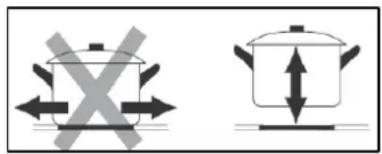
Diagram showing two cooking pots with crossed arrows indicating heating or cooling conditions, likely illustrating a cooking or cooking process.- Cast iron and cast aluminium cookware with damaged bases may scratch the ceramic surface if they are dragged across it.
o Pans should be lifted on and off the hob surface and not dragged.
- Cooking zones should not be switched on without cookware placed on it. Also the cookware should not be empty.
- Food or liquid that has high sugar content may damage the hob top, if it comes into contact with the ceramic hob surface. Any spillages should be wiped up immediately, however this may not prevent the hob surface from becoming damaged.
Specifications
text_image
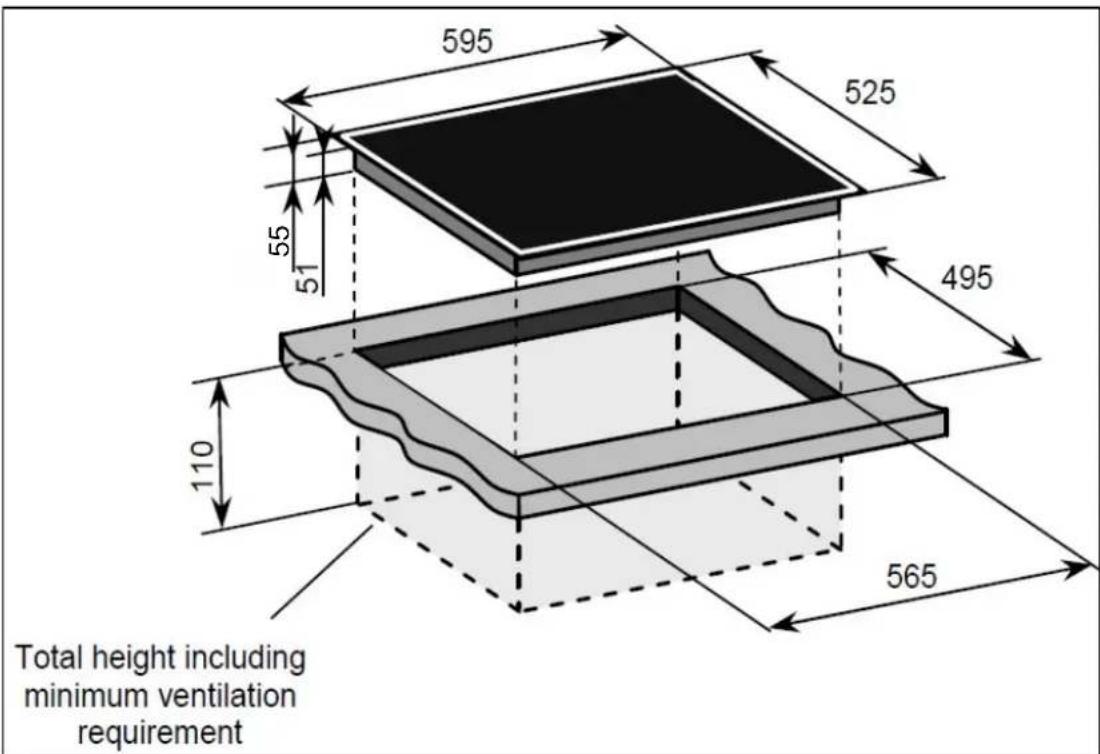
595 525 55 51 495 110 565 Total height including minimum ventilation requirementProduct dimensions:
Aperture dimensions:
Depth: 525 mm Depth: 495 mm
Width: 595 mm
Width: 565 mm
Height: 55 mm
Height: 110 mm (incl. ventilation)
Product specifications:
o 4 x 1.80 kW induction zones with booster (3.0 kW) ∅ 220 mm
2 x 3.0 kW dual zones with booster (4.0 kW) ∅ 220 mm x 400 mm
o Front touch control operation
- 4Individual residual heat indicators
- 4Independent induction generators
- Electronic timer
- Pancompatibility detection
○ Pause function
- Recall function
- Safety lock
- Bevelled edges
Standard accessories
- Ceramic hob scraper
Electrical details
Rated Voltage: 220 - 240 Vac 50 / 60 Hz
Supply Connection: 32A (double pole switched fused
outlet with 3mm contact gap)
Max Rated Inputs: 7.20 kW
Mains Supply Lead: 3 core x 6 mm ^4 (not supplied)
For future reference please record the following information which can be found on the rating plate and the date of purchase which can be found on your sales invoice. The rating plate of your hob is located on the underneath of the appliance. Therefore it is a good idea to record this information before you install your appliance.
Model Number ......
Serial Number
Date of Purchase ....
Ceramic hob surface layout

text_image
Baumatic 1 2 3 4 6 51) 1 x 1.80 kW induction zones with booster (3.0 kW) ∅ 200 mm
2) 1 x 1.80 kW induction zones with booster (3.0 kW) ∅ 200 mm
1) + 2) 3.0 kW induction zones with booster (4.0 kW) ∅200X400 mm
3) 1 x 1.80 kW induction zones with booster (3.0 kW) ∅ 200 mm
4) 1 x 1.80 kW induction zones with booster (3.0 kW) ∅ 200 mm
3) + 4) 3.0 kW induction zones with booster (4.0 kW) ∅200X400 mm
5) Control panel
6) Hob surface
Control panel layout
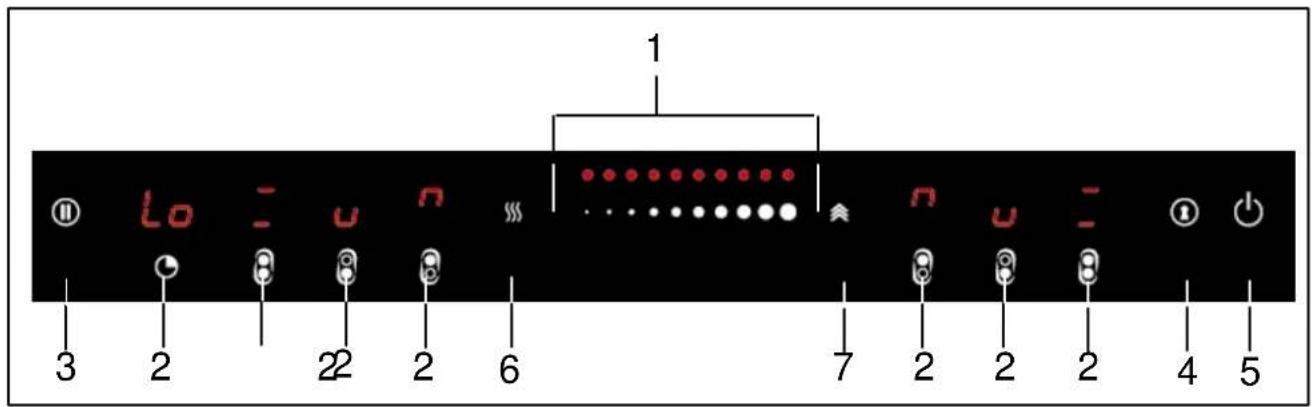
text_image
1 lo - u n ... n u - 3 2 22 2 6 7 2 2 2 4 51) Power / Timer slider touch control
2) Heating zone selection controls
3) Pause control
4) Key lock control
5) ON/OFF control
6) Keep warm control
7) Boost control
Using the ceramic hob
Before first use

IMPORTANT: You should clean the ceramic hob surface (see "Cleaning and maintenance" section).
- You should switch on one cooking zone at a time for 5 minutes at the maximum setting. This will help to eliminate any new smell that exists and evaporate any humidity that has formed on the heating elements during transit.
- Do not burn off more than one zone at once.
- You must place a saucepan filled half full with cold water on each zone as you burn it off. Otherwise the induction zone will not operate.
Touch controls
○ Alloperations are performed by means of the touch controls that can be found on the control panel.
- The controls respond to touch so you do not need to add any pressure.
- You should use the ball of your finger not the tip when using the controls.

text_image
Diagram showing two hand positions on a checkmark and an X mark, likely indicating correct or incorrect conditions.- A beep will sound each time a touch is registered.
- You should ensure that the controls are kept clean, dry and that no objects such as utensils or cloths cover them. Even a thin film of water may make the controls difficult to operate.
Switching the hob on
- When the hob is connected to a power supply, an audible signal will sound. All of the cooking zone indicators will show “-”. The hob has now entered stand-by mode.
natural_image
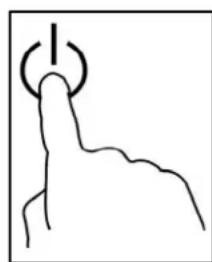
Simple line drawing of a finger pressing a button with a power symbol (no text or labels)- Press the ON/OFF button.
Switching on a zone and setting a power level
IMPORTANT: A zone must be selected within 1 minute of turning the hob on.
natural_image
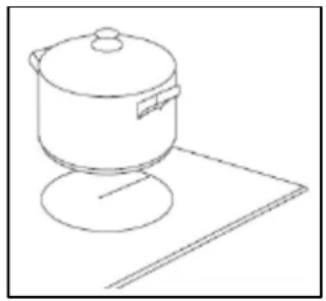
Line drawing of a cooking pot on a stand (no text or symbols)○ Make sure that the bottom of the pan and the surface of the hob are clean and dry before placing a suitable pan on the cooking zone that you wish to use.

text_image
6- Press the cooking zone selection button of the cooking zone that you want to use.
text_image
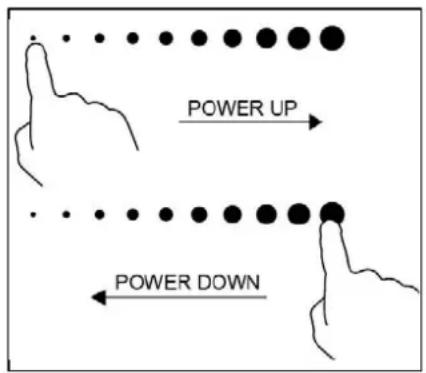
POWER UP POWER DOWN- Select the power level for the cooking zone that you have selected using the slider control. If you do not choose a heat setting within 1 minute of turning the hob on, the hob will switch off automatically.
- Sliding the slider control to the right will increase the power level while sliding the slider control to the left will decrease the power level. The power
level will show in the relevant display (0 - 9).
- You can alter the power level at any time during cooking using the slider control.

If the display flashes with the symbol shown opposite, alternatively with the heat setting, this means that:
- You have not placed a pan on the correct cooking zone or,
- The pan you are using is not suitable for induction cooking or,
- The pan is too small or not properly centred on the cooking zone.
- No heating will take place unless there is a suitable pan on the cooking zone. The display will automatically turn off after 1 minute if no suitable pan is placed on it.
Power levels
- For a general guide to cooking various foods at the different power levels please refer to the table below.
- Please note that this table should be viewed as a guide only and that other factors such as cookware, weight and amount of food and personal preference will all influence the power level required.
| Power Level | Recommended Use |
| 1 - 2 | ○ Delicatewarming of small amounts of food.○ Melting chocolate, butter and foods that burn quickly.○ Gentle simmering.○ Slow warming. |
| 3 - 4 | ○ Reheating.○ Rapid simmering.○ Cooking rice. |
| 5 - 6 | ○ Cooking pancakes. |
| 7 - 8 | ○ Sautéing.○ Cooking pasta. |
| 9 - Boost | ○ Stir-frying.○ Searing.○ Bringing soup to the boil.○ Boiling water. |
Switching off a zone
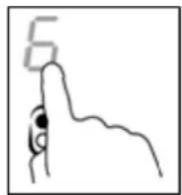
- Press the cooking zone selection button of the cooking zone that you want to switch off.
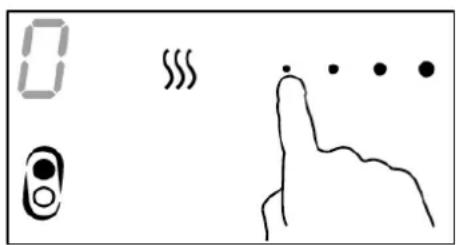
text_image
0 333 100 100Turn the cooking zone off by touching smallest dot on the power level control. Ensure display shows power level "0".
- After a few seconds, the cooking zone will switch off.
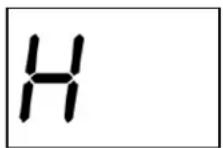
- A “H” symbol will show in the cooking zone indicator until the surface has cooled down to a safe temperature (see the section on the “residual heat indicator” for further information).
Switching the hob off
Once you have switched off all of the cooking zones, you should switch the hob off.

natural_image
Simple line drawing of a finger pressing a button with a plus sign (no text or symbols)- Press the ON/OFF button.
- It is possible to turn the hob off at any time by pressing the ON/OFF button.
Residual heat indicator
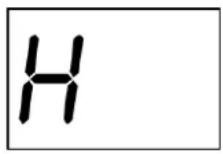
- After a zone is switched off, the corresponding cooking zone indicator will show a letter “H”. This means that the temperature of the zone is over 60°C and is therefore still high enough to cause injury.
- IMPORTANT: The residual heat indicator will disappear if your mains supply is cut. Care should be taken in case the surface temperature is still high.
Pan sensor
Each zone has a sensor on it, so it can detect the presence of a pan.
- The sensor is fine-tuned to detect a pan being placed on it. The pan should be one size smaller than the nominal diameter of the zone.

- If after placing a pan on a cooking zone and selecting that cooking zone, a “U” shaped symbol appears on the cooking zone indicator, this means that the pan is either the incorrect size or shape. Or it could be made from a material that is inappropriate for use on an induction zone hob.
- If a cooking zone is selected but no pan is detected, the pan sensor system will check for the presence of a pan approximately every few seconds. If no pan is detected after 1 minute the hob will automatically switch off
- You should check that your pans are suitable for use on an induction zone hob (see the pan manufacturer's trademark or instructions).
Cookware that is suitable for an induction hob
The table below shows cookware that is normally suitable for use on an induction zone hob:-
| Cookware | Suitable |
| Steel, enamelled steel | Yes |
| Cast iron | Yes |
| Stainless steel Yes (if stated by the pan manufacturer) | |
| Aluminium, copper, brass | No |
| Glass, ceramic, porcelain | No |
- The bottom of the pans should be as flat and thick as possible.
o Certain types of cookware may result in a noise being made when being used on an induction zone hob. This does not mean that there is an appliance fault. - IMPORTANT: You should make sure that all pans are placed in the centre of the induction zone that you are using.
The boost function
To obtain a faster and more powerful heating speed, the booster function can be used for any cooking zone.

- Press the cooking zone selection button of the zone you wish to use.
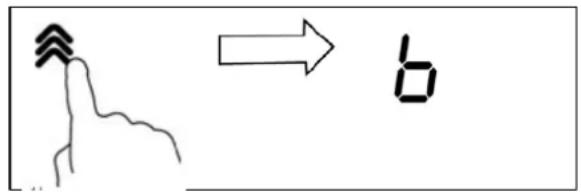
- Then press the booster button. The relevant cooking zone indicator will show "b" to indicate that the function has been activated.
text_image
Diagram showing a hand-drawn sketch of a person's head with an arrow pointing to the digit 'b' (meaning 'b')- The boost function will operate the chosen cooking zone at maximum power for 10 minutes. After this time, the cooking zone will return to its original power setting. The booster function can be used on every cooking zone.
- The booster function can be de-activated by selecting the relevant zone and then pressing either the booster button again, by selecting a new temperature from 1 – 9 on the control panel, or by selecting “0” on the control panel (lowest setting).
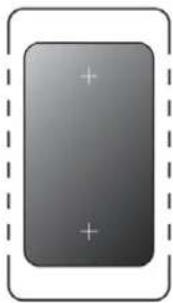
Switching on a dual circuit flexible cooking zone

The dual circuit cooking zones enable you to use two vertical cooking zones simultaneously, creating one large zone. This function is particularly useful when using larger / oval / rectangular or elongated pots and pans, but can also be used to cook with several smaller pots.
natural_image
Gray rectangular button with plus and minus signs, enclosed in a dashed border (no text or symbols)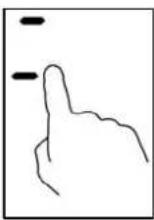
o Pre ss the dual zone selection key
○ Adjust the power in the usual way by using the power slider control.
NOTE: If for example your pan is moved from the front area of the dual zone to the rear of the dual zone, the flexible area automatically detects the new position of the pan and will adjust the heating accordingly whilst keeping the same power.
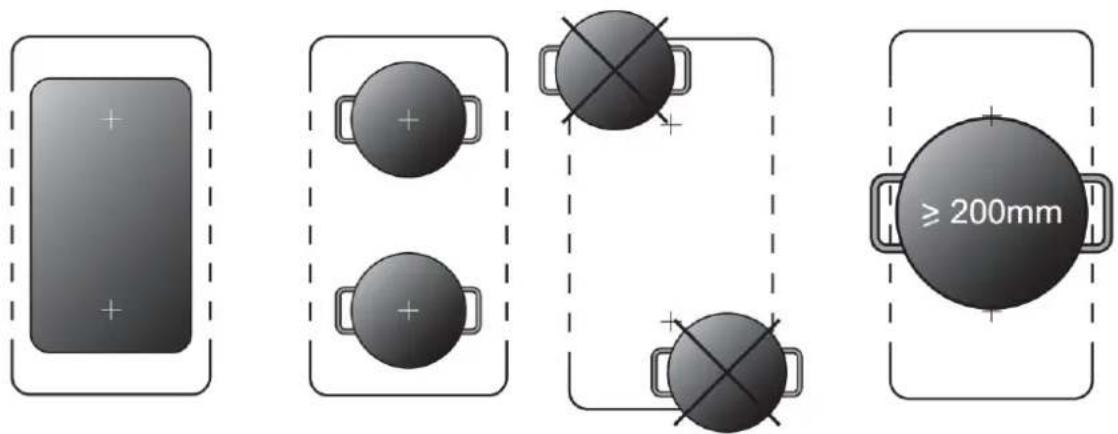
When using the dual zones cookware should be placed as central as possible and should ideally cover both crosses.
text_image
Diagram showing four different layout arrangements with plus signs and a labeled circle indicating '≥200mm'Switching off a dual circuit flexible cooking zone
- You can turn off the dual zone by the normal way of selecting the (dual) zone and reducing the power.
- You can you also separate the zones by selecting the individual cooking zones using the dedicated selection buttons.
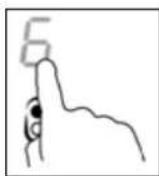
The warm function
This function is designed to automatically keep cooked food warm using variable low power levels. For example, it will keep a pan of boiled water between 40^ C \~ 70^ C.

o Pre ss the cooking zone selection button for the zone you wish to activate the warm function for.

o Pre ss the warm function selection button.
After touching the keep warm button , the zone indicator will show “I”

text_image
Hand-drawn sketch showing a hand holding a string with motion lines and an arrow pointing to a numbered symbol.NOTE: The keep warm function will last for 2 hours. After this time the hob will turn off.
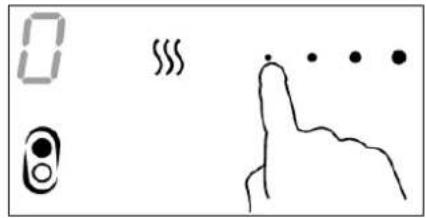
Turning off the warm function
○ Adjust the power of the zone in the usual way by using the power slider control. You can select a new heat setting, or reduce the heat setting to "0".
text_image
0 333 333The hob timer (minute minder)
Your hob has a timer which will countdown a period of time between 1 and 99 minutes. At the end of the countdown period an audible signal will sound.
natural_image
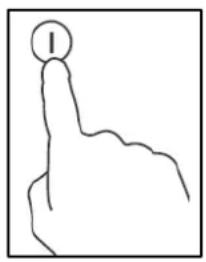
Simple line drawing of a hand pointing upward with a circular symbol on the index finger (no text or labels)- Press the ON/OFF button to turn the hob on. You can use the minute minder even if you are not using a cooking zone.
text_image
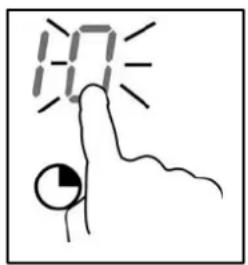
10:10- Touch timer control, the “10” will show in the timer display where touched. and the “O” flashes.

text_image
16 .......- Set the time by touching the slider control. (e.g. 6)

text_image
16- Touch timer control again, the “1” will flash.
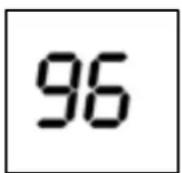
- Set the time by touching the slider control (e.g.9), now the timer you set is 96 minutes.
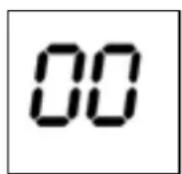
- When the set countdown time has elapsed an alarm will sound for 30 seconds and the timer indicator will show "00".
WARNING: Any cooking zones are in use will continue heating. You will need to switch them off manually when cooking is complete. The hob timer (minute minder) is an audible alarm only.
The hob timer (linked to a cooking zone)
You are able to link a countdown time to a cooking zone so that when the countdown time has elapsed the cooking zone will switch off automatically.
natural_image
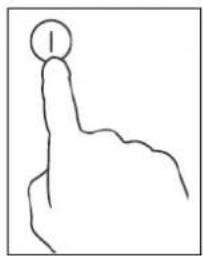
Simple line drawing of a hand pointing upward with a circular symbol on the index finger (no text or labels)- Press the ON/OFF button to turn the hob on.

text_image
6- Press the cooking zone selection button of the zone you wish to use.
text_image
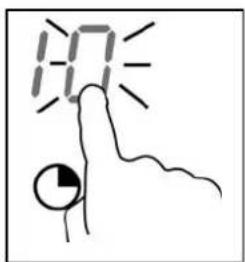
10- Touch timer control, the “10” will show in the timer display where touched. and the “O” flashes.
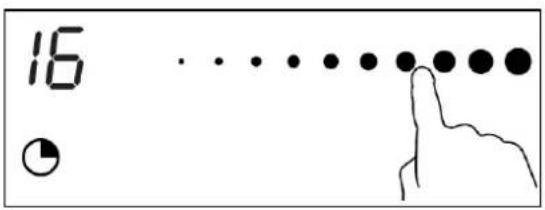
text_image
16 •- Set the time by touching the slider control. (e.g. 6)
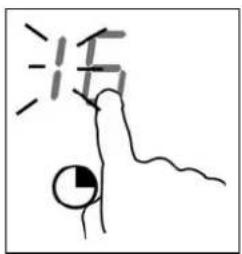
text_image
活- Touch timer control again, the “1” will flash.

- Set the time by touching the slider control (e.g.9), now the timer you set is 96 minutes.
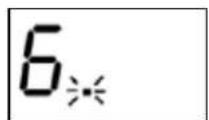
NOTE: The red dot next to power level indicator will illuminate indicating that the zone is selected.
- When cooking timer expires, the corresponding cooking zone will be switch off automatically.
IMPORTANT: All other cooking zones which are in use will continue to operate.
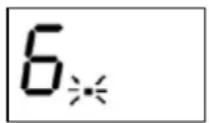
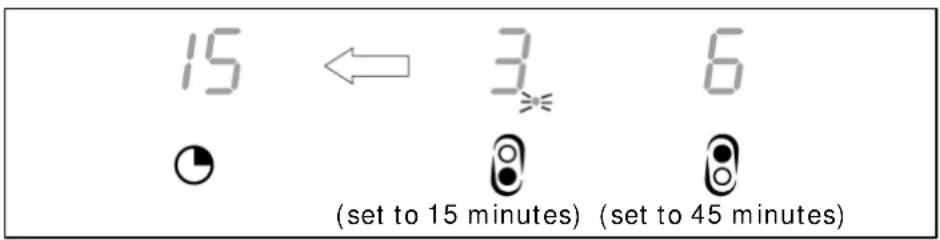
- A red dot will appear next to the power level indicator of the relevant zone. When you set a countdown time for several zones simultaneously, a red dot will appear in all the
relevant zone indicators. The timer display will show the minimum countdown time and the corresponding red dot will flash.
text_image
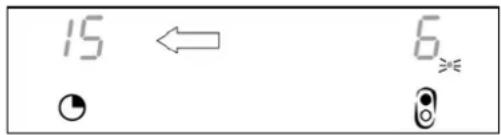
15 ← 3 6 ( set to 15 minutes) ( set to 45 minutes )When the set countdown time has elapsed, the relevant cooking zone will switch off automatically. If countdown timers for other cooking zones are set, the timer display will then show the next minimum countdown time and the corresponding red dot will flash.
text_image
15 ← 6 ● ●WARNING: If any other cooking zones are in use, without a countdown timer set, they will continue heating. You will need to switch them off manually when cooking is complete.
Cancelling or modifying a hob timer
You can cancel a hob timer by following the guidelines above. First you should select the zone with the active timer that you want to change or turn off. Then press the timer button and select a new countdown time, or reduce the time to "0" to turn off the timer.
Locking the hob top
It is possible to lock the controls to prevent unauthorised usage of the controls by other persons such as children.
- The whole hob top can be locked by pressing the safety lock button whilst the appliance is switched on.
- The timer display will show "L0" to indicate that the safety lock feature has been switched on.
- When the safety lock feature is activated, it will disable all buttons on the control panel apart from the ON/OFF button.

To disable the safety lock feature, you should press and hold the safety lock button for a few seconds. The "L0" symbol will disappear from the timer display and you are then able to use the hob in normal operation.
- If the hob is switched off using the ON/OFF button while the safety lock is activated, the safety lock will still be active when the hob is turned back on.
Safety cut-off
- If one or more of the cooking zones are accidentally left on, a safety cut off will activate after a certain period of time. The length of time depends on the power level that a zone or zones have been set on.
| Power level Keep warm | 1 | 2 | 3 | 4 | 5 | 6 | 7 | 8 | 9 | Boost | |
| Default working time (hours) | 2 | 8 | 8 | 8 | 4 | 4 | 4 | 2 | 2 | 2 | 10 Mins |
- If more than one zone is operating when one of the zones reaches its safety cut-off point, only the zone which has reached its safety cut off point will switch off.
High temperature protection
- The hob is equipped with a temperature sensor which monitors the temperature inside of the appliance.
- If an unusually high temperature is detected the induction hob will stop operating automatically.
Detection of unknown items
When an unsuitably sized or non-magnetic pan (e.g. aluminium), or some other small item (e.g. knife, fork, key) has been left on the hob, the hob will automatically go on to standby mode after 1 minute. The fan will keep cooling the induction hob for a further 1 minute.
The pause/ resume button
natural_image
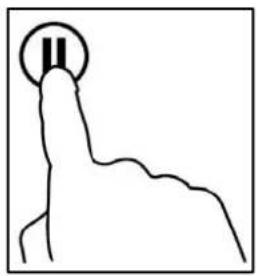
Simple line drawing of a hand holding a circular object with two vertical bars (no text or symbols)- This feature allows the user to "pause" all cooking operations.
○ Using this button will stop all zones from heating. All zones will display “ || ”. -
The control panel will automatically be locked and only the power button and the pause/resume button will operate.
-
Press the pause/resum button again to resume all previously in use zones.
The zones will resume heating at the power level which they were originally set at and will display the original power settings. It will also resume any active timers. - The pause function will operate for 10 minutes and then the hob will turn off
Hob guidelines
- The first few times the hob top is used, it may give off an acrid, burning smell. This smell will disappear completely with repeated use.
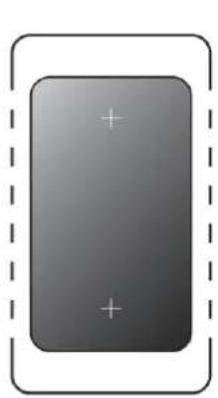
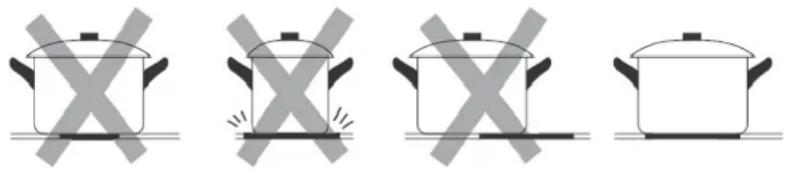
- Single zone cookware should be placed on the “+” and centred. When using the dual zones cookware should be placed as central as possible and should cover both crosses.
natural_image
Gray rectangular icon with plus signs inside, enclosed by a dashed border (no text or symbols)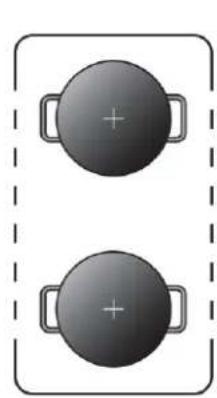
natural_image
Two identical circular objects with plus signs placed side by side within a dashed border (no text or symbols)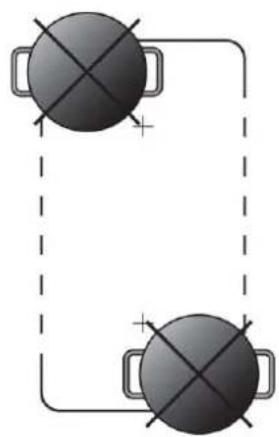
natural_image
Two identical gray circular objects with cross marks connected by lines, enclosed in a dashed rectangular border (no text or symbols)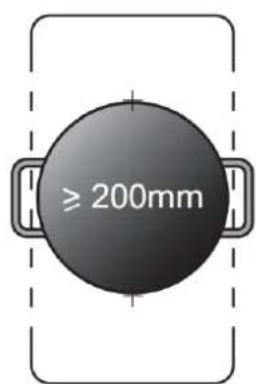
text_image
≥ 200mm- The saucepans must be positioned exactly on these zones for efficient heating to occur. Pans should have the same diametre as the cooking zone that they are being used on.
natural_image
Four identical cooking pots with crossed-out X marks, arranged horizontally (no text or symbols)- You should not use saucepans with rough bottoms, as this can scratch the ceramic surface. Before use, make sure that the bottoms of the saucepans are clean and dry.
- When cold, the bottom of the pans should be slightly concave, as they expand when hot and lie flat on the surface of the hob. This will allow the heat to transfer more easily.
- The best thickness for the bottom of the pans is 2 – 3 mm of enamelled steel and 4 – 6 mm for stainless steel with sandwich type bottoms.
- If these rules are not followed, then there will be a great loss of heat and energy. Heat not absorbed by the saucepan, will spread to the hob, frame and surrounding cabinets.
o Preferably cover pans with a lid to permit cooking at a lower heat. - Always cook vegetables and potatoes, etc. in as little water as possible to reduce cooking times.
- Food or liquid that has high sugar content may damage the hob top if it comes into contact with the ceramic hob surface. Any spillages should be wiped up immediately, however this may not prevent the hob surface from becoming damaged.
- IMPORTANT: The ceramic hob surface is tough; however it is not unbreakable and can be damaged. Especially if pointed or hard objects are allowed to fall on it with some force.
DO NOT USE THE HOB IF THE SURFACE BECOMES BROKEN OR CRACKED. YOU SHOULD CONTACT THE BAUMATIC CUSTOMER CARE DEPARTMENT IMMEDIATELY.
Cleaning and maintenance

text_image
Warning symbol with exclamation mark inside triangleCleaning operations must only be carried out when the hob is cool.
The appliance should be disconnected from your mains supply before commencing any cleaning process.
Cleaning the ceramic hob top

Any residues that are left on the hob top surface from cleaning agents will damage it. You should remove any residues with warm water mixed with a little washing up liquid

Abrasive cleaners or sharp objects will damage the hob surface; you should clean it using warm water and a little washing up liquid.

Although it is easier to clean some deposits whilst the hob surface is still warm, you should take care not to burn yourself.
After each use
- Wipe the appliance over with a damp cloth and a little washing up liquid.
- Dry the appliance by rubbing the surface with a clean cloth.
Cleaning table
| Type of deposit | Remove immediately? | Remove when the appliance has cooled down? | What should I use to remove the deposit? |
| Sugar or food/liquid containing sugar | Yes | No | Ceramic scraper |
| Tin foil or plastic | Yes | No | Ceramic scraper |
| Fat splashes | No | Yes | Ceramic cleaner |
| Metallic discolourations | No | Yes | Ceramic cleaner |
| Water splashes or water rings | No | Yes | Ceramic cleaner |
Using a ceramic hob scraper
A ceramic hob scraper will be provided with your appliance. The following guidelines should be followed when using the ceramic hob scraper:-

- The scraper should be placed on the ceramic surface at an angle.
o Residues should be removed by sliding the blade carefully over the ceramic surface.
- The ceramic surface should be wiped with a damp cloth and a small amount of washing up liquid.
o Dry the appliance by rubbing the surface with a clean cloth.
Using a specialist ceramic hob cleaner
It is possible to purchase specialist ceramic hob cleaner/conditioner.
You should follow the instructions given by the manufacturer of the specialist ceramic hob cleaner. You should ensure that it is suitable for use on your appliance.
Installation

The installation must be carried out by a suitably qualified person, in accordance with the current version of the following.
- UK Regulations and Safety Standards or their European Norm Replacements.
○ Building Regulations (issued by the Department of the Environment).
○ Building Standards (issued by the Scottish Development Department).
○ IEE Wiring Regulations.
- Electricity At Work Regulations.
Positioning

The adjacent furniture must be able to withstand a minimum temperature rise of 85^ C above the ambient temperature of the room it is located in, during periods of use.
This appliance is classified as Class 3 and therefore is to be built into a kitchen unit (depending on size) or 600 mm worktop that is at least 30 mm thick. The following minimum clearance distances must be observed:-
- 700 mm between the hob surface and the underside of any horizontal surface above it.
- 50 mm clearance around the sides and front of the appliance, measured from the cut out.
- 55 mm clearance between the back of the hob surface and the wall behind it, measured from the cut out.
○ If the hob is positioned so that the right or left hand side of the appliance will be near to the edge of a kitchen unit. There must be a gap of at least 150 mm between the side of the hob and the vertical surface of the kitchen unit.

text_image
700 mm 50 mm Air Exit 5 mm 20 mm Air Intake○ IMPORTANT: Underneath the appliance there must be a partition made of insulating material (e.g. wood). There must be a gap of at least 50 mm between the underneath of the appliance and this partition.
- You must make sure that there is a 5mm gap below the underneath of the worktop at the front edge of the hob.
Unpacking the appliance
When unpacking the appliance please check that the following items are contained within the packaging:-
1 Baumatic hob
1 Ceramic hob scraper
1 Installation and instruction manual
1 Baumatic guarantee card
Fixing brackets
Fixing screws
Installing the appliance

text_image
595 525 55 51 495 110 565 Total height including minimum ventilation requirement- Cut a hole in the worktop that corresponds with the drawing shown above.
text_image
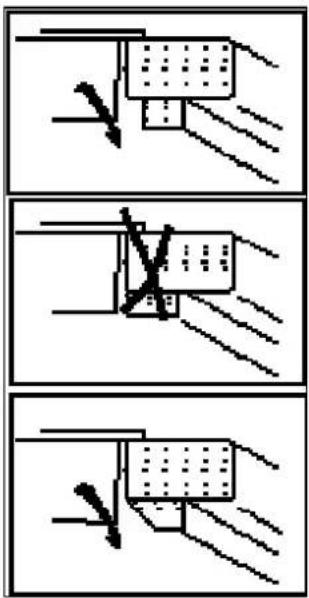
Diagram illustrating three different mechanical or structural states with arrows indicating direction of movement, likely illustrating a process or assembly.○ IMPORTANT: There are ventilation holes around the outside of the hob. YOU MUST ensure that these holes are not blocked by the work top, when you put the hob into position (see drawing opposite).
- IMPORTANT: Do not use a silicon sealant to seal the appliance against the aperture. This will make it difficult to remove the hob from the aperture in future, particularly if it needs to be serviced.
- Carefully lower the hob into the aperture hole that you have cut out.
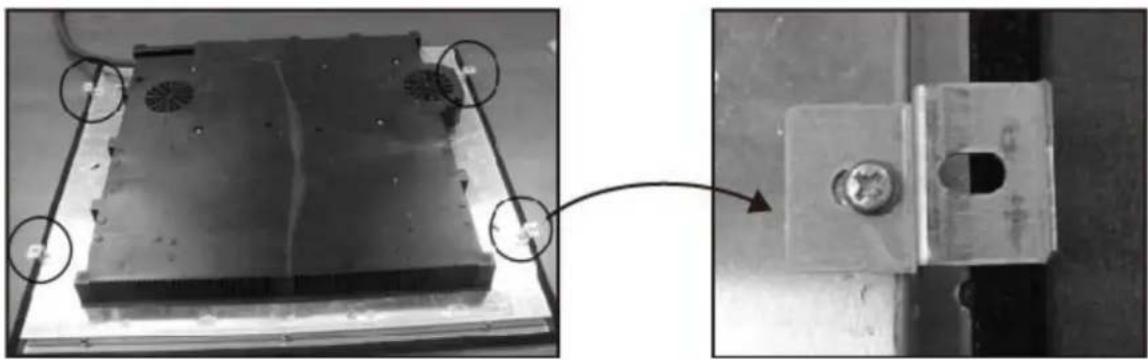
There are holes on the base of the hob that you can fix the brackets to.
natural_image
Mechanical assembly photo showing a metal plate with fan holes and a mounted component, connected by an arrow (no visible text or symbols)You should place the bracket on the underneath of the hob, in a position that is appropriate for the aperture that you have cut out. Using the screws provided, fix the bracket to the hob. These screws MUST be securely tightened.
Electrical connection

This appliance must be installed by a qualified person in accordance with the latest edition of the I.E.E. Regulations and in compliance with Baumatic's instructions.
Before connecting the appliance, make sure that the supply voltage marked on the rating plate corresponds with your mains supply voltage.
WARNING: THIS APPLIANCE MUST BE EARTHED.
- This appliance must be wired into a 32A double pole switched fused spur outlet, having 3mm contact separation and placed in an easily accessible position adjacent to the appliance. It should not be located above the appliance and no more than 1.25m away from it.
- The spur outlet must still be accessible even when your hob is located in its operating position.
○ Cable type: H05 RRF 3 core x 6 mm ^4 (not supplied).
Connecting the mains supply cable
- The mains terminal block is located on the underside of the hob and the terminals are accessible by removing the terminal block cover by removing the cover screw.

text_image
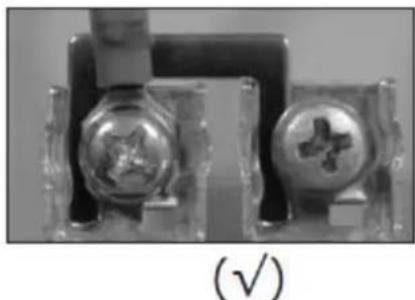
3 Core 220-240v 4 Core 220-240v / 400v 5 Core 220-240v L1 L2 N1 N2 Black Brown Grey Blue Yellow / Green Link Link L1 L2 N1 N2 Black Brown Grey Blue Yellow / Green Link L1 L2 N1 N2 Black Brown Grey Blue Yellow / Green- The brass links must be positioned as indicated, based on voltage and electrical connection, and once established ALL terminal screws must be tightened down firmly.
natural_image
Close-up of two electronic components with metallic contacts and a star symbol, labeled (√) below (no readable text or symbols on the components themselves)If when the hob is first switched on, only two of the zones work, you should recheck that the terminal screws are all fully tightened between the links. This should be done before contacting the Customer Care Department.
○ IMPORTANT: The appliance must NOT be connected to the mains supply by means of a 13A plug and socket.
The cable can be looped if necessary, but make sure that is not kinked or trapped when the hob is in position. Care must be taken to avoid the cable being in contact with hot parts of the appliance.
Replacing the mains supply cable
If the mains supply cable is damaged, then it must be replaced by an appropriate replacement.
The mains supply cable should be replaced in accordance with the instructions below:
- Switch the appliance off at the socket.
- Open the terminal block on theunderside of the hob.
- Unscrew the terminal screws fixing the cable.
○ Replace the cable with one of the same length and in accordance with the specification given on page 29. - The "green-yellow" earth wire must be connected to the terminal marked 12 It must be about 10 mm longer than the live and neutral wires.
My appliance isn't working correctly
- The cooking zones are not functioning or will not switch on.
* The safety lock has been switched on (see the “Locking the hob top” section for information on how to turn off the safety lock).
* Several cooking zone selection buttons have been pressed at once. You should only touch one cooking zone selection button at once.
* The safety cut out has been triggered. Press a cooking zone selection button to reset the hob.
* Check that the mains electrical supply to the appliance is correct and working. Check the mains fuse.
* The pans that you are using are not suitable for use on an induction hob.
- The residual heat indicator has not come on after I have switched a cooking zone off.
* The cooking zone has only been turned on for a short period of time; therefore it did not go above 60°C.
* IMPORTANT: If the cooking zone does appear to be hotter than 60°C and the residual heat indicator has not come on, you should call the Baumatic Customer Care Department.
- Ahumming sound is heard when a cooking zone is selected.
* This is normal; the sound will disappear when the zone heats up.
- Thecooking zones have become discoloured.
* This maybe caused by burnt on remnants of food. This will not affect the working of the appliance. However you should make sure that the cleaning instructions are being followed regularly.
○ Only two of the zones on my hob are working
* You should recheck that the terminal screws are all fully tightened between the links.
Error codes
The following error codes may appear in the timer display if there is a problem with the operation of the hob.
| Error code | Likely cause | Possible solution |
| F1-F6 | Temperature sensor failure Please contact Customer Care. | |
| F9-FA | Temperature sensor of the IGBT failure. | Please contact Customer Care. |
| FC | The connection between the display board and the main board has failed | Please contact Customer Care. |
| E1/E2 | Abnormal supply voltage Check the power supply to the appliance is correct. | |
| E3/E4 | Temperature sensor of the ceramic glass plate Is high | Turn the power off. Restart after the hob cools down. |
| E5 | Temperature sensor of the IGBT Is high | Turn the power off. Restart after the hob cools down. |
IMPORTANT: If any other error codes appear on the cooking zone display, you should turn the appliance off at the mains and contact the Customer Care Helpline. DO NOT continue to use the appliance.

text_image
Warning symbol with exclamation mark inside a triangleIMPORTANT: If your appliance appears not to be operating correctly, then you should disconnect it from your mains supply and then contact Baumatic Customer Care on telephone number (0118) 933 6911.
DO NOT ATTEMPT TO REPAIR THE APPLIANCE YOURSELF.
Please note that if an engineer is asked to attend whilst the product is under guarantee and finds that the problem is not the result of an appliance fault, then you may be liable for the cost of the call out charge.
The appliance must be accessible for the engineer to perform any necessary repair. If your appliance is installed in such a way that an engineer is concerned that damage will be caused to the appliance or your kitchen, then they will not complete a repair.
This includes situations where appliances have been tiled in, sealed in with sealant, have wooden obstructions placed in front of the appliance - like plinths, or any installation other than the one specified by Baumatic Ltd. has been completed.
Please refer to the conditions of guarantee that appear on the warranty card that you receive with the appliance.
IMPORTANT: Baumatic Ltd. operates a policy of continuous improvement and reserves the right to adjust and modify its products without prior notification.
Baumatic Consumables
- BC001Degreaser for Dishwashers (200 g)
- BC002 Descaler for WashingMachines and Dishwashers (200 g)
o BC003 Ceramic Hob Cleaner (250 ml) - BC004 Oven Cleaner (250 ml)
- BC005Stainless Steel Cleaner and Protector (250 ml)
- BC007 E-Cloth – General Purpose Cloth
- BC008Microwave Cover
To order a Baumatic consumable product please call 0123 5437 244 and quote the product code. You can also order online from eshop.baumatic.co.uk
Baumatic®
United Kingdom
Baumatic Ltd.,
Baumatic Buildings,
6 Bennet Road,
Reading, Berkshire
RG2 0QX
United Kingdom
Sales Telephone
(0118) 933 6900
Sales Fax
(0118) 931 0035
Customer Care Telephone
(0118) 933 6911
Customer Care Fax
(0118) 986 9124
Spares Telephone
(01235) 437244
Advice Line Telephone
(0118) 933 6933
E-mail: sales@baumatic.co.uk
customercare@baumatic.co.uk
spares@baumatic.co.uk
technical@baumatic.co.uk
Website:
www.baumatic.co.uk
Facebook:
www.facebook.com/baumatic.uk
Republic of Ireland
Service Telephone
1-890 812 724
Spares Telephone
091 756 771
Czech Republic/ Slovakia
Baumatic s.r.o.
Lípová 665/1
460 01 Liberec 4
Czech Republic
Panenská 34
811 03 Bratislava - Staré Mesto
Slovakia
+420 483 577 200 (CZ)
+421 255 640 618 (SK)
www.baumatic.cz
www.baumatic.sk