
FGC-881GR - Gas oven Infiniton - Free user manual and instructions
Find the device manual for free FGC-881GR Infiniton in PDF.


| Brand | Infiniton |
| Model | FGC-881GR |
| Product Type | Gas oven |
| Energy Source | Natural gas or LPG (adjustable) |
| Dimensions (H x W x D) | 595 x 595 x 575 mm |
| Weight | 35 kg |
| Oven Capacity | 60 L |
| Gas Consumption | 2.7 kW (natural gas) |
| Temperature Range | 50 – 250 °C |
| Functions | Conventional baking, grilling, fan-assisted cooking |
| Safety Features | Flame failure device, thermostat control |
| Cleaning | Manual interior cleaning, removable oven door |
| Installation | Requires qualified technician |
| Spare Parts | Available through Infiniton service network |
| Warranty | 2 years |
Frequently Asked Questions - FGC-881GR Infiniton
User questions about FGC-881GR Infiniton
0 question about this device. Answer the ones you know or ask your own.
Ask a new question about this device
Download the instructions for your Gas oven in PDF format for free! Find your manual FGC-881GR - Infiniton and take your electronic device back in hand. On this page are published all the documents necessary for the use of your device. FGC-881GR by Infiniton.
USER MANUAL FGC-881GR Infiniton
Important safety instructions -34-
Structure illustration -39-
Transport and handing -40-
Installation -40-
First use -41-
Display controls -42-
Coldest zone in the refrigerator -46-
Door reverse -48-
Storage of food -52-
Helpful hints and tips -53-
Cleaning and care -55-
Troubleshooting -58-
Technical specifications -61-

THIS PRODUCT IS FOR HOUSEHOLD USE ONLY!
Please read these instructions carefully before the first use of this product and save this manual for your future reference
IMPORTANT SAFETY INSTRUCTIONS
When using an electrical appliance, basic precautions should always be followed, including the following:
-
This appliance can be used by children aged from 8 years and above and persons with reduced physical, sensory or mental capabilities or lack of experience and knowledge if they have been given supervision or instruction concerning use of the appliance in a safe way and understand the hazards involved. Children shall not play with the appliance. Cleaning and user maintenance shall not be made by children without supervision.
-
Do not use if supply cord is damaged. If damaged, it must be replaced by the manufacturer or a similarly qualified person in order to avoid hazard.
-
In order to save power consumption, keep the air circulation around the appliance and dispose of food packages before placing them in the appliance as soon as possible.
-
Ensure the refrigerator is unplugged before cleaning or if the product is not in use.
-
To clean the appliance use only mild detergents or glass cleaning products. Never use harsh detergents or solvents.
-
It is not recommended to use this refrigerator with an extension cord or power board. Please ensure that the appliance is plugged directly into the electrical outlet.
-
Do not place hot food or drink into the refrigerator before it cools down to room temperature.
-
Close the door immediately after putting in any items so the inside temperature will not rise dramatically.
-
Keep appliance away from any heat source or direct sunlight.
-
To fix stably, the appliance must be placed on a flat and solid surface. It should not be laid on any soft material.
-
Do not place any other appliance on top of the refrigerator, and do not wet it.
-
Do not store something like ether, methanol, gasoline etc., which is easy to evaporate burn or explode.
-
To avoid injury or death from electrical shock do not operate the appliance with wet hands, while standing on a wet surface or while standing in water.
-
Do not use outdoors or in wet conditions.
-
Never pull the cord to disconnect it from the outlet. Grasp the plug and pull it from the outlet.
-
Keep the cord away from heated surfaces.
-
Do not move the appliance when it is well filled of foods to avoid any tipping over.
-
Check that the voltage of the power supply in your home is the same as the voltage shown on the rating label of this product.
-
Connect your refrigerator to an independent electrical socket and use a safe ground wire.
-
When the frost in freezer is removed, or when there is no electricity or when refrigerator ceases to be used, it should be cleaned in order to prevent it from smelling.
-
Defrost the freezer at least once a month because too much frost may affect refrigeration.
-
Do not touch the appliance with wet hands or with naked feet on a wet floor.
-
Do not store explosive substances such as aerosol cans with a flammable propellant in this appliance.
-
Turn on electricity only 5 minutes later after electricity goes off. Otherwise, the compressor may be damaged.
-
Children should be supervised to ensure that they do not play with the appliance.
-
The appliance is not intended to be operated by means of an external timer or a separate remote-control system.
-
This appliance has been incorporated with a grounded plug. Please ensure the wall outlet in your house is well earthed.
-
It is recommended to check regularly the supply cord for any sign of possible deterioration, and the appliance should not be used if the cable is damaged.
-
WARNING: Keep ventilation opening, in the appliance enclosure or in the built-in structure, clear of obstruction.
-
WARNING: Do not use mechanical devices or other means to accelerate the defrosting process, other than those recommended by the manufacturer.
-
WARNING: Do not use electrical appliances inside the food storage compartments of the appliance, unless they are of the type recommended by the manufacturer.
-
WARNING: Do not damage the refrigerant circuit.
-
This appliance is intended to be used in household and similar applications such as:
- staff kitchen areas in shops, offices and other working environments;
- farm houses;
- by clients in hotels, motels and other residential type environments;
- bed and breakfast type environments.
-
Regarding the information for replacing of the lamps of the appliance, thanks to refer to the below paragraph of the manual.
-
Regarding the information pertaining to the installation, handing, maintenance, servicing and disposal of the appliance, thanks to refer to the below paragraph of the manual.

- Cabinet
- LED light
- Glass shelf
- Chiller box cover
- Chiller box
- Vegetable box cover
- Vegetable box
- Upper freeze drawer
-
Middle freeze drawer
-
Lower freeze drawer
- Leg front(left)
- Gasket refrigerator
- Upper rack
- Lower rack
- Door refrigerator
- Gasket freezer
- Door Freezer
- Leg front(right)
TRANSPORT AND HANDING
When transportation, hold the base and lift the refrigerator carefully with an angle inferior at 45 degree. Never hold the door handle as support. Never place it upside down nor horizontally. Push refrigerator on its basis and place it thanks to its roller feet.
INSTALLATION
To fix stably, the appliance must be placed on a flat and solid surface. It should not be laid on any soft material.
Choose a location where there is no heat source. Keep the refrigerator away from direct sunlight or other appliance producing heat.
Choose a dry and well-ventilated place where there is no corrosive air.
In order to improve efficiency of the cooling system and save energy, it is necessary to maintain good ventilation around the appliance for the dissipation of heat. For this reason, sufficient clear space should be available around the refrigerator. Suggest: It is advisable for there to be at least 75mm of space from the back to the wall, at least 100mm from its top, at last 100mm from its side to the wall and a clear space in front to allow the doors to open 135°. As shown in following diagrams.

FIRST USE
Before the use of the refrigerator, remove all the packages, including bottom cushion and foam pads and rubber belts in the refrigerator.
Adjust the feet and clear the outside and inside of the refrigerator with warm cloth.
Do not start the refrigerator immediately after vertical placement. Only start it after 2-6 hours standing to ensure its proper operation.
To prevent damage to the power cord and any consequence incidents, the power cord should be not covered by the refrigerator or other objects. Before switching on the refrigerator, please check the voltage range of refrigerator carefully if the same as that of the power supply. When the refrigerator is first installed, allow it stabilize at normal operating temperatures for 2-3 hours prior to filling it with fresh or frozen foods.
If operation is interrupted, waits 5 minutes before restarting.
Use your appliance according to the following control regulations, your appliance has the corresponding functions and modes as the control panels showed in the pictures below. When the appliance is powered on for the first time, the backlight of the icons on display panel starts working. If no buttons have been pressed and the doors are closed, the backlighting will turn off.
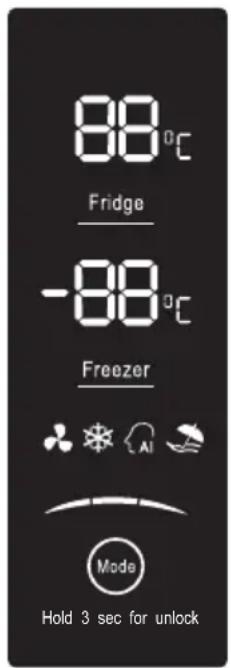
Controlling the temperature
We recommend that when you start your refrigerator for the first time, the temperature for the refrigerator is set to 5^ C and the freezer to -18^ C. If you want to change the temperature, follow the instructions below.
Caution! When you set a temperature, you set an average temperature for the whole refrigerator cabinet. Temperatures inside each compartment may vary from the temperature values displayed on the panel, depending on how much food you store and where you place them. Ambient temperature may also affect the actual temperature inside the appliance.
1. Fridge
Press “Fridge” to set fridge temperature between 2^ C and 8^ C as needed, and control panel will display corresponding values according to the following sequence.

chemical
Temperature gradient diagram showing alternating 8°C and 2°C to 4°C intervals2. Freezer
Press “Freezer” to set freezer temperature between -15^ and -25^ as needed, and control panel will display corresponding values according to the following sequence.

chemical
Temperature gradient scale for a substance, showing temperature values from -21°C to -15°C3. Mode choice
Press “Mode” to set function mode as needed, and the control panel will display corresponding value according to the following sequence with light on.

flowchart
graph LR
    A["AI Icon"] --> B["Leaf Icon"]
    B --> C["Leaf Icon + Wind"]
Intelligence AI
In the mode, the refrigerator works in the most beneficial food preservation and storage way. The fridge temperature is set 5°C, and the freezer temperature is -18°C in the mode.
Super cool
Super Cool can refrigerate your food much faster, keeping food fresh for a longer period Super cool automatically switches off after 6 hours and the refrigerator temperature setting displays 2°C.
When super cool function is on you can switch it off by pressing “Super Cool” or “Refrigerator” button and the refrigerator temperature setting will revert back to the previous setting.
Super freeze
Super Freeze will quickly lower the temperature within the freezer so food will freeze vitamins and nutrients of fresh food and keep food fresh longer.
In case of the maximum amount of food to be frozen, please wait about 24h.
Super freeze automatically switches off after 26 hours and the freezer temperature setting displays -25°C.
When super freeze function is on you can switch off super freeze function by pressing “Mode” or “Freezer” button and the freezer temperature setting will revert back to the previous setting.
Holiday

If you are going to be away for a long period of time, you can activate this function by pressing “Mode” button to set function
When the holiday function is activated, the temperature of the refrigerator is automatically switched to 15^ C to minimize the energy consumption.
Important! Do not store any food in the fridge during this time.
When the holiday function is on, you can switch it off by pressing “Model” or “Fridge” button and the refrigerator temperature setting will revert back to the previous setting.
Door Alarm
When the door of fridge or freezer is open for over 2 minutes, the door alarm will sound. In case of door alarm, buzzer will sound 1 times every 1 min and will stop alarming automatically after 10 minutes.
To save energy, please avoid keeping the door open for a long time when using the appliance.
The door alarm can also be cleared by closing the fridge door.
The side at which the door opens can be changed, from the right side (as supplied) to the left side, if the installation site requires.
Warning! When reversing the door, the appliance must not be connected to the mains. Ensure that the plug is removed from the mains socket.
Tools and parts you will need are as below:
| 8mm socket wrench | Cross-shaped screwdriver |
| Thin-blade screwdriver | 8mm wrench |
| left upper hinge cover | door block, left ref | door holder, left ref |
Note: Before you start lay the refrigerator on its back in order to gain access to the base, you should rest it on soft foam packaging or similar material to foam packaging or similar material to avoid damaging the backboard of the refrigerator. To reverse the door, the following steps are generally recommended.
- Stand the refrigerator upright. Open the upper door to take out all door racks (to avoid racks damaged) and then close the door.
- Open part ① on top of the upper door and then disconnect electrical connector. Take down part ② and put it back to the plastic
bag.
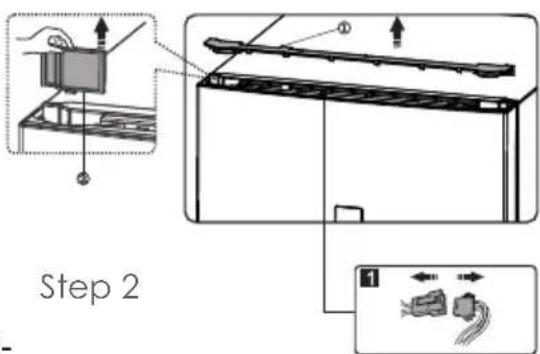
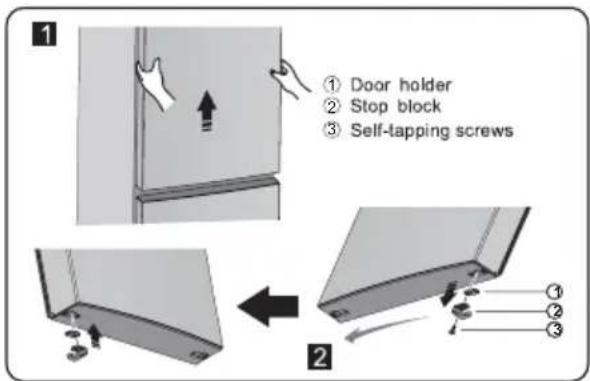
- Remove part ① and the screws ②. Put them back to the plastic bag.
Note: Please hold the upper door by hand during step 3 to prevent door dropping.
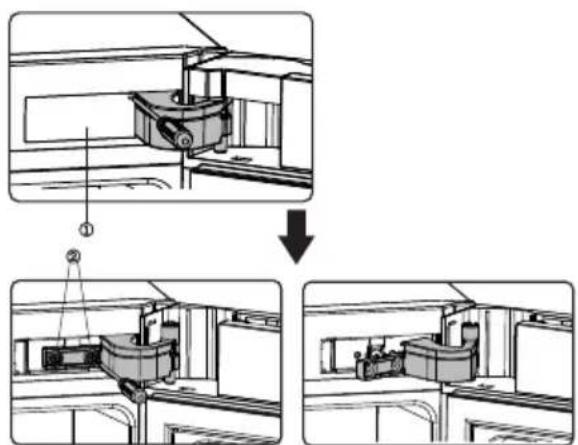
Step 3 Step 4
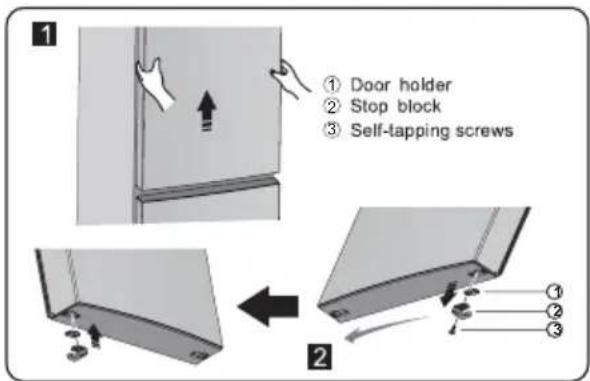
- Remove the upper door and place it on a smooth surface with its panel upwards. Loose screws ③, detach part ② and part ①, then install part ① and another part ② (in the plastic bag) to the left side with screws ③. Put part ② just detached back to plastic bag.
- Exchange wire from the right to left slot of refrigerator body.
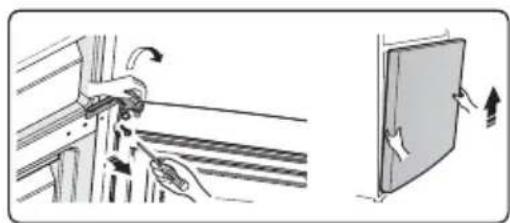
- Loose screws used to fix the middle hinge and remove middle hinge, Then remove the lower door.
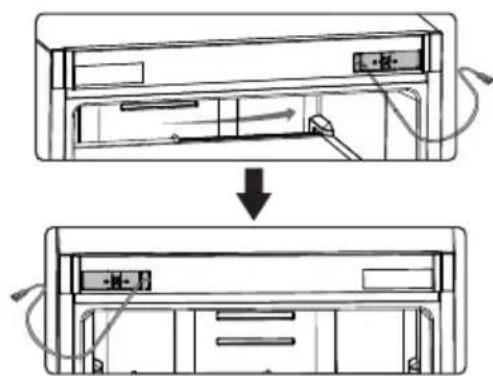
Step 5 Step 6

natural_image
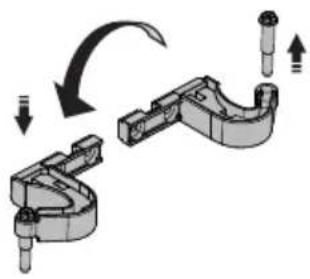
Illustration showing hand positioning and movement of a mechanical component next to a door (no text or symbols)- Place the lower door on a smooth surface with its panel upwards. Loose screws ③, detach part ② and part ①. Turn part ① by 180^ and then install part ① and part ② to corresponding position on left side together with screws ③.
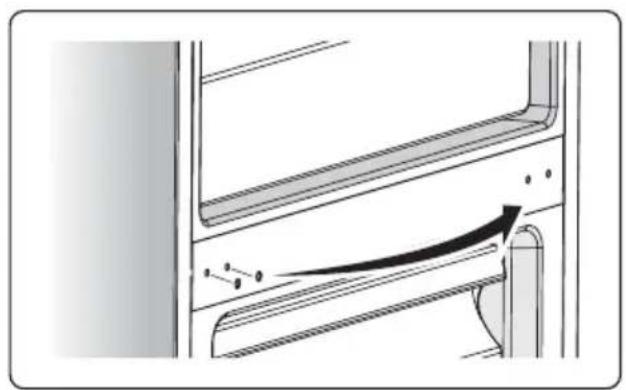
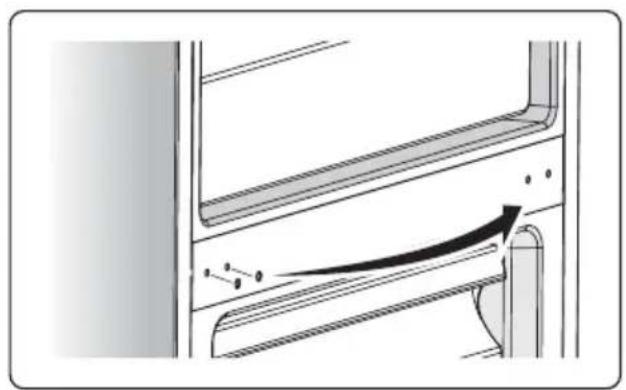
- Change screw hole covers on middle cover plate from left to right(as shown in figure below).
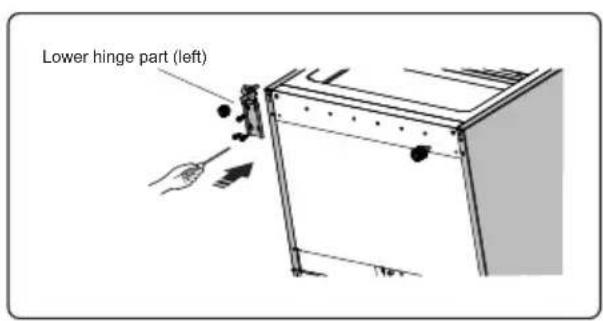
- Place refrigeration flat, remove part ② and then loose screws ④. Remove part ① and part ③.
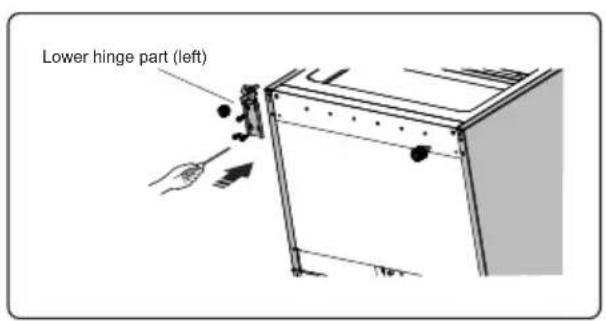
- Screw out lower hinge. Change it to the near hole site, and then screw up and mount washer.
- Just remount to the step 9. Change part ① and part ② to left and then fix them with screws ④. Change part ③ to right, and install it.
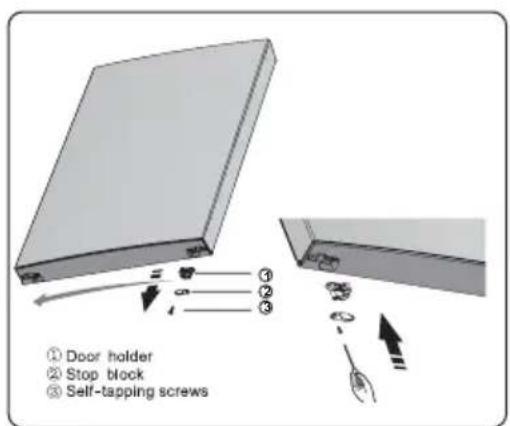
Step 7 Step 8

natural_image
Technical diagram of a mechanical assembly with an arrow indicating motion or force direction (no text or symbols present)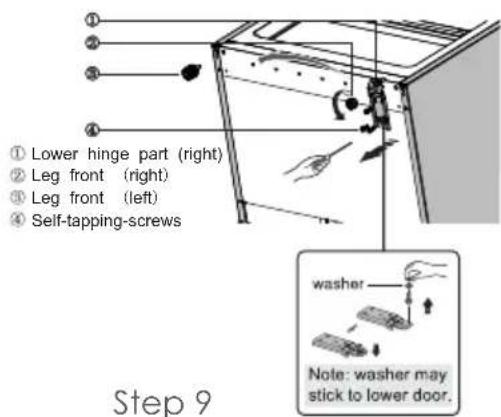

Step 11
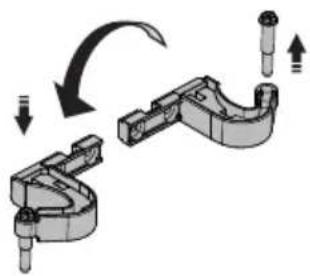
- Move the lower door and adjust its position to align lower hole site and upper hinge axis. Turn the middle hinge by 180^ . Change the washer on the axis to the upper side and adjust the middle hinge to the appropriate position and then install it.
- Screw out the upper hinge axis, turn the upper hinge over and fix axis on it. Then place it at side for use.
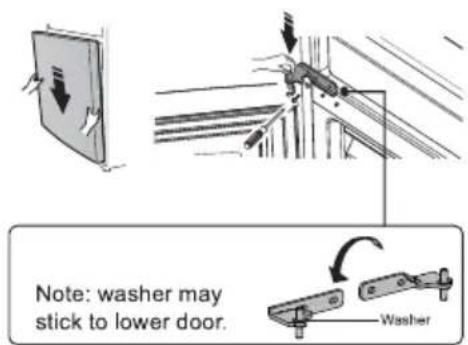
Step 12 Step 13
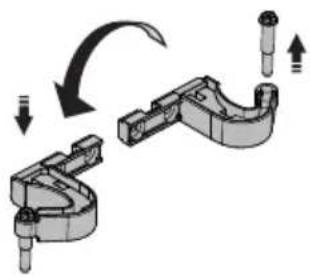
natural_image
Mechanical assembly diagram showing a clamping mechanism with arrows indicating motion (no text or symbols)- Move the upper door to appropriate position, adjust part ② and upper door. Move the connecting wire ③ in the slot of upper hinge(left), and install part ① onto the upper hinge, then fix part ② by screws ④. Finally mount part ⑤. (Please hold upper door by hand when installing.)
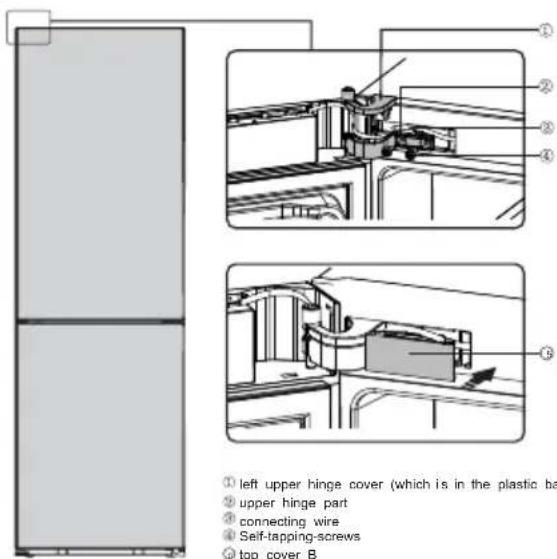
Step 14
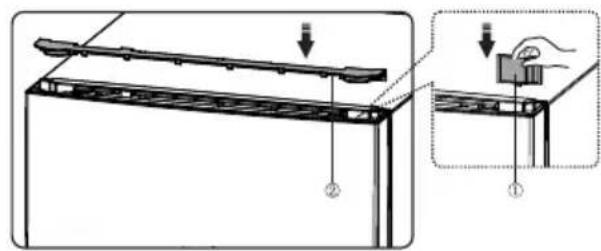
- Connect electrical connector ① in accordance with step1.
- Reverse part ① by 180^ and install it onto the right corner of upper door, then mount part ②.(Both of which are taken down in step 1.)

natural_image
Diagram of a device with two connectors and a panel, showing internal structure and connection point (no text or symbols)Step 15
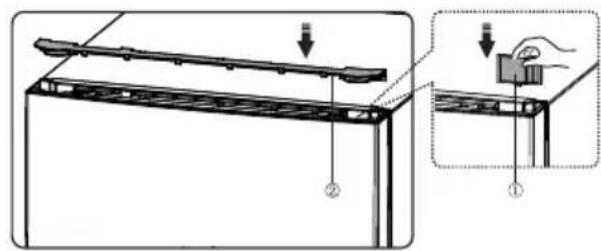
Step 16
STORAGE OF FOOD
You appliance has the accessories as the "Description of the appliance" showed in general, with this part instruction you can have the right way to storage your food.
Fridge compartment
The fridge compartment is mainly used to store foods that are preserved for a short time.
It is suitable for storing fruits, vegetables, drinks and other foods that will be eaten recently. It is suggested to seal food and then put them into the refrigerator.
Suggested sections of fridge compartment for various foods and variety name:
Glass shelves: wheaten foods, milk, etc. They can be taken out to be cleaned and adjusted to achieve different storage volume as you need.
Drawer: fruits, vegetables, etc.
Door rack: eggs, canned liquid, bottled drinks and packed food, etc. Do not place too many heavy things in the racks
Freezer compartment
The freezer compartment is used to freeze foods, store deeply frozen foods and make ice cubes. It can preserve foods for a long time.
It is suitable for retaining the freshness of foods for a long time. When storing meat, it is suggested to cut them into pieces which are easy to take out and mark the freezing date to prevent foods from exceeding the time limit.
It is used to store food which needs to be frozen, including meat, fish, ice-cream, etc.
HELPFUL HINTS AND TIPS
Helpful hints and tips
We recommend that you follow the tips below to save energy.
- Try to avoid keeping the door open for long periods in order to conserve energy.
- Ensure the appliance is away from any sources of heat(Direct sunlight, electric oven or cooker etc)
- Don't set the temperature colder than necessary.
- Don't store warm food or evaporating liquid in the appliance.
- Place the appliance in a well ventilated, humidity free room. Please refer to Installing your new appliance chapter.
- If the diagram shows the correct combination for the drawers, crisper and shelves, do not adjust the combination as this is designed to be the most energy efficient configuration.
Hints for fresh food refrigeration
- Do not place hot food directly into the refrigerator or freezer, the internal temperature will increase resulting in the compressor having to work harder and will consume more energy.
- Do cover or wrap the food, particularly if it has a strong flavor.
- Place food properly so that air can circulate freely around it.
Hints for refrigerator
Meat (All Types) Wrap in polythene food: wrap and place on the glass shelf above the vegetable drawer. Always follow food storage times and use by dates suggested by manufacturers.
- Cooked food, cold dishes, etc.: They should be covered and may be placed on any shelf.
- Fruit and vegetables: They should be stored in the special drawer provided.
- Butter and cheese: Should be wrapped in airtight foil or plastic film wrap.
- Milk bottles: Should have a lid and be stored in the door racks.
Hints for freezing
- When first starting-up or after a period out of use, let the appliance run at least 2 hours on the higher settings before putting food in the compartment.
- Prepare food in small portions to enable it to be rapidly and complete frozen and to make it possible to subsequently thaw only the quantity required.
- Wrap up the food in aluminum foil or polyethylene food wraps which are airtight.
-
Do not allow fresh, unfrozen food to touch the food which is already frozen to avoid temperature rise of the latter.
-
Iced products, if consumed immediately after removal from the freezer compartment, will probably cause frost burns to the skin.
- It is recommended to label and date each frozen package in order to keep track of the storage time.
Hints for the storage of frozen food
- Ensure that frozen food has been stored correctly by the food retailer
- Once defrosted, food will deteriorate rapidly and should not be re-frozen. Do not exceed the storage period indicated by the food manufacturer.
Switching off your appliance
If the appliance needs to be switched off for an extended period, the following steps should be taken prevent mould on the appliance.
- Remove all food
- Remove the power plug from the mains socket.
- Clean and dry the interior thoroughly.
- Ensure that all the doors are wedged open slightly to allow air to circulate.
CLEANING AND CARE
For hygienic reasons the appliance (including exterior and interior accessories) should be cleaned regularly at least every two months.
Caution! The appliance must not be connected to the mains during cleaning. Danger of electrical shock! Before cleaning switch the appliance off and remove the plug from the mains socket.
Exterior cleaning
To maintain good appearance of your appliance, you should clean it regularly.
-Wipe the digital panel and display panel with a clean, soft cloth.
-Spray water onto the cleaning cloth instead of spraying directly on the surface of the appliance. This helps ensure an even distribution of moisture to the surface.
-Clean the doors, handles and cabinet surfaces with a mild detergent and then wiped dry with a soft cloth.
Caution!
-Don't use sharp objects as they are likely to scratch the surface.
-Don't use Thinner, Car detergent, Clorox, ethereal oil, abrasive cleansers or organic solvent such as Benzene for cleaning. They may damage the surface of the appliance and may cause fire.
Interior cleaning
You should clean the appliance interior regularly. It will be easier to clean when food stocks are low. Wipe the inside of the fridge freezer with a weak solution of bicarbonate of soda, and then rinse with warm water using a wrung-out sponge or cloth. Wipe completely dry before replacing the shelves and baskets. Thoroughly dry all surfaces and removable parts.
Although this appliance automatically defrosts, a layer of frost may occur on the freezer compartment's interior walls if the freezer door is opened frequently or kept open too long. If the frost is too thick, choose a time when the supply of food stocks are low and proceed as follows:
-
Remove existing food and accessories baskets, unplug the appliance from the mains power and leave the doors open. Ventilate the room thoroughly to accelerate the thawing process.
-
When defrosting is completed, clean your freezer as described above.
Caution!
Don't use sharp objects to remove frost from the freezer. Only after the interior completely dry should the appliance be switched back on and plugged back into the mains socket.
Door seals cleaning
Take care to keep door seals clean. Sticky food and drinks can cause seals to stick to the cabinet and tear when you open the door. Wash seal with a mild detergent and warm water. Rinse and dry it thoroughly after cleaning.
Caution! Only after the door seals are completely dry should the appliance be powered on.
Replacing the LED light
Warning: The LED light must not be replaced by the user! If the LED light is damaged, contact the customer helpline for assistance. To replace the LED light, the below steps can be followed:
- Unplug your appliance.
- Remove light cover by pushing up and out.
- Hold the LED cover with one hand and pull it with the other hand while pressing the connector latch.
- Replace LED light and snap it correctly in place.
TROUBLESHOOTING
If you experience a problem with your appliance or are concerned that the appliance is not functioning correctly, you can carry out some easy checks before calling for service, please see below. You can carry out some easy checks according to this section before calling for service.
Warning! Don't try to repair the appliance yourself. If the problem persists after you have made the checks mentioned below, contact a qualified electrician, authorized service engineer or the shop where you purchased the product.
| Problem Possible cause & Solution | |
| Appliance is not working correctly | Check whether the power cord is plugged into the power outlet properly. |
| Check the fuse or circuit of your power supply, replace if necessary. | |
| The ambient temperature is too low. Try setting the chamber temperature to a colder level to solve this problem. | |
| It is normal that the freezer is not operating during the automatic defrost cycle, or for a short time after the appliance is switched on to protect the compressor. | |
| Odors from the appliance | The interior may need to be cleaned. |
| Some food, containers or wrapping cause odors. | |
| Noise from the appliance | The sounds below are quite normal:Compressor running noises.Air movement noise from the small fan motor in the freezer compartment or other compartments.Gurgling sound similar to water boiling.Popping noise during automatic defrosting.Clicking noise before the compressor starts. |
| Other unusual noises are due to the reasons below and may need you to check and take action:The cabinet is not level.The back of appliance touches the wall.Bottles or containers fallen or rolling. | |
| The motor runs continuously | It is normal to frequently hear the sound of the motor, it will need to run more when in following circumstances:Temperature setting is set colder than necessary |
| The motor runs continuously | Large quantity of warm food has recently been stored within the appliance.The temperature outside the appliance is too high.Doors are kept open too long or too often.After your installing the appliance or it has been switched off for a long time |
| A layer of frost occurs in the appliance | Check that the air outlets are not blocked by food and ensure food is placed within the appliance to allow sufficient ventilation. Ensure that door is fully closed. To remove the frost, please refer to cleaning and care chapter. |
| Temperature inside is too warm | You may have left the doors open too long or too frequently; or the doors are kept open by some obstacle; or the appliance is located with insufficient clearance at the sides, back and top. |
| Temperature inside is too cold | Increase the temperature by following the “Display controls” chapter. |
| Doors can't be closed easily | Check whether the top of the refrigerator is tilted back by 10-15mm to allow the doors to self close, or if something inside is preventing the doors from closing. |
| Water drips on the floor | The water pan(located at the rear bottom of the cabinet)may not be properly positioned to direct water into this pan, or the water spout is blocked. You may need to pull the refrigerator away from the wall to check the pan and spout. |
| The light is not working | The LED light may be damaged. Refer to replace LED lights in cleaning and care chapter.The control system has disabled the light due to the door being kept open too long, close and reopens the door to reactivate the light. |
We decline liability for any damage or accident derived from any use of this product which is not in conformity with the instructions contained in this booklet.
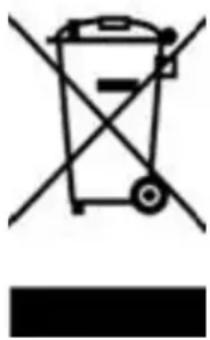
CORRECT DISPOSAL OF THIS PRODUCT
natural_image
Simple line drawing of a trash bin with crossed lines indicating no waste or plastic (no text or symbols)This marking indicates that this product should not be disposed with other household wastes throughout the EU. To prevent possible harm to the environment or human health from uncontrolled waste disposal, recycle it responsibly to promote the sustainable reuse of material resources. To return your used device, please use the return and collection systems or contact the retailer where the product was purchased. They can take this product for environmental safe recycling.

natural_image
Blank gray image with no visible content, text, or symbolsControlar la temperatura
chemical
Temperature gradient notation for carbon chain reaction2. Congelador
chemical
Temperature range diagram showing alternating -15°C to -21°C with corresponding intermediate values3. Elección de modo
flowchart
graph LR
    A["AI Icon"] --> B["Leaf Icon"]
    C["Tree Icon"] --> D["Leaf Icon"]
    E["Tree Icon"] --> F["Leaf Icon"]
Intelligence

| 8mm socket wrench | Cross-shaped screwdriver |
| Thin-blade screwdriver | 8mm wrench |
| left upper hinge cover | door block, left ref | door holder, left ref |
Paso 3 Paso 4
Paso 5 Paso 6
natural_image
Illustration showing hand positioning and movement of a mechanical component next to a door (no text or symbols)Paso 7 Paso 8
natural_image
Technical diagram of a mechanical assembly with an arrow indicating motion or force direction (no text or symbols present)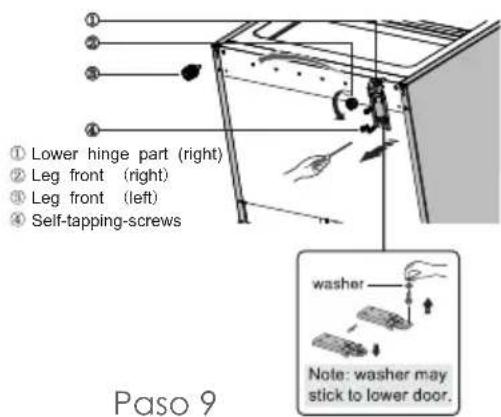
Paso 11
Step 12 Step 13
natural_image
Mechanical assembly diagram showing a clamping mechanism with arrows indicating motion (no text or symbols)Paso 14
natural_image
Diagram of a device with two connectors and a panel, showing internal structure and connection point (no text or symbols)Paso 15

Paso 16
ALMACENAMIENTO DE COMIDA
natural_image
Simple line drawing of a trash bin with crossed lines indicating no waste or restriction (no text or symbols)natural_image
Blank gray image with no visible content, text, or symbols$$ \frac{1}{2} = \frac{1}{3}\left(\frac{1}{4}\right)^{2} + \frac{1}{3}\left(\frac{1}{4}\right)^{2} + \frac{1}{3}\left(\frac{1}{4}\right)^{2} + \dots + \frac{1}{3}\left(\frac{1}{4}\right)^{2} + \dots + \frac{1}{3}\left(\frac{1}{4}\right)^{2} + \dots + \frac{1}{3}\left(\frac{1}{4}\right)^{2} + \dots + \frac{1}{3}\left(\frac{1}{4}\right)^{2} + \dots + \frac{\sqrt{3}}{4} - \frac{1}{3}\left(\frac{1}{4}\right)^{2} + \frac{1}{3}\left(\frac{1}{4}\right)^{2} + \dots + \frac{1}{3}\left(\frac{1}{4}\right)^{2} + \dots + \frac{1}{3}\left(\frac{1}{4}\right)^{2} + \dots + \frac{1}{3} - \frac{1}{3}\left(\frac{1}{4}\right)^{2} + \dots + \frac{1}{3}\left(\frac{1}{4}\right)^{2} + \dots + \frac{1}{3}\left(\frac{1}{4}\right)^{2} + \dots + \frac{1}{3}\left(\frac{1}{4}\right)^{2} + \dots + \frac0.5 - 0.6 - 0.7 - 0.8 - 0.9 - 1.0 - 1.1 - 1.2 - 1.3 - 1.4 - 1.5 - 1.6 - 1.7 - 1.8 - 1.9 - 2.0 - 2.1 - 2.2 - 2.3 - 2.4 - 2.5 - 2.6 - 2.7 - 2.8 - 2.9 - 3.0 - 3.1 - 3.2 - 3.3 - 3.4 - 3.5 - 3.6 - 3.7 - 3.8 - 3.9 - 4.0 - 4.1 - 4.2 - 4.3 - 4.4 - 4.5 - 4.6 - 4.7 - 4.8 - 4.9 - 5.0 - 5.1 - 5.2 - 5.3 - 5.4 - 5.5 - 5.6 - 5.7 - 5.8 - 5.9 - 6.0 - 6.1 - 6.2 - 6.3 - 6.4 - 6.5 - 6.6 - 6.7 - 6.8 - 6.9 - 7.0 - 7.1 - 7.2 - 7.3 - 7.4 - 7.5 - 7.6 - 7.7 - 7.8 - 7.9 - 8.0 - 8.1 - 8.2 - 8.3 - 8.4 - 8.5 - 8.6 - 8.7 - 8.8 - 8.9 - 9.0 - 9.1 - 9.2 - 9.3 - 9.4 - 9.5 - 9.6 - 9.7 - 9.8 - 9.9 - 10.0 $$
ÍNDICE
TRANSPORTE E MANUSEIO
Controlando a temperatura
chemical
Temperature gradient diagram showing alternating 8°C and 2°C to 4°C intervals2. Congelador
chemical
Temperature gradient scale for a substance, showing extreme values from -25°C to -21°C3. Escolha de modo
Step 3 Step 4

Step 5 Step 6

natural_image
Illustration showing a hand adjusting a metal bracket with arrows indicating motion, next to a door with directional arrows (no text or symbols)Step 7 Step 8
natural_image
Technical diagram of a mechanical assembly with an arrow indicating motion or force direction (no text or symbols present)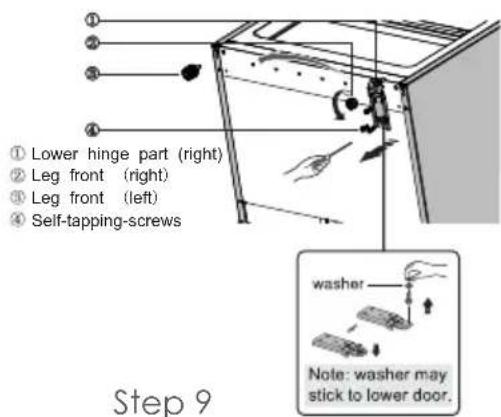
Step 11
Step 12 Step 13
natural_image
Mechanical assembly diagram showing a clamping mechanism with arrows indicating motion (no text or symbols)Step 14
natural_image
Diagram of a mechanical assembly with two components and a close-up view showing wiring connections (no text or symbols)Step 15
Step 16
natural_image
Simple line drawing of a trash bin with crossed lines indicating no waste or discharge (no text or symbols)

- THIS PRODUCT IS FOR HOUSEHOLD USE ONLY!
- IMPORTANT SAFETY INSTRUCTIONS
- TRANSPORT AND HANDING
- INSTALLATION
- FIRST USE
- Controlling the temperature
- Fridge
- Freezer
- Mode choice
- Intelligence AI
- Super cool
- Super freeze
- Holiday
- Door Alarm
- STORAGE OF FOOD
- Fridge compartment
- Freezer compartment
- HELPFUL HINTS AND TIPS
- Hints for fresh food refrigeration
- Hints for refrigerator
- Hints for freezing
- Hints for the storage of frozen food
- Switching off your appliance
- CLEANING AND CARE
- Exterior cleaning
- Caution!
- Interior cleaning
- Door seals cleaning
- Replacing the LED light
- TROUBLESHOOTING
- CORRECT DISPOSAL OF THIS PRODUCT
- Controlar la temperatura
- Congelador
- Elección de modo
- Intelligence
- ALMACENAMIENTO DE COMIDA
- ÍNDICE
- TRANSPORTE E MANUSEIO
- Controlando a temperatura
- Escolha de modo
Brand : Infiniton
Model : FGC-881GR
Category : Gas oven