MS181 - Chain saw RYOBI - Free user manual and instructions
Find the device manual for free MS181 RYOBI in PDF.


| Product Type | Cordless Compound Miter Saw |
| Brand | RYOBI |
| Model | MS181 |
| Blade Diameter | 209.6 mm (8-1/4 in) |
| Blade Arbor | 15.9 mm (5/8 in) |
| No Load Speed | 2000 rpm |
| Motor | 18 V DC |
| Net Weight | 9.7 kg (21 lb) |
| Cut Capacity (0° miter, 0° bevel) | 139.7 x 52.4 mm (5-1/2 x 2-1/16 in) |
| Cut Capacity (45° miter, 0° bevel) | 95.3 x 52.4 mm (3-3/4 x 2-1/16 in) |
| Cut Capacity (0° miter, 45° bevel) | 139.7 x 38.1 mm (5-1/2 x 1-1/2 in) |
| Cut Capacity (45° miter, 45° bevel) | 95.3 x 38.1 mm (3-3/4 x 1-1/2 in) |
| Battery Type | 18 V Ni-Cd (included) |
| Charger | 120 V, 60 Hz AC, 1-hour charge |
| Key Features | Electric brake, spindle lock, dust guide, dust bag, work clamp, preset miter stops (0°, 22.5°, 30°, 45°), bevel lock, carrying handle |
| Maintenance and Cleaning | Clean with a clean cloth; avoid solvents and petroleum-based products; empty dust bag when half full; sharpen or replace blade if necessary |
| Safety | Self-retracting lower blade guard, lock-off button, trigger lock (padlock compatible), safety stop |
| Spare Parts and Repairability | Use only identical RYOBI replacement parts; contact an authorized service center |
| General Information | Cordless compound miter saw, comes with carbide blade, blade wrench, dust guide, dust bag, work clamp, user manual |
Frequently Asked Questions - MS181 RYOBI
User questions about MS181 RYOBI
0 question about this device. Answer the ones you know or ask your own.
Ask a new question about this device
Download the instructions for your Chain saw in PDF format for free! Find your manual MS181 - RYOBI and take your electronic device back in hand. On this page are published all the documents necessary for the use of your device. MS181 by RYOBI.
USER MANUAL MS181 RYOBI
OPERATOR'S MANUAL 8-1/4 in. (209.6 mm) Cordless Compound Miter Saw Model MS181
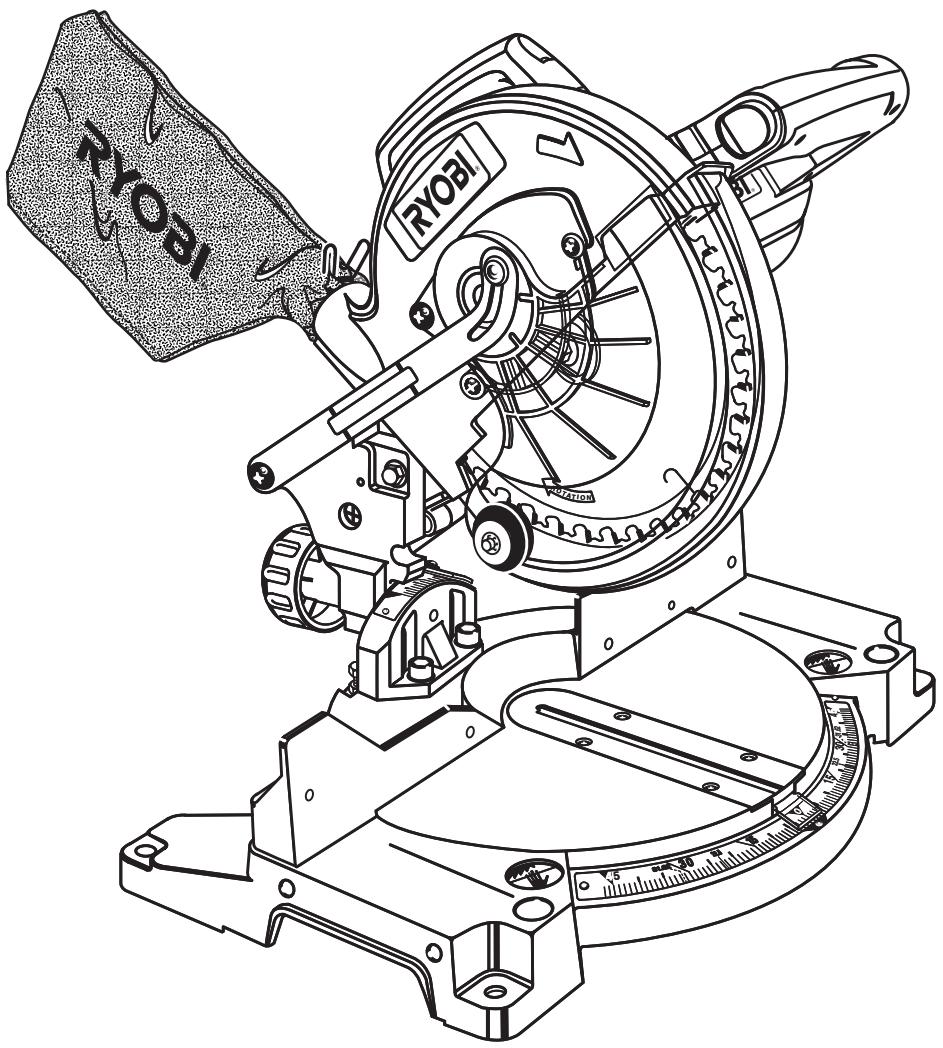
THANK YOU FOR BUYING A RYOBI CORDLESS COMPOUND MITER SAW.
Your new saw has been engineered and manufactured to Ryobi's high standards for dependability, ease of operation, and operator safety. Properly cared for, it will give you years of rugged, trouble-free performance.

CAUTION: Carefully read through this entire operator's manual before using your new saw.
Pay close attention to the Rules for Safe Operation,Warnings, and Cautions. If you use your saw properly and only for what it is intended, you will enjoy years of safe, reliable service.
Please fill out and return the Warranty Registration Card so we can be of future service to you.
Thank you again for buying Ryobi tools.
TABLE OF CONTENTS
Table of Contents and Introduction 2
Product Specifications 2
■ Rules For Safe Operation 3-6
Symbols 7
Glossary 8
Unpacking and Tools Needed 9
Loose Parts 10
■ Battery Pack and Charging Information 11
Features 12-14
Adjustments 15-22
Operation 23-30
■ Maintenance 31
Parts Ordering / Service 32

Look for this symbol to point out important safety precautions. It means attention!!! Your safety is involved.
INTRODUCTION
Your saw has many features for making cutting operations more pleasant and enjoyable. Safety, performance and dependability have been given top priority in the design of this saw making it easy to maintain and operate.

WARNING:
Carefully read through this entire operator's manual before using your new saw. Pay close attention to the Rules For Safe Operation, and all Safety Alert Symbols including Danger, Warning and Caution. If you use your saw properly and only for what it is intended, you will enjoy years of safe, reliable service.
PRODUCT SPECIFICATIONS
Blade Diameter 8-1/4 in. (209.6 mm)
Blade Arbor 5/8 in. (15.9 mm)
No Load Speed 2000 RPM
Charger Rating 120 Volts, 60 Hz-AC Only
Charger Rate 1 Hour
Motor 18 Volt DC
Net Weight 21 lbs. (9.7 kg)
Blade Type Carbide Tipped (Thin Kerf)
Cutting Capacity with Miter at 0^ /Bevel 0^ :
5-1/2 in. (139.7 mm) W x 2-1/16 in. (52.4 mm) T
Maximum Cutting Capacity with Miter at 45^ /Bevel 0^ :
3-3/4 in. (95.3 mm) W x 2-1/16 in. (52.4 mm) T
Maximum Cutting Capacity with Miter at 0^ /Bevel 45^ :
5-1/2 in. (139.7 mm) W x 1-1/2 in. (38.1 mm) T
Maximum Cutting Capacity with Miter at 45^ /Bevel 45^ :
3-3/4 in. (95.3 mm) W x 1-1/2 in. (38.1 mm) T
■ KNOW YOUR POWER TOOL. Read the operator's manual carefully. Learn the saw's applications and limitations as well as the specific potential hazards related to this tool.
■ GUARD AGAINST ELECTRICAL SHOCK BY PREVENTING BODY CONTACT WITH GROUNDED SURFACES. For example; pipes, radiators, ranges, refrigerator enclosures.
- KEEP GUARDS IN PLACE and in good working order.
■ REMOVE ADJUSTING KEYS AND WRENCHES. Get in the habit of checking to see that hex keys and adjusting wrenches are removed from tool before turning on saw.
- KEEP THE WORK AREA CLEAN. Cluttered work areas and work benches invite accidents. DO NOT leave tools or pieces of wood on the saw while it is in operation.
DO NOT USE IN DANGEROUS ENVIRONMENTS. Do not use power tools near gasoline or other flammable liquids, in damp or wet locations, or expose them to rain. Keep the work area well lit.
- KEEP CHILDREN AND VISITORS AWAY. All visitors should wear safety glasses and be kept a safe distance from work area. Do not let visitors contact tool while operating.
MAKE WORKSHOP CHILD-PROOF with padlocks and master switches, or by removing starter keys.
DO NOT FORCE THE TOOL. It will do the job better and safer at the rate for which it was designed.
USE THE RIGHT TOOL. Do not force the tool or attachment to do a job it was not designed for. Don't use it for a purpose not intended.
USE THE PROPER EXTENSION CORD FOR CHARGER. Make sure your extension cord is in good condition. When using an extension cord, be sure to use one heavy enough to carry the current your product will draw. An undersized cord will cause a drop in line voltage resulting in loss of power and overheating. A wire gage size (A.W.G.) of at least 16 is recommended for an extension cord 25 feet or less in length. If in doubt, use the next heavier gage. The smaller the gage number, the heavier the cord.
PERIODICALLY INSPECT EXTENSION CORDS and replace if damaged.
DRESS PROPERLY. Do not wear loose clothing, gloves, neckties, rings, bracelets, or other jewelry. They can get caught and draw you into moving parts. Rubber gloves and nonslip footwear are recommended when working outdoors. Also wear protective hair covering to contain long hair.
■ ALWAYS WEAR SAFETY GLASSES WITH SIDE SHIELDS. Everyday eyeglasses have only impact-resistant lenses; they are NOT safety glasses.
PROTECT YOUR LUNGS. Wear a face or dust mask if the cutting operation is dusty.
PROTECT YOUR HEARING. Wear hearing protection during extended periods of operation.
SECURE WORK. Use clamps or a vise to hold work when practical. It's safer than using your hand and it frees both hands to operate tool.
DO NOT OVERREACH. Keep proper footing and balance at all times.
MAINTAIN TOOLS WITH CARE. Keep tools sharp and clean for better and safer performance. Follow instructions for lubricating and changing accessories.
■ DISCONNECT ALL TOOLS. When not in use, before servicing, or when changing attachments, blades, bits, cutters, etc., all tools should be disconnected or battery pack removed.
AVOID ACCIDENTAL STARTING. Be sure switch is in the locked or off position before inserting battery pack. Carrying tools with your finger on the switch or inserting the battery pack into a tool with the switch on invites accidents.
USE RECOMMENDED ACCESSORIES. The use of improper accessories may cause risk of injury. Refer to this operator's manual for recommended accessories.
NEVER STAND ON TOOL. Serious injury could occur if the tool is tipped or if the blade is unintentionally contacted.
- CHECK DAMAGED PARTS. Before further use of the tool, a guard or other part that is damaged should be carefully checked to determine that it will operate properly and perform its intended function. Check for alignment of moving parts, binding of moving parts, breakage of parts, mounting and any other conditions that may affect its operation. A guard or other part that is damaged must be properly repaired or replaced by an authorized service center to avoid risk of personal injury.
NEVER LEAVE TOOL RUNNING UNATTENDED. REMOVE BATTERY PACK. Do not leave tool, move workpiece or make adjustments until it comes to a complete stop.
■ FIRMLY CLAMP OR BOLT your miter saw to a workbench or table at approximately hip height.
USE ONLY CORRECT BLADES. Do not use blades with incorrect size holes. Never use blade washers or blade bolts that are defective or incorrect. The maximum blade capacity of your saw is 8-1/4 in. (209.6 mm).
- KEEP BLADES CLEAN, SHARP AND WITH SUFFICIENT SET. Sharp blades minimize stalling and kickback.
DO NOT REMOVE THE SAW'S BLADE GUARDS. Never operate the saw with any guard or cover removed. Make sure all guards are operating properly before each use.
- KEEP HANDS AWAY FROM CUTTING AREA. Keep hands away from blades. Do not reach underneath work or around or under the blade while blade is rotating. Do not attempt to remove cut material when blade is moving.
BLADE COASTS AFTER TURN OFF.
DO NOT ABUSE CHARGER CORD. Never yank cord to disconnect it from receptacle. Keep cord from heat, oil, and sharp edges.
INSPECT CHARGER CORD PERIODICALLY and if damaged, have repaired at your nearest authorized service center.
DO NOT USE TOOL IF SWITCH DOES NOT TURN IT ON AND OFF. Have defective switches replaced by an authorized service center.
- KEEP TOOL DRY, CLEAN, AND FREE FROM OIL AND GREASE. Always use a clean cloth when cleaning. Never use brake fluids, gasoline, petroleum-based products, or any solvents to clean tool.
ALWAYS SUPPORT LONG WORKPIECES to minimize risk of blade pinching and kickback. Saw may slip, walk, or slide while cutting long or heavy boards.
BEFORE MAKING A CUT, BE SURE ALL ADJUSTMENTS ARE SECURE.
AVOID CUTTING NAILS. Inspect for and remove all nails from lumber before cutting.
ALWAYS USE A CLAMP to secure the workpiece when possible.
NEVER TOUCH BLADE or other moving parts during use.
NEVER START A TOOL WHEN THE BLADE IS IN CONTACT WITH WORKPIECE. Allow motor to come up to full speed before starting cut.
MAKE SURE THE MITER TABLE AND SAW ARM (BEVEL FUNCTION) ARE LOCKED IN POSITION BEFORE OPERATING YOUR SAW. Lock the miter table by securely tightening the miter lock handle. Lock the saw arm (bevel function) by securely tightening the bevel lock knob.
NEVER USE A LENGTH STOP ON THE FREE SCRAP END OF A CLAMPED WORKPIECE. NEVER hold onto or bind the free scrap end of the workpiece in any operation. If a work clamp and length stop are used together, they must both be installed on the same side of the saw table to prevent the saw from catching the loose end and kicking up.
NEVER cut more than one piece at a time. DO NOT STACK more than one workpiece on the saw table at a time.
NEVER PERFORM ANY OPERATION "FREEHAND". Always place the workpiece to be cut on the miter table and position it firmly against and parallel to the fence as a backstop. Always use the fence.
NEVER hand hold a workpiece that is too small to be clamped. Keep hands clear of the no hands zone.
NEVER reach behind, under, or within three inches (76 mm) of the blade and its cutting path with your hands and fingers for any reason.
NEVER reach to pick up a workpiece, a piece of scrap, or anything else that is in or near the cutting path of the blade.
AVOID AWKWARD OPERATIONS AND HAND POSITIONS where a sudden slip could cause your hand to move into the blade. ALWAYS make sure you have good balance. NEVER operate your miter saw on the floor or in a crouched position.
NEVER stand or have any part of your body in line with the path of the saw blade.
■ ALWAYS release the power switch and allow the saw blade to stop rotating before raising it out of the workpiece.
DO NOT TURN THE MOTOR SWITCH ON AND OFF RAPIDLY. This could cause the saw blade to loosen and could create a hazard. Should this ever occur, stand clear and allow the saw blade to come to a complete stop. Disconnect your saw from the power supply and securely retighten the blade bolt.
REPLACEMENT PARTS. All repairs, whether electrical or mechanical, should be made at your nearest authorized service center.
- When servicing use only identical Ryobi replacement parts. Use of any other parts may create a hazard or cause product damage.
NEVER USE IN AN EXPLOSIVE ATMOSPHERE. Normal sparking of the motor could ignite fumes.
NEVER leave the miter saw unattended while connected to a power source.
POLARIZED PLUGS. To reduce the risk of electric shock, this charger has a polarized plug (one blade is wider than the other). This charger plug will fit in a polarized outlet only one way. If the plug does not fit fully in the outlet, reverse the plug. If it still does not fit, contact a qualified electrician to install the proper outlet. Do not change the plug in any way.
IF ANY PART OF THIS MITER SAW IS MISSING or should break, bend, or fail in any way, or should any electrical component fail to perform properly, release switch trigger, remove the battery pack and have damaged, missing, or failed parts replaced before resuming operation.
DO NOT OPERATE THIS TOOL WHILE UNDER THE INFLUENCE OF DRUGS, ALCOHOL, OR ANY MEDICATION.
ALWAYS STAY ALERT! Do not allow familiarity (gained from frequent use of your saw) to cause a careless mistake. ALWAYS REMEMBER that a careless fraction of a second is sufficient to inflict severe injury.
STAY ALERT AND EXERCISE CONTROL. Watch what you are doing and use common sense. Do not operate tool when you are tired. Do not rush.
■ MAKE SURE THE WORK AREA HAS AMPLE LIGHTING to see the work and that no obstructions will interfere with safe operation BEFORE performing any work using your saw.
IMPORTANT SAFETY RULES FOR BATTERY TOOLS
-
Battery tools do not have to be plugged into an electrical outlet; therefore, they are always in operating condition. Be aware of possible hazards when not using your battery tool or when changing accessories.
-
Remove battery pack from tool or make sure the switch is in the lock-off position before making any adjustments, changing accessories, storing the tool or when not in use. Such preventive safety measures reduce the risk of starting the tool accidentally.
When battery pack is not in use, keep it away from metal objects like paper clips, coins, keys, nails, screws, other small metal objects as well as necklaces, chains, rings etc. that can make a connection from one terminal to another. Shorting the battery terminals together may cause sparks, burns, or a fire.
Use battery operated tool only with specifically designated battery pack. Use of any other batteries may create a risk of fire. Use only the battery pack listed.
USE ONLY THE CHARGER PROVIDED WITH YOUR BATTERY TOOL. Do not substitute any other charger. Use of another charger could cause batteries to explode causing possible serious injury.
DO NOT PLACE BATTERY TOOLS OR THEIR BATTERIES NEAR FIRE OR HEAT. Batteries vent hydrogen gas and can explode in the presence of heat or a source of ignition, such as a pilot light. To reduce the risk of serious personal injury, never use any cordless product in the presence of open flame. An exploded battery can propel debris and chemicals. If exposed, wash immediately with soap and water and neutralize with lemon juice or vinegar.
DO NOT CHARGE BATTERY TOOL IN A DAMP OR WET LOCATION. - Your battery tool should be charged in a location where the temperature is more than 50^ ( 10^ ) but less than 100^ ( 37^ ).
Under extreme usage or temperature conditions, battery leakage may occur. If liquid comes in contact with your skin, wash immediately with soap and water, then neutralize with lemon juice or vinegar. If liquid gets in your eyes, flush them with clean water for at least 10 minutes, then seek immediate medical attention.
If carrying your battery tool at your side, make sure it is not running and your finger is not on the switch. Avoid accidental starting.
WHEN SERVICING USE ONLY IDENTICAL RYOBI REPLACEMENT PARTS.
SAVE THESE INSTRUCTIONS. This manual contains important safety and operating instructions for charger part number 1423701.
Before using charger, read all instructions and cautionary markings in this manual, on charger, and product using charger.
To reduce risk of injury, charge only nickel-cadmium type rechargeable batteries. Other types of batteries may burst causing personal injury and damage.
- Do not expose charger to wet or damp conditions.
Use of an attachment not recommended or sold by the charger manufacturer may result in a risk of fire, electric shock, or injury to persons.
To reduce risk of damage to charger and cord, pull by charger plug rather than cord when disconnecting charger.
Make sure cord is located so that it will not be stepped on, tripped over, or otherwise subjected to damage or stress.
An extension cord should not be used unless absolutely necessary. Use of improper extension cord could result in a risk of fire and electric shock. If extension cord must be used, make sure:
a. That pins on plug of extension cord are the same number, size and shape as those of plug on charger.
b. That extension cord is properly wired and in good electrical condition; and
c. That wire size is large enough for AC ampere rating of charger as specified below:
Cord Length (Feet) 25' 50' 100'
Cord Size (AWG) 16 16 16
Note: AWG = American Wire Gage
DO NOT OPERATE CHARGER WITH A DAMAGED CORD OR PLUG. If damaged, have replaced immediately by a qualified serviceman.
- Do not operate charger if it has received a sharp blow, been dropped, or otherwise damaged in any way; take it to a qualified serviceman. Following this rule will reduce the risk of electric shock, fire, or serious personal injury.
- Do not disassemble charger; take it to a qualified serviceman when service or repair is required. Incorrect reassembly may result in a risk of electric shock or fire.
To reduce risk of electric shock, unplug charger from outlet before attempting any maintenance or cleaning. Turning off controls will not reduce this risk.
Do not use charger outdoors.
- Disconnect charger from power supply when not in use.
SAVE THESE INSTRUCTIONS. Refer to them frequently and use them to instruct others who may use this tool. If you loan someone this tool, loan them these instructions also.

WARNING:
Some dust created by power sanding, sawing, grinding, drilling, and other construction activities contains chemicals known to cause cancer, birth defects or other reproductive harm. Some examples of these chemicals are:
- lead from lead-based paints,
crystalline silica from bricks and cement and other masonry products, and - arsenic and chromium from chemically-treated lumber.
Your risk from these exposures varies, depending on how often you do this type of work. To reduce your exposure to these chemicals: work in a well ventilated area, and work with approved safety equipment, such as those dust masks that are specially designed to filter out microscopic particles.

WARNING:

The operation of any power tool can result in foreign objects being thrown into your eyes, which can result in severe eye damage. Before beginning power tool operation, always wear safety goggles or safety glasses with side shields and a full face shield when needed. We recommend Wide Vision Safety Mask for use over eyeglasses or standard safety glasses with side shields. Always use eye protection which is marked to comply with ANSI Z87.1.
SYMBOLS
| Important: Some of the following symbols may be used on your tool. Please study them and learn their meaning. Proper interpretation of these symbols will allow you to operate the tool better and safer. SYMBOL NAME DESIGNATION/EXPLANATION | ||
| V | Volts | Voltage |
| A | Amperes | Current |
| Hz | Hertz | Frequency (cycles per second) |
| min | Minutes | Time |
| ~ | Alternating Current | Type or a characteristic of current |
| == | Direct Current | Type or a characteristic of current |
| n0 | No Load Speed | Rotational speed, at no load |
| .../min | Revolutions or Reciprocation Per Minute | Revolutions, strokes, surface speed, orbits etc. per minute |
| Safety Alert Symbol | Indicates danger, warning or caution. It means attention!!! Your safety is involved. | |
| The purpose of safety symbols is to attract your attention to possible dangers. The safety symbols, and the explanations with them, deserve your careful attention and understanding. The safety warnings do not by themselves eliminate any danger. The instructions or warnings they give are not substitutes for proper accident prevention measures. SYMBOL MEANING | |
| SAFETY ALERT SYMBOL: Indicates danger, warning, or caution. May be used in conjunction with other symbols or pictographs. | |
| DANGER: Failure to obey a safety warning will result in serious injury to yourself or to others. Always follow the safety precautions to reduce the risk of fire, electric shock and personal injury. | |
| WARNING: Failure to obey a safety warning can result in serious injury to yourself or to others. Always follow the safety precautions to reduce the risk of fire, electric shock and personal injury. | |
| CAUTION: Failure to obey a safety warning may result in property damage or personal injury to yourself or to others. Always follow the safety precautions to reduce the risk of fire, electric shock and personal injury. | |
| NOTE: Advises you of information or instructions vital to the operation or maintenance of the equipment. |
SAFETY AND INTERNATIONAL SYMBOLS
This operator's manual describes safety and international symbols and pictographs that may appear on this product. Read the operator's manual for complete safety, assembly, operating and maintenance, and repair information.
SYMBOL
MEANING
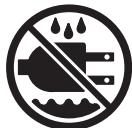
- Do not expose to rain or use in damp locations.
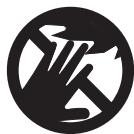
- NO HANDS SYMBOL
Failure to keep your hands away from the blade will result in serious personal injury.
SAVE THESE INSTRUCTIONS
GLOSSARY OF TERMS FOR WOODWORKING
Arbor
The shaft on which a blade or cutting tool is mounted.
Bevel Cut
A cutting operation made with the blade at any angle other than 90^ to the miter table.
Crosscut
A cutting or shaping operation made across the grain of the workpiece.
Compound Miter Cut
A compound miter cut is a cut made using a miter angle and a bevel angle at the same time.
Freehand
Performing a cut without using a fence, miter gage, fixture, work clamp, or other proper device to keep the workpiece from twisting or moving during the cut.
Gum
A sticky, sap based residue from wood products.
Miter Cut
A cutting operation made with the blade at any angle other than 90^ to the fence.
No Hands Zone
The area between the marked lines on the left and right side of the miter table base. This zone is identified by no hands zone labels placed inside the marked lines on the miter table base.
Resin
A sticky, sap based substance.
Revolutions Per Minute (RPM)
The number of turns completed by a spinning object in one minute.
Saw Blade Path
The area over, under, behind, or in front of the blade. As it applies to the workpiece, that area which will be, or has been, cut by the blade.
Set
The distance that the tip of the saw blade tooth is bent (or set) outward from the face of the blade.
Throat Plate
A plastic throat plate inserted in the miter table that allows for blade clearance. This provides support near the kerf that minimizes workpiece tear-out.
Throw-Back
Throwing of a workpiece in a manner similar to a kickback. Usually associated with a cause other than the kerf closing, such as a workpiece not being against the fence, being dropped into the blade, or being placed inadvertently in contact with the blade.
Through Sawing
Any cutting operation where the blade extends completely through the thickness of the workpiece.
Workpiece
The item on which the cutting operation is being done. The surfaces of a workpiece are commonly referred to as faces, ends, and edges.
UNPACKING
Your Compound Miter Saw has been shipped completely assembled except for the battery pack, dust bag or dust guide.

WARNING:
If any parts are missing, do not operate this tool until the missing parts are replaced. Failure to do so could result in possible serious personal injury.
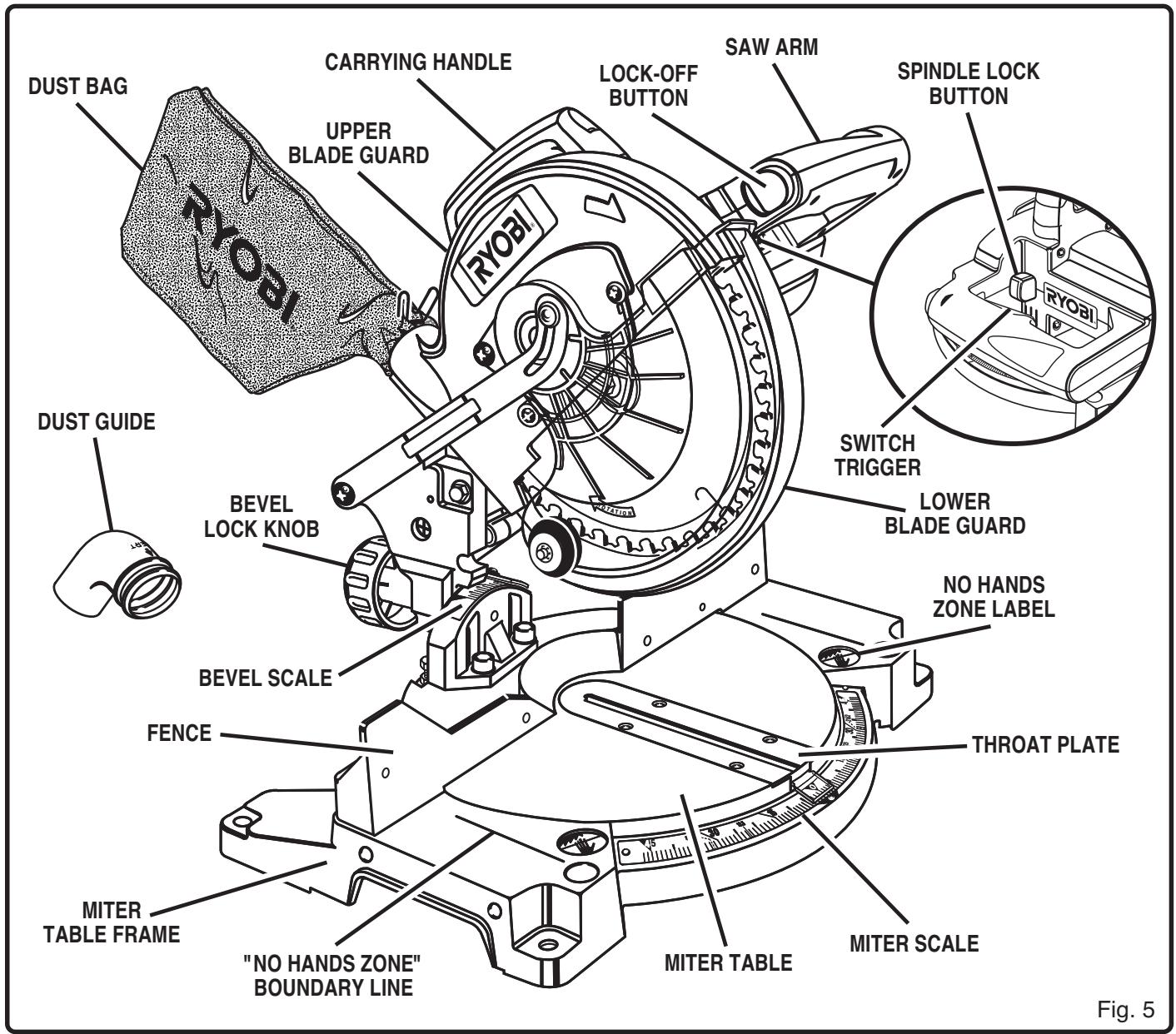
Remove all loose parts from the carton. Separate and check with the list of loose parts. See Figure 1.
Remove the packing materials from around your saw.
- Carefully lift saw from the carton and place it on a level work surface. Although small, this saw is heavy. To avoid back injury, get help when needed.
- Do not discard the packing materials until you have carefully inspected the saw, identified all loose parts, and satisfactorily operated your new saw.
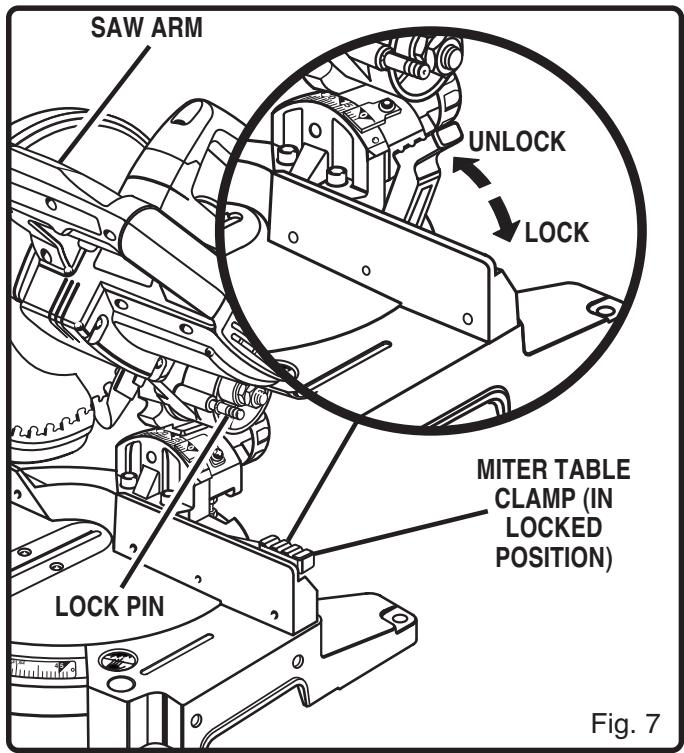
- Your saw has been shipped with the saw arm locked in the down position. To release saw arm, push down on top of saw arm and pull out the lock pin. See Figure 7.
- Lift the saw arm by the handle. Hand pressure should remain on the saw arm to prevent sudden rise upon release of the lock pin.
Examine all parts to make sure no breakage or damage has occurred during shipping.
If any parts are damaged or missing, do not attempt to turn the switch on until the damaged or missing parts are obtained and are installed correctly.
If any parts are damaged or missing, please call 1-800-525-2579 for assistance.
TOOLS NEEDED
The following tools (not included) are needed for checking adjustments of your saw or for installing the blade:
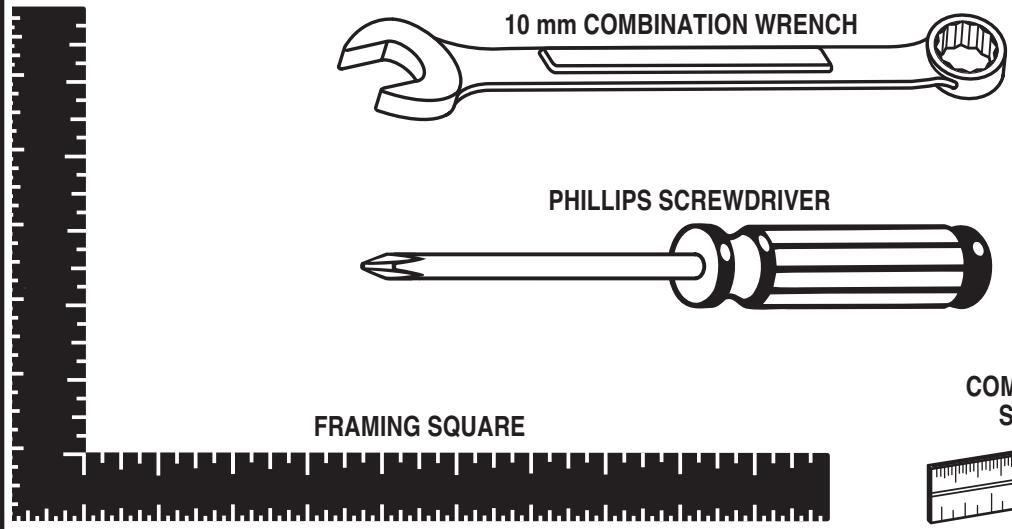
17 mm COMBINATION WRENCH
10 mm COMBINATION WRENCH
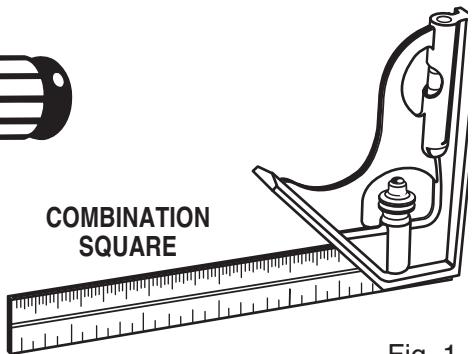
Fig. 1
LOOSE PARTS LIST
The following items are included with your Compound Miter Saw:
Carbide Tipped Saw Blade - 8-1/4 in. (209.6 mm)
Work clamp
Dust Bag
5 mm Hex Key
Dust Guide
6 mm Hex Key
Blade Wrench
Operator's Manual (Not Shown)
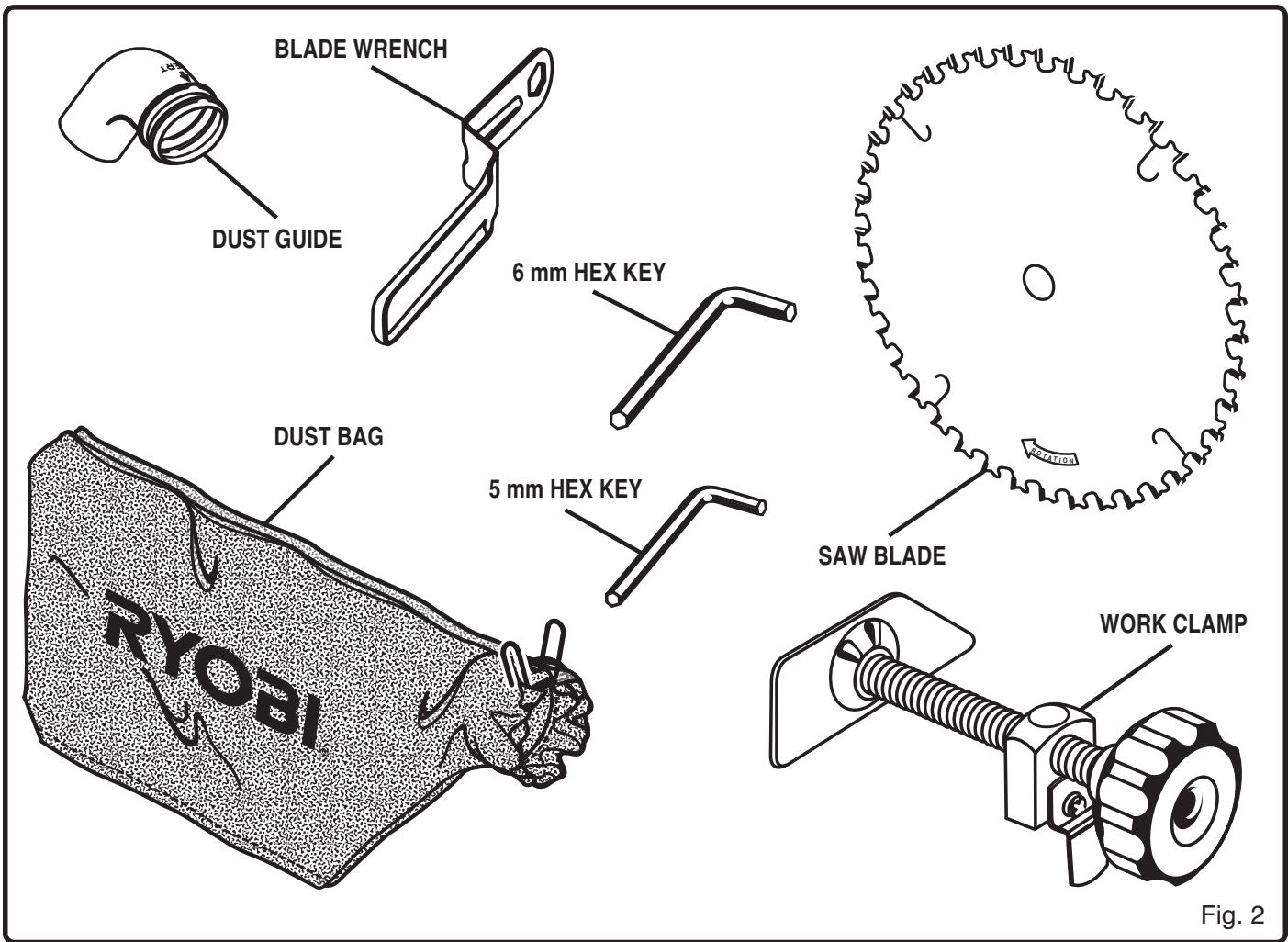
Fig. 2

WARNING: The use of attachments or accessories not listed can or could be hazardous and cause serious personal injury.
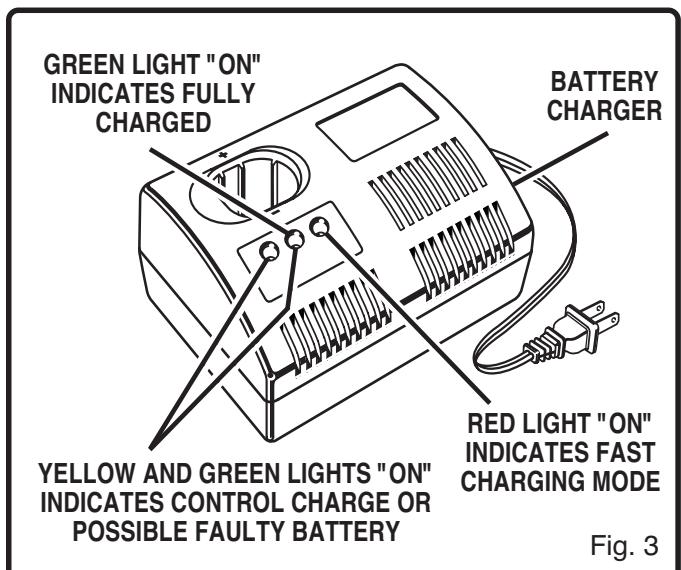
LED FUNCTION OF CHARGER
See Figure 3.
LED WILL BE LIGHTED TO INDICATE STATUS OF CHARGER AND BATTERY PACK:
RedLEDlighted = FastChargingMode
■ Green LED lighted = Fully Charged Battery Pack
Yellow and Green LED Lighted = Control Charge or possible faulty battery.
CHARGING BATTERY PACK
The battery pack for this tool has been shipped in a low charge condition to prevent possible problems. Therefore, you should charge it prior to use.
Note: Batteries will not reach full charge the first time they are charged. Allow several cycles (cutting followed by recharging) for them to fully charge.

WARNING:
RISK OF ELECTRIC SHOCK. DO NOT TOUCH UNINSULATED PORTION OF OUTPUT CONNECTOR OR UNINSULATED BATTERY TERMINAL.
TO CHARGE
Charge battery pack only with the charger provided.
Make sure power supply is normal house voltage, 120 volts, 60Hz , AC only.
Connect charger to power supply.
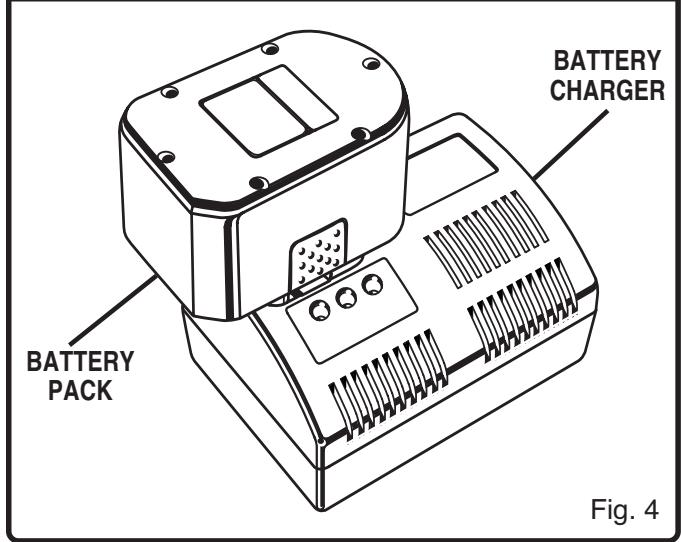
Place battery pack in charger. See Figure 4. Align raised rib on battery pack with groove in charger.
Press down on battery pack to be sure contacts on battery pack engage properly with contacts in charger. When properly connected, red light will turn on.
- Normally, the yellow and green lights on the charger will come on. This indicates charger is in control charge mode and should switch to fast charge mode within 5 minutes. When charger is in fast charge mode the red light will come on. If after a period of 15 minutes the yellow and green lights remain on, remove the battery pack, wait 1 minute and reinsert battery pack in charger. If the yellow and green lights continue to remain on an additional 15 minutes, the battery pack is damaged and will not accept charge.
- When your battery pack becomes fully charged, the red light will turn off and the green light will turn on.
After normal usage, 1 hour of charge time is required to be fully charged. A minimum charge time of 1 to 1-1/2 hours is required to recharge a completely discharged tool.
The battery pack will become slightly warm to the touch while charging. This is normal and does not indicate a problem.
DO NOT place charger in an area of extreme heat or cold. It will work best at normal room temperature.
IMPORTANT INFORMATION FOR RECHARGING HOT BATTERIES
When using your saw continuously, the batteries in your battery pack become hot. You should let a hot battery pack cool down for approximately 30 minutes before attempting to recharge.
Note: This situation occurs when continuous use of your saw causes the batteries to become hot. It does not occur under normal circumstances. Refer to "Charging Battery Pack" for normal recharging of batteries. If the charger does not charge your battery pack under normal circumstances, return both the battery pack and charger to your nearest Ryobi Authorized Service Center for electrical check.
Before attempting to use your saw, familiarize yourself with all operating features and safety requirements.

WARNING:
Do not allow familiarity with your saw to make you careless. Remember that a careless fraction of a second is sufficient to inflict severe injury.
8-1/4 in. (209.6 mm) BLADE
A 8-1/4 in. (209.6 mm) saw blade is included with your compound miter saw. It will cut materials up to 2-1/16 in. (52.4 mm) thick or 5-1/2 in. (139.7 mm) wide, depending upon the thickness of the material and the setting at which the cut is being made.
CUTTING CAPACITIES
When the miter angle (miter table) is set at 0^ and the bevel angle is set at 0^ :
Your saw will cut materials up to a maximum of 5-1/2 in. (139.7 mm) wide x 2-1/16 in. (52.4 mm) thick.
When the miter angle (miter table) is set at 45^ and the bevel angle is set at 0^ :
Your saw will cut materials up to a maximum of 3-3/4 in. (95.3 mm) wide x 2-1/16 in. (52.4 mm) thick.
When the miter angle (miter table) is set at 0^ and the bevel angle is set at 45^ :
Your saw will cut materials up to a maximum of 5-1/2 in. (139.7 mm) wide x 1-1/2 in. (38.1 mm) thick.
When the miter angle (miter table) is set at 45^ and the bevel angle is set at 45^ :
Your saw will cut materials up to a maximum of 3-3/4 in. (95.3 mm) wide x 1-1/2 in. (38.1 mm) thick.
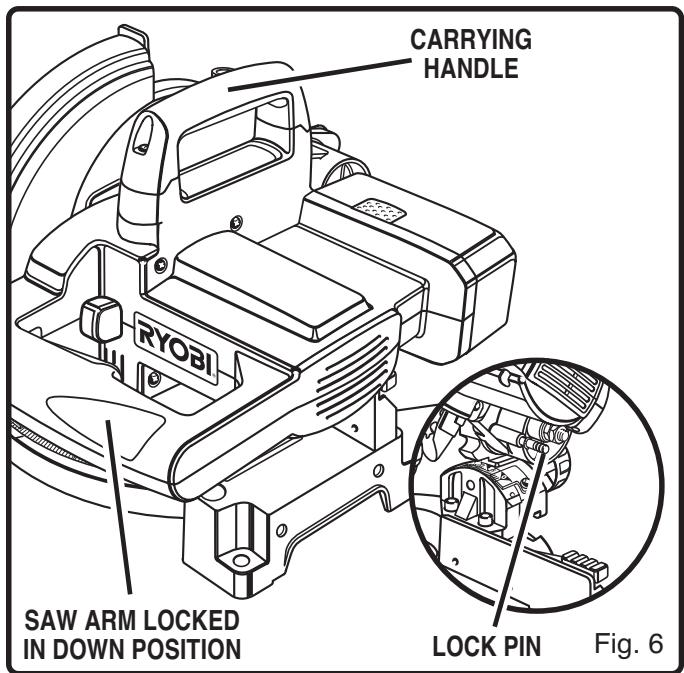
CARRYING HANDLE
See Figure 6.
For convenience when carrying or transporting your miter saw from one place to another, a carrying handle has been provided on top of the saw arm as shown in figure 6. To transport saw, remove battery pack, then lower the saw arm and lock it in the down position. Lock saw arm by depressing the lock pin.
MITER TABLE CLAMP
See Figure 7.
The miter table clamp securely locks your saw at desired miter angles.
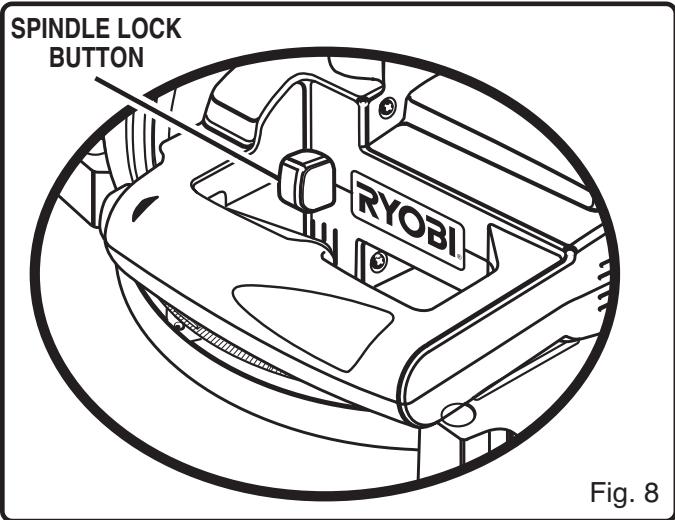
SPINDLE LOCK BUTTON
See Figure 8.
A spindle lock button has been provided for locking the spindle which keeps the blade in your saw from rotating. Depress and hold the spindle lock button while installing, changing, or removing the blade only.
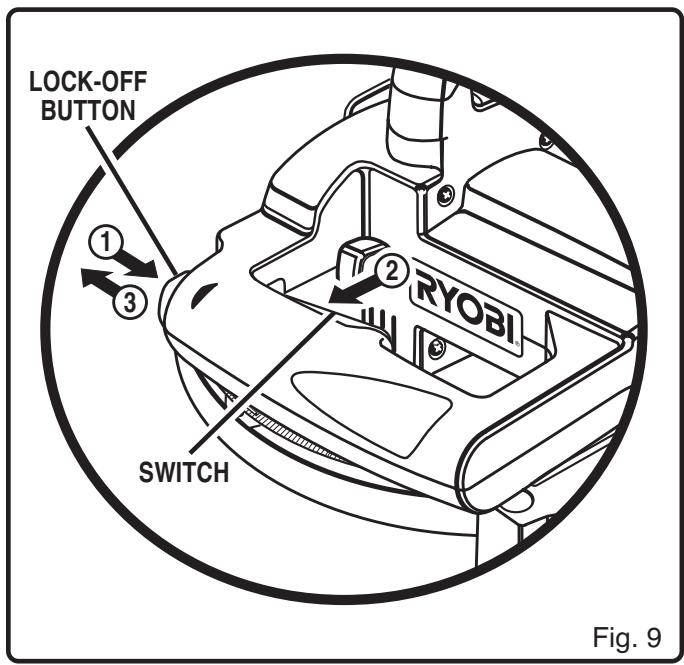
LOCK-OFF BUTTON
See Figure 9.
The switch trigger is equipped with a lock-off button to reduce the possibility of accidental starting.
To release lock-off feature:
Depress lock-off button (1).
While holding lock-off button pushed in, (2) depress switch trigger.
Release lock-off button (3).
Note: The spring loaded button will spring back into the lock-off position when the switch trigger is released.
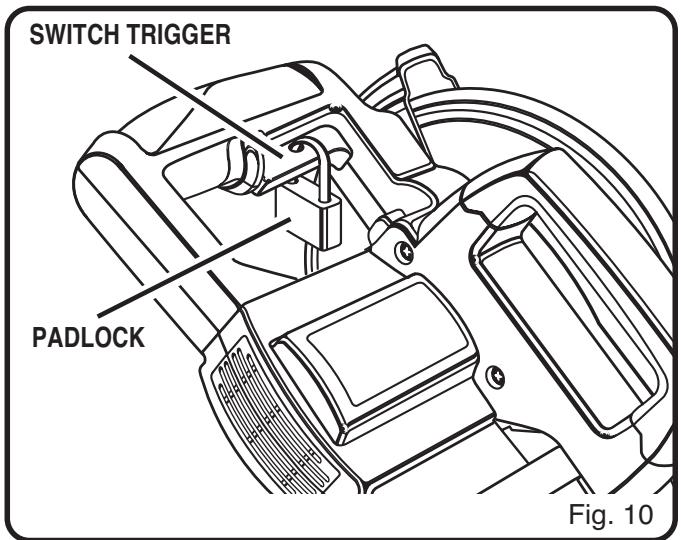
TRIGGER LOCK
See Figure 10.
To prevent unauthorized use of your compound miter saw, we suggest that you remove battery pack and lock the switch in the off position. To lock the switch, install a padlock through the hole in the switch trigger. A lock with a shackle up to 13/64 in. (5.2 mm) diameter may be used. When the lock is installed and locked, the switch is inoperable. Store the padlock key in another location.
DETENT STOPS ON MITER TABLE
Detent stops have been provided at 0^ , 22 - 1 / 2^ , 30^ , and 45^ . The 22 - 1 / 2^ , 30^ and 45^ detent stops have been provided on both the left and right side of the miter table.
BEVEL LOCK KNOB
The bevel lock knob securely locks your compound miter saw at desired bevel angles. Positive stop adjustment screws have been provided on each side of the saw arm. These positive stop adjustment screws are for making fine adjustments at 0^ and 45^ . See pages 20 and 21.
ELECTRIC BRAKE
An electric brake has been provided to quickly stop blade rotation after the switch is released.
FENCE
The fence on your compound miter saw has been provided to hold your workpiece securely against when making all cuts.
SELF-RETRACTING LOWER BLADE GUARD
The lower blade guard is made of shock-resistant, see-through plastic that provides protection from each side of the blade. It retracts over the upper blade guard as the saw is lowered into the workpiece.
MOUNTING HOLES
See Figure 11.
Your compound miter saw should be permanently mounted to a firm supporting surface such as workbench. Four 3/8 in. (10 mm) bolt holes have been provided in the saw base for this purpose. Each of the four mounting holes should be bolted securely using 3/8 in. (10 mm) machine bolts, lock washers, and hex nuts (not included). Bolts should be of sufficient length to accommodate the saw base, lock washers, hex nuts, and the thickness of the workbench. Tighten all four bolts securely.
The hole pattern for an 18-5/8 in. x 24 in. (457.2 mm x 609.6 mm) workbench is shown in Figure 11. Carefully check the workbench after mounting to make sure that no movement can occur during use. If any tipping, sliding, or walking is noted, secure the workbench to the floor before operating.
WARNING:
Always make sure your compound miter saw is securely mounted to a workbench or an approved workstand. Failure to do so could result in an accident resulting in possible serious personal injury.
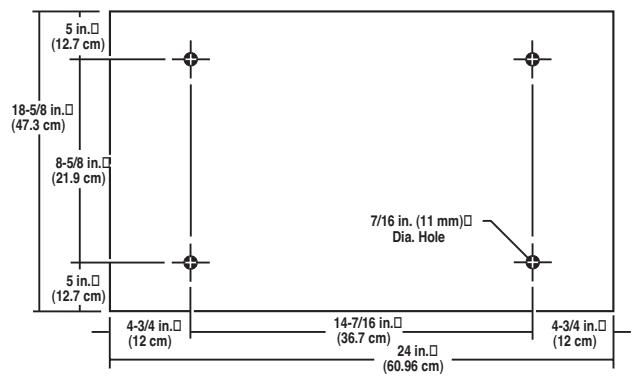
Fig. 11
WARNING:
The operation of any saw can result in foreign objects being thrown into your eyes, which can result in severe eye damage. Before starting power tool operation, always wear safety goggles or safety glasses with side shields and a full face shield when needed. We recommend wide vision safety mask for use over eyeglasses or standard safety glasses with side shields.
WARNING:
Do not attempt to modify this tool or create accessories not recommended for use with this tool. Any such alteration or modification is misuse and could result in a hazardous condition leading to possible serious personal injury.

WARNING:
To prevent accidental starting that could cause possible serious personal injury, assemble all parts to your saw before attaching battery pack. Battery pack should never be attached to saw when you are assembling parts, making adjustments, installing or removing blades, or when not in use.
As mentioned previously your saw has been factory assembled and adjusted. The dust guide or dust bag, battery pack and blade are the only parts that have to be installed.
DUST GUIDE
See Figure 12.
Remove battery pack from saw.

WARNING:
Failure to remove battery pack from your saw could result in accidental starting causing possible serious personal injury.
To install the dust guide, place the end marked INSERT over the exhaust port in the upper blade guard. Turn the guide so that the open end is facing down or toward the rear of the saw.
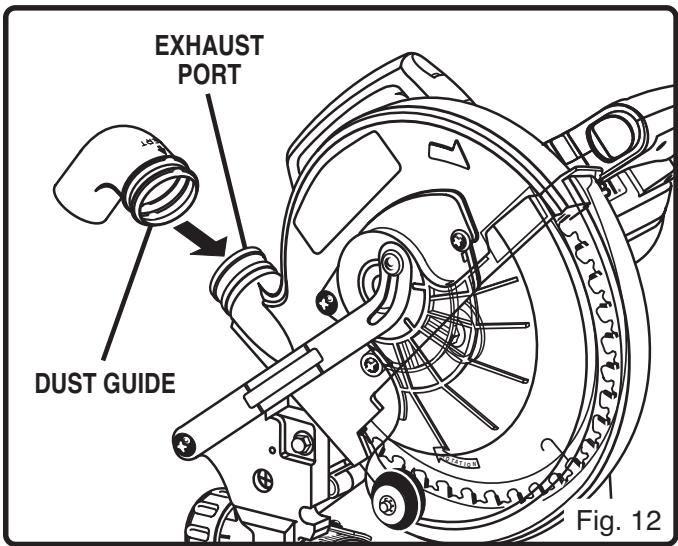
DUST BAG
See Figure 13.
Remove battery pack from saw.

WARNING:
Failure to remove battery pack from your saw could result in accidental starting causing possible serious personal injury.
A dust bag is packed with your saw. It fits over the exhaust port on the upper blade guard. To install it, remove the dust guide from the exhaust port. Then,
squeeze the two metal clips to open the mouth of the bag and slide it on the exhaust port. Release the clips. The metal ring in the bag should lock in one of the grooves on the exhaust port. For more efficient operation, empty dust bag when no more than half full. This will permit better air flow through the bag.
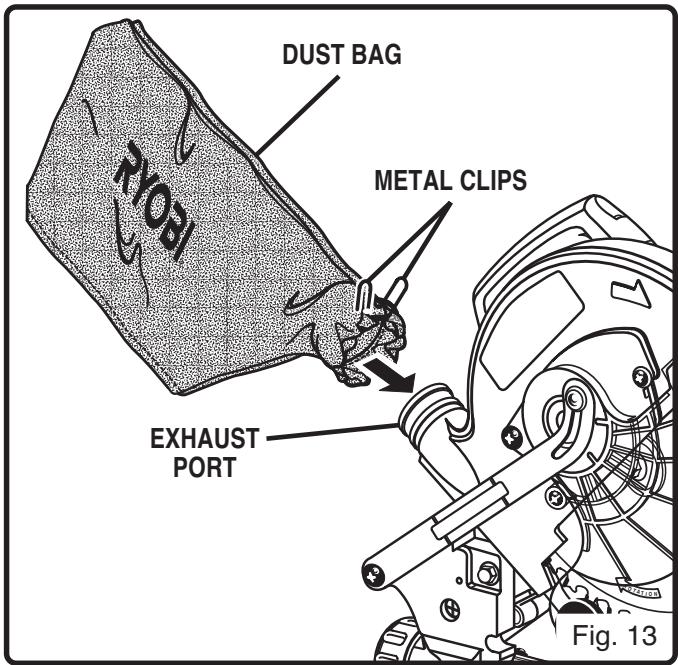
WORK CLAMP
See Figure 14.
Remove battery pack from saw.

WARNING:
Failure to remove battery pack from your saw could result in accidental starting causing possible serious personal injury.
To install work clamp, place the shaft of the clamp in either hole in front of the miter table base. Rotate the knob on the clamp to move it in or out as needed.
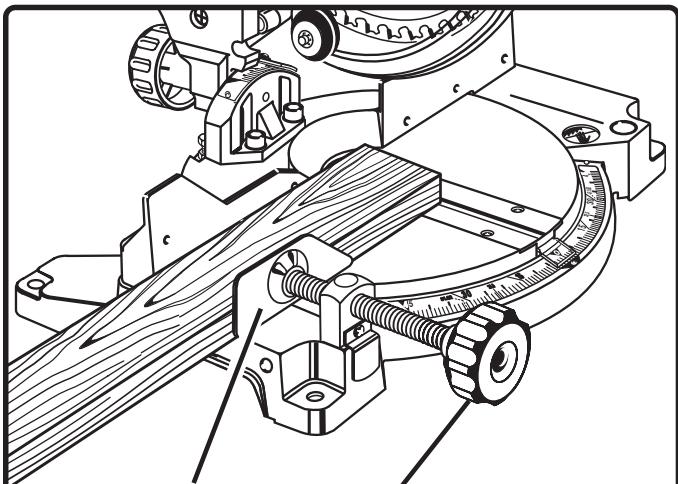
WORK CLAMP
KNOB
Fig. 14
TO INSTALL BLADE
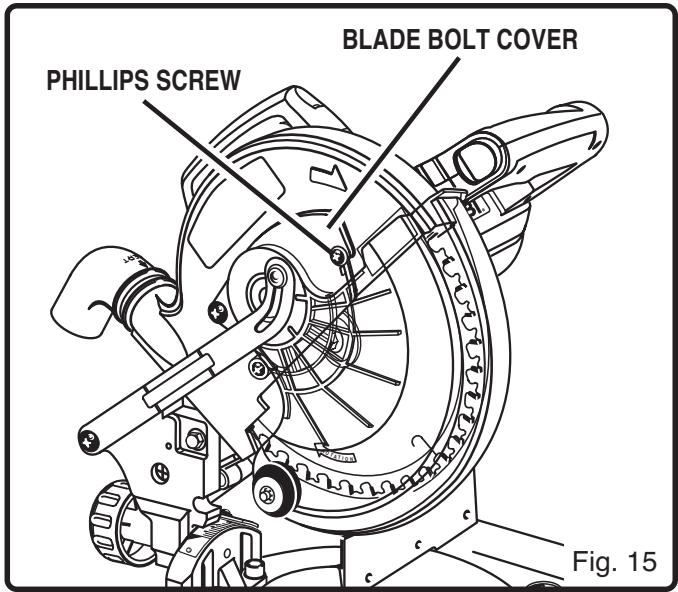
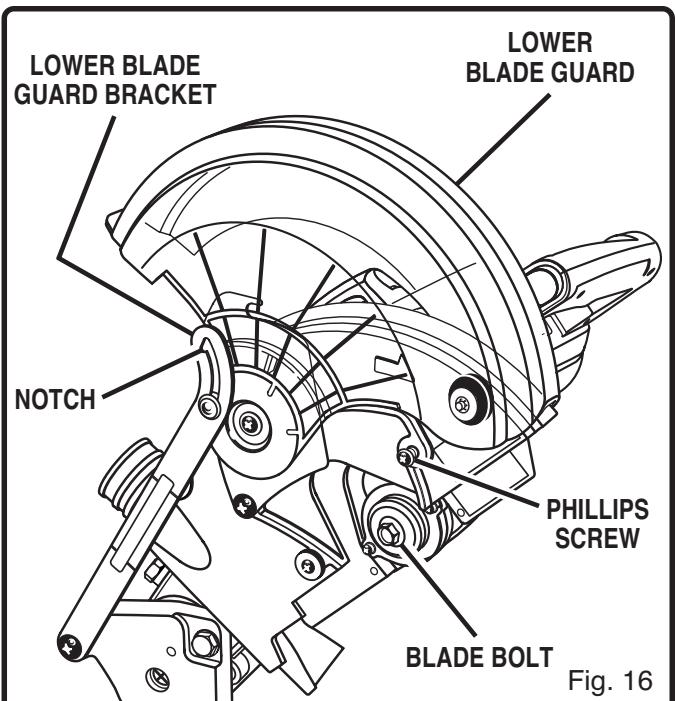
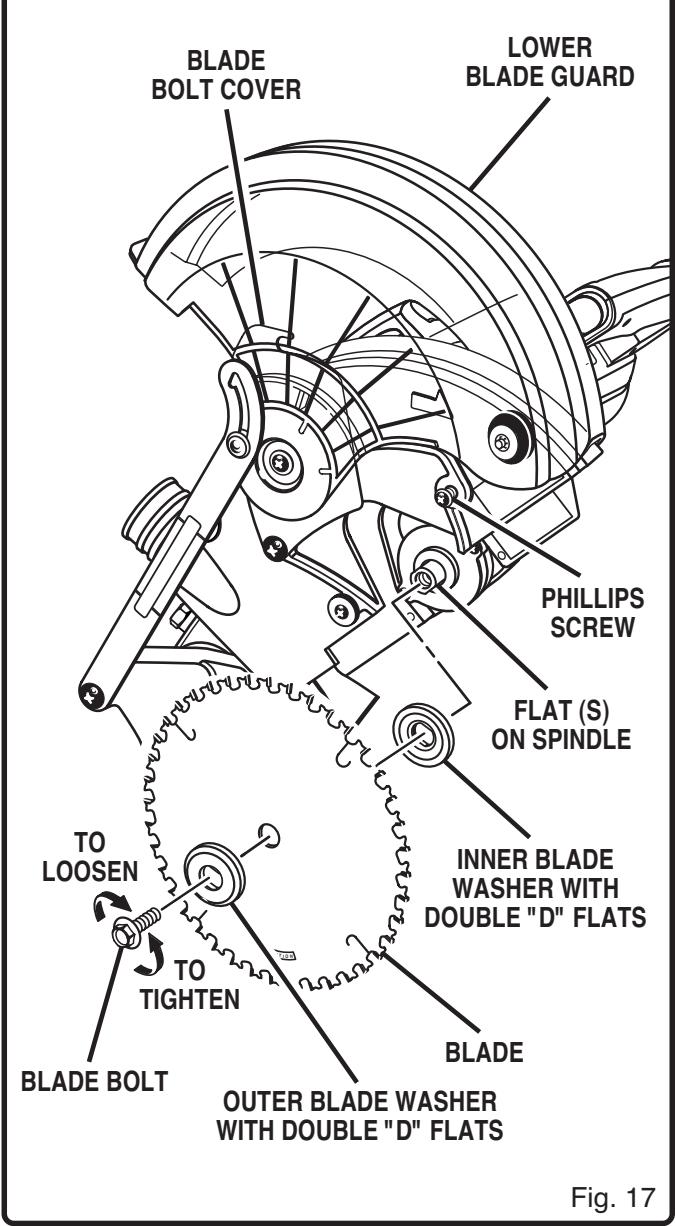
See Figures 15, 16, 17 and 18.

DANGER:
A 8-1/4 in. (209.6 mm) blade is the maximum blade capacity of your saw. Never use a blade that is too thick to allow outer blade washer to engage with the flats on the spindle. Larger blades will come in contact with the blade guards, while thicker blades will prevent the blade bolt from securing the blade on the spindle. Either of these situations will result in a serious accident and can cause serious personal injury.
Remove battery pack from saw.

WARNING:
Failure to remove battery pack from your saw could result in accidental starting causing possible serious personal injury.
Push down on the saw arm and pull out the lock pin to release saw arm. Raise saw arm to its full raised position. Be cautious, saw arm is spring loaded to raise.
Loosen the phillips screw on the blade bolt cover until blade bolt cover can be raised. See Figure 15.
Gently raise the lower blade guard bracket, releasing lower blade guard from notch so that lower blade guard and blade bolt cover can be rotated up and back to expose the blade bolt. See Figure 16.
ADJUSTMENTS
Depress the spindle lock button and rotate the blade bolt until the spindle locks. See Figure 18.
Using the blade wrench provided, loosen and remove the blade bolt.
Note: The blade bolt has left hand threads. Turn blade bolt clockwise to loosen.
Remove outer blade washer. Do not remove inner blade washer.
Wipe a drop of oil onto inner blade washer and outer blade washer where they contact the blade.

WARNING:
If inner blade washer has been removed, replace it before placing blade on spindle. Failure to do so could cause an accident since blade will not tighten properly.
Fit saw blade inside lower blade guard and onto spindle. The blade teeth point downward at the front of saw as shown in figure 17.

CAUTION:
Always install the blade with the blade teeth and the arrow printed on the side of the blade pointing down at the front of the saw. The direction of blade rotation is also stamped with an arrow on the upper blade guard.
Replace outer blade washer. The double "D" flats on the blade washers align with the flats on the spindle.
Depress spindle lock button and replace blade bolt. Note: The blade bolt has left hand threads. Turn blade bolt counterclockwise to tighten.
Using the blade wrench provided, tighten blade bolt securely.
Remove the blade wrench and store it in a safe place for future use.
Replace the lower blade guard and blade bolt cover.
Retighten phillips screw securing blade bolt cover. Tighten screw securely. See Figure 17.

WARNING:
To prevent damage to the spindle lock, always allow motor to come to a complete stop before engaging spindle lock. Make sure the spindle lock button is not engaged before attaching battery pack.
TO REMOVE BLADE
See Figures 15, 16, 17, and 18.
Remove battery pack from saw.

WARNING:
Failure to remove battery pack from your saw could result in accidental starting causing possible serious personal injury.
Loosen the phillips screw on the blade bolt cover until blade bolt cover can be raised. See Figures 15, 16, and 17.
Gently raise the lower blade guard bracket, releasing lower blade guard from notch so that lower blade guard and blade bolt cover can be rotated up and back to expose the blade bolt. See Figure 16.
Depress the spindle lock button and rotate the blade bolt until the spindle locks. See Figure 18.
Using the blade wrench provided, loosen and remove the blade bolt. Note: The blade bolt has left hand threads. Turn blade bolt clockwise to loosen.
Remove outer blade washer. The blade can now be removed.
Your compound miter saw has been adjusted at the factory for making very accurate cuts. However, some of the components might have been bumped out of alignment during shipping. Also, over a period of time, readjustment will probably become necessary due to wear. After unpacking your saw, check the following adjustments before you begin using saw. Make any readjustments that are necessary and periodically check the parts alignment to make sure that your saw is cutting accurately.
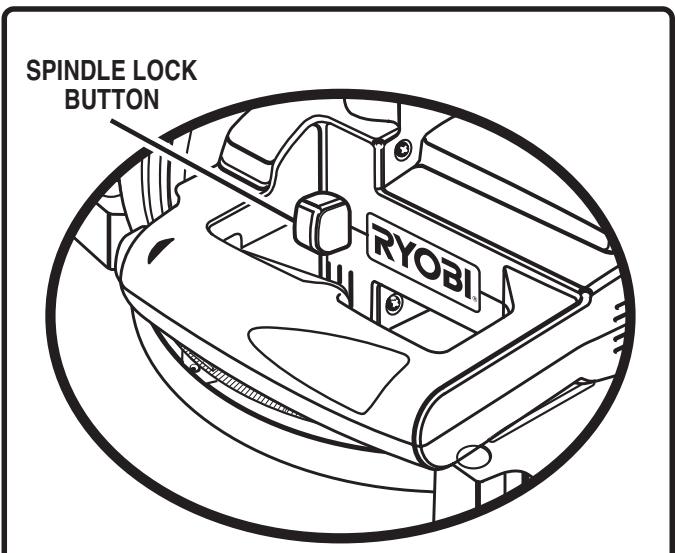
Fig. 18
ADJUSTMENTS
Note: Many of the illustrations in this manual show only portions of your compound miter saw. This is intentional so that we can clearly show points being made in the illustrations. Never operate your saw without all guards securely in place and in good operating condition.
SQUARING THE MITER TABLE TO THE FENCE
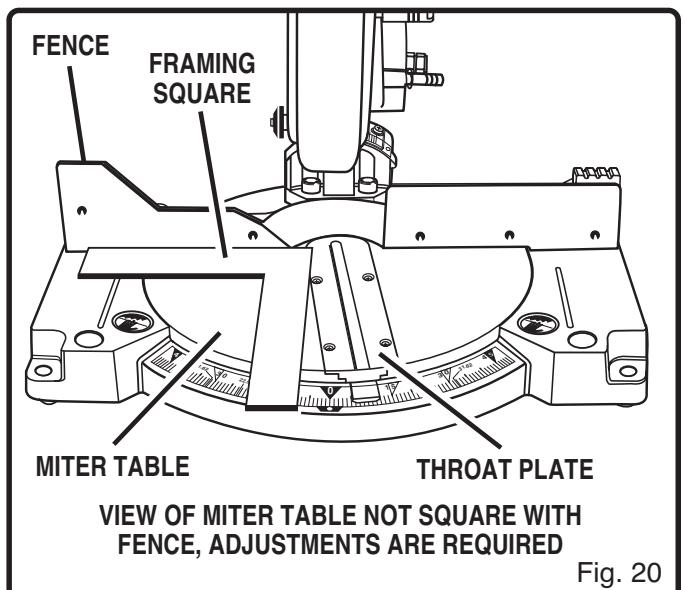
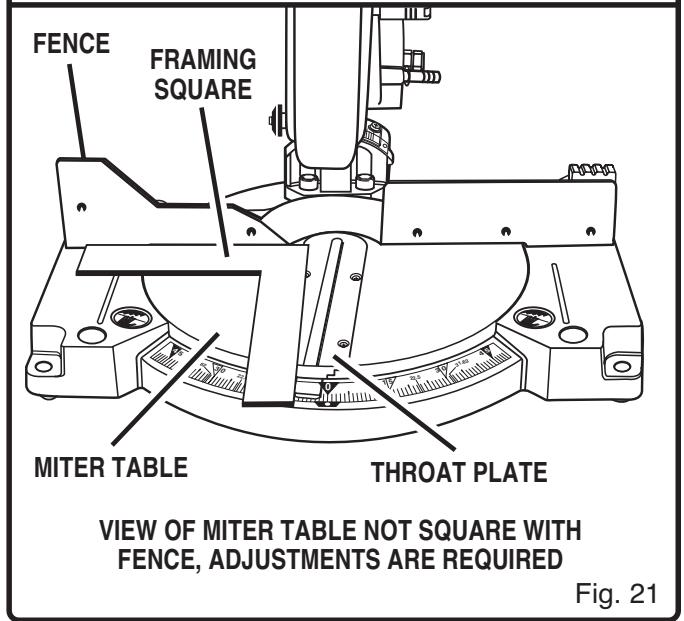
See Figures 19 - 22.
Remove battery pack from saw.

WARNING:
Failure to remove battery pack from your saw could result in accidental starting causing possible serious personal injury.
Push down on the saw arm and pull out the lock pin to release the saw arm.
Raise saw arm to its full raised position.
Lift the miter table clamp.
Rotate the miter table until the pointer is positioned at 0^ .
Push the miter table clamp back down.
- Lay a framing square flat on the miter table. Place one leg of the square against the fence. Place the other leg of the square beside the throat plate in the miter table. The edge of the square and the throat plate in the miter table should be parallel as shown in figure 19.
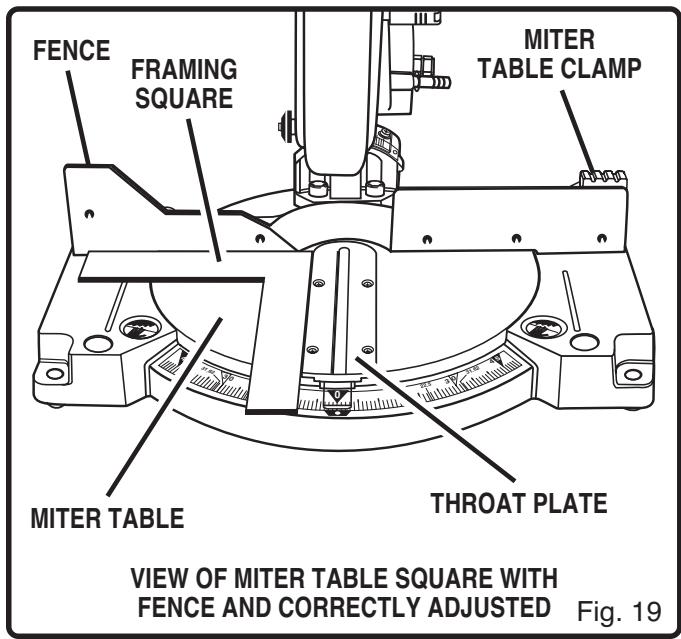
If the edge of the framing square and the throat plate in the miter table are not parallel as shown in figures 20 and 21, adjustments are needed.
ADJUSTMENTS
Using a 6 mm hex key, loosen the socket head screws securing the fence. See Figure 22. Adjust the fence left or right until the framing square and throat plate are parallel.
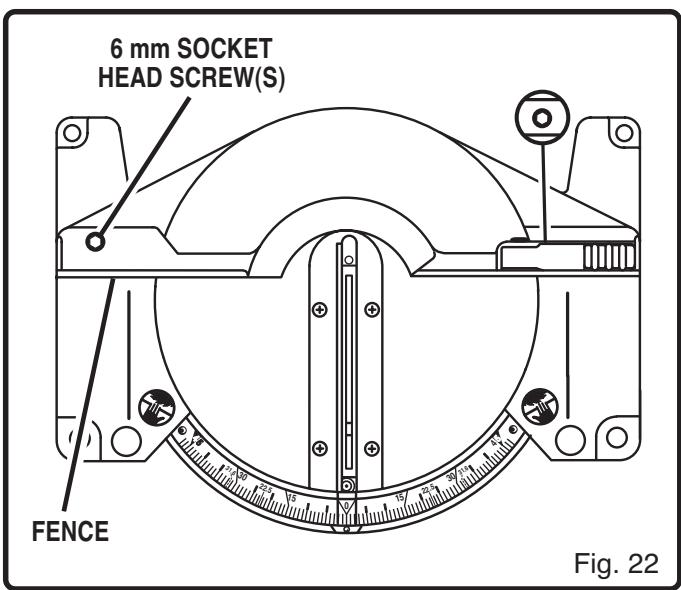
Retighten the screws securely and recheck the fence-to-table alignment.
SQUARING THE SAW BLADE TO THE FENCE
See Figures 23 - 26.
Remove battery pack from saw.

WARNING:
Failure to remove battery pack from your saw could result in accidental starting causing possible serious personal injury.
Pull the saw arm all the way down and engage the lock pin to hold the saw arm in transport position.
Lift the miter table clamp.
Rotate the miter table until the pointer is positioned at 0^ .
Push the miter table clamp back down.
- Lay a framing square flat on the miter table. Place one leg of the square against the fence. Slide the other leg of the square against the flat part of saw blade.
Note: Make sure that the square contacts the flat part of the saw blade, not the blade teeth.
The edge of the square and the saw blade should be parallel as shown in figure 23.
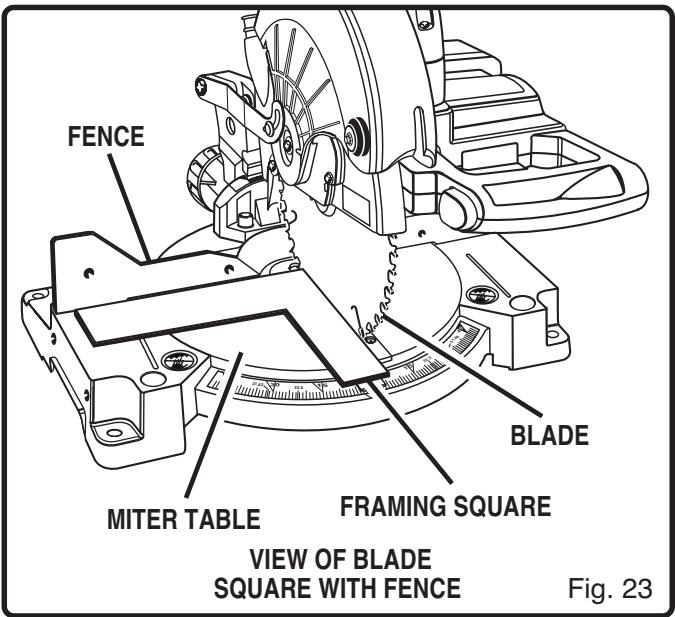
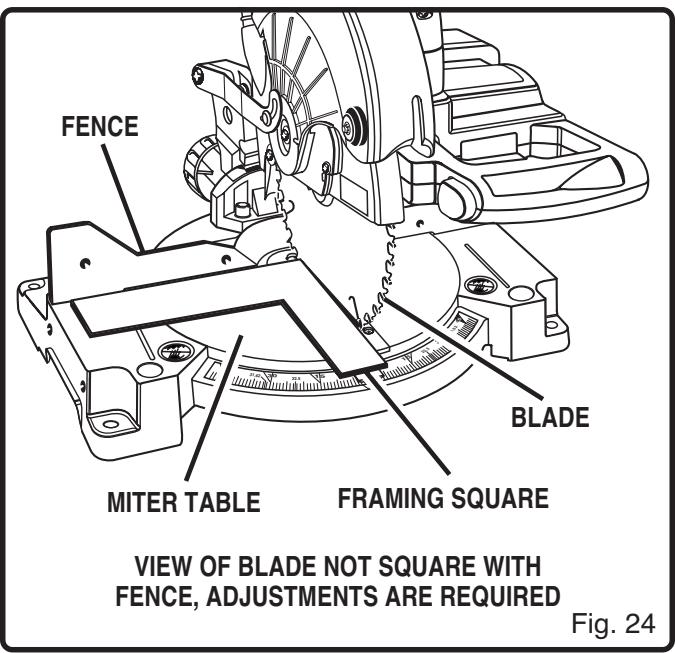
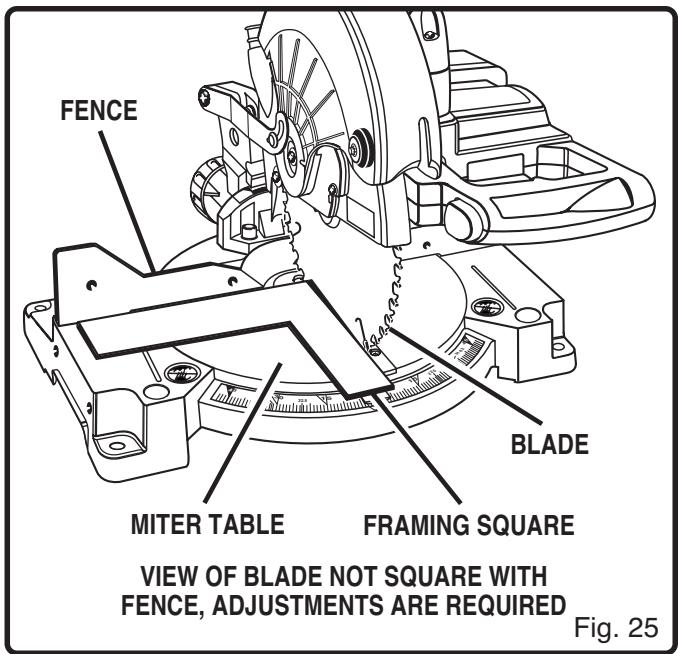
If the front or back edge of the saw blade angles away from the square as shown in figures 24 and 25, adjustments are needed.
Using the 6 mm hex key provided, loosen the socket head screws that secure the mounting bracket to the miter table. See Figure 26.
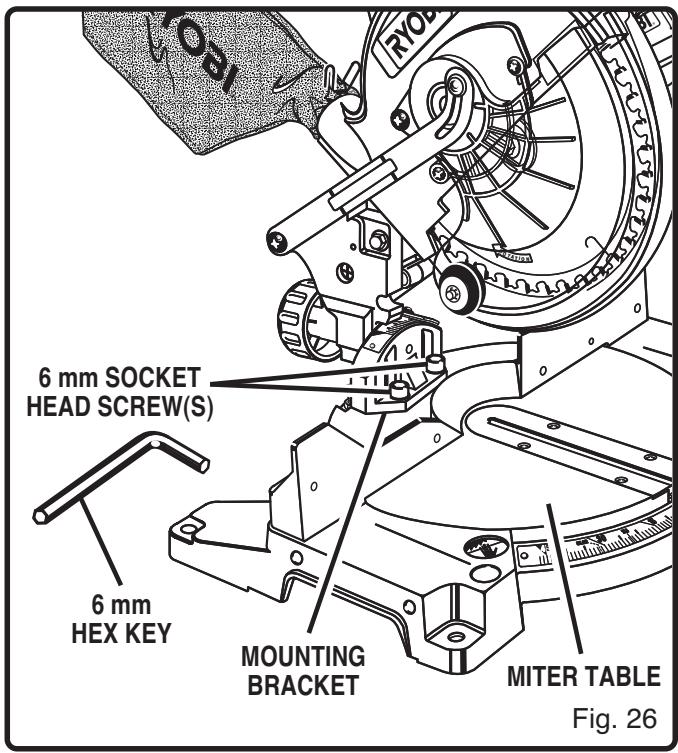
- Rotate the mounting bracket left or right until the saw blade is parallel with the square.
Retighten the screws securely and recheck the blade-to-fence alignment.
SQUARING THE BLADE TO THE MITER TABLE
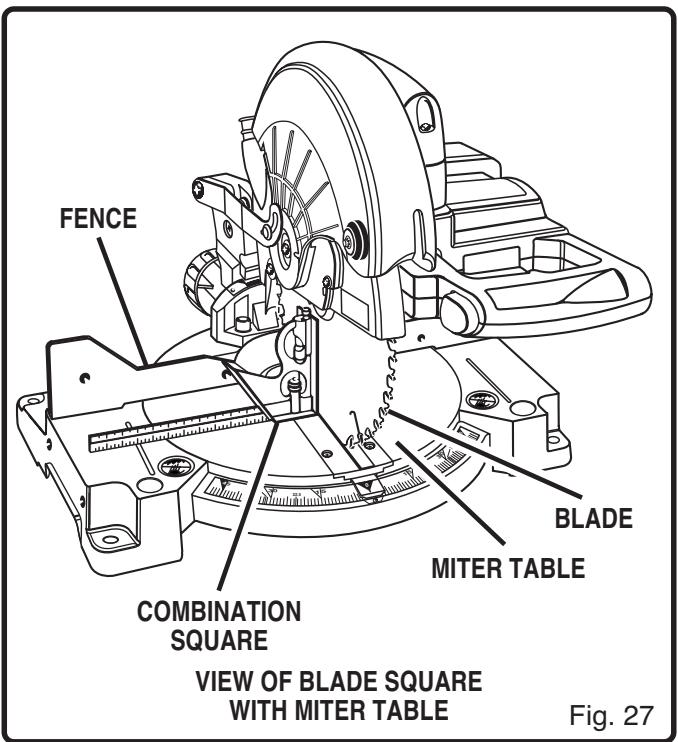
See Figures 27 - 31.
Remove battery pack from saw.
WARNING:
Failure to remove battery pack from your saw could result in accidental starting causing possible serious personal injury.
Pull the saw arm all the way down and engage the lock pin to hold the saw arm in transport position.
Lift up the miter table clamp.
Rotate the miter table until the pointer is positioned at 0^ .
Push the miter table clamp back down.
Loosen bevel lock knob and set saw arm at 0^ bevel (blade set 90^ to miter table). Tighten bevel lock knob.
Place a combination square against the miter table and the flat part of saw blade.
Note: Make sure that the square contacts the flat part of the saw blade, not the blade teeth.
Rotate the blade by hand and check the blade-to-table alignment at several points.
The edge of the square and the saw blade should be parallel as shown in figure 27.
ADJUSTMENTS
If the top or bottom of the saw blade angles away from the square as shown in figures 28 and 29, adjustments are needed.
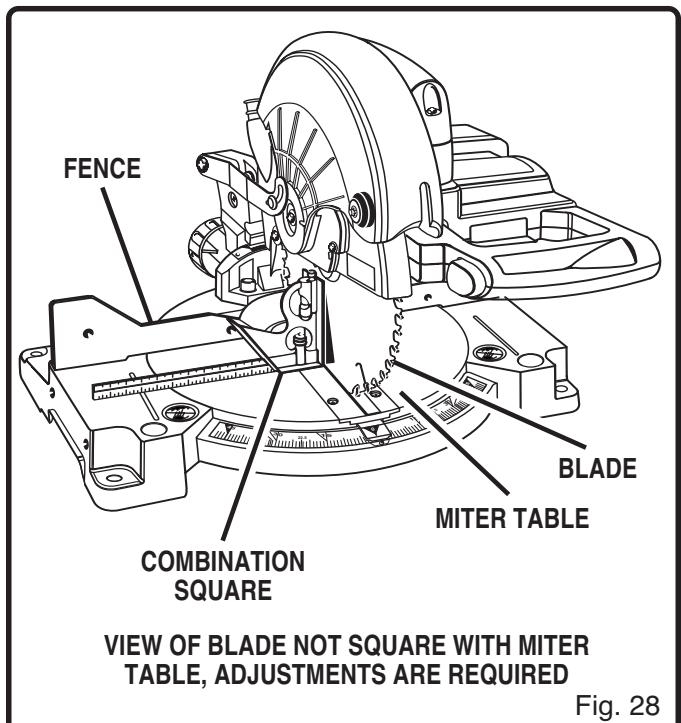
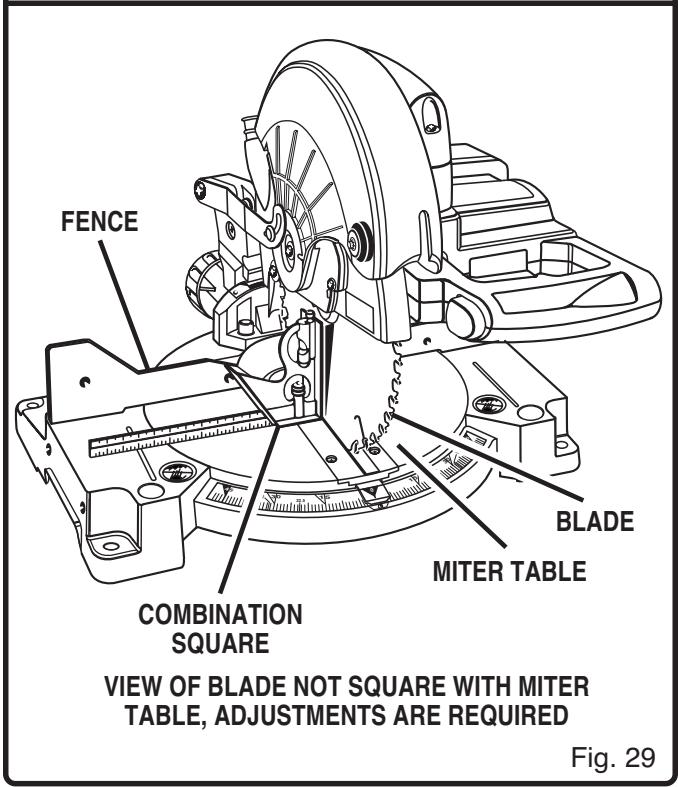
Using a 10mm wrench or adjustable wrench, loosen the lock nut securing positive stop adjustment screw. Also loosen bevel lock knob.
Adjust positive stop adjustment screw to bring saw blade into alignment with the square. See Figure 30.
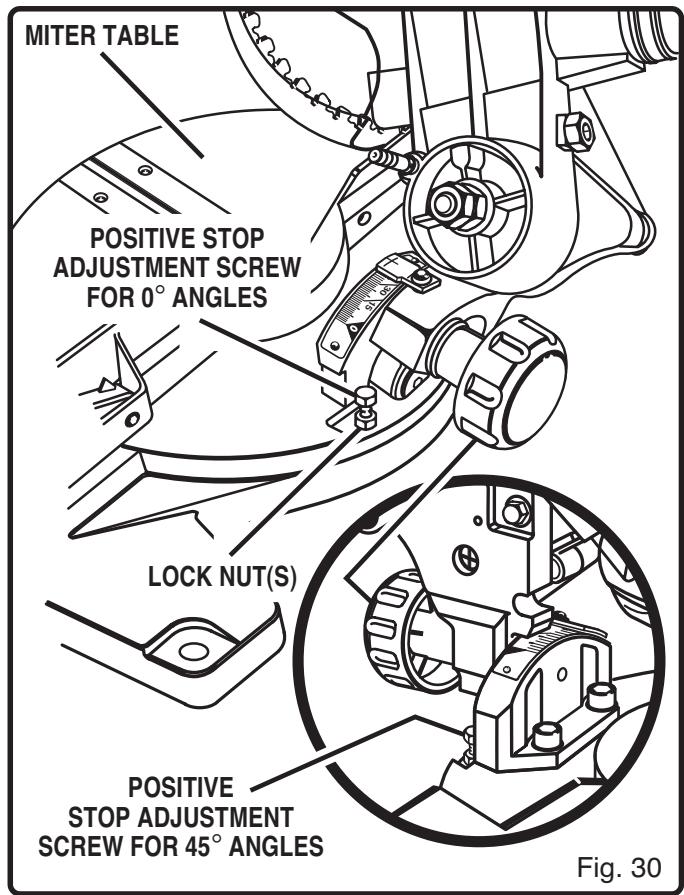
- Retighten bevel lock knob. Next, retighten lock nut securing the positive stop adjustment screw. Recheck blade-to-table alignment.
Note: The above procedure can be used to check blade squareness of the saw blade to the miter table at both 0^ and 45^ angles.
ADJUSTMENTS
PIVOT ADJUSTMENTS
Note: These adjustments were made at the factory and normally do not require readjustment.
TRAVEL PIVOT ADJUSTMENT
The saw arm should rise completely to the up position by itself.
If the saw arm does not raise by itself or if there is play in the pivot joints, have saw repaired at your nearest RYOBI AUTHORIZATION SERVICE CEN-TER.
BEVEL PIVOT ADJUSTMENT
Your compound miter saw should bevel easily by loosening bevel lock knob and tilting saw arm to the left.
If movement is tight or if there is play in the pivot, have saw repaired at your nearest RYOBI AUTHORIZATION SERVICE CENTER.
DEPTH STOP
The depth stop limits the blade's downward travel. It allows the blade to go below the miter table enough to maintain full cutting capacities. The depth stop positions the blade 1/4 in. (6.4 mm) from the miter table support.
Note: The miter table support is located inside miter table.
The depth stop is factory set to provide maximum cutting capacity for the 8-1/4 in. (209.6 mm) saw blade provided with your saw. Therefore, the saw blade provided should never need adjustments.
However, when the diameter of the blade has been reduced due to sharpening, it may be necessary to adjust the depth stop to provide maximum cutting capacity. Also, when a new blade is installed, it is necessary to check the clearance of the blade to the miter table support before starting the saw. Make adjustments if needed.
DEPTH STOP ADJUSTMENTS
See Figure 31.
Remove battery pack from saw.

WARNING:
Failure to remove battery pack from your saw could result in accidental starting causing possible serious personal injury.
To adjust the depth stop use a 17mm wrench or adjustable wrench and loosen the hex nut at the rear of the miter saw arm.
Use the 5 mm hex key provided to adjust the depth stop adjustment screw. The saw blade is lowered by turning the screw counterclockwise and raised by turning the screw clockwise.
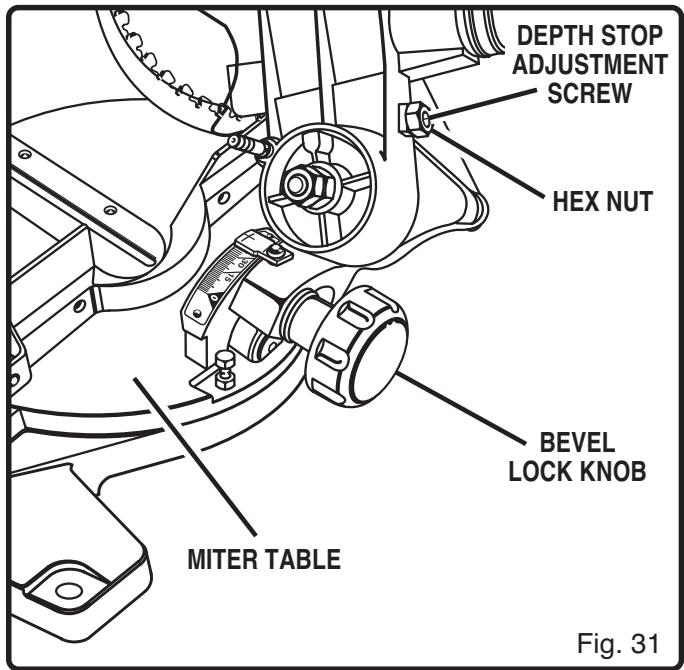
Lower the blade into the throat plate of the miter table. Check blade clearance and maximum cutting distance (distance from fence where blade enters) to front of miter table slot.
Readjust if necessary.

WARNING:
Do not install battery pack or start your compound miter saw without checking for any interference with the blade. If the blade strikes any part of the table or frame, serious injury or damage to the saw could result.
- Tighten the hex nut with a 17mm wrench or adjustable wrench.
To prevent the depth stop adjustment screw from turning while tightening the hex nut, carefully hold it with the hex key while tightening the hex nut.
OPERATION

WARNING:
Always wear safety goggles or safety glasses with side shields when operating tools. Failure to do so could result in objects being thrown into your eyes, resulting in possible serious injury.
After all parts have been assembled properly and adjustments have been made to saw, battery pack can now be attached to saw.
TO INSTALL BATTERY PACK
See Figure 32.
Place battery pack in your saw. Align raised rib on battery pack with groove inside saw.
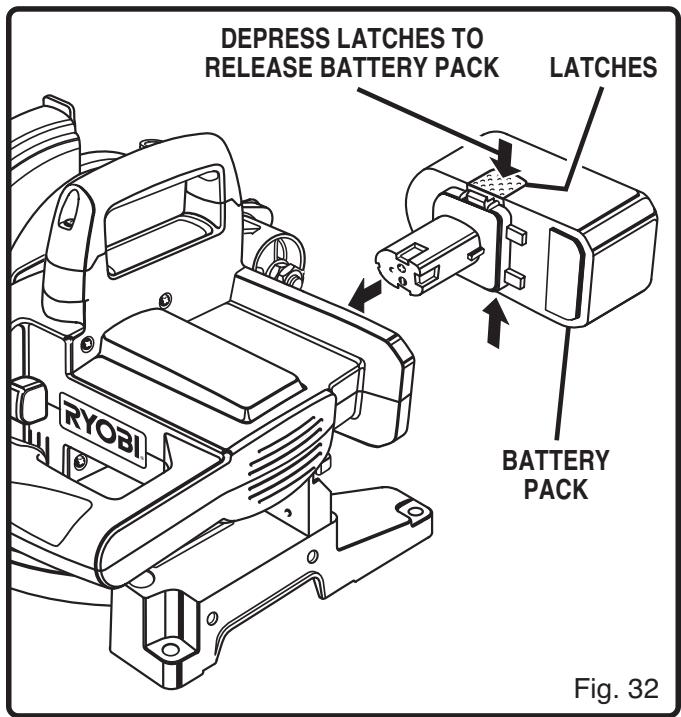
Make sure the latches on each side of your battery pack snap in place and battery pack is secured in saw before beginning operation.

CAUTION:
When placing battery pack in your saw, be sure raised rib on battery pack aligns with groove inside saw and latches snap into place properly. Improper assembly of battery pack can cause damage to internal components.

WARNING:
Remove battery pack from tool when not in use, changing blades, or making adjustments.
TO REMOVE BATTERY PACK
See Figure 32.
- Locate latches on each side of battery pack and depress to release battery pack from your saw.
Remove battery pack from your saw.
APPLICATIONS
(Use only for the purposes listed below)
Cross cutting wood and plastic.
Cross cutting miters, joints, etc. for picture frames, moldings, door casings, and fine joinery.
Note: The carbide tipped blade provided is fine for most wood cutting operations. For fine joinery cuts or cutting plastic, use one of the accessory blades available from your Ryobi dealer.

WARNING:
Before starting any cutting operation, clamp or bolt your compound miter saw to a workbench. Never operate your miter saw on the floor or in a crouched position. Failure to heed this warning can result in serious personal injury.

WARNING:
Do not attempt to operate this tool until you have read thoroughly and understand completely all instructions, safety rules, etc. contained in this manual. Failure to comply can result in accidents involving fire, electric shock, or serious personal injury. Save operator's manual and review frequently for continuing safe operation, and instructing others who may use this tool.
OPERATION
CUTTING WITH YOUR COMPOUND MITER SAW

WARNING:
When using a work clamp or C-clamp to secure your workpiece, clamp workpiece on one side of the blade only. The workpiece must remain free on one side of the blade to prevent the blade from binding in workpiece. The workpiece binding the blade will cause motor stalling and kickback. This situation could cause an accident resulting in possible serious personal injury.
CROSScutTING
See Figure 33.
A crosscut is made by cutting across the grain of the workpiece. A 90^ crosscut is made with the miter table set at the zero degree position. Miter crosscuts are made with the miter table set at some angle other than zero.
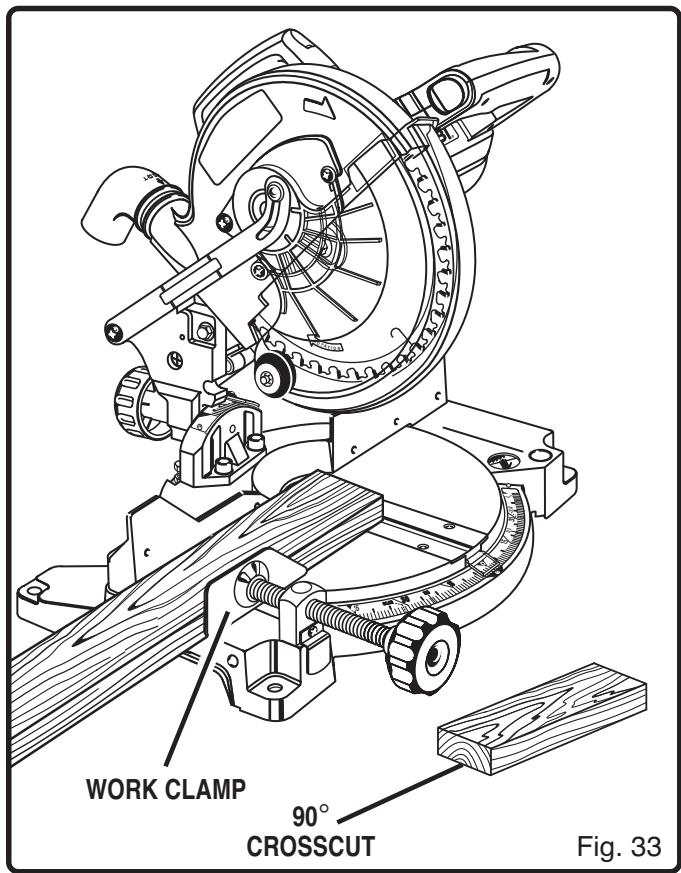
TO CROSScut WITH YOUR MITER SAW:
Pull out the lock pin and lift saw arm to its full height.
Lift the miter table clamp.
- Rotate the miter table until the pointer aligns with the desired angle on the miter scale.
Push the miter table clamp back down.
Note: You can quickly locate 0^ , 22 - 1 / 2^ left or right, 30^ left or right, and 45^ left or right on the scale. The miter table can be seated in one of the detent stop notches, located in the miter table frame.

WARNING:
To avoid serious personal injury, always push the miter table clamp back down before making a cut. Failure to do so could result in movement of the miter table while making a cut.
- Place the workpiece flat on the miter table with one edge securely against the fence. If the board is warped, place the convex side against the fence. If the concave edge of a board is placed against the fence, the board could collapse on the blade at the end of the cut, jamming the blade. See Figures 40 and 41.
- When cutting long pieces of lumber or molding, support the opposite end of the stock with a roller stand or with a work surface level with the saw table.
Align cutting line on the workpiece with the edge of saw blade. - Grasp the stock firmly with one hand and secure it against the fence. Use the work clamp or a C-clamp to secure the workpiece when possible. See Figure 33.

WARNING:
To avoid serious personal injury, keep your hands outside the no hands zone; at least 3 in. (8 cm) from blade. Never perform any cutting operation freehand (without holding workpiece against the fence). The blade could grab the workpiece if it slips or twists.
Before turning on the saw, perform a dry run of the cutting operation just to make sure that no problems will occur when the cut is made.
- Grasp the saw handle firmly, depress the lock-off button, then squeeze the switch trigger. Allow several seconds for the blade to reach maximum speed.
Slowly lower the blade into and through the workpiece. See Figure 33.
- Release the switch trigger and allow the saw blade to stop rotating before raising the blade out of workpiece.
OPERATION
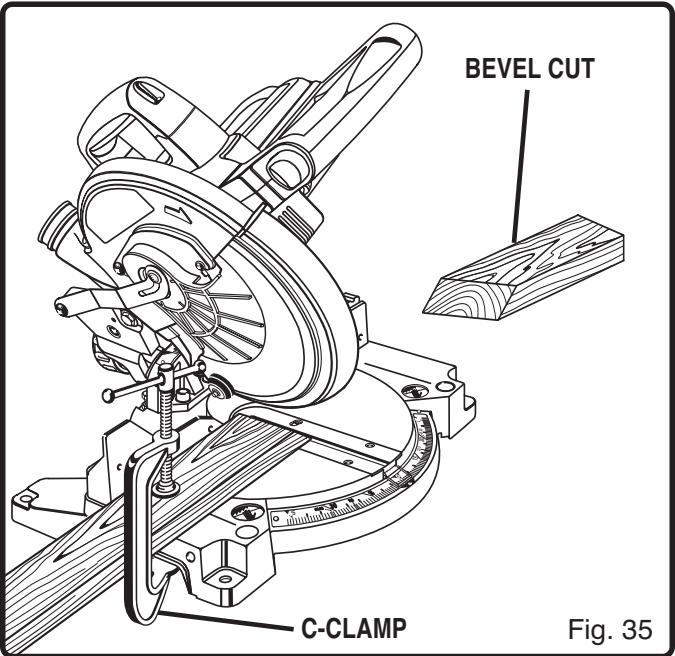
BEVEL CUT
See Figures 34 and 35.
A bevel cut is made by cutting across the grain of the workpiece with the blade angled to the fence and miter table. A bevel cut is made with the miter table set at the zero degree position and the blade set at an angle between 0^ and 45^ .
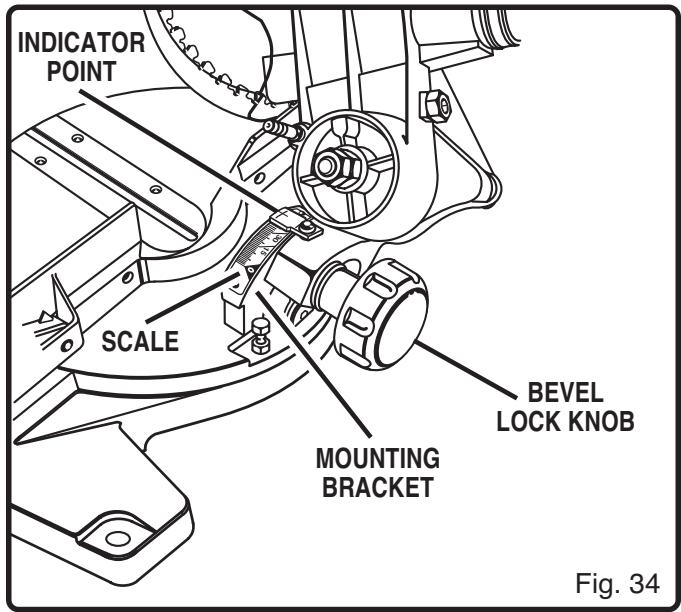
TO BEVEL CUT WITH YOUR MITER SAW:
Pull out the lock pin and lift saw arm to its full height.
Lift the miter table clamp.
Rotate the miter table until the pointer aligns with zero on the miter scale.
Push the miter table clamp back down.
Note: You can quickly locate zero on the scale.
The miter table can be seated in one of the built-in detent stops, located in the miter table frame.

WARNING:
To avoid serious personal injury, always push the miter table clamp back down before making a cut. Failure to do so could result in movement of the miter table while making a cut.
Loosen the bevel lock knob and move the saw arm to the left to the desired bevel angle.
Bevel angles can be set from 0^ to 45^ .
Align the indicator point with the desired angle.
Once the saw arm has been set at the desired angle, securely tighten the bevel lock knob.
- Place the workpiece flat on the miter table with one edge securely against the fence. If the board is warped, place the convex side against the fence. If the concave edge of a board is placed against the fence, the board could collapse on the
blade at the end of the cut, jamming the blade. See Figures 40 and 41.
- When cutting long pieces of lumber or molding, support the overhanging end(s) of the stock with a roller stand or with a work surface level with the saw table.
Align the cutting line on the workpiece with the edge of saw blade. - Grasp the stock firmly with one hand and secure it against the fence. Use the work clamp or a C-clamp to secure the workpiece when possible. See Figure 35.

WARNING:
To avoid serious personal injury, always keep your hands outside the no hands zone; at least 3 in. (8 cm) from blade. Never perform any cutting operation freehand (without holding workpiece against the fence). The blade could grab the workpiece if it slips or twists.
Before turning on the saw, perform a dry run of the cutting operation just to make sure that no problems will occur when the cut is made.
- Grasp the saw handle firmly, depress the lock-off button, then squeeze the switch trigger. Allow several seconds for the blade to reach maximum speed.
Slowly lower the blade into and through the workpiece. See Figure 35.
- Release the switch trigger and allow the saw blade to stop rotating before raising the blade out of workpiece. Wait until the electric brake stops blade from turning before removing the workpiece from miter table.
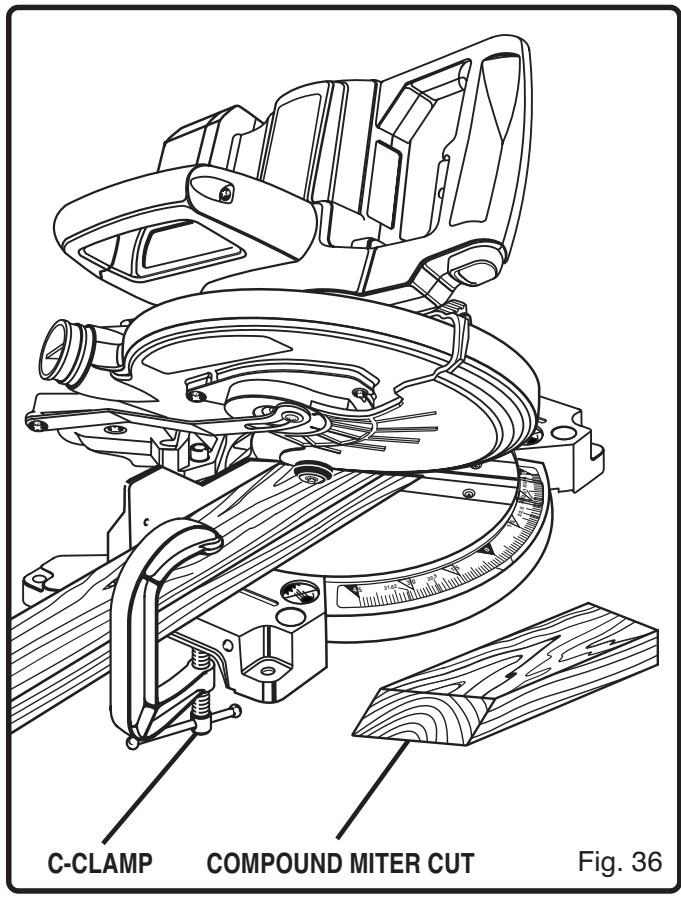
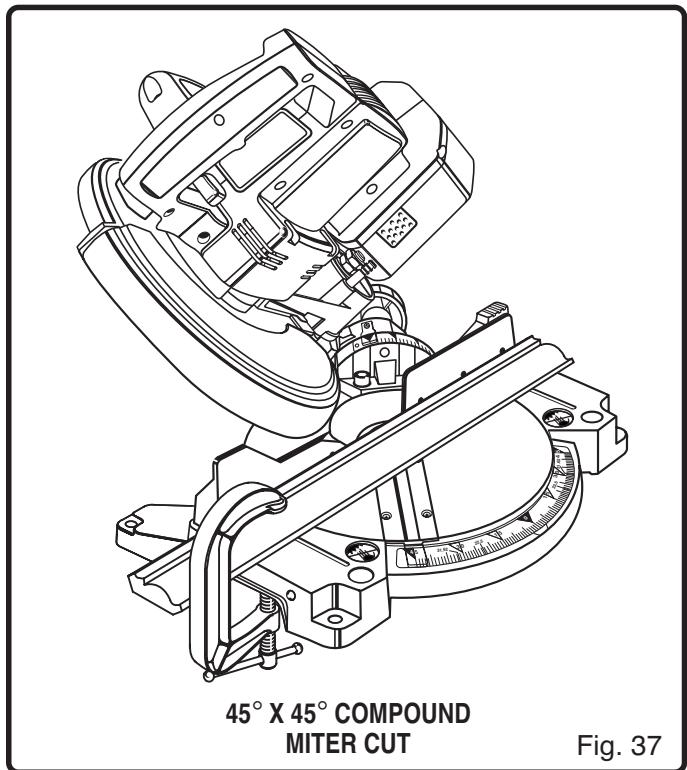
COMPOUND MITER CUT
See Figures 36 and 37.
A compound miter cut is a cut made using a miter angle and a bevel angle at the same time. This type of cut is used to make picture frames, cut molding, make boxes with sloping sides, and for certain roof framing cuts.
To make this type of cut the miter table must be rotated to the correct angle and the saw arm must be tilted to the correct bevel angle. Care should always be taken when making compound miter setups due to the interaction of the two angle settings.
Adjustments of miter and bevel settings are interdependent with one another. Each time you adjust the miter setting you change the effect of the bevel setting. Also, each time you adjust the bevel setting you change the effect of the miter setting.
It may take several settings to obtain the desired cut. The first angle setting should be checked after setting the second angle, since adjusting the second angle affects the first.
Once the two correct settings for a particular cut have been obtained, always make a test cut in scrap material before making a finish cut in good material.
TO MAKE A COMPOUND CUT WITH YOUR MITER SAW:
Pull out the lock pin and lift saw arm to its full height.
Lift the miter table clamp.
- Rotate the miter table until the pointer aligns with the desired angle on the miter scale.
Push the miter table clamp back down.
Note: You can quickly locate 0^ , 22 - 1 / 2^ left or right, 30^ left or right, and 45^ left or right on the scale. The miter table can be seated in one of the detent stop notches, located in the miter table frame.
WARNING:
To avoid serious personal injury, always push the miter table clamp back down before making a cut. Failure to do so could result in movement of the miter table while making a cut.
Loosen the bevel lock knob and move the saw arm to the left to the desired bevel angle.
Bevel angles can be set from 0^ to 45^ .
Align the indicator point with the desired angle.
Once the saw arm has been set at the desired angle, securely tighten the bevel lock knob.
- Recheck miter angle setting. Make a test cut in scrap material.
- Place the workpiece flat on the miter table with one edge securely against the fence. If the board is warped, place the convex side against the fence. If the concave edge of a board is placed against the fence, the board could collapse on the blade at the end of the cut, jamming the blade. See Figures 41 and 42.
- When cutting long pieces of lumber or molding, support the opposite end of the stock with a roller stand or with a work surface level with the saw table.
Align the cutting line on the workpiece with the edge of saw blade.
- Grasp the stock firmly with one hand and secure it against the fence. Use the work clamp or a C-clamp to secure the workpiece when possible. See Figure 36.
WARNING
To avoid serious personal injury, always keep your hands outside the no hands zone; at least 3 in. (8 cm) from blade. Never perform any cutting operation freehand (without holding workpiece against the fence). The blade could grab the workpiece if it slips or twists.
OPERATION
Before turning on the saw, perform a dry run of the cutting operation just to make sure that no problems will occur when the cut is made.
- Grasp the saw handle firmly, depress the lock-off button, then squeeze the switch trigger. Allow several seconds for the blade to reach maximum speed.
Slowly lower the blade into and through the workpiece. See Figures 36 and 37.
■ Release the switch trigger and allow the saw blade to stop rotating before raising the blade out of workpiece.
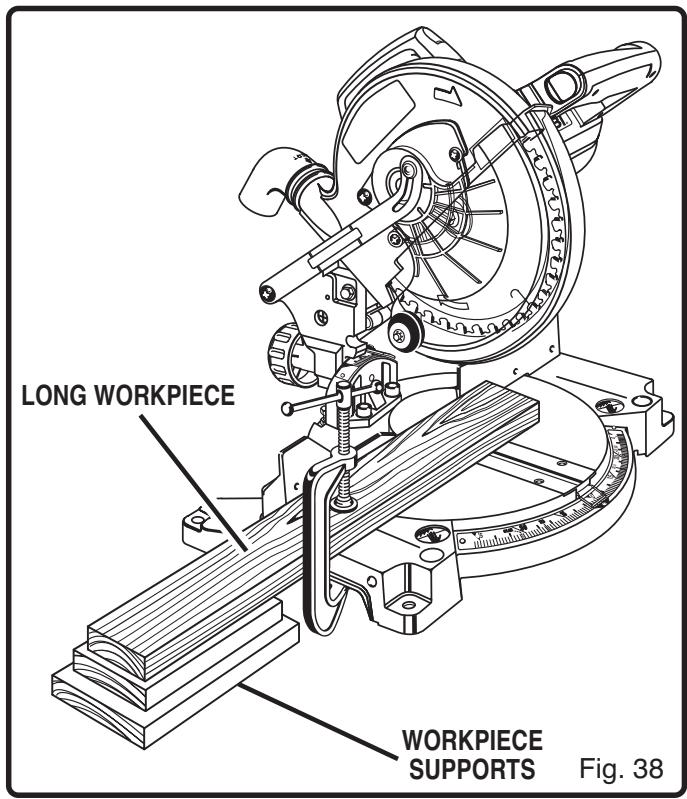
SUPPORT LONG WORKPIECES
See Figure 38.
Long workpieces need extra supports. Supports should be placed along the workpiece so it does not sag. The support should let the workpiece lay flat on the base of the saw and work table during the cutting operation. Use the work clamp or a C-clamp to secure the workpiece.
WARNING:
To avoid serious personal injury, always keep your hands outside the no hands zone; at least 3 in. (8 cm) from blade. Never perform any cutting operation freehand (without holding workpiece against the fence). The blade could grab the workpiece if it slips or twists.
CUTTING COMPOUND MITERS
To aid in making the correct settings, the compound angle setting chart below has been provided. Since compound cuts are the most difficult to accurately obtain, trial cuts should be made in scrap material, and much thought and planning made, prior to making your required cut.
| PITCH OF SIDE | NUMBER OF SIDES | ||||||
| 4 | 5 | 6 | 7 | 8 | 9 | 10 | |
| 0° | M- 45.00°B- 0.00° | M- 36.00°B- 0.00° | M- 30.00°B- 0.00° | M- 25.71°B- 0.00° | M- 22.50°B- 0.00° | M- 20.00°B- 0.00° | M- 18.00°B- 0.00° |
| 5° | M- 44.89°B- 3.53° | M- 35.90°B- 2.94° | M- 29.91°B- 2.50° | M- 25.63°B- 2.17° | M- 22.42°B- 1.91° | M- 19.93°B- 1.71° | M- 17.94°B- 1.54° |
| 10° | M- 44.56°B- 7.05° | M- 35.58°B- 5.86° | M- 29.62°B- 4.98° | M- 25.37°B- 4.32° | M- 22.19°B- 3.81° | M- 19.72°B- 3.40° | M- 17.74°B- 3.08° |
| 15° | M- 44.01°B- 10.55° | M- 35.06°B- 8.75° | M- 29.15°B- 7.44° | M- 24.95°B- 6.45° | M- 21.81°B- 5.68° | M- 19.37°B- 5.08° | M- 17.42°B- 4.59° |
| 20° | M- 43.22°B- 14.00° | M- 34.32°B- 11.60° | M- 28.48°B- 9.85° | M- 24.35°B- 8.53° | M- 21.27°B- 7.52° | M- 18.88°B- 6.72° | M- 16.98°B- 6.07° |
| 25° | M- 42.19°B- 17.39° | M- 33.36°B- 14.38° | M- 27.62°B- 12.20° | M- 23.56°B- 10.57° | M- 20.58°B- 9.31° | M- 18.26°B- 8.31° | M- 16.41°B- 7.50° |
| 30° | M- 40.89°B- 20.70° | M- 32.18°B- 17.09° | M- 26.57°B- 14.48° | M- 22.64°B- 12.53° | M- 19.73°B- 11.03° | M- 17.50°B- 9.85° | M- 15.72°B- 8.89° |
| 35° | M- 39.32°B- 23.93° | M- 30.76°B- 19.70° | M- 25.31°B- 16.67° | M- 21.53°B- 14.41° | M- 18.74°B- 12.68° | M- 16.60°B- 11.31° | M- 14.90°B- 10.21° |
| 40° | M- 37.45°B- 27.03° | M- 29.10°B- 22.20° | M- 23.86°B- 18.75° | M- 20.25°B- 16.19° | M- 17.60°B- 14.24° | M- 15.58°B- 12.70° | M- 13.98°B- 11.46° |
| 45° | M- 35.26°B- 30.00° | M- 27.19°B- 24.56° | M- 22.21°B- 20.70° | M- 18.80°B- 17.87° | M- 16.32°B- 15.70° | M- 14.43°B- 14.00° | M- 12.94°B- 12.62° |
| 50° | M- 32.73°B- 32.80° | M- 25.03°B- 26.76° | M- 20.36°B- 22.52° | M- 17.20°B- 19.41° | M- 14.91°B- 17.05° | M- 13.17°B- 15.19° | M- 11.80°B- 13.69° |
| 55° | M- 29.84°B- 35.40° | M- 22.62°B- 28.78° | M- 18.32°B- 24.18° | M- 15.44°B- 20.82° | M- 13.36°B- 18.27° | M- 11.79°B- 16.27° | M- 10.56°B- 14.66° |
| 60° | M- 26.57°B- 37.76° | M- 19.96°B- 30.60° | M- 16.10°B- 25.66° | M- 13.54°B- 22.07° | M- 11.70°B- 19.35° | M- 10.31°B- 17.23° | M- 9.23°B- 15.52° |
| 65° | M- 22.91°B- 39.86° | M- 17.07°B- 32.19° | M- 13.71°B- 26.95° | M- 11.50°B- 23.16° | M- 9.93°B- 20.29° | M- 8.74°B- 18.06° | M- 7.82°B- 16.26° |
| 70° | M- 18.88°B- 41.64° | M- 13.95°B- 33.53° | M- 11.17°B- 28.02° | M- 9.35°B- 24.06° | M- 8.06°B- 21.08° | M- 7.10°B- 18.75° | M- 6.34°B- 16.88° |
| 75° | M- 14.51°B- 43.08° | M- 10.65°B- 34.59° | M- 8.50°B- 28.88° | M- 7.10°B- 24.78° | M- 6.12°B- 21.69° | M- 5.38°B- 19.29° | M- 4.81°B- 17.37° |
| 80° | M- 9.85°B- 44.14° | M- 7.19°B- 35.37° | M- 5.73°B- 29.50° | M- 4.78°B- 25.30° | M- 4.11°B- 22.14° | M- 3.62°B- 19.68° | M- 3.23°B- 17.72° |
| 85° | M- 4.98°B- 44.78° | M- 3.62°B- 35.84° | M- 2.88°B- 29.87° | M- 2.40°B- 25.61° | M- 2.07°B- 22.41° | M- 1.82°B- 19.92° | M- 1.62°B- 17.93° |
| 90° | M- 0.00°B- 45.00° | M- 0.00°B- 36.00° | M- 0.00°B- 30.00° | M- 0.00°B- 25.71° | M- 0.00°B- 22.50° | M- 0.00°B- 20.00° | M- 0.00°B- 18.00° |
Each B (Bevel) and M (Miter) Setting is Given to the Closet 0.005^ . COMPOUND-ANGLE SETTINGS FOR POPULAR STRUCTURES
OPERATION
CUTTING CROWN MOLDING
Your compound miter saw does an excellent job of cutting crown molding. In general, compound miter saws do a better job of cutting crown molding than any other tool made.
In order to fit properly, crown molding must be compound mitered with extreme accuracy.
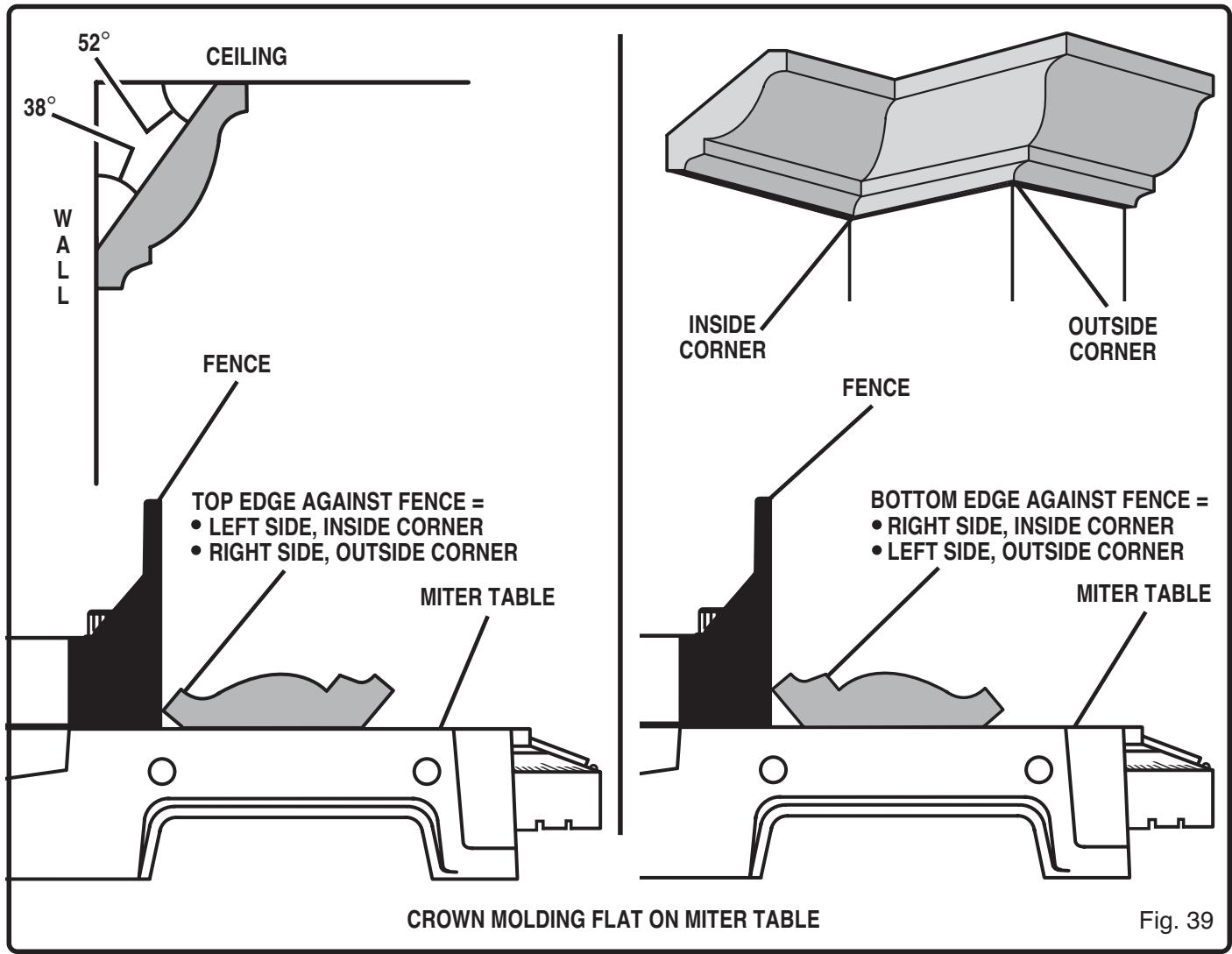
The two contact surfaces on a piece of crown molding that fit flat against the ceiling and the wall of a room are at angles that, when added together, equal exactly 90^ . Most crown molding has a top rear angle (the section that fits flat against the ceiling) of 52^ and a bottom rear angle (the section that fits flat against the wall) of 38^ .
LAYING MOLDING FLAT ON THE MITER TABLE
See Figure 39.
To use this method for accurately cutting crown molding for a 90^ inside or outside corner, lay the molding with its broad back surface flat on the miter table and against the fence.
When setting the bevel and miter angles for compound miters, remember that the settings are interdependent; changing one angle changes the other angle as well.
Keep in mind that the angles for crown moldings are very precise and difficult to set. Since it is very easy for these angles to shift, all settings should first be tested on scrap molding. Also, most walls do not have angles of exactly 90^ , therefore, you will need to fine tune your settings.
OPERATION
When cutting crown molding by this method the bevel angle should be set at 33.85^ . The miter angle should be set at 31.62^ either right or left, depending on the desired cut for the application. See the chart below for correct angle settings and correct positioning of crown molding on miter table.
The settings in the chart below can be used for cutting All Standard (U.S.) crown molding with 52^ and 38^ angles. The crown molding is placed flat on the miter table using the compound features of your miter saw.
| Bevel Angle Setting | Type of Cut |
| 33.85° | Left side, inside corner 1. Top edge of molding against fence 2. Miter table set right 31.62° 3. Save left end of cut |
| 33.85° | Right side, inside corner 1. Bottom edge of molding against fence 2. Miter table set left 31.62° 3. Save left end of cut |
| 33.85° | Left side, outside corner 1. Bottom edge of molding against fence 2. Miter table set left 31.62° 3. Save right end of cut |
| 33.85° | Right side, outside corner 1. Top edge of molding against fence 2. Miter table set right 31.62° 3. Save right end of cut |
CUTTING WARPED MATERIAL
See Figures 40 and 41.
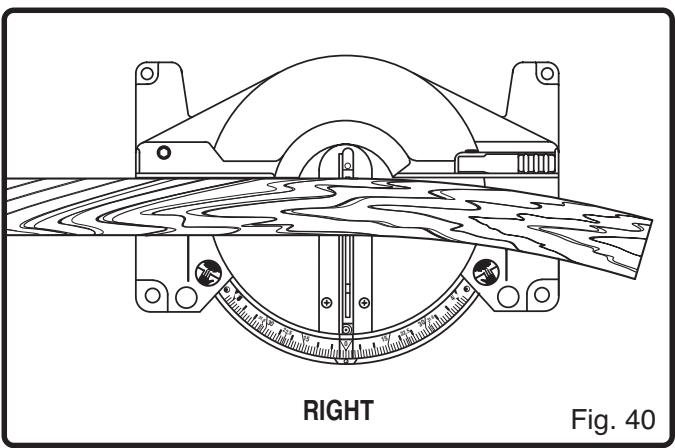
When cutting warped material, always make sure it is positioned on the miter table with the convex side against the fence as shown in figure 40.
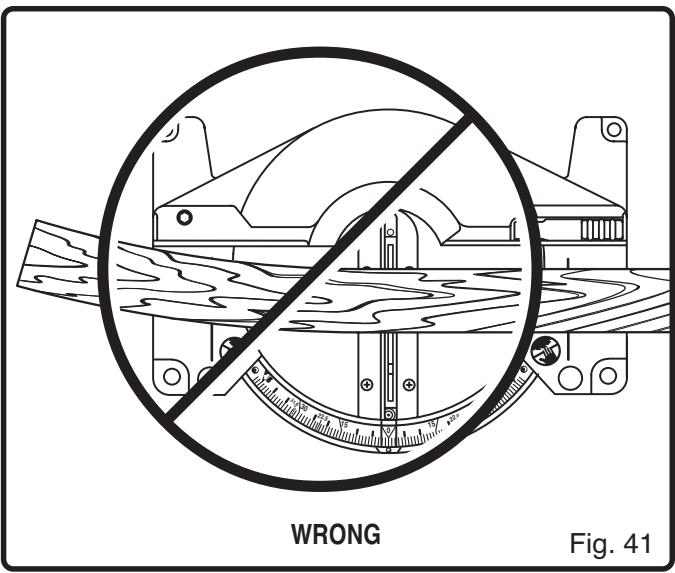
If the warped material is positioned the wrong way as shown in figure 41, it will pinch the blade near the completion of the cut.

WARNING:
To avoid a kickback and to avoid serious personal injury, never position the concave edge of bowed or warped material against the fence.

WARNING:
When servicing, use only identical Ryobi replacement parts. Use of any other part may create a hazard, cause product damage or create a risk of serious personal injury.
Avoid using solvents when cleaning plastic parts. Most plastics are susceptible to damage from various types of commercial solvents and may be damaged by their use. Use clean cloths to remove dirt, dust, oil, grease, etc.

WARNING:
Do not at any time let brake fluids, gasoline, petroleum-based products, penetrating oils, etc. come in contact with plastic parts. They contain chemicals that can damage, weaken or destroy plastic and create a risk of serious personal injury.
Do not abuse power tools. Abusive practices can damage tool as well as workpiece.

WARNING:
Do not attempt to modify this tool or create accessories not recommended for use with this tool. Any such alteration or modification is misuse and could result in a hazardous condition leading to possible serious personal injury.
IMPORTANT
Servicing requires extreme care and knowledge of the system and should be performed only by a qualified service technician. For service we suggest you return the tool to your nearest RYOBI AUTHORIZATION SERVICE CENTER for repair. Always use original factory replacement parts when servicing.
BATTERIES
The battery pack for this saw is equipped with 15 nickel-cadmium rechargeable battery cells. Length of service from each charging will depend on the type of work you are doing.
The battery cells have been designed to provide maximum trouble free life. However, like all batteries, they will eventually wear out. Do not disassemble battery pack and attempt to replace the battery cells. Handling of these batteries, especially when wearing rings and jewelry, could result in a serious burn and possible explosion.
To obtain the longest possible battery life, we suggest the following:
Store and charge your battery pack in a cool area. Temperatures above or below normal room temperature will shorten battery life.
- Never store battery pack in a discharged condition. Recharge them immediately after they are discharged.
All batteries gradually lose their charge. The higher the temperature the quicker they lose their charge. If you store your tool for long periods of time without using it, recharge the batteries every month or two. This practice will prolong battery life.

To preserve natural resources, please recycle or dispose of batteries properly.
This product contains nickel-cadmium batteries. Local, state or federal laws may prohibit disposal of nickel-cadmium batteries in ordinary trash.
Consult your local waste authority for information regarding available recycling and/or disposal options.
BATTERY PACK REMOVAL AND PREPARATION FOR RECYCLING

WARNING:
Upon removal, cover the battery pack's terminals with heavy duty adhesive tape. Do not attempt to destroy or disassemble battery pack or remove any of its components. Nickel-cadmium batteries must be recycled or disposed of properly. Also, never touch both terminals with metal objects and/or body parts as short circuit may result. Keep away from children. Failure to comply with these warnings could result in fire and/or serious injury.
OPERATOR'S MANUAL 8-1/4 in. (209.6 mm) Cordless Compound Miter Saw Model MS181
- SERVICE
Now that you have purchased your tool, should a need ever exist for repair parts or service, simply contact your nearest Ryobi Authorized Service Center. Be sure to provide all pertinent facts when you call or visit. Please call 1-800-525-2579 for your nearest Ryobi Authorized Service Center. You can also check our web site at www.ryobitools.com for a complete list of Authorized Service Centers.
- MODEL NO. AND SERIAL NO.
The model number of this tool will be found on a plate attached to the motor housing. Please record the serial number in the space provided below.
HOW TO ORDER REPAIR PARTS
WHEN ORDERING REPAIR PARTS, ALWAYS GIVE THE FOLLOWING INFORMATION:
- MODEL NUMBER MS181
- SERIAL NUMBER