TLR-090A - Laser level Ozito - Free user manual and instructions
Find the device manual for free TLR-090A Ozito in PDF.


| Product Type | Laser Level |
| Brand | Ozito |
| Model | TLR-090A |
| Laser Class | Class 2 |
| Laser Diode | 650 nm |
| Accuracy | ±3 mm at 10 m |
| Working Range | Up to 20 m |
| Self-Leveling | No (manual leveling) |
| Power Source | 2 x AA batteries (not included) |
| Operating Time | Up to 20 hours |
| Tripod Mount | 1/4" thread |
| Material | Plastic |
| Dimensions | Approx. 10 x 10 x 10 cm |
| Weight | Approx. 0.3 kg |
| Included Accessories | Laser level, user manual |
| Safety | Avoid direct eye exposure; do not dismantle |
| Cleaning | Wipe with a dry, soft cloth |
| Storage | Store in a dry, cool place |
Frequently Asked Questions - TLR-090A Ozito
User questions about TLR-090A Ozito
0 question about this device. Answer the ones you know or ask your own.
Ask a new question about this device
Download the instructions for your Laser level in PDF format for free! Find your manual TLR-090A - Ozito and take your electronic device back in hand. On this page are published all the documents necessary for the use of your device. TLR-090A by Ozito.
USER MANUAL TLR-090A Ozito
Power: 4.5V DC (3 x AA Batteries)
Laser Wavelength: 635nm
Laser Power: Class II, ,1mW
Working Range: 7m
Accuracy: ±0.5mm/m
Weight: 0.355kg
ozito.com.au
natural_image
Simple line drawings of a circle and three batteries (no text or symbols)Wall Mounting Plate, 3 x AA Batteries
3 YEAR REPLACEMENT WARRANTY
TLR-090A
WARRANTY
IN ORDER TO MAKE A CLAIM UNDER THIS WARRANTY YOU MUST RETURN THE PRODUCT TO YOUR NEAREST BUNNINGS WAREHOUSE WITH YOUR BUNNINGS REGISTER RECEIPT. PRIOR TO RETURNING YOUR PRODUCT FOR WARRANTY PLEASE TELEPHONE OUR CUSTOMER SERVICE HELPLINE:
Australia 1800 069 486
New Zealand 0508 069 486
TO ENSURE A SPEEDY RESPONSE PLEASE HAVE THE MODEL NUMBER AND DATE OF PURCHASE AVAILABLE. A CUSTOMER SERVICE REPRESENTATIVE WILL TAKE YOUR CALL AND ANSWER ANY QUESTIONS YOU MAY HAVE RELATING TO THE WARRANTY POLICY OR PROCEDURE.
The benefits provided under this warranty are in addition to other rights and remedies which are available to you at law.
Our goods come with guarantees that cannot be excluded at law. You are entitled to a replacement or refund for a major failure and for compensation for any other reasonably foreseeable loss or damage. You are also entitled to have the goods repaired or replaced if the goods fail to be of acceptable quality and the failure does not amount to a major failure.
Generally you will be responsible for all costs associated with a claim under this warranty, however, where you have suffered any additional direct loss as a result of a defective product you may be able to claim such expenses by contacting our customer service helpline above.
3 YEAR REPLACEMENT WARRANTY
Your product is guaranteed for a period of 36 months from the original date of purchase. If a product is defective it will be replaced in accordance with the terms of this warranty. Warranty excludes consumable parts, for example: valve adapters and accessories.
WARNING
The following actions will result in the warranty being void.
- If the tool has been operated on a supply voltage other than that specified on the tool.
- If the tool shows signs of damage or defects caused by or resulting from abuse, accidents or alterations.
- Failure to perform maintenance as set out within the instruction manual.
- If the tool is disassembled or tampered with in any way.
• Professional, industrial or high frequency use.
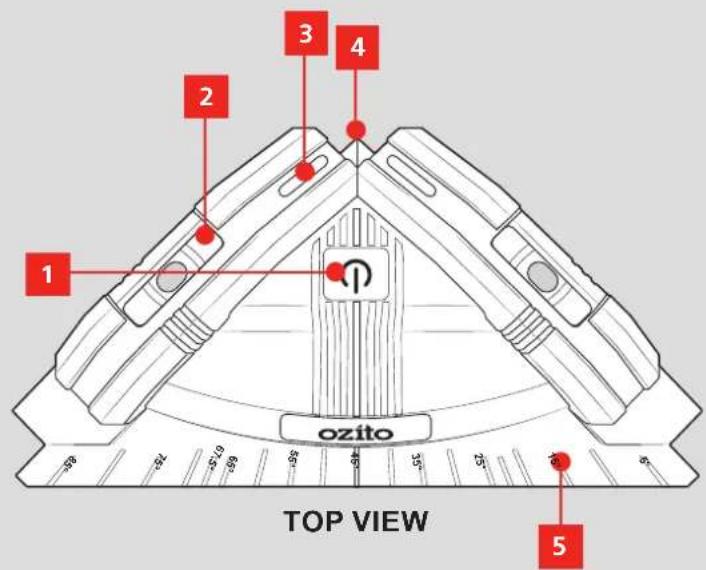
KNOW YOUR PRODUCT
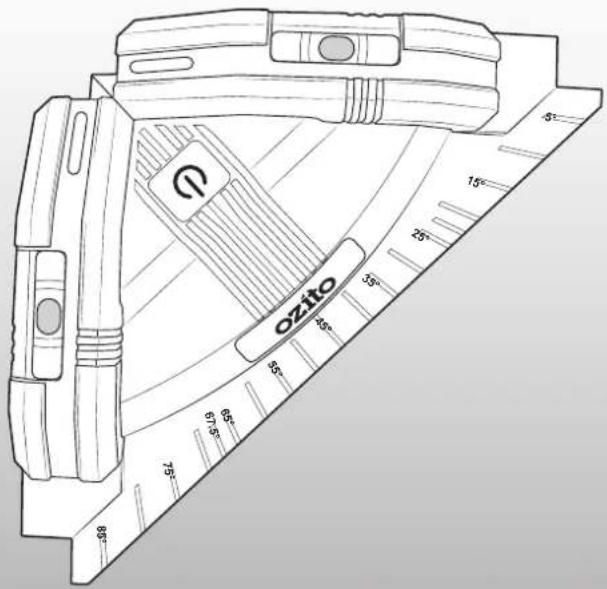
90° TILE LASER
-
On/Off Button
-
Angle Scale
-
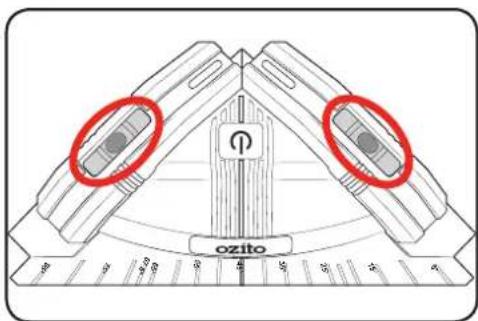
Spirit Levels
-
Wall Mounting Plate
-
90° Line Lasers
-
Battery Compartment
-
Angle Reference Point
-
Magnetic Base
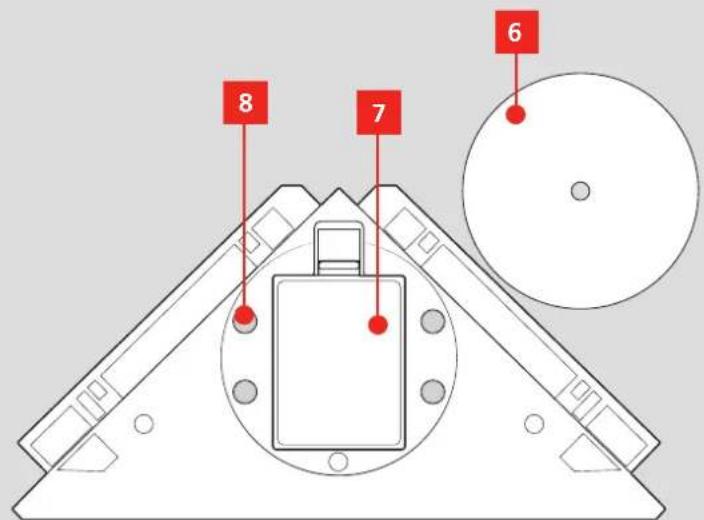
BOTTOM VIEW
ONLINE MANUAL
Scan this QR Code with your mobile device to take you to the online manual.

SETUP & PREPARATION
1. INSTALLING BATTERIES
The tool requires 3 AA batteries to operate.
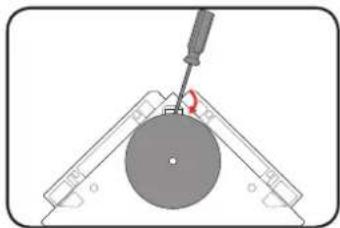
- Remove the metal wall mounting plate if it is attached.
Note: The magnets on the base of the tool are quite strong. Use a flat screwdriver to lift the plate off the tile laser if necessary.
-
Push in the tab and lift off the battery compartment lid.
-
Insert 3 AA batteries as directed by the embossing in the compartment.
-
Replace the battery compartment lid by sliding the lower tabs into the recess and pressing the top half of the lid into place.
natural_image
Diagram of a mechanical device with a circular component and a tool, no visible text or symbols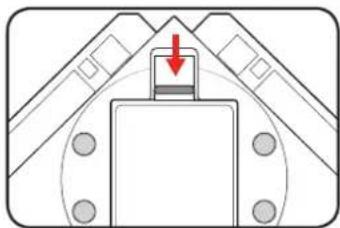
natural_image
Diagram of a tunnel entrance with a red arrow indicating direction, no text or symbols present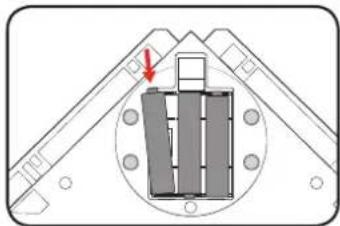
natural_image
Diagram of a mechanical assembly with a central component and directional arrows, no readable text or symbols present.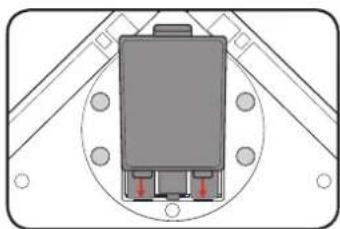
natural_image
Diagram of a mechanical or electrical component with mounting holes and a central connector (no text or symbols)OPERATION
2. USING THE WALL MOUNT 3. CONTRO
Installing The Wall Mounting Plate On A Wall
-
Remove the wall mounting plate from the tool.
-
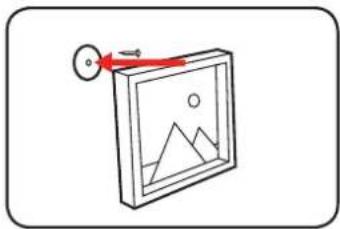
Attach the mounting bracket to a wall using a screw or nail (not included). Be sure that the head of the nail or screw fits into the sunken recessed side of the plate so that the magnets on the tool can connect firmly.
-
Place the base of the tile laser onto the mounting plate.
-
Using the spirit levels as a guide, rotate the tile laser on the mounting plate until it is fully level.
Attaching The Tile Laser To A Metal Surface
The magnets on the base of the tool can also be attached directly to a metal surface.
natural_image
Simple line drawing of a framed picture frame with mountain and sun motifs, no text or symbols present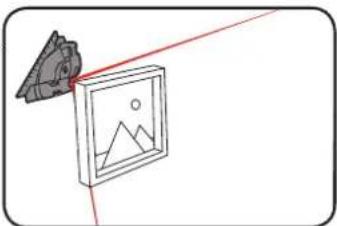
natural_image
Simple line drawing of a camera with red laser lines projecting a landscape image (no text or symbols)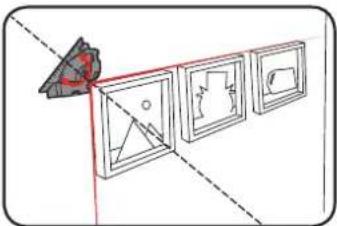
natural_image
Diagram showing a geometric setup with three framed artworks and a red arrow pointing to a triangular object (no text or symbols)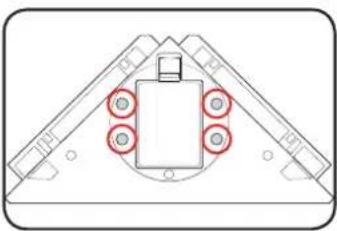
natural_image
Diagram of a mechanical assembly with four circular components and a central rectangular block (no text or symbols)S

WARNING! ENSURE THE LASER WINDOWS ARE NOT AT EYE LEVEL OR DIRECTED TOWARDS YOURSELF OR OTHERS WHEN OPERATING.
Switching The Tool On/Off
- Press the on/off button once to turn the unit on.
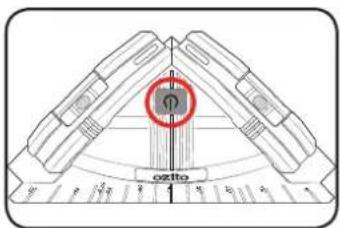
- Press the button again to turn the lasers off.
Spirit Levels
The tile laser also has 2 perpendicular spirit levels to ensure the tool is perfectly horizontal or vertical during installation and use.
4. OPERATING MODES 5. TROUBLESHO
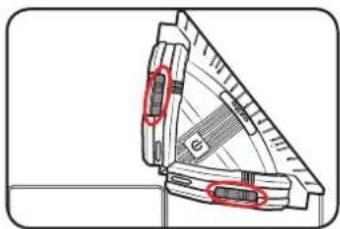
Using The 90° Alignment
-
Position the tile laser against the surface in the desired location.
-
Use the spirit levels to check that the tool is perfectly level.
-
Press the on/off switch to project the laser lines.
natural_image
Technical line drawing of a mechanical part with red annotations highlighting features (no text or symbols present)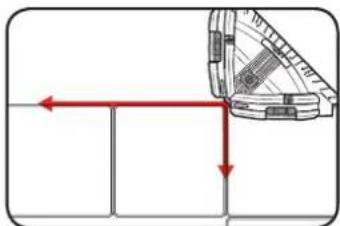
natural_image
Diagram showing a mechanical component with red arrows indicating direction, no text or symbols presentUsing The Tile Laser For Other Angles
-
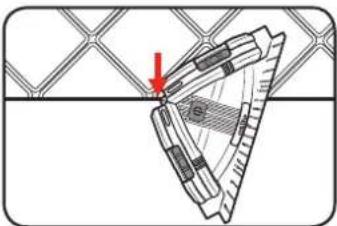
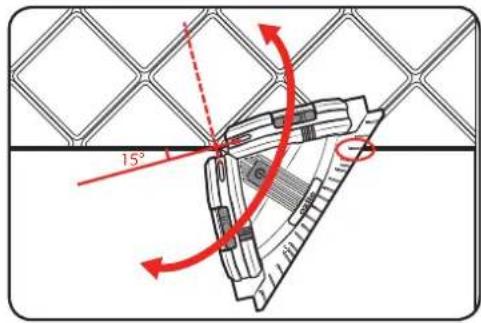
Align the angle reference point with the edge of a tile or horizontal line.
-
Using the reference point as a pivot, rotate the laser until the horizontal line/edge is aligned with the desired angle on the scale.
natural_image
Diagram of a mechanical component with a red arrow indicating direction, no visible text or symbols- Press the on/off switch to project the laser lines. The laser line will then be at the indicated angle beneath the horizontal.
TING
Laser does not turn on
Ensure that the batteries have been inserted in the correct direction within the compartment.
The batteries may be depleted. Replace the batteries with new ones and see if the tool will turn on.
The laser line is very small
The back of the laser unit must be placed against a flat surface for the laser line to project along the plane.
MAINTENANCE DESCRIPTION OF
SYMBOLS

WARNING! BEFORE CLEANING OR CARRYING OUT ANY MAINTENANCE PROCEDURE, MAKE SURE THAT THE POWER SUPPLY IS REMOVED TO PREVENT ACCIDENTAL STARTING.
Cleaning
- We recommend that you clean the appliance immediately after you use it.
- Use a dry cloth to clean the housing. Do not use cleaning agents or solvents; these may be aggressive to the plastic parts in the appliance. Ensure that no water can get into the interior of the appliance.
Storage
Store the tool in a dry location which is not accessible to unauthorised persons.
Do not store the tool underneath other objects, haphazardly in a drawer or similar where it may be turned on accidentally.
Remove batteries before long term storage.
Lasers
The laser LEDs are not replaceable.
Note: Ozito Industries will not be responsible for any damage or injuries caused by the repair of the tool by an unauthorised person or by mishandling of the tool.
| V | Volts | L/s | Litres per second | |
| mbar | Millibar |  | Indoor use only | |
 | Regulatory Compliance Mark (RCM) |  | Warning | |
 | Read Instruction Manual |  | Laser light radiation | |
CARING FOR THE ENVIRONMENT
Power tools that are no longer usable should not be disposed of with household waste but in an environmentally friendly way. Please recycle where facilities exist. Check with your local council authority for recycling advice.

Recycling packaging reduces the need for landfill and raw materials. Reuse of recycled material decreases pollution in the environment. Please recycle packaging where facilities exist. Check with your local council authority for recycling advice.
SPARE PARTS
Spare parts can be ordered from the Special Orders Desk at your local Bunnings Warehouse.
For further information, or any parts not listed here, visit www.ozito.com.au or contact Ozito Customer Service:
Australia 1800 069 486
New Zealand 0508 069 486
E-mail: enquiries@ozito.com.au

ELECTRICAL SAFETY

WARNING! When using mains-powered tools, basic safety precautions, including the following, should always be followed to reduce risk of fire, electric shock, personal injury and material damage.
Read the whole manual carefully and make sure you know how to switch the tool off in an emergency, before operating the tool.
Save these instructions and other documents supplied with this tool for future reference.

GENERAL POWER TOOL SAFETY WARNINGS

WARNING! Read all safety warnings and all instructions. Failure to follow the warnings and instructions may result in electric shock, fire and/or serious injury. Save all warnings and instructions for future reference. The term "power tool" in the warnings
refers to your mains-operated (corded) power tool or battery-operated (cordless) power tool.
- Work area safety
a. Keep work area clean and well lit. Cluttered or dark areas invite accidents.
b. Do not operate power tools in explosive atmospheres, such as in the presence of flammable liquids, gases or dust. Power tools create sparks which may ignite the dust or fumes.
c. Keep children and bystanders away while operating a power tool. Distractions can cause you to lose control.
- Electrical safety
a. Power tool plugs must match the outlet. Never modify the plug in any way. Do not use any adapter plugs with earthed (grounded) power tools. Unmodified plugs and matching outlets will reduce risk of electric shock.
b. Avoid body contact with earthed or grounded surfaces, such as pipes, radiators, ranges and refrigerators. There is an increased risk of electric shock if your body is earthed or grounded.
c. Do not expose power tools to rain or wet conditions. Water entering a power tool will increase the risk of electric shock.
d. Do not abuse the cord. Never use the cord for carrying, pulling or unplugging the power tool. Keep cord away from heat, oil, sharp edges or moving parts. Damaged or entangled cords increase the risk of electric shock.
e. When operating a power tool outdoors, use an extension cord suitable for outdoor use. Use of a cord suitable for outdoor use reduces the risk of electric shock.
- Personal safety
a. Stay alert, watch what you are doing and use common sense when operating a power tool. Do not use a power tool while you are tired or under the influence of drugs, alcohol or medication. A moment of inattention while operating power tools may result in serious personal injury.
b. Use personal protective equipment. Always wear eye protection. Protective equipment such as dust mask, non-skid safety shoes, hard hat, or hearing protection used for appropriate conditions will reduce personal injuries.
c. Prevent unintentional starting. Ensure the switch is in the off-position before connecting to power source and/or battery pack, picking up or carrying the tool. Carrying power tools with your finger on the switch or energising power tools that have the switch on invites accidents.
d. Remove any adjusting key or wrench before turning the power tool on. A wrench or a key left attached to a rotating part of the power tool may result in personal injury.
e. Do not overreach. Keep proper footing and balance at all times. This enables better control of the power tool in unexpected situations.
f. Dress properly. Do not wear loose clothing or jewellery. Keep your hair, clothing and gloves away from moving parts. Loose clothes, jewellery or long hair can be caught in moving parts.
g. If devices are provided for the connection of dust extraction and collection facilities, ensure these are connected and properly used. Use of dust collection can reduce dust-related hazards.
h. Do not let familiarity gained from frequent use of tools allow you to become complacent and ignore tool safety principles. A careless action can cause severe injury within a fraction of a second.
4. Power tool use and care
a. Do not force the power tool. Use the correct power tool for your application. The correct power tool will do the job better and safer at the rate for which it was designed.
b. Do not use the power tool if the switch does not turn it on and off. Any power tool that cannot be controlled with the switch is dangerous and must be repaired.
c. Disconnect the plug from the power source and/or the battery pack from the power tool before making any adjustments, changing accessories, or storing power tools. Such preventive safety measures reduce the risk of starting the power tool accidentally.
d. Store idle power tools out of the reach of children and do not allow persons unfamiliar with the power tool or these instructions to operate the power tool. Power tools are dangerous in the hands of untrained users.
e. Maintain power tools. Check for misalignment or binding of moving parts, breakage of parts and any other condition that may affect the power tool's operation. If damaged, have the power tool repaired before use. Many accidents are caused by poorly maintained power tools.
f. Keep cutting tools sharp and clean. Properly maintained cutting tools with sharp cutting edges are less likely to bind and are easier to control.
g. Use the power tool, accessories and tool bits etc. in accordance with these instructions, taking into account the working conditions and the work to be performed. Use of the power tool for operations different from those intended could result in a hazardous situation.
h. Keep handles and grasping surfaces dry, clean and free from oil and grease. Slippery handles and grasping surfaces do not allow for safe handling and control of the tool in unexpected situations.
5. Service
a. Have your power tool serviced by a qualified repair person using only identical replacement parts. This will ensure that the safety of the power tool is maintained.

BATTERY & TILE LASER SAFETY WARNINGS

WARNING! The appliance is not to be used by persons (including children) with reduced physical, sensory or mental capabilities, or lack of experience and knowledge, unless they have been given supervision or instruction.
Young children should be supervised to ensure that they do not play with the appliance.
- DO NOT store or use the tool and battery pack in locations where the temperature may reach or exceed 40°C (such as inside sheds or metal buildings in summer).
- Do not incinerate the battery pack even if it is seriously damaged or is completely worn out. The battery can explode in a fire.
- Do not use tool in wet conditions.
Additional safety instructions for laser lights
- The laser light/laser radiation used in this laser unit is Class 2 with maximum 1mW and 650nm wavelengths. These lasers do not normally present an optical hazard, although staring at the beam may cause flash blindness.

WARNING! Do not stare directly at the laser beam. A hazard may exist if you deliberately stare into the beam. Please observe all safety rules as follows:
- The laser shall be used and maintained in accordance with the manufacturer's instructions.
- Never aim the beam at any person or an object other than the work piece.
• The laser beam shall not be deliberately aimed at personnel and shall be prevented from being directed towards the eye of a person for longer than 0.25s.
- Always ensure the laser beam is aimed at a sturdy work piece without reflective surface, i.e. wood or rough coated surfaces are acceptable. Bright shiny reflective sheet steel or the like is not suitable for laser use as the reflective surface could direct the beam back at the operator.
- Do not change the laser light assembly with a different type.

WARNING! Use of controls or adjustments or performance of procedures other than those specified herein may result in hazardous radiation exposure. Please refer to the relevant Australian standards AS/NZS 60825 for more information on lasers.