SDI-HDSDXPRO - Audio / Video KanexPro - Free user manual and instructions
Find the device manual for free SDI-HDSDXPRO KanexPro in PDF.


| Product Type | HDMI to 3G-SDI Converter |
| Brand | KanexPro |
| Model | SDI-HDSDXPRO |
| Input | 1 x HDMI (Type A, 19-pin female) |
| Output | 2 x BNC (SDI), 3G/HD/SD-SDI |
| Video Resolutions Supported | SD: 720x480i (NTSC), 720x576i (PAL); HD: 720p, 1080i, 1080p (24/25/30); 3G: 1080p (50/60); 2K: 2048x1080p (24/30) |
| Audio Support | 2-channel stereo, auto re-sample to 48 kHz |
| SDI Standards | SD-SDI (SMPTE 259M), HD-SDI (SMPTE 292M), 3G-SDI (SMPTE 424M/425M) |
| Transmission Distance (RG6) | 3G: up to 100 m, HD: up to 170 m, SD: up to 400 m |
| EDID Learning | Yes, via DIP switch |
| Firmware Update | Via Micro-USB port, field-upgradable |
| Housing Material | SECC (galvanized steel) |
| Dimensions (L x W x H) | 104 mm x 63.3 mm x 26 mm |
| Power Supply | AC 100-240 V to DC +6~15 V adapter included |
| Operating Temperature | 0°C to 50°C |
| Storage Temperature | -20°C to 60°C |
| Warranty | 3 years limited warranty |
Frequently Asked Questions - SDI-HDSDXPRO KanexPro
User questions about SDI-HDSDXPRO KanexPro
0 question about this device. Answer the ones you know or ask your own.
Ask a new question about this device
Download the instructions for your Audio / Video in PDF format for free! Find your manual SDI-HDSDXPRO - KanexPro and take your electronic device back in hand. On this page are published all the documents necessary for the use of your device. SDI-HDSDXPRO by KanexPro.
USER MANUAL SDI-HDSDXPRO KanexPro
The KanexPro next generation of HDMI to SDI converters are designed for converting single –HDMI signal into two 3G-SDI, HD-SDI signals in professional applications involving broadcasting, post –production and filming. It auto detects input signals converting the output resolution to correct format.
Features
- Get the supreme quality HDMI conversion to HD-SDI
- SDI loop output for duplication or broadcasting
• Built-in re-clocking & equalization
• Supports 2 channel audio @48KHz
• Supports multiple video resolutions:
• SDI 525i, 625i • HD: 720p 24, 25,30,50 & 60 Hz
• HD: 1080i 50 & 60 Hz.
• HD: 1080p 24, 25,30, 50 & 60 Hz
• 3G mode length up to 130m
• HD mode length up to: 170m
• SD mode length up to 300m
• Supports conversion to SMPTE 425M Level A 1080p 50/59.94/60 4:2:2 10-bit
• Supports cascading of multiple SDI's in application - Automatically switches between SD, HD and 3G-SDI standards
- Compact & ruggedized size makes perfect mobile broadcasting hardware
- Micro-USB Port for firmware update
Application Diagram
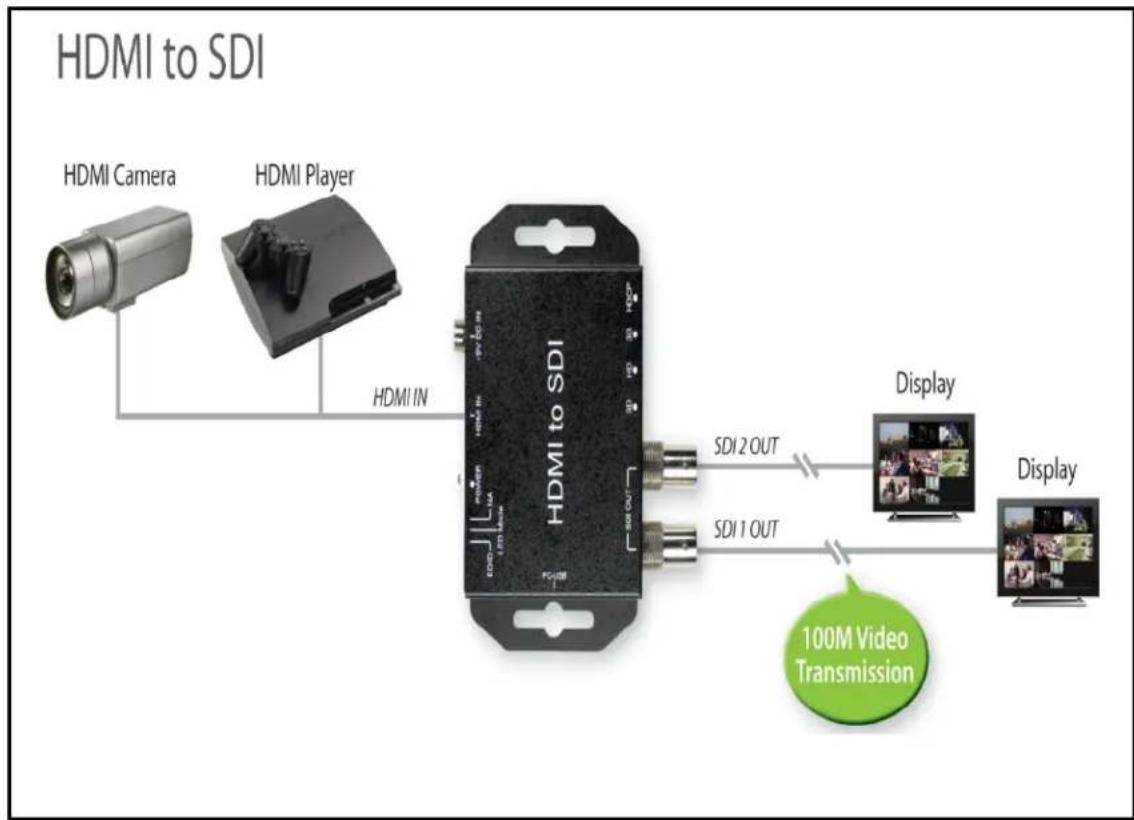
flowchart
graph LR
    A["HDMI Camera"] --> B["HDMI Player"]
    B --> C["HDMI to SDI"]
    C --> D["Display"]
    D --> E["Display"]
    C --> F["SDI 2 OUT"]
    C --> G["SDI 1 OUT"]
    H["100M Video Transmission"] --> C
Front Panel
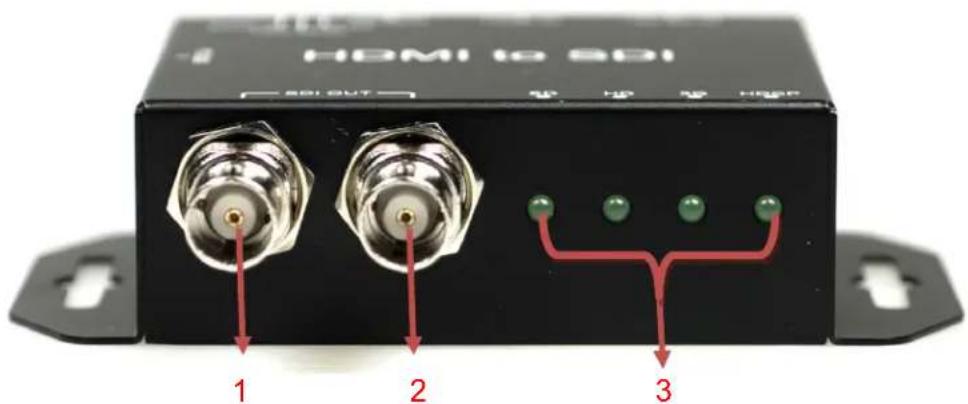
- 3G/HD/SD-SDI Output 1
- 3G/HD/SD-SDI Output 2
- 3G/HD/SD/HDCP LED indicator
Rear Panel
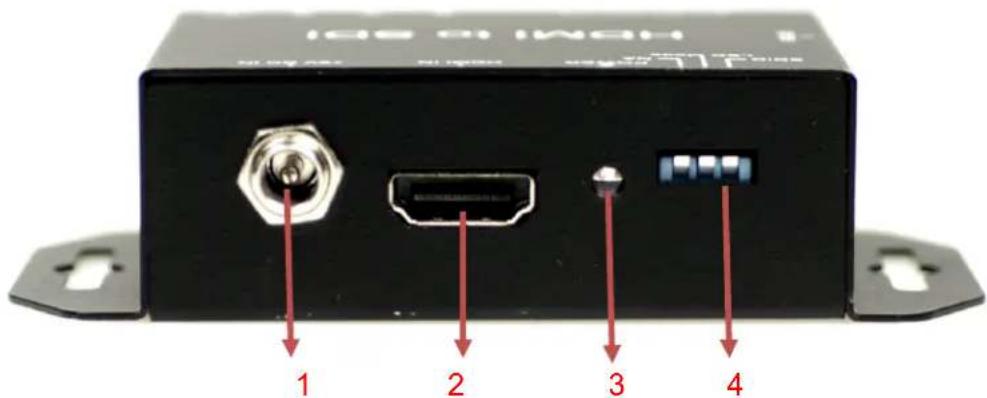
- Power (+6V \~ + 15V)
- HDMI Input
- Power LED indicator
- Dip Switch:
 |  | ||||
| Pin On (↑): Enable | Pin OFF (↓): Disable | ||||
a. EDID
b. LED Mode
c. 3GB/3GA Switch
Dip Switch
• EDID:
In order to keep the compatibility of HDMI to most monitors, SDI-HDSDXPRO features EDID learning ability.
Pin On (↑): Default EDID
Pin OFF (↓): Leaning EDID
- LED Mode:
Pin OFF (↓):
| Resolution | SD LED | HD LED | 3G LED | HDCP LED |
| 720 x 480i (NTSC) | ○ | ○ | ○ | ● |
| 720 x 576i (PAL) | ○ | ○ | ● | ○ |
| 1280 x 720 p50 | ○ | ○ | ● | ● |
| 1280 x 720 p60 | ○ | ● | ○ | ○ |
| 1920 x 1080 i50 | ○ | ● | ○ | ● |
| 1920 x 1080 i60 | ○ | ● | ● | ○ |
| 1920 x 1080 p24 | ○ | ● | ● | ● |
| 1920 x 1080 p25 | ● | ○ | ○ | ○ |
| 1920 x 1080 p30 | ● | ○ | ○ | ● |
| 1920 x 1080 p50 | ● | ○ | ● | ○ |
| 1920 x 1080 p60 | ● | ○ | ● | ● |
| Un-Support | ● | ● | ● | ● |
: LED ON
○ : LED OFF
Pin On (↑)
| Resolution | 3G LED | HD LED | SD LED |
| NTSC / PAL | ○ | ○ | ● |
| 720p / 1080i / 1080 [24p, 30p] | ○ | ● | ○ |
| 1080 [50p,60p] / 2K | ● | ○ | ○ |
Switcher 3GA and 3GB Format only supports 1920x1080 p60, 1920x1080p59 and 1920x1080 p50
| Dip Swticher | ||
| 3GA Format |  | |
| 3GB Format | ||
EDID Leaning
- Turn off SDI-HDSDXPRO Box and EDID pin is pull down.
- Connect the TV monitor thru HDMI port to SDI-HDSDXPRO box, and then turn on SDI-HDSDXPRO box.
- The LED of SDI-SDHDXPRO box will light, which indicates the EDID learning process is finished.
| LED Sequence | SD LED | HD LED | 3G LED | HDCP LED |
| Start↓Finish | ○ | ○ | ○ | ● |
| ○ | ○ | ● | ● | |
| ○ | ● | ● | ● | |
| ● | ● | ● | ● | |
| ○ | ○ | ○ | ○ |
- Connect SDI-HDSDXPRO box to the HDMI source through a HDMI cable
Specifications
| DESCRIPTION | |
| Support Video Resolution | SD - 720 x 480i (NTSC) / 720 x 576 I (PAL)HD- 1280 x 720p1920 x 1080 50i/60i1920 x 1080 24p/25p/30p3G- 1920 x 1080 50p/60p2K- 2048 x 1080 24p/30p |
| SDI format | SD-SDI (SMPTE 259M)HD-SDI (SMPTE 292M)3G-SDI (SMPTE 424M / SMPTE 425M) |
| Audio Support | 2 Channel |
| Audio Sample | Auto Re-sample to 48Khz (For Stereo) |
| Coaxial Cable Type | RG6/RG59(75Ω) |
| Cable Equalization | 3G: 100m of RG6/ 86m of RG59HD: 170m of RG6/ 120m of RG59SD: 400m of RG6/ 280m of RG59*1 RG6: CANARE L-5CFB Cable / RG59: Belden 9275 Cable*2 Cable Length Performance: Depending on SDI Signal and Cable Quality |
| Input | 1 x HDMI |
| Output | 2 x BNC [SDI] |
| BNC Connector | 3G 75 Ω inter-locked socket |
| HDMI Connector | TYPE A [19-pin female] |
| DIP Switch | 3-pin [EDID / LED mode / NA] |
| Housing | SECC |
| Dimension | L:104mm x W:63.3mm xH:26mm |
| Power Source | Power Adapter: AC 100 ~ 240 V/DC (+6 ~ 15 V) |
| Operation Temperature | 0~50°C [32~114°F] |
| Storage Temperature | -20~+60°C |
Firmware Upload
● Firmware is upgradable in the field using the integrated USB port
How to Firmware upgrade:
Step 1.
Open Upload Firmware Program tools.exe and connect box to PC by USB Cable.
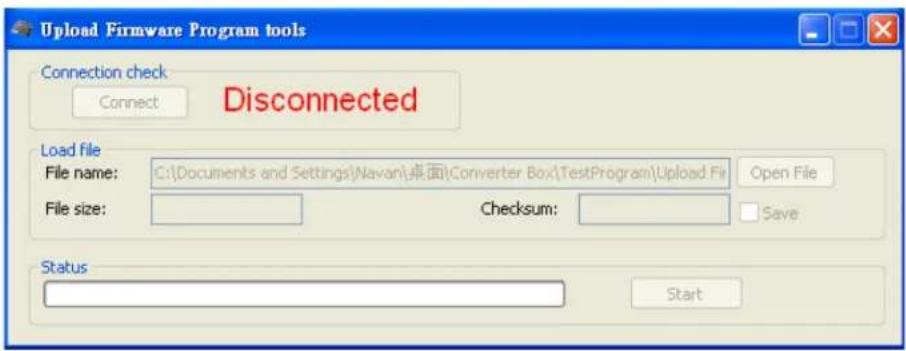
Step 2.
Plug and un-plug "DC adapter" to power on/off the converter box (the connection check status will be changed to "Connect")

Step 3.
Plug and un-plug "DC adapter" again (the connection check status will be changed to "Connected") and Please click the Open File button to select the firmware bin file.

Step 4.
Please click "Start" Button to proceed with new firmware programming. The PASS message will appear when the procedures finished.
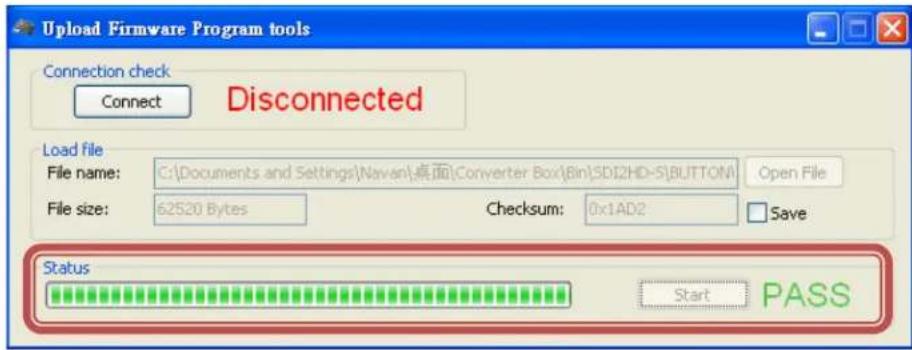
Step 5.
Close Upload Firmware Program tools
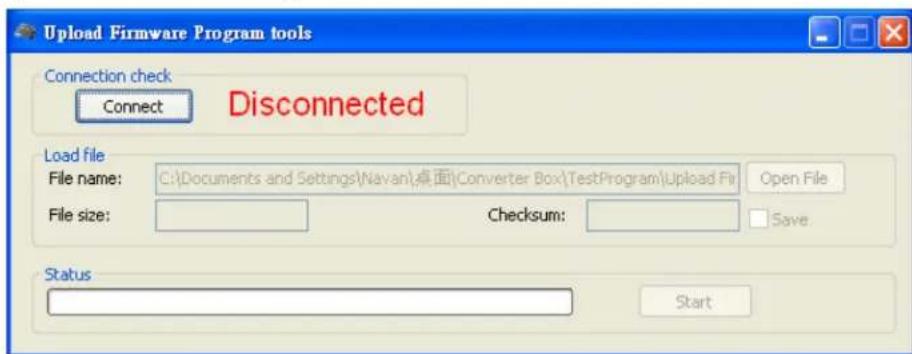
Update List
| Data | Version | Command |
| 2013.02.25 | V1.0 | Modify Spec for audio support. |
| 2016.02.23 | V1.1 | Add 3GB format (FW-0205) |
Warranty
A. LIMITED WARRANTY
KanexPro™ warrants that (a) its products (the "Product") will perform greatly in agreement with the accompanying written materials for a period of 36 months (3 full years) from the date of receipt and (b) that the product will be free from defects in materials and workmanship under normal use and service for a period of 3 years.
B. CUSTOMER REMEDIES
KanexPro's entire liability and Customer's exclusive remedy shall be, at KanexPro option, either return of the price paid for the product, or repair or replacement of the Product that does not meet this Limited Warranty and which is returned to KanexPro with a copy of customers' receipt. This Limited Warranty is
void if failure of the Product has resulted from accident, abuse, or misapplication. Any replacement Product will be warranted for the remainder of the original warranty period of 3 years, whichever is longer.
C. NO OTHER WARRANTIES
To the maximum extent permitted by applicable law, KanexPro disclaims all other warranties, either express or implied, including, but not limited to implied warranties of merchantability and fitness for a particular purpose, with regard to the product and any related written materials. This limited warranty gives customers specific legal rights. Customers may have other rights depending on the jurisdiction.
D. NO LIABILITY FOR DAMAGES
To the maximum extent permitted by applicable law, in no event shall KanexPro be liable for any damages whatsoever (including without limitation, special, incidental, consequential, or indirect damages for personal injury, loss of business profits, business interruption, loss of business information, or any other pecuniary loss) arising out of the use of or inability to use this product, even if KanexPro has been advised of the possibility of such damages.
KanexPro®
1405 pioneer street
Brea, CA 92821


Brand : KanexPro
Model : SDI-HDSDXPRO
Category : Audio / Video