
VM6404HB - KVM switch ATEN - Free user manual and instructions
Find the device manual for free VM6404HB ATEN in PDF.


| Product Type | Video Matrix KVM Switch |
| Brand | ATEN |
| Model | VM6404HB |
| Form Factor | Rackmount, 1U |
| Dimensions (W x D x H) | 438 x 280 x 44 mm |
| Weight | Approx. 5.0 kg |
| Power Supply | AC 100-240V, 50/60 Hz, redundant |
| Power Consumption | ≤ 120 W |
| Video Inputs | 4 HDMI |
| Video Outputs | 4 HDMI |
| Max Video Resolution | 4K@60Hz (3840x2160) |
| Control Interface | RESTful API (HTTP), Web GUI, RS-232 |
| API Protocol | JSON over HTTP (RESTlink) |
| Authentication | Basic or Token (bearer) |
| Key Features | Seamless switching, scaler, EDID management, HDCP support, OSD, CEC, video profiles |
| Audio Support | Embedded audio, independent audio routing |
| Operating Temperature | 0°C to 40°C |
| Storage Temperature | -20°C to 60°C |
| Humidity | 10-90% RH, non-condensing |
| Safety Certifications | CE, FCC |
| Included Accessories | Power cord, rack mount kit, user manual (digital) |
Frequently Asked Questions - VM6404HB ATEN
/api/v1.0/. Authenticate via HTTP Basic or Token (bearer) as described in the manual.PATCH /api/v1.0/video/connections/{output_id} endpoint to assign an input to an output./api/v1.0/auth/tokens with a Basic Authorization header containing base64(username:password). The response includes a token./api/v1.0/audio/connections endpoints, supporting embedding and separate audio matrix.User questions about VM6404HB ATEN
0 question about this device. Answer the ones you know or ask your own.
Ask a new question about this device
Download the instructions for your KVM switch in PDF format for free! Find your manual VM6404HB - ATEN and take your electronic device back in hand. On this page are published all the documents necessary for the use of your device. VM6404HB by ATEN.
USER MANUAL VM6404HB ATEN
Video Matrix RESTful API
User Guide
Introduction
The information enclosed defines ATEN's VM RESTful APIs — RESTlink. Each authorized client can configure and control ATEN VM Series devices via these APIs, with all request and response messages encoded in JSON.
Revision History
| Revision | Data | Editor | Description of Change | |
| 1.00 | 2019-05-30 | Jack Liao | Initial version. |
Compatible Firmware Versions
Make sure your VM series devices are of the following versions of firmware before proceeding:
| Model | Compatible Firmware Version |
| VM1600A | v4.3.423 or later |
| VM3200 | v2.1.204 or later |
| VM3250 | v2.1.208 or later |
| VM51616H | v3.5.344 or later |
| VM5808H | v3.5.344 or later |
| VM6404HB | v1.0.074 or later |
Table of Contents
Introduction 2
Revision History....2
Compatible Firmware Versions....2
1 Response....4
1.1 Status Codes....4
1.2 Response Messages ....5
2 Authentication....6
2.1 Basic Authentication ....6
2.2 Token Authentication....7
3 System....8
3.1 System Information....8
3.2 Video Board Information....9
3.3 Video Extender Information ....10
4 Network....11
4.1 Network Settings....11
5 Account....13
5.1 User Accounts 13
5.2 Current Account....15
6 Video....16
6.1 Device Configuration....16
6.2 Scaler Resolutions....17
6.3 Input Ports....18
6.4 Output Ports....20
6.5 Video Connection 24
6.6 Video Profiles....25
6.7 Current Profile....26
7 Audio....27
7.1 Device Configuration....27
7.2 Input Ports....28
7.3 Output Ports....30
7.4 Audio Connection 32
1 Response
1.1 Status Codes
For every RESTful request sent to an ATEN device, it shall respond with an HTTP status code.
The request results corresponding to each status code are described as follows.
■ Success
200 OK
■ 201 Created
■ 202 Accepted
■ 204 No content
■ Client errors
■ 400 Bad request
■ 401 Unauthorized
403 Forbidden
■ 404 Not found
■ 405 Method not allowed
■ 413 Payload too large
■ Server errors
■ 500 Internal server error
■ 501 Not implemented
■ 503 Service unavailable
1.2 Response Messages
In addition to status codes, ATEN devices also enclose the related detailed descriptions within the HTTP message body, in the following format.
{
    "code": {error code},
    "message": "{error description}"
}
| Status Code | ||
| 200 OK | ||
| 201 Created | ||
| 202 Accepted | ||
| 204 No content | ||
| 400 Bad request | 40000 | "The value ofis invalid: {value}. " |
| 40001 | "The value ofis unsupported: {value}. " | |
| 40002 | "The operation onis disallowed." | |
| 40003 | "The field cannot be recognized." | |
| 40004 | "No message content found." | |
| 401 Unauthorized | 40100 | "User account is unauthorized." |
| 403 Forbidden | 40300 | "The demand on the resource is refused." |
| 404 Not found | 40400 | "The resource is not found: {url}. " |
| 40401 | "The instance of the resource is not found: {idx}. " | |
| 405 Method not allowed | 40500 | "The operation is disallowed." |
| 413 Payload Too Large | 41300 | "The message is too large." |
| 500 Internal Server Error | 50000 | "System error." |
| 501 Not implemented | 50100 | "API version is unsupported." |
| 503 Service unavailable | 50300 | "System is overloaded." |
| 50301 | "System is down for maintenance." | |
| 50302 | "Service is not ready." | |
| 50303 | "Maximum is exceeded." | |
| 50304 | "System is in the recovery mode." |
2 Authentication
The client must first be authenticated in order to access ATEN device via RESTful APIs, which can be done through one of these two methods: basic authentication or token authentication.
2.1 Basic Authentication
In basic authentication, each request MUST contain a header field in the form of — Authorization: Basic
{
    "authorization": "<base64{username:password}>"
}
2.2 Token Authentication
To use token authentication, the client MUST first get a token from the ATEN device. Then all configuration and control to the ATEN device are allowed by putting this token in the 'Authentication' header of each request.
API
/api/v1.0/auth/tokens
Request
■ POST: request an authorized token for accessing ATEN device. (Login)
| Field | Type | Value | Description |
| authorization | string | base64('username:password') | Authentication code encoded in base64. |
■ DELETE: end access to the ATEN device. (Logout)
Response
■ Success
201 Created
| Field | Type | Value | Description |
| credential | string | {credential} | Token. |
Failure
401 Unauthorized
Example
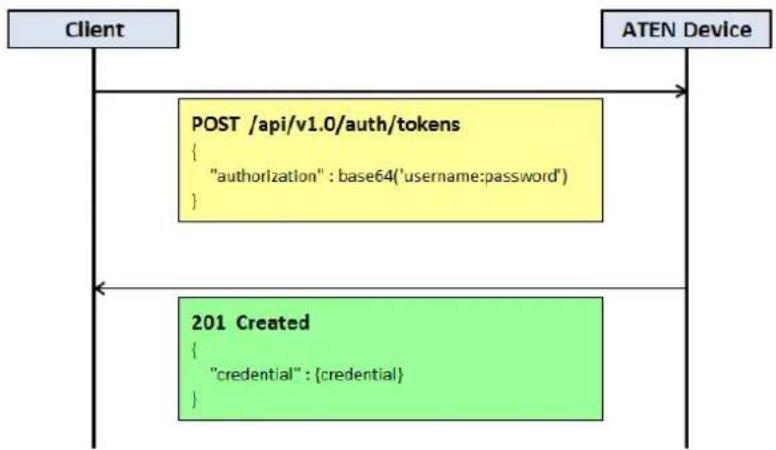
flowchart
graph TD
A["Client"] --> B["POST /api/v1.0/auth/tokens<br>{<br> "authorization" : base64('username:password')<br>}"] --> C["ATEN Device"]
C --> D["201 Created<br>{<br> "credential" : {credential}<br>}"] --> B
3 System
System APIs are used for getting the general information of the ATEN device and its peripherals.
3.1 System Information
System information contains model type, device name, firmware version, and etc.
API
/api/v1.0/system/info
Request
■ GET: get system information.
■ PATCH: modify system information
| Field | Type | Value | Description |
| deviceName | string | {device name} | Device name. |
Response
■ Success
200 OK
| Field | Type | Value | Description |
| type | string | {model type} | Model type. |
| modelName | string | {model name} | Model name. |
| deviceName | string | {device name} | Device name. |
| serialNumber | string | {serial number} | Device serial number. |
| uptime | number | {system uptime} | System uptime in seconds. |
| fwVersion | string | {FW version} | Firmware version. |
3.2 Video Board Information
(VM1600A / VM3200 / VM3250 only)
Video board information contains the board type, interface count, and model name of each video board. If video extenders are attached, the related information is included as well. Note that video board information is only supported by video modular products.
API
/api/v1.0/system/videoBoards
/api/v1.0/system/videoBoards/
Request
■ GET: get information of all video boards or a single video board specified.
Response
■ Success
200 OK
- For all video boards:
| Field | Type | Value | Description | |
| maxInputCount | number | {maximum input video board count} | Maximum number of input video boards supported. | |
| maxOutputCount | number | {maximum output video board count} | Maximum number of output video boards supported. | |
| videoBoards | array (object) | Container of all video board information. | ||
| id | string | {video board ID} | Video board ID. | |
| type | string | {video board type} | Video board type. | |
| idx | number | {video board index} | Video board index. | |
| modelName | string | {model name} | Model name. | |
| interfaceCount | number | {interface count} | Number of Interfaces supported. | |
| fwVersion | string | {FW version} | Firmware version. | |
| videoExts | object | Video extender information, if attached (see 3.3 Video Extender Information). | ||
- For a single video board:
| Field | Type | Value | Description |
| id | string | {video board ID} | Video board ID. |
| type | string | {video board type} | Video board type. |
| idx | number | {video board index} | Video board index. |
| modelName | string | {model name} | Model name. |
| interfaceCount | number | {interface count} | Number of Interfaces supported. |
| fwVersion | string | {FW version} | Firmware version. |
| videoExts | object | Video extender information, if attached (see 3.3 Video Extender Information). |
3.3 Video Extender Information
(VM7514 / VM8514 only)
Video extender information contains the extender type, interface count, and model name of each video extender.
API
/api/v1.0/system/videoExts
/api/v1.0/system/videoExts/
Request
■ GET: get information of all video extenders or a single video extender specified.
Response
■ Success
200 OK
- For all video extenders:
| Field | Type | Value | Description | |
| maxTxCount | number | {maximum Tx video extender count} | Maximum number of Tx video extenders supported. | |
| maxRxCount | number | {maximum Rx video extender count} | Maximum number of Rx video extenders supported. | |
| videoExts | array (object) | Container of all video extender information. | ||
| id | string | {video extender ID} | Video extender ID. | |
| type | string | {video extender type} | Video extender type. | |
| idx | number | {video extender index} | Video extender index. | |
| modelName | string | {model name} | Model name. | |
| interfaceCount | number | {interface count} | Number of Interface supported. | |
| fwVersion | string | {FW version} | Firmware version. | |
- For a single video extender:
| Field | Type | Value | Description |
| id | string | {video extender ID} | Video extender ID. |
| type | string | {video extender type} | Video extender type. |
| idx | number | {video extender index} | Video extender index. |
| modelName | string | {model name} | Model name. |
| interfaceCount | number | {interface count} | Number of Interfaces supported. |
| fwVersion | string | {FW version} | Firmware version. |
4 Network
4.1 Network Settings
Network settings contain the information and configurations of each network interface.
API
/api/v1.0/network/interfaces
/api/v1.0/network/interfaces/
Request
■ GET: get settings of all network interfaces or a single network interface specified.
■ PATCH: modify settings of all network interfaces or a single network interface specified.
- For all network interfaces:
| Field | Type | Value | Description | ||
| interfaces | array (object) | Container of all network interface settings. | |||
| id | string | {network interface ID} | Network interface ID. | ||
| macAddr | string | {MAC address} | MAC address. | ||
| mode | object | Network mode. | |||
| value | number | 0 | DHCPv4. | ||
| 1 | Reserved. | ||||
| 2 | |||||
| 3 | IPv4 fixed. | ||||
| 4 | Reserved. | ||||
| ip4Addr | string | {IPv4 address} | IPv4 address. | ||
| ip4Mask | string | {IPv4 address} | IPv4 network mask. | ||
| ip4Gateway | string | {IPv4 address} | IPv4 gateway. | ||
- For a single network interface:
| Field | Type | Value | Description | |
| mode | object | Network mode. | ||
| value | number | 0 | DHCPv4. | |
| 1 | Reserved. | |||
| 2 | ||||
| 3 | IPv4 fixed. | |||
| 4 | Reserved. | |||
| ip4Addr | string | {IPv4 address} | IPv4 address. | |
| ip4Mask | string | {IPv4 address} | IPv4 network mask. | |
| ip4Gateway | string | {IPv4 address} | IPv4 gateway. | |
Response
■ Success
200 OK
- For all network interfaces:
| Field | Type | Value | Description | ||
| interfaces | array (object) | Container of all network interface settings. | |||
| id | string | {network interface ID} | Network interface ID. | ||
| macAddr | string | {MAC address} | MAC address. | ||
| mode | object | Network mode. | |||
| valid | array (number) | Indicates network modes supported. | |||
| value | number | 0 | DHCPv4. | ||
| 1 | Reserved. | ||||
| 2 | |||||
| 3 | IPv4 fixed. | ||||
| 4 | Reserved. | ||||
| ip4Addr | string | {IPv4 address} | IPv4 address. | ||
| ip4Mask | string | {IPv4 address} | IPv4 network mask. | ||
| ip4Gateway | string | {IPv4 address} | IPv4 gateway. | ||
- For a single network interface:
| Field | Type | Value | Description | |
| id | string | {network interface ID} | Network interface ID. | |
| macAddr | string | {MAC address} | MAC address. | |
| mode | object | Network mode. | ||
| valid | array (number) | Indicates network modes supported. | ||
| value | number | 0 | DHCPv4. | |
| 1 | Reserved. | |||
| 2 | ||||
| 3 | IPv4 fixed. | |||
| 4 | Reserved. | |||
| ip4Addr | string | {IPv4 address} | IPv4 address. | |
| ip4Mask | string | {IPv4 address} | IPv4 network mask. | |
| ip4Gateway | string | {IPv4 address} | IPv4 gateway. | |
5 Account
5.1 User Accounts
Manage user accounts, including their username, password, description, and privilege.
API
/api/v1.0/account/users
/api/v1.0/account/users/
Request
■ GET: get settings of all user accounts or a single user account specified.
■ DELETE: remove the user account specified.
■ POST: create a new user account.
■ PATCH: modify settings of all user accounts or a single user account specified.
- For all user accounts:
| Field | Type | Value | Description | ||
| users | array (object) | Container of all user account information. | |||
| id | string | {user ID} | User ID. | ||
| name | string | {user name} | Username. | ||
| password | string | {user password} | User password. | ||
| description | string | {user description} | User description. | ||
| privilege | object | User privilege. | |||
| value | number | 0 | Basic user. | ||
| 1 | Advanced user. | ||||
| 2 | Administrator. | ||||
- For a single user account:
| Field | Type | Value | Description | |
| Name | string | {user name} | Username. | |
| password | string | {user password} | User password. | |
| description | string | {user description} | User description. | |
| privilege | object | User privilege. | ||
| value | number | 0 | Basic user. | |
| 1 | Advanced user. | |||
| 2 | Administrator. | |||
Response
■ Success
200 OK
- For all user accounts:
| Field | Type | Value | Description | ||
| users | array (object) | Container of all user account settings. | |||
| id | string | {user ID} | User ID. | ||
| name | string | {user name} | User name. | ||
| description | string | {user description} | User description. | ||
| privilege | object | User privilege. | |||
| valid | array (number) | Indicates user privileges supported. | |||
| value | number | 0 | Basic user. | ||
| 1 | Advanced user. | ||||
| 2 | Administrator. | ||||
- For a single user account:
| Field | Type | Value | Description | |
| id | string | {user ID} | User ID. | |
| name | string | {user name} | Username. | |
| description | string | {user description} | User description. | |
| privilege | object | User privilege. | ||
| valid | array (number) | Indicates user privileges supported. | ||
| value | number | 0 | Basic user. | |
| 1 | Advanced user. | |||
| 2 | Administrator. | |||
5.2 Current Account
Manage the current account, including its username, password, description, and privilege.
API
/api/v1.0/account/users/me
Request
■ GET: get settings of the current account.
■ PATCH: modify settings of the current account.
| Field | Type | Value | Description |
| name | string | {user name} | Username. |
| password | string | {user password} | User password. |
| description | string | {user description} | User description. |
| privilege | object | User privilege. | |
| 0 | Basic user. | ||
| value | number | 1 | Advanced user. |
| 2 | Administrator. |
Response
■ Success
200 OK
| Field | Type | Value | Description |
| id | string | {user ID} | User ID. |
| name | string | {user name} | Username. |
| description | string | {user description} | User description. |
| privilege | object | User privilege. | |
| valid | array (number) | Indicates user privileges supported. | |
| 0 | Basic user. | ||
| value | number | 1 | Advanced user. |
| 2 | Administrator. |
6 Video
ATEN devices provide APIs for configuring their video-related settings, including video configuration, video input/output ports, video connection, and etc.
6.1 Device Configuration
Contains all video configurations of the ATEN device.
API
/api/v1.0/video/configs
Request
- GET: get device's video configurations.
■ PATCH: modify device's video configurations.
| Field | Type | Value | Description | |
| edid | object | EDID mode. | ||
| value | number | 1 | Use ATEN's default EDID. | |
| 2 | Use EDID of the 1^st video output port. | |||
| 3 | Use remixed EDID. | |||
| osd | object | OSD setting. | ||
| value | number | 1 | Turn OSD off. | |
| 2 | Turn OSD on. | |||
| blank | object | Blank screen setting. | ||
| value | number | 1 | Turn blank screen off. | |
| 2 | Turn blank screen on. | |||
Response
■ Success
200 OK
| Field | Type | Value | Description | |
| scaler | number | 0 | Support scaling. | |
| 1 | Scaling unsupported. | |||
| edid | object | EDID mode. | ||
| valid | array (number) | Indicates the EDID modes supported. | ||
| value | number | 0 | EDID unsupported. | |
| 1 | Use ATEN's default EDID. | |||
| 2 | Use EDID of the 1^st video output port. | |||
| 3 | Use remixed EDID. | |||
| osd | object | OSD setting. | ||
| valid | array (number) | Indicates the OSD settings supported. | ||
| value | number | 0 | OSD unsupported. | |
| 1 | Turn OSD off. | |||
| 2 | Turn OSD on. | |||
| blank | object | Blank screen setting. | ||
| valid | array (number) | Indicates the black screen settings supported. | ||
| value | number | 0 | Blank screen unsupported. | |
| 1 | Turn blank screen off. | |||
| 2 | Turn blank screen on. | |||
6.2 Scaler Resolutions
(With scaler VM models only)
Scaler resolutions enumerate the scaler-supported video resolutions.
API
/api/v1.0/video/scalerResolutions
Request
■ GET: get the scaler-supported video resolutions.
Response
■ Success
200 OK
| Field | Type | Value | Description | |
| scalerResolutions | array (object) | Container of scaler video resolutions. | ||
| id | number | {scaler resolution ID} | Scaler resolution ID. | |
| description | string | {scaler resolution description} | Scaler resolution description. | |
6.3 Input Ports
API
/api/v1.0/video/inputs
/api/v1.0/video/inputs/
Request
■ GET: get information of all video input ports or a single video input port specified.
■ PATCH: modify configuration of all video input ports or a single video input port specified.
- For all video input ports:
| Field | Type | Value | Description | ||
| inputs | array (object) | Container of all video input ports. | |||
| id | string | {video input ID} | Video input ID. | ||
| name | string | {video input name} | Video input name. | ||
| hdcp | object | HDCP mode. | |||
| value | number | 1 | Without HDCP. | ||
| 2 | HDCP v1.4 supported. | ||||
| 3 | HDCP v2.2 supported. | ||||
- For a single video input port:
| Field | Type | Value | Description | |
| name | string | {video input name} | Video input name. | |
| hdcp | object | HDCP mode. | ||
| value | number | 1 | Without HDCP. | |
| 2 | HDCP v1.4 supported. | |||
| 3 | HDCP v2.2 supported. | |||
Response
■ Success
200 OK
- For all video input ports:
| Field | Type | Value | Description | ||
| inputs | array (object) | Container of all video input ports. | |||
| id | string | {video input ID} | Video input ID. | ||
| name | string | {video input name} | Video input name. | ||
| type | string | {video input type} | Video input type. | ||
| idx | number | {video input type index} | Video input type index. | ||
| status | number | 0 | Normal; source is connected. | ||
| 1 | Source is disconnected. | ||||
| 2 | Unavailable. | ||||
| hdcp | object | HDCP mode. | |||
| valid | array (number) | Indicates the HDCP modes supported. | |||
| value | number | 0 | HDCP unsupported. | ||
| 1 | Without HDCP. | ||||
| 2 | HDCP v1.4 supported. | ||||
| 3 | HDCP v2.2 supported. | ||||
- For a single video input port:
| Field | Type | Value | Description | |
| id | string | {video input ID} | Video input ID. | |
| name | string | {video input name} | Video input name. | |
| type | string | {video input type} | Video input type. | |
| idx | number | { video input type index} | Video input type index. | |
| status | number | 0 | Normal; source is connected. | |
| 1 | Source is disconnected. | |||
| 2 | Unavailable. | |||
| hdcp | object | HDCP mode. | ||
| valid | array (number) | Indicates the HDCP modes supported. | ||
| value | number | 0 | HDCP unsupported. | |
| 1 | Without HDCP. | |||
| 2 | HDCP v1.4 supported. | |||
| 3 | HDCP v2.2 supported. | |||
6.4 Output Ports
API
/api/v1.0/video/outputs
/api/v1.0/video/outputs/
Request
■ GET: get information of all video output ports or a single video output port specified.
■ PATCH: modify configuration of all video output ports or a single video output port specified.
- For all video output ports:
| Field | Type | Value | Description | ||
| outputs | array (object) | Container of all video output ports. | |||
| id | string | {video output ID} | Video output ID. | ||
| name | string | {video output name} | Video output name. | ||
| seamlessSwitch | object | Seamless switch setting. | |||
| value | number | 1 | Turn seamless switch off. | ||
| 2 | Turn seamless switch on. | ||||
| transitionMode | object | Transition mode setting. | |||
| value | number | 1 | Turn transition mode off. | ||
| 2 | Slow transition speed. | ||||
| 3 | Normal transition speed. | ||||
| 4 | Fast transition speed. | ||||
| resolution | number | {scaler resolution ID} | Scaler resolution ID (see 6.2 Scaler Resolutions). | ||
| fixHDCP | object | Fixed-HDCP setting. | |||
| value | number | 1 | Turn fixed-HDCP off. | ||
| 2 | Turn fixed-HDCP on. | ||||
| osd | object | OSD setting. | |||
| value | number | 1 | Turn OSD off. | ||
| 2 | Turn OSD on. | ||||
| cec | object | CEC setting. | |||
| value | number | 1 | Turn CEC off. | ||
| 2 | Turn CEC on. | ||||
| blank | object | Video blanking setting. | |||
| value | number | 1 | Turn video blanking off. | ||
| 2 | Turn video blanking on. | ||||
- For a single video output port:
| Field | Type | Value | Description | |
| name | string | {video output name} | Video output name. | |
| seamlessSwitch | object | Seamless switch setting. | ||
| value | number | 1 | Turn seamless switch off. | |
| 2 | Turn seamless switch on. | |||
| transitionMode | object | Transition mode setting. | ||
| value | number | 1 | Turn transition mode off. | |
| 2 | Slow transition speed. | |||
| 3 | Normal transition speed. | |||
| 4 | Fast transition speed. | |||
| resolution | number | {scaler resolution ID} | Scaler resolution ID (see 6.2 Scaler Resolutions). | |
| fixHDCP | object | Fixed-HDCP setting. | ||
| value | number | 1 | Turn fixed-HDCP off. | |
| 2 | Turn fixed-HDCP on. | |||
| osd | object | OSD setting. | ||
| value | number | 1 | Turn OSD off. | |
| 2 | Turn OSD on. | |||
| cec | object | CEC setting. | ||
| value | number | 1 | Turn CEC off. | |
| 2 | Turn CEC on. | |||
| blank | object | Video blanking setting. | ||
| value | number | 1 | Turn video blanking off. | |
| 2 | Turn video blanking on. | |||
Response
■ Success
200 OK
- For all video output ports:
| Field | Type | Value | Description | ||
| outputs | array (object) | Container of all video output port information. | |||
| id | string | {video output ID} | Video output ID. | ||
| name | string | {video output name} | Video output name. | ||
| type | string | {video output type} | Video output type. | ||
| idx | number | {video output type index} | Video output type index. | ||
| status | Number | 0 | Normal; sink is connected. | ||
| 1 | Sink is disconnected. | ||||
| 2 | Unavailable. | ||||
| seamlessSwitch | object | Seamless switch setting. | |||
| valid | array (number) | Indicates the seamless switch settings supported. | |||
| value | number | 0 | Seamless switch unsupported. | ||
| 1 | Turn seamless switch off. | ||||
| 2 | Turn seamless switch on. | ||||
| transitionMode | object | Transition mode setting. | |||
| valid | array (number) | Indicates the transition mode settings supported. | |||
| value | number | 0 | Transition mode unsupported. | ||
| 1 | Turn transition mode off | ||||
| 2 | Slow transition speed. | ||||
| 3 | Normal transition speed. | ||||
| 4 | Fast transition speed. | ||||
| resolution | number | {scaler resolution ID} | Scaler resolution ID (see 6.2 Scaler Resolutions). | ||
| fixHDCP | object | Fixed-HDCP setting. | |||
| valid | array (number) | Indicates the fixed-HDCP settings supported. | |||
| value | number | 0 | Fixed-HDCP unsupported. | ||
| 1 | Turn fixed-HDCP off. | ||||
| 2 | Turn fixed-HDCP on. | ||||
| osd | object | OSD setting. | |||
| valid | array (number) | Indicates the OSD settings supported. | |||
| value | number | 0 | OSD unsupported. | ||
| 1 | Turn OSD off. | ||||
| 2 | Turn OSD on. | ||||
| cec | object | CEC setting. | |||
| valid | array (number) | Indicates the CEC settings supported. | |||
| value | number | 0 | CEC unsupported. | ||
| 1 | Turn CEC off. | ||||
| 2 | Turn CEC on. | ||||
| blank | object | Video blanking setting. | |||
| valid | array (number) | Indicates the video blanking settings supported. | |||
| value | number | 0 | Video blanking unsupported. | ||
| 1 | Turn video blanking off. | ||||
| 2 | Turn video blanking on. | ||||
- For a single video output port:
| Field | Type | Value | Description | |
| id | string | {video output ID} | Video output ID. | |
| name | string | {video output name} | Video output name. | |
| type | string | {video output type} | Video output type. | |
| idx | number | {video output type index} | Video output type index. | |
| status | Number | 0 | Normal; sink is connected. | |
| 1 | Sink is disconnected. | |||
| 2 | Unavailable. | |||
| seamlessSwitch | object | Seamless switch setting. | ||
| valid | array (number) | Indicates the seamless switch settings supported. | ||
| value | number | 0 | Seamless switch unsupported. | |
| 1 | Turn seamless switch off. | |||
| 2 | Turn seamless switch on. | |||
| transitionMode | object | Transition mode setting. | ||
| valid | array (number) | Indicates the transition mode settings supported. | ||
| value | number | 0 | Transition mode unsupported. | |
| 1 | Turn transition mode off. | |||
| 2 | Slow transition speed. | |||
| 3 | Normal transition speed. | |||
| 4 | Fast transition speed. | |||
| resolution | number | {scaler resolution ID} | Scaler resolution ID (see 6.2 Scaler Resolutions). | |
| fixHDCP | object | Fixed-HDCP setting. | ||
| valid | array (number) | Indicates the fixed-HDCP settings supported. | ||
| value | number | 0 | Fixed-HDCP unsupported. | |
| 1 | Turn fix-HDCP off. | |||
| 2 | Turn fix-HDCP on. | |||
| osd | object | OSD setting. | ||
| valid | array (number) | Indicates the OSD settings supported. | ||
| value | number | 0 | OSD unsupported. | |
| 1 | Turn OSD off. | |||
| 2 | Turn OSD on. | |||
| cec | object | CEC setting. | ||
| valid | array (number) | Indicates the CEC settings supported. | ||
| value | number | 0 | CEC unsupported. | |
| 1 | Turn CEC off. | |||
| 2 | Turn CEC on. | |||
| blank | object | Video blanking setting. | ||
| valid | array (number) | Indicates the video blanking settings supported. | ||
| value | number | 0 | Video blanking unsupported. | |
| 1 | Turn video blanking off. | |||
| 2 | Turn video blanking on. | |||
6.5 Video Connection
Video connection indicates the relationship between the video input and video output ports.
API
/api/v1.0/video/connections
/api/v1.0/video/connections/
Request
■ GET: get the information of all video connections or a single video connection specified.
■ PATCH: modify all video connections or a single video connection specified.
- For all video connections:
| Field | Type | Value | Description | |
| connections | array (object) | Container of all video output port connections. | ||
| id | string | {video output ID} | Video output ID. | |
| videoInput | string | “” | Null port. | |
| {video input ID} | Video input ID. | |||
- For a single video connection:
| Field | Type | Value | Description |
| videoInput | string | “” | Null port. |
| {video input ID} | Video input ID. |
Response
■ Success
200 OK
- For all video connections:
| Field | Type | Value | Description | |
| connections | array (object) | Container of all video output port connections. | ||
| id | string | {video output ID} | Video output ID. | |
| videoInput | string | “” | Null port. | |
| {video input ID} | Video input ID. | |||
- For a single video connection:
| Field | Type | Value | Description |
| id | string | {video output ID} | Video output ID. |
| videoInput | string | “” | Null port. |
| {video input ID} | Video input ID. |
6.6 Video Profiles
Video profile contains the basic information of video profiles, such as the profile name. The client can refer to all profiles or a single profile specified.
API
/api/v1.0/video/vmProfiles
/api/v1.0/video/vmProfiles/
Request
GET: get basic information of all video profiles or a single profile specified.
DELETE: remove a video profile specified.
PATCH: modify the information of all video profiles, a single profile specified, or the current profile.
- For all video profiles:
| Field | Type | Value | Description | |
| profiles | array (object) | Container of all video profiles. | ||
| id | string | {profile ID} | Video profile ID. | |
| name | string | {profile name} | Video profile name. | |
- For single video profile:
| Field | Type | Value | Description |
| name | string | {profile name} | Video profile name. |
Response
■ Success
200 OK
- For all video profiles:
| Field | Type | Value | Description | |
| maxCount | number | {max profile count} | Maximum number of video profiles. | |
| profiles | array (object) | Container of all video profiles. | ||
| id | string | {profile ID} | Video profile ID. | |
| name | string | {profile name} | Video profile name. | |
- For a single video profile:
| Field | Type | Value | Description |
| id | string | {profile ID} | Video profile ID. |
| name | string | {profile name} | Video profile name. |
6.7 Current Profile
The client can get the basic information of the current video profile, or play another profile as the current one.
API
/api/v1.0/video/vmProfiles/now
Request
GET: get basic information of the current video profile.
DELETE: remove the current video profile.
PATCH: change the current video profile.
| Field | Type | Value | Description |
| id | string | {profile ID} | Video profile ID. |
Response
■ Success
200 OK
| Field | Type | Value | Description |
| id | string | “” | No video currently being played back. |
| “undefined” | The current video being played does not belong to any video profile. | ||
| {profile ID} | Video profile ID. | ||
| name | string | {profile name} | Video profile name. |
7 Audio
ATEN devices provide APIs for configuring their audio-related settings, including audio configuration, audio input/output ports, audio connections, and etc.
7.1 Device Configuration
Contains all audio configurations of the ATEN device.
API
/api/v1.0/audio/configs
Request
- GET: get device's audio configurations.
■ PATCH: modify device's audio configuration.
| Field | Type | Value | Description | |
| volume | number | -1 | Audio volume. | |
| 0 ~ maximum volume | ||||
| mute | object | Mute setting. | ||
| value | number | 1 | Unmute. | |
| 2 | Mute. | |||
Response
■ Success
200 OK
| Field | Type | Value | Description | |
| volume | number | -1 | Audio volume. | |
| 0 ~ maximum volume | ||||
| mute | object | Mute setting. | ||
| valid | array (number) | Indicates the mute settings supported. | ||
| value | number | 0 | Mute unsupported. | |
| 1 | Unmute. | |||
| 2 | Mute. | |||
7.2 Input Ports
API
/api/v1.0/audio/inputs
/api/v1.0/audio/inputs/
Request
■ GET: get information of all audio input ports or a single audio input port specified.
■ PATCH: modify configuration of all audio input ports or a single audio input port specified.
- For all audio input ports:
| Field | Type | Value | Description | ||
| inputs | array (object) | Container of all audio input port information. | |||
| id | string | {audio input ID} | Audio input ID. | ||
| name | string | {audio input name} | Audio input name. | ||
| mute | object | Mute setting. | |||
| value | Number | 1 | Unmute. | ||
| 2 | Mute. | ||||
- For a single audio input port:
| Field | Type | Value | Description | |
| name | string | {audio input name} | Audio input name. | |
| mute | object | Mute setting. | ||
| value | Number | 1 | Unmute. | |
| 2 | Mute. | |||
Response
■ Success
200 OK
- For all audio input ports:
| Field | Type | Value | Description | ||
| inputs | array (object) | Container of all audio input port information. | |||
| id | string | {audio input ID} | Audio input ID. | ||
| name | string | {audio input name} | Audio input name. | ||
| type | string | {audio input type} | Audio input type. | ||
| idx | number | {audio input type index} | Audio input type index. | ||
| status | number | 0 | Normal; source is connected. | ||
| 1 | Source is disconnected. | ||||
| 2 | Unavailable. | ||||
| mute | object | Mute setting. | |||
| valid | array (number) | Indicates the mute settings supported. | |||
| value | Number | 0 | Mute unsupported. | ||
| 1 | Unmute. | ||||
| 2 | Mute. | ||||
- For a single audio input port:
| Field | Type | Value | Description | |
| id | string | {audio input ID} | Audio input ID. | |
| name | string | {audio input name} | Audio input name. | |
| type | string | {audio input type} | Audio input type. | |
| idx | number | {audio input type index} | Audio input type index. | |
| status | number | 0 | Normal; source is connected. | |
| 1 | Source is disconnected. | |||
| 2 | Unavailable. | |||
| mute | object | Mute setting. | ||
| valid | array (number) | Indicates the mute settings supported. | ||
| value | Number | 0 | Mute unsupported. | |
| 1 | Unmute. | |||
| 2 | Mute. | |||
7.3 Output Ports
API
/api/v1.0/audio/outputs
/api/v1.0/audio/outputs/
Request
■ GET: get information of all audio output ports or a single audio output port specified.
■ PATCH: modify configuration of all audio output ports or a single audio output port specified.
- For all audio output ports:
| Field | Type | Value | Description | ||
| outputs | array (object) | Container of all audio output port information. | |||
| id | string | {audio output ID} | Audio output ID. | ||
| name | string | {audio output name} | Audio output name. | ||
| volume | number | -1 | Audio output volume. | ||
| 0 ~ maximum volume | |||||
| mute | object | Mute setting. | |||
| value | number | 1 | Unmute. | ||
| 2 | Mute. | ||||
- For a single audio output port:
| Field | Type | Value | Description | |
| name | string | {audio output name} | Audio output name. | |
| volume | number | -1 | Audio output volume. | |
| 0 ~ maximum volume | ||||
| mute | object | Mute setting. | ||
| value | number | 1 | Unmute. | |
| 2 | Mute. | |||
Response
■ Success
200 OK
- For all audio output ports:
| Field | Type | Value | Description | ||
| outputs | array (object) | Container of all audio output port information. | |||
| id | string | {audio output ID} | Audio output ID. | ||
| name | string | {audio output name} | Audio output name. | ||
| type | string | {audio output type} | Audio output type. | ||
| idx | number | {audio output type index} | Audio output type index. | ||
| status | number | 0 | Normal; sink is connected. | ||
| 1 | Sink is disconnected. | ||||
| 2 | Unavailable. | ||||
| volume | number | -1 | Audio output volume. | ||
| 0 ~ maximum volume | |||||
| mute | object | Mute setting. | |||
| valid | array (number) | Indicates the mute settings supported. | |||
| value | Number | 0 | Mute unsupported. | ||
| 1 | Unmute. | ||||
| 2 | Mute. | ||||
- For a single audio output port:
| Field | Type | Value | Description | |
| id | string | {audio output ID} | Audio output ID. | |
| name | string | {audio output name} | Audio output name. | |
| type | string | {audio output type} | Audio output type. | |
| idx | number | {audio output type index} | Audio output type index. | |
| status | number | 0 | Normal; sink is connected. | |
| 1 | Sink is disconnected. | |||
| 2 | Unavailable. | |||
| volume | number | -1 | Audio output volume. | |
| 0 ~ maximum volume | ||||
| mute | object | Mute setting. | ||
| valid | array (number) | Indicates the mute settings supported. | ||
| value | Number | 0 | Mute unsupported. | |
| 1 | Unmute. | |||
| 2 | Mute. | |||
7.4 Audio Connection
Audio connection indicates the relationship between audio input and audio output ports.
API
/api/v1.0/audio/connections
/api/v1.0/audio/connections/
Request
■ GET: get the information of all audio connections or a single audio connection specified.
■ PATCH: modify all audio connections or a single audio connection specified.
- For all audio connections:
| Field | Type | Value | Description | |
| connections | array (object) | Container of all audio output port connections. | ||
| id | string | {audio output ID} | Audio output ID. | |
| audiolInput | array (string) | “” | Null port. | |
| {audio input ID} | Audio input ID. | |||
- For a single audio connection:
| Field | Type | Value | Description |
| audiInput | array (string) | “” | Null port. |
| {audio input ID} | Audio input ID. |
Response
■ Success
200 OK
- For all audio connections:
| Field | Type | Value | Description | |
| connections | array (object) | Container of all audio output port connections. | ||
| id | string | {audio output ID} | Audio output ID. | |
| audiolInput | array (string) | “” | Null port. | |
| {audio input ID} | Audio input ID. | |||
- For a single audio connection:
| Field | Type | Value | Description |
| id | string | {audio output ID} | Audio output ID. |
| audiInput | array (string) | “” | Null port. |
| {audio input ID} | Audio input ID. |
- Video Matrix RESTful API
- Introduction
- Table of Contents
- Response
- Status Codes
- ■ Success
- ■ Client errors
- ■ Server errors
- Response Messages
- Authentication
- Basic Authentication
- Token Authentication
- API
- Request
- Response
- Example
- System
- System Information
- Video Board Information
- Video Extender Information
- Network
- Network Settings
- Account
- User Accounts
- Current Account
- Video
- Device Configuration
- Scaler Resolutions
- Input Ports
- Output Ports
- Video Connection
- Video Profiles
- Current Profile
- Audio
- Device Configuration
- Input Ports
- Output Ports
- Audio Connection
Brand : ATEN
Model : VM6404HB
Category : KVM switch