AT-PKT-3H - Informatique et périphériques Atlona - Free user manual and instructions
Find the device manual for free AT-PKT-3H Atlona in PDF.


User questions about AT-PKT-3H Atlona
0 question about this device. Answer the ones you know or ask your own.
Ask a new question about this device
Download the instructions for your Informatique et périphériques in PDF format for free! Find your manual AT-PKT-3H - Atlona and take your electronic device back in hand. On this page are published all the documents necessary for the use of your device. AT-PKT-3H by Atlona.
USER MANUAL AT-PKT-3H Atlona
Pocket™ Series Architectural Cable Access Enclosure for Three Cables

natural_image
Close-up of a white and black Alstomniator component with a textured base (no visible text or symbols)FOR TABLETOP USE

ATLONA.
Installation Guide
AT-PKT-3H
Package Contents

text_image
1 x Tension Ring 2 x Cable ribs 2 x Cable tie holders 2 x Screws for cable ribs1 x AT-PKT-3H

natural_image
Illustration of various mechanical components including screws, bolts, and a notebook with a closed book (no text or symbols present)4 x Screws for cable tie holders
3 x Cable bushings 2 x Cable ties 1 x Polyester cable bag 1 x Installation Guide

ATLONA.
Installation Guide
AT-PKT-3H
Installation
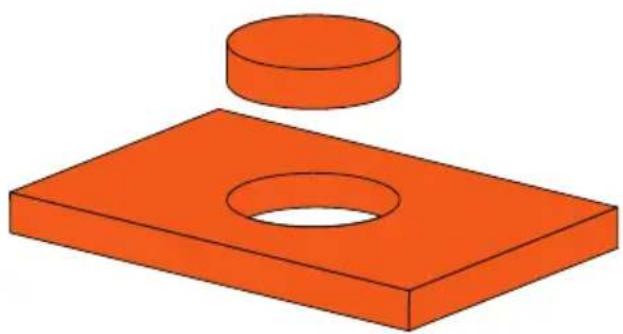
1 Drill a 102mm diameter hole into the table.
2 Insert the AT-PKT-3H into the hole.
natural_image
3D illustration of a red rectangular plate with a circular hole and a cylindrical top (no text or symbols)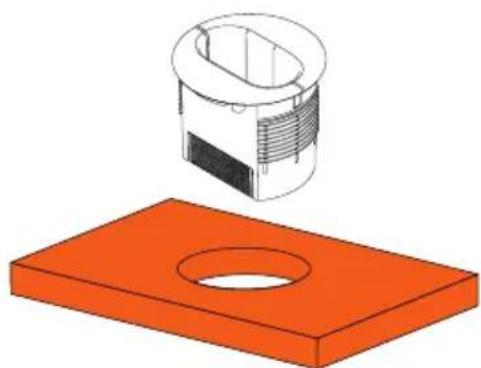
natural_image
3D illustration of a mechanical component with a cylindrical housing and an orange rectangular base (no text or symbols)Mounting Dimensions Inches Millimeters
| Maximum Table Depth 1.97 50 | |
| Maximum Cable Size 0.24 6 | |
| Minimum Cable Housing 0.39 10 |

ATLONA.
Installation Guide
AT-PKT-3H
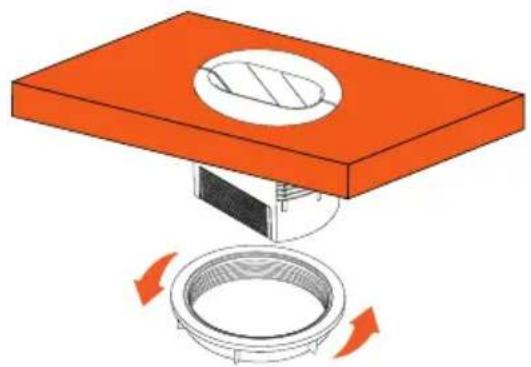
3 Thread the tension ring onto the AT-PKT-3H from below the table, until the unit is secure and no longer moves.
4 Insert the cables through the PKT-3H, then affix the cable bushings and cable ribs to the wires.
natural_image
Diagram of a mechanical assembly with an orange base and a circular component, showing rotational motion arrows (no text or symbols)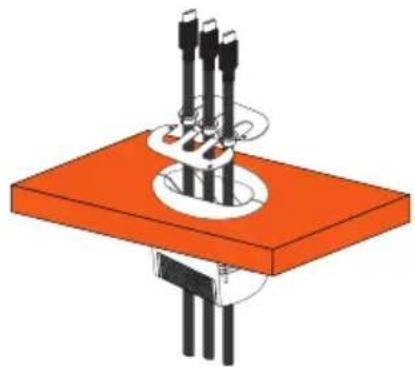
natural_image
3D diagram of a mechanical assembly with orange base and black components, no visible text or symbols
ATLONA.
Installation Guide
AT-PKT-3H
5 Affix the cable ribs to the AT-PKT-3H using the two included screws.
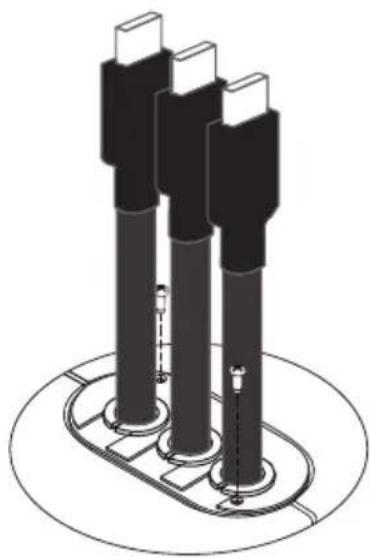
natural_image
Technical illustration of three cylindrical electronic components mounted on a circular base (no text or symbols)6 Mount the cable tie holders* underneath the table, using the included screws.
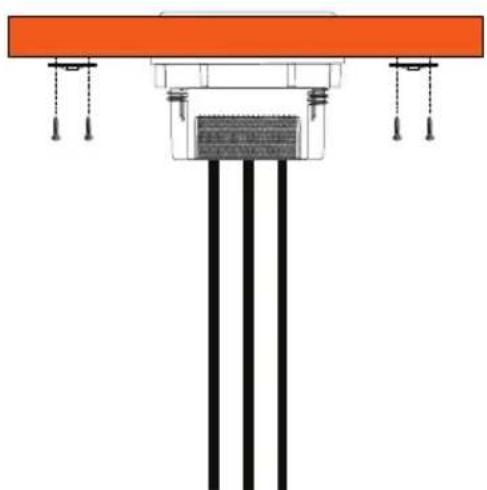
natural_image
Pure architectural or structural diagram showing vertical columns and horizontal beams, no text or symbols present* Mount one or both holders based on need.

ATLONA.
Installation Guide
AT-PKT-3H
7 Place the cables within the included cable bag.
8 Affix the cable bag to the unit using the already installed Velcro of the unit and bag.
9 Thread the cables through the cable tie and the holder then tighten the cables ties until the cables are secured.

natural_image
Technical line drawing of a mechanical assembly with three views: top view, side view, and bottom view (no text or symbols)
ATLONA.
Installation Guide
AT-PKT-3H
Installation
| Dimensions Inches Millimeters | ||
| H x W x D (external) 5.51 x 6.50 x 6.50 | 140 x 165 x 165 | |
| W x D (internal) 3.27 x 1.65 83 x 42 |
Weight Pounds Kilograms
| Unit 0.50 0.23 | ||
| Shipping 0.90 0.41 |
Certification
| Unit CE |
© 2018 Atlona Inc. All rights reserved. "Atlona" and the Atlona logo are registered trademarks of Atlona Inc. All other brand names and trademarks or registered trademarks are the property of their respective owners. Pricing, specifications and availability subject to change without notice. Actual products, product images, and online product images may vary from images shown here.

ATLONA.
atlona.com • 408.962.0515 • 877.536.3976