
AT-HD4-SI40SR - Audio/video extension Atlona - Free user manual and instructions
Find the device manual for free AT-HD4-SI40SR Atlona in PDF.


| Product Type | HDMI Extender over Single CAT5e/6/7 |
| Brand | Atlona |
| Model | AT-HD4-SI40SR |
| Transmission Distance | Up to 40m (130ft) at 1080p |
| Maximum Resolution | 1080p, 1920x1200 |
| Video Support | Deep Color, 3D |
| Audio Support | Dolby TrueHD, DTS-HD Master Audio, 7.1ch |
| HDCP Compliance | Yes |
| Bandwidth | 6.75 Gbps |
| Dimensions (HxWxD) | 1 x 2.9 x 3.5 in (25 x 75 x 90 mm) |
| Weight | 1.06 lbs (0.48 kg) |
| Power Supply | 2 x 5V DC (included) |
| Power Consumption | 1.5W |
| Operating Temperature | 32°F to 104°F (0°C to 40°C) |
| Storage Temperature | -4°F to 140°F (-20°C to 60°C) |
| Connectivity (Transmitter) | 1 x HDMI In, 1 x CAT5e/6/7 Out |
| Connectivity (Receiver) | 1 x CAT5e/6/7 In, 1 x HDMI Out |
| Adjustable EDID | 8 modes including learning mode |
| Equalization Control | 8-level (adjusts cable skew) |
| Mounting | Wall-mountable housing |
| Cascading Support | Yes |
| Warranty | 3 years limited |
| Cleaning | Use a damp cloth; avoid liquids and aerosols |
Frequently Asked Questions - AT-HD4-SI40SR Atlona
User questions about AT-HD4-SI40SR Atlona
0 question about this device. Answer the ones you know or ask your own.
Ask a new question about this device
Download the instructions for your Audio/video extension in PDF format for free! Find your manual AT-HD4-SI40SR - Atlona and take your electronic device back in hand. On this page are published all the documents necessary for the use of your device. AT-HD4-SI40SR by Atlona.
USER MANUAL AT-HD4-SI40SR Atlona
Atlona HDMI Extender over Single CAT5/6 up to 130 feet with 3D Support
AT-HD4-SI40SR

User Manual
Table of Contents
- Introduction 3
- Package Contents 3
- Features
- Specifications 3
- Panel Descriptions
a. Transmitter 4
b. Receiver - Installation 5
- A/V Issues and Solutions 5
- Category Cable 5
- EDID Learn 5
- Connection and Installation 6
- Safety Information 7
- Warranty 8
- Atlona Product Registration 9
Revision D (2/15/13):
New Firmware Fixed error with Pioneer AVRs
Introduction
The Atlona High Speed HDMI Extender over a single category cable ensures a quality audio/video signal up to 130ft with pass through of deep color, 3D, Dolby® TrueHD and DTS-HD Master Audio™. Supports resolutions up to 1080p or 1920x1200 extending an HD source to any display.
Package Contents
• 1 x AT-HD4-SI40SR (Transmitter and Receiver kit)
- 2 x 5V Power Supply
- 1 x User Manual
Features
• Extends an A/V signal up to 40m (130ft) at 1080p
- Adjustable EDID mode dial to ensure compatibility
- Minimizes cable skew with adjustable 8-level equalization control
• DTS-HD Master Audio and Dolby TrueHD audio support
- HDCP compliant
- Allows cascading
• Wall mounting housing design for easy installation
- Deep Color & full 3D support
Specifications
| Bandwidth frequency 6.75Gbps | |||
| Resolution outputs Video: up to 1080p | |||
| Vesa: up to 1920x1200 | |||
| Dimensions (HxWxD) 1x2.9x3.5 (inch) or 25x75x90 (mm) | |||
| Weight 1.06lbs or 0.48kg | |||
| Temperature Operating: 32°F to 104°F or 0°C to 40°C | |||
| Storage: -4°F to 140°F or -20°C to 60°C | |||
| Power consumption 1.5W | |||
Sender:
| Input | Port | 1 | x | HDMI |
| Output | Port | 1 | x | CAT5e/6/7 |
| Receiver: | ||||
| Input | Port | 1 | x | CAT5e/6/7 |
| Output | Port | 1 | x | HDMI |
Panel Description
Transmitter


- MODE: 0 - EDID HD (up to 1080p@60) 2D video & 7.1ch audio
1 - EDID HD (up to 1080p@60) - 2D video & 2ch audio
2 - EDID HD (1080p@60) - 2D video & 7.1ch audio
3 - EDID HD (1080p@60) - 2D video & 2ch audio
4 - EDID HD (1080p@60) - 3D video & 7.1ch audio
5 - EDID HD (1080i@50/60)(720p@50/60) - 2D video & 2ch audio
6 - EDID HD (1080p@60) - 3D video & 2ch audio
7 - EDID learning mode (See page 5 for instructions)
- HDMI In: Connect HDMI source here
- +5V DC: Connect to 5V DC power supply
- CAT Out: Connect to the CAT in of receiver with a category cable
Receiver


- +5V DC: Connect to 5V DC power supply.
- CAT IN: Connect category cable from the transmitter's CAT out
- EQ: The 8-level equalization dial varies from MAX (long distance) to MIN (short distance). Adjust the dial from MIN to MAX until the signal is stable.
- HDMI OUT: Connect to an HDMI display
Installation
- Connect the source to the HDMI IN on the transmitter
- Connect the display to the HDMI OUT on the receiver
- Use a category cable terminated 568B to connect the transmitter and receiver
- Connect the power sources to the transmitter and receiver
The extenders are now connected. Depending on cable type and distance, some minor adjustments may be needed to ensure the best quality.
Possible Audio/Video Issues and Solutions
If audio or video is not passing, try one of the steps below:
- Test HDMI and CAT cables to make sure they are certified
- If using patch panels or wall plates, bypass them to minimize loss
- Validate 568B termination is used
- Adjust EQ dial on receiver until the picture stabilizes
- In the source's menu turn off auto feature and select a specific resolution
- If 3D is not passing between source and display, turn the EDID dial on the transmitter to mode 4 or 6
- If the signal is not stable, use the steps listed below to learn EDID.
Category Cable
For the category cables used in these products' set up, please be sure to use a 568B termination as pictured below.

bar
| Category | Value | |---|---| | 1 - White - Orange | 1 | | 2 - Orange | 2 | | 3 - White - Green | 3 | | 4 - Blue | 4 | | 5 - White - Blue | 5 | | 6 - Green | 6 | | 7 - White - Brown | 7 | | 8 - Brown | 8 |EDID Learning
- Turn off (unplug) the transmitter
- Unplug the category cable from the transmitter and receiver
- Connect the display to the HDMI IN on the transmitter
- Turn the EDID dial on the transmitter to mode 7
- Plug the power cable into the transmitter
The signal light on the port will dim then light again to indicate EDID learning is complete
Note: Leave the dial on mode 7
Connection and Installation

Safety Information
Safeguards

To reduce the risk of electric shock, do not expose this product to rain or moisture

If the wall plug does not fit into your local power socket, hire an electrician to replace your obsolete socket.

Do not modify the wall plug. Doing so will void the warranty and safety features.

This equipment should be installed near the socket outlet and the device should be easily accessible in the case it requires disconnection.
Precautions
FCC regulations state that any unauthorized changes or modifications to this equipment, not expressly approved by the manufacturer, could void the user's authority to operate this equipment.
Operate this product using only the included external power supply. Use of other power supplies could impair performance, damage the product, or cause fires.
In the event of an electrostatic discharge this device may automatically turn off. If this occurs, unplug the device and plug it back in.
Protect and route power cords so they will not be stepped on or pinched by anything placed on or against them. Be especially careful of plug-ins or cord exit points from this product.
Avoid excessive humidity, sudden temperature changes or temperature extremes.
Keep this product away from wet locations such as bathtubs, sinks, laundries, wet basements, fish tanks, and swimming pools.
Use only accessories recommended by Atlona to avoid fire, shock, or other hazards.
Unplug the product before cleaning. Use a damp cloth for cleaning and not cleaning fluid or aerosols. Such products could enter the unit and cause damage, fire, or electric shock. Some substances may also mar the finish of the product.
Never open, remove unit panels, or make any adjustments not described in this manual. Attempting to do so could expose you to dangerous electrical shock or other hazards. It may also cause damage to your AT-HD4-SI40SR. Opening the product will void the warranty.
Do not attempt to service the unit. Disconnect the product and contact your authorized Atlona reseller or contact Atlona directly.
Warranty
Limited Warranty
Atlona Technologies warrants that (a) its products (AT-HD4-SI40SR) will perform substantially in accordance with the accompanying written materials for a period of 3 years from the date of receipt and (b) that the product will be free from defects in materials and workmanship under normal use and service for a period of 3 years. In the event applicable law imposes any implied warranties, the implied warranty period is limited to 3 years from the date of receipt. Some jurisdictions do not allow such limitations on duration of an implied warranty, so the above limitation may not apply to customers that fall within those areas.
Customer Remedies
Atlona Technologies' and its suppliers' entire liability and Customer's exclusive remedy shall be, at Atlona Technologies' decision, either return of the price paid for the product, repair, or replacement of the product that does not meet this Limited Warranty and which is returned to Atlona Technologies with a copy of the Customer's receipt. This Limited Warranty is void if failure of the product has resulted from accident, abuse, misapplication, or natural occurrence. In example, but not limited to: power surges (electrical storms, local power outage), dropping the product (or items on the product), contact with fluids, and physical misconduct (i.e. kicking or punching). Any replacement product will be warranted for the remainder of the original warranty period.
No other warranties
To the maximum extent permitted by applicable law, Atlona Technologies and its suppliers disclaim all other warranties, either expressed or implied, including, but not limited to, implied warranties of merchantability and fitness for a particular purpose, with regard to the product and any related written materials. This Limited Warranty gives customer specific legal rights. Customers may have other rights depending on the jurisdiction.
No liability for damages
To the maximum extent permitted by applicable law, in no event shall Atlona Technologies or its suppliers be liable for any damages arising out of the use of or inability to use this product, even if Atlona Technologies has been advised of the possibility of such damages. Such damages include but are not limited to: special, incidental, consequential, or indirect damages for personal injury, loss of business profits, business interruption, loss of business information, or any other pecuniary loss. Atlona Technologies' and its suppliers' entire liability under any provision of this agreement shall be limited to the amount actually paid by you for the product. Some Jurisdictions do not allow the exclusion or limitation of liability for consequential or incidental damage. The above limitations may not apply to you in such jurisdictional cases.
Atlona Product Registration
Thank you for purchasing this Atlona product. - We hope you enjoy it and will take an extra few moments to register your new purchase.
Registration creates an ownership record if your product is lost or stolen and helps ensure you'll receive notification of performance issues and firmware updates.
At Atlona, we respect and protect your privacy, assuring you that your registration information is completely secure. Atlona product registration is completely voluntary and failure to register will not diminish your limited warranty rights.
To register go to: http://www.atlona.com/registration
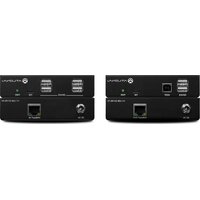


- Atlona HDMI Extender over Single CAT5/6 up to 130 feet with 3D Support
- Table of Contents
- Introduction
- Package Contents
- Features
- Specifications
- Panel Description
- Transmitter
- Receiver
- Installation
- Possible Audio/Video Issues and Solutions
- Category Cable
- EDID Learning
- Connection and Installation
- Safety Information
- Safeguards
- Precautions
- Warranty
- Limited Warranty
- Customer Remedies
- No other warranties
- No liability for damages
- Atlona Product Registration
Brand : Atlona
Model : AT-HD4-SI40SR
Category : Audio/video extension