ASGG24LFCD-B - Air-conditioner FUJITSU - Free user manual and instructions
Find the device manual for free ASGG24LFCD-B FUJITSU in PDF.


User questions about ASGG24LFCD-B FUJITSU
0 question about this device. Answer the ones you know or ask your own.
Ask a new question about this device
Download the instructions for your Air-conditioner in PDF format for free! Find your manual ASGG24LFCD-B - FUJITSU and take your electronic device back in hand. On this page are published all the documents necessary for the use of your device. ASGG24LFCD-B by FUJITSU.
USER MANUAL ASGG24LFCD-B FUJITSU
AIR CONDITIONER WALL MOUNTED TYPE
natural_image
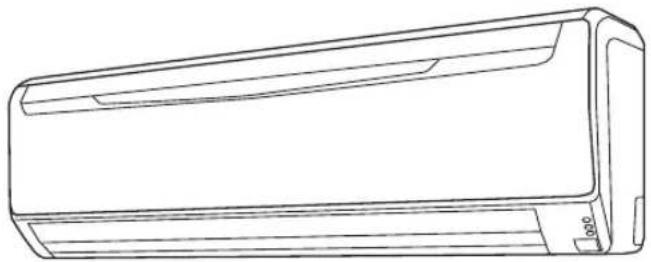
Line drawing of a rectangular air conditioner unit (no text or symbols)KEEP THIS MANUAL FOR FUTURE REFERENCE
| SAFETY PRECAUTIONS | En-1 |
| FEATURES AND FUNCTIONS | En-2 |
| NAME OF PARTS | En-3 |
| PREPARATION | En-5 |
| OPERATION | En-6 |
| TIMER OPERATION | En-8 |
| SLEEP TIMER OPERATION | En-9 |
| ADJUSTING THE DIRECTION OF AIR CIRCULATION | En-10 |
| SWING OPERATION | En-11 |
| 10 °C HEAT OPERATION | En-12 |
| MANUAL AUTO OPERATION | En-12 |
| CLEANING AND CARE | En-13 |
| SELECTING THE REMOTE CONTROLLER | |
| CUSTOM CODE | En-15 |
| TROUBLESHOOTING | En-16 |
| OPERATING TIPS | En-17 |
SAFETY PRECAUTIONS
To prevent personal injury to others, or property damage, read this section carefully before you use this product, and be sure to comply with the following safety precautions.
Incorrect operation due to failure to follow the instructions may cause harm or damage, the seriousness of which is classified as follows:

WARNING CAUTION

This mark warns of death or serious injury. This mark warns of injury or damage to property.

This mark denotes an action that is PROHIBITED.

This mark denotes an action that is COMPULSORY.

WARNING

- This product contains no user-serviceable parts. Always consult authorized service personnel for repairing, installation, and relocation of this product. Improper installation or handling will cause leakage, electric shock, or fi re.
- In the event of a malfunction such as burning smell, immediately stop operation of the air conditioner, and disconnect all the power supply by turning off the electrical breaker or disconnecting the power plug. Then consult authorized service personnel.
- Take care not to damage the power supply cable. If the supply cord is damaged, it must be replaced by the manufacturer, its service agent or similarly qualified persons in order to avoid a hazard.
- In the event of refrigerant leakage, be sure to keep away from fire or any flammables, and consult authorized service personnel.

- If you see lightning or hear thunder, there might be a lightning strike.
To prevent electric shock hazard, turn off the air conditioner by using the remote controller, and do not touch this product or the power plug during thunderstorm. - Do not start or stop the operation of this product by inserting or pulling out the power plug, or by turning on or off the circuit breaker.
- Do not use infl ammable gases near this product.
- Do not expose yourself directly to the cooling airflow for many hours.
- Do not insert your fingers or any other objects into outlet port or inlet port.
- Do not operate with wet hands.
- This appliance is not intended for use by persons (including children) with reduced physical, sensory or mental capabilities, or lack of experience and knowledge, unless they have been given supervision or instruction concerning use of the appliance by a person responsible for their safety. Children should be supervised to ensure that they do not play with the appliance.


CAUTION

- Provide occasional ventilation during use.
- Always operate this product with air filters installed.
- Ensure that any electronic equipment is at least 1 meter away from either this product.
- Turn off power source when not using this product for extended periods.
- After long period of use, check whether the installation stand does not deteriorate to prevent this product from falling down.
- The airflow direction and the room temperature should be carefully considered when you use this product in a room with infants, children, elderly or sick persons.
- Keep the surroundings of the outdoor unit clean and tidy, and do not place items around it. Any objects blocking or entering from the outlet ports may cause product malfunction.

- Do not direct the airflow at fireplaces or heating apparatus.
- Do not block or cover the inlet port and the outlet port.
- Do not apply any heavy pressure to radiator fi ns.
- Do not climb on, place objects on, or hang objects from this product.
- Do not place any other electrical products or household belongings under this product.
Dripping condensation from this product might get them wet, and may cause damage or malfunction of your property. - Do not expose this product directly to water.
- Do not use this product for preservation of food, plants, animals, precision equipment, art work, or other objects. This may cause quality deterioration of those items.
- Do not expose animals or plants to the direct airflow.
- Do not drink the drainage from the air conditioner.
- Do not pull the power supply cable.
- Do not touch the aluminium fins of heat exchanger built-in this product to avoid personal injury when you install or maintain the unit.
- Do not stand on unstable steps when operating or cleaning this product. It may overturn and can cause injury.
■ Energy saving and Comfortable function
INVERTER
At the start of operation, large amount of power is used to bring the room quickly to the desired temperature. Afterwards, the unit automatically switches to a low power setting for economic and comfortable operation.
ECONOMY OPERATION
When ECONOMY operation mode is operated, the room temperature will be a little higher than the set-temp under cooling mode and lower than the set-temp under heating mode. Therefore, the ECONOMY mode is able to save more energy than other normal modes.
HORIZONTAL AIRFLOW: COOLING/ DOWNWARD AIRFLOW: HEATING
For cooling, use horizontal airflow so the cool air does not blow directly on the occupants in the room. For heating, use downward airflow to send powerful, warm air to the floor and create a comfortable environment.
OMNI-DIRECTIONAL AIR FLOW (SWING OPERATION)
Three-dimensional control over air direction swing is possible through dual use of both an UP/DOWN air direction swing and RIGHT/LEFT air direction swing. Since UP/DOWN air direction fl aps operate automatically according to the operating mode of the unit, it is possible to set air direction based on the operating mode.
When the FAN button is used to select QUIET, the indoor unit begins Super Quiet operation; the indoor unit's airflow is reduced to produce quieter operation.
AUTO CHANGEOVER
The operation mode (cooling, heating, dry) is switched automatically to maintain the set temperature, and the temperature is kept constant at all times.
10°C HEAT OPERATION
The room temperature can be maintained at 10^ C so as to prevent the room temperature from falling too far.
■ Convenient function
PROGRAM TIMER
The program timer allows you to integrate OFF timer and ON timer operations in a single sequence. The sequence can involve one transition from OFF timer to ON timer, or from ON timer to OFF timer, within a twenty-four hour period.
SLEEP TIMER
When the SLEEP button is pressed during Cooling mode, the thermostat setting is gradually raised during the period of operation. When the set time is reached, the unit automatically turns off. When the SLEEP button is pressed during Heating mode, the air conditioner's thermostat setting is gradually lowered during the period of operation; during Cooling or Dry mode, the thermostat setting is gradually raised during the period of operation. When the set time is reached, the unit automatically turns off.
■ Clean function
REMOVABLE INTAKE GRILLE
The indoor unit's intake grille can be removed for easy cleaning and maintenance.
APPLE-CATECHIN FILTER
The APPLE-CATECHIN FILTER uses static electricity to clean fi ne particles and dust in the air such as tobacco smoke and plant pollen that are too small to see.
ION DEODORIZATION FILTER
The filter deodorizes by powerfully decomposing absorbed odours using the oxidizing and reducing effects of ions generated by the ultra-fi ne-particle ceramic.
■ Remote controller
The wireless remote controller allows convenient control of air conditioner operation.
WIRED REMOTE CONTROLLER (OPTION)
The optional wired remote controller can be used. When you use the wired remote controller, there are the following different points compared to using the wireless remote controller.
[Additional functions for wired remote controller]
- Weekly timer
• Temperature set back timer
You can use both wired and wireless remote controller simultaneously. (But function is limited)
When the restricted functions on the remote controller are used, beeping sound will be heard, OPERATION, TIMER and the 3rd lamp of the indoor unit will flash.
[Restricted functions for wireless remote controller]
- 10^ Heat operation
- Timer (ON timer, OFF timer and Program timer)
- Sleep timer
Fig. 1

text_image
Fig. 2 MANUAL AUTO ① ② ③ ④ ⑤ ⑥ ⑦ ⑧ ⑨ ⑩ ⑪ ⑫ ⑬ ⑭ ⑮ ⑯ OPERATION TIMER ECONOMYFig. 5

text_image
INVERTER AUTO COOL DRY FAN HEAT 88 AUTO HIGH MED LOW LIFT 18:88.23 MODE START STOP FAN 10°C HEAT BCONOMY SLEEP SET TEMP. SET ←→ SET C→SWING TIMES TIME MCH CLOCK AD/VST TEST RUN RESET 30 29 31 28 27 26 25 24 23 22 17 18Fig. 6

text_image
AUTO COOL DRY FAN HEAT SLEEP 88°C CLOCK OFF↔ON CANCEL AM 18:88 ON PM 18 H T M OFF AUTO HIGH MED LOW QUIET 32 33 34 35 36 37 38 39 40To facilitate explanation, the accompanying illustration has been drawn to show all possible indicators; in actual operation, however, the display will only show those indicators appropriate to the current operation.
Fig. 1 Indoor Unit
① Operating Control Panel (Fig. 2)
② MANUAL AUTO button
- When the MANUAL AUTO button is pressed in for more than 10 seconds, the Forced Cooling operation will start.
● The Forced Cooling operation is used at the time of installation.
Only for authorized service personnel's use.
- When the Forced Cooling operation starts by any chance, press the START/STOP button to stop the operation.
- Please press the button at FILTER INDICATOR RESET.
③ Indicator (Fig. 3)
④ Remote Control Signal Receiver
⑤ OPERATION Indicator Lamp (green)
⑥ TIMER Indicator Lamp (orange)
- If the TIMER indicator lamp flashes when the timer is operating, it indicates that a fault has occurred with the timer setting (See Page 18 Auto Restart).
⑦ ECONOMY Indicator Lamp (green)
- ECONOMY indicator lamp lights when Economy operation and 10 °C Heat operation are operating.
⑧ Intake Grille (Fig.4)
⑨ Front Panel
⑩ Air Filter
⑪ Airflow Direction Louver
⑫ Power Diffuser
⑬ Right-Left Louver
(behind Airflow Direction Louver)
⑭ Drain Hose
⑮ Air Cleaning Filter
Fig. 5 Remote Controller
⑯ Signal Transmitter
⑰ MODE button
⑱ 10 °C HEAT button
⑲ ECONOMY button
⑳ SLEEP button
②1 TIMER MODE button
② FAN button
②3 START/STOP button
⑳ SET button (Vertical)
⑲ SET button (Horizontal)
②6 SWING button
⑳ SET TEMP. button (▲/▼)
28 TIMER Set ( + / - ) button
⑲ CLOCK ADJUST button
③0 TEST RUN button
- This button is used when installing the air conditioner, and should not be used under normal conditions, as it will cause the indoor unit's thermostat function to operate incorrectly.
- If this button is pressed during normal operation, the indoor unit will switch to test operation mode, and the Indoor Unit's OPERATION Indicator Lamp and TIMER Indicator Lamp will begin to flash simultaneously.
- To stop the test operation mode, press the START/STOP button to stop the air conditioner.
③1 RESET button
③2 Remote Controller Display(Fig.6)
③3 Temperature Set Display
③4 Operating Mode Display
③5 Sleep Timer Display
③6 Transmit Indicator
③7 Fan Speed Display
38 Swing Display
⑲ Timer Mode Display
④0 Clock Display
Turn on the Power
1 Turn on the circuit breaker
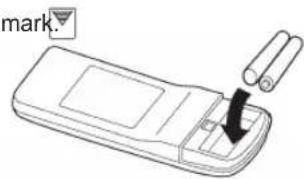
Load Batteries (AAA/R03/LR03 × 2)
1 Press and slide the battery compartment lid on the reverse side to open it.
Slide in the direction of the arrow while pressing the mark.
text_image
mark2 Insert batteries.
Be sure to align the battery polarities ( ) correctly.
3 Close the battery compartment lid.
Set the Current time
1 Press the CLOCK ADJUST button (Fig. 5 29). Use the tip of a ball-point pen or other small object to press the button.
2 Use the TIMER Set ( + ) buttons (Fig. 5 just the clock to the current time.
⑳) to ad-
button:Press to advance the time. - button:Press to reverse the time.
(Pressing the buttons changes the value by the minute. Pressing down on the buttons changes the value by 10 minutes.)
3 Press the CLOCK ADJUST button (Fig. 5 ⑲) again. This completes the time setting and starts the clock.
To Use the Remote Controller
● The Remote Controller must be pointed at signal receiver (Fig.3 ④) to operate correctly.
● Operating Range: About 7 m.
- When a signal is properly received by the air conditioner, a beeping sound will be heard.
- If no beep is heard, press the Remote Controller button again.
Remote Controller Holder
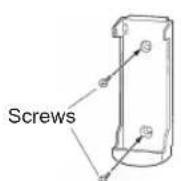
① Mount the Holder.

② Set the Remote Controller.
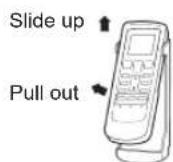
③ To remove the Remote Controller (to use in hand).
CAUTION
● Take care to prevent infants from accidentally swallowing batteries.
- When not using the Remote Controller for an extended period, remove the batteries to avoid possible leakage and damage to the unit.
- If leaking battery fluid comes in contact with your skin, eyes, or mouth, immediately wash with copious amounts of water, and consult your physician.
● Dead batteries should be removed immediately and disposed of properly, either in a battery collection receptacle or to the appropriate authority.
- Do not attempt to recharge dry batteries.
Do not mix different types or new and used batteries together. Batteries can be used about 1 year in ordinary use.
If the remote control range noticeably shortens, replace the batteries, and press RESET button with the tip of a ballpoint pen or other small objects.
To Select Mode Operation
1 Press the START/STOP button (Fig.5 23).
The indoor unit's OPERATION Indicator Lamp (green) (Fig. 3 ⑤) will light.
The air conditioner will start operating.
2 Press the MODE button (Fig.5 ⑰) to select the desired mode.
Each time the button is pressed, the mode will change in the following order.

After 3 seconds, the display will return to the original state.
To Set the Thermostat
Press the SET TEMP. button (Fig. 5②7).
▲ button: Press to raise the thermostat setting.
▼ button: Press to lower the thermostat setting.
● Thermostat setting range:
AUTO ....18 - 30 °C Heating ....16 - 30 °C Cooling/Dry ....18 - 30 °C
The thermostat cannot be used to set room temperature during the FAN mode (the temperature will not appear on the Remote Controller Display).
About 3 seconds later, the entire display will reappear.
The thermostat setting should be considered a standard value, and may differ somewhat from the actual room temperature.
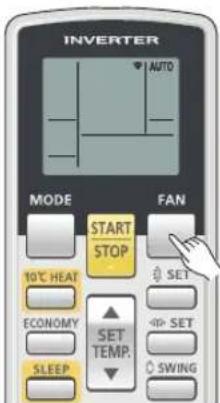
To Set the Fan Speed
Press the FAN button (Fig. 5 22).
Each time the button is pressed, the fan speed changes in the following order:

flowchart
graph LR
    A["AUTO"] --> B["HIGH"]
    B --> C["MED"]
    C --> D["LOW"]
    D --> E["QUIET"]
After 3 seconds, the display will return to the original state.
When set to AUTO:
Heating : Fan will operate to optimally circulate warmed air.
However, the fan will operate at very low speed when the temperature of the air released from the indoor unit is low.
Cooling : As the room temperature approaches the set temperature, the fan speed will slow down.
Fan : The fan runs at the low fan speed.
The fan will operate at a very low setting during Monitor operation and at the start of the Heating mode.
Super Quiet Operation
When set to Quiet:
Super Quiet operation begins. The airflow will be reduced for quieter operation.
● Super Quiet operation cannot be used during Dry mode. (It is the same when Dry mode is selected during AUTO mode operation.)
- During Super Quiet operation, Heating and Cooling performance will be reduced. If the room does not warm up/ cool down when using Super Quiet Operation, please adjust the air conditioner's Fan Speed.

text_image
INVERTER COOL MODE START STOP FAN 10°C HED ECONOMY SLEEP SET SET SET TEMP. SWINGExample: When set to COOL.

text_image
INVERTER 26°C MODE FAN START STOP 10°C HEAT ECONOMY SLEEP SET SET SET SWINGExample: When set to 26 °C.
text_image
INVERTER AUTO MODE FAN START STOP 10°C HEAT ECONOMY SLEEP SET TEMP. SET SET SWINGExample: When set to AUTO.
To Stop Operation
Press the START/STOP button (Fig. 5 ^23 ).
The OPERATION indicator lamp will go out.
MODE Operation
AUTO: ● When AUTO (automatic changeover) operation is selected, the air conditioner selects the appropriate operation mode (Cooling or Heating) according to your room's temperature.
- When AUTO operation is first selected, the fan will operate at very low speed for about one minute, while the unit determines the current conditions of the room and selects the proper operation mode.
- When the room temperature is near the thermostat setting, the air conditioner will begin monitor operation. In the monitor operation mode, the fan will stop or operate at low speed. If the room temperature subsequently changes, the air conditioner will once again select the appropriate operation (Heating or Cooling) to adjust the temperature to the value set in the thermostat. (The monitor operation range is ± 2^ relative to the thermostat setting.)
- If the mode automatically selected by the unit is not what you wish, select one of the mode operation (HEAT, COOL, DRY, FAN). See page 6.
HEAT: ● Use to warm your room.
- When heating mode is selected, the air conditioner will operate at very low fan speed for about 3 to 5 minutes, after which it will switch to the selected fan setting. This period of time is provided to allow the indoor unit to warm up before beginning full operation.
- When the room temperature is very low, frost may form on the outdoor unit, and its performance may be reduced. In order to remove such frost, the unit will automatically enter the defrost cycle from time to time. During Automatic Defrost operation, the OPERATION indicator lamp will flash, and the heat operation will be interrupted.
● After the start of heating operation, it takes some time before the room gets warmer.
COOL: ● Use to cool your room.
- During cooling mode, the indoor unit's fan may stop from time to time. (Indoor unit fan control for energy saving)
DRY: ● Use for gently cooling while dehumidifying your room.
● You cannot heat the room during Dry mode.
- During Dry mode, the unit will operate at low speed; in order to adjust room humidity, the indoor unit's fan may stop from time to time. Also, the fan may operate at very low speed when adjusting room humidity.
● The fan speed cannot be changed manually when Dry mode has been selected.
FAN: ● Use to circulate the air throughout your room.
Set the thermostat to a temperature setting that is higher than the current room temperature. The Heating mode will not operate if the thermostat is set lower than the actual room temperature.
Set the thermostat to a temperature setting that is lower than the current room temperature. The Cooling and Dry modes will not operate if the thermostat is set higher than the actual room temperature (in Cooling mode, the fan alone will operate).
You cannot use the unit to heat and cool your room.
By stopping rotation of the indoor unit fan when the outdoor unit is stopped, it enables power-saving operation.
In initial setting, this function is activated.
During Heating mode:
During Cooling/Dry mode:
During Fan mode:
Indoor unit fan control for energy saving:
To inactivate the function, consult your installer or authorized service personnel.
Even if the setting is changed, if the fan speed in Cooling or Dry operation is set to "AUTO", this function still works to suppress the diffusion of circulated indoor humidity.
Before using the timer function, be sure that the Remote Controller is set to the correct current time (P.5).
To Use the ON timer or OFF timer
1 Press the START/STOP button (Fig. 5 23) (if the unit is already operating, proceed to step 2).
The indoor unit's OPERATION Indicator Lamp (green) (Fig. 3 ⑤) will light.
2 Press the TIMER MODE button (Fig. 5 ②1) to select the OFF timer or ON timer operation.
Each time the button is pressed the timer function changes in the following
order:

The indoor unit's TIMER Indicator Lamp (orange)(Fig. 3 ⑥) will light.
3 Use the TIMER Set buttons (Fig. 5 ②8) to adjust the desired OFF time or ON time.
Set the time while the time display is flashing (the flashing will continue for about 5 seconds).
- button: Press to advance the time.
- button: Press to reverse the time.
After 5 seconds, the display will return to the original state.
To Use the Program timer
1 Press the START/STOP button (Fig. 5 23). (if the unit is already operating, proceed to step 2).
The indoor unit's OPERATION Indicator Lamp (green) (Fig.3 ⑤) will light.
2 Set the desired times for OFF timer and ON timer. See the section "To Use the ON timer or OFF timer" to set the desired mode and times.
After 3 seconds, the display will return to the original state. The indoor unit's TIMER Indicator Lamp (orange) (Fig.3 ⑥) will light.
3 Press the TIMER MODE button (Fig. 5 ②) to select the PROGRAM timer operation (OFF → ON or OFF ← ON will display).
The display will alternately show "OFF timer" and "ON timer", then change to show the time setting for the operation to occur first.
- The program timer will begin operation. (If the ON timer has been selected to operate first, the unit will stop operating at this point.)
After 5 seconds, the display will return to the original state.
About the Program timer
- The program timer allows you to integrate OFF timer and ON timer operations in a single sequence. The sequence can involve one transition from OFF timer to ON timer, or from ON timer to OFF timer, within a twenty-four hour period.
- The first timer function to operate will be the one set nearest to the current time. The order of operation is indicated by the arrow in the Remote Controller's Display (OFF → ON, or OFF ← ON).
- One example of Program timer use may be to have the air conditioner automatically stop (OFF timer) after you go to sleep, then start (ON timer) automatically in the morning before you wake up.
To Cancel the Timer
Use the TIMER MODE button to select "CANCEL".
The air conditioner will return to normal operation.
To Change the Timer Settings
Perform steps 2 and 3.
To Stop Air Conditioner Operation while the Timer is Operating
Press the START/STOP button.
To Change Operating Conditions
If you wish to change operating conditions (Mode, Fan Speed, Thermostat Setting, Super Quiet mode), after making the timer setting wait until the entire display reappears, then press the appropriate buttons to change the operating condition desired.
To Cancel the Timer
Use the TIMER MODE button to select "CANCEL".
The air conditioner will return to normal operation.
To Change the Timer Settings
- Follow the instructions given in the section "To Use the ON timer or OFF timer" to select the timer setting you wish to change.
- Press the TIMER MODE button to select either OFF → ON or OFF ← ON.
To Stop Air Conditioner Operation while the Timer is Operating
Press the START/STOP button.
To Change Operating Conditions
If you wish to change operating conditions (Mode, Fan Speed, Thermostat Setting, SUPER QUIET mode), after making the timer setting wait until the entire display reappears, then press the appropriate buttons to change the operating condition desired.
Unlike other timer functions, the SLEEP timer is used to set the length of time until air conditioner operation is stopped.
To Use the SLEEP Timer
While the air conditioner is operating or stopped, press the SLEEP button (Fig. 5 ^20 ).
The indoor unit's OPERATION Indicator Lamp (green) (Fig. 3 ⑤) lights and the TIMER Indicator Lamp (orange) (Fig. 3 ⑥) lights.
To Change the Timer Settings
Press the SLEEP button (Fig. 5 ⑳) once again and set the time using the TIMER Set (☐) buttons (Fig. 5 ⑳).
Set the time while the Timer Mode Display is flashing (the flashing will continue about 5 seconds).
- button: Press to advance the time.
- button: Press to reverse the time.
After 5 seconds, the display will return to the original state.
To Cancel the Timer:
Use the TIMER MODE button to select "CANCEL".
The air conditioner will return to normal operation.
To Stop the Air Conditioner During Timer Operation:
Press the START/STOP button.
About the SLEEP Timer
To prevent excessive warming or cooling during sleep, the SLEEP timer function automatically modifies the thermostat setting in accordance with the set time setting. When the set time has elapsed, the air conditioner completely stops.
During Heating operation:
When the SLEEP timer is set, the thermostat setting is automatically lowered 1 °C every thirty minutes. When the thermostat has been lowered a total of 4 °C, the thermostat setting at that time is maintained until the set time has elapsed, at which time the air conditioner automatically turns off.
During Cooling/Dry operation:
When the SLEEP timer is set, the thermostat setting is automatically raised 1 °C every sixty minutes. When the thermostat has been raised a total of 2 °C, the thermostat setting at that time is maintained until the set time has elapsed, at which time the air conditioner automatically turns off.
SLEEP timer setting

text_image
Set temp. 1 °C 2 °C 3 °C 4 °C 30 minutes 1 hour 1 hour 30 minutes Set timeSLEEP timer setting

text_image
Set time 1 hour Set temp. 1 °C 2 °C- Adjust the up, down, left, and right air directions with the air direction buttons on the Remote Controller.
- Use the air direction buttons after the Indoor Unit has started operating and the airflow-direction louvers have stopped moving.
Vertical Air Direction Adjustment
Press the SET button (Vertical) (Fig. 5 ②4).
Each time the button is pressed, the air direction range changes as follows:

Types of Airflow Direction Setting:
①,②,③,④,⑤,⑥: For all modes
The Remote Controller display does not change.

text_image
Diagram of a car air conditioner with numbered layers from 1 to 6, showing the cooling effect.● Use the air direction adjustments within the ranges shown above.
● The vertical airflow direction is set automatically as shown, in accordance with the type of operation selected.
During Cooling/Dry mode : Horizontal flow ①
During Heating mode : Downward flow ⑤
- During AUTO mode operation, for the first minute after beginning operation, airflow will be horizontal ①; the air direction cannot be adjusted during this period.
- Direction ① ← ②
Only the direction of the Airflow Direction Louver changes; the direction of the Power Diffuser does not change.
The airflow direction setting will temporarily become ① when the temperature of the airflow is low at the start of the Heating mode.
- After beginning of AUTO/HEAT mode operated and automatic defrosting operation time (see page 16), the airflow will be horizontal①.
However, the Airflow Direction cannot be adjusted at beginning AUTO operation mode.
Horizontal Air Direction Adjustment
Press the SET button (Horizontal)(Fig. 5 ^25 ).
● Each time the button is pressed, the air direction range will change as follows:

The remote controller's display does not change.

text_image
Diagram illustrating a mechanical or fluid flow with five labeled directional arrows indicating flow direction.WARNING
● Never place fingers or foreign objects inside the outlet ports, since the internal fan operates at high speed and could cause personal injury.
- Always use the Remote Controller's SET button to adjust the vertical airflow louvers. Attempting to move them manually could result in improper operation; in this case, stop operation and restart. The louvers should begin to operate properly again.
- During Cooling and Dry modes, do not move the vertical airflow direction louvers outside their proper operating range for the mode ① - ③ and into the fan region ④ - ⑥; using the louvers in the fan region will cause moisture to condense near the air outlet, and water may drop onto the floor. During the Cooling/Dry modes, if the louvers are operated outside the range ① - ③ for more than 20 minutes, they will be automatically returned to the ③ range.
- When used in a room with infants, children, elderly or sick persons, the air direction and room temperature should be considered carefully when making settings.
Begin air conditioner operation before performing this procedure.
To select Swing Operation
Press the SWING button (Fig. 5 26).
The Swing Display (Fig. 6 38) will light.
Each time the SWING button is pressed, the swing operation will change in the following order.

flowchart
graph TD
    A["Up/down swing operation Left/right swing operation"] --> B["Swing operation stops Up/down/left/right swing operation"]
    B --> C["Arrow to right"]
To stop Swing Operation
Press the SWING button and select STOP.
Airflow direction will return to the setting before swing was begun.
About Swing Operation
● Up/down swing: Swing operation begins using the following range according to the current airflow direction.
For heating: Swings between position (3) - (6)
For cooling, dry: Swings between position (1) - (4)
With the upper airfl ow-direction louver in the horizontal position, the lower Airfl ow Direction Louver moves (swings) to direct airfl ow to a wide area.
In FAN mode, the Up/down swing operation range is decided according to the airflow direction previously set before starting the swing operation.
Airflow direction (1) - (3): Range (1) - (4)
Airflow direction (4) - (6): Range (3) - (6)
● Left/right swing: The Airflow Direction Louvers move (swing) in the left/right airflow direction.
- Up/down/left/right swing: The Airflow Direction Louvers move (swing) in both the up/down and left/right airflow directions.
- The SWING operation may stop temporarily when the air conditioner's fan is not operating, or when operating at very low speeds.
- If the SET button (Vertical) is pressed during the up/down swing operation, the up/down swing operation will stop and if the SET button (Horizontal) is pressed during the left/right swing operation, the left/right swing operation will stop.
ECONOMY OPERATION
Begin Air Conditioner operation before performing this procedure.
To Use the Economy Operation
Press the ECONOMY button (Fig.5 19).
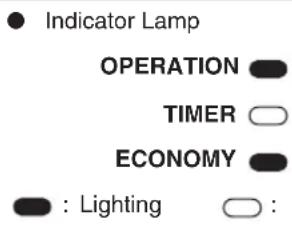
The ECONOMY Indicator Lamp (green) (Fig. 3 ⑦) will light.
Economy operation begins.
To Stop the Economy Operation
Press the ECONOMY button (Fig.5 ⑲) again.
The ECONOMY Indicator Lamp (green) (Fig. 3 ⑦) will go out.
Normal operation begins.
text_image
Indicator Lamp OPERATION TIMER ECONOMY : Lighting :OFF
About Economy Operation
At the maximum output, Economy Operation is approximately 70% of normal air conditioner operation for cooling and heating.
- If the room is not cooled (or heated) well during Economy operation, select normal operation.
- During the monitor period in the AUTO mode, the air conditioner operation will not change to Economy operation even if Economy operation is selected by pressing the ECONOMY button.
- When Economy operation mode is operated, the room temperature will be little higher than the set-temp under Cooling mode and lower than set-temp under Heating mode. Therefore, the Economy mode is able to save more energy than other normal modes.
- In case of multi-type air conditioner, the Economy operation mode is only available for the set indoor unit.
To use 10 °C Heat Operation
Press the 10 °C HEAT button (Fig.5 ⑱)
The OPERATION indicator lamp (green) (Fig. 3 ⑤) will go out, and the ECONOMY indicator lamp (green) (Fig. 3 ⑦) will light.
To stop 10 °C Heat Operation
Press the START/STOP button (Fig.5②3)
Then the OPERATION stops and the ECONOMY indicator lamp (green) (Fig. 3 ⑦) will go out.
About the 10 °C Heat Operation
- The Heating mode will not operate if the room temperature is high enough.
- The room temperature can be maintained at 10 °C by pressing the 10 °C HEAT button (Fig.5 ⑱) so as to prevent the room temperature from falling too far.
- In case of multi-type air conditioner, if other indoor unit is used for heating, the temperature of the room where the "10 °C HEAT" function is applied will rise. When using the "10 °C HEAT" function, we recommend all indoor units should be run under the "10 °C HEAT" mode
While 10 °C HEAT OPERATION is in progress, only the following operation can be used.
SWING
- Indicator Lamp
OPERATION
TIMER
ECONOMY
: Lighting
○ :
OFF
Use the MANUAL AUTO operation in the event the Remote Controller is lost or otherwise unavailable.
How To Use the Main Unit Controls
Press the MANUAL AUTO button (Fig. 2②) more than 3 seconds and less than 10 seconds on the main unit control panel.
To stop operation, press the MANUAL AUTO button (Fig. 2②) once again. (Controls are located inside the intake grille)
- When the air conditioner is operated with the controls on the MANUAL AUTO button, it will operate under the same mode as the AUTO mode selected on the Remote Controller (see page 7).
- The fan speed selected will be "AUTO" and the thermostat setting will be standard. (24 °C)

CAUTION
● Before cleaning the air conditioner, be sure to turn it off and disconnect the Power Supply Cable.
● Before starting operation, make sure that the intake grille (Fig.4) has been shut completely.
- Do not touch the aluminium fins of heat exchanger built-in the indoor unit to avoid personal injury when you maintain the unit.
- Do not stand on slippery, uneven or unstable surfaces when you maintain the unit.
Cleaning the Intake Grille
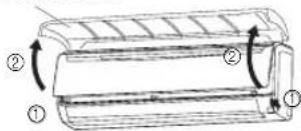
1. Remove the Intake Grille.
① Place your fingers at both lower ends of the grille panel, and lift forward; if the grille seems to catch partway through its movement, continue lifting upward to open.
② Pull past the intermediate catch and open the Intake Grille wide so that it becomes horizontal.
③ Pull the knob fully to release the mounting shaft in order to remove the intake grille.
Intake Grille
text_image
Diagram of a cylindrical device with labeled parts and directional arrows indicating motion or force directions.
text_image
Intake Grille Mounting shaft Knob ③ ③2. Clean with water.
Remove dust with a vacuum cleaner; wipe the unit with warm water, then dry with a clean, soft cloth.
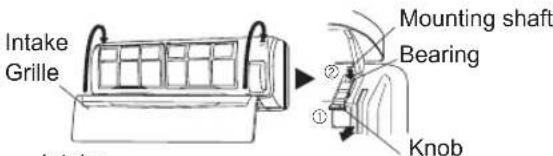
3. Replace the Intake Grille.
① Pull the knobs all the way.
② Hold the grille horizontal and set the left and right mounting shafts into the bearings at the top of the panel.
③ Push the knob back to its original position.
④ Press the place where the arrow on the diagram indicates and close the Intake Grille.
text_image
Intake Grille Mounting shaft Bearing ② ① Knob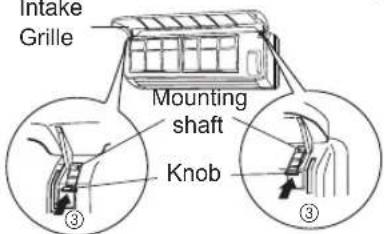
text_image
Intake Grille Mounting shaft Knob ③ ③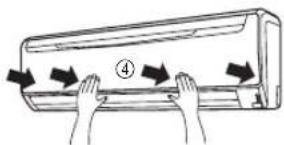
text_image
Diagram showing airflow around a car with numbered arrows indicating direction or movement, likely illustrating air circulation or airflow dynamics.Cleaning the Air Filter
1. Open the Intake Grille, and remove the air fi iter.
Lift up the air filter's handle, disconnect the two lower tabs, and pull out.
Air filter handle
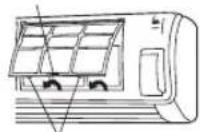

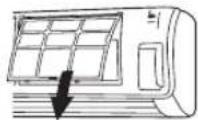
Hooks (2 places)
2. Remove dust with a vacuum cleaner or by washing.
After washing, allow to dry thoroughly in a shaded place.
3. Replace the Air Filter and close the Intake Grille.
① Align the sides of the air filter with the panel, and push in fully, making sure the 2 lower tabs are returned properly to their holes in the panel.
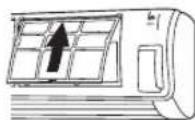

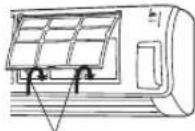
② Close the Intake Grille.
Hooks (2 places)
(For purposes of example, the illustration shows the unit without Intake Grille installed.)
- Dust can be cleaned from the air filter either with a vacuum cleaner, or by washing the filter in a solution of mild detergent and warm water. If you wash the filter, be sure to allow it to dry thoroughly in a shady place before reinstalling.
- If dirt is allowed to accumulate on the air filter, airflow will be reduced, lowering operating efficiency and increasing noise.
● During periods of normal use, the Air Filters should be cleaned every two weeks. -
Do not operate the air conditioner with the Intake grille open.
-
When used for extended periods, the unit may accumulate dirt inside, reducing its performance. We recommend that the unit be inspected regularly, in addition to your own cleaning and care. For more information, consult authorized service personnel.
- When cleaning the unit's body, do not use water hotter than 40^ , harsh abrasive cleansers, or volatile agents like benzene or thinner.
- Do not expose the unit body to liquid insecticides or hairsprays.
- When shutting down the unit for one month or more, first allow the fan mode to operate continuously for half a day to allow internal parts to dry thoroughly.
Air Cleaning Filter Installation
(This part is optional.)
- Open the Intake Grille and remove the Air fi Iters.
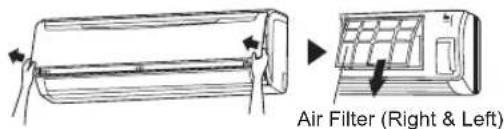
text_image
Air Filter (Right & Left)- Install the Air cleaning fi Iter set (set of 2).
① Set the air cleaning filter into the air cleaning filter frame.
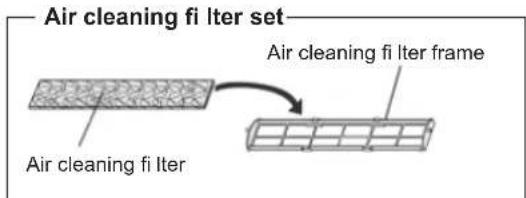
text_image
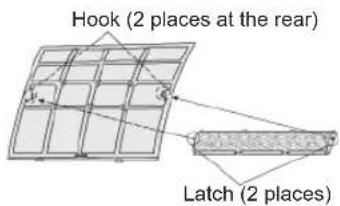
Air cleaning fi Iter set Air cleaning fi Iter frame② Engage the latch at both ends of the filter with the 2 hooks at the rear of the air cleaning filter frame.
text_image
Hook (2 places at the rear) Latch (2 places)Take care that the air cleaning filter does not project beyond the frame.
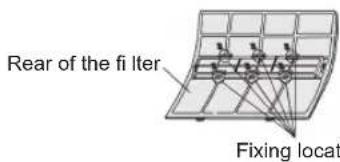
③ Engage the six fi xing locations at the top and bottom of the air cleaning filter frame with the hooks of the air filter.
text_image
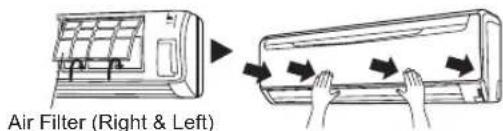
Rear of the filter Fixing locat- Install the two Air filters and close the Intake Grille.
text_image
Air Filter (Right & Left)- When air cleaning filters are used, the effect will increased by setting the fan speed to "High".
Replacing dirty Air cleaning fi Iters
Replace filters with the following components (purchased separately).
● APPLE-CATECHIN FILTER: UTR-FA13-1
● ION DEODORIZATION FILTER: UTR-FA13-2
-
Open the Intake Grille and remove the Air fi Iters.
-
Replace them by two new Air cleaning filters.
① Remove the old air cleaning filters in reverse order of their installation.
② Install in the same way as for installation of the air cleaning filter set.
- Install the two Air filters and close the Intake Grille.
In regard to the Air Cleaning Filters
APPLE-CATECHIN FILTER (1 sheet)
● The filters are disposable filters. (They cannot be washed and reused.)
- For storage of the filters, use the filters as soon as possible after the package has been opened.
(The air cleaning effect decreases when the filters are left in the opened package)
● Generally, the filters should be exchanged about every 3 months.
Please buy dedicated APPLE-CATECHIN FILTER (UTR-FA13-1) (Sold separately) to exchange the used dirty air cleaning filters.
[ION DEODORIZATION FILTER (1 sheet) — light blue]
● The filters should be exchanged about every three years so as to maintain the deodorizing effect.
Please buy dedicated ION DEODORIZATION FILTER (UTR-FA13-2) (Sold separately) when exchanging the filters.
Maintenance of ION DEODORIZATION FILTER
In order to maintain the deodorizing effect, please clean the filter in the follow way every three months.
① Remove the fi Iter.
② Clean with water and dry in the air.
1) Flush the fi Iters with high-pressure hot water until the surface of the fi Iters are covered with water. Please flush with diluent neutral detergent.
(Never wash by reaming or rubbing, otherwise it will damage the deodorizing effect.
2) Rinse with water flow.
3) Dry in shade.
③ Reinstall the fi Iter.
Filter Indicator Reset (Special setting)
- This function can be used if set correctly during installation.
Please consult authorized service personnel in order to use this function. - Clean the air filter according to “CLEANING AND CARE” when the indicator lamp show the following;
ECONOMY indicator lamp Flashes 3 times, at intervals of 21 seconds
After cleaning, reset the filter indicator by pushing the "MANUAL AUTO" button (Fig. 2②) on the indoor unit for 2 seconds or less.
- Indicator Lamp
OPERATION
TIMER
ECONOMY

Flashing : OFF
SELECTING THE REMOTE CONTROLLER CUSTOM CODE
When two or more air conditioners are installed in a room and the Remote Controller is operating an air conditioner other than the one you wish to set, change the custom code of the Remote Controller to operate only the air conditioner you wish to set (4 selections possible).
When two or more air conditioners are installed in a room, please contact your retailer to set the individual air conditioner custom codes.
Remote controller custom code setting
Use the following steps to select the custom code of the Remote Controller. (Note that the air conditioner cannot receive a signal if the air conditioner has not been set for the matching custom code.)
1 Press the START/STOP button until only the clock is displayed on the Remote Controller display.
2 Press the MODE button for at least five seconds to display the current custom code (initially set to R).
3 Press the (▲) buttons to change the custom code between A→b→c→d. Match the code on the display to the indoor unit custom code.
4 Press the MODE button again to return to the clock display. The custom code will be changed.

text_image
INVERTER R MODE 10°C HEAT ECONOMY SLEEP FAN START STOP SET SET TEMP. → SET → SWING- If no buttons are pressed within 30 seconds after the custom code is displayed, the system returns to the original clock display. In this case, start again from step 1.
- The indoor unit custom code is set to A prior to shipment. Contact your retailer to change the custom code.
- The Remote Controller resets to custom code A when the batteries in the Remote Controller are replaced. If you use a custom code other than custom code A, reset the custom code after replacing the batteries.
If you do not know the indoor unit custom code setting, try each of the custom codes (R - b - c - d) until you find the code which operates the air conditioner.

WARNING
In the event of a malfunction (burning smell, etc.), immediately stop operation, turn off the electrical breaker or disconnect the power supply, and consult authorized service personnel.
Merely turning off the unit's power switch will not completely disconnect the unit from the power source. Always be sure to turn off the electrical breaker or disconnect the power supply, to ensure that power is completely off.
Before requesting service, perform the following checks:
| Symptom Cause See Page | |||
| NORMAL FUNCTION | Doesn't operate immediately: | ● If the indoor unit is stopped and then immediately started again, the compressor will not operate for about 3 minutes, in order to prevent fuse blowouts.● Whenever the Power Supply is disconnected and then reconnected to a power outlet, the protection circuit will operate for about 3 minutes, preventing unit operation during that period. | — |
| Noise is heard: | ● During operation or immediately after stopping the unit, the sound of water flowing in the air conditioner's piping may be heard. Also, noise may be particularly noticeable for about 2 to 3 minutes after starting operation (sound of refrigerant flowing).● During operation, a slight squeaking sound may be heard. This is the result of minute expansion and contraction of the front panel due to temperature changes. | — | |
| ● During Heating operation, a sizzling sound may be heard occasionally. This sound is produced by the Automatic Defrost-ing operation. | 17 | ||
| Smells: | ● Some smell may be emitted from the indoor unit. This smell is the result of room smells (furniture, tobacco, etc.) which have been taken into the air conditioner. | — | |
| Mist or steam is emitted: | ● During Cooling or Dry operation, a thin mist may be seen emitted from the indoor unit. This results from the sudden Cooling of room air by the cool air emitted from the air conditioner, resulting in condensation and misting. | — | |
| ● During Heating operation, the outdoor unit's fan may stop, and steam may be seen rising from the unit. This is due to Automatic Defrosting operation. | 17 | ||
| Airflow is weak or stops: | ● When Heating operation is started, fan speed is temporarily very low, to allow internal parts to warm up.● During Heating operation, if the room temperature rises above the thermostat setting, the outdoor unit will stop, and the indoor unit will operate at very low fan speed. If you wish to warm the room further, set the thermostat for a higher setting. | — | |
| ● During Heating operation, the indoor unit will temporarily stop operation (Max. 15 minutes) as the Automatic Defrosting mode operates. During Automatic Defrosting operation, the OPERATION Indicator Lamp will flash. | 17 | ||
| ● During Dry mode, the indoor unit will operate at low speed; in order to adjust room humidity, the indoor unit's fan may stop from time to time. Also, the fan may operate at very low speed when adjusting room humidity. | 7 | ||
| ● During Super Quiet operation, the fan will operate at very low speed. | 6 | ||
| ● When the outdoor unit is stopped, the indoor unit's fan may stop from time to time in cooling operation. | 7 | ||
| ● In the monitor of AUTO operation, the fan will operate at very low speed. | 7 | ||
| ● In case of Multi-type unit, if multiple units are operated in different operation modes as shown below, the units operated afterward will stop and the OPERATION indicator lamp (green) will flash.Heating mode and Cooling mode (or Dry mode) Heating mode and Fan mode | 18 | ||
| Water is produced from the outdoor unit: | ● During Heating operation, water may be produced from the outdoor unit due to Automatic Defrosting operation. | 17 | |
When the filter sign is set, the LED lamp may flash. In this case, please refer to the "Filter Indicator Reset".
| Symptom Diagnostic See Page | |||
| CHECK ONCE MORE | Doesn't operate at all: | ● Has the Power Supply been disconnected from its outlet?● Has there been a power failure?● Has a fuse blown out, or a circuit breaker been tripped? | — |
| ● Is the timer operating? 8 - 9 | |||
| Poor Cooling (or Heating) performance: | ● Is the Air Filter dirty?● Are the air conditioner's Intake Grille or outlet port blocked?● Did you adjust the room temperature settings (thermostat) correctly?● Is there a window or door open?● In the case of Cooling operation, is a window allowing bright sunlight to enter? (Close the curtains.)● In the case of Cooling operation, are there heating apparatus and computers inside the room, or are there too many people in the room? | — | |
| ● Is the unit set for Super Quiet operation? 6 | |||
| The unit operates differently from the Remote Controller's setting: | ● Are the Remote Controller's batteries dead?● Are the Remote Controller's batteries loaded properly? | 5 | |
If the problem persists after performing these checks, or if you notice burning smells, or the OPERATION Indicator Lamp (Fig. 3 ⑤) and the TIMER Indicator Lamp (Fig. 3 ⑥) fl ashes and ECONOMY Indicator Lamp (Fig.3⑦) fl ashes fast, immediately stop operation, disconnect the Power Supply and consult authorized service personnel.
OPERATING TIPS
Operation and Performance
Heating Performance
- This air conditioner operates on the heat-pump principle, absorbing heat from outdoor air and transferring that heat to indoor unit. As a result, the operating performance is reduced as outdoor air temperature drops. If you feel that insufficient heating performance is being produced, we recommend you use this air conditioner in conjunction with another kind of heating appliance.
- Heat-pump air conditioners heat your entire room by recirculating air throughout the room, with the result that some time may be required after first starting the air conditioner until the room is heated.
Microcomputer-controlled Automatic Defrosting
- When using the Heating mode under conditions of low outdoor temperature and high humidity, frost may form on the outdoor unit, resulting in reduced operating performance.
In order to prevent this kind of reduced performance, this air conditioner is equipped with a Microcomputer-controlled Automatic Defrosting function. If frost forms, the air conditioner will temporarily stop, and the defrosting circuit will operate briefly (Max. 15 minutes).
During Automatic Defrosting operation, the OPERATION Indicator Lamp (green) will flash.
● After heating operation stops, if frost forms on the outdoor unit, the unit will start Automatic Defrosting operation. At this time, the outdoor unit will automatically stop after operating for a few minutes.
AUTO Restart
In Event of Power Interruption
- When the air conditioner power has been interrupted by a power failure; The air conditioner will then restart automatically in its previous mode when the power is restored.
- If a power failure occurs during TIMER operation, the timer will be reset and the indoor unit will begin (or stop) operation at the new time setting. In the event that this kind of timer fault occurs, the TIMER Indicator Lamp will flash (see Page. 3).
- Use of other electrical appliances (electric shaver, etc.) or nearby use of a wireless radio transmitter may cause the air conditioner to malfunction. In this event, temporarily disconnect the Power Supply, reconnect it, and then use the Remote Controller to resume operation.
Multi-type Air conditioner
This indoor unit can be connected to a multi-type outdoor unit. The multi-type air conditioner allows multiple indoor units to be operated in multiple locations. The indoor units may be operated simultaneously, in accordance with their respective output.
Simultaneous Use of Multiple Units
- When using a multi-type air conditioner, the multiple indoor units can be operated simultaneously, but when two or more indoor units of the same group are operated simultaneously, the heating and cooling efficiency will be less than when a single indoor unit is used alone. Accordingly, when you wish to use more than one indoor unit for cooling at the same time, the use should be concentrated at night and other times when less output is required. In the same way, when multiple units are used simultaneously for heating, it is recommended that they be used in conjunction with other auxiliary space heaters, as required.
- Seasonal and outdoor temperature conditions, the structure of the rooms and the number of persons present may also result in differences of operating efficiency. We recommend that you try various operating patterns in order to confirm the level of heating and cooling output provided by your units, and use the units in the way that best matches your family's lifestyle.
- If you discover that one or more units delivers a low level of cooling or heating during simultaneous operation, we recommend that you stop simultaneous operation of the multiple units.
- Operation cannot be done in the following different operating modes.
If the indoor unit is instructed to do an operating mode that it cannot perform, the OPERATION indicator lamp (green) on the indoor unit will flash (1 second on, 1 second off) and the unit will go into the standby mode.
Heating mode and Cooling mode (or Dry mode)
Heating mode and Fan mode
- Operation can be done in the following different operating modes.
Cooling mode and Dry mode
Cooling mode and Fan mode
Dry mode and Fan mode
- The operating mode (Heating mode or Cooling (Dry) mode) of the outdoor unit will be determined by the operating mode of the indoor unit that was operated first. If the indoor unit was started in fan mode, the operating mode of the outdoor unit will not be determined.
For example, if indoor unit (A) was started in Fan mode and then indoor unit (B) was then operated in Heating mode, indoor unit (A) would temporarily start operation in Fan mode but when indoor unit (B) started operating in Heating mode, the OPERATION indicator lamp (green) for indoor unit (A) would begin to fl ash (1 second on, 1 second off) and it would go into standby mode. Indoor unit (B) would continue to operate in Heating mode.
Notice
- During use of the Heating mode, the outdoor unit will occasionally commence the defrost operation for brief periods. During the defrosting operation, if the user sets the indoor unit for heating again, the defrosting mode will continue, and the heating operation will begin after completion of defrosting, with the result that some time may be required before warm air is emitted.
- During use of the Heating mode, the top of the indoor unit may become warm, but this is due to the fact that coolant is circulated through the indoor unit even when it is stopped; it is not a malfunction.