CE-DP0C12-S1 - Adapter Siig - Free user manual and instructions
Find the device manual for free CE-DP0C12-S1 Siig in PDF.


User questions about CE-DP0C12-S1 Siig
0 question about this device. Answer the ones you know or ask your own.
Ask a new question about this device
Download the instructions for your Adapter in PDF format for free! Find your manual CE-DP0C12-S1 - Siig and take your electronic device back in hand. On this page are published all the documents necessary for the use of your device. CE-DP0C12-S1 by Siig.
USER MANUAL CE-DP0C12-S1 Siig
natural_image
Simple black-and-white icon of a circular shape with a horizontal line, resembling a stylized eye or lens (no text or symbols)DisplayPort 1.2 to 3-Port HDMI MST Splitter
User Reference Guide
Introduction
The DisplayPort 1.2 to 3-Port HDMI MST Splitter boosts your productivity by allowing you to connect three HDMI displays to your DisplayPort Multi-Stream Transport (MST) enabled computer.
Key Features and Benefits
- Capable of multiple display modes for various applications. Mirror mode, Extended mode with individual content on each display, and panoramic video wall mode which combines multiple monitors into one large display
• Supports UHD video resolutions up to 3840x2160 (4Kx2K) and 7.1-ch surround audio - Compatible with DisplayPort 1.2 graphics cards with AMD Eyefinity or NVIDIA Surround technology
- Plug-n-play, hassle-free setup - no software or driver installation needed
- Premium aluminum housing delivers efficient heat dissipation for dependable performance and superior electro-magnetic shielding for optimal viewing quality
Specifications
| Chipset STDP4320 | |
| Compliance DisplayPort 1.2a | |
| Output signal HDMI | |
| Maximum resolution 3840x2160 @30Hz | |
| Audio 7.1-ch surround audio | |
| Disp lay mode | Mirror, Extended, and Panoramic video wall mode |
| Connectors | Input: 1x 20-pin, DisplayPort, Male Output: 3x 19-pin, HDMI , Female Power: Micro-USB, Female |
| Housing material Aluminum | |
| Built-in cable length 10.24" (overall) | |
| Dimensions 4.13" (W) x 0.65" (H) x 2.60" (D) | |
| Weight 0.28lbs | |
Package Contents
• DisplayPort 1.2 to 3-Port HDMI MST Splitter
- Micro-USB power cable
- User Reference Guide
System Requirements
• PC with an available DisplayPort 1.2 connection
- Windows ^ 10 / 8.1 / 8 / 7 (32-/64-bit)
Layout
text_image
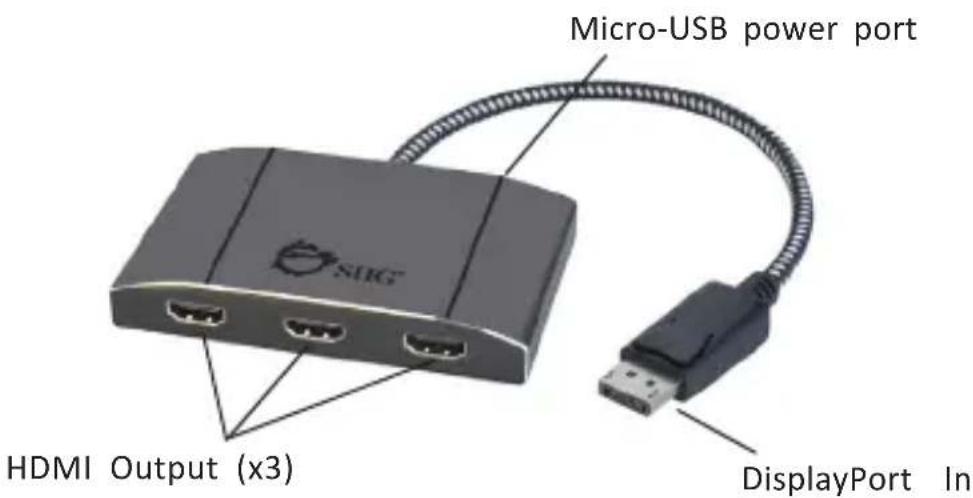
Micro-USB power port HDMI Output (x3) DisplayPort InFigure 1: DisplayPort 1.2 to 3-Port HDMI MST Splitter
• DisplayPort In: Connect to PC's DisplayPort
- HDMI Output (x3): Connect to HDMI displays with HDMI cables (not included)
- Micro-USB power port* (no data transfer): Connect to a USB port using the included Micro-USB power cable
*Note: This connection is required to power the adapter.
Hardware Installation
Important: If the source's DisplayPort signal doesn't support DP 1.2, the Multiple Stream Transport function will be disabled and this adapter becomes a splitter, mirroring your video source across all displays.
- Power off all devices you plan to connect to the unit.
- Connect the unit to your PC's DisplayPort connector.
- Connect your HDMI monitors to the unit's HDMI outputs with HDMI cables (not included).
- Connect the unit's Micro-USB power port to power USB port for power source with the included cable.
- Power on all of the connected devices.
- The Splitter is ready for use.
Application
Adds 3 external monitors to maximize productivity.

text_image
Screenshot collage showing desktop computer, tablet, and dashboard with visible logos and text elementsFigure 2
Monitors & Resolutions Support
The total bandwidth of 21.6 Gbps is shared amongst all attached monitors. If the total bandwidth is consumed by the first and second HDMI monitors, the remaining monitor will be disabled (no video output).
Please refer to the table below:
| Monitor 1Output Resolution | Monitor 2Output Resolution | Monitor 3Output Resolution |
| 3840 x 2160 @30Hz | 3840 x 2160 @30Hz OFF | |
| 3840 x 2160 @30Hz | 2560 x 1440 @60Hz 1920 x 1080 @60Hz | |
| 3840 x 2160 @30Hz | 1920 x 1200 @60Hz 1920 x 1080 @60Hz | |
| 2560 x 1600 @60Hz | 2560 x 1600 @60Hz 1920 x 1080 @60Hz | |
| 2560 x 1440 @60Hz | 2560 x 1440 @60Hz 1920 x 1200 @60Hz | |
| 1920 x 1200 @60Hz | 1920 x 1200 @60Hz 1920 x 1200 @60Hz |
Note: When Monitor 1 and 2 are set with resolution 3840 x 2160 @30Hz, Monitor 3 will be disabled.
For AMD Eyefinity Video Cards
Go to AMD Radeon Settings, and click Eyefinity for advanced display mode setup such as video wall. Refer to your graphic card menu for more details.

text_image
AMD ARDEON GRAPHICS Radeon Additional Settings Create Eyefinity Display Group Create an AMD Eyefinity display group. Combine multiple displays to work together as a single desktop. Completed: creation of an AMD Eyefinity display group with 3 displays (3 x 1).Figure 3
Technical Support and Warranty
QUESTIONS? SIIG's Online Support has answers! Simply visit our web site at www.siig.com and click Support. Our online support database is updated daily with new drivers and solutions. Answers to your questions could be just a few clicks away. You can also submit questions online and a technical support analyst will promptly respond.
SIIG offers a 2-year manufacturer warranty with this product. This warranty covers the original purchaser and guarantees the product to be free of any defects in materials or workmanship for two (2) years from the date of purchase of the product. This warranty is not transferable and is available only to the original purchaser of the product.
SIIG will, at our discretion, repair or replace (with an identical product or product having similar features and functionality) the product if defective in materials or workmanship. This warranty gives you specific legal rights, and you may also have other rights which vary from state to state. Please see our web site for more warranty details.
If you encounter any problems with this product, please follow the procedures below.
A) If it is within the store's return policy period, please return the product to the store where you purchased from.
B) If your purchase has passed the store's return policy period, please follow the steps below to have the product repaired or replaced.
Step 1: Submit your RMA request.
Go to www.siig.com, click Support, then REQUEST A PRODUCT REPLACEMENT to submit a request to SIIG RMA or fax a request to 510-657-5962. Your RMA request will be processed, if the product is determined to be defective, an RMA number will be issued.
Step 2: After obtaining an RMA number, ship the product.
- Properly pack the product for shipping. All accessories that came with the original package must be included
- Include a copy of your original sales receipt inside the package with date of purchase and place of purchase circled and clearly visible
- Clearly write your RMA number on the top of the returned package. SIIG will refuse to accept any shipping package, and will not be responsible for a product returned without an RMA number posted on the outside of the shipping carton
- You are responsible for the cost of shipping to SIIG. Ship the product to the following address:
SIIG, Inc. 6078 Stewart Avenue Fremont, CA 94538-3152, USA RMA #: ____
• SIIG will ship the repaired or replaced product via Ground in the U.S. and International Economy outside of the U.S. at no cost to the customer
About SII G, Inc.
Founded in 1985, SIIG, Inc. is a leading manufacturer of IT connectivity solutions (including Serial ATA and Ultra ATA Controllers, FireWire, USB, and legacy I/O adapters) that bridge the connection between Desktop/Notebook systems and external peripherals. SIIG continues to grow by adding A/V and Digital Signage connectivity solutions to our extensive portfolio.
SIIG products offer comprehensive user manuals, many user-friendly features, and are backed by an extensive manufacturer warranty. High quality control standards are evident by the overall ease of installation and compatibility of our products, as well as one of the lowest defective return rates in the industry. SIIG products can be found in computer retail stores, mail order catalogs, through major distributors, system integrators, and VARs in the Americas and the UK, and through e-commerce sites.
PRODUCT NAME
DisplayPort 1.2 to 3-Port HDMI MST Splitter
FCC RULES: TESTED TO COMPLY WITH FCC PART 15, CLASS B OPERATING ENVIRONMENT: FOR HOME OR OFFICE USE
FCC COMPLIANCE STATEMENT:
This device complies with part 15 of the FCC Rules. Operation is subject to the following two conditions: (1) This device may not cause harmful interference, and (2) this device must accept any interference received, including interference that may cause undesired operation.
THE PARTY RESPONSIBLE FOR PRODUCT COMPLIANCE
SIIG, Inc.
6078 Stewart Avenue
Fremont, CA 94538-3152, USA
Phone: 510-657-8688
DisplayPort 1.2 to 3-Port HDMI MST Splitter is a trademark of SIIG, Inc. SIIG and the SIIG logo are registered trademarks of SIIG, Inc. All other names used in this publication are for identification only and may be trademarks of their respective owners.