Deluxe UCCSL-12-36HP - Chargeur pour appareil mobile Black Box - Free user manual and instructions
Find the device manual for free Deluxe UCCSL-12-36HP Black Box in PDF.


| Product Type | Mobile Device Charger |
| Brand | Black Box |
| Model | Deluxe UCCSL-12-36HP |
| Input Voltage | 100-240V AC, 50/60Hz |
| Output Power | 36W total |
| Number of USB Ports | 2 |
| Output per Port | Up to 2.4A (12W) per port |
| Dimensions | 3.5 x 2.0 x 1.2 inches (8.9 x 5.1 x 3.0 cm) |
| Weight | 4.2 oz (120 g) |
| Cable Length | 4 ft (1.2 m) |
| Protection Features | Overcurrent, overvoltage, short circuit, and temperature protection |
| Compatibility | Smartphones, tablets, and other USB devices |
| Charging Technology | Smart IC with auto-detect for optimal charging speed |
| Materials | Fire-resistant ABS plastic |
| Certifications | FCC, CE, RoHS |
| Operating Temperature | 32°F to 104°F (0°C to 40°C) |
| Storage Temperature | -4°F to 140°F (-20°C to 60°C) |
| Warranty | 1 year limited |
Frequently Asked Questions - Deluxe UCCSL-12-36HP Black Box
User questions about Deluxe UCCSL-12-36HP Black Box
0 question about this device. Answer the ones you know or ask your own.
Ask a new question about this device
Download the instructions for your Chargeur pour appareil mobile in PDF format for free! Find your manual Deluxe UCCSL-12-36HP - Black Box and take your electronic device back in hand. On this page are published all the documents necessary for the use of your device. Deluxe UCCSL-12-36HP by Black Box.
USER MANUAL Deluxe UCCSL-12-36HP Black Box
natural_image
Two industrial cart carts side by side, one open and one with vertical slats (no text or symbols visible)
TABLE OF CONTENTS
SAFETY INFORMATION/ELECTRICAL PRECAUTIONS 3
Important Safety Information....3
Electrical Precautions....3
1. SPECIFICATIONS......4
1.1 Deluxe Charging Carts General Specifications....4
1.2 Deluxe Charging Carts Specifications for Hinged Door 5
1.3 Deluxe Charging Carts Specifications for Sliding Door 6
2. OVERVIEW....7
2.1 Introduction....7
2.2 What's Included....7
3. CONFIGURATION AND SETUP 8
3.1 Unpacking 8
3.2 Routing the Cables 8
3.3 Customizing the Timer 11
3.4 Plugging In the Cart 12
3.5 Turning On the Cart 12
3.6 Moving the Cart....12
APPENDIX A. REGULATORY INFORMATION....13
A.1 FCC Statement....13
A.2 NOM Statement (Electrical Safety)....13
TRADEMARKS USED IN THIS MANUAL....15
SAFETY INFORMATION/ELECTRICAL PRECAUTIONS
IMPORTANT SAFETY INFORMATION
WARNING! Death or serious injury may occur when children climb on the Cart. The cart can tip over onto the child.
WARNING! Avoid uneven loading of equipment onto the cart. Uneven weight distribution could cause the cart to tip when the cart is moving. Ensure devices are distributed evenly within the cart. Excess weight on sides of cart could cause the cart to tip while in motion.
- Only adults should move the cart.
- Do not leave the cart unattended in areas where children have access.
- Do not block the air vent openings.
- The Cart can be very heavy when fully loaded with laptops and should be moved about by persons physically able to do so.
- The Cart should only be used for the storage and transport of tablets, laptops, and other similar devices.
- Misuse, incorrect operation, or inadequate repair of the Cart will void the warranty.
ELECTRICAL PRECAUTIONS
DANGER! Failure to observe the following electrical safety precautions can result in fire or death by electric shock.
- The power switch must be in the "OFF" position before plugging the Cart into a wall receptacle.
- The Cart must ONLY be connected to a 110–120-volt AC, 15-amp power supply.
- The Cart must only be used by adults or with adult supervision.
- Never pull the Cart by the power cord.
Do not plug the Cart in if the switch, receptacle(s), or power cord has been damaged. All electrical components on this product must be repaired by a qualified electrician.
- Do not use an extension cord in conjunction with the Cart.
- Do not use liquids in or around the Cart environment.
- Inadequate repair or modifications can create significant hazards to users and are not covered by warranty.
For your safety, we recommend that a qualified electrician test the circuit you will be plugging the Cart into. The circuit should be checked for ground integrity and appropriate branch circuit protection.
The Cart ground prong must be present for safe operation. If the plug is damaged or if the ground prong has been removed, it should be replaced by a qualified electrician.
The use of the Cart, including plugging or unplugging laptops, plugging or unplugging the Cart, operating the control switch, and engaging or releasing the directional and locked casters, must be done with adult supervision.
All electrical outlets provided are for the sole purpose of charging electronic devices. Any use of these electrical outlets, other than for the intended purpose, is not advised and must be approved by a qualified electrician.
Do not exceed the maximum specified wattage of the cart timer. The load current shall not exceed 12 amps under any operating conditions.
1.1 DELUXE CHARGING CARTS GENERAL SPECIFICATIONS
TABLE 1-1. GENERAL SPECIFICATIONS
| SPECIFICATION DESCRIPTION | |
| General | |
| Approvals UL | * 60950 Approved; UL 60730 Approved; UL 1678 - Tip Test Compliant, CE, RoHS2 |
| Use Indoor office and mobile use only | |
| Assembled Yes | |
| Material 18 ga (1.2 mm) minimum thick steel | |
| Construction Fully welded box frame, riveted and bolted panels | |
| Finish Powder Coat | |
| Color Gray | |
| Electrical | |
| Input Power 120 VAC, 15 A, 50-60 Hz, 1 Ph | |
| Input Power Cord | NEMA5-15P plug, min. 6-ft. (1.8-m) cord |
| Power Cord Access | (2) 1.3" (3.3 cm) DIA holes (Left and Right rear bottom corner) |
| On/Off Switch | (1) illuminated switch on cart timer unit |
| Device Charging Type | Customizable round-robin style timed power switch |
| Power Switch Time | 5 mins, 10 mins, 15 mins, 30 mins or 60 mins (factory set, user customizable) |
| Auxiliary Power | (1) NEMA5-15R on cart timer unit (for units w/o external power);(3) NEMA5-15R and (2) USB 2.0 Type A outlets (external power option only) |
| Dimensions | |
| Unit Height 49.3" (125.2 cm) | |
| Unit Width | 25.6" (65.0 cm) w/o handle, 29.1" (73.9 cm) w/ handle |
| Unit Depth | 23.6" (59.9 cm) |
| Unit Weight | 150 lb. (68.2 kg) |
| Shipping Height | 55" (139.7 cm) |
| Shipping Width | 35" (88.9 cm) |
| Shipping Depth | 32" (81.3 cm) |
| Shipping Weight | 175 lb. (79.5 kg) |
| Top Weight Capacity | 150 lb. (68.2 kg) |
| Frame | |
| Ventilation | Min. 75% high flow steel mesh, (2) places per shelf |
| Top | Molded ABS plastic top with recessed work area |
| Casters | |
| Type | (2) Fixed, (2) Swiveling and Locking |
| Diameter | 5" (12.7 cm) |
| Wheel | Polyurethane tread |
| Frame | Nickel Plated Steel |
| Warranty | |
| Cart | Lifetime |
| Electronics | 3 Years |
1.2 DELUXE CHARGING CARTS SPECIFICATIONS FOR HINGED DOOR
*4up towards cable manager 4.7, Down towards shell: 5.4 *4up towards cable manager 5+, Down towards shell: 5+
| Part Number | Typical Device | Device Quantity | External Power | Distribution System |
| UCOS-10-30H | Tablet | 30 | No | Max. Power Brick Size (inches) Basket |
| UCOSS-10-30H-HASP | Tracker | 30 | No | N/A |
| UCOSS-10-30H-P-HASP | Tablet | 30 | Yes | N/A |
| UCOSS-12-36H-R2 | Tablet | 36 | Yes | N/A |
| UCOSV-12-36H-RSP | Tablet | 36 | Yes | N/A |
| UCOSV-12-36H-P-HASP | Tracker | 30 | Yes | N/A |
| UCOSV-10-30H-R2 | Chromedock | 30 | Yes | N/A |
| UCOSV-10-30HP-R2 | Chromedock | 30 | Yes | N/A |
| UCOSM-10-30HP-RSP | Chromedock | 30 | Yes | N/A |
| UCOSM-12-36H-R2 | Chromedock | 36 | Yes | N/A |
| UCOSM-12-36HP-RSP | Chromedock | 36 | Yes | N/A |
| UCOSM-12-36H-RSP-R2 | Chromedock | 30 | Yes | N/A |
| UCOSM-12-36H-R2 | Chromedock | 36 | No | N/A |
| UCOSM-12-36HP-RSP | Chromedock | 36 | Yes | N/A |
| UCOSM-12-36HP-HASP | Chromedock | 36 | Yes | N/A |
| UCOSM-12-36HP-RSP-R2 | Chromedock | 30 | Yes | N/A |
| UCOSM-12-36H-RSP-R2 | Chromedock | 36 | No | N/A |
| UCOSM-12-36H-R2 | Chromedock | 36 | Yes | N/A |
| UCOSM-14-42H-R2 | Chromedock | 42 | No | N/A |
| UCOSM-14-42H-R2 | Chromedock | 42 | No | N/A |
| UCOSM-14-42H | Chromedock | 42 | Yes | N/A |
| UCOSL-12-36H-R2 | Chromedock | 36 | No | N/A |
| UCOSM-14-42H-R2 | Chromedock | 42 | No | N/A |
| UCOSL-12-36H-R2 | Chromedock | 42 | Yes | N/A |
| UCOSM-14-42H-R2 | Chromedock | 42 | Yes | N/A |
| UCOSM-14-42H-R2 | Chromedock | 42 | Yes | N/A |
| UCOSL-12-36H-R2 | Chromedock | 42 | No | N/A |
| UCOSM-14-42H-R2 | Chromedock | 42 | Yes | N/A |
| UCOSL-12-36H-R2 | Chromedock | 42 | No | N/A |
| UCOSM-14-42H-R2 | Chromedock | 42 | Yes | N/A |
| UCOSL-12-36P-HASP | Chromedock | 42 | Yes | N/A |
| UCOSL-12-36H-R2 | Chromedock | 42 | No | N/A |
| UCOSM-14-42H-R2 | Chromedock | 42 | Yes | N/A |
| UCOSM-14-42H-R2 | Chromedock | 42 | Yes | N/A |
| UCOSL-12-36H-R2 | Chromedock | 42 | No | N/A |
| UCOSM-14-42C-HASP | Chromedock | 42 | Yes | N/A |
| UCOSL-12-36H-R2 | Chromedock | 42 | Yes | N/A |
| UCOSM-14-42H-R2 | Chromedock | 42 | Yes | N/A |
| UCOSL-12-36H-R2 | Chromedock | 42 | Yes | N/A |
| UCOSM-14-42H-R2 | Chromedock | 42 | Yes | N/A |
| UCOSL-12-36H-R2 | Chromedock | 42 | Yes | N/A |
DEUXE CHARGING CARTS SPECIFICATIONS FOR HIKEED DOOR
1.3 DELUXE CHARGING CARTS SPECIFICATIONS FOR SLIDING DOOR
^2 Up towards cable manager: 4.7, Down towards shelf 5.4 ^ ^3 Up towards cable manager: 5+, Down toward shelf 5 ^ ^4 Up towards cable manager: 2.0 ^ , Down towards shelf 5.96 ^
| Basket Distribution System | Part Number Typical Device Device | Quantity | Extramal Power | Lock Type | Max. Device Size (inches) | Max. Wall Wart Size (inches) | Max. Power Block Size (inches) | ||||
| Height | Width | Depth | Height | Width | Height | Width | |||||
| UCOS-10-30T | Tablet | 30 | No | Key lock | 1062 | 14 | 10 | SET BELOW** | 11 | 483 | N/A |
| UCOS-10-30T-HASP | Tablet | 30 | Yes | Key lock | 1062 | 14 | 10 | SET BELOW** | 11 | 483 | N/A |
| UCOS-10-30T-R2 | Tablet | 36 | No | Key lock | 1062 | 115 | 10 | SET BELOW** | 11 | 483 | N/A |
| UCOS-12-36T-HASP | Tablet | 36 | Yes | Key lock | 1062 | 115 | 10 | SET BELOW** | 11 | 483 | N/A |
| UCOS-12-36T-HASP | Tablet | 36 | No | Redlock | 1062 | 115 | 10 | SET BELOW** | 11 | 483 | N/A |
| UCOS-12-36T-R2 | Chromedock | 30 | No | Key lock | 1062 | 136 | 10 | SET BELOW** | 11 | 469 | N/A |
| UCOSM-10-30T-HASP-R2 | Chromedock | 30 | Yes | Key lock | 1062 | 136 | 10 | SET BELOW** | 11 | 469 | N/A |
| UCOSM-10-30T-R2 | Chromedock | 30 | Yes | Key lock | 1062 | 136 | 10 | SET BELOW** | 11 | 469 | N/A |
| UCOSM-10-30T-HASP | Chromedock | 30 | Yes | Redlock | 1062 | 136 | 10 | SET BELOW** | 11 | 469 | N/A |
| UCOSM-12-36T-HASP | Chromedock | 36 | No | Redlock | 1062 | 11 | 15 | SET BELOW** | 11 | 469 | N/A |
| UCOSM-12-36T-R2 | Chromedock | 36 | No | Key lock | 1062 | 11 | 15 | SET BELOW** | 11 | 469 | N/A |
| UCOSM-12-36T-P HASP | Chromedock | 36 | Yes | Redlock | 1062 | 11 | 15 | SET BELOW** | 11 | 469 | N/A |
| UCOSM-12-36T-R2 | Chromedock | 36 | No | Redlock | 1062 | 11 | 15 | SET BELOW** | 11 | 469 | N/A |
| UCOSM-12-36T-P HASP | Chromedock | 36 | Yes | Key lock | 1062 | 11 | 15 | SET BELOW** | 11 | 469 | N/A |
| UCOSM-12-36T-P HASP | Chromedock | 36 | No | Redlock | 1062 | 11 | 15 | SET BELOW** | 11 | 469 | N/A |
| UCOSM-12-42T-HR2 | Chromedock | 36 | No | Key lock | 1062 | 11 | 15 | SET BELOW** | 11 | 469 | N/A |
| UCOSM-14-42T-R2 | Chromedock | 36 | No | Key lock | 1062 | 11 | 15 | SET BELOW** | 11 | 469 | N/A |
| UCOSM-14-42T-P HASP | Chromedock | 42 | No | Key lock | 1062 | 091 | 13 | SET BELOW** | 11 | 469 | N/A |
| UCOSM-14-42T-R2 | Chromedock | 42 | Yes | Key lock | 1062 | 091 | 13 | SET BELOW** | 11 | 469 | N/A |
| UCOSM-14-42T-P HASP | Chromedock | 42 | Yes | Key lock | 1062 | 091 | 13 | SET BELOW** | 11 | 469 | N/A |
| UCOSM-14-27T-R2 | Chromedock | 42 | No | Key lock | 1062 | 091 | 13 | SET BELOW** | 11 | 469 | N/A |
| UCOSM-14-27T-R2 | Chromedock | 42 | No | Redlock | 1062 | 091 | 13 | SET BELOW** | 11 | 469 | N/A |
| UCOSM-14-27T-HASP | Chromedock | 42 | No | Redlock | 1062 | 091 | 13 | SET BELOW** | 11 | 469 | N/A |
| UCOSL-12-36T-HASP | Chromedock | 42 | Yes | Key lock | 1062 | 091 | 13 | SET BELOW** | 11 | 469 | N/A |
| UCOSL-12-36T-R2 | Chromedock | 42 | No | Key lock | 1062 | 091 | 13 | SET BELOW** | 11 | 469 | N/A |
| UCOSL-12-36T-P HASP | Chromedock | 42 | Yes | Key lock | 1062 | 091 | 13 | SET BELOW** | 11 | 469 | N/A |
| UCOSL-12-36T-R2 | Chromedock | 42 | No | Key lock | 1062 | 091 | 13 | SET BELOW** | 11 | 469 | N/A |
| UCCSL-12-36T-HASP | Chromedock | 36 | Yes | Redlock | 1062 | 11 | 15 | SET BELOW** | 11 | 469 | N/A |
| UCOSM-12-36T-HASP | Chromedock | 36 | No | Redlock | 1062 | 11 | 15 | SET BELOW** | 11 | 469 | N/A |
| UCOSM-12-36T-P HASP | Chromedock | 36 | Yes | Key lock | 1062 | 11 | 15 | SET BELOW** | 11 | 469 | N/A |
| UCOSL-12-36T-HASP | Chromedock | 36 | No | Redlock | 1062 | 11 | 15 | SET BELOW** | 11 | 469 | N/A |
DELUXE CHARGING CARTS SPECIFICATIONS FOR SLIDING DOOR
2.1 INTRODUCTION
The Deluxe Charging Cart is designed to store, charge and transport tablets, e-readers, laptops, netbooks, Chromebooks and other similar devices. Each cart plugs into a typical 120-V, 15-A outlet. The units come equipped with a charging unit that efficiently charges devices while ensuring the cart won't overload the electrical circuit.
The Deluxe Charging cart can be equipped in various configurations according to the following standard options.
• 30, 36, 42, 48 stored devices
- Split hinged steel front door or split sliding plastic front door
- Keyed front and back lock or padlock front and back lock
- External power outlets
- Basket distribution system
In addition to the standard options, the Deluxe Charging cart can be equipped with non-standard (custom) options. The following are typical custom options or accessories that can be configured.
- 19" Rackmount Equipment
- Shelf and divider device protection
- Caster size & type
- Lock type
- Exterior color
- Exterior artwork
All deluxe charging carts feature a heavy-duty, fully welded steel frame, molded plastic top work surface, heavy duty, 5" casters and 19"/23" EIA-310 rackmount rails for mounting of equipment.
Please know and understand the configuration of your cart and read these operating instructions carefully. The manual contains important information concerning the use and safety of your cart and the operators. This cart must be used for its intended purpose only and in accordance with these operating instructions.
2.2 WHAT'S INCLUDED
Your package should contain the following items. If anything is missing or damaged, contact Black Box Technical Support at 877-877-2269 or info@blackbox.com.
(1) Cart
(2) sets of keys
CHAPTER 3: CONFIGURATION AND SETUP
NEED HELP? LEAVE THE TECH TO US
LIVE 24/7 TECHNICAL SUPPORT
1.87 7.877.2269
3.1 UNPACKING
Remove and discard all packaging materials and lock the lockable casters.
Open and inspect the cart to verify all doors, locks, and casters are working properly.
Do not plug the cart into a wall outlet until all configurations and setup are complete.
3.2 ROUTING THE CABLES
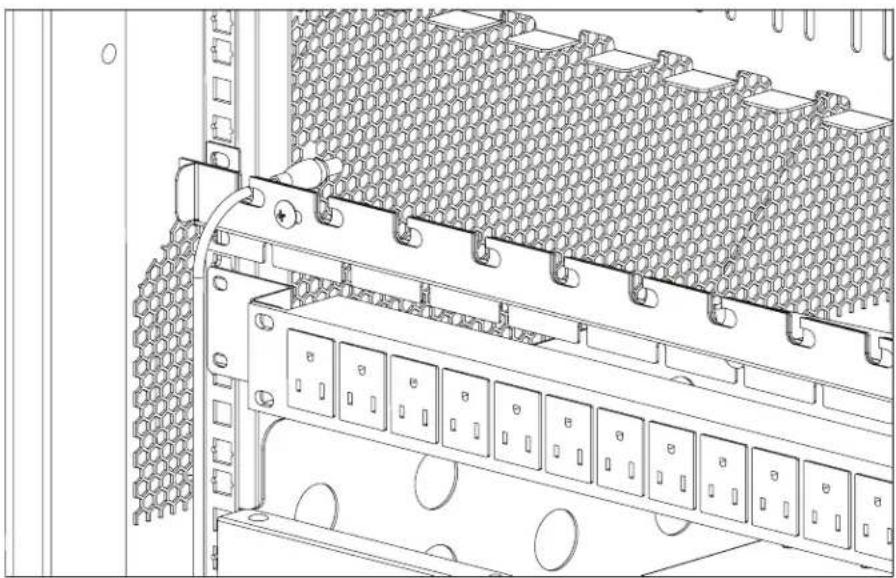
- At the back of the cart, loosen the two screws on the cable manager, slide the top section of the cable manager, and place the device side of the charging cable into one of the slots. See Figure 3-1.
natural_image
Technical line drawing of a server rack with hexagonal mesh insulation and multiple circuit switches (no text or symbols)FIGURE 3-1. CABLE ROUTING DIAGRAM #1
- Slide back the top section of the cable manager and tighten the screws.
- Route the device side of the charging cable to the front of the cart.
CHAPTER 3: CONFIGURATION AND SETUP
NEED HELP? LEAVE THE TECH TO US
LIVE 24/7 TECHNICAL SUPPORT
1.87 7.877.2269
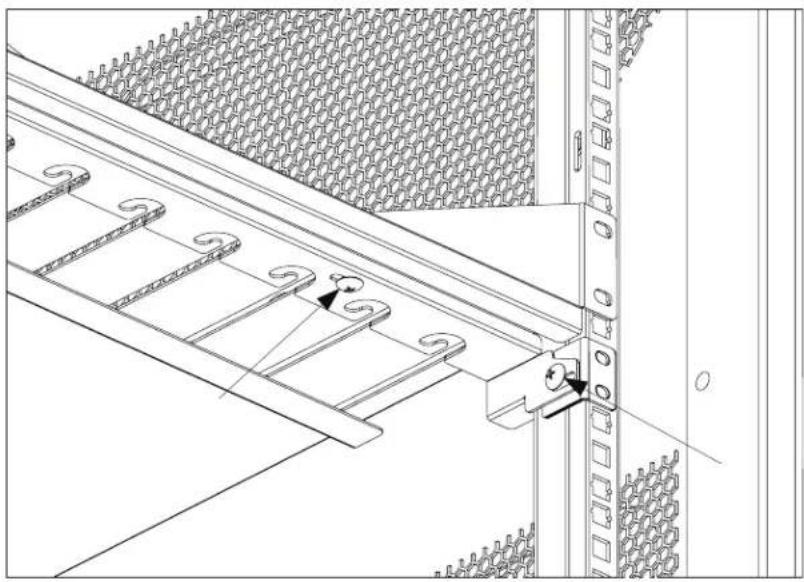
- At the front of the cart, loosen the screws on the side and front of the cable manager.
natural_image
Technical line drawing of a structural panel assembly with ladder and bracket (no text or symbols)FIGURE 3-2. CABLE ROUTING DIAGRAM #2
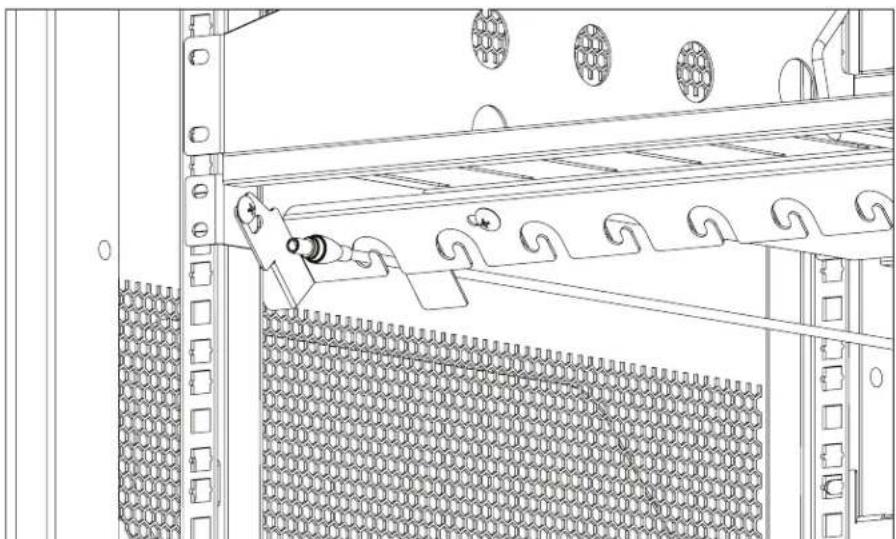
- Push back and down on the front cable manager to drop it down and make it accessible. Slide the top section and place the charging cable into the slots.
natural_image
Technical line drawing of a mechanical assembly with meshed panel and mounting bracket (no text or symbols)FIGURE 3-3. CABLE ROUTING DIAGRAM #3
CHAPTER 3: CONFIGURATION AND SETUP
NEED HELP?
LEAVE THE TECH TO US
LIVE 24/7
TECHNICAL
SUPPORT
1.87 7.877.2269
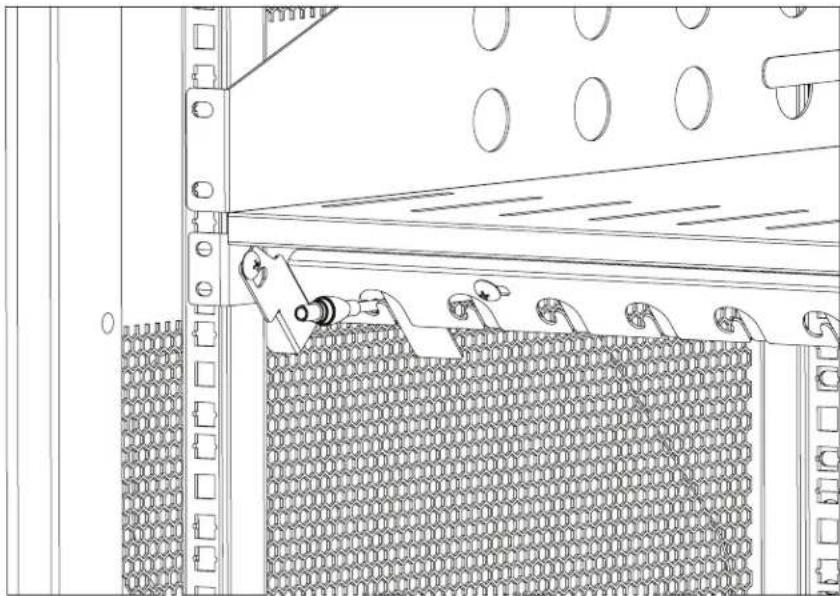
- Slide back the top section and tighten the front screws.
natural_image
Technical line drawing of a mechanical assembly with a chain mesh and pipe connection (no text or symbols)FIGURE 3-4. CABLE ROUTING DIAGRAM #4
- Push up and pull back on the cable manager to secure it.
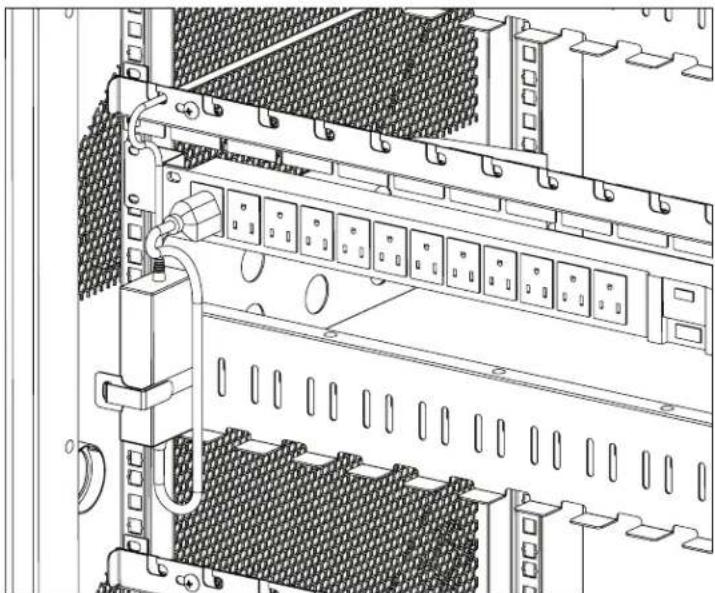
- Wrap any excess cable around the cable wrap on the back of the shelf.
- Attach the power brick to the back of the shelf using the hook and loop strap.
- Plug the charger power plug into the power strip located below the shelf.
natural_image
Technical line drawing of a server rack with multiple drive bays and ventilation slots (no text or symbols)FIGURE 3-5. CABLE ROUTING DIAGRAM #5
3.3 CUSTOMIZING THE TIMER
The cart timer unit is designed to supply power to multiple power distribution units (PDUs) inside the charging cart or locker while preventing overloading of the building circuit.
The cart timer unit has one illuminated on/off rocker switch. This turns on or off the power to the cart.
The cart timer unit has one C13 inlet where the cart power cord plugs into. The power cord plugs into a 120-VAC, 15-A, 50/60-Hz, 1-ph NEMA5-15R outlet only.
The cart timer unit has one "always on" NEMA5-15R outlet for constant power supply to any appliance requiring 120 VAC, 15 A, 50/60 Hz, 1 ph. The external power outlets on certain cart configurations will plug into the "always on" outlet.
The cart timer unit also has 4 "timed" NEMA5-15R outlets that supply power to the PDUs, which in-turn charge the devices stored within. The 4 timed outlets switch from on to off based on the configuration of the cart timer unit.
The cart timer unit has 8 DIP switches that control the configuration of the cart timer unit.
The features, functions and instructions described in this manual are important to understand and follow to successfully use this product.
The timer is configured from the factory to a certain setting of charging. The timer configuration can be changed to change the charging profile of the cart or locker. This could increase the evenness of the charged devices and the speed to charge. The configuration can be set by activating or deactivating different timed outlets, charging timed outlets together by grouping and increasing or decreasing charging interval. The table below shows the different DIP switch settings to achieve the desired configuration of the cart timer unit.
TABLE 3-1. DIP SWITCH SETTINGS
*Default settings: Active: 1-3 ON, No Group, Timing: 15 min.
Additional Details
| Purpose of Control | Time Switch |
| Construction of Control | Freestanding Control |
| Action Type | Type 1 Action (Operating Control) |
| Pollution Degree | Pollution Degree 2 |
| Impulse Voltage | 1500 V |
CHAPTER 3: CONFIGURATION AND SETUP
NEED HELP?
LEAVE THE TECH TO US
LIVE 24/7
TECHNICAL
SUPPORT
1.87 7.877.2269
3.4 PLUGGING IN THE CART
After the devices have been loaded into the Cart, plug the power cord of the Cart into a suitable receptacle.
3.5 TURNING ON THE CART
Locate the internal power switches on the timer and power strips of the Cart and push the switches to the ON position. They will illuminate if on. The external power indicator will glow green under "Cart Power" if the cart is on.
3.6 MOVING THE CART
- Remove the Cart plug from the wall receptacle and wrap the cord around the cord wrap or handle.
- Close and lock the hinged or sliding doors.
◆ Unlock the locking and swiveling casters before moving the cart to a new location. - When you reach your destination, lock the casters to prevent the cart from moving and plug the cart into a wall receptacle.
A.1 FCC STATEMENT
This equipment generates, uses, and can radiate radio-frequency energy, and if not installed and used properly, that is, in strict accordance with the manufacturer's instructions, may cause interference to radio communication. It has been tested and found to comply with the limits for a Class A computing device in accordance with the specifications in Subpart B of Part 15 of FCC rules, which are designed to provide reasonable protection against such interference when the equipment is operated in a commercial environment. Operation of this equipment in a residential area is likely to cause interference, in which case the user at his own expense will be required to take whatever measures may be necessary to correct the interference.
Changes or modifications not expressly approved by the party responsible for compliance could void the user's authority to operate the equipment.
This digital apparatus does not exceed the Class A limits for radio noise emission from digital apparatus set out in the Radio Interference Regulation of Industry Canada.
TRADEMARKS USED IN THIS MANUAL
NEED HELP?
LEAVE THE TECH TO US
LIVE 24/7
TECHNICAL
SUPPORT
1.87 7.877.2269
Black Box and the Double Diamond logo are registered trademarks of BB Technologies, Inc.
UL is a registered trademark of Underwriters' Laboratories.
Any other trademarks mentioned in this manual are acknowledged to be the property of the trademark owners.
NEED HELP?
LEAVE THE TECH TO US
LIVE 24/7
TECHNICAL
SUPPORT
1.87 7.87 7.2269
- TABLE OF CONTENTS
- SAFETY INFORMATION/ELECTRICAL PRECAUTIONS 3
- SPECIFICATIONS......4
- OVERVIEW....7
- CONFIGURATION AND SETUP 8
- APPENDIX A. REGULATORY INFORMATION....13
- TRADEMARKS USED IN THIS MANUAL....15
- SAFETY INFORMATION/ELECTRICAL PRECAUTIONS
- IMPORTANT SAFETY INFORMATION
- ELECTRICAL PRECAUTIONS
- DELUXE CHARGING CARTS GENERAL SPECIFICATIONS
- DELUXE CHARGING CARTS SPECIFICATIONS FOR HINGED DOOR
- DELUXE CHARGING CARTS SPECIFICATIONS FOR SLIDING DOOR
- INTRODUCTION
- WHAT'S INCLUDED
- CHAPTER 3: CONFIGURATION AND SETUP
- UNPACKING
- ROUTING THE CABLES
- CUSTOMIZING THE TIMER
- PLUGGING IN THE CART
- TURNING ON THE CART
- MOVING THE CART
- A.1 FCC STATEMENT
- TRADEMARKS USED IN THIS MANUAL
Brand : Black Box
Model : Deluxe UCCSL-12-36HP
Category : Chargeur pour appareil mobile