Sequel 20 6114 - Storage furniture BDI - Free user manual and instructions
Find the device manual for free Sequel 20 6114 BDI in PDF.


User questions about Sequel 20 6114 BDI
0 question about this device. Answer the ones you know or ask your own.
Ask a new question about this device
Download the instructions for your Storage furniture in PDF format for free! Find your manual Sequel 20 6114 - BDI and take your electronic device back in hand. On this page are published all the documents necessary for the use of your device. Sequel 20 6114 by BDI.
USER MANUAL Sequel 20 6114 BDI
natural_image
Line drawing of a three-tier office cabinet with legs and top panel (no text or symbols)BDi
Congratulations on the purchase of your Sequel 20 3 Drawer File Pedestal 6114 from BDI. Your file pedestal has been designed to provide a lifetime of enjoyment. This manual will provide you with assembly instructions and other helpful information that will ensure that you get the most out of your file pedestal. Please save it for future reference.
Your Sequel 20 File Pedestal has been engineered for simple assembly. Please follow these directions carefully to prevent any damage.
Should you need further assistance, contact BDI at customerservice@bdiusa.com.
ENJOY!
HARDWARE AND COMPONENTS
Unpack and identify the parts listed below. The assembly workspace should be a non-marring surface such as carpet. For missing hardware pieces, please contact BDI Customer Service at customerservice@bdiusa.com.
Do not use power tools for assembly of this product.
For all other concerns, please contact your BDI retailer.
 | |
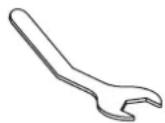
| PART # | T1 |
| DESCRIPTION | Hex Wrench |
| QUANTITY | 1 |

 | |
| PART # | H2 |
| DESCRIPTION | M4 x 35mm Screw |
| QUANTITY | 6 |

natural_image
Simple line drawing of a diagonal line with no text or symbols
| PART # | C1 |
| DESCRIPTION | Cabinet |
| QUANTITY | 1 |
| PART # | C2 |
| DESCRIPTION | Leg |
| QUANTITY | 2 |
| PART # | C3 |
| DESCRIPTION | Drawer Pull |
| QUANTITY | 3 |
| PART # | C4 |
| DESCRIPTION | Glass Top |
| QUANTITY | 1 |
text_image
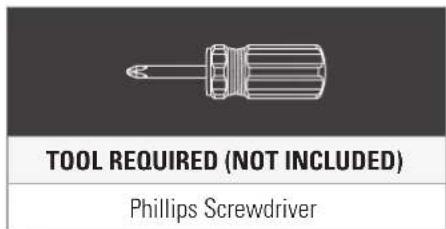
TOOL REQUIRED (NOT INCLUDED) Phillips ScrewdriverSTEP 1. ATTACH THE LEGSASSEMBLY
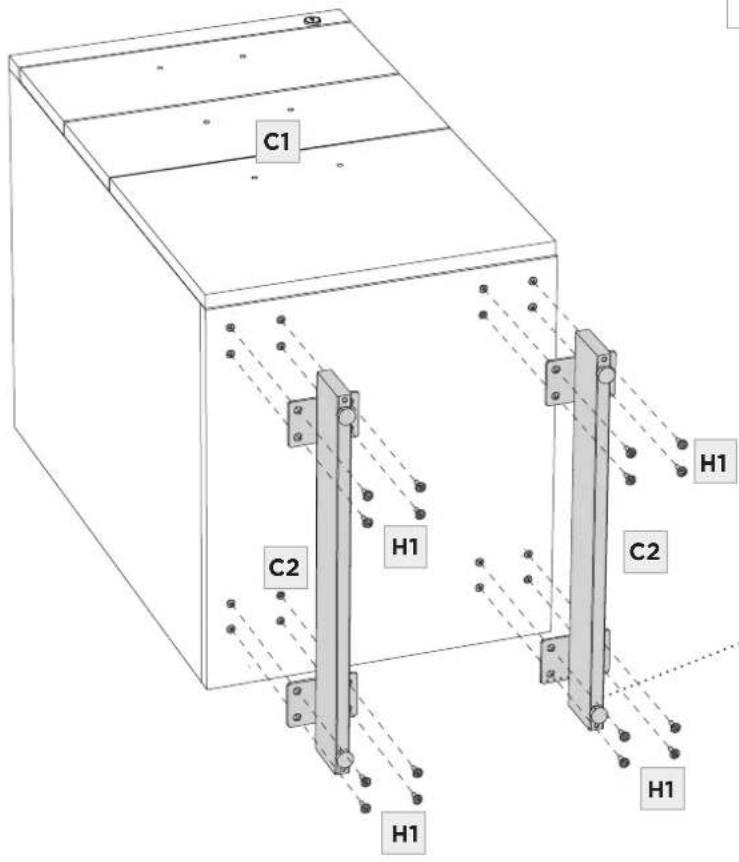
Carefully position (C1) Cabinet onto its back. Install (C2) Legs using (H1) Screws and (T1) Hex Wrench.
| PART/DESCRIPTION QTY | ||
| T1-HEX WRENCH 1 | ||
| H1-SCREW 16 |
text_image
C1 H1 C2 H1 C2 H1 H1
text_image
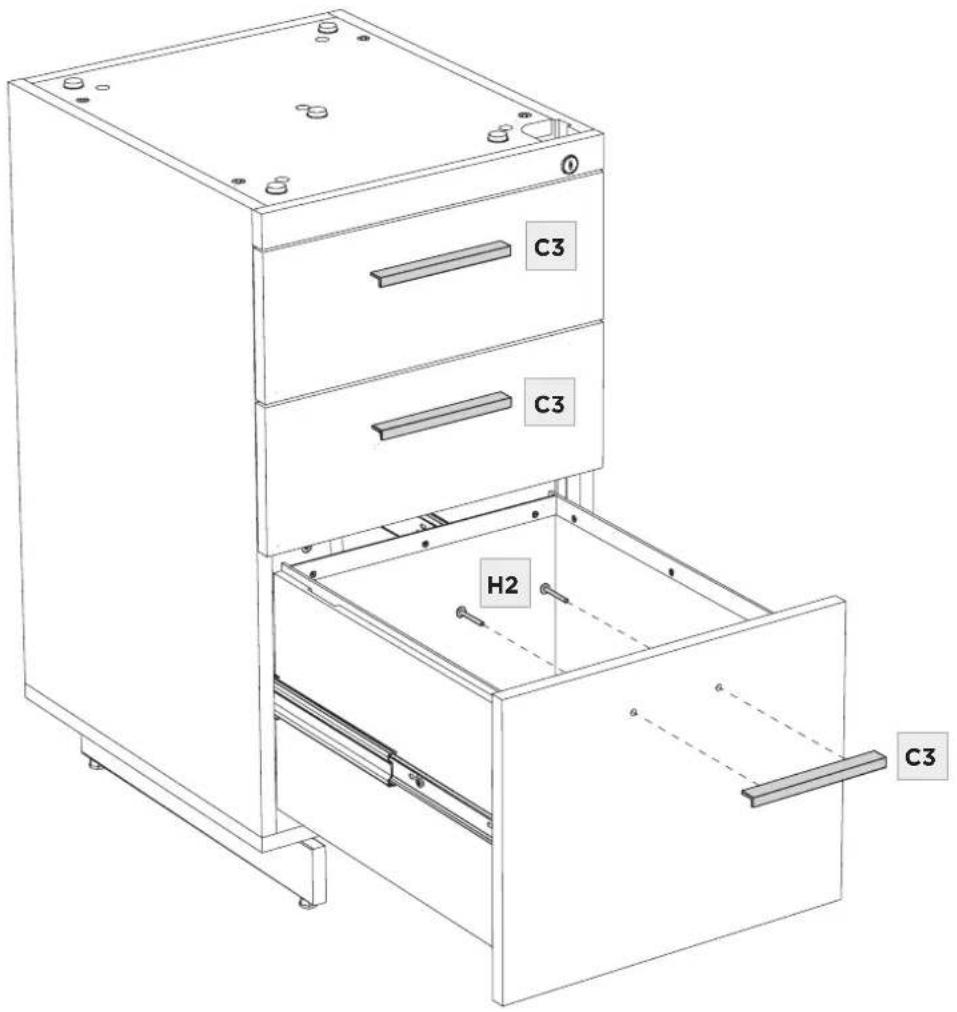
C2 H1Open a drawer and connect a (C3) Drawer Pull using 2 (H2) Screws. Tighten with a Phillips Screwdriver (not included). Install the other 2 (C3) Drawer Pulls one at a time.
| PART/DESCRIPTION QTY | ||
 | H2-Screw 6 | |
 | NOT INCLUDEDPhillips Screwdriver | 1 |
text_image
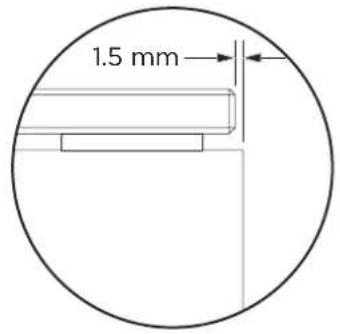
C3 C3 H2 C3Place (C4) Glass Top into position on top of the cabinet. Align all edges. The glass edge should be offset 1.5mm from the side of the cabinet on all four sides.
text_image
1.5 mm
text_image
C4 0 C1FINE TUNING
LEVEL CABINET
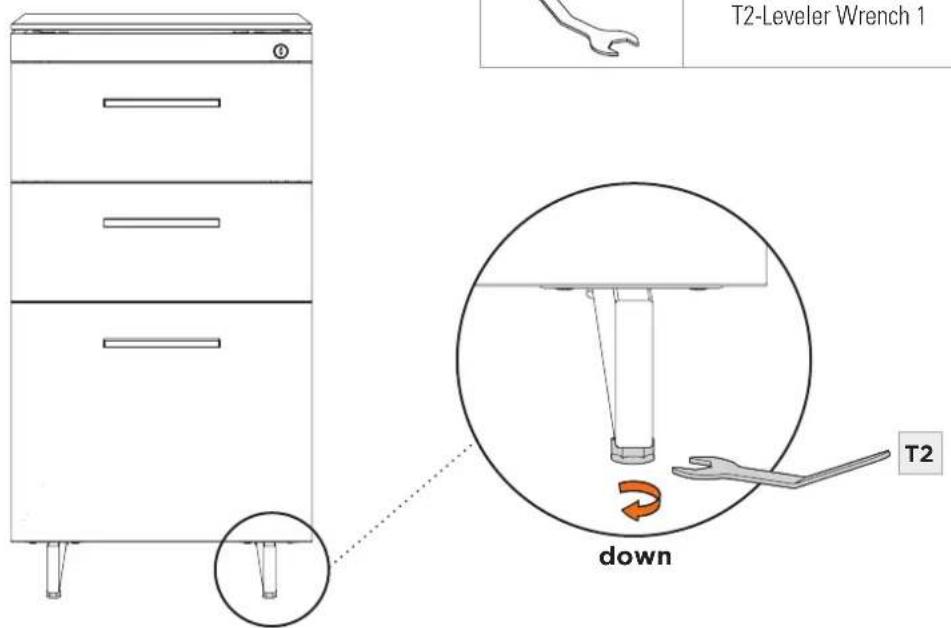
If needed, dial out 1 or more levelers using the (T2) Leveler Wrench attain a level stance.
| PART/DESCRIPTION QTY | ||
| T2-Leveler Wrench 1 |
text_image
T2-Leveler Wrench 1 down T2Letter sized file folders fit side-to-side as shown.
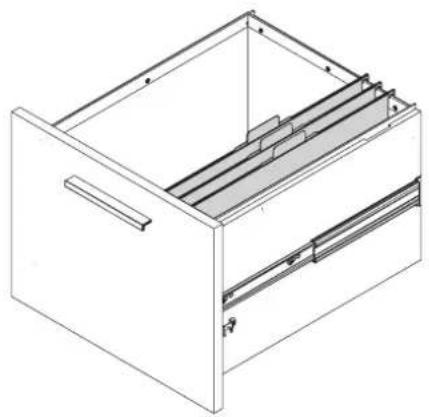
Legal sized file folders fit front-to-back.
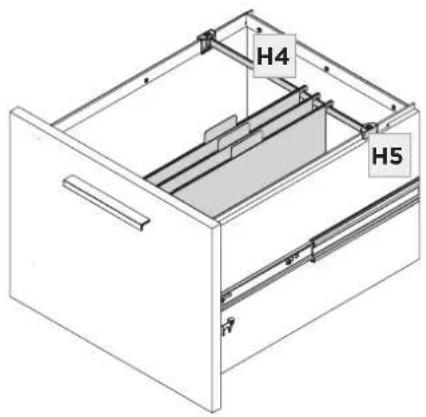
For Letter or A4 files facing front-to-back, attach
(H5) File Bar Clip to both ends of (H4) Small File Bar as shown. Place the file bar assembly in the notches located on the left and right drawer side panels. For A4, slide the file bar backwards within the notch.
| PART/DESCRIPTION QTY | |
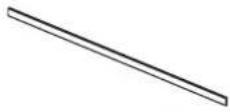 | H4-SMALL FILE BAR 1 |
 | H5-FILE BAR CLIP 2 |

natural_image
Isometric line drawing of a file drawer with internal compartments and drawers (no text or symbols)Letter side-to-side
natural_image
Isometric line drawing of a file drawer with internal compartments and handle (no text or symbols)Legal front-to-back
text_image
H4 H5Letter/A4 front-to-back

text_image
H5 H4 H5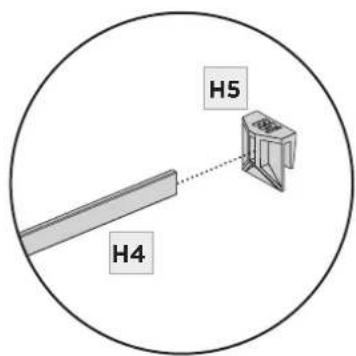
text_image
H4 H5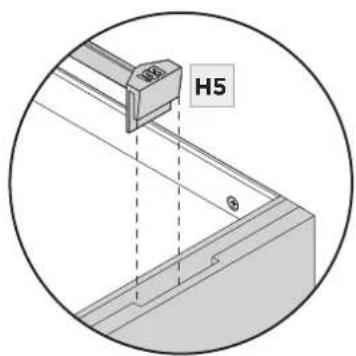
text_image
H5Letter/A4 notch
GLASS
Glass surface is maintained using household glass cleaner and a paper towel or cloth.
SATIN-ETCHED GLASS
This uniquely smooth-to-the-touch glass surface can be regularly maintained using household glass cleaner and a paper towel or cloth. Minor scratches or scuffs not eliminated using paper towel or cloth can usually be removed by using a 'Magic Eraser'. Magic Eraser is a melamine foam product available at any grocery store or home improvement center. Dampen the entire glass surface as well as the Magic Eraser, then rub the entire glass surface in broad, even strokes using moderate pressure. Clean and dry the surface with a paper towel. Check for results and repeat as necessary.
Any scratches or scuffing not eliminated by one of the above methods can often be addressed by 'refreshing' the glass. This is a process that should not be required more than once per 6-12 months.
See this brief video for the simple method: www.bdiusa.com/glass
WOOD
Wood surfaces should be cleaned with a slightly damp (not saturated) cloth or paper towel. Do not use glass cleaner on wood. If moisture remains, dry the surface with another cloth. If needed, a gentle non-abrasive cleanser may be used, but be sure to wipe away all cleaner residue and dry the surface with a cloth.
BDI's wood finishes feature natural hardwood solids and veneers. Wood is a product of nature and—unlike man-made materials that can be manufactured to strict and consistent specifications—has natural imperfections that are part of its appeal and character. Every piece of wood differs from every other, even when coming from the very same tree. As such, variation in grain, texture and tone should be expected from one panel or piece of furniture to the next.
While BDI's stained wood finishes are stable in tone & appearance, all finishes are subject to some degree of discoloration with prolonged exposure to direct sunlight. Please take care to avoid positioning your BDI cabinet in any area with extensive direct sunlight. To learn more about the features of natural wood, visit www.bdiusa.com/wood
METAL & PAINTED SURFACES
Surfaces should be cleaned with a slightly damp (not saturated) cloth or paper towel. If moisture remains, dry the surface with another cloth. If needed, a gentle non-abrasive cleanser may be used, but be sure to wipe away all cleaner residue and dry the surface with a cloth.
BDI warrants to the original purchaser that for the below stated warranty term, BDI will repair or replace any product, part, or component covered by this warranty which fails under normal use as a result of a defect in material or workmanship. BDI will repair or replace the aforementioned product, part or component with a comparable product, part or component. The decision to repair or replace will be at BDI's sole discretion.
BDI Home Theater Furniture, Office Furniture, Modular Systems, Tables and other furniture pieces are warranted for three (3) years from the date of purchase as shown on your sales receipt. The warranty period starts from the date of purchase. This warranty extends only to the original purchasers who acquire new product from BDI Authorized Resellers. Any product, part, or component must have been assembled, installed, used, and maintained according to BDI's published instructions in order to be eligible for warranty coverage. Any modification to the original product voids the warranty.
To view BDI's complete warranty information, visit www.bdiusa.com/warranty
PRODUCT REGISTRATION
Registering your new BDI product allows us to send you important product updates, service information and helpful hints related to your BDI products. Register today, and you will be entered to win free a BINK table from BDI: www.bdiusa.com/register

WARNING
SERIOUS OR FATAL CRUSHING INJURIES CAN OCCUR FROM FURNITURE TIP-OVER. TO HELP PREVENT TIP-OVER:
■ Install tip-over restraint.
■ Place heaviest items in lower compartments.
■ Never allow children to climb or hang on drawers, doors or shelves.
■ Never open more than one drawer at a time.
USE OF TIP-OVER RESTRAINT MAY REDUCE—BUT NOT ELIMINATE—THE RISK OF TIP-OVER.