D:screet Core 4062 - Microphone DPA - Free user manual and instructions
Find the device manual for free D:screet Core 4062 DPA in PDF.


| Brand | DPA |
| Model | D:screet Core 4062 |
| Product Type | Condenser Microphone |
| Polar Pattern | Omnidirectional |
| Frequency Response | 20 Hz – 20 kHz |
| Sensitivity | 20 mV/Pa ±2 dB at 1 kHz |
| Equivalent Noise Level | Typ. 23 dB(A) re. 20 µPa (max. 26 dB(A)) |
| Max SPL | 144 dB SPL peak before clipping |
| Dynamic Range | 121 dB |
| Output Impedance | 30 – 40 Ω (depending on termination) |
| Power Requirement | 48 V phantom power (standard P48) |
| Current Consumption | 1.5 mA (minimum) |
| Connector | MicroDot (detachable, various adapters available) |
| Capsule Diameter | 5.4 mm |
| Length | 12.7 mm (excluding cable) |
| Weight | 7 g (including cable) |
| Material | Brass, stainless steel, and high-grade ABS |
| Color | Black (standard) |
| Operating Temperature | -40 °C to +45 °C (-40 °F to +113 °F) |
| Storage Temperature | -40 °C to +70 °C (-40 °F to +158 °F) |
| Relative Humidity | Up to 90% (non-condensing) |
| Maintenance | Clean with a soft, dry cloth. Do not use solvents. |
| Warranty | 2 years (subject to DPA terms) |
Frequently Asked Questions - D:screet Core 4062 DPA
User questions about D:screet Core 4062 DPA
0 question about this device. Answer the ones you know or ask your own.
Ask a new question about this device
Download the instructions for your Microphone in PDF format for free! Find your manual D:screet Core 4062 - DPA and take your electronic device back in hand. On this page are published all the documents necessary for the use of your device. D:screet Core 4062 by DPA.
USER MANUAL D:screet Core 4062 DPA
natural_image
Product photo of earphones and earpluses with connector cables, shown in black and brown (no text or symbols visible)www.dpamicrophones.com
www.dpamicrophones.com/dfine
Introduction
All the define™ Headset Microphones provide a unique natural and open sound. Ultra-lightweight and adjustable, define™ Headset Mics ensure a secure and comfortable fit in live performance environments. To ensure optimal performance of your define Headset Mics please follow the simple instructions below.
Placement of microphone
For discreet placement, you can bond the microphone boom slightly so that the capsule is as close to the cheek as positive. Do not hold the capore while bending bend
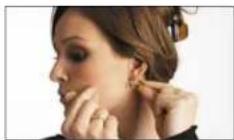
the wire boom, making a smooth curve with your thumb to best fill the profile of the face.
Mount a directional mic 2-3 cm (1 in) from the corner of the intake to ensure optimal sound quality compared to an omnidirectional mic that can be placed. Further away from the mouth
Omnidirectional characteristics
• The telephone receiver will stand from 2.15 words
The following table is provided in the image.
The following table provides the original text:
• The positioning of membrane with some wire
[Unreadable]
A. 2016年1月1日
in a lot, a lot of
Directional characteristics
• Surgees hectgouse nate and melaigher aetanlon
• In the presence of a cell line, we are used to define
- 2017年1月1日
• 10.2.1.1.1
in the low coverage and all states according to this plan to the result
Choose a set with field, + and a set of b.
• Can should be done to provide a way to pay more for the cost.
-
2017年
-
2017年
How to tell the difference between d:fine™ Headset Microphone capsules
dfinc ^TM Omnidrectonal

Omnidirectional

See the mark on the capsule
d-finc™ Directiona

Directional

See the mark on the capsule
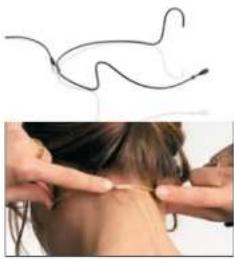
4065 is pre-formed but may require adjustment in order to get a tight. Fixed position to the back of the neck. Adjust the steel tube carefully at the curve
A protection grid is mounted over the microphone head. If clogged with dirt or make-up, gently remove it and clean it with distilled water.
Adjusting the define ^TM 4066, 4067, and 4088
The size of the "exact" mount can easily be adjusted. Change the standard bed by carefully expanding the distance between the schools.
to change sides, simply click the boom out of the clips and switch it over to the other side.
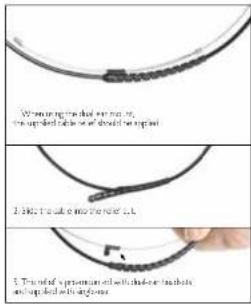
The remaining two clips are not used, the soft cable must no, be attached into the clips.
natural_image
Close-up of hands performing a neck massage technique with a medical wire diagram above (no text or symbols)Adjusting the d:fine™ Omnidirectional, d:fine™ Directional, d:fine™ 66 and d:fine™ 88.
The directional characteristics of the microphone is indicated on the flat microphone head with ⏻ for omnicirectional and ➤ for directional as shown on page 3. This marking should always point towards the mouth Mount a directional headset 2 - 3 cm (1 m) from the corner of the mouth to ensure optimal sound quality
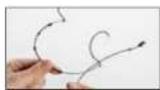
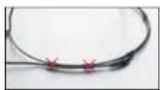
For the single-ear, just open the spring hook lightly, first place the side behind your ear lose (Pic. 1) and let go of the spring over your ear (Pic. 2). For the dual-ear, place the headset behind your ears and place the springs like for the single-ear. Adjust the headset mount by pulling or pushing the wires until it fits tight (Pic. 3).
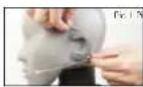
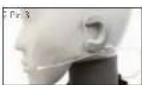
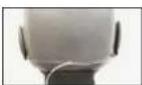
Correct placement behind the varLobe
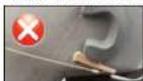

See instruction video at
democropres.com/dine
Position the microphone properly by pulling or pushing the boom along the side.
Sw an between left and right ear wearing style smosy by rotating the microphone boom. Hold on to the sarbook while gently turning the boom.
For the dual-ear versions, also rotate the two earcocks.
Adjust the microphone boom to follow the shape of your face by gently bending the soft sales on the scale hanger.
Adjust the angle of the cable run also by gently bending the soft vessel (see arrows). Position the cable as shown on the picture for securing the position of the microphone.
The cable relief on the dual ear verson should be fixed in the clip that also holds the two wires on the mount.
Always leave the protection grid on the define Omnidirectional and refine™ Directions, as it protects the inner grid and offers protection against wind and breathing noise. The protection grid is replaccable.
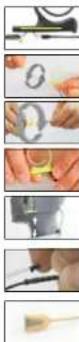
Service connector for exchange of cables or booms on the dfine™ Omnidirectional, define™ Directional, define™ 66 and dfine™ 88
Present line ^10 Breaklet. Microphones offer exchange of cables or microphone zooms. Simply locate the service access point, pull back the small protection gap and gently pull the zoom away from the table hanger.
Windscreens
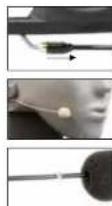
The enclosed windscreens offer additional protection against wind and top noise. Generally draw the windscreen over the microphone head. For even better protection, bigger windscreens are available.
Sweat stop
The microphone is equipped with a transparent sweat stop around the microphone boom to prevent sweet running along the microphone boom to the microphone head.
Accessories (see note at www.panicophore.com) Grids and windscreens, cables and adapters, banners and earbuds
Protection cap
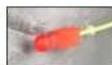
The d'aire ^™ Orn-directional and saline ^™ Directional micropones come with a red plastic cap which serves to protect the microphone head when putting on make-p. harspray and more. Remove the cap before use.
Color codes & cable steer
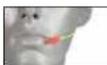
The dline ^18 Onndirectional and define Directional microphones come with a number of cable steer clips in different colours. Mounted on the cable relief, this clip allows for quick recognition of a specific headset microphone.

Clothing clip for d:fine ^TM Omnidirectional, d:fine ^TM Directional, d:fine ^TM 66 and d:fine ^TM 88.
The supplied clothing do allows you to attach the cable to your clothes, thus relieving the cable draw to the headset mic. This is essential on the single-car headset mic.
Correct use of microphone grids
The two different protection grids that are supplied with 4066, 4067, and dfne66 are for acoustical squalization, depending on the placement on the performer. Remove the premounted soft-boost grid before replacing it with the high boost grid.

Cleaning the mic grid of dfine™ 4065, 4066, 4067 and dfine™ 66
Remove the microphone grid from the microphone element and clean the grid using as soft cloth and distilled water only. Make sure the grid is dry before remounting it on the microphone element. This is not possible on the 4088 and cfine® 86 as the diaphragm is protected inside the microphone housing and the protection grids are not removable. Therefore, no attempts should be made to clean the grid surface and extreme care should be taken not to dig the grids with makeup eq.

Cable maintenance
The cable is usually longer than required. Make sure that superfluous cable is wound up in soft figure of eight loops (preferably 5–3 cm (2.5–3 m) diameter) and avoid kins in the tube.
Use organic oil (e.g., olive oil) or lukewarm distilled water to remove rescue from tape, gluc, or make-up on the cable. Do not send the cable or rub it harshly, it may stress the inner cores of the cable and cause them to break over time.
General Maintenance
The define Headsets are resistant to high levels of humidity. However, care must be taken to keep the headset microphone away from exposure to water and cleaning fluids, and to keep the microphone head dry at all times. Do not use spray or use fluid containing chemicals that could remove static electricity on or close to the microphone. This could cause permanent damage.
MicroDot connectors and adapters
To provide users with sale and compact mounting of connectors, all neckets from DPA are fitted with the MicroDot connector as standard. A broad range of connection adapters is offered as optional accessories for most wireless systems for professional use. See www.pamikrophones.com/adapters
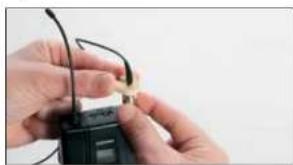
Use the supplied connector-tightening too whenever the MicroDot connector needs to be fastened to the adaptor for long periods of time.
natural_image
Close-up of hands holding a black electronic device with earphones (no visible text or symbols)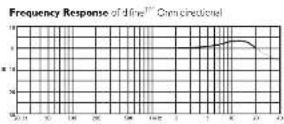
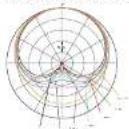
Polar Pattern of dire ^™ On directedal
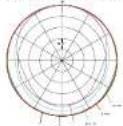

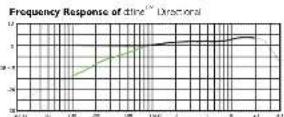
Polar Pattern crine ^16 Directional

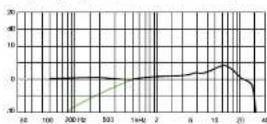
Frequency Response (cfine ^1 4063, 4056, 4067 and dfine ^2 166)
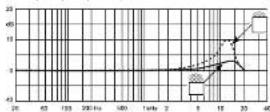
Frequency Response (ifin: 1438 and r: no 28)
Polar Pattern (cfire™ 4053, 4066, 4267 and eTM 65)
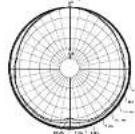

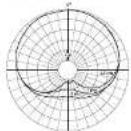
Polar Pattern (dln ^31 1085 and dln ^32 RR)

Specifications
dfine™ Omnidirectional Headset Microphones
Directional characteristics
Omnidirectional
Principle of operation
Pressure
Frequency range
20 Hz - 20 kHz
Frequency range, ± 2 dB
d:fine omnidirectional
20 Hz - 20 kHz with 3 dB soft boost at 8 - 15 kHz
4065, 4066, 4067 and dfine 66:
20 Hz - 20 kHz with 3 dB soft boost at 8 - 20 kHz
Sensitivity, nominal, ± 3 dB at 1 kHz
6 mV/Pa; -44 dB re. 1 V/Pa
Equivalent noise level, A-weighted
Typ. 26 dB(A) re. 20 μPa (max. 28 dB(A))
S/N ratio (A-weighted),
re. 1 kHz at 1 Pa (94 dB SPL)
Typ. 68 dB(A)
Total Harmonic Distortion (THD)
<1 % up to 123 dB SPL peak
<1% up to 120 dB SPL RMS sine
Dynamic range
Typ. 97 dB
Max. SPL, peak before clipping
144 dB
Power supply (for full performance)
Min. 5 V - max. 50 V through DPA adapter for
wireless systems, 48 V phantom power ± 4 V
with DAD6001-BC XLR adapter
Current consumption
Typ. 1.5 mA (microphone)
3.5 mA with DAD6001-BC XLR adapter
Connector
MicroDot
Color (microphone, cable and earhook)
Black, beige, brown
Microphone head size (h x w x d)
9.5×5.3×2.9mm(0.37×0.21×0.11in)
Cable length
1.3 m (4.3 ft)
Cable diameter
1.6 mm (0.06 in)
Temperature range
-40 °C to 45 °C (-40 °F to 113 °F)
Relative Humidity (RH)
Up to 90%
Specifications
d.fine™ Directional Headset Microphones
Directional characteristics
Cardioid
Principle of operation
Pressure gradient
Frequency range
20 Hz - 20 kHz
Frequency range, ± 2 dB,
Near field 2-3 cm (0.8-1.2 in)
define directional
100 Hz - 20 kHz with 3 dB soft boost at 8 - 20 kHz
4088 and dfine 88
100 Hz - 20 kHz with 4-6 dB soft boost at 15 kHz
Sensitivity, nominal, ±3 dB at 1 kHz
6 mV/Pa: -44 dB re. | V/Pa
Equivalent noise level, A-weighted
Typ. 28 dB(A) re. 20 μPa (max. 30 dB(A))
S/N ratio (A-weighted),
re. 1 kHz at 1 Pa (94 dB SPL)
Typ. 66 dB(A)
Total Harmonic Distortion (THD)
<1 % up to 123 dB SPL peak
<1 % up to 120 dB SPL RMS sine
Dynamic range
Typ. 95 dB
Max. SPL, peak before clipping
144cB
Power supply (for full performance)
Min. 5 V - max. 50 V through DPA adapter for
wireless systems. 48 V phantom power ± 4 V
with DAD6001-BC XLR adapter
Current consumption
Typ. 1.5 mA (microphone)
3.5 mA with DAD6001-BC XLR adapter
Connector
MicroDot
Color (microphone, cable and earhook)
Black, beige, brown
Cable length
1.3 m (4.3 l)
Cable diameter
1.5 mm (0.06 in)
Temperature range
-40 °C to 45 °C (-40 °F to 113 °F)
Relative Humidity (RH)
Up to 90%
Service & repair
If you are not satisfied with the characteristics achieved by this product, please go to
www.dpanmicrophones.com/service-for-instructors
Warranty
The d-line 'headset microphone is covered by a two-year limited warranty.
CE marking
This product conforms with all relevant directives approved by the European Commission.
Product features and specifications are subject to change without notice.


© Copyright 2014