Compact Home 24200 - Coffee maker RUSSELL HOBBS - Free user manual and instructions
Find the device manual for free Compact Home 24200 RUSSELL HOBBS in PDF.


User questions about Compact Home 24200 RUSSELL HOBBS
0 question about this device. Answer the ones you know or ask your own.
Ask a new question about this device
Download the instructions for your Coffee maker in PDF format for free! Find your manual Compact Home 24200 - RUSSELL HOBBS and take your electronic device back in hand. On this page are published all the documents necessary for the use of your device. Compact Home 24200 by RUSSELL HOBBS.
USER MANUAL Compact Home 24200 RUSSELL HOBBS
natural_image
Exterior view of a stainless steel right-to-left toaster with digital display and control buttons (no text or symbols on main body)24200
www.russellhobbs.com


text_image
Diagram of a kitchen grater with labeled parts including tray, lid, and air conditionerIMPORTANT SAFEGUARDS
Follow basic safety precautions, including:
This appliance can be used by children aged from 8 years and above and persons with reduced physical, sensory or mental capabilities or lack of experience and knowledge if they have been supervised/instructed and understand the hazards involved.
Children shall not play with the appliance.
Cleaning and user maintenance shall not be done by children unless they are older than 8 and supervised.
Keep the appliance and cable out of reach of children under 8.
Don't connect the appliance via a timer or remote control system.
Bread can burn therefore do not use the appliance near or below combustible materials such as curtains. Never use the appliance below wall cupboards or shelves.
Do not leave the appliance unattended while it is in use.
The surfaces of the appliance will get hot.
Remove and empty the crumb tray regularly. Wipe with a damp cloth, dry, then replace in the toaster.
If the cable is damaged, return the appliance, to avoid hazard.
This appliance is intended to be used in household and similar applications such as:
- staff kitchen areas in shops, offices and other working environments;
- by clients in hotels, motels and other residential type environments;
• bed and breakfast type environments; - farm houses.
Do not use this appliance near bathtubs, showers, basins or other vessels containing water.
- Don't toast or reheat bread that is too thick, buttered, torn, or misshapen.
• Take extra care when toasting items that contain sugar, jam, seeds, currants, etc. These can melt or drop into the toaster and cause overheating or fire. - If bread gets jammed, unplug the toaster, let it cool, and carefully remove the bread.
- Never use a knife, fork or any other implement to remove jammed bread. As well as potentially damaging the toaster, there is a risk of electric shock!
PARTS
-
Toasting slot
-
Lever
-
Browning control
-
Crumb tray
-
Digital display
BEFORE USING FOR THE FIRST TIME
- Set the browning level to maximum.
- Operate the appliance empty, to cure the new elements.
- This may smell a bit, but it's nothing to worry about. Ensure the room is well ventilated.
TOASTING
Toasting involves exposing bread to a controlled heat, which causes a chemical reaction called the ‘Maillard Reaction’. This doesn’t just brown the bread, but alters the flavour and texture, which is why toast tastes so good!
Since toasting is a combination of drying then cooking the bread, it is affected by various factors such as differences in the bread's thickness, freshness and surface texture. Local and regional variations in household electricity voltages can also have an effect on toasting time which is why we would advise to initially try different toasting settings in order to find your perfect shade of toast.
TOASTING BREAD
- Sit the toaster upright on a firm, level, heat-resistant surface.
- Put the plug into the power socket.
- Move the browning control to the required setting (1 = light, 6 = dark).
- Put bread into the toasting slot.
- Press the lever down fully. It won't lock down unless the toaster is connected to the electricity supply.
- The digital display will show the browning setting you have selected (1 to 6) for 5 seconds and then show the remaining toasting time counting down in seconds. If you change the browning setting during the toasting cycle, the display will again show the new browning setting for 5 seconds and then show the remaining toasting time. The toasting time will be adjusted according to the new browning setting you have selected.
- When the time reaches 0 the toast will pop up.
- To stop toasting, press ▲.
- You may raise the lever further, to remove small items.
- You may raise the lever during toasting, to check progress, then lower it again.
FROZEN BREAD
- Leave the browning level at your favoured setting, insert the frozen bread, lower the lever, then press ✝.
- The ✝ light will come on, and the toasting time will be altered automatically to give the same degree of browning you get with unfrozen bread.
REHEATING TOAST
- Leave the browning control at your favoured setting, insert the bread, lower the lever, then press 🏠.
- The 🏠 light will come on, and the toast will be given a short burst of heat.
- Don't reheat buttered, torn, or misshapen bread.
HINTS AND TIPS
- Old (yesterday's) bread has less moisture, so makes crisper toast.
- Old bread, thin slices, and sweet bread products (tea cakes, fruit loaf, etc.) brown faster – use a lower setting.
CARE AND MAINTENANCE
- Unplug the toaster and let it cool down.
- Wipe outer surfaces with a damp cloth.
RECYCLING
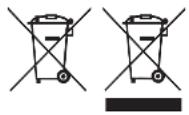
To avoid environmental and health problems due to hazardous substances, appliances and rechargeable and non-rechargeable batteries marked with one of these symbols must not be disposed of with unsorted municipal waste. Always dispose of electrical and electronic products and, where applicable, rechargeable and non-rechargeable batteries, at an appropriate official recycling/collection point.
SERVICE
If you ring Customer Service, please have the Model Number to hand, as we won't be able to help you without it. It's on the rating plate (usually underneath the product).
The product isn't user-serviceable. If it's not working, read the instructions, check the plug fuse and main fuse/circuit breaker. If it's still not working, consult your retailer.
If that doesn't solve the problem – ring Customer Service – they may be able to offer technical advice.
If they advise you to return the product to us, pack it carefully, include a note with your name, address, day phone number, and what's wrong. If under guarantee, say where and when purchased, and include proof of purchase (till receipt). Send it to:
Customer Service
Spectrum Brands (UK) Ltd
Fir Street, Failsworth, Manchester M35 0HS
email: support@russellhobbs.com
telephone: 0345 658 9700 (local rate number)
Please note: If you have purchased the product within the last 6 months, please contact the retailer in the first instance to deal with any matters relating to warranty.
GUARANTEE
Defects affecting product functionality appearing within the guarantee period will be corrected by replacement or repair at our option provided the product is used and maintained in accordance with the instructions. Your statutory rights are not affected.
Guarantee period = 2 years from first retail purchase.
To claim an extra 1 year guarantee, register your product online within 28 days of purchase. Register at: uk.russellhobbs.com/product-registration
Consumables are guaranteed only for their recommended lifecycle. Replacement/ Spare parts* are excluded and are only covered by a 1 year warranty.
* Examples include filters, removable grill plates, drip trays/crumb trays etc.

ONLINE
www.russellhobbs.com for more products