
Sonicare Airfloss HX8516 - Water flosser PHILIPS - Free user manual and instructions
Find the device manual for free Sonicare Airfloss HX8516 PHILIPS in PDF.


| Product Type | Water Flosser |
| Brand | Philips |
| Model | Sonicare Airfloss HX8516 |
| Dimensions | Approx 15.0 x 10.0 x 5.0 cm |
| Weight | Approx 200 g |
| Power Source | Rechargeable lithium-ion battery |
| Battery Life | Up to 2 weeks on full charge |
| Charging Time | 24 hours for full charge |
| Water Tank Capacity | 15 ml |
| Jet Pressure | Adjustable (low, medium, high) |
| Number of Jets | 2 settings: air and water |
| Nozzle Type | Standard and compact nozzle included |
| Speed Settings | 3 modes |
| Timer | 60-second timer with 30-second pacer |
| Cleaning | Nozzle should be cleaned monthly |
| Safety | Water-resistant design (IPX7) |
| Spare Parts | Replacement nozzles available |
| Warranty | 2 years |
Frequently Asked Questions - Sonicare Airfloss HX8516 PHILIPS
User questions about Sonicare Airfloss HX8516 PHILIPS
0 question about this device. Answer the ones you know or ask your own.
Ask a new question about this device
Download the instructions for your Water flosser in PDF format for free! Find your manual Sonicare Airfloss HX8516 - PHILIPS and take your electronic device back in hand. On this page are published all the documents necessary for the use of your device. Sonicare Airfloss HX8516 by PHILIPS.
USER MANUAL Sonicare Airfloss HX8516 PHILIPS
AirFloss
Philips Sonicare
AirFloss
Electric dental flosser
HX8521/02, HX8511/02,
HX8526/02, HX8516/02
User manual
With warranty certificate
The warranty certificate is attached to the last page
of this user manual. Please
have it filled in by the
retailer where you made
your purchase.
Introduction
Guidance in English 17~29
● Warranty
Warranty and After-Sales Service 31
Specifications 32
Free Repair Regulations 34
Warranty Certificate ...... Last Page
Be sure to observe
Continuous spray function
Charge indicator
Low battery indicator
Charging
No plug adapter required.
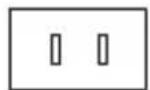
Plug adapter required.
After filling, when using, water
2. Clean it.
Empty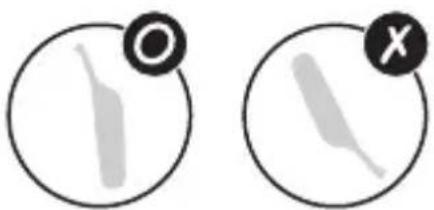
4. Wipe the charger.
Unplug the charger from the outlet.

Caution
3. Wipe the handle.
2. Empty the water from the tank.
When disposing of the product
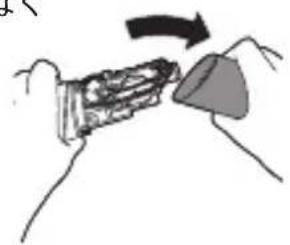
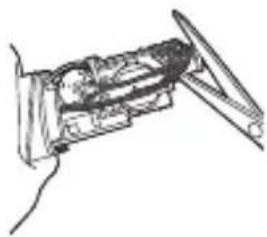
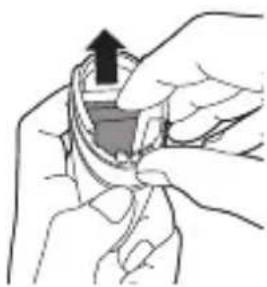
- Wipe the upper and lower parts of the handle thoroughly.

Introduction
Congratulations on your purchase and welcome to Philips! To fully benefit from the support that Philips offers, register your product at www.philips.com/welcome. Use AirFloss as part of your oral care routine. In addition to brushing, it helps reduce plaque.
IMPORTANT SAFEGUARDS
READ ALL INSTRUCTIONS BEFORE USE DANGERS
To reduce the risk of electrocution:
- Do not place or store product where it can fall or be pulled into water.
- Do not place or drop charger into water or other liquids, unplug the charger immediately if this should occur.
- After cleaning, make sure the charger is completely dry before you connect it to an electrical outlet.
WARNINGS
To reduce the risk of burns, electrocution, fire, or physical injury:
- DO NOT use isopropyl alcohol or other cleaning fluids in the reservoir as it may be an ingestion hazard.
- DO NOT use attachments other than those recommended by the manufacturer.
- DO NOT plug the charger into an electrical outlet with a voltage other than specified on the bottom of the charger. This product is designed to operate within a range of 100 to 240 volts.
Voltage converters DO NOT warrant voltage compatibility.
- DO NOT use hot water so as to avoid physical injury.
- DO NOT use the charger outdoors.
- DO NOT drop or insert any foreign objects into the reservoir.
- Never force the plug into an electrical outlet; if the plug does not easily fit into the electrical outlet, discontinue use.
- Keep the cord away from heated surfaces.
- Discontinue use if the nozzle, body, or charger body/cord appears damaged in any way.
- The mains cord cannot be replaced. If the mains cord is damaged, discard the charger.
- This product contains no user-serviceable parts. Refer to chapter ‘Warranty and service’ if the appliance no longer works properly or needs repair.
- Use this product only for its intended use as described in this document or as recommended by your dental professional.
- This product is not intended for use by persons (including children) with reduced physical, sensory, or mental capabilities, or lack of experience and knowledge, unless they have been given supervision or instruction concerning use of the appliance by a person responsible for their safety.
- Children should be supervised to ensure that they do not play with the appliance.
- AirFloss is a personal care device and is not intended for use on multiple patients in a dental office or institution.
- Do not direct the spray under the tongue or into the ear, nose, eye, or other sensitive areas. This
product may cause serious damage to these areas. See chapter ‘Using your AirFloss’ for correct usage.
- Avoid applying excessive pressure on the guidance tip of the nozzle.
MEDICAL WARNINGS
- Consult your dental professional before you use this product if you: have any concern, recent oral or gum surgery, suffer from an ongoing dental condition or had extensive dental work in the previous two (2) months.
- Contact your dental professional if excessive bleeding occurs after using this product or bleeding continues to occur after one (1) week of use.
- Discontinue use of this product and contact a physician/dentist if discomfort or pain is experienced.
- This product complies with the safety standards for electromagnetic devices. If you have a pacemaker or other implanted device, contact your physician or the device manufacturer prior to use.
- Consult your physician if you have other medical concerns.
Electromagnetic fields (EMF)
This Philips product has been tested and is compliant with safety standards for electromagnetic devices. If handled properly and according to the instructions in this user manual, the product is safe to use.
SAVE THESE INSTRUCTIONS
Overview (Fig. 1)
1 Guidance tip 2 AirFloss nozzle
3 Activation button 4 Reservoir and cover 5 Handle 6 Charge indicator 7 Power on/off button 8 Charger
Note: The contents of the box may vary based on the model purchased.
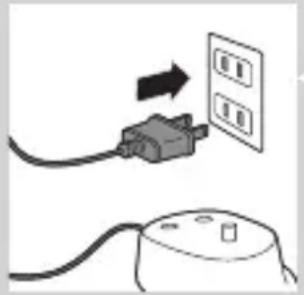
Charging
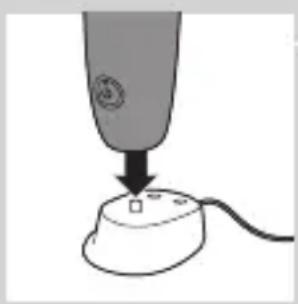
Charge AirFloss for 24 hours before first use.
1 Put the plug of the charger in the electrical outlet.
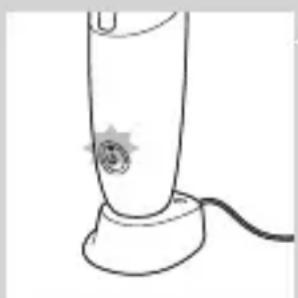
2 Place the handle on the charger.
The charge indicator flashes green to indicate that the appliance is charging.
Note: When it is fully charged, AirFloss has an operating time of up to 2 weeks (or 14 uses).
Note: When the charge indicator flashes yellow, the battery is low and needs to be recharged (fewer than 3 uses left).
Preparing for use
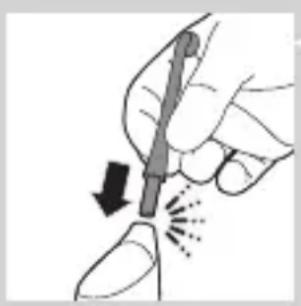
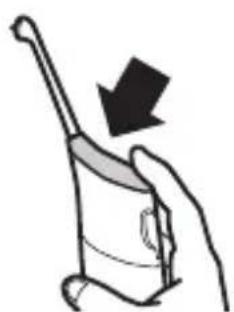
1 Align the nozzle so the tip faces the front of the handle and press the nozzle down onto the handle ('click').
Note: Replace the nozzle every 6 months for optimal results. Also, replace the nozzle if it becomes loose or no longer 'clicks' onto the handle.
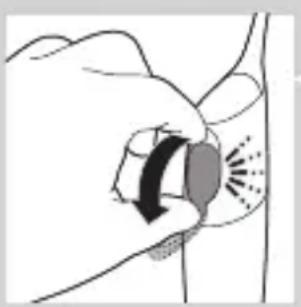
2 Open the cover of the reservoir ('click').
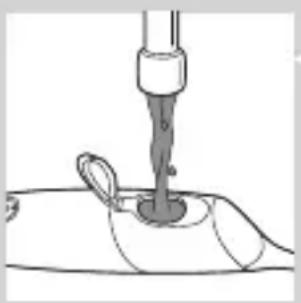
3 Fill the reservoir with mouthwash or water.
Note: To operate effectively, AirFloss must contain either mouthwash or water.
Tip: For a fresher experience, use mouthwash with your AirFloss.
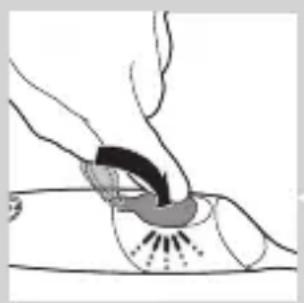
Note: Do not use mouthwash that contains isopropyl myristate (e.g. Dentyl Active) or high concentrations of essential oils, as it may damage the appliance. This includes all mouthwash sold in glass and ceramic packaging.
4 Close the cover of the reservoir by pressing ('click').
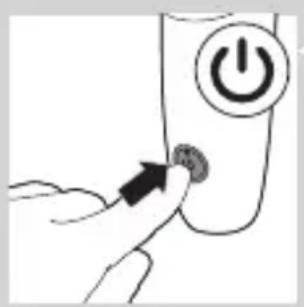
5 Press the on/off button. The green light illuminates.
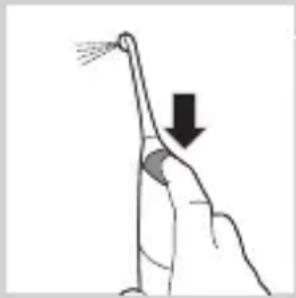
6 Press and hold the activation button until spray comes out of the tip.
Using your AirFloss
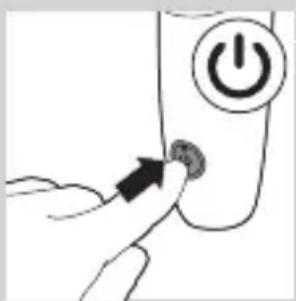
1 Make sure the AirFloss is turned on.
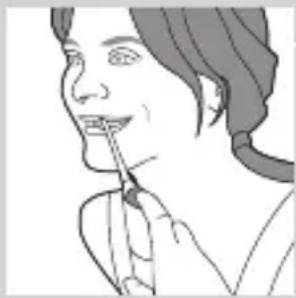
2 Place the tip between the teeth and apply gentle pressure. Slightly close your lips over the nozzle when it is in place, to avoid splashing.
Tip: Use your finger to press the activation button.
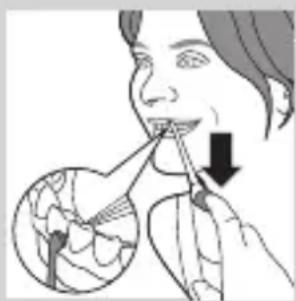
3 Press the activation button to deliver a single burst of air and micro-droplets of mouthwash or water between the teeth. Alternatively, hold the activation button to deliver continuous bursts of mouthwash or water approximately every 1 second (select models).
4 Slide the guidance tip along the gum line until you feel it settle between the next two teeth.
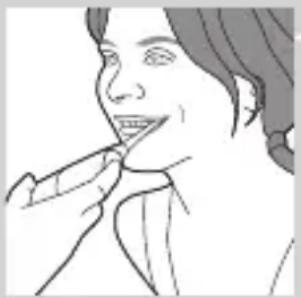
5 Continue this procedure for all spaces including behind your back teeth.
Note: AirFloss is intended to be used on the front/outside surface of the teeth only.
6 To turn off AirFloss, press the on/off button again.
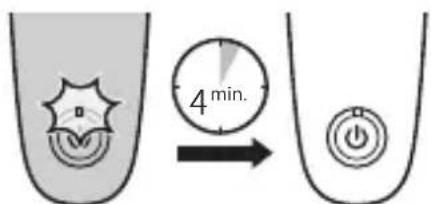
Automatic shut-off function
The automatic shut-off function automatically turns off AirFloss if it has not been used for 4 minutes.
Cleaning
Do not clean the nozzle, handle or charger in the dishwasher.
Do not use cleaning agents to clean the appliance.
Handle and nozzle
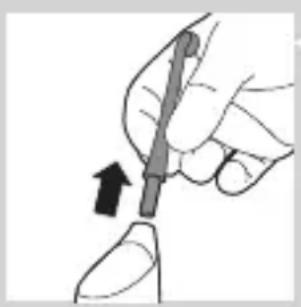
1 Remove the nozzle from the handle. Rinse the nozzle after each use.
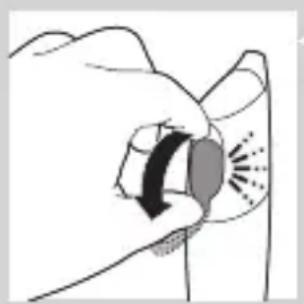
2 Open the reservoir and rinse it under a faucet to eliminate residue.
Tip: You can also use a cotton swab to wipe the reservoir.
Note: Do not immerse the handle in water.
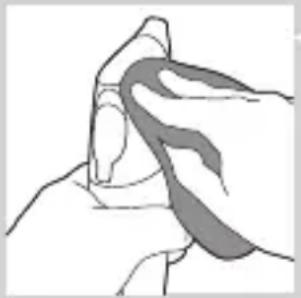
3 Wipe the entire surface of the handle with a damp cloth.
Charger
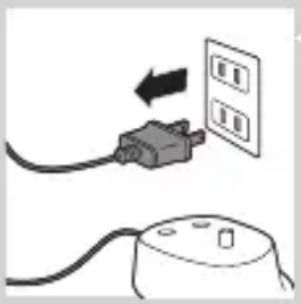
1 Unplug the charger before you clean it.
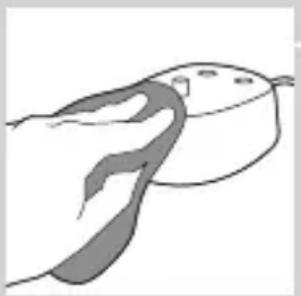
2 Wipe the surface of the charger with a damp cloth.
Storage
If you are not going to use AirFloss for an extended period of time, follow the steps below.
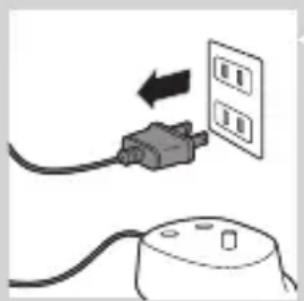
1 Open the cover of the reservoir and empty it. 2 Press the activation button until no more spray comes out. 3 Unplug the charger. 4 Clean AirFloss nozzle, handle and charger. 5 Store AirFloss in a cool, dry place away from direct sunlight.
Environment
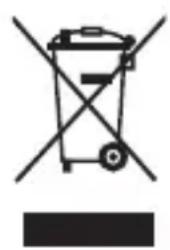
- Do not throw away the appliance with the normal household waste at the end of its life, but hand it in at an official collection point for recycling. By doing this, you help to preserve the environment.
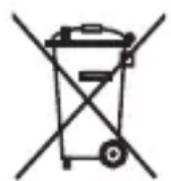
- The built-in rechargeable battery contains substances that may pollute the environment. Always remove the battery before you discard and hand in the appliance at an official collection point. Dispose of the battery at an official collection point for batteries. If you have trouble removing the battery, you can also take the appliance to a Philips service center. The staff of this center will remove the battery for you and will dispose of it in an environmentally safe way.
Removing the rechargeable battery
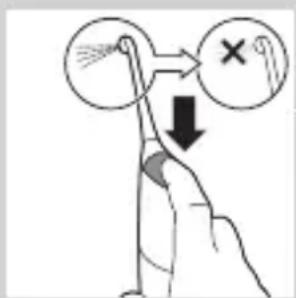
Please note that this process is not reversible.
1 To deplete the battery, repeatedly press the activation button until AirFloss no longer produces any bursts of air.
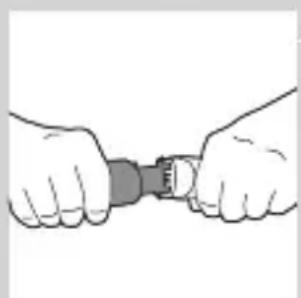
2 Use a screwdriver to pry open the handle.
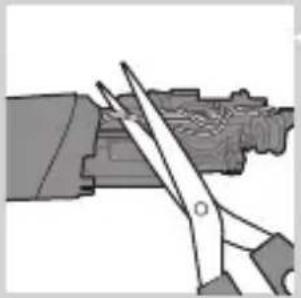
3 Cut the wires and remove the battery from the appliance. Observe basic safety precautions.
Warranty and service
- Philips warrants its products for two years after the date of purchase. Defects due to faulty materials and workmanship will be replaced at Philips expense provided that convincing proof of purchase in the qualifying period is provided. - Contact our Consumer Care Center at 1-800-682-7664 (North America), outside North America contact your local Philips Consumer Care Center. Internet information: www.sonicare.com (North America) or www.philips.com (outside North America).
WARRANTY EXCLUSIONS
What is not covered under warranty:
- AirFloss nozzle
- Damage caused by misuse, abuse, neglect, alterations or unauthorized replacement.
- Normal wear and tear, including chips, scratches, abrasions, discoloration or fading.
IMPLIED WARRANTIES
ANY IMPLIED WARRANTIES, INCLUDING IMPLIED WARRANTIES OF MERCHANTABILITY AND FITNESS FOR A PARTICULAR PURPOSE, SHALL BE LIMITED TO THE DURATION OF THE EXPRESS WARRANTIES SET FORTH ABOVE. IN
SOME STATES LIMITATION ON DURATION OF IMPLIED WARRANTIES DO NOT APPLY.
LIMITATION OF REMEDIES
IN NO EVENT SHALL PHILIPS OR ANY OF ITS AFFILIATED OR SUBSIDIARY COMPANIES BE LIABLE FOR ANY SPECIAL, INCIDENTAL OR CONSEQUENTIAL DAMAGES BASED UPON BREACH OF WARRANTY, BREACH OF CONTRACT, NEGLIGENCE, TORT, OR ANY OTHER LEGAL THEORY. SUCH DAMAGES INCLUDE, WITHOUT LIMITATION, LOSS OF SAVINGS OR REVENUE; LOSS OF PROFIT; LOSS OF USE; THE CLAIMS OF THIRD PARTIES INCLUDING, WITHOUT LIMITATION, DENTISTS AND DENTAL HYGIENISTS; AND COST OF ANY SUBSTITUTE EQUIPMENT OR SERVICES. SOME STATES DO NOT ALLOW THE EXCLUSION OR LIMITATION OF INCIDENTAL OR CONSEQUENTIAL DAMAGES.
Warranty certificate attached to the last page.
The warranty applies only to the purchaser of this product.
Philips Oral Healthcare, LLC.
22100 Bothell Everett Hwy Bothell, WA 98021 U.S.A.
Phone: +1 (800) 682-7664
Philips Oral Healthcare, LLC.
22100 Bothell Everett Hwy
Bothell, WA 98021 U.S.A.
Japan Sales Agent
Koizumi Seiki Co., Ltd.
4235.020.8615.3 (09/16)


- AIRFLOSS
- USER MANUAL
- INTRODUCTION
- BE SURE TO OBSERVE
- CONTINUOUS SPRAY FUNCTION
- CHARGE INDICATOR
- LOW BATTERY INDICATOR
- CHARGING
- CLEAN IT
- WIPE THE CHARGER
- CAUTION
- WIPE THE HANDLE
- EMPTY THE WATER FROM THE TANK
- WHEN DISPOSING OF THE PRODUCT
- IMPORTANT SAFEGUARDS
- READ ALL INSTRUCTIONS BEFORE USE DANGERS
- TO REDUCE THE RISK OF ELECTROCUTION
- WARNINGS
- TO REDUCE THE RISK OF BURNS, ELECTROCUTION, FIRE, OR PHYSICAL INJURY
- MEDICAL WARNINGS
- ELECTROMAGNETIC FIELDS (EMF)
- SAVE THESE INSTRUCTIONS
- OVERVIEW (FIG. 1)
- PREPARING FOR USE
- USING YOUR AIRFLOSS
- AUTOMATIC SHUT-OFF FUNCTION
- CLEANING
- HANDLE AND NOZZLE
- CHARGER
- STORAGE
- ENVIRONMENT
- REMOVING THE RECHARGEABLE BATTERY
- WARRANTY AND SERVICE
- WARRANTY EXCLUSIONS
- IMPLIED WARRANTIES
- LIMITATION OF REMEDIES
- WARRANTY CERTIFICATE ATTACHED TO THE LAST PAGE
- PHILIPS ORAL HEALTHCARE, LLC
- JAPAN SALES AGENT
- KOIZUMI SEIKI CO., LTD
Brand : PHILIPS
Model : Sonicare Airfloss HX8516
Category : Water flosser