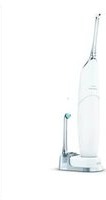
Sonicare AirFloss HX8632 - Water Flosser PHILIPS - Free user manual and instructions
Find the device manual for free Sonicare AirFloss HX8632 PHILIPS in PDF.


| Product Type | Water Flosser (Oral Irrigator) |
| Brand | Philips |
| Model | Sonicare AirFloss HX8632 |
| Power Source | Rechargeable via charger type HX6100 |
| Charging Time | 24 hours for full charge |
| Battery | Lithium-ion |
| Operating Time | Up to 11 days (triple burst) or 33 days (single burst) |
| Modes | Single burst, Double burst, Triple burst |
| Nozzle Type | AirFloss Ultra nozzle (HX8032/HX8033) |
| Nozzle Replacement | Every 6 months |
| Reservoir Capacity | Approx. 10 ml |
| Water Refill | Open reservoir cover, fill with water |
| Auto Shut-Off | After 1 minute of inactivity |
| Auto-Burst Function | Hold activation button for continuous bursts |
| Low Battery Indicator | Yellow flashing LEDs |
| Water Resistance | Handle is not waterproof; do not immerse |
| Cleaning | Rinse nozzle and reservoir; wipe handle and charger |
| Guarantee | Standard worldwide guarantee (details in leaflet) |
Frequently Asked Questions - Sonicare AirFloss HX8632 PHILIPS
User questions about Sonicare AirFloss HX8632 PHILIPS
0 question about this device. Answer the ones you know or ask your own.
Ask a new question about this device
Download the instructions for your Water Flosser in PDF format for free! Find your manual Sonicare AirFloss HX8632 - PHILIPS and take your electronic device back in hand. On this page are published all the documents necessary for the use of your device. Sonicare AirFloss HX8632 by PHILIPS.
USER MANUAL Sonicare AirFloss HX8632 PHILIPS
natural_image
White electric toothbrush with metallic tip, no visible text or symbols on bodyAirFloss Ultra
フィリップ スソニッケー
エアーフロス ウ ルト ラ
電動デンタルフロス
HX8632/01, HX8622/01
取扱説明書
保証書付
保証書は、この取扱説明
書の最終 ページについ
ておりますのでお 買い 求
めの販売店で記入を受
けてください。
はじめに
natural_image
Simple 3D cube diagram with a downward arrow pointing to its top face (no text or symbols)Guidance in English 19\~30
●保 証
保証とアフターサービス 31
仕様 32
無料修理規定 34
保証書 ...... 最終ページ
必ずお守り ください
natural_image
Close-up of a metallic tool tip emitting bubbles from a glass rod (no text or symbols visible)連続噴射機能
natural_image
Diagram showing two electrical components: a wall-mounted power outlet connected to an open plug, and a socket with wires (no text or symbols)natural_image
Simple line drawing of a blender with a power button and base, no text or symbols present充電表示
充電催促表示
natural_image
Simple diagram of a lightning bolt inside a U-shaped object (no text or symbols)充電中
No plug adapter required.

natural_image
Line drawing of a three-pin electrical plug (no text or symbols)Plug adapter required.
natural_image
Illustration of a hand holding a circular object with a curved arrow indicating rotation (no text or symbols)エアーフロス ウルトラの使用
1. 電源を入れます。
natural_image
Hand placing a button into a glass with an 'Power' icon (no text or symbols on the diagram itself)2. 起動ボタンを押します。
natural_image
Illustration of a hand holding an electric toothbrush with a downward arrow indicating force or direction (no text or symbols)選べる噴射回数モード設定
natural_image
Simple line drawing of a curved container with an internal circular symbol and arrows indicating direction (no text or labels)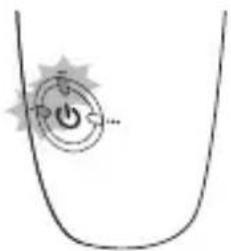
natural_image
Simple line drawing of a container with a power button and starburst symbol (no text or labels)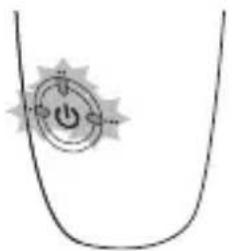
natural_image
Simple line drawing of a curved container with an internal symbol (no text or labels)3.ガイドチップを歯間に当てます
natural_image
Illustration showing dental tooth manipulation: one being adjusted to form teeth, the other using a tool to remove teeth (no text or symbols present)●連続噴射機能 …
起動ボタンを噴射されます。
押し 続け秋ごとに空気と水が断続的に
5. 電源を切ります。

natural_image
Illustration of a hand holding a pen with an arrow indicating direction (no text or symbols)natural_image
Illustration of a hand holding a tool or object, possibly a medical or laboratory device (no text or symbols visible)2. 水タンク内を清掃します。
natural_image
Illustration of a hand holding a small object with a circular arrow indicating rotation (no text or symbols)4. 充電器を拭きます。
natural_image
Illustration showing a plug being inserted into a socket connected to a cable, with no text or symbols present.
注意
natural_image
Diagram showing a device connected to a wall-mounted panel with an arrow indicating direction (no text or symbols present)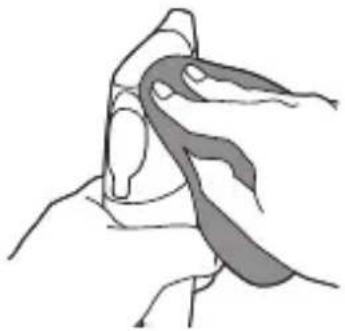
natural_image
Illustration of a hand holding a curved object, possibly a tool or device, with no visible text or symbols.2. 水タンク内の水を捨てます。
4. 保管します。
natural_image
Diagram of a vacuum cleaner inside a cabinet with an arrow indicating direction (no text or symbols)リチウムイオン電池のリサイクルについて
- ハンドルの上 部と下 部をそれぞれしっ
natural_image
Illustration of a hand holding a device with a magnified view showing internal components (no text or symbols)
natural_image
Illustration showing two hands performing a cable installation or repair operation (no text or symbols present)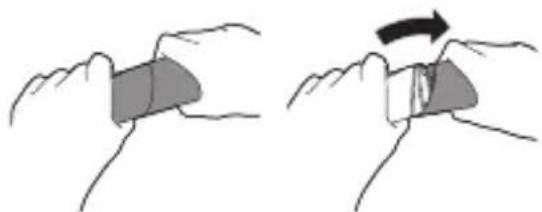
natural_image
Illustration of two hands holding a rectangular object with a curved arrow indicating rotation (no text or symbols)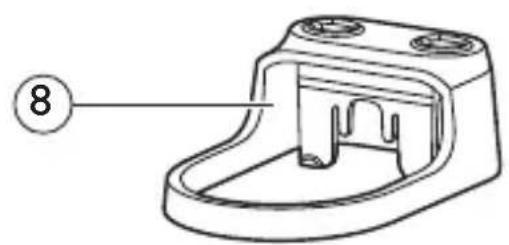
natural_image
Technical line drawing of a mechanical component with no visible text or symbols
natural_image
Simple line drawing of a mechanical component with a numbered label (9) pointing to its base, no text or symbols present.

Introduction
Congratulations on your purchase and welcome to Philips! To fully benefit from the support that Philips offers, register your appliance at www.
philips.com/welcome.
Use AirFloss Ultra as a part of your oral care routine. In addition to brushing, AirFloss Ultra helps reduce the plaque in between teeth in order to improve your gum health.
Important
Read this user manual carefully before you use the appliance and save it for future reference.
Danger
- Keep the charger away from water. Do not place or store it over or near water contained in a bathtub, washbasin, etc. Do not immerse the charger in water or any other liquid. After cleaning, make sure the charger is completely dry before you connect it to the mains.
Warning
- The mains cord cannot be replaced. If the mains cord is damaged, discard the charger. Always have the charger replaced with one of the original type in order to avoid a hazard.
- Use only charger type HX6100 provided with the AirFloss Ultra to recharge the battery.
- If the appliance is damaged in any way (AirFloss Ultra nozzle, handle and/or charger), stop using it.
- This appliance contains no serviceable parts. If the appliance is damaged, contact the Consumer Care Centre in your country (see chapter ‘Guarantee and support’).
- Do not use the charger outdoors or near heated surfaces.
- This appliance is not intended for use by persons (including children) with reduced physical, sensory or mental capabilities, or lack of experience and knowledge, unless they have been given supervision or instruction concerning use of the appliance by a person responsible for their safety.
- Children should be supervised to ensure that they do not play with the appliance.
Caution
- Consult your dentist before you use this appliance if you have had recent oral or gum surgery, suffer from an ongoing dental condition, had extensive dental work in the previous 2 months, or have suspected issues with your dental work (filings, crowns, etc.).
- Consult your dentist if excessive bleeding occurs after using this appliance or if bleeding continues to occur after 1 week of use.
- If you have medical concerns, consult your doctor before you use this appliance.
- This Philips appliance complies with the safety standards for electromagnetic devices. If you have a pacemaker or other implanted device, contact your physician or the appliance manufacturer of the implanted appliance prior to use.
- Do not use attachments other than the ones recommended by the manufacturer.
- Do not exert excessive pressure on the nozzle tip of the nozzle.
- To avoid physical injury, do not fill the reservoir with hot water. Do not put foreign objects in the reservoir.
- Only use the AirFloss Ultra for its intended purpose as described in this user manual.
- To avoid physical injury, do not direct the spray under the tongue or into the ear, nose, eye or other sensitive area.
- Do not clean the AirFloss Ultra nozzle, the handle, the charger, the water reservoir and its cover in the dishwasher or a microwave.
- To avoid an ingestion hazard, do not put isopropyl alcohol or other cleaning fluids in the reservoir.
- The AirFloss Ultra is a personal care appliance and is not intended for use on multiple patients in a dental practice or institution.
Electromagnetic fields (EMF)
This Philips appliance complies with all applicable standards and regulations regarding exposure to electromagnetic fields.
General description (Fig. 1)
1 Nozzle tip
2 AirFloss Ultra nozzle
3 Activation button
4 Reservoir and reservoir cover
5 Handle
6 Charge & burst mode indicators
- Single burst: 1 LED
- Double burst: 2 LEDs
- Triple burst: 3 LEDs
7 Power/mode button
8 Removable nozzle holder (select models)
9 Charger
Note: The contents of the box may vary based on the model purchased.
Charging
Charge the AirFloss Ultra for 24 hours before first use.
1 Put the plug of the charger in the electrical outlet.
2 Place the handle on the charger (Fig. 2).
▶Charging process: (Fig. 3)
- 1 green LED: 33% charged.
- 2 green LEDs: 66% charged.
- 3 green LEDS: 100% charged.
Note: When it is fully charged, AirFloss Ultra has an operating time of up to 11 days when it is used in triple burst mode, and up to 33 days when it is used in single burst mode.
Note: When the charge indicators flash yellow, the battery is low and needs to be recharged (fewer than 3 uses left).
Preparing for use
1 Align the nozzle and press the nozzle down onto the handle ('click') (Fig. 4).
Note: We advise you to place the tip facing the front of the handle as the illustration shows, but the nozzle can be placed in the handle either way without affecting the function. You can try both options and use what works best for you in your oral care routine.
Note: Replace the nozzle (HX8032, HX8033) every 6 months for optimal results. Also replace the nozzle if it becomes loose or no longer ‘clicks’ onto the handle.
Note: The AirFloss Ultra only supports AirFloss Ultra nozzles. Do not attempt to use non-AirFloss Ultra nozzles on the AirFloss Ultra handle.
2 Open the cover of the reservoir ('click') (Fig. 5).
3 Fill the reservoir with water (Fig. 6).
4 Close the cover of the reservoir by pressing ('click') (Fig. 7).
5 Press the power/mode button to switch on the appliance. (Fig. 8) The LEDs illuminate.
6 Press and hold the activation button until spray comes out of the tip of the nozzle (Fig. 9).
Using the appliance
1 Make sure the AirFloss Ultra is switched on. If it is off, press and release the power/mode button to switch on the appliance. (Fig. 8)
-
You can change the modes to have the desired amounts of bursts each time you press the activation button. For optimal results, use the triple burst mode (the default setting) from both the outside and inside of your teeth.
To change modes, press the power/mode button to cycle through the modes until you reach your desired mode. The LEDs show the selected mode: -
Single burst: 1 LED (Fig. 10)
- Double burst: 2 LEDs (Fig. 11)
- Triple burst: 3 LEDs (Fig. 12)
ENGLISH
Note: The AirFloss Ultra remembers what mode was selected last and it is ready for the next use. If your AirFloss Ultra becomes fully drained of power, it will go back to the triple burst default mode once it has been recharged.
2 Place the nozzle tip between two teeth at your gum line. Slightly close your lips over the nozzle when it is in place, to avoid splashing (Fig. 13).
3 Press the activation button to deliver 1-3 bursts (depending on the selected mode) of air and micro-droplets of water between the teeth. (Fig. 14)
4 Slide the nozzle tip along the gum line until you feel it settle between the next two teeth.
5 Continue this procedure for all spaces between your teeth, including behind your back teeth (Fig. 15).
Note: Refill the reservoir as needed.
Auto-burst function
Hold the activation button to deliver bursts continuously, approximately one second between set of bursts.
1 To switch off the AirFloss Ultra, press and hold the power/mode button for one second.
Automatic shut-off function
The AirFloss Ultra automatically switches off if it has not been used for one minute.
Cleaning
To clean the inside of the AirFloss, fill the reservoir with warm water and press the activation button until the reservoir is empty.
Do not clean the nozzle, handle or charger in the dishwasher.
Do not use cleaning agents to clean the appliance. The formulation or strength of some agents may damage the appliance.
Handle and nozzle
1 Remove the AirFloss Ultra nozzle from the handle. Rinse the nozzle after each use to eliminate the residue left in it (Fig. 16).
2 Open the reservoir and rinse it under a faucet to eliminate residue (Fig. 17).
Tip: You can also use a cotton swab to wipe the reservoir and remove the remaining residue.
Note: Do not immerse the handle in water.
Note: Failure to remove residue from the nozzle or reservoir may result in an unhygienic condition.
3 Wipe the entire surface of the handle with a damp cloth (Fig. 18).
Charger
1 Unplug the charger before you clean it.
2 Wipe the surface of the charger with a damp cloth (Fig. 19).
Storage
If you are not going to use AirFloss Ultra for an extended period of time, follow the steps below.
1 Open the cover of the reservoir and empty it.
2 Press the activation button until no more spray comes out of the nozzle.
3 Unplug the charger.
4 Clean AirFloss Ultra nozzle, handle and charger. Refer to chapter 'Cleaning'.
5 Store AirFloss Ultra in a cool, dry place away from direct sunlight.
Recycling
Do not throw away the appliance with the normal household waste at the end of its life, but hand it in at an official collection point for recycling. By doing this, you help to preserve the environment.
Removing the rechargeable battery
Please note that this process is not reversible.
1 To deplete the battery, repeatedly press the activation button until the AirFloss Ultra no longer produces any bursts of air (Fig. 20).
2 Remove the nozzle from the handle. (Fig. 21)
3 Firmly grab the handle with one hand at the top and one hand on the bottom (Fig. 22).
4 Snap the handle into two parts. (Fig. 23)
Note: This step requires a good amount of physical force. The top and bottom half of the handle should be separated once you snap the handle.
5 Remove the bottom half of the handle (Fig. 24).
6 Cut all 6 wires on the internal component with scissors (Fig. 25).
7 Completely pull apart the internal component from the top part of the handle (Fig. 26).
8 The battery is located inside the top half of the handle. Remove the battery and dispose of it properly (not in household waste) (Fig. 27).
Guarantee and support
If you need information or support, please visit www.philips.com/support or read the separate worldwide guarantee leaflet.
Guarantee restrictions
The terms of the international guarantee do not cover the following: - AirFloss Ultra nozzle.
ENGLISH
- Damage caused by misuse, abuse, neglect, alterations or unauthorised repair.
- Normal wear and tear, including chips, scratches, abrasions, discolouration or fading.
〈保証書・最終ページに付属〉
●保証は、本製品を購入された方のみ適
Philips Oral Healthcare, LLC.
22100 Bothell Everett Hwy Bothell, WA 98021 U.S.A.
Phone:+1 (800) 682-7664
Philips Oral Healthcare, LLC.
22100 Bothell Everett Hwy
Bothell, WA 98021 U.S.A.
株式会社 フィリップス・ジャパン
〒108-8507

- AirFloss Ultra
- 取扱説明書
- はじめに
- 必ずお守り ください
- 連続噴射機能
- 充電表示
- 充電催促表示
- 充電中
- エアーフロス ウルトラの使用
- 電源を入れます。
- 起動ボタンを押します。
- 選べる噴射回数モード設定
- 3.ガイドチップを歯間に当てます
- ●連続噴射機能 …
- 電源を切ります。
- 水タンク内を清掃します。
- 充電器を拭きます。
- 注意
- 水タンク内の水を捨てます。
- 保管します。
- リチウムイオン電池のリサイクルについて
- Introduction
- philips.com/welcome.
- Important
- Danger
- Warning
- Caution
- Electromagnetic fields (EMF)
- General description (Fig. 1)
- Charging
- Preparing for use
- Using the appliance
- ENGLISH
- Auto-burst function
- Automatic shut-off function
- Cleaning
- Handle and nozzle
- Charger
- Storage
- Recycling
- Removing the rechargeable battery
- Guarantee and support
- Guarantee restrictions
- 〈保証書・最終ページに付属〉
- Philips Oral Healthcare, LLC.
- 株式会社 フィリップス・ジャパン
Brand : PHILIPS
Model : Sonicare AirFloss HX8632
Category : Water Flosser