
Sonicare Protectclean HX6466 - Electric toothbrush PHILIPS - Free user manual and instructions
Find the device manual for free Sonicare Protectclean HX6466 PHILIPS in PDF.


| Product Type | Electric toothbrush |
| Brand | Philips |
| Model | Sonicare Protectclean HX6466 |
| Brush Head Technology | BrushSync technology for wear tracking |
| Included Brush Heads | Smart brush head(s) with BrushSync |
| Brushing Modes | Clean (2 min), Gum Care (3 min) |
| Intensity Levels | 3 (Low, Medium, High) |
| EasyStart Feature | Gradual power increase over first 14 brushings (deactivatable) |
| Brush Head Replacement Reminder | Amber light when replacement due |
| Pressure Sensor | Alerts via vibration change when brushing too hard |
| Quadpacer | Beeps every 30 seconds for 4 quadrants |
| Battery Type | Built-in rechargeable lithium-ion |
| Battery Indicator | Solid green (full), flashing green (medium), flashing amber (low) |
| Charging | Inductive charger base, full charge in ~48 h |
| Radio Frequency | 13.56 MHz, max 30.16 dBm |
| Travel Accessories | Hygienic travel cap, travel case (may vary) |
| Cleaning Instructions | Rinse brush head and handle; wipe charger with damp cloth; not dishwasher safe |
| Safety | Do not immerse charger; keep away from water; consult dentist after oral surgery |
| Warranty | International warranty (brush heads excluded) |
| Disposal | Recycle at official collection point; rechargeable battery removable |
Frequently Asked Questions - Sonicare Protectclean HX6466 PHILIPS
User questions about Sonicare Protectclean HX6466 PHILIPS
0 question about this device. Answer the ones you know or ask your own.
Ask a new question about this device
Download the instructions for your Electric toothbrush in PDF format for free! Find your manual Sonicare Protectclean HX6466 - PHILIPS and take your electronic device back in hand. On this page are published all the documents necessary for the use of your device. Sonicare Protectclean HX6466 by PHILIPS.
USER MANUAL Sonicare Protectclean HX6466 PHILIPS
Guidance in English 24\~38
● 保 証
保証とアフターサービス 39
仕様 40
無料修理規定 42
保証書 ...... 最終ページ
必ずお守り
ください
- ブラッシング後は、水で口をゆすぎます。
上手なみがきかた
ブラッシング 強さ表示ランプ
モード・ 強さボタン
ブラシヘッド
製品を廃棄するとき
製品のリサイクルについて
Read this user manual carefully before you use the appliance and save it for future reference.
Danger
-Keep the charger away from water. Do not place or store it over or near water contained in a bathtub, washbasin, sink etc. Do not immerse the charger in water or any other liquid. After cleaning, make sure the charger is completely dry before you connect it to the wall socket.
Warning
-The mains cord cannot be replaced. If the mains cord is damaged, discard the charger.
-Always have the charger replaced with one of the original type in order to avoid a hazard.
-Do not use the charger outdoors or near heated surfaces.
-If the appliance is damaged in any way (brush head, toothbrush handle or charger), stop using it. This appliance contains no serviceable parts. If the appliance is damaged, contact the Consumer Care Center in your country (see chapter 'Warranty and support').
-This appliance can be used by children and persons with reduced physical, sensory or mental capabilities or lack of experience and knowledge if they have been given supervision or instruction concerning use of the appliance in a safe way and understand the hazards involved. Cleaning and user maintenance shall not be made by children without supervision.
-Children shall not play with the appliance.
Caution
-Do not clean the brush head, the handle or the charger in the dishwasher.
-If you have had oral or gum surgery in the previous 2 months, consult your dentist before you use the toothbrush.
-Consult your dentist if excessive bleeding occurs after using this toothbrush or if bleeding continues to occur after 1 week of use. Also consult your dentist if you experience discomfort or pain when you use the Philips Sonicare.
-The Philips Sonicare toothbrush complies with the safety standards for electromagnetic devices. If you have a pacemaker or other implanted device, contact your physician or the device manufacturer of the implanted device prior to use.
-If you have medical concerns, consult your doctor before you use the Philips Sonicare.
-This appliance has only been designed for cleaning teeth, gums and tongue. Do not use it for any other purpose. Stop using the appliance and contact your doctor if you experience any discomfort or pain.
-The Philips Sonicare toothbrush is a personal care device and is not intended for use on multiple patients in a dental practice or institution.
-Stop using a brush head with crushed or bent bristles. Replace the brush head every 3 months or sooner if signs of wear appear. Do not use other brush heads than the ones recommended by the manufacturer.
-If your toothpaste contains peroxide, baking soda or bicarbonate (common in whitening toothpastes), thoroughly clean the brush head with soap and water after each use. This prevents possible cracking of the plastic.
Electromagnetic fields (EMF)
This Philips appliance complies with all applicable standards and regulations regarding exposure to electromagnetic fields.
Radio Equipment Directive
-Radio Equipment in this product operates at 13.56 MHz
-Maximum RF power transmitted by the Radio Equipment is 30.16dBm
English
Introduction
Congratulations on your purchase and welcome to Philips! To fully benefit from the support that Philips offers, register your product at www.philips.com/welcome.
Your Philips Sonicare (Fig. 1)
1 Hygienic travel cap
2 Smart brush head(s)*
3 Handle
4 Power on/off button
5 Intensity light
6 Mode/intensity button
7 Mode light
8 Brush head replacement reminder light
9 Battery indication
10 Charging base
11 Travel case
*Note: The content of the box may vary based on the model purchased.
Brush heads
Your Philips Sonicare comes with one or more brush heads which are designed to deliver superior results for your oral care needs.
Philips Sonicare BrushSync Technology
Your brush head(s) are enabled with BrushSync technology. This technology enables the following feature with this toothbrush:
- Brush head replacement reminder (see 'Features and Accessories') This symbol indicates the brush head is equipped with BrushSync technology. (Fig. 2)
Brushing modes
Your power toothbrush is equipped with 2 different modes to
accommodate all your oral care needs.
To change modes, press the mode/intensity button while the toothbrush is off.
The following modes are available:
Clean mode
Clean is a 2-minute mode, recommended to be used with intensity level 3. It gives you a thorough and complete clean and is recommended to be used with the C2 Optimal Plaque Control brush head.
Gum Care mode
Gum Care is a 3-minute mode, recommended to be used with intensity level 3 and the G2 Optimal Gum Care brush head.
Intensity settings
Your power toothbrush gives you the option to choose between 3 different intensity levels: low, medium and high. (Fig. 3) The intensity can be changed by pressing the mode/intensity button while brushing. For optimal results it is recommended to use the automatically selected intensity. The intensity cannot be changed as long as the handle is powered off or paused.
Note: The intensity LED's will not be visible while the toothbrush is turned off.
Using your Philips Sonicare
Brushing instructions
1 Press the brush head onto the handle in such a way that the bristles will face the front of the handle. (Fig. 4)
2 Firmly press the brush head down onto the metal shaft until it stops.
Note: It is normal to see a slight gap between the brush head and the handle.
3 Wet the bristles. (Fig. 5)
English
4 Apply a small amount of toothpaste on the bristles. (Fig. 6)
5 Place the toothbrush bristles against the teeth at a slight angle (45 degrees), pressing firmly to make the bristles reach the gumline or slightly beneath the gumline. (Fig. 7) A change in vibration (and a slight change in sound) alerts you when you apply too much pressure while brushing.
Note: Keep the center of the brush in contact with the teeth at all times.
6 Press the power on/off button to turn on the Philips Sonicare. (Fig. 8)
7 Gently keep the bristles placed on the teeth and in the gumline. Brush your teeth with small back and forth motion so the bristles reach between the teeth. (Fig. 9)
Note: The bristles should slightly flare. Do not scrub.
8 To clean the inside surfaces of the front teeth, tilt the brush handle semi-upright and make several vertical overlapping brushing strokes on each tooth. (Fig. 10)
9 To make sure you brush evenly throughout the mouth, divide the mouth into 4 sections using the Quadpacer feature. (Fig. 11) The quadpacer feature beeps after 30 seconds.
10 Brush for the full 2 minutes following the Quadpacer. (Fig. 12) After 2 minutes, the toothbrush will automatically shut off.
In gum care mode, after 2 minutes the handle will continue to brush for an additional minute so you can gently stimulate and massage your gums.
-After you have completed the brushing cycle, you can spend additional time brushing the chewing surfaces of your teeth and areas where staining occurs. (Fig. 13)
Your Philips Sonicare toothbrush is safe to use on:
-Braces (brush heads wear out sooner when used on braces)
-Dental restorations (fillings, crowns, veneers)
Note: When the Philips Sonicare toothbrush is used in clinical studies, it must be used in the Clean mode (for plaque and gum health claims) at high intensity with EasyStart turned off.
Features
-EasyStart
-Brush head replacement reminder
-Pressure sensor
-Quadpacer
Easy-start
This Philips Sonicare model comes with the EasyStart feature deactivated. The EasyStart feature gently increases the power over the first 14 brushings to help you get used to the brushing with the Philips Sonicare. The EasyStart feature works in all modes.
To activate EasyStart see 'Activating or deactivating features'.
Brush head replacement reminder
Your Philips Sonicare is equipped with BrushSync technology that tracks the wear of your brush head. (Fig. 14)
1 When attaching a new smart brush head for the first time the brush head replacement reminder light blinks green three times. This confirms you have a Philips brush head with BrushSync technology.
2 Over time, based on the pressure you apply and the amount of time used, the handle will track brush head wear in order to determine the optimal time to change your brush head. This feature gives you the guarantee for the best cleaning and care of your teeth.
3 When the brush head replacement reminder light lights up amber, you should replace your brush head.
To deactivate the brush head replacement reminder see 'Activating or deactivating features'.
English
Pressure sensor
Your Philips Sonicare is equipped with an advanced sensor that measures the pressure you apply while brushing. If you apply too much pressure, the toothbrush will provide immediate feedback to indicate that you need to reduce the pressure. This feedback is given by a change in vibration and therefore brushing sensation.
To deactivate the pressure sensor see 'Activating or deactivating features'.
Quadpacer
The Quadpacer is an interval timer that has a short beep and pause to remind you to brush the different sections of your mouth. Depending on the brushing mode you have selected (see 'Brushing modes'), the Quadpacer beeps at different intervals during the brushing cycle.
Activating or deactivating features
You can activate or deactivate the following features of your toothbrush:
-EasyStart
-Brush head replacement reminder
-Pressure sensor
To activate or deactivate these features, follow the instructions below:
EasyStart
1 Put the handle on the plugged-in charger.
2 Press and hold the power on/off button while the handle remains on the charger.
3 Keep the power on/off button pressed until you hear a single short beep (after 2 seconds).
4 Release the power on/off button.
-Triple tone of low-med-high means the EasyStart feature has been activated. The brush head replacement light and
battery light will also blink green 2 times in unison to confirm activation.
-Triple tone of high-med-low means the EasyStart feature has been deactivated. The brush head replacement light and battery light will also blink amber 1 time in unison to confirm deactivation.
Note: To achieve clinical efficacy, EasyStart needs to be deactivated.
Brush head replacement reminder
1 Put the handle on the plugged-in charger.
2 Press and hold the power on/off button while the handle remains on the charger.
3 Keep the power on/off button pressed until you hear a series of two short beeps (after 4-5 seconds).
4 Release the power on/off button.
-Triple tone of low-med-high means the Brush head replacement reminder feature has been activated. The brush head replacement light and battery light will also blink green 2 times in unison to confirm activation.
-Triple tone of high-med-low means the Brush head replacement reminder feature has been deactivated. The brush head replacement light and battery light will also blink amber 1 time in unison to confirm deactivation.
Pressure sensor
1 Put the handle on the plugged-in charger.
2 Press and hold the power on/off button while the handle remains on the charger.
3 Keep the power on/off button pressed until you hear a series of three short beeps (after 6-7 seconds).
4 Release the power on/off button.
-Triple tone of low-med-high means the pressure sensor feature has been activated. The brush head replacement
English
light and battery light will also blink green 2 times in unison to confirm activation.
-Triple tone of high-med-low means the pressure sensor feature has been deactivated. The brush head replacement light and battery light will also blink amber 1 time in unison to confirm deactivation.
If you continue holding the power on/off button after the three short beeps, the activate/deactivate sequence repeats.
Battery status and charging
1 Put the plug of the charger in an electrical outlet.
2 Place the handle on the charger.
-The charger will emit 2 short beeps to confirm that the handle is placed properly.
-The flashing light of the battery level indicator shows that the toothbrush is charging.
-When handle is fully charged on the charger, the battery light shows solid green for 30 seconds and switches off.
Note: Your toothbrush comes pre-charged for first use. After first use, charge for at least 48 hours.
Battery status (when handle is not on charger)
When removing the Philips Sonicare from the charger, the battery light at the bottom of the toothbrush will indicate the status of the battery life.
-Solid green LED: full battery
-Flashing green LED: medium battery
-Flashing amber LED and three beeps: low battery
-Flashing amber LED and two sets of five beeps: No brushing sessions left (charge toothbrush)
Cleaning
Note: Do not clean the brush head, handle or travel case in the dishwasher.
Toothbrush handle
1 Remove the brush head and rinse the metal shaft area with warm water. Make sure you remove any residual toothpaste (Fig. 15).
Note: Do not push on the rubber seal on the metal shaft with sharp objects, as this may cause damage.
2 Wipe the entire surface of the handle with a damp cloth.
Note: Do not use isopropyl rubbing alcohol, vinegar or bleach to clean handle as this may cause discoloration.
Brush head
1 Rinse the brush head and bristles after each use (Fig. 16).
2 Remove the brush head from the handle and rinse the brush head connection with warm water at least once a week.
Charger
1 Unplug the charger before you clean it.
2 Wipe the surface of the charger with a damp cloth.
Storage
If you are not going to use your Philips Sonicare for an extended period of time, unplug the charger from the wall socket, clean it and store it in a cool and dry place away from direct sunlight.
Locating the model number
Look on the bottom of the Philips Sonicare toothbrush handle for the model number (HX642X).
Recycling
-Do not throw away the product with the normal household waste at the end of its life, but hand it in at an official collection point for recycling. By doing this, you help to preserve the environment.
English
-This product contains a built-in rechargeable battery which shall not be disposed of with normal household waste. Please take your product to an official collection point or a Philips service center to have a professional remove the rechargeable battery.
-Follow your country's rules for the separate collection of electrical and electronic products and rechargeable batteries. Correct disposal helps prevent negative consequences for the environment and human health.
Removing the rechargeable battery
Warning: Only remove the rechargeable battery when you discard the appliance. Make sure the battery is completely empty when you remove it.
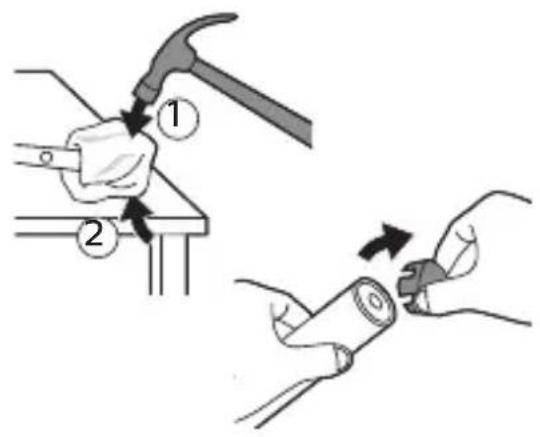
To remove the rechargeable battery, you need a towel or cloth, a hammer and a flat-head (standard) screwdriver. Observe basic safety precautions when you follow the procedure outlined below. Be sure to protect your eyes, hands, fingers, and the surface on which you work.
1 To deplete the rechargeable battery of any charge, remove the handle from the charger, turn on the Philips Sonicare and let it run until it stops. Repeat this step until you can no longer turn on the Philips Sonicare.
2 Remove and discard the brush head. Cover the entire handle with a towel or cloth (Fig. 17).
3 Hold the top of the handle with one hand and strike the handle housing 0.5 inch above the bottom end. Strike firmly with a hammer on all 4 sides to eject the end cap (Fig. 18).
Note: You may have to hit on the end several times to break the internal snap connections.
4 Remove the end cap from the toothbrush handle. If the end cap does not release easily from the housing, repeat step 3 until the end cap is released (Fig. 19).
5 Holding the handle upside down, press the shaft down on a hard surface. If the internal components do not easily release
from the housing, repeat step 3 until the internal components are released (Fig. 20).
6 Remove the rubber battery cover.
7 Wedge the screwdriver between the battery and the black frame at the bottom of the internal components. Then pry the screwdriver away from the battery to break the bottom of the black frame (Fig. 21).
8 Insert the screwdriver between the bottom of the battery and the black frame to break the metal tab connecting the battery to the green printed circuit board. This will release the bottom end of the battery from the frame (Fig. 22).
9 Grab the battery and pull it away from the internal components to break the second metal battery tab (Fig. 23).
Caution: Be aware of the sharp edges of the battery tabs so as to avoid injury to your fingers.
10 Cover the battery contacts with tape to prevent any electrical short from residual battery charge. The rechargeable battery can now be recycled and the rest of the product discarded appropriately (Fig. 24).
Warranty and support
If you need information or support, please visit
www.philips.com/support or read the international warranty leaflet.
Warranty restrictions
The terms of the international warranty do not cover the following:
-Brush heads.
-Damage caused by use of unauthorized replacement parts.
-Damage caused by misuse, abuse, neglect, alterations or unauthorized repair.
-Normal wear and tear, including chips, scratches, abrasions, discoloration or fading.
保証と アフターサービス
Philips Oral Healthcare, LLC. 22100 Bothell Everett Hwy Bothell, WA 98021 U.S.A. Phone:+1 (800) 682-7664
Philips Oral Healthcare, LLC.
22100 Bothell Everett Hwy
Bothell, WA 98021 U.S.A.
株式会社 フィリップス・ジャパン
〒108-8507
4235.021.6354.1 (07/18)



- 必ずお守り
- ください
- 上手なみがきかた
- ブラシヘッド
- 製品を廃棄するとき
- 製品のリサイクルについて
- DANGER
- WARNING
- CAUTION
- ELECTROMAGNETIC FIELDS (EMF)
- RADIO EQUIPMENT DIRECTIVE
- ENGLISH
- INTRODUCTION
- YOUR PHILIPS SONICARE (FIG. 1)
- BRUSH HEADS
- PHILIPS SONICARE BRUSHSYNC TECHNOLOGY
- BRUSHING MODES
- CLEAN MODE
- GUM CARE MODE
- INTENSITY SETTINGS
- USING YOUR PHILIPS SONICARE
- BRUSHING INSTRUCTIONS
- FEATURES
- EASY-START
- BRUSH HEAD REPLACEMENT REMINDER
- PRESSURE SENSOR
- QUADPACER
- ACTIVATING OR DEACTIVATING FEATURES
- EASYSTART
- BATTERY STATUS AND CHARGING
- BATTERY STATUS (WHEN HANDLE IS NOT ON CHARGER)
- CLEANING
- TOOTHBRUSH HANDLE
- BRUSH HEAD
- CHARGER
- STORAGE
- LOCATING THE MODEL NUMBER
- RECYCLING
- REMOVING THE RECHARGEABLE BATTERY
- WARRANTY AND SUPPORT
- WARRANTY RESTRICTIONS
- 保証と アフターサービス
- PHILIPS ORAL HEALTHCARE, LLC
- 株式会社 フィリップス・ジャパン
Brand : PHILIPS
Model : Sonicare Protectclean HX6466
Category : Electric toothbrush