
WP 21-32 - Cordless phone SAGEM - Free user manual and instructions
Find the device manual for free WP 21-32 SAGEM in PDF.


| Product Type | DECT Cordless Phone with Answering Machine |
| Brand | SAGEM |
| Model | WP 21-32 |
| Handset dimensions (approx.) | 160 x 50 x 25 mm |
| Base dimensions (approx.) | 120 x 100 x 80 mm |
| Handset weight | Approx. 130 g (with battery) |
| Base weight | Approx. 250 g |
| Base power supply | 9 V DC / 200 mA power adapter (ref. 872101) |
| Battery type | Rechargeable NiMH 2.4 V / 600 mAh (ref. 872102) |
| Standby time | Approx. 120 hours |
| Talk time | Approx. 10 hours |
| Max. number of handsets | Up to 6 handsets |
| Main features | Digital answer machine (12 min), caller ID, call logs (20 entries), directory (50 names), call waiting, hands-free, mute, call transfer, internal call, voicemail, ring tone selection (base 21 melodies, handset 6) |
| Range | Up to 50 m indoors, 300 m outdoors |
| Handset display | Backlit LCD display |
| Menu languages | French, English, German, Spanish, Italian, Dutch, Portuguese |
| Care and cleaning | Clean with a damp (not wet) cloth or an antistatic wipe. Do not use household cleaner or a dry cloth. |
| Safety | Use only the supplied power adapter. Do not open the handset or base. Keep away from water and moisture. Unplug during thunderstorms. |
| Spare parts and repairability | Rechargeable battery (ref. 872102) and power adapter (ref. 872101) available from after-sales service. |
| Warranty | 12 months from date of purchase |
| General information | REN (Ringer Equivalence Number): 1. Compatible with analog telephone standards. Not suitable for emergency calls in case of power failure. |
Frequently Asked Questions - WP 21-32 SAGEM
User questions about WP 21-32 SAGEM
0 question about this device. Answer the ones you know or ask your own.
Ask a new question about this device
Download the instructions for your Cordless phone in PDF format for free! Find your manual WP 21-32 - SAGEM and take your electronic device back in hand. On this page are published all the documents necessary for the use of your device. WP 21-32 by SAGEM.
USER MANUAL WP 21-32 SAGEM
This equipment is not designed for making emergency telephone calls when the power fails. Alternative arrangements should be made for access to emergency services.
This product is intended for connection to analogue public switched telephone networks and private switchboards in the United Kingdom and Eire.
BT On-Air 2250 Classic
Digital Cordless Telephone Answering Machine
User Guide
At a glance
Handset
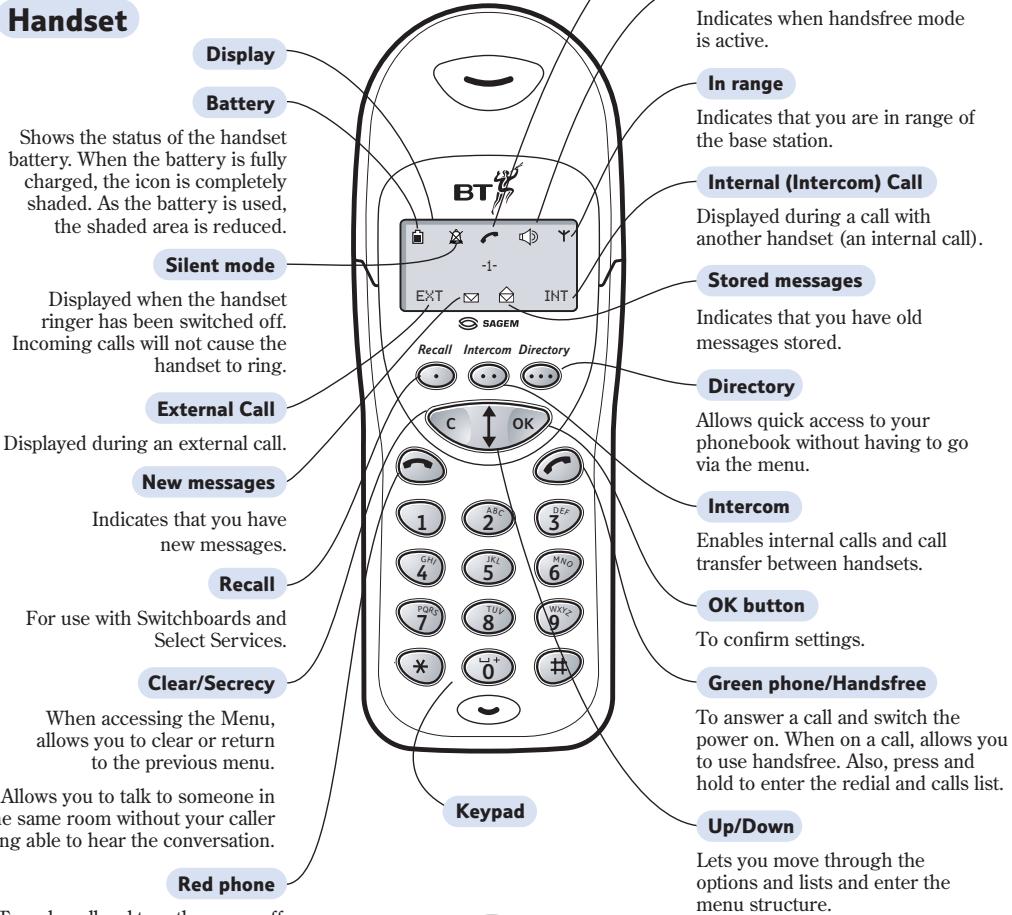
To end a call and turn the power off.
Base
Allows you to skip backwards and forwards through your messages. Skip forward can also be used to page handsets.
Speaker
Skip buttons
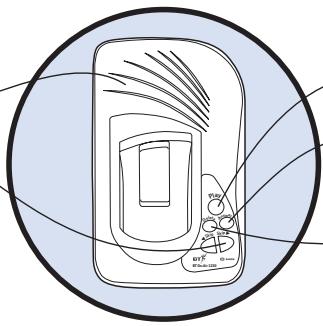
Play button
Answer button
Switches the answering machine on and off.
Delete button
To delete unwanted messages.
Quick Guide to the Menu Structure
Page number
| 1 PHONE BK | 11 NEW | 11 | |
| (Director) | 12 EDIT | 12 | |
| 13 DELETE | 12 | ||
| 2 CALLS | 21 DELETE | 11 | |
| 22 TIME | 11 | ||
| 3 RING | 31 MELODY | 14 | |
| 32 VOLUME | 14 | ||
| 33 SILENT | 14 | ||
| 34 BEEPS | 14 | ||
| 4 ANSWER | 41 PLAY | MESSAGES | 23 |
| OUT MSG | ANSWER REC | ||
| ANSWER | |||
| 42 DELETE | MESSAGES | 24 | |
| OUT MSG | |||
| 43 RECORD | MESSAGES | 24 | |
| OUT MSG | ANSWER REC | ||
| ANSWER | |||
| 44 OFF | 18 | ||
| 45 ON | ANSW REC | ||
| ANSWER | |||
| 5 SET | 51 LANGUAGE | 15 | |
| 52 END CALL | 15 | ||
| 6 BASE | 61 REGIST | AUTO | 29 |
| CUSTOM | 30 | ||
| 62 PRIOR | 16 | ||
| 63 PARAM | 15 |
Important
If you make a mistake you can return to the previous menu by pressing the C (clear) button. If you keep pressing the C (clear) button you will return to the idle screen.
In this guide
Note
There is a detailed Index at the back of this guide, please see page 39.
At a glance
Quick guide to the menu structure
Introduction
Unpacking your BT On-Air 2250 Classic 4
For your records 4
Safety information 4
Setting up
Plan the location 5
Using the telephone
Making and ending calls 8
Call timer 8
Handsfree 9
Secrecy 9
9
Caller Display 10
Calls list 10
Call Waiting 11
Name and number directory 11
13
Internal calls 13
Transferring calls 13
Handset settings 14
Base settings 15
Using the answering machine 18
Answering machine modes 18
To record your outgoing message (OGM) 18
Switch on and off 22
Playing your messages 23
Answering machine operation during message playback 24
Call screening 25
VIP 25
Remote access 27
Switch answering machine on from another external telephone 28
Answering machine control functions 28
Using additional handsets and bases 29
Registering additional handsets 29
To de-register a handset from the base 31
General information 32
Guarantee 32
Technical information 32
Switchboard compatibility 33
Recall 33
Switchboard external line access code 34
Wall mounting 36
Index 39
Helpline
If you experience any difficulties using your On-Air 2250 Classic, please call the BT On-Air Helpline on 0870 240 4682.
Introduction
Unpacking your BT On-Air 2250 Classic
If anything is missing, please contact your place of purchase immediately.
One BT On-Air 2250 base.
One BT On-Air 2000 Classic handset.
One power supply for base station.
One telephone line cord.
One NiMH rechargeable battery installed pack and battery compartment cover.
One handset belt clip.
Three removable handset fascias.
Self adhesive label.
Four rubber feet.
For your records
Date of purchase:
Place of purchase:
Serial number:
For guarantee purposes proof of purchase is required so please keep your receipt.
Enter your System Code here.

The pre-set System Code number is 0000. See page 15 for information on your System Code.
Safety information
General
Only use the power supply included with the product. Using an unauthorised power supply will invalidate your guarantee and may damage the telephone. The item number for the mains power supply is 872101.
Do not open the handset or base station. This could expose you to high voltages or other risks. Contact the helpline for all repairs.
Radio signals transmitted between the handset and base may cause interference to hearing aids.
It is recommended that advice from a qualified expert be sought before using this product in the vicinity of emergency/intensive care medical equipment.
It is recommended that if you have a pacemaker fitted you check with a medical expert before using this product.
Never dispose of batteries in a fire. There is a serious risk of explosion and/or the release of highly toxic chemicals.
Cleaning
Simply clean the handset and base station with a damp (not wet) cloth, or an antistatic wipe. Never use household polish as this will damage the product. Never use a dry cloth as this may cause a static shock.
Environmental
Do not expose to direct sunlight.
The product may heat up when the batteries are being recharged. This is normal. However, we recommend that you do not place the product on antique/veneered wood to avoid damage.
Do not stand your product on carpets or other surfaces which generate fibres, or place it in locations preventing free flow of air over its surfaces.
Do not submerge any part of your product in water and do not use it in damp or humid conditions, such as in bathrooms.
Do not expose your product to fire, explosive or other hazardous conditions.
There is a slight chance that your phone could be damaged by an electrical storm. We recommend that you unplug the power and telephone line cord for the duration of the storm.
Setting up
Please note that your handset is already registered to the base station.
Plan the location
Situate your product close enough to the telephone and mains power sockets so that the cables will reach. The only way to disconnect the product from the power supply is to remove the power adaptor from the mains power socket. Therefore you must ensure you plan the location so that the mains power is easily accessed.
Make sure it is at least 1 metre away from other electrical products to avoid interference.
Do not situate the product in the bathroom or other humid areas.

Connect the power supply and switch on.
Important
You must thread the power supply cable into the socket on the underside of your base. The power cable connector and socket are coloured red.
WARNING
Please take care that the power supply and telephone line cord are connected to the correct sockets as incorrect placement could damage your equipment.
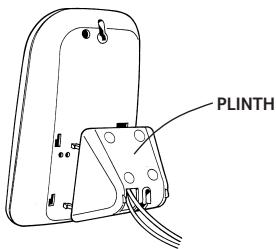
Once connected, put the plinth back on the base to prevent it from rocking on the table.
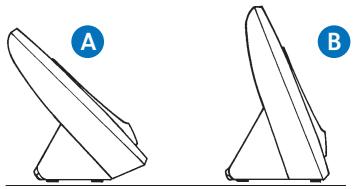
There are two positions for the plinth when joining it to the base, both can be used for desk mounting and one for wall mounting. Position A is for desk mounting only and position B is for desk or wall mounting (see Wall mounting on page 36).
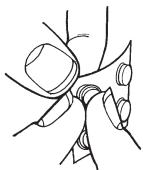
Rubber feet
Hold the black plastic square between thumb and forefinger and peel off individual feet from backing sheet as shown. These are to stop your base from moving and to protect your work surface.
If you decide on position B, place 2 of the rubber feet on the plinth and 2 on the base.
Plug the power adaptor into the wall socket and switch on. When the power is switched on, the button on your base will light up.
WARNING
Do not connect the telephone line cord to the phone socket until your handset is fully charged. This will prevent the risk of the phone being answered before the battery is charged. Answering the phone before the battery is fully charged may prevent it from reaching its optimum capacity.

Charge the battery in the handset for at least 16 hours
WARNING
Under no circumstances should non-rechargeable batteries be used. Only use the approved batteries. Using unapproved batteries will invalidate your guarantee and may damage the telephone.
Under ideal conditions the battery should give about 10 hours talk time and 120 hours standby when the batteries have been fully charged.
Fully discharging the batteries at least once a week will help them to last as long as possible. However, the charge capacity of rechargeable batteries will reduce with time as they wear out, so reducing the talk/standby time of the handset. Eventually they will need to be replaced. New batteries can be obtained from the Helpline on 0870 240 4682.
When the battery has been charged for at least 16 hours the display will show the symbol; you can then connect the telephone line cord to the base.

Empty

1/3

2/3

Full
Battery low warning
If the handset battery symbol is empty and you hear warning beeps, you will need to recharge your handset before you can use it.
Battery performance
Your handset is supplied with NiMH batteries. These need to be initially charged continuously for 16 hours to reach full charge.
Note that the battery charge icon does not indicate the correct level when the batteries are first installed. The batteries must first be fully charged.
Helpline
If you are experiencing difficulty, please call the BT On-Air Helpline on 0870 240 4682.
To replace the handset battery
If you need to replace the handset battery, slide off the battery cover. Remove the old battery by disconnecting the small plug inside the battery compartment.
Connect the plug of the new battery.
Replace the battery cover.

Please pay attention not to damage the charging contacts on the handset.

Connect the telephone line cord (after charging your handset)
Plug the line cord into the telephone wall socket.

Changing your handset fascias
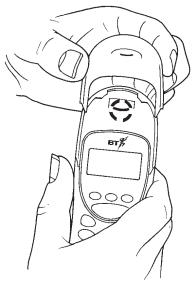
There are 3 removable handset fascias to choose from. Simply slide the fascias off and replace with another.

Attach the belt clip
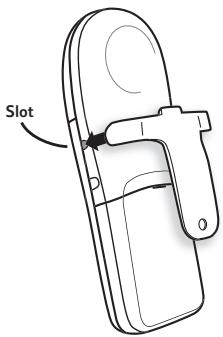
Fit the belt clip onto the back of the handset.
Helpline
If you experience any difficulties setting up or using your BT On-Air 2250 Classic, please call the BT On-Air Helpline on 0870 240 4682.
Using the telephone
To switch the handset power on and off

Press and hold the GREEN PHONE button until after the display check sequence has happened and only the battery icon is displayed.
If you release the button before this has happened the handset will remain switched off.

Press and hold the RED PHONE button to switch the handset off.
Making and ending calls
To make an external call

Press the GREEN PHONE button. The display shows the symbol.
Dial the number.
Preparatory dialling

First enter the number to be dialled. The number is shown in the display. (If you make a mistake press C to remove the incorrect digit).
If you have entered the number correctly, press the GREEN PHONE button to dial the number.
Call timer
Your handset will automatically time the duration of all external calls. The handset display shows the call duration both during your call and for a few seconds after it is completed.
To end a call

Press the RED PHONE button.
To receive a call

Press the GREEN PHONE button to answer the call.
To adjust the earpiece volume

Press the UP button to increase the volume.

Press the DOWN button to decrease the volume.
The display shows the current volume level.
Note
The symbol on your handset display indicates when you are in range of the base station. If the symbol disappears you are out of range and will need to move closer to the base station.
Handsfree
Handsfree allows you to talk to your caller without holding the handset.
To use handsfree

During a call you can switch to handsfree mode.
Whilst on a call press the GREEN PHONE button.
When handsfree is active you see the symbol flashing

To switch handsfree off, press the GREEN PHONE button again.

To adjust the volume use the UP or DOWN button to increase or decrease the volume.
Note
When you end your call the handsfree volume will return to the default setting of volume level 2.
Helpline
If you experience any difficulties using your BT On-Air 2250 Classic, please call the BT On-Air Helpline on 0870 240 4682.
Secrecy
When on a call you can talk to someone in the same room, without your caller hearing.
To switch secrecy on/off

During a call, press the C button. C will now flash to show it is in operation.

Press the C button again to resume your call.
Redial
Your handset automatically saves up to 20 telephone numbers dialled and received into a Calls list.
Calls list

Press and hold the GREEN PHONE button.
The display will show CALLS and then the last number that was dialled or received.

Use the UP or DOWN button to scroll to the number you require.

Press the GREEN PHONE button to dial the number.
Note
To delete the Calls list, see page 11.
Caller Display
Important
To use Caller Display or Call Waiting you must first subscribe to the service from your Network Provider. A quarterly fee is payable.
For more information on BT Select Services call BT free on 0800 800 150.
If you have subscribed to a Caller Display Service you can see who is calling you on your handset display, (unless the number has been withheld).
Important
The Caller Display Service will not operate when your base station is connected to a switchboard.
Whether you take a call or not, the caller's details are stored in the Calls list. The Calls list holds the telephone numbers of the last 20 people who called you.
You can display, scroll through and dial numbers on the list.
When you receive a call the caller's number will appear on the display. If the caller has withheld their number then will appear on the display. If for some reason the caller's number is not available then will appear on the display.
Calls list
The Calls list contains both the telephone numbers of the people who have called you and the telephone numbers that you have dialled. The Calls list holds 20 telephone numbers and they are stored in the order they were either received or dialled. If you have stored a name to
go with the number in your handset directory, the name will be displayed instead. If you receive more than one call from the same telephone number then it will only appear once in the list.
If a call is received when the Calls list is full, then the oldest entry will be deleted automatically.
If no number is received for a call then no entry will appear in the Calls list.
To view and dial a number in the Calls list

Press and hold the GREEN PHONE button. The display will show CALLS.
The most recently received or dialled number will be displayed.

Press the DOWN button to scroll backwards through the Calls list towards the older calls in the list.

Press the UP button to scroll forwards through the Calls list towards the most recent calls.

When the number you wish to call is displayed, press the GREEN PHONE button. The number will be dialled automatically.

Press the C button to exit.
Note
If you press the OK button when a number in the Calls list is displayed you will see the time and date of the call.
To delete all numbers shown in the radial and calls list

Press the DOWN button until CALLS is displayed.

Press the OK button. The display will show DELETE.

Press the OK button to confirm. The display will show DONE. All numbers in the radial and calls list have been deleted.

Press the C button twice to exit.
To view the length of the last call

Press the DOWN button until CALLS is displayed.

Press the OK button to confirm.

Press the DOWN button until TIME is displayed.

Press the OK button to confirm.

The length of the last call will be shown on the display.
Press the C button twice to exit.
Call Waiting
If an incoming call arrives while you are already engaged on a telephone call, you will hear a soft beep every 5 seconds (this beep is not audible to the person you are speaking to).
Instead of the engaged tone, the second caller will hear an announcement to hold on as you are aware that there is a second call.
To use Call Waiting

You can answer the second call, without disconnecting your first caller, by pressing the RECALL button. The first caller will be put on hold.

When you have spoken to the second caller you can return to the first caller by pressing the RECALL button again.
You can switch back and forth between the two calls without disconnecting either if you wish.

If you wish to disconnect the first call press the RED PHONE button after speaking to the first caller.

The handset will then ring. Press the GREEN PHONE button again and continue with the second caller.
The second caller will only be charged for their call from the moment you answer and not while they are waiting for your initial contact.
50 Name and number directory
You can store up to 50 of your most frequently used names and numbers.
Quick guide to directory settings menu
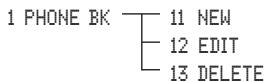
To store a name and number in the directory

Press the DOWN button until PHONE BK is displayed.

Press the OK button to confirm.
Use the DOWN button to scroll to NEH.
Press the OK button to confirm.
Enter the name using the letters on the keypad.
Entering names
Use the keypad letters to enter names by using a long press of the button, i.e. if you press and hold the 8 button the following characters appear, T, U, V. You can enter names of up to 8 characters.
For example, if you wish to store the name TOM:

To enter the letter T, press 8 the cursor will automatically move to the right and display the next chosen letter.
To enter O, press 6 and hold.
To enter the M, press 6.

If you enter a digit incorrectly you can delete it by pressing the C button.
Press the OK button to confirm.

Enter the telephone number you want to store.

Press the OK button to confirm.
The display will then show DONE.

Press the C button twice to exit.
To dial a number from the directory
Directory

Press the Directory button to enter the directory.

Use the UP or DOWN button to find the entry you want to dial.
Or
To search alphabetically, press the relevant keypad number, for example to find TOM, press the 8 button and scroll through the entries under T.

Press the GREEN PHONE button to dial the number.
To edit directory numbers

Press the DOWN button until PHONE BK is displayed.

Press the OK button to confirm.

Use the UP or DOWN button to scroll to EDIT.

Press the OK button to confirm.

Use the UP or DOWN button to find the entry you want to amend.

Press the OK button to confirm.

Use the C button to delete numbers or letters.

Edit the entry using the numbers/letters on the keypad.

Press the OK button to store the new entry.

The display will then show DONE.
Press the C button twice to exit.
To delete directory numbers

Press the UP or DOWN button until the display shows PHONE BK.

Press the OK button.

Press the DOWN button until the display shows DELETE.

Press the OK button.

Use the UP or DOWN button to select the name and number you want to delete.

Press the OK button to delete.
The directory name and number has been deleted.

The display will show OK. (If there are no numbers in the directory to delete the display will show EMPTY).
Press the C button twice to exit.
Helpline
If you experience any difficulties using your BT On-Air 2250 Classic, please call the BT On-Air Helpline on 0870 240 4682.
Paging handsets
You can alert handset users that they are wanted, or locate a missing handset. (Paging calls cannot be answered by a handset.)
To page a handset from the base

Press the Skip button on the base. All handsets registered with the base and switched on will ring.
To end paging, press the button again.
Or

Press the RED PHONE button on any handset.
Internal calls
If you have multiple handsets registered to a base you can make internal calls between handsets.
To make an internal call to another handset
Intercom


Press the INTERCOM button.
Enter the number of the handset you want to call.
Or

Enter the digit if you want to call all the handsets.

Press the RED PHONE button to disconnect the call.
Transferring calls
You can transfer an external call to another handset registered to the base.
To transfer an external call between handsets
While on an external call:
Press the OK button.
Enter the number of the handset to which you want to transfer the call.
Press the GREEN PHONE button to transfer the call.
If you wish you can talk to the other handset user first.
Press the RED PHONE button to disconnect the call.
Handset settings
Quick guide to handset settings menu
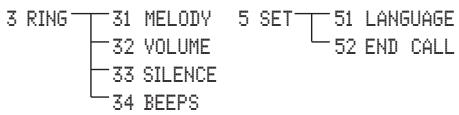
Ringer melody

Press the UP or DOWN button until the display shows RING.

Press the OK button.
The display will show MELOODY.

Press the OK button.

Use the UP or DOWN button to select the melody you require.

There are 6 melodies to choose from.
Press the OK button to confirm.

The display will show DONE.
Press the C button twice to exit.
Ringer volume

Press the UP or DOWN button until the display shows RING.

Press the OK button.

Press the DOWN button until the display shows VOLUME.

Press the OK button.

Use the UP or DOWN button to select the volume you require. There are 4 volume levels to choose from.

Press the OK button to confirm.
The display will show DONE.

Press the C button twice to exit.
Silent ring

Press the UP or DOWN button until the display shows RING.

Press the OK button.

Press the DOWN button until the display shows SILENT.

Press the OK button.

Use the UP or DOWN button to select either OFF or ON.

The display will show the symbol to indicate a silent ring.

Press the OK button to confirm.
The display will show DONE.
Press the C button twice to exit.
Note
When silent ring is switched on the handset will not ring or emit any keypad beeps.
Keypad beeps

Press the UP or DOWN button until the display shows RING.

Press the OK button.

Press the DOWN button until the display shows BEEPS.

Use the UP or DOWN button to select either OFF or ON.

Press the OK button to confirm.

The display will show DONE.
Press the C button twice to exit.
Note
Please note that the melody and volume are omitted from the handset only. For base settings see page opposite.
Use the UP or DOWN button to select either OFF or ON.
Press the OK button to confirm.
The display will show DONE.
Press the C button twice to exit.
To change the display language

Press the UP or DOWN button until the display shows SET.

Press the OK button.

Press the DOWN button until the display shows LANGUAGE.

Press the OK button.

Use the UP or DOWN button to select the language you require (English, German, Spanish, Italian, Dutch, Portuguese or French).

Press the OK button to confirm.

The display will show DONE.

Press the C button twice to exit.
To switch automatic end call on or off

If you switch automatic end call ON you can end a call by simply placing the handset back on the base. This means you won't always have to press the RED PHONE button to end a call.

Press the UP or DOWN button until the display shows SET.

Press the OK button.
Press the DOWN button until the display shows END CALL.

Press the OK button.
Base settings
System Code
Your base station has a default setting of 0000 but you may want to change this to prevent unauthorised use of the handset.
If you change your System Code keep record of the new number by writing it in the space provided on page 4.
To change your System Code

Press the UP or DOWN button until the display shows BASE.

Press the OK button.

Press the DOWN button until the display shows PARM.

Press the OK button.

The display will show F1.

Press the 3 button.

Press the 1 button.
OLD CODE
Enter the existing code (0000 if not changed). As you enter each digit in turn, the dash will stop flashing.
NEW CODE
Four dashes will be shown on the display. Enter your new System Code. As you enter each digit in turn the dash will disappear.
CONFIRM CODE
Enter your new System Code again.

Press the C button twice to exit.
To change the base station ringer volume

Press the UP or DOWN button until the display shows BASE.

Press the OK button.

Press the DOWN button until the display shows PARM.

Press the OK button.

The display will show F1.

Press the 2 button.

Press the 8 button.

Press the 2 button.

Use the UP or DOWN button to select the volume. The base will play a sample ring on each press. There are 6 volume levels to choose from (no ringing, low, to high).

Press the OK button to confirm.
The display will show F282.
Press the C button three times to exit.
To change the base station ringer melody

Press the UP or DOWN button until the display shows BASE.

Press the OK button.

Press the DOWN button until the display shows PARM.

Press the OK button.

The display will show F1.
Press the 2 button.

Press the 8 button.

Press the 1 button.

Use the UP or DOWN button to select the melody you require. The base will play a sample melody on each press.
There are 21 melodies to choose from.
Press the OK button to confirm.
The display will show F281.
Press the C button three times to exit.
Base station priority
If you are using multiple bases, you can select which base your handset will use.
To change base station priority

Press the UP or DOWN button until the display shows BASE.

Press the OK button.

Press the DOWN button until the display shows PRIOR.

Press the OK button.
The display will show NONE.
Use the UP or DOWN button to select either NONE, 1, 2, 3 or 4.

Press the OK button to confirm.

Press the C button twice to exit.
To view the date and time
Press the UP or DOWN button until the display shows BASE.
Press the OK button.
Press the DOWN button until the display shows PARM.
Press the OK button.
The display will show F1.
1 Press the 1 button twice.
The display will show the current date.
Press the DOWN button to display the time.
Press the C button three times to exit.
Note
If you subscribe to a Caller Display Service the time and date will be set automatically.
To set the time

Press the UP or DOWN button until the display shows BASE.

Press the OK button.

Press the DOWN button until the display shows PARAM.

Press the OK button.
The display will show F1.

Press the 1 button.

Press the 2 button.

The current time is displayed.
Enter the time.
The display will show F12.
Press the C button twice to exit.
To set the date

Press the UP or DOWN button until the display shows BASE.

Press the OK button.

Press the DOWN button until the display shows PARM.

Press the OK button.

The display will show F1.
Press the 1 button.

Press the 3 button.
The current date is displayed i.e. 05 02 2002.

Enter the date.

Press the C button to go back a digit if you make a mistake and enter the correct digit. (Please note that you cannot change the 20 of 2002).
The display will show F13.
Press the C button twice to exit.
Using the answering machine
Before using your answering machine for the first time you need to: set the time and date and switch the answering machine on.
Your BT On-Air 2250 comes with the pre-recorded outgoing message (OGM) "Hello, your call cannot be taken at the moment, so please leave your message after the tone". You can use this outgoing message or record your own.
Answering machine modes
There are two types of answering machine mode:
1 Answer and Record - Callers can leave you a message.
2 Answer Only - Callers will hear your outgoing message but cannot leave you a message.
Each answering machine mode has its own outgoing message and you can record an outgoing message in both modes, therefore, please ensure that you switch on the correct answer mode.
The answering machine has an incoming message capacity of approximately 12 minutes.
To set the time and date
Please see page 17 'To set the time and date'
To record your own Answer and Record outgoing message (OGM)

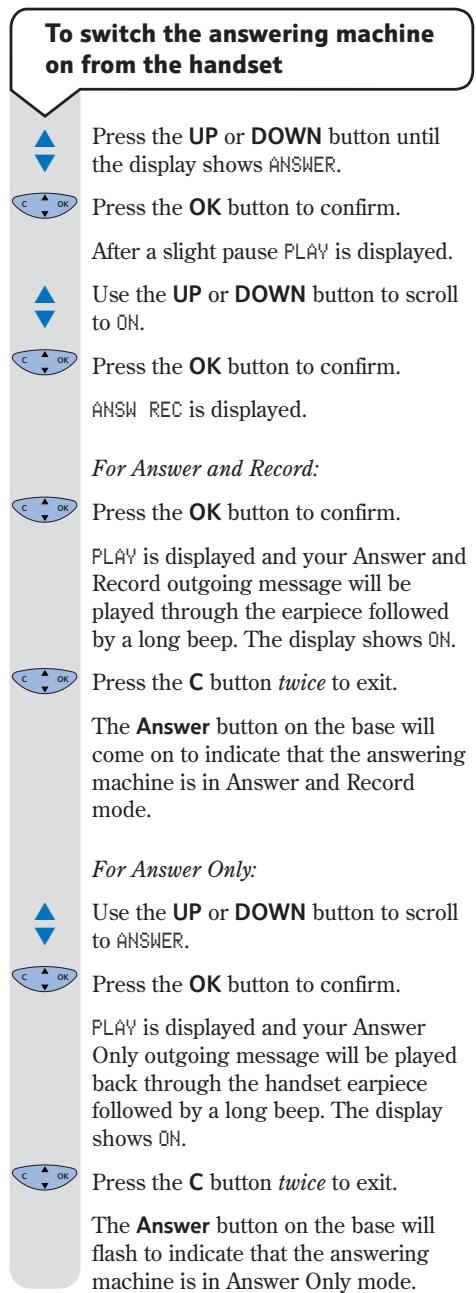
Press the UP or DOWN button until the display shows ANSWER.

Press the OK button to confirm.
After a slight pause PLAY is displayed.

Use the UP or DOWN button to scroll to RECORD.

Press the OK button to confirm.
MESSAGE is displayed.

Use the UP or DOWN button to scroll to OUT MSG.

Press the OK button to confirm.
ANSW REC is displayed.

Press the OK button to confirm.
Hold the handset to your ear. You will hear, "Please record your message after the tone". After you hear a long beep in the earpiece, speak your outgoing message into the handset. Whilst you record your message, REC is displayed.
Press the OK button to end recording.
PLAY is displayed and your Answer and Record outgoing message will be played back through the handset earpiece followed by a long beep.
Once playback has finished DONE is displayed then RECORD.
Press the C button twice to exit.
The Answer button on the base will come on to indicate that the answering machine is in Answer and Record mode.
Note
If you record a new outgoing message it will overwrite the previous one.
PLAY is displayed and your Answer Only outgoing message will be played back through the handset earpiece followed by a long beep.
Once playback has finished DONE is displayed then RECORD.
Press the C button twice to exit.
The Answer button on the base will flash to indicate that the answering machine is in Answer Only mode.
To record your own Answer Only outgoing message (OGM)

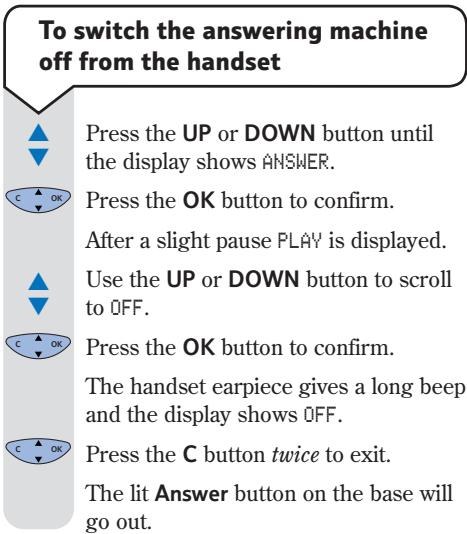
Press the UP or DOWN button until the display shows ANSWER.

Press the OK button to confirm.
After a slight pause PLAY is displayed.

Use the UP or DOWN button to scroll to RECORD.

Press the OK button to confirm.
MESSAGE is displayed.

Use the UP or DOWN button to scroll to OUT MSG.

Press the OK button to confirm.
ANSI REC is displayed.

Use the UP or DOWN button to scroll to ANSWER.

Press the OK button to confirm.
Hold the handset to your ear. You will hear, "Please record your message after the tone". After you hear a long beep in the earpiece, speak your outgoing message into the handset. Whilst you record your message, REC is displayed.

Press the OK button to end recording.
Note
Once you have recorded your outgoing message the answering machine will automatically be switched on. Remember, if the last message recorded was the Answer Only outgoing message then the answering machine will be on but callers will not be able to leave messages.
Helpline
If you experience any difficulties using your BT On-Air 2250 Classic, please call the BT On-Air Helpline on 0870 240 4682.
To listen to your outgoing message

Press the UP or DOWN button until the display shows ANSWER.

Press the OK button to confirm.
After a slight pause PLAY is displayed.

Press the OK button to confirm.
MESSAGEs is displayed.

Use the UP or DOWN button to scroll to OUT MSG.

Press the OK button to confirm.
ANSW REC is displayed.

For Answer and Record:
Press the OK button.
PLAY is displayed and your Answer and Record outgoing message will be played back through the handset earpiece followed by a long beep.
Or
For Answer Only:

Use the UP or DOWN button to scroll to ANSWER.

Press the OK button to confirm.
PLAY is displayed and your Answer Only outgoing message will be played back through the handset earpiece followed by a long beep.

Press the C button twice to exit.
To delete your own outgoing message
Important
Both your own Answer and Record and Answer Only outgoing messages will be deleted. The pre-recorded outgoing messages (OGM) will be automatically restored when your own outgoing messages are deleted.

Press the UP or DOWN button until the display shows ANSWER.

Press the OK button to confirm.
After a slight pause PLAY is displayed.
Use the DOWN button to scroll to DELETE.

Press the OK button to confirm.
MESSAGEs is displayed.
Use the DOWN button to scroll to OUT MSG.

Press the OK button to confirm.
DONE is displayed and then DELETE.
Your own Answer and Record and Answer Only messages are deleted and the pre-recorded outgoing messages will be re INSTATED.

Press the C button twice to exit.
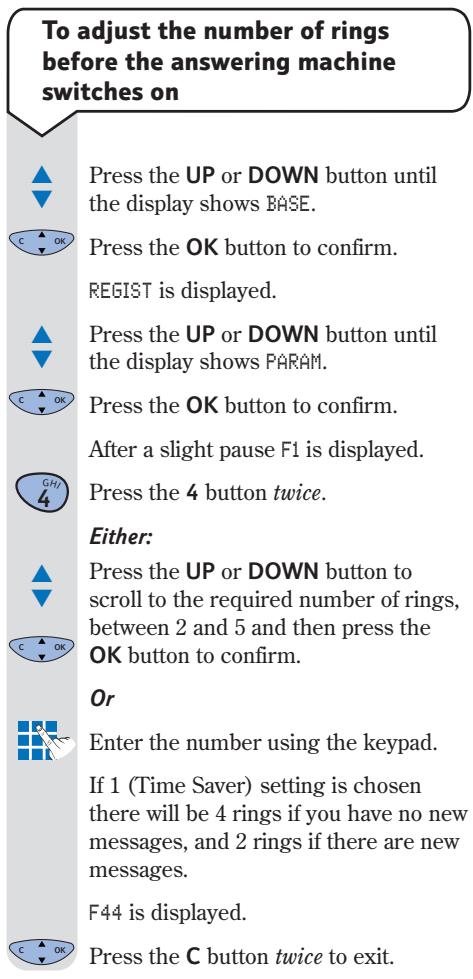
Note: Timesaver
If you call from another telephone and it rings 4 times, there are no new messages. If the call is answered after 2 rings there are new messages to listen to.
To adjust the time allowed for recording incoming messages
It is possible to adjust the time available to leave a message. The options are 30 seconds, 2 minutes, 4 minutes and unlimited message length. The answering machine has a total recording time of up to 12 minutes.
Press the UP or DOWN button until the display shows BASE.
Press the OK button to confirm.
REGIST is displayed.
Press the UP or DOWN button until the display shows PARM.
Press the OK button to confirm. After a slight pause F1 is display
Press the 4 button.
Press the 3 button.
Press the UP or DOWN button to scroll to the required message length:
1 = 30 seconds, 2 = 2 minutes, 3 = 4 minutes, 4 = unlimited length.
Press the OK button to confirm. F43 is displayed.
Press the C button twice to exit.
Playing your messages
Incoming message indicator:
If you have new messages the Play button on the base will flash red and a closed envelope icon ~一~ will appear on the handset display.
If there is one new message the Play button will flash once.
If there are two new messages the Play button will flash twice rapidly.
If there are three new messages the Play button will flash three times rapidly.
If there are four new messages the Play button will flash four times rapidly.
If there are five or more new messages the Play button will flash five times rapidly.
If you have old messages (ones you have listened to) the Play button on the base will be lit solid red and an opened envelope icon appears on the handset display.
If you have no messages the Play button will be lit solid green and there will be no envelope icon on the handset display.
Helpline
If you experience any difficulties using your BT On-Air 2250 Classic, please call the BT On-Air Helpline on 0870 240 4682.
To play your messages

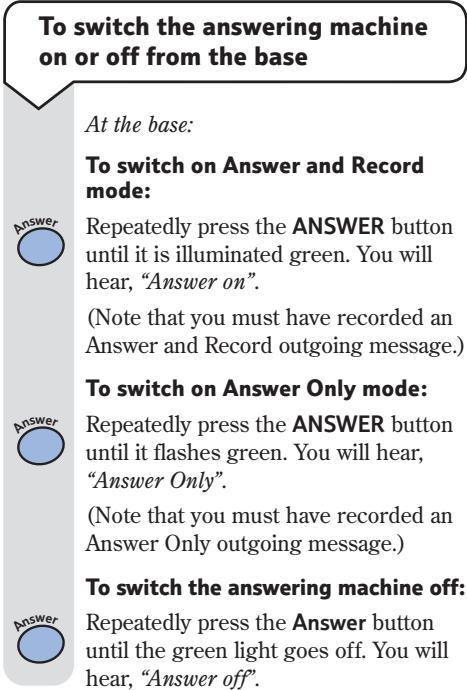
To play your messages from the base:
Press the Play button.
Any new messages will be automatically played back through the base loudspeaker.

To play all messages, press the Play button again.
At the end of message playback you will hear, "End of messages".
To play new messages from the handset:
Note
When you play messages from the handset the display will show the date and time the message was left.

Press the UP or DOWN button until the display shows ANSWER.

Press the OK button to confirm.
After a slight pause PLAY is displayed followed by the number of new messages you have.
Your messages are automatically played back to you. At the end of message playback you will hear "End of messages".
To play all old messages from the handset:

Press the UP or DOWN button until the display shows ANSWER.

Press the OK button to confirm.
After a slight pause PLAY is displayed.

Press the OK button to confirm.
MESSAGEs is displayed.

Press the OK button to confirm.
Your messages are played back to you. At the end of message playback you will hear "End of messages".
Answering machine operation during message playback
| From base | From handset | |
| Skip to next message | skip | MNO 6 |
| Go back to start of current message | skip | OHJ 4 |
| Go back to previous message | skip | DO 4 |
| Pause/Resume playback | play | JKL 5 |
| Delete current message | delete | 1 |
| Stop playback (press and hold) | play |
To delete all messages
You can only delete all messages if there are no new messages.
At the base:
Press and hold the Delete button until you hear a long beep. You will then hear, "All messages deleted".
All messages are automatically deleted.
At the handset:


Press the UP or DOWN button until the display shows ANSWER.

Press the OK button to confirm.
After a slight pause PLAY is displayed.

Use the UP or DOWN button to scroll to DELETE.

Press the OK button to confirm.
MESSAGEs is displayed.

Press the OK button to confirm.
DONE is displayed and then DELETE.
You will hear, "All messages deleted".
All messages are automatically deleted.
Press the C button twice to exit.
When all messages have been deleted the Play button on the base will be lit solid green.
To record a memo message
It is possible to record a message directly on to the answering machine as a memo, which can be played back in the same way as other messages.
Press the UP or DOWN button until the display shows ANSWER.
Press the OK button to confirm.
After a slight pause PLAY is displayed.
Use the UP or DOWN button to scroll to RECORD.
Press the OK button to confirm.
MESSAGE is displayed.
Press the OK button to confirm.
Hold the handset to your ear. You will hear, "Please record your message after the tone". After you hear a long beep in the earpiece, speak your memo message into the handset. Whilst you record your message, REC is displayed.
Press the OK button to end recording.
DONE is displayed, and then RECORD.
Press the C button twice to exit.
The × icon is displayed on the handset and the Play button on the base flashes red.
Call screening
To use call screening
You can decide whether to listen to incoming messages over the loudspeaker and answer them or let your answering machine take the message.
Alternatively you can choose not to hear the callers leaving messages.
Call screening is off by default.
You can intercept the call at any time and speak to the caller by pressing the GREEN PHONE button.
To set up call screening

Press the UP or DOWN button until the display shows BASE.

Press the OK button to confirm.
REGIST is displayed.

Press the UP or DOWN button until the display shows PARM.

Press the OK button to confirm.
After a slight pause F1 is displayed.

Press the 4 button.

Press the 5 button.
Either:

Press the UP or DOWN button to scroll to either to switch call screening off or, 1 to switch it on and then press the OK button to confirm.
Or
Press 0 (off) or 1 (on) using the keypad.
F45 is displayed.
Press the C button twice to exit.
VIP feature
When the answering machine is switched on, this feature allows you to still receive calls on your handset from privileged callers who you have given the VIP code to.
When the VIP feature is switched on your handset will not ring when a call is received. When the caller hears the outgoing message they can enter followed by your VIP code to make your handset ring.
To set up and change the VIP access code
Note
You must change the code from the default setting of 0000 for the VIP feature to work.

Press the UP or DOWN button until the display shows BASE.

Press the OK button to confirm.
REGIST is displayed.

Press the UP or DOWN button until the display shows PARM.

Press the OK button to confirm.

After a slight pause F1 is displayed.

Press the 4 button.

Press the 6 button.
Enter your old four digit access code.
Enter your new 4 digit access code.
Re-enter your new 4 digit access code.
F46 is displayed.

Press the C button twice to exit.
To switch VIP on or off

Press the UP or DOWN button until the display shows BASE.

Press the OK button to confirm.
REGIST is displayed.

Press the UP or DOWN button until the display shows PARM.

Press the OK button to confirm.
After a slight pause F1 is displayed.

Press the 4 button.

Press the 7 button.

Press the UP or DOWN button to scroll to either to switch VIP off or 1 to switch VIP on.

Press the OK button to confirm.
F47 is displayed.

Press the C button twice to exit.
Note
In order to call you, when VIP is switched on, your caller must follow these steps.
1) Dial your phone number.
2) Listen to the outgoing message.
3) Press the button.
4) Enter the VIP access code. Your telephone will now ring
Helpline
If you experience any difficulties using your BT On-Air 2250 Classic, please call the BT On-Air Helpline on 0870 240 4682.
Remote access
You can operate your answering machine from any external TouchtoneTM phone by phoning your BT On-Air and entering your remote access code.
Having a remote access code prevents other people from accessing your answering machine functions without your permission.
Important
You must change the remote access code from the default setting of 0000 for your remote access to function.
To change the remote access code

Press the UP or DOWN button until the display shows BASE.

Press the OK button to confirm.
REGIST is displayed.

Press the UP or DOWN button until the display shows PARM.

Press the OK button to confirm.
After a slight pause F1 is displayed.
Press the 4 button.

Press the 1 button.

Enter your old four digit code (0000 if not changed).
WARNING
If you enter your old code incorrectly the display will show F41. Please check that you have not changed the code. Press the C button twice to exit and try again with the correct code.
If you have forgotten your remote access code you should call the Helpline on 0870 240 4682 and you will be advised on how to reset your telephone to its factory settings.

Enter your new 4 digit code.
Re-enter your new 4 digit code.
F41 is displayed.
Press the C button twice to exit.
To switch on your answering machine from another external telephone
If you forget to switch your answering machine on you can do it from another telephone:

Dial your telephone number and let the phone ring. After approximately 10 rings your BT On-Air will automatically answer, although you will hear no message.

At this point, press the # button.
You will hear, "Please enter your security code". Enter your remote access code.

Wait for the confirmation tone then press 7.
Your answering machine will now be switched on.
Note
If you enter your remote access code incorrectly, you will hear, "Code error, thank you for calling".
To access your answering machine from a remote phone

Dial your telephone number.
Start listening to your outgoing message.

Press the # button then you will hear the voice prompt.
Enter your remote access code.

You now have control of your answering machine. Any new messages will be automatically played.
Answering machine control functions
| Press: | |
| 1 | To erase message being played. |
| DEF3 | To listen to your Answer and Record outgoing message. |
| 3G1G2G3 | To listen to your Answer Only outgoing message. |
| 4G14 | To replay the current message |
| 4G4 | To listen to the previous message |
| 5 | To replay your messages, also pause/resume playback |
| 6 | To listen to your next message |
| 7 | To switch the answering machine ON. |
| 8 | To record a message |
| 8G1G2G3 | To record your outgoing message. Press 3 to stop recording. |
| 8G5 | To record a memo message. Press 5 to stop recording |
| 9 | To switch the answering machine OFF. |
Note
When you access your answering machine remotely, the above menu options will be played to you to help you make your choice.
Using additional handsets and bases
Using additional handsets and bases
Up to six handsets can be registered and operated from any one base. This allows you to make internal calls between two handsets while a third is making an external call.
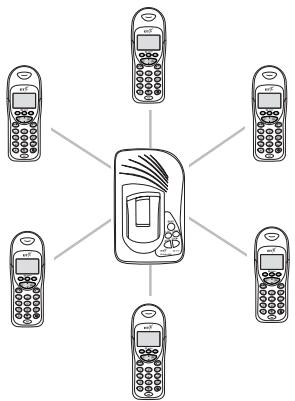
Each handset can also be registered on up to four bases.
Each additional handset you purchase must be registered to a base.
Your handset supplied is pre-registered (as Handset 1) to its base (as Base 1).
Note
To register a non BT On-Air additional handset i.e. another DECT GAP compatible handset to the On-Air 2250 Classic base please follow the instructions in your handset's user guide.
Registering additional handsets
If you purchase new handsets to use with your current BT On-Air 2250 Classic, they will not be pre-registered to a base station. You will need to do this before you can use them.
To register a handset to a base station (if you have not changed the System Code from 0000)
Note
Please note that when you register a handset in the following way any previous base that the handset has been registered to will be deleted. To prevent the deletion of other registered bases please register using the process on page 30 even if you have not changed the system code from 0000.
If you have registered your handset to more than one base you can prioritise which base you want your handset to use. For instructions on base station priority, see page 16.
At the base:-
Press and hold down the Skip button on the base until the PLAY button starts to flash.

On the handset:-
Press the UP or DOWN button until the display shows BASE.
Press the OK button.
The display will show REGIST.
Press the OK button.
The display will show AUTO.
Press the OK button to confirm.
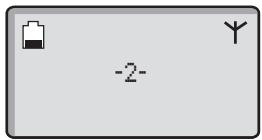
The display will show REGIST and then return to:
Note
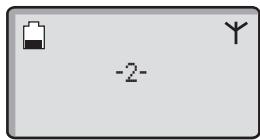
To check whether registration has been successful, press the GREEN PHONE button and listen for the dial tone. If there is no dial tone either you have not registered the handset correctly or the telephone line cord is not plugged in properly.
To register a new handset to a base (if you have changed System code from 0000)
On the handset:-

Press the UP or DOWN button until the display shows BASE.
Press the OK button.
The display will show REGIST.
Press the OK button.
The display will show AUTO.

Press the DOWN button until CUSTOM is displayed.

The available bases will be displayed.
Use the UP or DOWN button to select the base you want to register your handset to.
Press the OK button.
The display will show CODE?.
CODE
The display will show ----
Enter your 4 digit base system code (once only).
Press the OK button.
At the base:-
Press and hold the Skip button on the base until the PLAY button begins to flash.
On the handset:-
The display will show 2, 3, 4, 5, 6.
Use the UP or DOWN button to select the handset you wish to register.
Press the OK button to confirm.
The display will show REGIST and then return to:
To de-register a handset from the base

Press the UP or DOWN button until the display shows BASE.

Press the OK button.

Press the DOWN button until the display shows PARM.

Press the OK button.

Press the 3 button twice.

Enter your base system code (0000 if not changed).
All registered handset numbers are displayed.

Enter the number of the handset you wish to de-register.

Press the C button twice to exit.
Note
When planning to use a handset with more than one base, we recommend that you:
- Number each handset (from 1-6).
- Register your handset(s) at base 2 (and 3 & 4 if used) using the same internal number as at base 1.
When registered to more than one base, the base unit will automatically allocate itself a number.
Helpline
If you are experiencing difficulty, please call the BT On-Air Helpline on 0870 240 4682.
General information
Guarantee
Your BT On-Air 2250 Classic is guaranteed for a period of 12 months from the date of purchase.
Subject to the terms listed below the guarantee will provide for the repair of, or at BT's or its agent's discretion the option to replace the BT On-Air 2250 Classic, or any component thereof, (other than batteries), which is identified as faulty or below standard, or as a result of inferior workmanship or materials. Products over 28 days old from the date of purchase may be replaced with a refurbished product.
The conditions of this guarantee are:
- The guarantee shall only apply to defects that occur within the 12 month guarantee period.
Proof of purchase is provided. - The equipment is returned to BT or its agent as instructed.
- This guarantee does not cover any faults or defects caused by accidents, misuse, fair wear and tear, neglect, tampering with the equipment, or any attempt at adjustment or repair other than through approved agents.
- This guarantee does not affect your statutory rights.
Within the 12-month guarantee period:
If you experience a problem with your product you should contact the Helpline on 0870 240 4682. Calls are charged at local call rates. If the problem is not remedied, you will be advised to return your product to the Helpline.
Outside the 12-month guarantee period:
If your product needs repair after the guarantee period has ended, the repair must meet the approval requirements for connection to the telephone network. We recommend that you call the Helpline on 0870 240 4682 and ask for details of our recommended repair agents.
If you have to return your product
If the Helpline are unable to remedy your problem they will ask you to return the product. Pack the base station and handset securely, preferably in the original packaging. All parts must be returned, including line cords, power supplies and original batteries. (Please note that we can not take responsibility for goods damaged in transit). Use the self adhesive Freepost label to post your product.
If you have lost the label please call the Helpline for instructions.
Important
Keep proof of posting
Make sure the Post Office give you proof of posting.
Technical information
How many handsets can you have?
All items of telephone equipment have a Ringer Equivalence Number (REN) which is used to calculate the number of items that may be connected to any one telephone line. The BT On-Air 2250 Classic (with up to 6 handsets) has a total REN of 1. Any other instrument provided by BT may be assumed to have a REN of 1 unless stated otherwise.
Helpline
If you are experiencing difficulty, please call the BT On-Air Helpline on 0870 240 4682.
A total REN of 4 is allowed per telephone line. (For example: if the BT On-Air Classic is used in conjunction with three extension telephones, each with a REN of 1, then the total REN = 4
Only use approved power supply item code: 872101.
Only use approved batteries supply item code: 872102.
RTTE
This apparatus was designed in compliance with European Council decision Number 98/482/EC relative to pan-European connection in view to its connection on the Public Switched Telephone Network (PSTN). It is in conformity with Standards TBR21, TBR38(*)ETSI 201 121.
(*) Terminals integrating an analogue handset function.
If problems arise, your supplier should be contacted first.
The EC marking attests product conformity with the essential requirements in compliance with Directives 73/23/EC for User Safety, 89/336/EC for Electromagnetic perturbations and 98/13/EC for Telecommunication network access.
The manufacturer declares that the products have been manufactured in conformity with Annex III of RTTE Directive 99/05/EC.
Please note this product does not support earth recall.
Switchboard compatibility
Generally this telephone may be connected to switchboards which support tone signalling and timed break recall. In the event of any difficulties please consult your switchboard service provider.
Recall
To activate Recall
This is of use when connected to some switchboards i.e. to transfer calls or for some BT Select Services or those services available via your Network Provider. It is only available when a call is in progress.
When you need to use recall during a call:-
Press the RECALL button.
appears on the display.
To switch between tone and pulse dialling

Press the UP or DOWN button until the display shows BASE.

Press the OK button.

Press the UP or DOWN button until the display shows PARM.

Press the OK button.

The display will show F1.

Press the 2 button twice.

Use the UP or DOWN button to select either 1 for tone or 2 for pulse (the default setting is tone).

Press the OK button to confirm.
Press the C button twice to exit.
Switchboard external line access code
When you connect your telephone to a switchboard, you can set the switchboard's external line access code so that when you make an external call using the handset directory, radial list or preparatory dialling the code is automatically dialled before the number.
To set the external line access code

Press the UP or DOWN button until the display shows BASE.

Press the OK button.

Press the UP or DOWN button until the display shows PARM.

Press the OK button.

Press the 2 button.

Press the 4 button.

Press the 1 button.

Press the OK button.
Enter the switchboard external line access code, e.g. 9.
You can enter codes up to 8 digits in length.

Press the OK button to confirm,

Press the C button three times to exit.
To set the number of digits

Press the UP or DOWN button until the display shows BASE.

Press the OK button.

Press the UP or DOWN button until the display shows PARM.

Press the OK button.
The display will show F1.

Press the 2 button.

Press the 4 button.

Press the 2 button.

Press the OK button.
Enter the number of digits you dial to make internal calls to other extensions on your switchboard.

Press the OK button to confirm.

Press the C button three times to exit.
Note
For the external line access code to be dialled for external calls only, it is important that all external numbers stored in your handset memories contain more digits than the number of digits required to make an internal call to other extensions on your switchboard.
This is most likely to occur when you have local external numbers stored in the handset memories without the area code. To overcome potential problems ensure that all numbers are stored complete with area code.
To activate and de-activate the external line access code

Press the UP or DOWN button until the display shows BASE.

Press the OK button.

Press the UP or DOWN button until the display shows PARM.

Press the OK button.

The display will show F1.

Press the 2 button.

Press the 4 button.

Press the 3 button.

Use the UP or DOWN button to select 0 to de-activate, or 1 to activate.

Press the OK button to confirm.
Press the C button three times to exit.
Helpline
If you are experiencing difficulty, please call the BT On-Air Helpline on 0870 240 4682.
Wall mounting
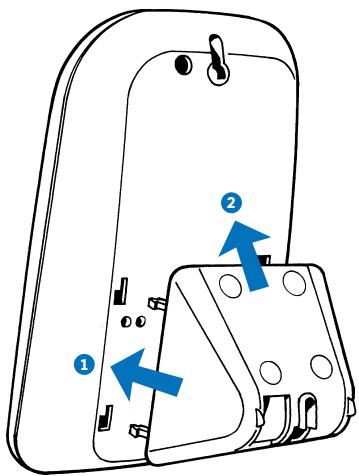
Push the base-mount forward onto the rear of the base.
Once slotted into the rear of the base, slide upwards to lock into position.
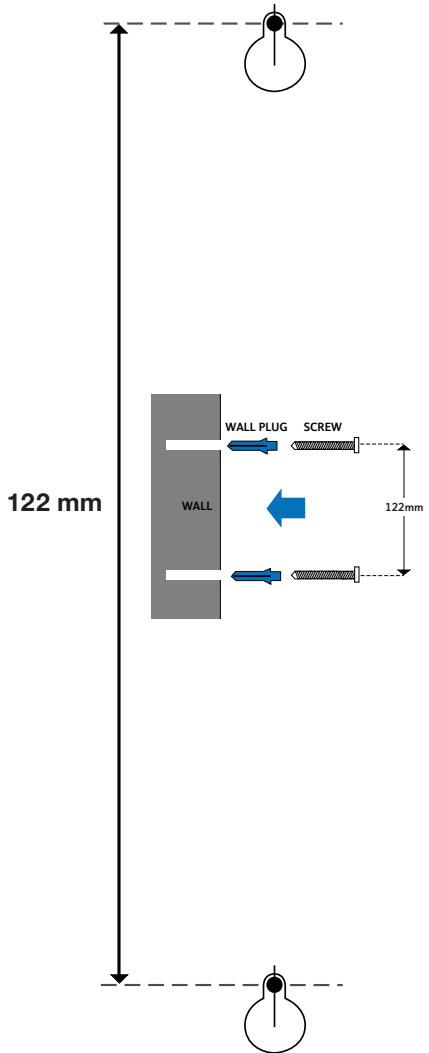
If wall mounting your BT On-Air 2250 Classic, use this guide for position.
- Make sure that you are not drilling into any hidden wiring and check that the power cable will reach from the mains socket to the charger. Switch the power adaptor off at the mains and remove the adaptor plug from its socket.
- Drill two holes 25mm deep using a 3mm drill, 122mm apart to take the wall plugs.
- Put wall plugs into the drill holes and then insert both screws. Leave 2-3mm between the head of the screw and the wall. You are now able to mount the base to the wall.
- Fit the base onto the two screws. If necessary, tighten or loosen the screws for the best fit.
- Put the handset back in the base and switch the power back on at the wall socket.
Index
Additional handsets and bases 29
Answering machine
adjust recording time 21
answer mode 18
delete messages 24
delete own outgoing message 20
listen to outgoing message 20
memo 24
number of rings before answers 21
on/off 22
play message 23
record an outgoing message 18-19
remote access 27
setting up 18
VIP 25
Answer modes 18
Automatic end call on/off 15
Base settings 15
Base station priority 16
Base system code 15
Battery
charge 6
low warning 6
performance 6
replacing 7
Belt clip 7
Caller Display 10
Call screening 25
Call timer 8
Call waiting 11
Calls
end 8
external 8
handsfree 9
internal 13
make 8
receive 8
redial 9
secrecy 9
transfer 13
Calls list 10
Date - set 17
Delete
all messages 24
calls list 11
directory numbers 12
messages during playback 24
own outgoing message 20
redial list 11
De-register handsets 31
Desk mounting 5
Dialling mode 34
Directory 11 delete 12 dial 12 edit 12 store 11
Earpiece volume 8
External line access code 34
General information 32
Guarantee 32
Handset fascias 7
Handset power 8
Handset settings 14
Handsfree 9
Helpline 3
Internal calls 13
Keypad beeps 14
Language 15
Length of last call 11
Location of product 5
Making calls 8
Melody base 16
handset 14
Memo 24
Messages delete 24
new message indicator 23
pausing playback 24
playback 23
skipping through 24
Name and number directory 11
delete 12
dial 12
edit 12
store 11
Number of rings before answering 21
On/Off answering machine 22
automatic end call 15
handset power 8
secrecy 9
VIP 26
Paging 13
Play messages 23
Power on/off 8
Power supply 5
Preparatory dialling 8
Priority base selection 16
Pulse dialling 34
Quick guide to menu structure 2
Recall 33
Receiving calls 8
Record outgoing message 18-19
Record memo 24
9
Registering additional handsets 29
Remote access 27
access remotely 28
answering machine control functions 28
change code 27
switch on 28
REN 32
Returning your product 32
Ringer base melody 16
base volume 16
handset melody 14
handset volume 14
Rubber feet 5
Safety information 4
Secrecy 9
Set date and time 17
Setting up 5
Silent ring 14
Store a name and number 11
Switchboard external line access code 34-35
Switchboard compatibility 33
System code 15
Technical information 32
Telephone line cord 7
Time - set 17
Tone dialling 34
Transferring calls 13
VIP
changing code 25
on/off 26
Volume base ringer 16
earpiece 8
handset ringer 14
Wall mounting 36
BT

Offices worldwide
The telecommunications services described in this publication
are subject to availability and may be modified from time to time.
Services and equipment are provided subject to British Telecommunications
plc's respective standard conditions of contract. Nothing in this publication
forms any part of any contract.
TouchtoneTM is a registered trade mark of
British Telecommunications plc in the UK.
© British Telecommunications plc 2002.
Registered Office: 81 Newgate Street, London EC1A 7AJ.
Registered in England No. 1800000.
Designed by: The Art & Design Partnership Limited.
Printed in Europe. On-Air 2250 Classic. Issue 1 (07/02) 5
Printed on paper which meets international environmental standards.

User manual Indice A
* 251180180*
- BT On-Air 2250 Classic
- Digital Cordless Telephone Answering Machine
- User Guide
- At a glance
- Handset
- Base
- Speaker
- Skip buttons
- Play button
- Answer button
- Delete button
- Quick Guide to the Menu Structure
- Important
- In this guide
- Note
- Introduction
- Setting up
- Using the telephone
- Using the answering machine 18
- Remote access 27
- Using additional handsets and bases 29
- General information 32
- Wall mounting 36
- Helpline
- Unpacking your BT On-Air 2250 Classic
- For your records
- Safety information
- General
- Cleaning
- Environmental
- Plan the location
- Connect the power supply and switch on.
- WARNING
- Rubber feet
- Charge the battery in the handset for at least 16 hours
- Battery low warning
- Battery performance
- To replace the handset battery
- Connect the telephone line cord (after charging your handset)
- Changing your handset fascias
- Attach the belt clip
- To switch the handset power on and off
- Making and ending calls
- To make an external call
- Preparatory dialling
- Call timer
- To end a call
- To receive a call
- To adjust the earpiece volume
- Handsfree
- To use handsfree
- Secrecy
- To switch secrecy on/off
- Redial
- Calls list
- Caller Display
- To view and dial a number in the Calls list
- To delete all numbers shown in the radial and calls list
- To view the length of the last call
- Call Waiting
- To use Call Waiting
- Name and number directory
- Quick guide to directory settings menu
- To store a name and number in the directory
- Entering names
- To dial a number from the directory
- Directory
- Or
- To edit directory numbers
- To delete directory numbers
- Paging handsets
- To page a handset from the base
- Internal calls
- To make an internal call to another handset
- Transferring calls
- To transfer an external call between handsets
- Handset settings
- Quick guide to handset settings menu
- Ringer melody
- Ringer volume
- Silent ring
- Keypad beeps
- To change the display language
- To switch automatic end call on or off
- Base settings
- System Code
- To change your System Code
- OLD CODE
- NEW CODE
- CONFIRM CODE
- To change the base station ringer volume
- To change the base station ringer melody
- Base station priority
- To change base station priority
- To view the date and time
- To set the time
- To set the date
- Using the answering machine
- Answering machine modes
- To set the time and date
- To record your own Answer and Record outgoing message (OGM)
- To record your own Answer Only outgoing message (OGM)
- To listen to your outgoing message
- To delete your own outgoing message
- Note: Timesaver
- To adjust the time allowed for recording incoming messages
- Playing your messages
- To play your messages
- To play your messages from the base:
- To play new messages from the handset:
- To play all old messages from the handset:
- Answering machine operation during message playback
- To delete all messages
- To record a memo message
- Call screening
- To use call screening
- To set up call screening
- Either:
- VIP feature
- To set up and change the VIP access code
- To switch VIP on or off
- Remote access
- To change the remote access code
- To switch on your answering machine from another external telephone
- To access your answering machine from a remote phone
- Answering machine control functions
- Using additional handsets and bases
- Registering additional handsets
- To register a handset to a base station (if you have not changed the System Code from 0000)
- At the base:-
- On the handset:-
- CODE
- To de-register a handset from the base
- General information
- Guarantee
- The conditions of this guarantee are:
- Within the 12-month guarantee period:
- Outside the 12-month guarantee period:
- If you have to return your product
- Keep proof of posting
- Technical information
- How many handsets can you have?
- RTTE
- Switchboard compatibility
- Recall
- To activate Recall
- To switch between tone and pulse dialling
- Switchboard external line access code
- To set the external line access code
- To set the number of digits
- To activate and de-activate the external line access code
- Wall mounting
- Index
- Offices worldwide
Brand : SAGEM
Model : WP 21-32
Category : Cordless phone