
4400 THX Select - Water heater ATLANTIC - Free user manual and instructions
Find the device manual for free 4400 THX Select ATLANTIC in PDF.


| Product Type | THX Select Loudspeaker System (Front, Center, Surround) |
| Model | 4400 THX Select (LR, C, SR) |
| Enclosure Type | Sealed-box, 2-way (LR and C); Dipole/Bipole surround (SR) |
| Woofer | LR & C: 2 x 5¼" (135mm) GLH; SR: 2 x 4½" (115mm) GLH |
| Tweeter | LR & C: 1 x 1" (25mm) ferrofluid-cooled silk dome; SR: 2 x 1" silk dome |
| Frequency Response | 80 Hz – 20 kHz ±3 dB (all models) |
| Nominal Impedance | 8 ohms |
| Sensitivity | 90 dB (all models) |
| Recommended Amplifier Power | 10 – 150 Watts RMS per channel |
| Crossover Frequency | LR & C: 2.5 kHz; SR: 3 kHz |
| Magnetic Shielding | LR and C: Yes; SR: No |
| Dimensions (W x H x D) | LR: 8.3 x 15 x 9.5 in (211 x 382 x 242 mm); C: 18.4 x 8.4 x 9.7 in (467 x 213 x 246 mm); SR: 10.9 x 12.4 x 7.5 in (277 x 315 x 191 mm) |
| Weight | LR: 15 lb (6.8 kg); C: 17 lb (7.7 kg); SR: 11 lb (5.0 kg) |
| Mounting Options | On stands (1/4-20 bolt) or on wall via keyhole brackets |
| Grille Attachment | Magnetic (neodymium magnets) |
| Acoustic Controls | High Frequency Energy switch (THX/Average, Reverberant, Damped); Boundary Compensation switch (LR & C) |
| Surround Mode | Dipole/Bipole switchable (SR) |
| Certification | THX Select |
| Application | Home theater, stereo, 7.1 channel systems |
| Bass Management | Set speakers to 'Small' in receiver/processor |
| Care & Cleaning | Soft lint-free cloth (dampened with water); vacuum grilles with brush attachment |
Frequently Asked Questions - 4400 THX Select ATLANTIC
User questions about 4400 THX Select ATLANTIC
0 question about this device. Answer the ones you know or ask your own.
Ask a new question about this device
Download the instructions for your Water heater in PDF format for free! Find your manual 4400 THX Select - ATLANTIC and take your electronic device back in hand. On this page are published all the documents necessary for the use of your device. 4400 THX Select by ATLANTIC.
USER MANUAL 4400 THX Select ATLANTIC
System 4400 THX Select
High Performance
Loudspeaker Components


Atlantic TECHNOLOGY
Table of Contents
2 Unpacking the Speakers
2 Attaching the Grilles
3 What's THX?
3 Individual Component Descriptions
3 Model 4400 LR Front Channel Speakers
4 Acoustic Controls
4 Model 4400 C Center Channel Speaker
4 Models 4400 SR Surround Speakers
4 Placement
4 Home Theater
4 Surround Effects and Speaker Locations
4 7.1 Channel Systems
6 Stereo Systems
6 Connecting Your System
8 System Setup
8 Bass Management
8 Dipole/Bipole Operation of the SR Speakers
9 Setting Levels
9 Mounting
10 Care and Feeding of Your Speakers
10 Specifications
8 Operation of the Rear Panel Controls on the LCR Speakers
System 4400 THX Select High Performance Loudspeaker Components
Thank you for choosing Atlantic Technology products. Your new speaker components are precision-crafted to give you years of enjoyable, trouble-free service. This manual covers the Atlantic Technology System 4400 speaker components. It will show you how to incorporate these components into your present setup, as well as how to assemble a complete system from them. The Model 642e SB box-type enclosure subwoofer is covered in detail in a separate manual. This system can be used with all current and past sound formats including Stereo, Dolby Surround®, Pro Logic IIx®, Dolby Digital 5.1®, Dolby Digital 7.1, DTS®, DTS ES®.
Unpacking the Speakers
Use care when unpacking the speakers. Since the grilles are packed off the speakers, be particularly careful of the driver elements as you unpack and move the speakers. Remember to keep the original boxes and packing material, in the unlikely event the speakers need servicing, or if you move.
Attaching the Grilles
The included metal grilles are held to the front of the enclosures with powerful neodymium magnets. There are depressions on the back of the grille that the magnets fit into. Once the speakers are in their final position, remove the grille from its protective plastic bag and carefully position it over the magnets on the baffle. Move them together slowly and when you get close enough, the magnets will draw the grille in and hold it tight. Be careful not to get your fingers caught between the grille and the cabinet.
NOTE: You will notice a threaded insert in the bottom of the LR satellites. This is for bolting the satellites to speaker stands that utilize a through hole in the middle of the stand's top plate. Use a 1/4" x 20 bolt to secure the LR to the stand.
For Future Reference
Record the serial number and date of purchase for each speaker here. The serial number is found on the speaker terminal panel on the back of the enclosure.
Serial Number
Serial Number
Serial Number
Date of Purchase
The contents of this manual are Copyright © 2009 by Atlantic Technology International, Corp., and may not be duplicated or reproduced by any means, whether physical, electronic or otherwise without prior written consent from Atlantic Technology International, Corp.
Atlantic Technology and the Atlantic Technology logo are registered trademarks of Atlantic Technology International, Corp.
Specifications are those in effect at the time of printing. Atlantic Technology International, Corp. reserves the right to change specifications or designs at any time without notice without obligation to modify existing units.
What's THX?
THX is a series of demanding performance standards and specific technologies developed by Lucasfilm Ltd. (of Star Wars fame). Equipment that meets the rigorous THX standards will deliver performance in your home that matches as closely as possible what the director/artist/engineer heard and saw during the final mixing of the source material. Please note that THX is not a separate surround sound decoding format. THX-certified equipment enhances every viewing and listening experience, regardless of the surround format used.
THX Select standards are based upon a room size of 2000 cubic feet (L x W x H). This does not mean these components must be used in a rooms this size. The room sizes simply provide a frame of reference, as they indicate that these systems must deliver a minimum level of performance in this specified room size. Your System 4400 is THX Select certified. For more information, visit the THX website at www.thx.com.
Individual Component Descriptions
Model 4400 LR Front Channel Speakers
The Model 4400 LR Front Channel Speakers (Figure 1) are high-performance 2-way systems intended for use with a quality subwoofer, such as the Atlantic Technology Model 642e SB box-type subwoofer. Each speaker contains two GLH (Graphite Loaded Homopolymer) 5 ¼" (135mm) woofers and an advanced 1" (25mm) ferrofluid-cooled, damped silk dome tweeter with a powerful neodymium magnet structure. The drivers are configured in a D'Appolito array (midrange-tweeter-midrange alignment) This vertical arrangement of drivers provides wide left to right coverage of sound while limiting the floor and ceiling reflections that color the sound. These components are mounted in an acoustically inert internally braced MDF enclosure. The LR speakers are magnetically shielded so they may be placed close to a TV set without concern.
Acoustic Controls
System 4400 LR speakers include unique acoustic controls to help maximize their performance in your room. These controls are explained in greater detail on page 8.
Model 4400 C Center Channel Speaker
For accurate reproduction of a multi-channel soundtrack, the three front-channel speakers must have the same sonic signature. Therefore, the 4400 C Center Channel speaker contains the same driver complement as the respective matching LR speakers (see Figure 2). They are both designed for use with a dedicated subwoofer and include the same unique acoustic controls mentioned on page 8. The 4400 C is designed to be placed horizontally. They are also magnetically shielded and can be placed directly adjacent to your TV set with no adverse effects on the television's picture. The 4400 C can be tilted on its dedicated base to provide optimum sonic coverage of the listening area.
Figure 1
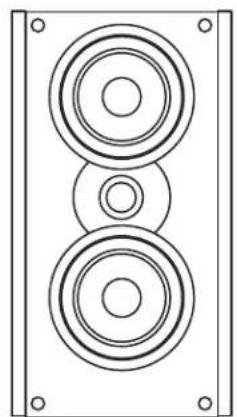
4400 LR
Figure 2

4400 C
Figure 3

Model 4400 SR Surround Speakers
The Model 4400 SR Dipole/Bipole Surround Speakers (Figure 3) are intended for use in multi-channel audio/video sound systems as dedicated side or back surround channel speakers. The 4400 SR enclosure has two 4½" (115mm) GLH woofers and two of the same high performance silk dome tweeters found in the 4400 front speakers. The surround speaker can be switched between Dipole and Bipole operation. These settings are explained on page 8, "Dipole/Bipole Operation of the SR Speakers."
NOTE: Although the speakers in the Atlantic Technology System 4400 are acoustically and cosmetically matched to each other for ideal results, they may also be used with other Atlantic Technology components and a wide variety of speakers from other manufacturers with excellent results.
Placement
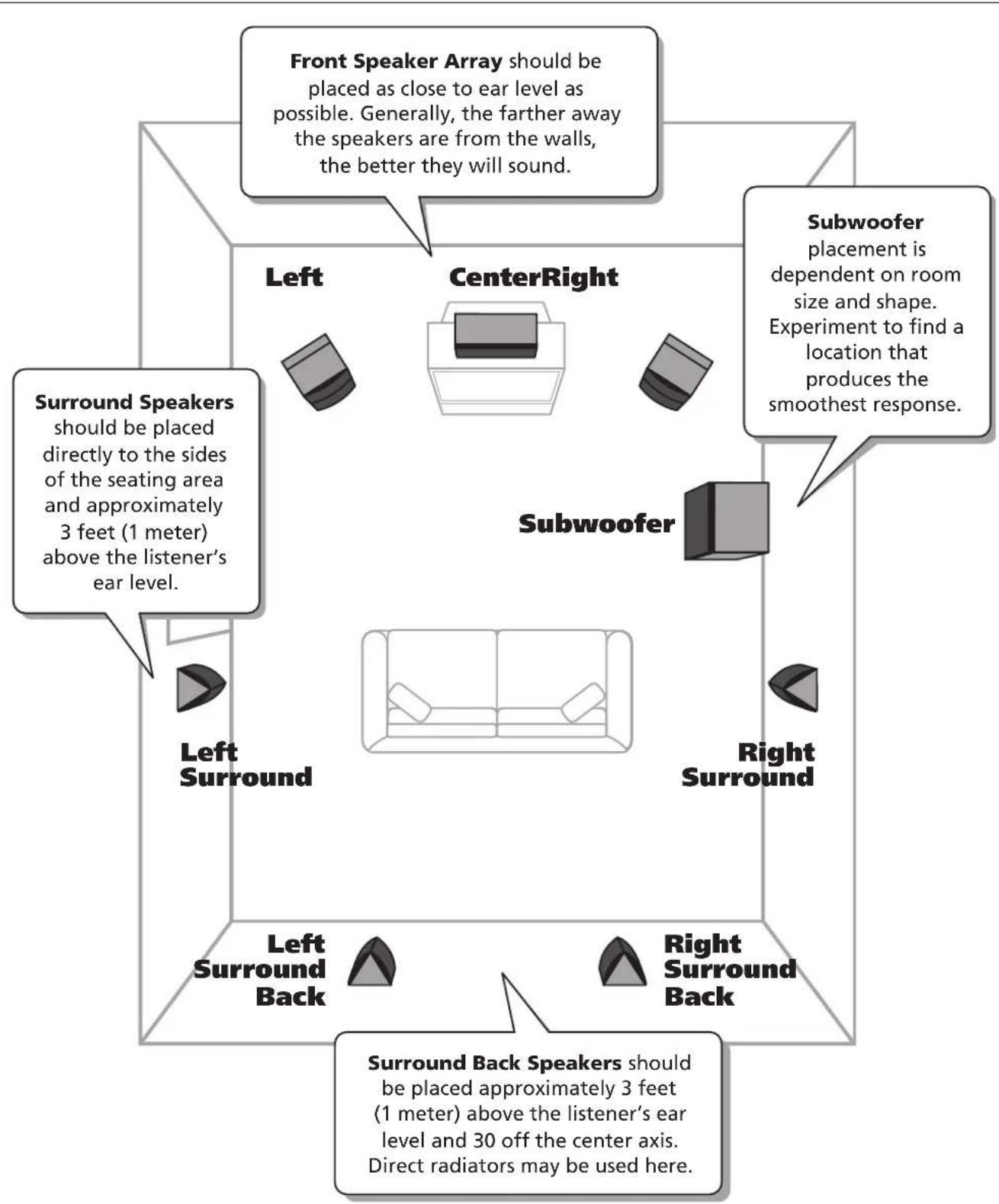
Speaker/room interactions have a huge impact on the sound of the system. Moving the speakers just a little can make a dramatic difference in what you hear. Remember that the best acoustic placement of the speakers will vary from room to room. Use the following placement guidelines (see opposite page) as a starting point. But also feel free to experiment. In fact, it may be beneficial to hook up the front LR and surround speakers with some extra wire and to simply drape the wire across the floor before installing the speakers permanently. This will allow you the opportunity to move the speakers around easily so you can find the best sonic and visual locations.
Home Theater
Remember that the primary goal of a good home theater is not to make you believe that you are in a movie theater. It's to make you believe you're in the movie. For a home theater system, place the LR speakers on either side of the television. The three front channel speakers (LR and C) are magneti shielded so they will not interfere with your television picture. The left and right front speakers should be far enough apart (6 to 10 feet, 2-3 meters, is usually best) that you get a good stereo "image" when they are playing alone, but not so far apart that the sound seems to be disembodied from the TV, distracting you from the picture. When using a center channel speaker, a wider separation of the left and right front speakers is usually possible. You may chose to "toe" the LR speakers in, aiming them approximately the prime listening position. This can be particularly useful if the front LR speakers are fairly far apart.
Surround Effects and Speaker Locations
The 4400 SR's shape allows great flexibility in placement. Due to the swit-able Dipole/Bipole design, it's possible to place the speakers almost anywhere within the rear third of the room and get good results. However, the best location for surround speakers is straight out to the sides, or slightly behind the primary listening area, approximately 1-2 feet (.3,.6m) above seated ear level, but no closer than 2 feet (.6m) from the ceiling. As noted above, the surround speakers (as opposed to the back speaker(s) in a 5.1 or 7.1 channel system, see below) are primarily intended to re-create the ambient sounds taking place in the movie scene. Therefore, throughout most of a movie or TV program you may not be consciously aware of output from these speakers. In other words, don't worry if you aren't hearing the surround speakers. Please try to avoid the trap of turning the surrounds up and up so that you hear them most of the time. The result will be a much less believable surround experience.
There are dedicated LEFT and RIGHT model 4400 SR speakers. This is clearly marked on the back of each speaker. Be sure that the Left side surround speaker is placed directly to the left side of the prime listening area Y(facing the screen) and the Right speaker is directly to the right side. As an easy reference, the Dipole/Bipole switch should always be facing the back of the room.
7.1 Channel Systems
For best performance in a 7.1 channel system, we recommend using another pair of 4400 LR's on the back wall, and 4400 SR's on the side walls.
If you are setting up a system that uses back surround speaker(s) as well as side surrounds (Dolby Digital EX, DTS ES, etc.) you can choose to use either SR model speakers in Dipole or Bipole mode or another pair of front LR speakers in the back of the room. If the 4400 SR's are used as back sur- rounds in a 7.1 channel system, they should be installed with the Right speaker placed over the listener's left shoulder and the Left speaker placed over the listener's right shoulder. About one-third of the way out from the corners in most rooms is a good starting point.
If you are using a THX Ultra 2 certified controller/receiver, you should place the back surround speakers approximately 1 to 2 feet (.3,.6m) apart in the center of the back wall. The special circuitry in the processor will help to variate a believable and effective surround field using this placement. Please read the electronics manual to learn more about this placement option.
IMPORTANT NOTE Try to keep the LR and C tweeters at approximately the same height and aimed at ear level when seated. This is because we've designed the alignment of the drivers on the front panel to limit the vertical spread of the mid and high frequencies, thereby reducing the floor and ceiling reflections that adversely affect sound quality. If the speakers are too high or too low however, you will miss a significant portion of the upper middle and high range elements of the sound. This alignment of the drivers provides enhanced horizontal spread of the sound making for a much better sound experience for a group of listeners and reducing the need to sit in a precise "sweet spot."
Speaker Placement
Stereo Systems
If you are setting up a stereo system using a pair of 4400 LR's with subwoofer(s), begin with these general guidelines:
■ The distance between the speakers should be approximately one-half their distance from the prime listening position.
If you point the front of the speakers directly towards the prime listening position ("toe" them in), you will achieve the most precise imaging and the most direct high frequency sound. If you have a "bright" or "hard" sounding room, aiming the speakers straight out into the room (or just aiming them partially towards you) may make for a more natural and pleasing sonic balance.
■ For the smoothest upper bass/lower midrange response, the distance from each speaker to its three closest room surfaces should be different.
In most rooms, you should not place your speakers in the corners.
■ Try to keep the speakers at least 2 feet (.6m) from the back and side walls.
The goal is to reproduce the most accurate musical timbre and the most convincing natural sound. Additionally, a well set-up stereo pair of speakers will create excellent imaging and a cohesive representation of the sound-stage. Placement in the room and your listening position has an enormous impact on the ultimate sound you will achieve from your system. The most important thing is to be creative! Try placing your speakers on the long wall instead of the short one. Toe the speakers in or point them straight ahead. Pull them away from the wall or push them closer. Don't be timid. You'll that moving your speakers, even a few inches, can dramatically change and possibly improve their sound.
Connecting Your System
We recommend that you connect your system using high quality dual conductor stranded wire of 16 gauge or heavier, for lengths up to 25 feet (8m). (Remember, the lower the gauge number, the heavier the wire). Use heavier gauge wire for longer runs. Please contact your audio/video dealer or installer for specific cable recommendations and further information regarding special circumstances. The terminals themselves are designed to allow the use of very heavy speaker wire or connectors. Be sure to tighten them securely, but don't over-tighten them.
WARNING: To prevent risk of electrical shock or damage to your equipment, always switch off the amplifier or receiver when making any system connections.
You can connect your speakers by using a variety of audio connectors such as banana plugs (single or double), pin connectors, spade lugs, etc., or you can:
- Remove 1/2 " (13mm) of insulation from each wire end.
- Twist the stranded wire together, keeping the two ends to separate.
- Place the appropriate wire through the postholes in the connectors. These holes are revealed when you loosen the connector's capscrew.
- Screw down the capscrew tightly, but be careful not to over tighten it.
\$ Check the tightness of the capscrews 24 hours after hookup and occasionally after that, as they can loosen over time.
We recommend that you check your local electrical codes to make sure that you are not using improper connectors. It's important to observe polarity while making speaker connections: red (+) terminals on the amplifier to red (+) on the speaker, black (−) on the amplifier to black (−) on the speaker. Look carefully at the wires you are using and note that one of the conductors of each pair will typically be identified by color, printing on the outer jacket, ridges on the outer jacket, or a thread intertwined with the wire strands. By convention, the marked wire is connected to the red (+) terminal. Whether you are connecting a complete system, or adding a single speaker component to your present system, the wiring should look like the system wiring diagrams on the opposite page
WARNING: Before turning on the amplifier, be certain that no stray wire strands are touching across any terminals as this might damage your amplifier.
Finally, check the polarity of your front speakers by listening to some stereo music with good bass content. If the sound seems "hollow", unusually spread out, or seem to have weak bass, recheck your connections for proper polarity and correct any out of phase connections, if necessary.
System Wiring
Be sure to connect red (+) on the speaker to red (+) on the amplifier and black (-) on the speaker to black (-) on the amplifier.
![graph TD A["Speaker 1"] --> B["Left Center"] C["Speaker 2"] --> D["Left Center"] E["Speaker 3"] --> F["Left Center"] G["Speaker 4"] --> H["Left Center"] I["Speaker 5"] --> J["Left Center"] K["Speaker 6"] --> L["Left Center"] M["Speaker 7"] --> N["Left Center"] O["Speaker 8"] --> P["Left Center"] Q["…](/content/2026/06/1199233/images/63cef077c70d848884ca2bfb46a9c973f46fe4495e26e4175699ae7c6cd1223b.jpg)
System Setup
Bass Management
Some older surround sound decoders and receivers offer a choice of "Normal" or "Wide-band" modes for the center channel speaker. The Model 4400 C is designed to be used in the Normal mode. Additionally, digital processing multi-channel systems provide a Bass Management menu, typically requires you to select between "Small" or "Large" speakers during system set-up. Since these systems have been designed to work with a dedicated subwoofer, please set all the speakers in System 4400 to Small.
Figure 4

Operation of the Rear Panel Controls on the LCR Speakers
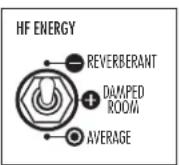
High Frequency Energy This control changes the tilt or roll-off slope of the tweeter. It has been designed to help compensate for different room acoustics. The THX/ Average position is intended for rooms with a reasonable combination of reflective (hard) and absorptive (soft) surfaces. The Reverberant position
is designed for rooms with an abundance of reflective surfaces like hardwood or tile floors, glass walls, etc. It decreases the high frequency output of the speaker to reduce excess HF energy that builds up in live rooms. The Damped position brings the tweeter's output slightly above flat response to compensate for overly absorbent rooms with lots of soft surfaces. Speakers in overly damped rooms can sound dead and lifeless unless compensated.

Boundary Compensation Use this switch to adjust the lower frequency output of the speaker to compensate for the typical sound colorations caused by placing the speaker close to a TV screen or building it into a wall unit or cabinet. To set these controls, sit in the prime listening position and have someone
switch between the compensation choices, using well recorded dialogue or which musical instrument recordings. Choose whichever switch position sounds most natural and real to you.
NOTE: Although these controls have been designed to compensate for various acoustic room anomalies, we recommend that you try them to hear the difference that they make in the sound of the system. For any number of reasons, you may decide that you prefer them set in a particular manner inconsistent with your room's acoustics, but which sounds best to you. Experiment. It will be worth it.
Dipole/Bipole Operation of the SR Speakers
In Dipole mode the 4400 SR's produce ambience with minimal local-
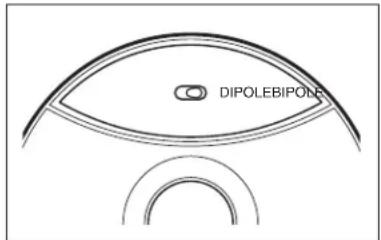
ization (best for most movies and video soundtracks), and more localizable sound in the Bipole mode (preferred for some music recordings). Switching between Dipole and Bipole mode is easily accomplished using a toggle switch
conveniently located under one of the speaker's grilles. Please note that the vast majority of the time in movies and TV broadcasts the surround speakers are called upon to reproduce the environmental sounds that are used as cues to help get you immersed in the scene on the screen.
Once the surround speakers are properly positioned in the listening area, we recommend that you begin with the dipole mode, as this usually delivers the most involving and believable surround performance in most situations. However, as noted above, feel free to experiment with both switch positions.
When using as front "height" speakers, we recommend starting in the Bipole mode.
Setting Levels
When setting up a complete home theater we strongly recommend that you use a Sound Pressure Level (SPL) meter. As of this writing Radio Shackone that's affordably priced (approximately \$40) that can be used effectively. To use this meter, turn on your system, put the processor/receiver in Tc Mode and set its main volume control to 0dB (or a reasonably loud level). Sit in the prime listening position, set the SPL meter to the 70dB scale, s response, and C weighting. Hold the meter with the microphone pointed up, towards the ceiling and in front of you. Cycle the test tone from speaker, setting each to the same level (usually75dB) using the individual level settings available in the processor/receiver (please see the instructions for your processor/receiver if you are unsure of how to access the test signal or level controls).
IMPORTANT NOTE: The power recommendation for these speaker systems assumes that you will not operate your amplifier/receiver in a way that produces distortion. Even rugged speakers like these can be damaged by an amplifier driven into audible distortion. The harsh amplifier distortion ("clipping") that occurs in this situation will eventually cause damage to the speaker system. This type of damage may be cumulative and can build up over time, as the amplifier is driven into overload again and again. Such damage is easily identifiable through examination of the damaged speaker's voice coil and is not covered by the warranty.
These systems will play very loudly when provided with enough undistorted power to do so. If necessary, consult your dealer or Atlantic Technology for additional information.
Mounting
System 4400 LR and SR speakers can be mounted in different ways:
On Stands Speaker stands are recommended to elevate the satellites to the proper position for maximum performance. Many brands of quality speaker stands have a through hole in the mounting plate that allows the speaker to be securely bolted to the stand. Use the 1/4 " x 20 insert on the bottom of each speaker to couple the stand directly to the speaker via a 1/4 " x 20 bolt. This connection is recommended not only for better sound but for safety (especially if you have little ones running around) The recommended stand height is approximately 30". See Figure 5.
On the Wall (4400 LR and SR only) To mount your speakers on a wall, we have supplied metal key-hole brackets attached to the back of the cabinet. These speakers are heavy and care must be used when hanging them. Be sure to use a strong screw to drive into the wall, one whose head and shaft will fit within properly the keyhole opening and slot. Also be sure to drive the screw directly into a stud or to use a mounting device (such a molly-bolt) that is capable of safely holding the speaker's weight. Never simply drive a nail or screw into sheet rock or other wall materials, as the 4400 SR is very heavy for its size.
NOTE: Always consult a knowledgeable installer regarding the proper mounting hardware to use with your speakers.

Figure 5
Care of Your Speakers
Clean your cabinets using a soft, lint-free cloth. If you wish, you can slit moisten the cloth with plain water. Do not use any other cleaning agent or chemicals. Be careful not to get any water on the driver cones or tweeter domes. After carefully removing the grilles from the speakers by pulling them forward, gently clean them with a quick pass from a vacuum cleaner with a brush attachment. This should remove any dust accumulation. Reattach them by lining up the magnet depressions in the back of the grilles the magnets on the speaker baffle and slowly moving them closer until they connect with each other.
Avoid placing your speakers in direct sunlight or near a source of heat t may, over time, damage the finish.
IMPORTANT: SAVE YOUR BOXES! If you can do so, save the cartons, packing pieces, and plastic bags that came with your speakers. They will be useful in case you move or have to ship your loudspeakers for any reason. In any case, save all packing materials until you are certain that the systems have suffered no damage in shipment. If you find such damage, either visible or internal, contact your dealer immediately.
Specifications
Model 4400 LR 4400 C 4400 SR
| Type Sealed-box, 2-way | Sealed-box, 2-way Sealed-box, Dipole/M-T-M array M-T-M array Bipole surround speaker | |||
| Drivers | WooferTweeter | (2) 5 1⁄4" GLH(1) 1" silk dome | (2) 5 1⁄4" GLH(1) 1" silk dome | (2) 4 1⁄2" GLH(2) 1" silk dome |
| Frequency Response | 80Hz – 20kHz ±3dB | 80Hz – 20kHz ±3dB | 80Hz – 20kHz ±3dB | |
| Nominal Impedance | 8Ω | 8Ω | 8Ω | |
| Crossover Frequency | 2.5kHz | 2.5kHz | 3kHz | |
| Crossover Typehat | Computer designed Butterworth 4th-order asymmetrical (time aligned) Linkwitz-Riely | |||
| Sensitivity | 90dB | 90dB | 90dB | |
| RecommendedAmplifier Power | 10 – 150 Watts RMS | 10 – 150 Watts RMS | 10 – 150 Watts RMS | |
| Magnetic Shielding | Yes | Yes | No | |
| Dimensions w/ grilles(W x H x D) | 8.3 x 15 x 9.5*211 x 382 x 242mm | 18.4 x 8.4 x 9.7**467 x 213 x 246mm | 10.9 x 12.4 x 7.5*277 x 315 x 191mm | |
| Weight (ea) | 15lbs; 6.8kg | 17lbs; 7.7kg w/base | 11lbs; 4.99kg | |
*Height includes tilt base.
Specifications are those in effect at the time of printing. Atlantic Technology reserves the right to change specifications or appearance at any time without notice.
THX, and THX Select are trademarks of THX Inc. Dolby Digital 5.1, Dolby Digital 7.1, and Dolby Pro Logic Ilx are trademarks of Dolby Laboratories Licensing Corporation. DTS is a registered trademark of DTS Technology.
Instruction Manual




- SYSTEM 4400 THX SELECT
- TABLE OF CONTENTS
- SYSTEM 4400 THX SELECT HIGH PERFORMANCE LOUDSPEAKER COMPONENTS
- UNPACKING THE SPEAKERS
- ATTACHING THE GRILLES
- FOR FUTURE REFERENCE
- WHAT'S THX
- INDIVIDUAL COMPONENT DESCRIPTIONS
- MODEL 4400 LR FRONT CHANNEL SPEAKERS
- ACOUSTIC CONTROLS
- MODEL 4400 C CENTER CHANNEL SPEAKER
- MODEL 4400 SR SURROUND SPEAKERS
- PLACEMENT
- HOME THEATER
- SURROUND EFFECTS AND SPEAKER LOCATIONS
- 7.1 CHANNEL SYSTEMS
- STEREO SYSTEMS
- CONNECTING YOUR SYSTEM
- SYSTEM WIRING
- SYSTEM SETUP
- BASS MANAGEMENT
- OPERATION OF THE REAR PANEL CONTROLS ON THE LCR SPEAKERS
- DIPOLE/BIPOLE OPERATION OF THE SR SPEAKERS
- SETTING LEVELS
- MOUNTING
- CARE OF YOUR SPEAKERS
- SPECIFICATIONS
Brand : ATLANTIC
Model : 4400 THX Select
Category : Water heater