111178 - Audio Equipment MONOPRICE - Free user manual and instructions
Find the device manual for free 111178 MONOPRICE in PDF.


| Product Type | Audio Equipment |
| Brand | Monoprice |
| Model | 111178 |
| Dimensions (W x D x H) | 8.5 x 6.3 x 3.2 inches |
| Weight | 2.4 lbs |
| Power Supply | AC 100-240V, 50/60Hz |
| Power Consumption | 15W |
| Frequency Response | 20Hz - 20kHz |
| Impedance | 8 ohms |
| Inputs | 3.5mm AUX, RCA, Bluetooth |
| Outputs | Headphone jack, Subwoofer out |
| Controls | Volume knob, power button, source selector |
| Key Features | Bluetooth 5.0, built-in amplifier, stereo sound |
| Cleaning & Maintenance | Wipe with dry cloth, avoid liquids |
| Safety | Do not expose to water or extreme temperatures |
| Spare Parts | Power adapter, remote control (optional) |
| Repairability | Replaceable fuse, user-serviceable |
| General Information | Compatible with smartphones, tablets, computers |
Frequently Asked Questions - 111178 MONOPRICE
User questions about 111178 MONOPRICE
0 question about this device. Answer the ones you know or ask your own.
Ask a new question about this device
Download the instructions for your Audio Equipment in PDF format for free! Find your manual 111178 - MONOPRICE and take your electronic device back in hand. On this page are published all the documents necessary for the use of your device. 111178 by MONOPRICE.
USER MANUAL 111178 MONOPRICE
natural_image
Close-up of a black and silver JDAI headband with adjustable earbuds and a white connector (no text or symbols visible)Bluetooth™ Hi-Fi On-the-Ear
Headphones
with Built-in Microphone
((M))
SAFETY WARNINGS AND GUIDELINES
- Do not expose this device to water or moisture of any kind. If this device gets wet, turn it off immediately and do not attempt to use it again until it is thoroughly dried, inside and out.
- Do not disassemble or attempt to repair or modify this unit.
- Do not use this device while operating a motor vehicle, heavy equipment, walking in traffic, or any other situation in which situational awareness is a key to safety.
- Clean only using a soft, dry cloth. For stubborn dirt, slightly moisten the cloth with warm water.
- This device contains a rechargeable battery and electronic circuits. It should only be disposed of in accordance with local laws and regulations.
PRODUCT OVERVIEW
- Headband
- Headband adjustment
- Previous track button
- Micro USB charging port
- Multi-Function button
- Next track button
- Microphone
- Earpieces
- Power switch
- Volume down/- button
- Volume up/+ button
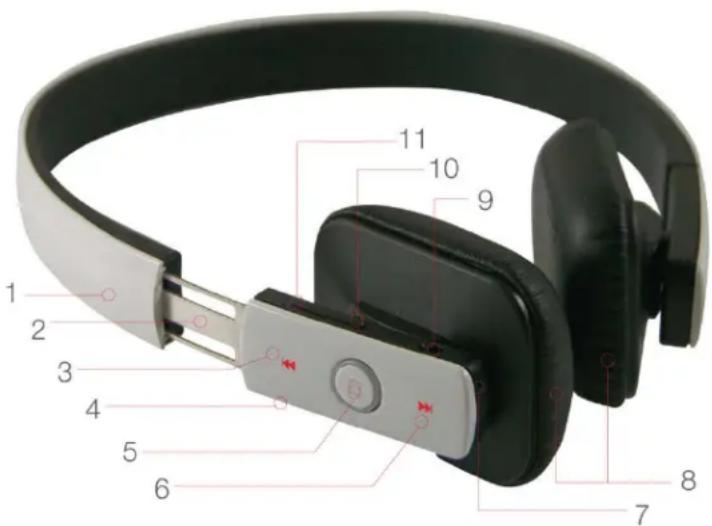
text_image
Labeled diagram of a smart ear with numbered parts for identificationOPERATION
Charging
Perform the following steps to charge built-in rechargeable battery prior to use and whenever the battery level is low:
- Ensure that the headphones are powered OFF.
- Plug one end of the included USB cable into the charging port on the headphones and the other end into a USB power source, such as a computer, wall charger, backup battery pack, etc.
- Depending on the current level of your USB power source, it can 2-3 hours to fully charge the headphones. The LED indicator will glow red during charging.
- When charging is complete the LED indicator will glow blue.
Power
- Power ON the headphones by sliding the Power Switch (9) until a beep sounds in the earpieces and the LED indicator begins flashing blue.
- Power OFF the headphones by sliding the Power Switch (9) until a beep sounds in the earpieces and the LED indicator flashes blue twice.
Bluetooth Pairing
- Ensure that both the headphones and your phone are powered ON.
- Ensure that the headphones and the phone are within about 3 feet of each other.
- Press and hold the Multi-Function button (5) on the headsets until the LED indicator glows blue steadily.
- Ensure that the Bluetooth feature on your phone is enabled. Perform a search for Bluetooth devices and select the headphones from the list.
- If asked for a passkey, enter 0000.
- If pairing is successful, the LED indicator will rapidly flash blue 10 times, then will flash once every 3 seconds.
- If pairing is unsuccessful, the LED indicator will remain steady blue.
- If no Bluetooth connection is established within about 60 seconds, the Bluetooth pairing mode will turn off and the LED indicator will turn off, as well.
Disconnecting
Any of the following actions will break the Bluetooth connection between your phone and the headphones:
- Turn headphones OFF
- Disconnect the headphones from the Bluetooth list on your phone.
- Move the phone at least 32 feet (10 meters) from the headphones.
Reconnecting
If your phone has previously been paired with the headphones, you can reestablish the connection using one of the following methods:
- Press the Multi-Function button (5) once to automatically reconnect.
- With the headphones powered on, select the headphones from the list of available Bluetooth devices on your phone.
Music Playback
- Press the Multi-Function button (5) to play or pause music.
- Press the Next Track button (6) to skip ahead to the next track.
- Press the Previous Track button (3) to skip back to the beginning of the current track. If already at the beginning, pressing the Previous Track button will skip back to the beginning of the previous track.
Volume Control
Press the Volume Up/+ (11) and/or Volume Down/- (10) buttons to control the volume level. You can hold down the button for continuous volume adjustment rather than repeatedly pressing the button to adjust the volume in steps.
Answering or Rejecting an Incoming Call
When an incoming call is detected, your phone will automatically pause music playback and the ringtone will sound in the earpieces.
• To answer the call, press the Multi-Function button (5) once.
- To reject the call, press and hold the Multi-Function button (5) for about 2 seconds. Music playback will automatically resume when a call is rejected.
Ending a Call
Press and release Multi-Function button (5) once. Music playback will automatically resume when the call is ended.
Placing a Call on Hold\*
- While the call is active, press and hold the Multi-Function button (5) for about 2 seconds to place the call on hold.
- To resume a call on hold, press and hold the Multi-Function button (5) for about 2 seconds.
Redialing the Previous Number\*
Press and hold the Multi-Function button (5) for about 2 seconds until you hear a long beep. The previously dialed number will be redialed.
*Note that the Call Hold and Last Number Redialing features are functional only if your phone supports those features.