
10e CSB - Subwoofer ATLANTIC - Free user manual and instructions
Find the device manual for free 10e CSB ATLANTIC in PDF.


| Product Type | Powered subwoofer |
| Model | 10e CSB (Corner Subwoofer) |
| Enclosure Type | Sealed, down-firing |
| Driver | 10" (254 mm) long-throw composite cone with vented motor structure and oversized 4-layer voice coil |
| Amplifier Power | 180 Watts RMS (Class-D PWM) |
| Peak Output | 106 dB in 2000 cu.ft. room |
| Frequency Response | 30 - 250 Hz ±3 dB (usable in-room 25 Hz - 150 Hz) |
| Low-Pass Crossover | Adjustable 50 - 160 Hz, 18 dB/octave (with bypass for THX/pre-filtered signal) |
| Phase Control | 0 - 180° rotary |
| Inputs | 2x Low Level (RCA), 2x High Level (speaker terminals) |
| Outputs | 2x High Level (high-pass filtered for satellite speakers) |
| Standby Mode | Automatic signal sensing with 10-15 min delay, or always on (switchable) |
| Status LED | Green (on), Amber (standby) |
| Power Requirements | 110-120V or 220-240V (selectable via switch), 50/60 Hz |
| Dimensions (W x H x D) | 22 x 19.5 x 12 inches (559 x 496 x 305 mm) |
| Weight | 35 lbs (16 kg) |
| Cabinet Material | Medium Density Fiberboard (MDF), paintable |
| Placement | Corner placement recommended for optimal bass reinforcement |
| Safety Certifications | UL/CSA and European safety requirements |
| Included Accessories | Power cord, Y-adapter for dual sub connection |
| Warranty | Refer to dealer for warranty terms; save original packaging |
Frequently Asked Questions - 10e CSB ATLANTIC
User questions about 10e CSB ATLANTIC
0 question about this device. Answer the ones you know or ask your own.
Ask a new question about this device
Download the instructions for your Subwoofer in PDF format for free! Find your manual 10e CSB - ATLANTIC and take your electronic device back in hand. On this page are published all the documents necessary for the use of your device. 10e CSB by ATLANTIC.
USER MANUAL 10e CSB ATLANTIC
10 CSB Corner Subwoofer
Atlantic TECHNOLOGY
Safety Precautions Table of Contents

CAUTION: To reduce the risk of electric shock, do not remove the cover (or back). No user serviceable parts inside. Refer to qualified personnel.
WARNING: To reduce the risk of fire or electric shock, do not expose this appliance to rain or moisture. This device generates a small amount of heat. Make sure nothing blocks the ventilation of the amplifier.
The lightning flash with arrowhead, within an equilateral triangle, is

intended to alert the user to the presence of uninsulated “dangerous voltage” within the product’s enclosure that may be of sufficient magnitude to constitute a risk of electrical shock to persons.

The exclamation point within an equilateral triangle is intended to alert the user to the presence of important operating maintenance (servicing) instructions in the literature accompanying the appliance.
2 Model 10 CSB
3 10 CSB Subwoofer Rear Panel
4 Features
5 Connecting Your Subwoofer
5 Low-Level Connection
5 Adding a Second Sub
5 High-Level Connection
5 High-Level Output
6 Example 1: Subwoofer Line Out/Low Level In
6 Example 2: Sub Out/Low Level In, Two Subs
7 Example 3: Preamp Line Out/Low Level In for 1 Subwoofer
17 Example 4: Preamp Line Out/ Low Level In for Stereo Subwoofers
7 Example 5: Preamp Line Out/Low Level In Dual Mono Subs
8 Example 6: Speaker Out/High Level In for 1 Subwoofer
8 Example 7: Speaker Our/High Level In for Stereo Subwoofers
9 Placement
9 System Initial Set Up
9 Subwoofer Tuning Without an SPL Meter or Test Tones
9 How Much is Enough?
9 Using the Low Pass Frequency Crossover Control
10 The Phase Control
10 A Word About Bass, Center Channel Modes and System Set Up
10 Care of Your Subwoofer
11 Painting the Cabinet
11 Specifications
11 Subwoofer Troubleshooting Guide
Model 10 CSB
Corner Subwoofer
For Future Reference
Record your serial numbers and date of purchase here:
Model Number
Serial Number
Date of Purchase
The serial number is found on the back panel.
Copyright © 2006 Atlantic Technology International.
Specifications are those in effect at the time of printing. Atlantic Technology reserves the right to change specifications or designs at any time without notice.
Congratulations on your purchase of an Atlantic Technology 10 CSB Corner subwoofer. The special design of this product allows it to be placed unobtrusively in the corner of your room, minimizing its visual impact. The unique shape of the subwoofer's cabinet combined with corner placement also provides the maximum amount of bass reinforcement, so your subwoofer will deliver optimum performance.
This subwoofer uses an extremely high-performance driver with an over-sized voice coil for low distortion, vented voice coil and vented basket for extremely high power handling and high-excursion, and a low-resonance cone for exceptionally deep response.
The built-in low-noise amplifier has a linear power supply and preamp, coupled to a Class-D PWM output stage. This compact high-efficiency amplifier provides great sound with minimal heat and easy hookup in any system.
10 CSB Subwoofer Rear Panel
Figure 1
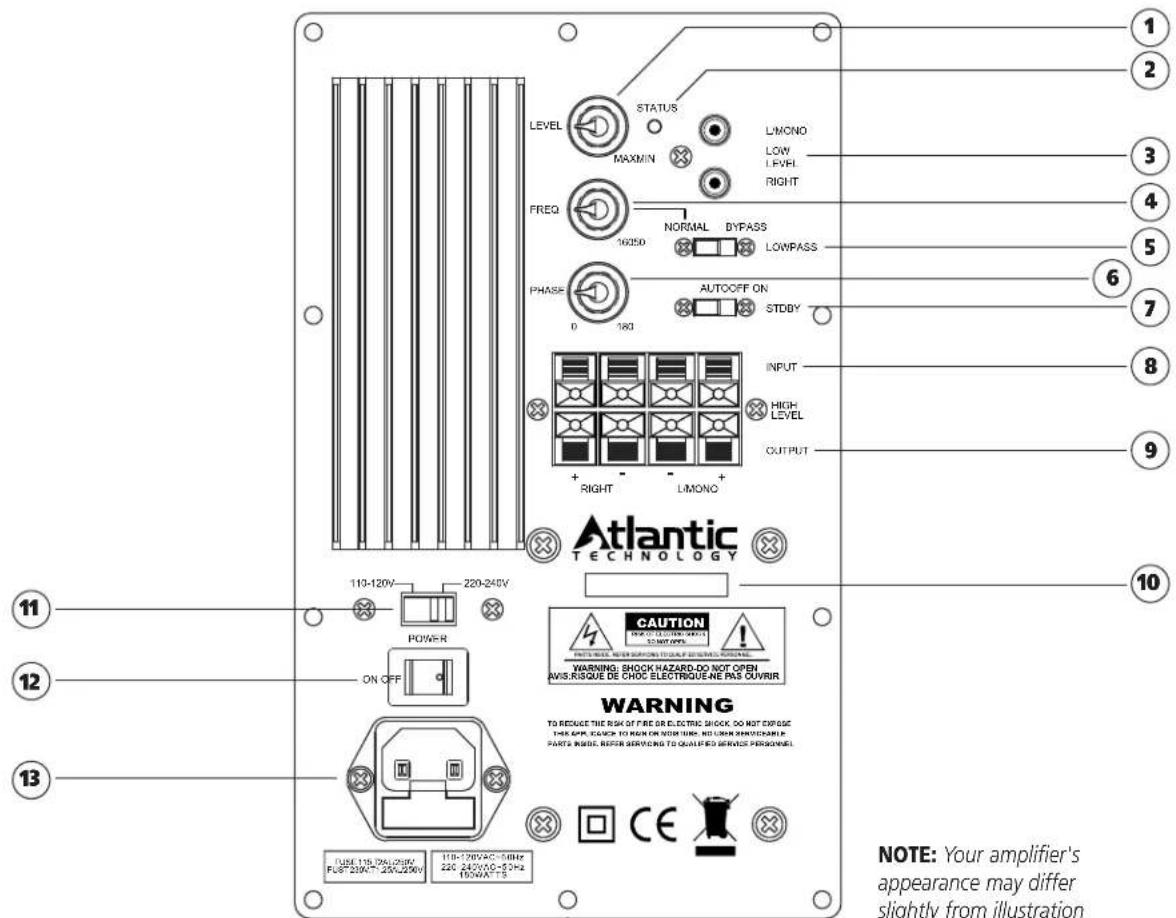
NOTE: Your amplifier's appearance may differ slightly from illustration
① Variable Level Control
Use this control to set the level of bass desired
② Status LED
This will be green for "on" condition, amber for "standby"
③ Low Level Input
This is the preferred input to connect to the subwoofer or LFE line out from your receiver/processor. (pgs 5 and 6)
④ Low Pass Control
An adjustable (40Hz to 140Hz) @ 18dB/octave low-pass crossover. (pgs 5 and 9)
⑤ Low Pass Switch
When in the NORMAL position, adjustment of the crossover can be made by the Crossover Control. If being fed a pre-filtered or THX signal, place the switch at the BYPASS position. (pgs 5 and 9)
⑥ Phase Control
This switch allows precise acoustic matching with satellite speaker systems whose output may be phase reversed. (pgs 5 and 10)
⑦ Standby Switch
When in ON position, the amplifier will always be on. When in the AUTO position, the amplifier will be in Automatic Standby Mode. When in the OFF position, the amplifier is muted. (pages 5 and 9)
⑧ High Level Input
Use this input if your receiver/processor lacks a line-level output, or if you have some other reason to do so. (pgs 5 and 8)
⑨ High Level Output
If using the high level input, you may connect your right and left satellites here. This output has a high-pass filter to help avoid overdriving of satellites. (pgs 5 and 8)
⑩ Product Model and Serial Number
Write this number in the space provided on page 2 for future reference.
11 Voltage Select Switch
Voltage switch for use in different countries. This switch will be set when you receive the unit. Change this setting only when you are sure your application requires it. For US, the switch should be set to the 110-120V position.
12 On/Off Switch
Use this switch to turn the amplifier completely on or off.
13 AC Input and Fuse Holder
Use the included power cord to connect your amplifier to a wall outlet. (pgs 5 and 6)
Features
Your Atlantic Technology powered subwoofer has been engineered using the latest technology and finest components available. It features:
■ A long-throw composite cone driver with a vented motor structure and an oversized high temperature, 4-layer voice coil
This powerful driver has a very stiff cone that acts like a piston throughout its operating range. Its massive magnetic motor assembly and high temperature component parts deliver exceptional-performance and reliability.
■ Sealed enclosure design for low distortion and deep bass output
Sealed enclosure woofer designs are inherently low in distortion, and deliver deep smooth bass response with a gradual and predictable roll-off below resonance. As with all Atlantic Technology subwoofers, we have paid close attention to providing accurate musical bass reproduction along with terrific special effects.
■ High-current amplifier
The output stage of this amplifier is a highly efficient PWM switching type capable of very high current delivery for exceptional driver control and cool operation. It has been precision matched and equalized to our rugged drivers. Together they deliver powerful, controlled bass with great articulation and authority.
■ A useful in room working frequency range of 25Hz to 150Hz
Many subwoofers offer specifications that look great on paper, but in real world use deliver less than promised. Atlantic Technology subwoofers are over-designed to ensure that they will deliver their rated performance in your room, when properly placed and adjusted.
■ An adjustable (50Hz to 160Hz) @ 18dB per octave LowPass crossover
The steep upper end roll-off slope of 18dB per octave allows for much better bass integration with the satellite speakers while making the ■ woofer less localizable.
Two low level inputs, two high level inputs with highpass outputs
Either input may be used with either mono or stereo feed. This allows great flexibility of installation method and hookup. Highpass filter at high level output reduces bass overdriving of satellites, preserving clarity.
A Phase rotary control (0-180°)
This switch allows precise acoustic matching with satellite speaker systems whose output may be phase reversed. This control also allows you to compensate for unusual room acoustics that occur when the woofer is physically separated from the main speakers. Be sure to try the Phase control across its range when you set up your subwoofer. Even if you've simply changed the built-in crossover settings it's a good idea to recheck the phase control since the crossover and phase controls acoustically interact with each other. Pay particular attention to the transition of bass from the woofer to the satellites, listening for smooth and well defined bass throughout the range.
Automatic standby operation, LED indicator
Automatic standby features signal sensing turn-on with 10-15 minute turn-off delay. There's a multi-color LED status indicator that lets you know when the unit is on or in standby. Automatic Standby can be defeated by placing the rear mounted switch in the ON position.
■ An AC cord power input socket and fuse holder
Your subwoofer comes supplied with a heavy-duty detachable power cord.
■ Voltage Selector
Easily accessible with a screwdriver tip. When changing voltage setting also change fuse accordingly.
Designed and built to meet all current UL/CSA and European safety requirements
Instruction Manual
Connecting Your Subwoofer
The Atlantic Technology 10 CSB is simple to hook up, offering several connection methods for maximum flexibility. Study the system diagrams starting on the next page. Once you have found the example which most closely matches your system, hook up your subwoofer(s) as shown in that diagram.
Low-Level Connection
In most cases, we suggest using the low-level (RCA jack) subwoofer line out or preamp output if your receiver/processor has one. Simply connect your subwoofer with high quality shielded cables as shown in the diagrams. Use the diagram that best suits your connection requirements.
Adding a Second Sub
Use the supplied y-adapter to connect the cable from the second sub. This may be located at either end of the first sub's input cable.
High-Level Connection
Alternately, you may use the high-level (speaker) inputs. We recommend that you connect your new Subwoofer(s) using high quality wire of 16 gauge or larger. There are many respected manufacturers in the audio industry that specialize in speaker wire and interconnect cables suitable for your new system. Please consult your audio/video dealer for more specific information.
High-level Output
When using the high level inputs, connect your front left and right speakers here. This method is primarily intended for systems without a built-in crossover or a dedicated subwoofer output. The signal that comes from the High-level Output jacks is high-pass filtered to avoid overdriving these speakers with deep bass. The characteristics of this filter are designed for maximum compatibility with Atlantic speakers.
WARNING: To prevent risk of electrical shock or damage to your equipment, always unplug all component AC cords before proceeding with speaker and component connections! The last step in wiring your system should be plugging in the AC cords!
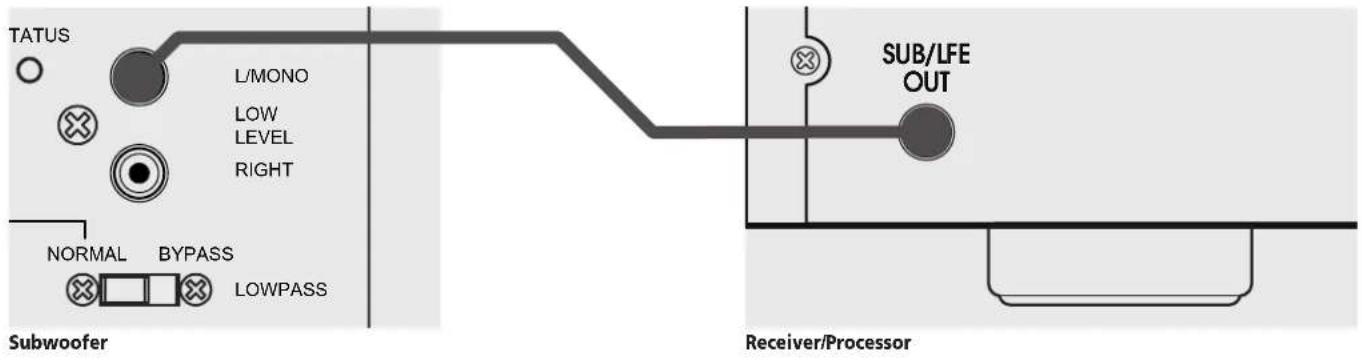
Example 1: Subwoofer Line Out/Low Level In
This is the simplest, most common connection.
Example 2: Sub Out/Low Level In, Two Subs
2A. Y-Adapter located at Receiver/Processor
![graph TD A["TATUS"] --> B["L/MONO"] B --> C["LOW LEVEL"] B --> D["RIGHT"] E["Subwoofer 1"] --> F["Y-Adapter"] G["Subwoofer 2"] --> H["L/MONO"] H --> I["LOW LEVEL"] H --> J["RIGHT"] K["Receiver/Processor"] --> L["SUB/LFE OUT"]](/content/2026/06/1198683/images/15ae4e180af49e0b75bc2e548facfc3363eaf3d6333f77049771c3e047891058.jpg)
2B. Y-Adapter located at one Subwoofer
![graph TD A["TATUS"] --> B["L/MONO"] B --> C["LOW LEVEL RIGHT"] D["Subwoofer 1"] --> E["Y-Adapter"] E --> F["Receiver/Processor"] G["TATUS"] --> H["L/MONO"] H --> I["LOW LEVEL RIGHT"] J["Subwoofer 2"] --> K["Receiver/Processor"] L["SUB/LFE OUT"] --> M["Output"]](/content/2026/06/1198683/images/da7087e5617a25474036d0028f63af29d8a219cca37fece439d9062a853fd7f3.jpg)
Instruction Manual
Example 3: Preamp Line Out/Low Level In for 1 Subwoofer
This arrangement is for owners of stereo receivers/amplifiers with Preamp outputs.
![graph LR A["TATUS"] --> B["L/MONO"] B --> C["LOW LEVEL"] B --> D["RIGHT"] E["NORMAL"] --> F["BYPASS"] F --> G["LOWPASS"] H["Receiver/Processor"] --> I["L PRE OUT R"] H --> J["L MAIN IN R"] H --> K["R"]](/content/2026/06/1198683/images/af97f61a5cc932f40888b7cb6027f9c19eade728b6e9852a09bc306dcff9a492.jpg)
Example 4: Preamp Line Out/ Low Level In for Stereo Subwoofers
Note that the L/MONO input is used on both subwoofers.
![graph TD A["Subwoofer 1"] --> B["L/MONO"] B --> C["LEVEL"] C --> D["RIGHT"] E["Receiver/Processor"] --> F["L"] F --> G["R"] G --> H["Y-Adapter"] I["Subwoofer 2"] --> J["L/MONO"] J --> K["LEVEL"] K --> L["RIGHT"] M["Y-Adapter"] --> N["L"] N --> O["R"] O --> P["Y-Adapter"]](/content/2026/06/1198683/images/efc9ad0cf3fdcbaaf003280b431694fc59e00f26c854c222ebff07c20041090d.jpg)
Example 5: Preamp Line Out/Low Level In Dual Mono Subs
![graph TD subgraph TATUS A["○"] --> B["L/MONO"] B --> C["LOW LEVEL"] B --> D["RIGHT"] E["×"] --> F["Subwoofer 1"] end subgraph Subwoofer 2 G["○"] --> H["L/MONO"] H --> I["LOW LEVEL"] H --> J["RIGHT"] end subgraph Y-Adapters K["●"] --> L["LEND"] M["●"] --> N["LEND"] O["●"] --> P["LEND"] Q["●"] --> R["…](/content/2026/06/1198683/images/34233f1314f6acfab7986b3cf8864e6c580606379f3ffe608c279db89b534823.jpg)
Example 6: Speaker Out/High Level In for 1 Subwoofer
This is the most common method for connecting a subwoofer to a system without a dedicated subwoofer line out or preamp outputs. The signal that comes from the High-Level Output jacks is hi-pass filtered to prevent overdriving the satellites with deep bass frequencies.
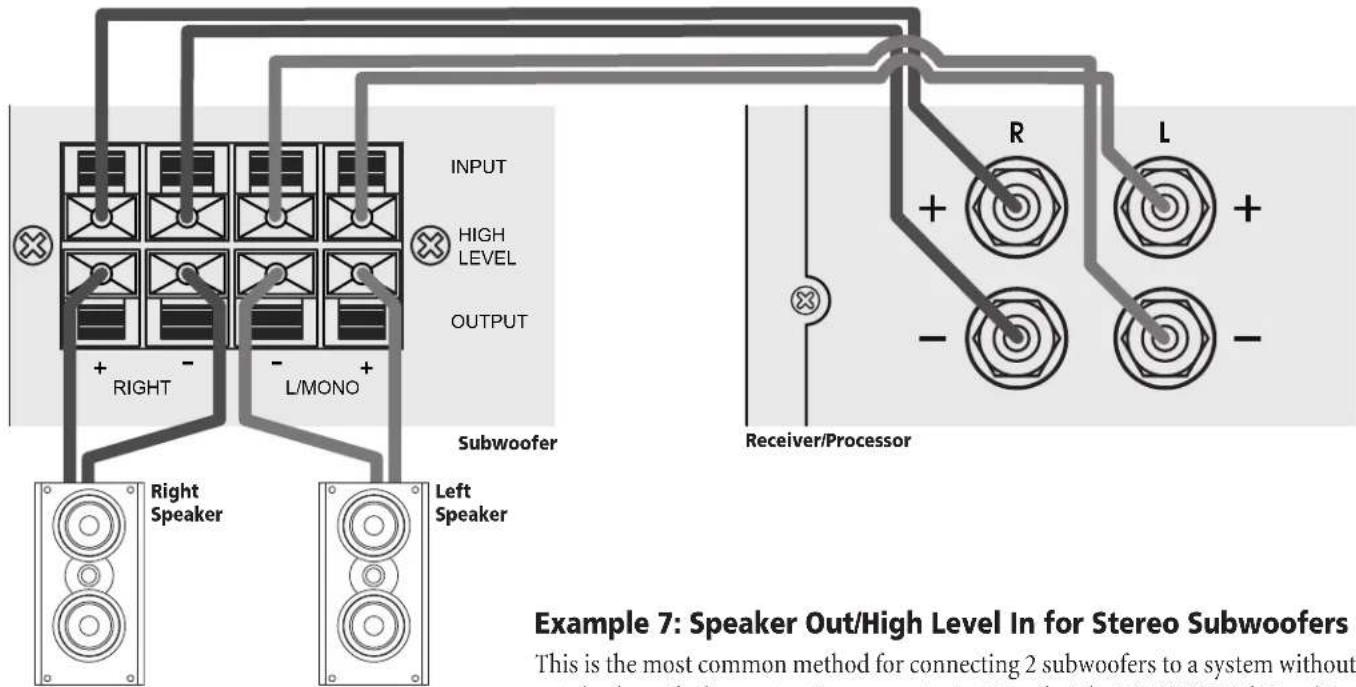
This is the most common method for connecting 2 subwoofers to a system without a dedicated subwoofer line out or Preamp outputs. Note that the L/MONO High Level input is used on both left and right subwoofers.
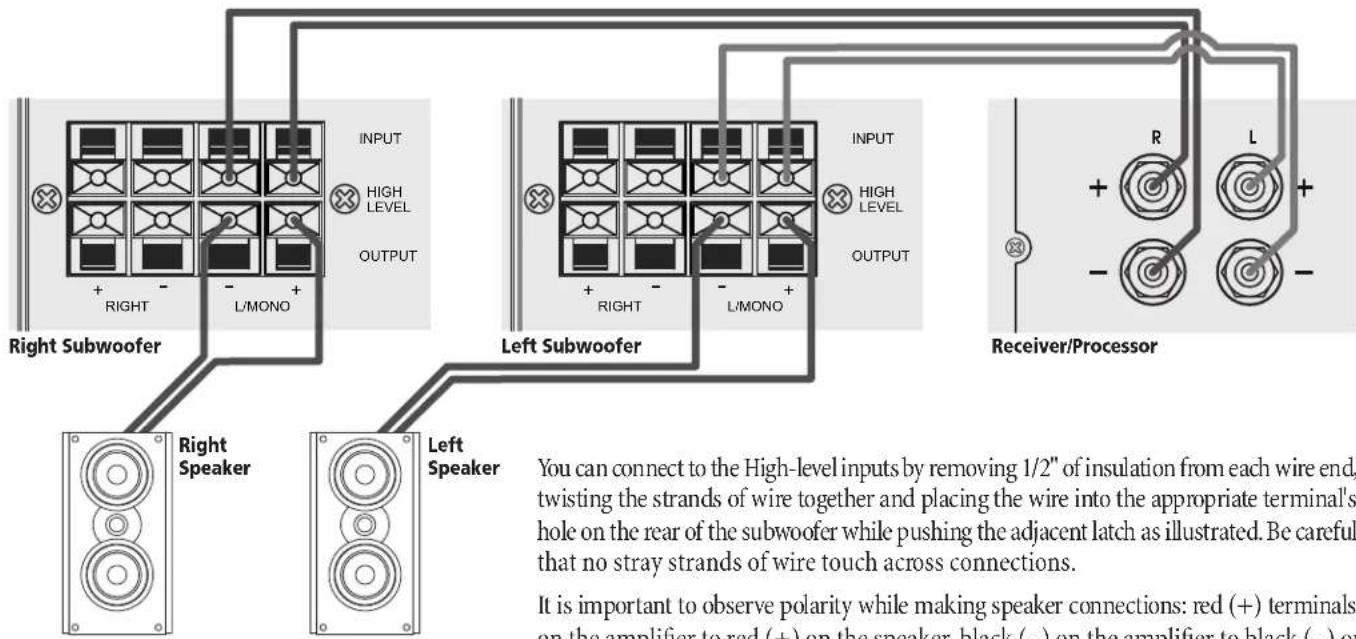
You can connect to the High-level inputs by removing 1/2" of insulation from each wire end, twisting the strands of wire together and placing the wire into the appropriate terminal's hole on the rear of the subwoofer while pushing the adjacent latch as illustrated. Be careful that no stray strands of wire touch across connections.
It is important to observe polarity while making speaker connections: red (+) terminals on the amplifier to red (+) on the speaker, black (−) on the amplifier to black (−) on the speaker. Look carefully at the wires you are using and note that one of the wires in each pair will be marked by either the conductor color, printing on the wire jacket, a ridge on one side of the wire jacket, or a thread intertwined with the wire strands. By convention, the marked wire is connected to the red (+) terminal.
Instruction Manual
Placement
use the level control on the rear panel of the sub to make this adjustment. If you decide not to use an SPL meter try to set all the speaker levels the same using the Test Tones. Of course, this will be more difficult without the meter, especially for the subwoofer.
Subwoofer Tuning Without an SPL Meter or Test Tones
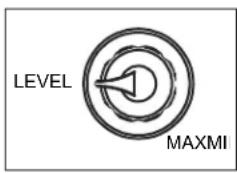
Start by listening with the subwoofer Cross-over control set at around 100Hz (mid-point) or in the Bypass position if you're using a THX Certified processor or unit with a built-in crossover. Set the phase control to 0°, and the Variable Level Control (Figure
6) to the minimum position. Play some music that you know has good bass content, and turn the level control up until you just start to hear the subwoofer working. Now, from your normal listening position, deter mine whether the subwoofer is playing loudly enough and filling in the bass frequencies of the music evenly. If adjustment is necessary, start by changing the setting in the processor or with the level control if your processor lacks a subwoofer level adjustment.
As you listen, adjust the phase control for image "solidity" during those frequencies/musical notes which are shared with the satellites.
How Much is Enough?
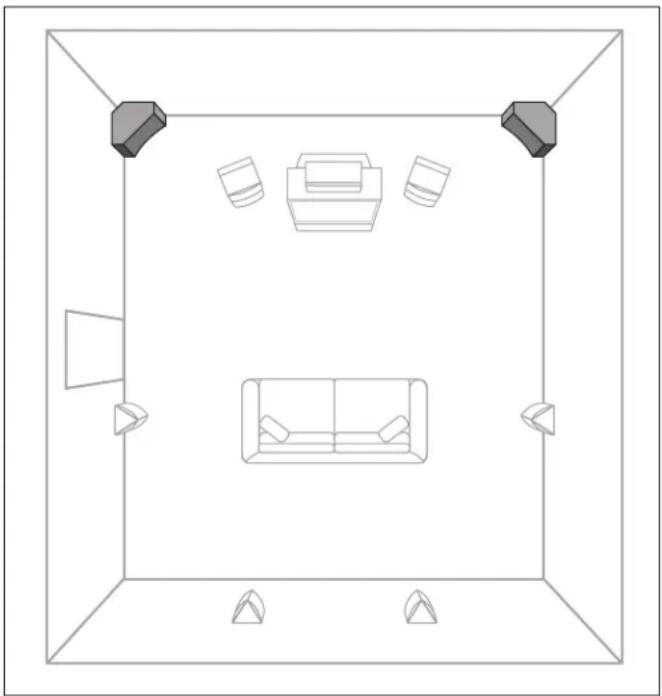
Place the subwoofer in the corner of the room flush up against the walls sometimes people prefer more bass impact for movies, but using this as shown. You will still obtain perfectly acceptable results even if there setting for music can result in overpowering and unnatural bass repro 2 or 3-inch distance between the subwoofer cabinet and the walls becadetion. You may wish to determine both a video level and an audio level of decorative baseboard wall molding or other obstruction. if you find yourself falling into this camp. Remember however, the most
If using a single sub, either front corner is usable, however, try to avoid placement next to an open doorway, as this may cause excessive loss of bass energy. Also, try to avoid placement against a heater. The high temperatures may trigger the sub's protective circuitry resulting in temporary loss of output. Extreme high temperatures may result in damage to the sub.
common error people make when setting up their system is to play the subwoofer (and surrounds) too loudly. Of course, the Home Theater Police will not arrest you for this act. But should you desire the most accurate overall reproduction, a well balanced sound from lowest bass to highest treble is the best way to get it. Have fun. Experiment. Enjoy.
System Initial Set Up
When setting up a complete home theater we strongly recommend that you use a Sound Pressure Level meter. Radio Shack® has a good one that is very affordably priced (approximately \$40-50). To use this met
turn on your system, put the Processor/Receiver in the Test Mode and set its main volume control to 0dB. Sit in the prime listening position, set the subwoofer and satellites produce a cohesive and well integrated the SPL meter to the 70dB scale, Slow Response, and C Weighting. Now sound “picture.”
holding the meter pointed up and in front of you, let the system cycle its test tone from speaker to speaker and set every speaker to the same level, typically 75dB, using the individual level settings in the Processo Receiver. As tempting as it may be to set the subwoofer and/or surround speakers higher than 75dB, listen again after calibration and see if you can acclimate to these levels. Try watching several different movies are keep in mind that the goal is to have a system that sounds like you're actually "in the movie."
For the subwoofer, begin with the processor's calibration set to zero, a
Using the Low Pass Frequency Crossover Control
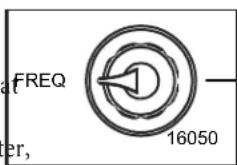
The Phase Control and Low Pass Frequency Control work together to define the behavior of the subwoofer in the frequency range where the sub and satellites play simultaneously.
Most surround sound receivers and processors offer a choice of several crossover frequencies, typically between 80 Hz and 120 Hz. If yours does, we recommend using the 100Hz setting when using small speakers such as those in the System 1200 or 2200. Consult your electronics owner's manual for more details.
Higher crossover frequencies pass more signals to the sub, but can sound boomy and may be more easily localized to the subwoofer. Higher cross over frequencies may be suitable, however, when using very small satellite lights that have no real low frequency performance. Settings lower than
80Hz should be employed if you are using larger speakers that have extended bass response. This way, the subwoofer will only reproduce to very lowest bass frequencies that are in the range where the large main speakers begin to roll off.
It's generally undesirable to have the main speakers and the subwoofer overlap too much. Larger speakers means a lower Low-pass crossover frequency, smaller speakers means a higher Low-pass crossover frequency. Consult the manufacturer's specified low frequency response for your main speakers to determine the appropriate Low-pass setting on your subwoofer. In the end, however, a little time spent experiment will generally result in dramatically better bass response.
The Phase Control
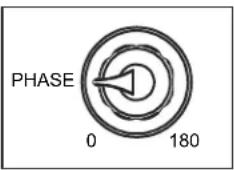
A subwoofer operating out of phase with the rest of the system won't provide optimum low frequency performance. Also, the subwoofer's phase can be affected by room acoustics. Since there is variation in the industry regarding phase, a control that will
adjust the phase of the subwoofer is provided on the amplifier panel. Listen to a monaural musical source with strong bass content. (For example, you can use the mono switch on an FM tuner or preamp, or use a Y-connector on the outputs of one of your source components to get a mono signal.)
Experiment with the position of the phase control to get the smooth est bass. Careful listening will reveal the correct setting. In particular, there will be a more integrated transition between the satellites and the subwoofer when they are properly phased.
A Word About Bass, Center Channel Modes and System Set Up
Many surround processors and receivers feature a “Wide” and “Normal” mode for the center channel speaker. Atlantic Technology recommends that the center channel be operated in the “Normal” mode when using a powered subwoofer. The center channel speaker will sound more dynamic and the intelligibility of the system will generally be improved when in the “Normal” mode.
With discrete digital 5.1, 6.1, or 7.1 channel systems (Dolby Digital, DTS, etc.) many controllers provide a Bass Management option, which lets you set the front and rear speakers in a limited bandwidth (Small) or full range (Large) mode. When using a subwoofer with Atlantic Technology speakers we recommend setting such a controller to the Small position for all the speakers in the system, with one exception.
When using the high level input connected to your receiver/amplifier's left and right speaker outputs, set the "speaker size" for these left and right channels to "large." This will deliver full-range signals to the subwoofer. The left and right speakers are then connected to the sub's high level outputs, which have filtering to remove deep bass and therefore avoid overdriving these speakers.
Care of Your Subwoofer
The 10 CSB is constructed from Medium Density Fiberboard. MDF is a non-resonant material ideal for speaker system enclosures. To clean the cabinet you may use a soft cloth either dry or slightly dampened with clean water. Be careful not to wet the cabinet or allow any water to enter the cabinet seams. Avoid placing your speakers in direct sunlight or near a source of heat that may, over time, damage the finish.
IMPORTANT: Save Your Boxes! If you can do so, save the carton, packing pieces and plastic bags that came with your subwoofer. They will be useful in case you move or have to ship your subwoofer for any reason. In any case, save all packing materials until you are certain that the system has suffered no damage in shipment. If you find such damage, either visible or internal, contact your dealer immediately for the proper return procedure.
Instruction Manual
Painting the Cabinets
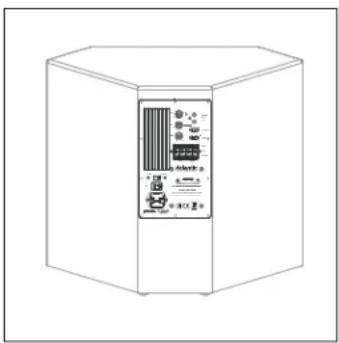
The cabinet may be painted to blend in even better with your room's décor. First, clean the cabinet, using an appropriate cleaner such as non-ammonia Windex® or diluted Simple Green®. Then use a coat of primer, such as Glidden® interior/exterior Grip per® or Rust-Oleum® Rusty Metal Primer. Be sure to follow the primer's instructions.
For the finish coat, we recommend using a latex water-based paint. You may use a brush, pad, roller, or spray paint, depending on the type of finish effect desired. For best results apply two light coats of the final color. Make sure the first coat is completely dry before applying the second coat.
IMPORTANT: Please don't get paint on the amplifier. Also, don't paint the driver recess area of the cabinet or risk getting any paint on the acoustical foam or the driver itself, as this may seriously degrade the unit's performance and void the warranty.
During painting, please protect these areas with paper and masking (painter's) tape. For best results, remove while the paint is still wet.
Specifications
Type Sealed enclosure, down-firing
Bass driver 10" (254mm) long-throw
Frequency response 30-250Hz, +/- 3dB
Amplifier power 180 RMS
Peak output 106dB in 2000 cu.ft.
Dimensions (WxHxD) 22 x 19½ x 12" 559 x 496 x 305mm
Weight 35 lbs (16 kg)
Specifications are those in effect at the time of printing. Atlantic Technology reserves the right to change specifications or designs at any time without notice.
Subwoofer Troubleshooting Guide
Once your subwoofer is set up, you should have many years of maintenance free enjoyment from your system. However, if you should encounter a problem, refer to the following guide to help you find the solution. If a problem persists, you should contact your local authorized Atlantic Technology dealer.
| Problem | Possible Cause | Possible Solution |
| No bass output | AC power cord unplugged or plugged into a non-working outlet. | Plug into a working outlet. |
| Input cables not securely connected or defective. | Check all connections, then try another input cable. | |
| Receiver/Processor's sub-out is muted, due to incorrect configuration of speaker setup menu. | Check that receiver/processor is configured so that all speakers are set to "small" and sub is "on." | |
| Audible buzz or hum | Input cable not securely connected or defective. | Check all connections, then try another input cable. |
| Ground loop through antenna or cable TV system input. | Test by disconnecting antenna and/or cable system input leads. If hum goes away, install isolation balun(s) at that point. |


- 10 CSB CORNER SUBWOOFER
- SAFETY PRECAUTIONS TABLE OF CONTENTS
- MODEL 10 CSB
- CORNER SUBWOOFER
- FOR FUTURE REFERENCE
- 10 CSB SUBWOOFER REAR PANEL
- FEATURES
- CONNECTING YOUR SUBWOOFER
- LOW-LEVEL CONNECTION
- ADDING A SECOND SUB
- HIGH-LEVEL CONNECTION
- HIGH-LEVEL OUTPUT
- EXAMPLE 1: SUBWOOFER LINE OUT/LOW LEVEL IN
- EXAMPLE 2: SUB OUT/LOW LEVEL IN, TWO SUBS
- EXAMPLE 3: PREAMP LINE OUT/LOW LEVEL IN FOR 1 SUBWOOFER
- EXAMPLE 4: PREAMP LINE OUT/ LOW LEVEL IN FOR STEREO SUBWOOFERS
- EXAMPLE 5: PREAMP LINE OUT/LOW LEVEL IN DUAL MONO SUBS
- EXAMPLE 6: SPEAKER OUT/HIGH LEVEL IN FOR 1 SUBWOOFER
- SUBWOOFER TUNING WITHOUT AN SPL METER OR TEST TONES
- HOW MUCH IS ENOUGH
- SYSTEM INITIAL SET UP
- USING THE LOW PASS FREQUENCY CROSSOVER CONTROL
- THE PHASE CONTROL
- A WORD ABOUT BASS, CENTER CHANNEL MODES AND SYSTEM SET UP
- CARE OF YOUR SUBWOOFER
- PAINTING THE CABINETS
- SPECIFICATIONS
- SUBWOOFER TROUBLESHOOTING GUIDE
Brand : ATLANTIC
Model : 10e CSB
Category : Subwoofer