
MD-AD13MB - Walking Aid Gabor - Free user manual and instructions
Find the device manual for free MD-AD13MB Gabor in PDF.


| Product Type | Monitor Mount / Arm |
| Brand | Gabor |
| Model | MD-AD13MB |
| Compatible Monitor Size | 13"-27" (33-69 cm) |
| Maximum Load Capacity | 22 lb (10 kg) |
| VESA Compatibility | 75x75, 100x100 |
| Tilt Range | ±15° |
| Swivel Range | 360° |
| Roll Range | 360° |
| Maximum Arm Extension | 16.3" (41.3 cm) |
| Height | 22.8" (58 cm) |
| Weight | 5.1 lb (2.3 kg) |
| Installation Method | Clamp mount on desk up to 2.4" (6 cm) thick |
| Material | Steel / Aluminum (not specified, typical) |
| Cleaning Instructions | Use a soft, dry cloth only |
| Safety Warning | Do not exceed 22 lb (10 kg) load; mount on sturdy, flat surface |
| Included Parts | Mounting arm, shaft, clamp, VESA plate, spacers, screws, hex key, locking collar, shaft cap |
| Warranty | 1-year limited warranty |
Frequently Asked Questions - MD-AD13MB Gabor
User questions about MD-AD13MB Gabor
0 question about this device. Answer the ones you know or ask your own.
Ask a new question about this device
Download the instructions for your Walking Aid in PDF format for free! Find your manual MD-AD13MB - Gabor and take your electronic device back in hand. On this page are published all the documents necessary for the use of your device. MD-AD13MB by Gabor.
USER MANUAL MD-AD13MB Gabor
For 13"-27" (33-69 cm) LCD desktop computer monitors
User Manual
Thank you for choosing Gabor.
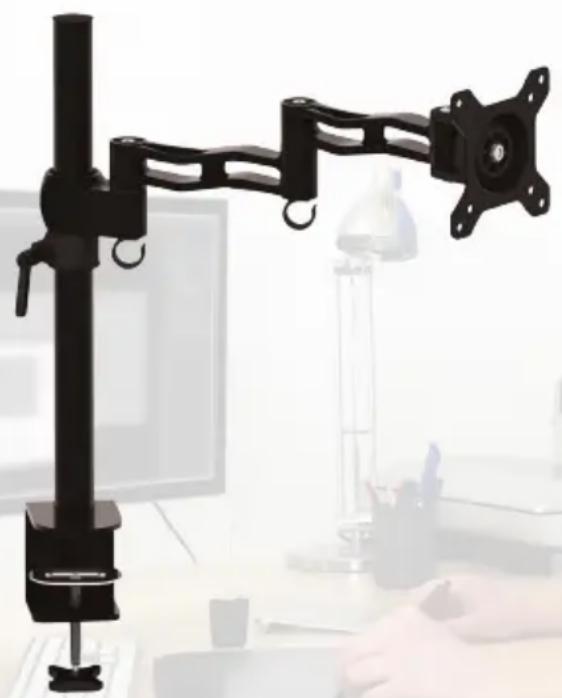
The Gabor MD-AD13MB mounts your 13"-27" (33-69 cm) LCD computer monitor. It attaches to your desk via a built-in clamp, freeing up valuable desk space and enabling personalized monitor placement for improved safety and comfort over conventional monitor stands. This desktop mount incorporates a dual-segment arm with multiple points of articulation to provide a full range of motion, making it easy to adjust your monitor's horizontal position, tilt, swivel, and roll.
natural_image
Black adjustable arm mounted on a stand with a computer monitor and office desk in the background (no visible text or symbols)3Welcome

Also Included
Supplied Parts & Hardware
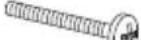
A (4) M4×12 screws
B (4) M4×30 screws
C (4) M5×12 screws
D (4) M5×30 screws
E 4 mm hex key
F Shaft cap
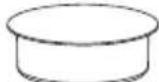
G (4) Spacers
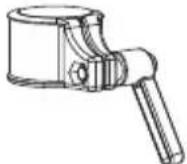
H Locking collar
I User Manual
| M4 M5 Hex Key & Cap Spacers | Locking Collar | |||
 |  | E x1 |  | H x1 |
 |  |  | [4A70] | |
 |  |  |  | |
 |  |  | ||
| (Installed in shaft) | ||||
Product Specifications
Monitor display size:
13"-27" (33-69 cm)
Maximum load capacity:
22 lb. (10 kg)
VESA standards: 75 × 75, 100 × 100
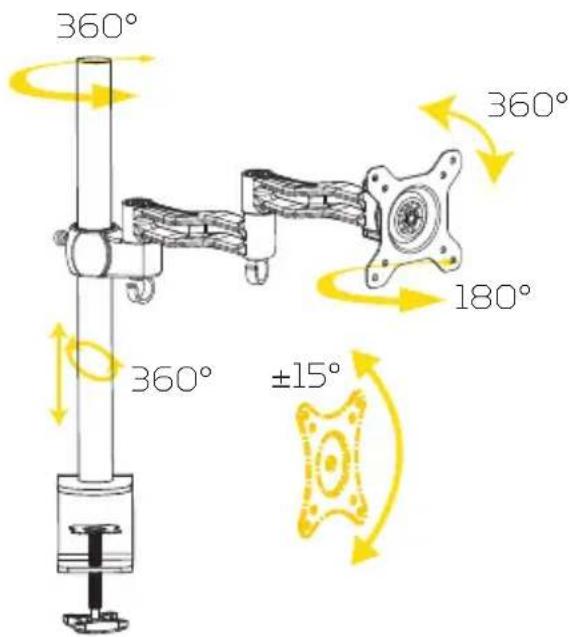
Tilt: ±15°
Swivel: 360°
Roll: 360°
Installation: Horizontal surfaces up to 2.4"
(6 cm) thick
Maximum arm extension: 16.3" (41.3 cm)
Spacer dimensions
Length: 16.5 mm
Outer diameter: 13 mm
Inner diameter: 5.5 mm
Height: 22.8" (58 cm)
Weight: 5.1 lb. (2.3 kg)
Safety Warnings
Please read and follow these instructions and keep this manual in a safe place.
€lean this product with only a soft, dry cloth.
Keep this product away from children.
Make sure everything is secure before proceeding.
Make sure that this product is intact and that there are no missing parts.
To avoid damage to this product, be careful not to overtighten or improperly thread any of the threaded fittings.
Do not exceed the maximum load capacity.
☐ No not install this product on an unsteady structure or one that is prone to vibration, has a chance of being impacted, or is susceptible to other movements. Reinforce the structure as necessary before installing this product.
Mounting surfaces should be sturdy and flat. Do not install this product on a weak, uneven surface.
All photos are for illustrative purposes only.
Getting Started
Decide where you want to place your monitor. Position your monitor directly in front of you, at eye level, and approximately at an arm's length away. You shouldn't need to turn your head to look at your monitor. If you have to strain to look at it, readjust its position.
Attaching the Shaft
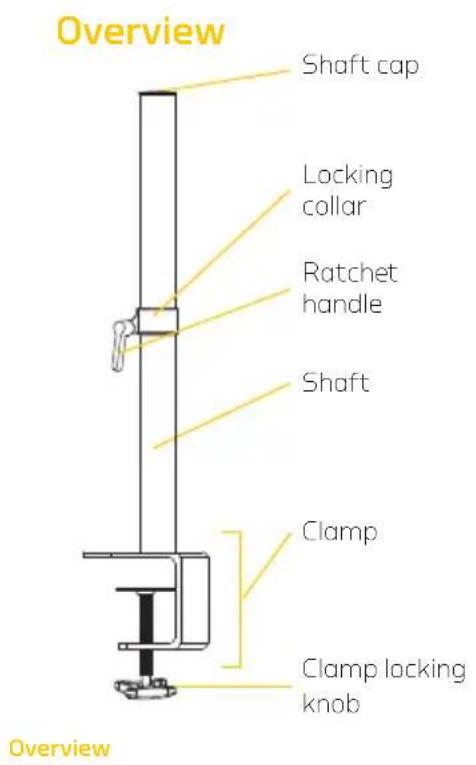
The MD-AD13MB easily attaches to most desks up to 2.4" (6 cm) thick, even if your desk is nearly flush against a wall. Before attaching the shaft to your desk, make sure you have enough room to fit the entire clamp behind your desk.
-
Loosen the clamp locking knob until you can fit the clamp over the edge of your desk.
-
Fit the clamp over the edge of your desk, and tighten the clamp locking knob until the shaft is securely mounted to your desk.
Attaching Your Monitor to the VESA Mounts:
Before attaching your monitor to the VESA mount, you may need to detach your monitor's built-in stand. For information on how to do this, consult your monitor's user manual.
Depending on how the rear of your monitor is configured, you can use one of two methods to install the VESA mount onto your monitor: recessed or flush. If your monitor's VESA mounting holes are in a recessed area of the monitor, use the Recessed Installation instructions on page 12. If your monitor's VESA mounting holes are flush with the rest of the monitor, use the Flush Installation instructions on the next page.
Flush Installation
Note: Before starting, make sure the VESA mount, mounting arm, and monitor are facing the proper direction.
- Carefully place your monitor facedown on a flat surface.
Tip: To avoid scratching the screen, place your monitor on a soft cloth such as a towel.
-
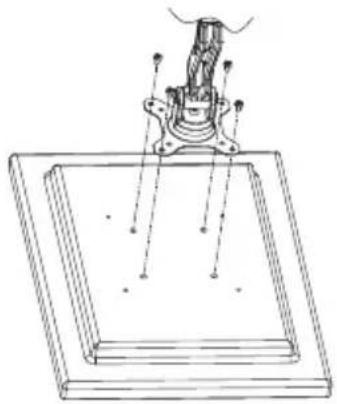
Align the mounting holes in the VESA mount with the corresponding mounting holes in your monitor.
-
Depending on your monitor's thread size, insert four of the included M4×12 or M5×12 screws into the VESA mount and use a Phillips-head screwdriver to fasten them until fully tightened.
Continue to Attaching the Mounting Arm Assembly on page 13.
natural_image
Technical line drawing of a mechanical assembly with mounting bracket and base plate (no text or symbols)Recessed Installation
Note: Before starting, make sure the VESA mount, mounting arm, and monitor are facing the proper direction.
- Carefully place your monitor facedown on a flat surface.
Tip: To avoid scratching the screen, place your monitor on a soft cloth such as a towel.
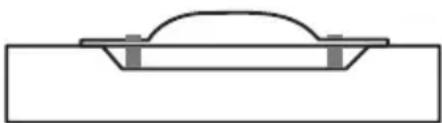
- Place four of the included spacers on each of your monitor's four VESA mounting holes.
- Align the mounting holes in the VESA mount with the four spacers.
- Depending on your monitor's thread size, insert four of the included M4×30 or M5×30 screws into the VESA mount and use a Phillips-head screwdriver to fasten them until fully tightened.
Tip: Thread each of the screws by hand before fastening them with the screwdriver.
Continue to Attaching the Mounting Arm Assembly on the next page.
natural_image
Simple line drawing of a mechanical component or bracket (no text or symbols)Attaching the Mounting Arm Assembly
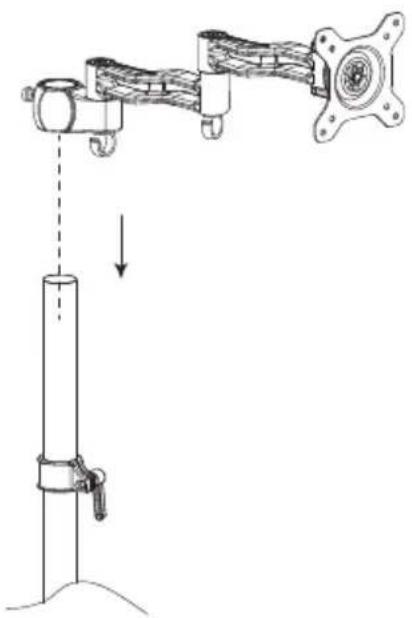
- Loosen the locking collar by rotating the ratchet handle, and then slide the collar onto the shaft.
-
Slide the locking collar to the height at which you want to mount your monitors, and then tighten the ratchet handle to lock the collar in place.
-
Slide the mounting arm assembly (with monitor attached) onto the shaft so it rests on the locking collar, and then fully tighten the locking knob until secure.
- Insert the protective cap into the top of the shaft.
- Thread your monitor cable through the cable clips.
natural_image
Mechanical assembly diagram showing a vertical rod connected to a horizontal arm with a valve, no text or symbols present.Adjusting Tension and Articulation
Arm Positioning
The mounting arm has two joints, making it easy to adjust your monitor's horizontal placement. Position the arm as desired and use the included 4 mm hex key to fasten the hex screws until fully tightened.

natural_image
Technical line drawing of a mechanical assembly with gears and housing (no text or symbols)Monitor Tilt, Swivel, and Roll
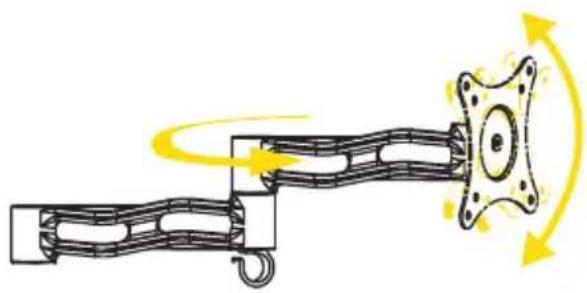
You can adjust the (vertical) tilt and (horizontal) swivel action of your monitor for optimal viewing comfort. You can also roll, or rotate, the monitor 360° for portrait or landscape orientation or anything in between.
natural_image
Diagram of a mechanical linkage with motion arrows indicating rotational motion (no text or symbols)14 Installation Instructions
Customer Support
For more information or to arrange service, visit www.madebygabor.com or call Customer Service at 212-594-2353.

GABOR™ A Gradus Group Brand
Product warranty is provided by the Gradus Group. www.gradusgroup.com
Gabor is a registered trademark of the Gradus Group.
© 2014 Gradus Group LLC. All Rights Reserved.
ONE-YEAR LIMITED WARRANTY
This GABOR product is warranted to the original purchaser to be free from defects in materials and workmanship under normal consumer use for a period of one (1) year from the original purchase date or thirty (30) days after replacement, whichever occurs later. The warranty provider's responsibility with respect to this limited warranty shall be limited solely to repair or replacement, at the provider's discretion, of any product that foils during normal use of this product in its intended manner and in its intended environment. Inoperability of the product or part(s) shall be determined by the warranty provider. If the product has been discontinued, the warranty provider reserves the right to replace it with a model of equivalent quality and function.
This warranty does not cover damage or defect caused by misuse, neglect, accident, alteration, abuse, improper installation or maintenance. EXCEPT AS PROVIDED HEREIN, THE WARRANTY PROVIDER MAKES NEITHER ANY EXPRESS WARRANTIES NOR ANY IMPLIED WARRANTIES, INCLUDING BUT NOT LIMITED TO ANY IMPLIED WARRANTY OF MERCHANTABILITY OR FITNESS FOR A PARTICULAR PURPOSE. This warranty provides you with specific legal rights, and you may also have additional rights that vary from state to state.
To obtain warranty coverage, contact the Gabor Customer Service Department to obtain a return merchandise authorization ("RMA") number, and return the defective product to Gabor along with the RMA number and proof of purchase. Shipment of the defective product is at the purchaser's own risk and expense.

www.MADEBYGABOR.com


- Thank you for choosing Gabor.
- Also Included
- Supplied Parts & Hardware
- Product Specifications
- Safety Warnings
- Getting Started
- Attaching the Shaft
- Attaching Your Monitor to the VESA Mounts:
- Flush Installation
- Recessed Installation
- Attaching the Mounting Arm Assembly
- Adjusting Tension and Articulation
- Arm Positioning
- Monitor Tilt, Swivel, and Roll
- Customer Support
- ONE-YEAR LIMITED WARRANTY
Brand : Gabor
Model : MD-AD13MB
Category : Walking Aid