KASLCR12PCA - Cutting machine Kogan - Free user manual and instructions
Find the device manual for free KASLCR12PCA Kogan in PDF.


User questions about KASLCR12PCA Kogan
0 question about this device. Answer the ones you know or ask your own.
Ask a new question about this device
Download the instructions for your Cutting machine in PDF format for free! Find your manual KASLCR12PCA - Kogan and take your electronic device back in hand. On this page are published all the documents necessary for the use of your device. KASLCR12PCA by Kogan.
USER MANUAL KASLCR12PCA Kogan
natural_image
Green and white plastic container with internal compartments (no text or symbols visible)WHAT'S IN THE BOX

natural_image
Green plastic electronic device casing with a white circular button (no text or symbols visible)
natural_image
Exterior view of a gray plastic mechanical component with a rectangular cutout (no text or symbols)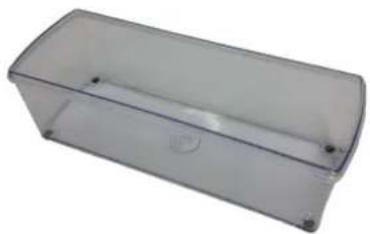
natural_image
Transparent rectangular plastic container with rounded corners and a small circular mark on the side (no text or symbols visible)1 upper cutting section 1 lower cutting section 1 storage container
(1,500ml)

natural_image
Green plastic container with lid, no visible text or symbols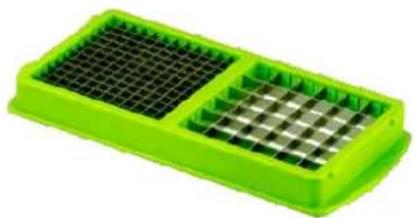
natural_image
Green plastic tray with two mesh grating, one filled and one outlined (no text or symbols visible)
natural_image
Green plastic tray with two side grilles, one filled with black lines (no text or symbols visible)1 lid 1 small/medium blade insert 1 large/slicer blade insert

natural_image
Green plastic tray with two circular cutouts and a central grid pattern (no text or symbols)
natural_image
Green leaf-shaped object with serrated edges and central vein (no text or symbols)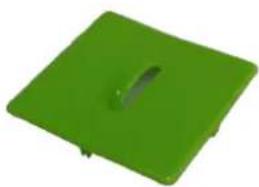
natural_image
Solid green square object with a small circular hole on top (no text or symbols)1 quarter/wedge insert 1 cutting stamp 1 blade guard

natural_image
Green plastic tray with grid pattern and small object inside (no text or symbols)
natural_image
Green plastic tray with a handle and mounting holes (no text or symbols visible)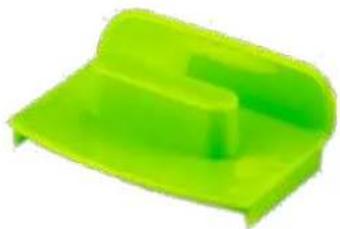
natural_image
Green plastic tray or shelf component with no visible text or symbols1 grating insert (with cover) 1 slicing insert (with blade cover) 1 food grip

natural_image
Green plastic yander with a silver handle, isolated on white background (no text or symbols)1 food peeler
SAFETY
- Blades are extremely sharp. Take care not to touch the blades with your bare hands during use.
- Keep device out of the reach of children at all times!
- To protect against injury to persons or damage to the blades, always use the protective blade guard on the unused blades.
- When using the self-cleaning mechanism, ensure that there are no blade inserts in the device.
SETTING UP
Cutting blades
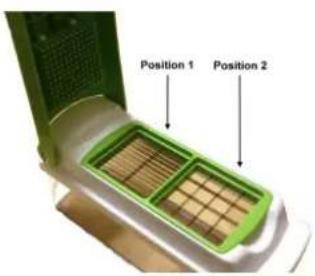
During use, always ensure that the blades you wish to use are set in position 1 as shown to right, except when using the quarters and wedges blade. (See 'Blade insert for quarters and wedges' below for further details.)
text_image
Position 1 Position 2Blade guard
Ensure that you have the blade guard in place to cover the unused blades in position 2 at all times.
This will protect the blades from dulling and will prevent cross-contamination from other foods, while also protecting the user from possible injuries.

natural_image
Hand placing a green griddle into a white and white plastic food processor (no text or symbols visible)Blade insert for quarters and wedges
The quarters and wedges blade insert must always be inserted with the quarter blade ALWAYS being placed in position 1, and the wedges blade must ALWAYS be in position 2.

natural_image
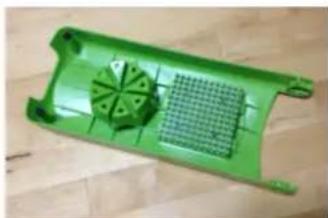
Close-up of a green plastic tray holding a white plastic tray, with a hand adjusting the tray (no visible text or symbols)On the underside of the upper cutting section, there are some rails which slot into the back of the cutting stamp.
To fit the cutting stamp into the rails, simply press the stamp into the rails until they grip into the grooved rear section.
natural_image
Green plastic tray with a grid pattern and circular cutout, placed on a wooden surface (no text or symbols visible)NOTE: The ONLY time the cutting stamp is to be fitted to the upper cutting section is when cutting quarters and wedges. For all other uses with other blade types, remove the cutting stamp.
Grating Insert
Open the upper cutting section to a vertical position, then lift upwards so the hinges lift up from the sides. Remove the protective cover by unhooking the side tabs. (Ensure you put the cover back over the grating blades again after use to protect them from damage, and yourself from injury.)
Position the end feet of the grating insert into the lower cutting section, then press downward until they lock into position.
You can now grate your food. The gratings will fall into the storage container.

natural_image
Close-up of a hand pressing down on a white plastic tray with green grating (no text or symbols visible)
natural_image
Close-up of hands holding a green plastic container with visible internal components (no text or symbols)Slicing insert
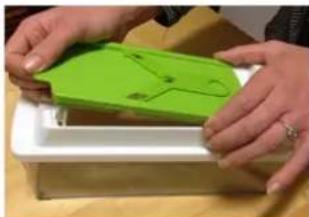
Open the upper cutting section up to a vertical position, then lift it upwards so the hinges lift up off from the sides.
Position the feet of the slicing insert into the lower cutting section. Press downward until it locks into position.
natural_image
Close-up of hands holding a green 3D-printed object with a small circular mark, placed on a white tray (no visible text or symbols)Remove the protective blade cover by pulling on the tab and pulling the cover away from the V-shaped blade.
Guide the food across the blade with one hand while holding the unit in place with the other hand.
The V-shaped blade will cut the food into slices of uniform thickness.
Be sure to always use the food holder under all circumstances when using this insert.

natural_image
Hand placing a green plastic tray with a black outline on top, placed on a white tray (no text or symbols visible)Food Holder
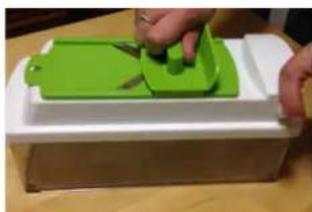
Place food onto the slicing insert, then using the food grip, press the flat edge down onto the ingredients, firmly enough so that the small points on the hold dig slightly into the food for a good grip.
Ensure that the upwardly sloped end of the food grip points away from the grip of the slicing insert.
natural_image
Person using a green 3D printer to cut a green component into a white base (no text or symbols visible)CARE & CLEANING
Clean the unit thoroughly before first use, and then clean it after each time it is used again. The unit is fully dishwasher safe.
Disassembling the unit
Open the upper cutting section up to a vertical position, then lift it upwards so the hinges lift up off from the sides.
Lift up the entire upper and lower cutting sections together to remove.
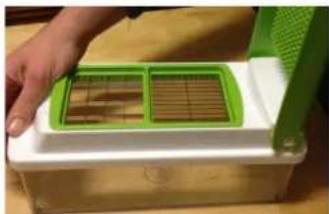
natural_image
Close-up of a hand placing a green and white plastic grating into a white mold (no text or symbols visible)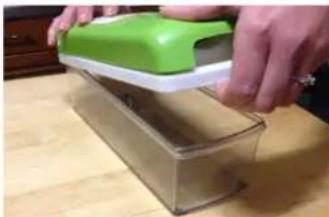
natural_image
Person using a green and white plastic tool to press or install a transparent container on a wooden surface (no text or symbols visible)Self-cleaning
To remove food scraps from between the pegs, simply press the bottom on top of the cutting section. The self-cleaning plate will then move down along the pegs, pushing all remaining food scraps off.

natural_image
Person using a green spray bottle to add chocolate into a white mold (no text or symbols visible)HINTS & TIPS
•Dip blade inserts into water before use. Wet blades cut faster and easier.
- Foods with skins such as capsicums, apples, pear or pineapple should either be peeled beforehand, or placed onto the blades with the skins facing up. This reduces the effort required in cutting and also reduces dulling of the blades.
- The storage container can be used to store ingredients in the fridge for extended periods of time when used with the sealing lid.