
X606-R - Surveillance Camera Epcom - Free user manual and instructions
Find the device manual for free X606-R Epcom in PDF.


| Product Type | Mini Light Bar |
| Brand | Epcom |
| Model | X606-R |
| Light Source | 18 High-Power LEDs (Gen III) |
| Input Voltage | 12-24 VDC |
| Max Current | 3A |
| Power Output | 36W |
| Flash Patterns | 25 programmable patterns |
| Operating Temperature | -40°C to 55°C |
| Mounting Method | Suction cups and magnetic base (with cigarette lighter adapter) |
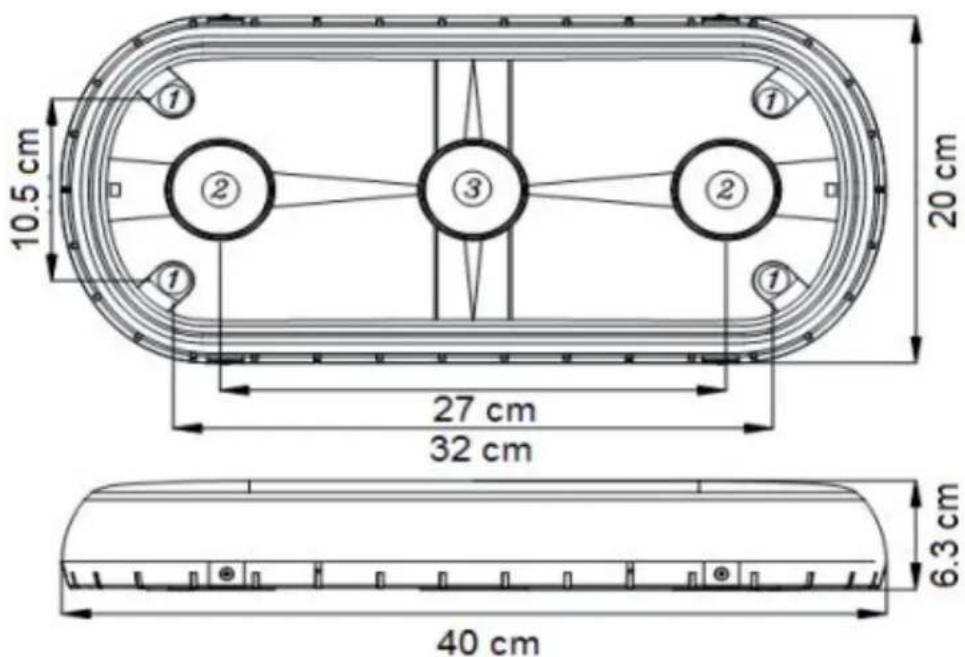
| Dimensions (W x H x D) | 15.7" x 7.8" x 2.4" (40cm x 20cm x 6.3cm) |
| Cable Functions | Black (Ground), Red (Power +), White (Pattern select) |
| Package Includes | Mini light bar (1 pc) |
| Package Includes | User Manual (1 pc) |
| Intended Use | External vehicle installation |
| Maintenance | Periodic check of mounting bolts |
| Cleaning | Use neutral soap and soft cloth |
| Chemical Warning | Do not use gasoline or other chemicals |
| Specifications Note | Subject to change without notice |
Frequently Asked Questions - X606-R Epcom
User questions about X606-R Epcom
0 question about this device. Answer the ones you know or ask your own.
Ask a new question about this device
Download the instructions for your Surveillance Camera in PDF format for free! Find your manual X606-R - Epcom and take your electronic device back in hand. On this page are published all the documents necessary for the use of your device. X606-R by Epcom.
USER MANUAL X606-R Epcom
natural_image
Close-up of a red-lit warning light fixture with two illuminated buttons (no text or symbols visible)Introduction
The X606 mini lightbar, adopts the high power of 18 Leds Gen III (Generation III) as a light source, with unique appearance, Compact structure, easy operation and flashing patterns
Features included are high brightness, easy installation and a long life span.
The lightbar is designed to be installed outside a vehicle
Please read the manual before installing.
Dimensions
Cable Configuration
Black Cable : GND
Red Cable: VCC
White Cable: select type of cable (gives positive pulses)
Technical Data
• Voltage: 12 - 24 VDC
• Consumption: 3A max
- Power: 36W
- Flash Patterns: 25 patterns
• Temperature: -40°C \~ 55°C
- Mounting: Suction and Magnet with vehicular cigarette lighter adapter
- Dimensions: 15.7" x 7.8" x 2.4" / 40cm x 20cm x 6.3cm
Content
Mini light bar X606 1 Pc
User Manual 1 Pc
Maintenance
It is recommended to periodically check the mounting bolts in order to avoid any accident.
Use neutral soap and a soft cloth to clean the cover plastic.
Note: Do not use gasoline or other chemicals to clean the plastic cover.
Important Announcement
Due to continuous changes & improvements done to this product We reserve the right to change specifications and information provided in this user manual at any time without notice


Brand : Epcom
Model : X606-R
Category : Surveillance Camera