ESD 9230 WX - Gps COBRA - Free user manual and instructions
Find the device manual for free ESD 9230 WX COBRA in PDF.


User questions about ESD 9230 WX COBRA
0 question about this device. Answer the ones you know or ask your own.
Ask a new question about this device
Download the instructions for your Gps in PDF format for free! Find your manual ESD 9230 WX - COBRA and take your electronic device back in hand. On this page are published all the documents necessary for the use of your device. ESD 9230 WX by COBRA.
USER MANUAL ESD 9230 WX COBRA
Operating Instructions for Your
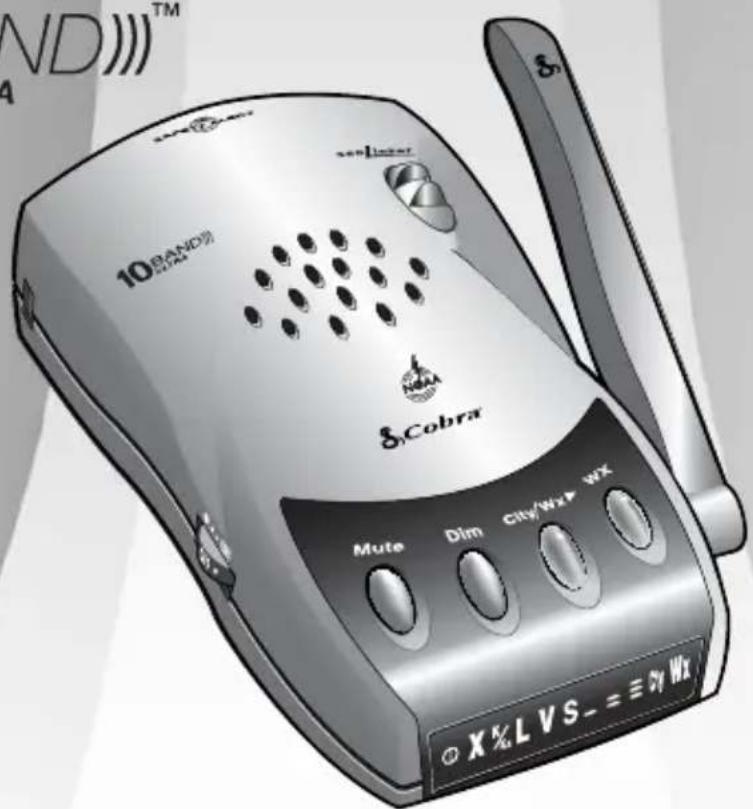
Cobra® 10 Band™ Extra Sensory Detection®
RADAR/LASER DETECTOR
MODEL ESD -9230 WX
10BAND)TM ULTRA
text_image
10 BRAND SOMAR senLinear NBAI 8Cobra Mute Dim City/Wx Wx X% L VS- = ≡ 6y WxNothing comes close to a Cobra™

Cobra®
RADAR/LASER DETECTOR
MODEL ESD-9230 WX
Congratulations
You've made a smart choice by purchasing the ESD-9230 WX radar/laser detector from Cobra: Just look at some of the sophisticated features and capabilities your new unit includes:
- ULTRA SENSITIVITY
- Detects and provides separate alerts for: radar signals (X, K, and Ka bands, with signal strength indicated)
- laser signals
- emergency vehicle safety and strobe alert signals
- VG-2 signals
- LASEREYE ^® for 360° detection of laser and strobe signals
- "INSTANT-ON" speed monitoring detection
• WEATHER/ALL HAZARDS ALERT
RADIO mode to monitor weather radio
broadcast and Weather/All Hazards Alert
• TONE ALERT or VOICE ALERT™ with adjustable volume
- ULTRABRIGHT™ DATA DISPLAY is easy-to-read with adjustable brightness
• CITY or HIGHWAY modes to reduce false alerts
• SAFETY ALERT® Traffic Warning System
• STROBE ALERT™
• MANUAL MUTE or AUTO MUTE of audio alerts
• Distinguishes important safety alerts, from other K band signals
- Mounts easily on windshield or dashboard
This booklet describes the simple steps for mounting and setting up your ESD-9230 WX. It also provides helpful information about how radar and laser guns are used and how you can interpret the alerts you receive.
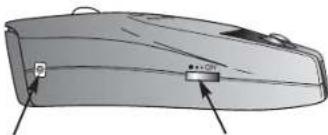
12V DC POWER JACK
ON-OFF/VOLUME
control allows you to adjust the volume of the TONE or VOICE alerts.
MUTE button for MANUAL MUTE or AUTO MUTE of audio alerts. (Also turns Voice Alerts™ on and off.*)
DIM button allows you to adjust the UltraBright™ Data Display brightness for easy reading. (Also turns VG-2 Alert® audio on and off.*)
LASEREYE® for 360° detection of laser and strobe signals.
SPEAKER
WEATHER button to turn Weather/All Hazards Radio mode on and off. (Also turns Weather/All Hazards Alert™ on and off.*)
CITY/WEATHER SET button for CITY or HIGHWAY modes to reduce false alerts. (Also used to select Weather/All Hazards Alert Radio stations)
natural_image
Illustration of a streamlined body with two buttons and a highlighted section (no text or symbols)12V DC POWER JACK
ON-OFF/VOLUME control

power-on, radar, laser, VG-2 and safety/strobe indicators signal strength indicator, city/highway and Weather/All Hazards Alert Radio indicators

text_image
windshield bracket mount CobraImportant Information
Important information about...
Federal Laws Governing the Use of Radar Detectors
It is not against federal law to receive radar transmissions with your Cobra® radar detector. The Communications Act of 1924 guarantees your right to receive radio transmissions on any frequency. Local laws that contravene this Act, while illegal, may be enforced by your local law enforcement officials until and unless they are prohibited from doing so by federal court action.
Safety Alert
Use of this product is not intended to, and does not, ensure that motorists or passengers will not be involved in traffic accidents. It is only intended to alert the motorist that an emergency vehicle equipped with a Cobrd® Safety Alert® transmitter is within range as defined by that product. Please call local fire and police departments to learn if coverage exists in your area.
Safe Driving
Motorists, as well as operators of emergency or service vehicles, are expected to exercise all due caution while using this product, and to obey all applicable traffic laws.
Security of Your Vehicle
Before leaving your vehicle, always remember to conceal your radar detector in order to reduce the possibility of break-in and theft.
Customer Support
In this user's manual, you should find all the information you need to install and operate your ESD-9230 WX. If you require further assistance after reading through this manual, Cobra® Electronics offers the following customer support services:
Automated Help Desk is available 24 hours a day, 7 days a week at 773-889-3087.
Customer Service Operators are available at 773-889-3087 Monday through Friday, 8:00 a.m. to 6:00 p.m. CST.
Questions can be faxed to 773-622-2269.
Automated Technical Assistance is available 24 hours, 7 days a week via e-mail at: productinfo@cabra.com
On-line answers to frequently asked questions can be found at: www.cobra.com.
WARNING
Modifications or parts substitutions not approved by Cobra Electronics Corporation may violate FCC Rules and void your authority to operate this equipment.
Table of Contents
Important information about...
Federal Laws, Safety Alert ^® /Strobe Alert ^™ , Safe Driving, Security of Your Vehicle, Customer Support....A1
1 Installation 2-4
2 Operation—Getting Started 5
3 Operation—Settings 6-13
Highway/City Mode 6
UltraBright™ Data Display Brightness 7
Muting an Alert 8
Auto Mute Mode 8
Voice/Tone Setting 9
VG-2 Alert® Audio Setting 10
Weather/All Hazards Alert Radio mode 11
Weather/All Hazards Alert 12-13
4 Detection 14-17
Signals Detected 14
Audio Alerts 14
Visual Display 14-16
Instant-On Detection 17
Responding to Alerts 17
5 Understanding Radar and Laser 18-19
6 Maintenance and Service 20-21
7 Limited 1-Year Warranty 22
8 Specifications 23
9 Optional Accessories 24
10 Order Form 25
INSTALLATION
Where to Mount Your Unit
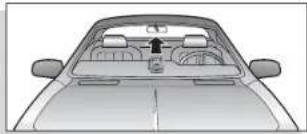
You will get optimum performance from your ESD-9230 WX if you mount it at a point approximately in the center of the vehicle, as low as possible on the front windshield without obstructing the unit's view of the road either to the front or rear. You can also mount it directly on the dashboard.

natural_image
Illustration of a car interior with dashboard and air duct (no text or symbols)Windshield mounting

natural_image
Interior view of a vehicle dashboard with control panel and steering wheel (no visible text or symbols)Dashboard mounting
The unit's lenses must not be blocked and the LaserEye® should have a clear view out the back window to allow 360° detection.
natural_image
Top-down view of a car dashboard with frontview and rear seats (no text or symbols visible)Radar and laser signals pass through glass but not through other materials and objects. Objects that can block or weaken incoming signals include:
▶ windshield wiper blades
▶ mirrored sun screens
▶ dark tinting at the top of the windshield
▶ heated windshields currently available on some vehicles (Instaclear for Ford, ^® Electriclear for GM, ^® consult your dealer to see if you have this option)
Instruction for Ford ^® is a registered trademark of Ford Motor Company, Inc. Electriclear for GM ^® is a registered trademark of General Motors Corporation.
INSTALLATION
Windshield Mounting
- Attach the rubber cups to the bracket.

-
Make sure the rubber cups and your windshield are clean.
-
Push the bracket firmly onto the windshield.
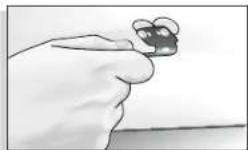
- Attach the detector to the bracket. Check the angle of the unit.

- To adjust the angle if necessary, gently push or pull on the bracket to bend it. DO NOT use the detector to bend the bracket.

- Plug the power cord into the detector.

- Plug the cigarette lighter adapter on the power cord into your vehicle's cigarette lighter.
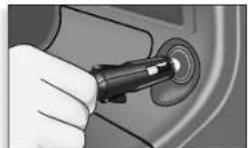
- You can temporarily remove the detector whenever you wish by sliding it off of the bracket.
1
INSTALLATION
Dashboard Mounting
- Place the detector on the dashboard to find a location where the unit has a clear, level view of the road. The angle can NOT be adjusted after mounting.
- Remove the paper backing from one side of the hook-and-loop fastener.

natural_image
Close-up of hands holding a small object, possibly a tool or component (no visible text or symbols)- Attach the pad to the dashboard at your chosen location and remove the other paper backing.

natural_image
Hand holding a small object on a surface (no text or symbols visible)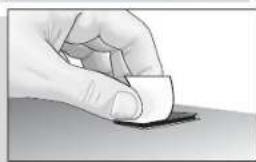
natural_image
Hand holding a small object on a surface, no visible text or symbols- Attach the detector to the hook-and-loop fastener. You can remove and reattach the unit as often as you like.
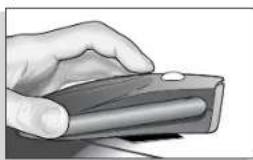
natural_image
Hand holding a flat electronic device (no visible text or symbols)- Plug the power cord into the detector.

natural_image
Close-up of hands using a handheld device to press or install a card (no visible text or symbols)- Plug the cigarette lighter adapter on the power cord into your vehicle's cigarette lighter.
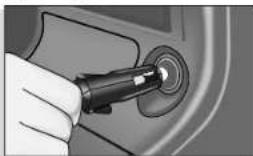
natural_image
Close-up of a hand using a handheld tool to press or install a circular component (no visible text or symbols)OPERATION·GETTING STARTED
2
- Turn on the unit and adjust audio volume by rotating the
ON-OFF/VOLUME CONTROL DIAL clockwise (away from you).

- You will hear the voice messages, "TESTING" (then three beeps) "SYSTEM READY" and "VOICE ALERT". The power symbol will appear in the display indicating that the power is on.
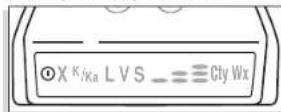
NOTE: In some vehicles, power is supplied to the cigarette lighter even while the ignition is off. If this is the case with your vehicle, you should turn off or unplug your ESD-9230 WX when parking for lengthy periods.

OPERATION·SETTINGS
When changing the settings on your ESD-9230 WX, please keep in mind:
- Buttons can have multiple functions.
- Depending on your choice of Voice Alert™ or Tone Alert mode, you will hear either voice messages or tones confirming changes in settings.
- All settings will be stored in memory when the power is turned off and recalled when the power is turned back on.
Highway/City Mode
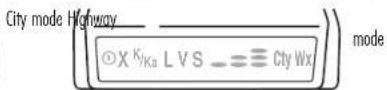
Setting your ESD-9230 WX to City mode delays all X band audio alerts until the signal strength reaches level 3. (A single beep will sound when the signal is first detected.) This will reduce false alerts while
you are driving in or near urban areas where there are many sources for conflicting X band signals such as microwave towers and automatic door openers.
To change settings, follow the procedure in the table below, which indicates what you will see and hear (either in Voice Alert™ or Tone Alert mode) as you complete each step. The factory setting is Highway mode.
CITY/Wx button

text_image
Press and release Muts Dim Oxy Wx Wx| Procedure | Tone | Voice | Visual Display | |
| To change from Highway mode to City mode | Press and release the CITY/Wx button. | 1 beep | "city" | City appears in the display |
| To change from City mode back to Highway mode | Press and release the CITY/Wx button again. | 2 beeps | "highway" | none |

OPERATION·SETTINGS

UltraBright™ Data Display Brightness
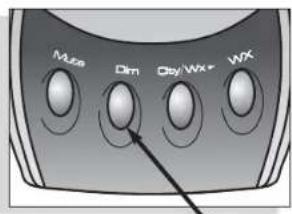
You can choose from three settings for brightness of the display.
You can cycle through the settings by repeatedly pushing the DIM button The factory setting is Bright.
text_image
Muse Dim Clay WX WXDIM button Press and release

flowchart
graph TD
    A["Bright"] --> B["Dim"]
    B --> C["Dark"]
    C --> D["Light"]
    D --> A
    style A fill:#f9f,stroke:#333
    style B fill:#ccf,stroke:#333
    style C fill:#cfc,stroke:#333
    style D fill:#fcc,stroke:#333
| Procedure | Tone | Voice | Visual Display | |
| To changethe brightnessto Dim | Press and releasethe DIM buttononce. | 1 beep | "dim" | Display dims |
| To changethe brightnessto Dark | Press and releasethe DIM buttonagain. | 1 beep | "dark" | Display remains dim (No visual alerts will be seen) |
| To changethe brightnessto Bright | Press and releasethe DIM buttona third time. | 2 beeps | "bright" | Display returnsto full brightness |

OPERATION·SETTINGS
Muting an Alert
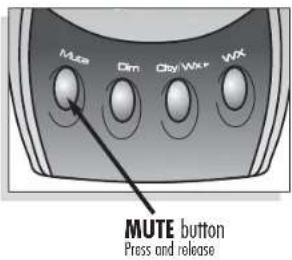
Your ESD-9230 WX allows you to quickly turn off an audio alert by momentarily pressing the MUTE button. If you press the MUTE button a second time during the alert, the audio alert will be turned back on.
Auto Mute Mode
Auto Mute will automatically reduce the audio volume of all alerts after 4 seconds for as long as the signal is detected.
The factory setting for Auto Mute is ON.
text_image
Mute Dim Qty/Wx+ Wx MUTE button Press and release| Procedure | Tone | Voice | Visual Display | |
| To turn Auto Mute off | Press and release the MUTE button while no alert is occurring. | 1 beep | "auto mute off" | none |
| To turn Auto Mute on | Press and release the MUTE button again while no alert is occurring. | 2 beeps | "auto mute on" | none |
OPERATION·SETTINGS

Voice/Tone Setting
You can set your ESD-9230 WX to sound alerts with either a voice or a tone. You can change settings by using the MUTE button.
In Voice Alert™ mode you will first hear several tones, then a voice message announcing the type of signal detected, followed by more tones. In Tone Alert mode, you will hear the tones only.
The factory setting is Voice Alert™ mode.
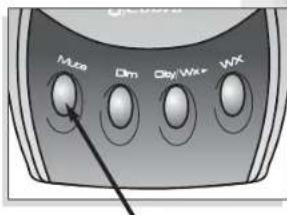
text_image
Mua Dim Grey/Wke WXMUTE button
Press and hold for 2 seconds
| Procedure | Tone | Voice | Visual Display | |
| To change from Voice AlertTM to Tone Alert | While no signal is being detected, press and hold the MUTE button for two seconds. | 1 beep | "tone alert" | none |
| To change from Tone Alert back to Voice AlertTM | While no signal is being detected, press and hold the MUTE button for two seconds again. | none | "voice alert" | none |

OPERATION·SETTINGS
VG-2 Alert® Audio Setting
The ESD-9230 WX is undetectable by police VG-2 detection devices, and will alert you when such a device is in use near your vehicle. During the alert, the unit continues to detect other signals. You can choose whether or not you want your unit to sound VG-2 alerts.
The factory setting is VG-2 Audio On.
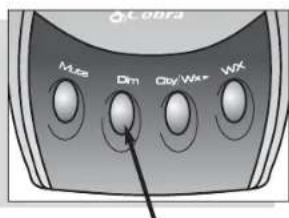
text_image
Cobra Mcs Dim Cty/Wx+ WXDIM button
Press and hold for 2 seconds
| Procedure | Tone | Voice | Visual Display | |
| To turn offVG-2audio alert | While no signal is being detected, press and hold the DIM button for two seconds. | 1 beep | "VG-2audio off" | Vwill blinkonce inthe display |
| To turn onVG-2audio alert | While no signal is being detected, press and hold the DIM button for two seconds again. | 2 beeps | "VG-2audio on" | Vwill blinktwice inthe display. |

OPERATION·SETTINGS

Weather/All Hazards Alert Radio Mode
The Weather/All Hazards Alert Radio feature of your ESD-9230 WX allows you to listen to Weather/All Hazards Alert Radio transmitted
by National Oceanic and Atmospheric Administration (NOAA) in your area. In Weather mode, your unit will continue to detect radar signals and provide alerts. The factory setting is Weather Off.

WX button Press and release
| Procedure | Tane | Voice | Visual Display |
| Press and release theWXbutton to activateWeather/All Hazards AlertRadio mode. If a signal isreceived, you will hearthe radio broadcast. | 2 beeps | "weather on" | Wx |
| NOTE: The Wx in the LED acts as a signal strength meter. A weak signal will cause it to flicker.If the signal is lost, your unitwill automatically return toradar mode. | 1 beep | "weather signallost" | none |
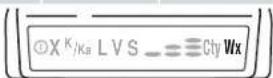
Selecting a Weather Channel
1.
| Procedure | Tone | Voice | Visual Display |
| If you do not hear a broadcast, press and release the CITY/Wx→(STEP) button to cycle through the 10 channels until a signal is received. | none | none | none |
2.
| Procedure | Tone | Voice | Visual Display |
| To turn off: Weather mode, press and release the WX button again. | 1 beep | "weather off" | none |

OPERATION·SETTINGS
Weather/All Hazards Alert
In Weather/All Hazards Alert mode, your ESD-9230 WX will automatically sound a tone alert when a local NOAA broadcast station activates a Weather/All Hazards Alert. The tone alert will be followed by a warning message related to weather, chemical, and other civilian emergencies. While in Weather/All Hazards Alert mode, your unit will continue to detect radar signals and provide alerts.
Note: Weather/All Hazards Alert will operate only when a signal from a weather station can be received. You must first use Weather mode to find a weather station before activating Weather/All Hazards Alert.
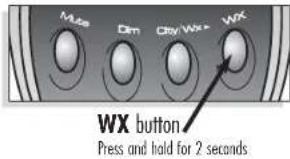
text_image
Mute Dim Ctrl/Wk WX WX button Press and hold for 2 seconds| Procedure | Tone | Voice | Visual Display |
| After finding a weather station in Weather/All Hazards Alert Radio mode (see previous section), press and hold the WX button for 2 seconds to activate Weather/All Hazards Alert. You will not hear a radio broadcast. | 2 beeps | "weather on" | Wx blinks slowly |
| NOTE: If you attempt to activate Weather/All Hazards Alert while no signal is being received, the unit will not go into Weather/All Hazards Alert mode. | 1 beep | "weather alert off" | Wx does not blink |
| If no signal is received for 1 minute, your unit will notify you and but continue to monitor for the signal to return. | 1 beep | "weather signal lost" | Wx stops blinking |
| If no signal is received for 5 minutes, your unit will automatically leave Weather/All Hazards Alert mode. | none | "weather alert off" | none |

OPERATION·SETTINGS

| Procedure | Tone | Voice | Visual Display |
| When an emergency Weather/All Hazards Alert notification is detected, your unit will automatically go into Weather/All Hazards Alert Radio mode and you will begin to hear the broadcast. | none | "weather alert on" | Wx continues to blink slowly |
| Procedure | Tone | Voice | Visual Display |
| Tohum off Weather/All Hazards Alert, press and hold the WX button for 2 seconds again. | 1 beep | "weather alert off" | Wx stops blinking |
Note: If Weather/All Hazards Alert mode automatically turns off because the radio station signal is lost, you can use City/Wx button mode to find a different station, then activate Weather/All Hazards Alert again.

DETECTION
Signals Detected
The tables on the following pages show you the types of signals your ESD-9230 WX will detect, as well as the voice and visual alerts it provides for each one.
Audio Alerts
In Voice Alert™ mode you will first hear several tones, then a voice message announcing the type of signal detected, followed by more tones. In Tone Alert mode, you will hear the tones only.
In both Voice Alert™ and Tone Alert modes, a distinctly different alert tone is used for each type of signal detected (including separate tones for each laser signal). For X, K and Ka band radar signals, the tones will repeat faster as you approach the signal source. The repeat rate of the tones gives you useful information about the signal detected. (See Responding to Alerts, page 17.)
Visual Display
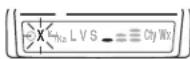
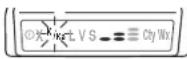
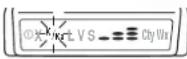
An indication of the type of signal detected will appear in the UltraBright™ Data Display. During X, K and Ka alerts, from one to three ovals will also appear, indicating the strength
of the signal detected. (band indicator only = weakest signal, all ovals lit = strongest signal)
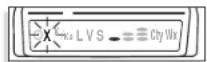
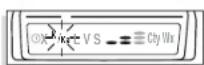
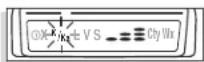
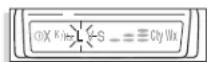
During laser alerts the letter "L" will appear, instead of the signal strength indication.
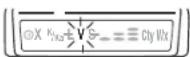
During VG-2 Alert ^® the letter "V" will appear.
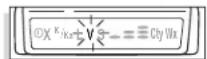
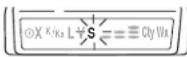
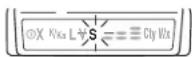
During Safety Alert ^® and Strobe Alert ^™ the letter "S" will appear.

DETECTION

| Type of Signal | Voice | Visual Display | |
| Radar | X band radarK band radarKa band radar | “X alert”“K alert”“Ka alert” | X plus signal strengthK/Ka plus signal strengthK/Ka plus signal strength |
| Type of Signal | Voice | Visual Display | |
| Laser^* | LTI 20-20TM* | "laser alert" | L |
| LTI Ultra-LyteTM* | "laser alert" | L | |
| Kustom Signals ProLaserTM* | "laser alert" | L | |
| Kustom Signals ProLaser IIITM* | "laser alert" | L | |
PLEASE NOTE: Beep rate changes with different laser alerts

| Type of Signal | Voice | Visual Display | |
| Stroke Alert ^1 N · A | 3M, Opticam ^1 N · B or Tomar ^ 3 | "emergency vehicleapproaching" | $ |

DETECTION
| Type of Signal | Voice | Visual Display | |
| Safety Alen® | emergency vehicles | "emergency vehicle approaching" | |
| road hazards | "road hazard ahead" | ||
| trains | 'train approaching" | $ |
PLEASE NOTE: There are different tones for each Safety Alert®
| Type of Signal | Voice | Visual Display | |
| VG-2 Alert* | Intercceptor VG-2TM | "VG-2 alert" | V |
20-20™ and Ultra-Lyte™ are trademarks of Laser Technology, Inc.
ProLaser™ and ProLaser III™ are trademarks of Kustom Signals, Inc.
Strobe Alert™ and 10 Band Ultra™ are trademarks of Cobra Electronics Corporation.
Safety Alert® Traffic Warning System, VG-2 Alert® and LaserEye® are registered trademarks of Cobra Electronics Corporation.
Opticom™ is a trademark of 3M Corporation.
Tomar ^® is a registered trademark of TOMAR Electronics, Inc
Interceptor VG-2™ is a trademark of TechniSonic Industries LTD.
DETECTION

Instant-On Detection
Your ESD-9230 WX is designed to detect instant-on speed monitoring signals, which can suddenly appear at full strength.
You should take appropriate action immediately whenever an alert is given.
Responding To Alerts
| Description Interpretation Recommended Response | ||
| tone repeats slowly at first, then speeds up rapidly | probably police radar | FULL ALERT |
| tone sounds one time only | probably a false alarm, but possibly pulsed radar | exercise caution |
| tone instantly begins repeating rapidly | radar or VG-2 nearby has been activated suddenly | FULL ALERT |
| tone repeats slowly as you approach a hill or bridge, then speeds up sharply as you reach it | probably police radar beyond the hill or bridge | FULL ALERT |
| tone repeats slowly far a short period | probably a false alarm | exercise caution |
| any type of laser alert | laser alerts are never false alarms | FULL ALERT |
| any Safety Alert ^TM or Strobe Alert ^TM | you are nearing an emergency vehicle, railroad crossing, or road hazard (construction, accident, etc.) | exercise caution |

UNDERSTANDING RADAR & LASER
Radar Speed Monitoring Systems
Three band frequencies have been approved by the Federal Communications Commission (FCC) for use by speed monitoring radar equipment:
X band 10.525 GHz
K band 24.150 GHz
Ka band 33.400-36.00 GHz
Your ESD-9230 WX detects signals in all three radar bands.
VG-2
VG-2 is a "detector detector" that works by detecting low-level signals emitted by most radar detectors. Your ESD-9230 WX does not emit signals that can be detected by VG-2, but does detect VG-2 signals and will alert you when a device is in use near your vehicle.
Safety Alert® Traffic Warning System
FCC-approved Safety Alert® transmitters emit
microwave radar signals that indicate the presence of a safety-related concern. Depending on the frequency of the signal emitted, it can indicate a speeding
emergency vehicle or train, or a stationary road hazard.
Because these microwave signals are within the K band frequency, most conventional radar detectors will detect Safety Alert® signals as standard K band radar. Your ESD-9230 WX, however, is designed to differentiate between standard K band and Safety Alert® signals, and give separate alerts for each.
Safety Alert ^® technology is relatively new. Safety Alert ^® transmitters can be found in limited numbers in all 50 states, but the number is growing. Depending on your location, you may not receive these alerts regularly and may often encounter emergency vehicles, trains, and road hazards without being alerted. As the number of transmitters increases, these alerts will become more common.
When you receive such an alert, please watch for emergency vehicles ahead of you, on cross streets, and behind you. If you see an emergency vehicle approaching, please pull over to the right side of the road and allow it to pass.
UNDERSTANDING RADAR & LASER

Strobe Alert™
Special strobes mounted on the light bars of authorized emergency vehicles (fire trucks, police cars, ambulances) automatically change traffic signals as the vehicle approaches an intersection. These strobes and the special strobe detectors located on the traffic signals, introduced fairly recently by 3M and Tomar, are already in use in more than 1000 cities nationwide. Cobra's exclusive Strobe Alert™ detector will detect these special strobes and give an Emergency Vehicle alert.
When you receive such an alert, please watch for an approaching emergency vehicle and pull over to allow it to pass. To inquire about coverage in your area, contact your local fire and police departments.
LIDAR (laser)
The correct name for the technology that most people refer to as laser is actually LIDAR, which stands for Light Detection and Ranging. LIDAR operates much like radar. Its signal spreads out like a radar signal, though not as quickly. Unlike radar, LIDAR must have a clear line of sight to its target vehicle throughout the entire measurement interval. Obstructions such as sign posts, utility poles, tree branches, etc., will prevent valid speed measurement.
Some common questions about LIDAR include:
Does weather have any affect on LIDAR?
Yes. Rain, snow, smoke, fog, or airborne dust particles will reduce the effective range of LIDAR and can, if dense enough, prevent its operation.
Can LIDAR operate through glass?
Yes. Newer LIDAR guns can obtain readings through most types of glass. However, the laser pulse also can be
received through glass to trigger an alarm by your ESD-9230 WX.
Can LIDAR operate while in motion?
No. Because LIDAR operates by line of sight, the person using it cannot drive the vehicle, aim, and operate the gun all at the same time
Is LIDAR legal to use?
Yes. It is legal in all 50 states.
MAINTENANCE & SERVICE
MAINTENANCE & SERVICE

Maintenance of Your Radar Detector
Your ESD-9230 WX is designed and built to give you years of trouble-free performance without the need for service. No routine maintenance is required.
If your unit does not appear to be operating properly, please follow these troubleshooting steps:
▶ Make sure the power cord is properly connected.
Make sure the socket of your vehicle's cigarette lighter is clean and free of corrosion.
▶ Make sure the power cord's cigarette lighter adapter is firmly seated in your cigarette lighter.
▶ Check the power cord fuse. (Unscrew the ribbed end cap of the cigarette lighter adapter and examine the fuse. If required, replace it with a 1-amp fuse only.)
Service
You can receive technical assistance with your unit through one of our customer support services:
Automated Help Desk is available 24 hours a day, 7 days a week at 773-889-3087.
Customer Service Operators are available at 773-889-3087 Monday through Friday, 8:00 a.m. to 6:00 p.m. CST.
Questions can be faxed to 773-622-2269.
Automated Technical Assistance is available 24 hours, 7 days a week via e-mail at: productinfo@cobra.com
On-line answers to frequently asked questions can be found at: www.cobra.com.
If you suspect that your unit requires service, please call 773-889-3087 BEFORE shipping it to Cobra. This will ensure that you receive service as quickly as possible.
If you are asked to send your unit to the Cobra® factory, please follow these steps:
- Send the complete unit, including power cord. (It is not necessary to include the mounting bracket.)
- For warranty repair, enclose some form of proof-of-purchase, such as a photocopy or carbon copy of a sales receipt. If you send the original receipt, it cannot be returned.
- Enclose a typed or clearly written description of the problem you are having with your unit, plus the name and address where you want the unit returned.
-
Pack the unit securely to prevent damage during transit. If possible, use the original packing materials.
-
Ship prepaid and insured using a traceable carrier such as United Parcel Service (UPS), Federal Express, or first class mail with delivery confirmation. Ship to:
Cobra Factory Service Cobra Electronics Corporation 6500 West Cortland Street Chicago, IL 60707 USA
- Please allow 3 to 4 weeks before contacting us about the status of your service. Call 773-889-3087 for assistance.
If your unit is under warranty, it will either be repaired or replaced upon receipt, depending on the model. If your unit is out of warranty, you will receive a letter informing you of the repair or replacement charge.

Cobra Electronics Corporation
6500 West Cortland Street, Chicago, Illinois 60707
www.cobra.com
COBRA ELECTRONICS CORPORATION
warrants that its Cobra® 10 Band Ultra™ Radar/Laser Detectors, and the component parts thereof, will be free of defects in workmanship and materials for period of one (1) year from the date of first consumer purchase. This warranty may be enforced by the first consumer purchaser, provided that the product is utilized within the U.S.A.
Cobra® will, without charge, repair or replace, at its option, defective 10 Band Ultra™ Radar/Laser Detectors, products or component parts upon delivery to the Cobra® Factory Service Department, accompanied by proof of the date of first consumer purchase, such as a duplicated copy of a sales receipt.
You must pay any initial shipping charges required to ship the product for warranty service, but the return charges will be at Cobra's expense, if the product is repaired or replaced under warranty.
This warranty gives you specific rights, and you may also have other rights which vary from state to state.
Exclusions: This limited warranty does not apply; 1) to any product damaged by accident; 2) in the event of misuse or abuse of the product or as a result of unauthorized alterations or repairs; 3) if the serial number has been altered, defaced or removed; 4) if the owner of the product resides outside the U.S.A.
All implied warranties, including warranties of merchantability and fitness for a particular purpose are limited in duration to the length of this warranty.
Cobra ^® shall not be liable for any incidental, consequential or other damages; including, without limitation, damages resulting from loss of use or cost of installation.
Some states do not allow limitations on how long an implied warranty lasts and/or do not allow the exclusion or limitation of incidental or consequential damages, so the above limitations may not apply to you.
| Band | Frequencies |
| X band 10.525 ± 0.050 GHz | |
| K band 24.125 ± 0.125 GHz | |
| Safety Alert ^TM Traffic Warning System | 24.070 ± 0.010 GHz |
| 24.110 ± 0.010 GHz | |
| 24.190 ± 0.010 GHz | |
| 24.230 ± 0.010 GHz | |
| Ka band 34.700 ± 1.300 GHz | |
| Laser 910 ± 50 nm | |
| Strobe 700 ± 300 nm | |
| Unit Dimensions & Weight | |
| Dimensions | 3 12 "W x 1 12 "H x 5 12 "D |
| Weight 170 grams | |
This radar detector is covered by one or more of the following U.S. patents: 5,497,148; 5,594,432; 5,612,685; 6,078,279; 6,094,148. Additional patents may be listed inside the product or pending.

OPTIONAL ACCESSORIES
You can find these fine accessories at your local Cobra® dealer. If you wish, you can order directly from Cobra®
To order by phone
Call 773.889.3087
(Press 1 from the main menu 8 a.m.-6 p.m. M-F CST.)
To order by mail or fax
Please fill out order form on next page, and mail/fax directly to Cobra.®
To order online
Go to www.cobra.com and click on "shop Cobra."

natural_image
Illustration of a mechanical component with no visible text or symbolsDual Port Power Adapter
Includes adjustable plug (upto 90°) and fuse CLP-2B

natural_image
Black-and-white photo of a handheld electric shaver with coiled cable (no text or symbols visible)Straight 12V DC Power Cord
Includes plug and fuse 420-030-N-001

natural_image
Cartoon character wearing a graduation cap (no text or symbols)Windshield Mounting Bracket
Includes suction cups 545-139-N-001
natural_image
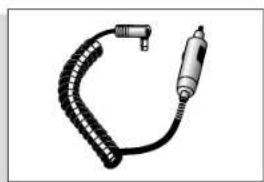
Illustration of a coiled mechanical device with a cylindrical connector (no text or symbols)Curled 12V DC Power Cord
Includes plug and fuse 420-026-N-001
ORDER FORM

| Item # Description Cost Eq. Qty. Amount | ||||
| 420-030-N-001 Straight 12V Power Cord | ||||
| 420-026-N-001 Curled 12V Power Cord | ||||
| 545-139-N-001 Windshield Mounting Bracket | ||||
| CLP-2B | Dual Port Power Adapter | |||
| Prices subject to change without notice.Tax TableIllinois residents add 8.75%Indiana residents add 5%Michigan residents add 4% | Subtotal | |||
| (Tax if applicable) | ||||
| Shipping/handling $4.00 | ||||
| Total | ||||
Tax Table
Illinois residents add 8.75% Indiana residents add 5% Michigan residents add 6% Ohio residents add 5% Wisconsin residents add 5%
For credit card orders fill out order form and fax to: 773.622.2269 or call 773.889.3087 (Press 1 from the main menu) 8:00 am - 6:00 pm, M-F, CST.
Make check or money order payable to: Cobra Electronics 6500 West Cortland St Chicago, IL 60707 USA Attn: Accessories Dept.
To order online, please visit our website at: www.cobra.com and click "shop Cobra" ^12 "
Please print clearly
Name
Address (No P.O. Box)
City State
Zip
Telephone (____)
Credit Card No. Exp. Date
Circle One: Visa MasterCard Discover
Customer Signature
Allow 2-3 weeks for delivery. Offer valid in Continental U.S. only.
S Cobra®
The Cobra® line of quality products includes:
CB radios
microTALK® radios
Radar/Laser Detectors
Safety Alert®
Traffic Warning Systems
Accessories
HighGear™ Accessories
For more information or to order any of our products, please visit our website:
www.cobra.com
Click "shop Cobra®"
Nothing comes close to a Cobra™
Printed in Korea
Part No. 480-018-P
©2002 Cobra Electronics Corporation
6500 West Cortland Street
Chicago, IL 60707 USA