BO73CLBUK - Oven GORENJE - Free user manual and instructions
Find the device manual for free BO73CLBUK GORENJE in PDF.


User questions about BO73CLBUK GORENJE
0 question about this device. Answer the ones you know or ask your own.
Ask a new question about this device
Download the instructions for your Oven in PDF format for free! Find your manual BO73CLBUK - GORENJE and take your electronic device back in hand. On this page are published all the documents necessary for the use of your device. BO73CLBUK by GORENJE.
USER MANUAL BO73CLBUK GORENJE
Instructions for Use
Dear customer!

We sincerely thank you for your purchase. We believe you will soon find ample evidence that you can really rely on our products. To make the appliance easier, we attach these hensive instruction manual.
The instructions should aid you in getting familiar with your new appliance. Please, read them carefully before using the appliance for the first time.
In any case, please make sure the appliance was supplied to you undamaged. Should you identify and transport damage, contact your sales representative or the regional warehouse from where the product was delivered. You will find the telephone number on the receipt or delivery report. We wish you a lot of pleasure with your new household appliance.
Instructions for connection
The connection should be carried out in compliance with the instructions in the section “Connection to the power mains”, and the relevant effective regulations and standards. This should only be performed by a qualified technician.
Rating plate
The rating plate indicating the basic information on the appliance is attached to the edge of the oven and it is visible when you open the oven door.
TABLE
IMPORTANT - READ BEFORE USING THE APPLIANCE ....5
Safety perceptions....5
Warnings....6
Appliance purpose....6
APPLIANCE DESCRIPTION ....7
Cooling fan....8
Control lamps....8
Program timer....8
THE OVEN 9
Before using the oven for the first time....9
Important warnings....9
Electronic program timer....10
Setting the time of day 10
Oven operation without timer settings 10
Oven operation with program timer settings 11
Setting the minute minder....12
Displaying the setting....12
Deleting a setting....12
Operating the oven 13
The oven may be operated in the following modes 14
Shelf levels (depending on the model) 16
Telescopic pull-out guides (depending on the model) .....17
Oven accessories (depending on the model) .....17
FOOD PREPARATION 18
Baking pastry 18
Cooking / roasting meat....23
Grilling and browning....25
Preservation....28
Defrosting 29
CLEANING AND MAINTENANCE ....30
Cleaning 31
Maintenance (depending on the model) 32
Replacing appliance parts 34
SPECIAL WARNINGS AND ERROR REPORTING 36
Important 36
INSTRUCTIONS FOR INSTALLATION AND 38
CONNECTION 38
Important warnings....38
Installation....38
Electrical connection....39
TECHNICAL CHARACTERISTICS ......41
Rating plate....41
Safety percautions
- This appliance can be used by children aged from 8 years and above and persons with reduced physical, sensory or metal capabilities or lack of experience and knowledge if they have been given supervision or instruction concerning use of the appliance in a safe way and understand the hazards involved. Children shall not play with the appliance. Cleaning and user maintenance shall not be made by children without supervision.
- WARNING: The appliance and its accessible parts become hot during use. Care should be taken to avoid touching heating elements. Children less than 8 years of age shall be kept away unless continuously supervised.
- WARNING: Danger of fire: do not store items on the cooking surfaces.
- Only use the temperature probe recommended for this oven.
- WARNING: Ensure that the appliance is switched off before replacing lamp to avoid the possibility of electric shock.
- Do not use harsh abrasive cleaners or sharp metal scrapers to clean the oven door glass since they can scratch the surface, which may result in shattering of the glass.
- Do not use steam cleaners or high-pressure cleaners to clean the cooking hob, as this may result in an electric shock.
- The appliance is not intended to be controlled by external timers or special control systems.
Warnings
- The appliance may only be connected to the power mains by an authorized service technician or expert.
- Tampering with the appliance or non-professional repair thereof may result in risk of severe injury or damage to the product. Any repairs may only be carried out by an authorized service technician or expert.
- If the power cords of appliances located near this appliance are caught in the oven door, they can be damaged, which may in turn result in a short circuit. Therefore, keep the power cords of other appliances at a safe distance.
- The appliance is intended solely for cooking. Do not use it for any other purpose, e.g. for room heating. Do not place empty cookware on the cooking zones.
- Be particularly careful when cooking food in the oven. Due to high temperatures, baking trays, baking sheets, the grid and the oven interior walls become very hot. Always use oven mitts.
- Do not line the oven walls with aluminium foil and do not place baking trays or other cookware on the oven bottom. Aluminium foil would prevent air circulation in the oven, hinder the cooking process, and ruin the enamel coating.
- Appliance operation is safe with and without tray guides.
- Oven door become very hot during operation. A third glass is installed or additional protection to reduce the temperature of the outside surface (only with some models).
- Oven door hinges may be damaged if overloaded. Do not place heavy cookware on the open oven door and do not lean against the door while cleaning the oven. Before cleaning the oven, remove the oven door (see chapter »Removing and re-installing the oven door«). Do not stand or sit on the open oven door (children!).
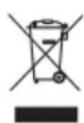
The symbol on the product or on its packaging indicates that this product may not be treated as household waste. Instead it shall be handed over to the applicable collection point for the recycling of electrical and electronic equipment. By ensuring this product is disposed of correctly, you will help prevent potential negative consequences for the environment and human health, which could otherwise be caused by inappropriate waste handling of this product. For more detailed information about recycling of this product, please contact your local city office, your household waste disposal service or the shop where you purchased the product.
Appliance purpose
The appliance is intended for conventional preparation of food in households and should not be used for any other purpose. Individual options of use are comprehensively described in this instruction manual.
APPLIANCE DESCRIPTION
The figure represents one of the appliance models. Since a group of appliances to which these instructions apply, have different features, the instruction manual may describe functions and equipment that may not be available in your appliance.
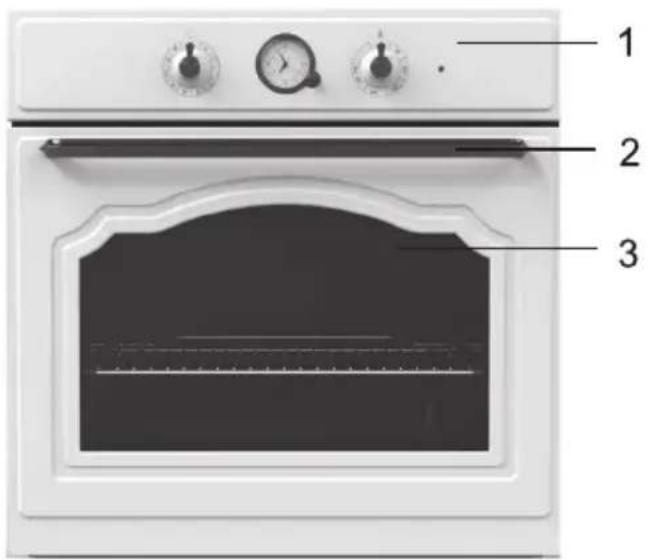
text_image
Labeled diagram of an oven with three parts marked: top view, front view, and interior panel.natural_image
Interior view of a dark oven with two gauges and a horizontal stove (no visible text or symbols)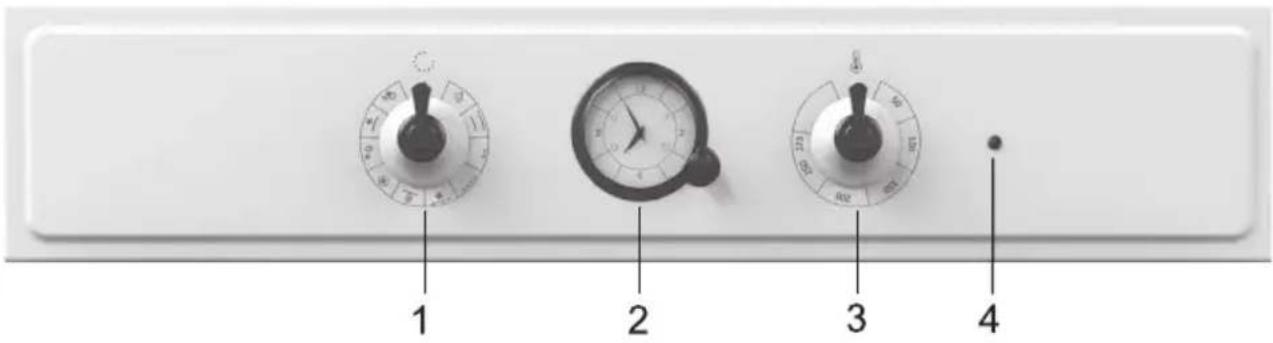
text_image
1 2 3 41 On/Off knob and oven operation mode selection knob
2 Program timer (only with some models)
3 Temperature selection knob / dial
4 Oven control light. This light it lit while the oven is heating up; when the set temperature is reached, it goes off (only featured in some models)
Cooling fan
Control lamps
Program timer
(only with some models)
The appliance features a built-in cooling fan which cools the appliance housing and control panel.
Red lamp
The red lamp is lit when heaters in the oven are operating; when the selected temperature is reached, the lamp goes off.
Backlit knob dials
(only with some models)
The dial of an activated knob is lit when a function is selected. Appliances with this feature do not have the yellow control lamp.
Setting the time of day is requisite for the use of the appliance. Oven operation is only possible once the time of day has been set.
THE OVEN
Before using the oven for the first time
Important warnings
- Remove all accessories from the oven and clean them with warm water and a conventional detergent. Do not use abrasive cleaning aids.
- When the oven is heated up for the first time, a specific odor of a "new appliance" will be discharged; therefore, ventilate the room thoroughly while the oven heats up.
- Use dark, black silicon coated or enamel coated baking trays, as these transmit the heat particularly well.
- Only preheat the oven if specifically stated in the recipe or in the instruction tables herein.
- Heating up an empty oven uses a lot of energy; therefore, a lot of power is saved if several types of pastry are cooked consecutively, as the oven is already heated up.
- Approximately ten minutes before the anticipated end of the cooking process, the oven may be turned off. This way, you will save some power and make use of the accumulated heat.
- Note: When cooking is completed, the cooling fan will stop operating. If you leave the dish in the oven, steam could evaporate from it and condense on the front panel and the oven door. In order to prevent condensation, set the program selector switch to the »light« position. Thus, the cooling fan will continue to operate and cool the oven, preventing the accumulation of condensate.
ELECTRONIC PROGRAM TIMER
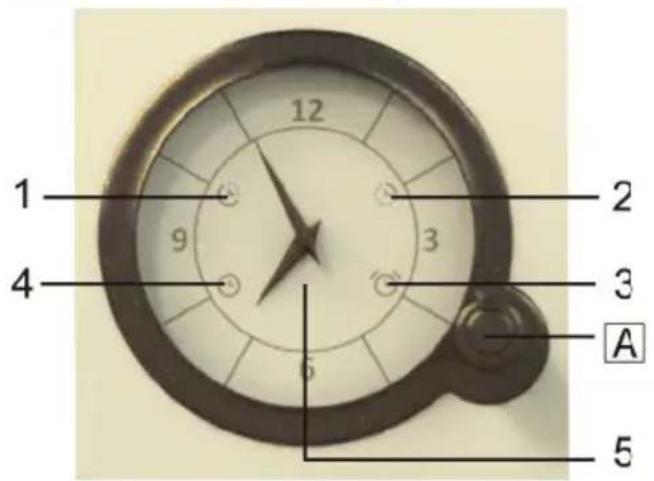
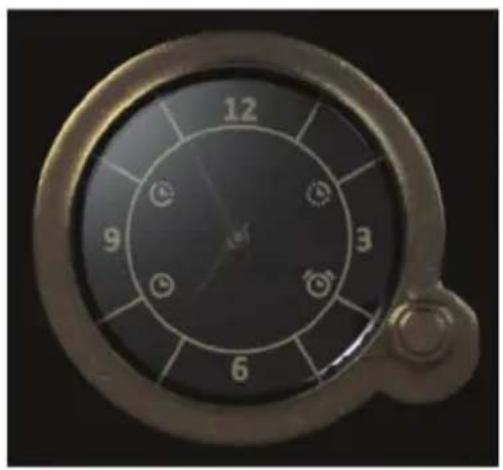
text_image
1 2 3 4 5 AA Function selection knob
natural_image
Close-up of a metallic analog dial with numbered segments (no visible text or symbols)1 Oven delayed start
2 End oven operation
3 Minute minder
4 Time display
5 Clock
Setting the time of day
Oven operation without timer settings
- Select the time settings by consecutively pressing the (A) knob. Selected symbol will flash on the display. Rotate the (A) knob to set the function and press to confirm. Clock hands will automatically move to time display. The set symbols will remain lit.
• Each time you press the (A) knob, this will be confirmed by a short acoustic signal. - Press and hold the (A) knob for 2 seconds to delete the set function.
- If the time display symbol (4) is fl ashing (after connecting the appliance for the first time or following a power failure), press the (A) knob and hold it for two seconds until the fl ashing stops.
- Then select the time display (4) by consecutively pressing the (A) knob. Time display will flash when selected.
- Rotate the (A) knob to set the time.
- Confi rm the setting by pressing the (A) knob again. If nothing is pressed, the setting will be stored automatically after a few seconds.
- After connecting the appliance to the power mains for the first time or after a power supply failure, time display symbol (4) will flash.
Oven operation with program timer settings
- In order for the oven to operate, press the (A) knob and hold it for two seconds. Time display will stop flashing.
- The oven can be used without restrictions if no timer settings are made.
Program timer can be used to program oven operation in two ways:
- Setting the stop time - the oven will stop operating at the preset time.
- Setting delayed start - the oven will automatically start and stop operating at a preset time.
Setting the stop time
This mode allows you to set the time at which you wish the oven to stop operating. The longest possible setting is 15 hours from the current time.
- Check if the clock is set accurately to current time.
- Select the (2) symbol by consecutively pressing the (A) knob until the symbol starts to flash.
- Rotate the (A) knob to set stop time.
- Confir rm the setting by pressing the (A) knob again. Clock hands will move to time display. The oven stop symbol will light up.
- Switch on the oven (use the oven knobs to set the operating mode and temperature). The oven will start to operate at the set time and stop and the selected stop time.
- When the clock reaches the selected stop time, the oven will be switched off, which will also be indicated by an intermittent acoustic signal. The acoustic signal can be switched off by pressing the (A) knob; otherwise, it will switch off automatically after 1 minute. The symbol (2) will flash. To continue cooking, press the (A) knob and hold it for 2 seconds, and set a new cooking time if necessary.
Setting the delayed start
This mode allows you to specify the time when the oven should start to operate (cooking start time) and the time when you wish the cooking process to stop (end time).
Stop time may be delayed by a maximum of 12 hours relative to the current time of day; cooking duration may be set to a maximum of 3 hours.
- Check if the clock is set accurately to current time.
- Setting the start time: Select the (1) symbol by pressing the (A) knob. Rotate the (A) knob to set the start time
Setting the minute minder
Displaying the setting
Deleting a setting
and confirm it by pressing the (A) knob. The symbol for the end of operation will start to flash (2).
- Set the stop time: Rotate the (A) knob to set the stop time and confirm it by pressing the (A) knob.
- The clock hands will turn to clock display. Symbols (1) and (2) will be lit up.
- The timer will wait for the start of the cooking process.
- Set the oven – use the oven knobs to set the operating mode and temperature.
- The oven will start to operate at the start time, and stop operating at the stop time.
- When the clock reaches the selected stop time, the oven will be switched off, which will also be indicated by an intermittent acoustic signal. The acoustic signal can be switched off by pressing the (A) knob; otherwise, it will switch off automatically after 1 minute. The symbol (2) will flash. To continue cooking, press the (A) knob and hold it for 2 seconds, and set a new cooking time if necessary.
The clock can also be used as a minute minder which will sound an alarm upon expiry of a set amount of time.
The minute minder can only be selected when the program timer is not programmed or in use.
- Select the (3) symbol by consecutively pressing the (A) knob until the symbol starts to flash.
- Rotate the (A) knob to set the time when you wish the minute minder to sound the alarm. The longest possible setting is 3 hours.
- Confir rm the setting by pressing the (A) knob again. Clock hands will automatically turn to lock display and the symbol (3) will be lit up.
- When the time you set runs out, an intermittent acoustic signal will be sounded. The acoustic signal can be switched off by pressing the (A) knob and holding it for 2 seconds; otherwise, it will switch off automatically after 1 minute.
Whenever a timer function is set, you may check it by pressing the (A) knob. The clock hands will briefly move to the set value and then return to display the current time.
Delete the setting by pressing the (A) knob and holding it for 2 seconds. The symbol of the deleted function will be switched off.
Operating the oven
The oven is operated by the on/off and operation mode selection knob and the temperature setting knob / dial.
Note: When using the operation mode Large grill or Grill, set the temperature selection knob to the position indicated, as appropriate for these two operation modes.
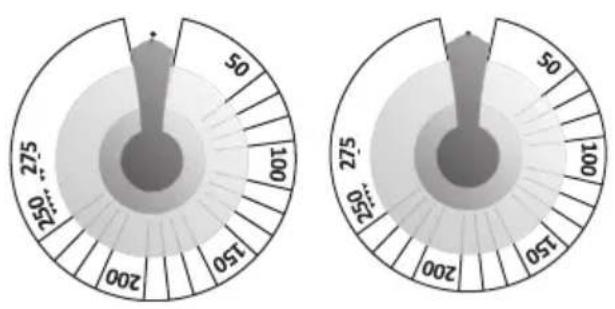
On/off and operation mode knob.
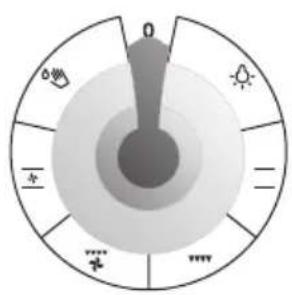
text_image
0 ∞ - + ... +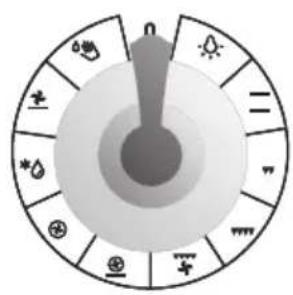
text_image
nThe oven may be operated in the following modes
natural_image
Pure diagram of a mechanical or electrical component with no text, numbers, or symbols visible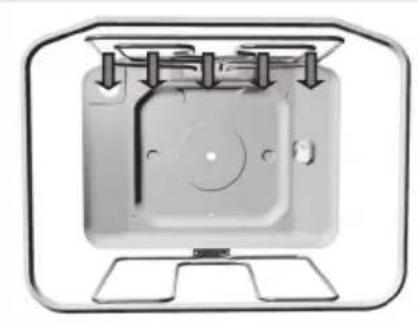
natural_image
Diagram of a mechanical device with mounting base and internal components (no text or symbols)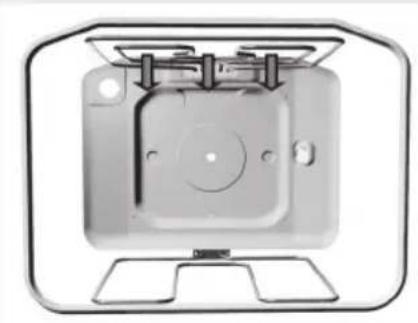
natural_image
Technical illustration of a mechanical component with mounting base and mounting holes (no text or symbols)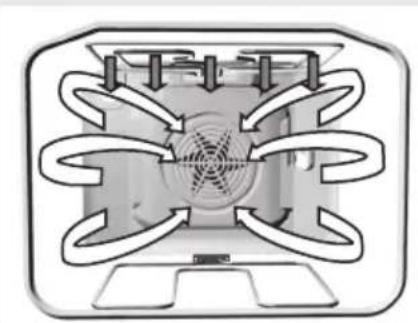
natural_image
Diagram of a mechanical or electrical component with concentric curved flow paths and central hub (no text or symbols)
Oven lighting
With some models, there are two interior lighting lamps: one on the upper part of the back wall, and the other, additional lamp on middle of the right side wall. Oven lighting can be selected independently, without selecting another function. With all other modes of operation, the oven lighting is turned on automatically when the operation mode is selected.

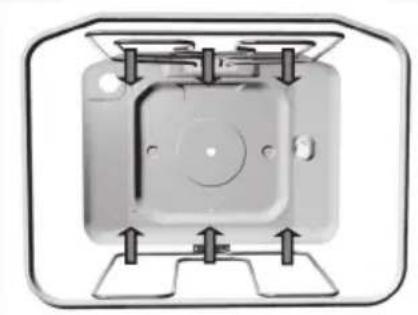
Upper / lower heater
The heaters on the upper and lower side of the oven radiate heat uniformly and evenly into the oven interior. Pastry and meat can be cooked on one shelf level only.

Large grill
With this operation mode, the upper heater and the infra heater are activated simultaneously. The infra heater installed on the oven interior ceiling radiates heat directly. To boost the heating effect or to make optimal use of the entire area of the oven grid, the upper heater is also activated. This operation mode is appropriate for cooking smaller chunks of meat, such as steaks, roasts, chops, ribs, etc.

Grill
Only the infra heater is activated (which also operates, along with the upper heater, in the Large grill mode).
This mode is appropriate for grilling smaller quantities of toasted sandwiches, grill sausages, or simply for toasting bread.

Grill & fan
With this operation mode, the infra heater and the fan are activated simultaneously. It is appropriate for grilling meat and large chunks of meat or poultry on one shelf level.
Also appropriate for cooking food au gratin or browning.
natural_image
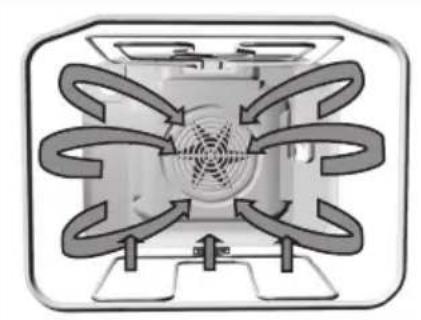
Diagram of a fan or fan-like structure with multiple curved arrows indicating airflow or flow direction (no text or symbols)Hot air and lower heater
With this operation mode, the lower heater and the hot air fan operate simultaneously. This is particularly convenient for making pizza. Also ideal for moist or heavy pastry, fruit cakes made of leavened dough, short pastry, or cheesecakes.
natural_image
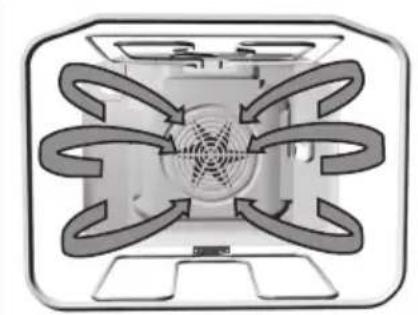
Diagram of a multi-layered air vent system with directional flow arrows (no text or labels)Hot air
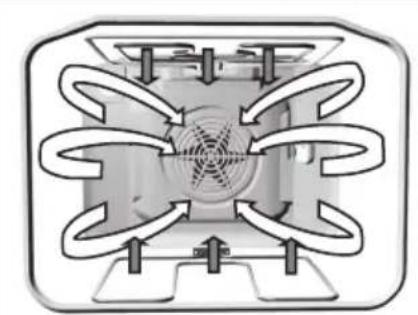
With this operation mode, the round heater and the fan operate simultaneously. The fan at the oven back wall causes the hot air to circulate constantly around a roast of pastry. This operation mode is appropriate for roasting meat and making pastry on several shelves simultaneously. Cooking temperature should be set lower than with conventional operation modes.
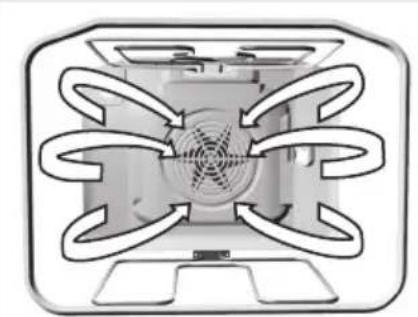
natural_image
Diagram of a refrigerator with airflow arrows indicating circulation or ventilation (no text or symbols)\* Defrosting
With this mode, the air is circulating without any heater being turned on. Only the fan is in operation. This is used for slow defrosting or thawing of frozen food.
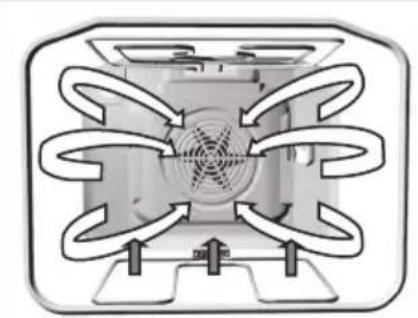
natural_image
Diagram of a heat exchanger or cooling unit with multiple airflow paths and central fan (no text or labels)\* Lower heater and fan
With this operation mode, the lower heater and the fan operate simultaneously. Used for baking low leavened dough and preserving fruit and vegetables. Use the first shelf position from the bottom and shallow rather than deep baking trays to allow the warm air circulate around the upper side of the dish as well.
natural_image
Pure diagram of a symmetrical mechanical or electrical component with radial arrows, no text or symbols present.Upper and lower heater plus the fan
The upper and the lower heater operate simultaneously. The fan enables uniform circulation of hot air in the oven. The system is suitable for making all kinds of pastry, for defrosting food, and drying fruit and vegetables. Before placing food into the preheated oven, wait for the signal lamp (heater operation lamp) to go off for the first time. For best results, cook on a single shelf level only; with cooking on two levels simultaneously, the results are somewhat inferior. The oven must be preheated. Use the second and fourth shelf level (from the bottom). The temperature should be set lower than with conventional heating combinations.
natural_image
Diagram of a mechanical component with mounting holes and internal features, no text or symbols presentShelf levels (depending on the model)
natural_image
Top-down view of a white rectangular device with numbered compartments and a central smiley face (no text or symbols)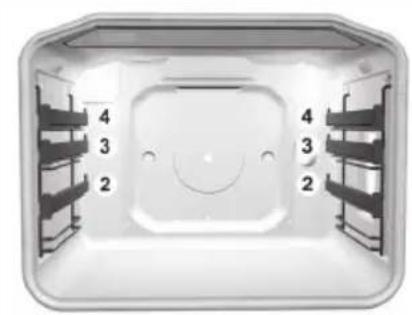
natural_image
Top-down view of a white plastic enclosure with numbered compartments (2, 3, 4) and a central smiley face (no text or symbols)— Lower heater / Aqua Clean
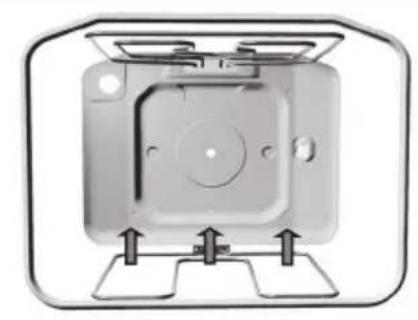
The heat is only radiated by the heater installed in the bottom of the oven. Select this operation mode when you wish to bake / cook the bottom side of the dish more thoroughly (e.g. for moist pastry with fruit filling). Set the temperature with the temperature selection knob / dial. The lower heater can be used for cleaning the oven. Details are given in the “Cleaning and maintenance” section.
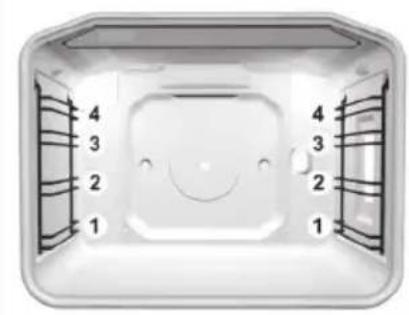
- Accessories (grid, shallow and deep baking tray) can be inserted into the oven at four levels.
- Please note that the shelf levels are always referred to by consecutive numbers starting from the bottom (particular shelf levels are described in the cooking tables below)
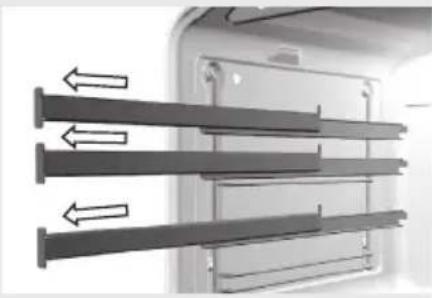
- The guides may be drawn, wire, or telescopic (depending on the appliance model). Telescopic (pull-out or, retractable) guides are installed for the second, third, and fourth level. In case of wire guides, the grid and the trays should always be inserted into the leading slot formed by adjacent wire profi les.
Telescopic pull-out guides (depending on the model)
natural_image
Diagram of a door with three horizontal bars and directional arrows indicating flow or movement (no text or symbols)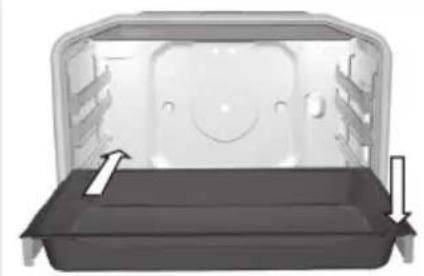
natural_image
3D rendering of a vehicle rear bumper with visible door, seat, and side-mounted sensors (no text or symbols)Oven accessories (depending on the model)
natural_image
Simple line drawing of a rectangular metal grate or rack with vertical slats (no text or symbols)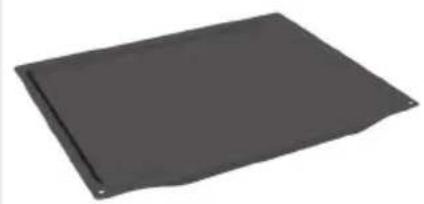
natural_image
Gray rectangular object with a slightly curled edge, resembling a plastic or metal sheet (no text or symbols visible)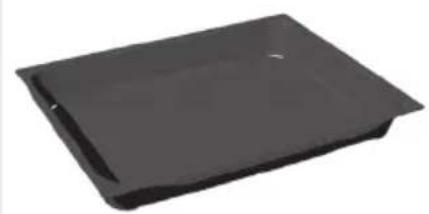
natural_image
Black rectangular object with a flat top and side edge, resembling a plastic or plastic sheet (no text or symbols visible)Telescopic (pull-out or, retractable) guides are installed for the second, third, and fourth level. They are installed on the left and right side wall of the oven interior at three levels.
Pull-out levels consist of (depending on the model):
- three guides that can be pulled out partially,
- one guide that can be pulled out completely and two that can be pulled out partially, or
- three guides that can be pulled out completely.

Telescopic pull-out guides and other parts of oven accessories will heat up! Use a kitchen glove or similar protection when handling them.
- To insert the grid, baking tray, or drip tray, first pull out the telescopic guides of the desired level.
- Place the grid or the shallow or deep baking tray on the pull-out guides and push it into the oven with your hand. Close the oven door only when the telescopic guides have been fully retracted.
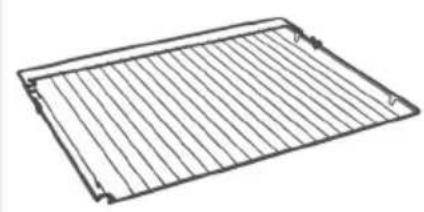
The grid onto which the container with food, or the food directly, is placed.

A safety stop is fitted on the grid and on the guides. To pull out the grid, lift it slightly when it hits the stop.
Shallow baking tray is only intended for baking pastry and cakes.
Deep baking tray is intended for baking meat and moist pastry; it is also intended as a drip tray.

Unless you are using the grill, or the deep baking tray is used only as a drip tray when spit-roasting, the deep tray should not be inserted into the first guide.
FOOD PREPARATION
Baking pastry
natural_image
Pure diagram of a mechanical or electrical component with no text, numbers, or symbols visible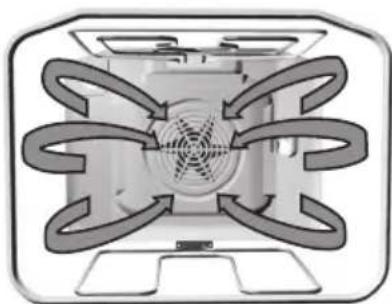
natural_image
Diagram of a fan or vent system with radial flow arrows, no text or symbols present- For baking pastry, use the = , or . mode of operation. (Oven operation with the selected mode, or system, depends on the appliance model).
- When baking pastry, always remove the fat filter.
Instructions
- When baking pastry, always observe the instructions on the shelf / guide level, temperature, and cooking time indicated in the pastry baking table. Do not be prejudiced by experience you may have with other ovens. The values indicated in the cooking table are defined and checked especially for this particular oven.
- If the baking table does not specifically address a particular type of pastry, see the information for a similar type of pastry.
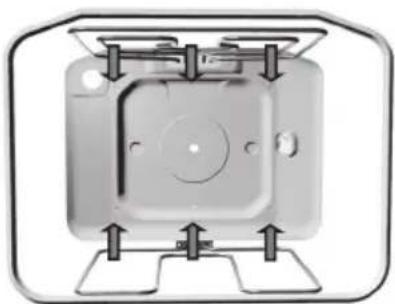
— Baking pastry with upper and lower heater
- Bake the pastry at one level only.
- Upper / lower heater combination is particularly appropriate for baking various types of pastry, bread, and meat.
- Use dark-colored baking trays. Light-colored trays reflect the heat, which leads to poorer cooking (browning) results. Always place the models on the grid. If you are using the supplied baking tray, remove the grid.
- Preheating will shorten the cooking time. Place the dish into the oven only when the selected temperature has been reached, i.e. when the control lamp (heater operation lamp) goes off for the first time.
Baking pastry with hot air
Baking pastry with hot air is particularly convenient when you wish to bake on several shelf / guide levels simultaneously, especially when preparing bite-size pastry in shallow trays. Preheating is recommended, and the use of the second and third guide level. This mode is also appropriate for moist pastry and fruit cakes (in this case, bake on a single level only).
- The temperature is normally set lower than when baking with the upper/lower heater combination (see also the pastry baking table).
- Various types of pastry can be baked simultaneously, if the required temperature is at least approximately the same for all.
- Baking time can vary, even for equal baking trays. When
baking in several baking trays simultaneously – on two or even three levels, baking time for each tray can be different. You may have to remove one of the trays sooner (normally, this would be the uppermost tray.
- If possible, prepare bite-size pastry, such as cupcakes, in the same thickness and height. Unevenly sized pastry will be unevenly browned!
- When baking several types of pastry simultaneously, there will be a significant amount of vapor in the oven, resulting in accumulation of condensate on the oven door.
Tips on baking pastry
Is the pastry completely done?
Use a wooden stick to pierce the pastry at the highest point. If there are no traces of dough when the stick is removed, the pastry is done. Turn off the oven and use the remaining accumulated heat.
The pastry has collapsed
Check the recipe. Next time, use less liquid. Observe the instructions on mixing / kneading time, especially when using small household appliances.
The pastry is too light-colored
Next time, use a dark-colored baking tray, place the tray one guide level lower, or turn on the lower heater towards the end of the cooking process.
The pastry with a moist fi lling (e.g. cheesecake) is not completely done
Next time, reduce the temperature and extend the cooking time.
Notes on the pastry baking table:
- Two values are indicated for temperature, lower and upper. Initially, set the lower temperature; if the pastry is not brown enough, increase the temperature next time.
- Cooking times are given as an estimate and may vary subject to a number of circumstances.
- The value printed in bold in the temperature table indicates the most appropriate operating mode for a particular type of pastry.
- The indication * means that the oven should be preheated with the corresponding operating mode selected.
- When using baking paper, make sure it is resistant to high temperature.
Pastry baking table for combined upper and lower heater or hot air operating mode - when cooking on one level only
| Type of pastry Guide | (from the bottom) | Temperature (°C) = | Guide (from the bottom) | Temperature (°C) ⊕ | Cooking time (minutes) |
| Sweet pastry | |||||
| Marble cake, ring cake 1 160-170 1 150-160 50-70 | |||||
| Rectangle-shaped cake 1 160-170 1 150-160 55-70 | |||||
| Cake made in cake tin 1 160-170 2 150-160 45-60 | |||||
| Cake tin cheesecake | 1 | 170-180 | 2 | 150-160 | 65-85 |
| Fruit cake, short pastry | 1 | 180-190 | 2 | 160-170 | 50-70 |
| Fruit cake with dressing | 1 | 170-180 | 2 | 160-170 | 60-70 |
| Sponge cake* | 1 | 170-180 | 2 | 150-160 | 30-40 |
| Cake with icing | 2 | 180-190 | 2 | 160-170 | 25-35 |
| Fruit cake, mixed dough | 2 | 170-180 | 2 | 150-160 | 45-65 |
| Cherry cake | 2 | 180-200 | 2 | 150-160 | 35-60 |
| Sponge cake roll* | 2 | 180-190 | 2 | 160-170 | 15-25 |
| Leavened dough cake 2 160-170 2 150-160 25-35 | |||||
| Hefezopf (leavened dough) | 2 | 180-200 | 2 | 160-170 | 35-50 |
| Christmas cake | 2 | 170-180 | 2 | 150-160 | 45-70 |
| Apple pie | 2 | 180-200 | 2 | 170-180 | 40-60 |
| Oven-baked donuts | 1 170-180 2 150-160 40-55 | ||||
| Savory pastry | |||||
| Quiche Lorraine | 1 | 190-210 | 2 | 170-180 | 50-65 |
| Pizza* | 2 | 210-230 | 2 | 190-210 | 25-45 |
| Bread | 2 | 190-210 | 2 | 170-180 | 50-60 |
| Buns* | 2 | 200-220 | 2 | 180-190 | 30-40 |
| Bite-size pastry | |||||
| Short pastry - cookies * | 2 | 160-170 | 2 | 150-160 | 15-25 |
| Merengue * | 2 | 160-170 | 2 | 150-160 | 15-28 |
| Leavened dough | 2 | 180-190 | 2 | 170-180 | 20-35 |
| Puff pastry | 2 | 190-200 | 2 | 170-180 | 20-30 |
| Choux pastry (cream filled) | 2 | 180-190 | 2 | 180-190 | 25-45 |
| Soufflés | |||||
| Rice soufflé | 1 | 190-200 | 2 | 180-190 | 35-50 |
| Fresh cheese soufflé | 1 | 190-200 | 2 | 180-190 | 40-50 |
| Frozen pastry | |||||
| Apple, cheese pie | 2 | 180-200 | 2 | 170-180 | 50-70 |
| Cheesecake | 2 | 180-190 | 2 | 160-170 | 65-85 |
| Pizza | 2 | 200-220 | 2 | 170-180 | 20-30 |
| French fries for oven * | 2 | 200-220 | 2 | 170-180 | 20-35 |
| Croquettes | 2 | 200-220 | 2 | 170-180 | 20-35 |
Note: Guide number refers to the grid onto which smaller baking trays or cake tins are placed, and to shallow baking tray. The deep baking tray should not be inserted into the first guide.
Settings table for baking pastry with hot air and lower heater
| Type of pastry Guide (from the bottom) | Temperature (°C) Cooking time (minutes) | |
| Cheesecake (750g cheese) - short pastry | 2 150-160 65-80 | |
| Pizza * - leavened dough 2 20 | 0-210 15-20 | |
| Quiche Loraine - short crust dough | 2 180-200 35-40 | |
| Apple pie with icing - leavened dough | 2 150-160 35-40 | |
| Fruit cake - mixed dough 2 15 | 0-160 45-55 | |
| Apple pie - flaky pastry 2 170 | -180 45-65 | |
Pastry baking table for upper and lower heater with fan operating mode
| Type of pastry Guide | (from the bottom) | Temperature (°C) Cooking time | |
| = | (minutes) | ||
| Sweet pastry | |||
| Marble cake, ring cake 1 150-160 | 50-60 | ||
| Rectangle-shaped cake 1 150-160 | 55-65 | ||
| Cake made in cake tin 1 150-160 | 45-55 | ||
| Cake tin cheesecake 1 150-160 | 65-75 | ||
| Fruit cake, short pastry 1 160-170 | 45-65 | ||
| Fruit cake with dressing 1 160-170 | 55-65 | ||
| Sponge cake* 1 150-160 25-35 | |||
| Cake with icing 2 160-170 25-35 | |||
| Fruit cake, mixed dough | 2 | 150-160 | 45-60 |
| Cherry cake | 2 150-160 30-40 | ||
| Sponge cake roll* | 2 | 160-170 | 15-23 |
| Leavened dough cake 2 | 150-160 25-35 | ||
| Hefezopf (leavened dough) | 2 | 160-170 | 35-45 |
| Christmas cake 2 150-160 45-65 | |||
| Apple pie | 2 160-170 50-60 | ||
| Oven-baked donuts | 1 150-160 35-45 | ||
| Savory pastry | |||
| Quiche Lorraine | 1 170-180 45-55 | ||
| Pizza* | 2 | 190-200 | 20-25 |
| Bread | 2 170-180 50-60 | ||
| Buns* | 2 180-190 | 15-20 | |
| Bite - size pastry | |||
| Short pastry - cookies | 2 | 150-160 | 15-25 |
| Merengue * | 2 | 150-160 | 15-25 |
| Leavened dough | 2 | 160-170 | 18-23 |
| Puff pastry | 2 | 170-180 | 20-30 |
| Choux pastry (cream filled) | 2 | 170-180 | 20-30 |
| Frozen pastry | |||
| Apple, cheese pie | 2 170-180 50-70 | ||
| Cheesecake | 2 160-170 65-85 | ||
| Pizza | 2 | 170-180 | 20-30 |
Note: Guide number refers to the grid onto which smaller baking trays or cake tins are placed.
Cooking / roasting meat
• To cook meat, use the operating modes = and ✉.
- Data printed in bold represent the most appropriate operation mode for a particular type of meat.
- When cooking meat, the use of the fat filter is recommended (depending on the model).
Tips on using the cookware
- Meat can be cooked in enamel coated cookware, tempered glass (Pyrex) cookware, clay, or cast iron cookware.
- Stainless steel baking trays are less appropriate because they reflect the heat.
- If the roast is covered, it will remain juicier, and the oven will not be as dirty.
• In an open baking tray, the roast will brown sooner.
Some notes on cooking meat
- The meat cooking table indicates recommended temperatures, guide/shelf level, and cooking time. Since cooking times depend strongly on the type, weight, and quality of meat, they may have to be adjusted.
- Cooking meat, poultry, and fish in an oven is economical only at weights exceeding 1 kg.
- When cooking meat, add enough liquid to prevent the fat and juices from the meat to be burnt onto the baking tray. This means that, in case of longer cooking times, the roast should be checked upon every one in a while, and liquid should be added.
- After approximately half of cooking time, turn the roast around, especially when baking in a tray. For better results, start the cooking with the upper side turned downwards.
- When cooking larger chunks of meat, condensate may accumulate on the oven door. This is a natural phenomenon which does not affect the operation of the appliance. After cooking, wipe the door and door glass dry.
- In order to prevent accumulation of condensate, do not let the dishes to cool down in the oven.
Meat cooking table for upper/lower heater combination or with hot air - when cooking on one level only
| Type of meat Weight | (g) | Guide (from bottom) | Tempera-ture (°C) = | Guide (from bot-tom) | Tempera-ture (°C) Ⓧ | Cooking time (min.) |
| Beef | ||||||
| Beef roast 1000 2 190-210 | 2 180-190 | 100-120 | ||||
| Beef roast 1500 2 190-210 | 2 170-180 | 120-150 | ||||
| Roastbeef, medium done | 1000 2 | 200-210 2 180-200 30-50 | ||||
| Roastbeef, well done 1000 | 2 200-210 | 2 180-200 | 40-60 | |||
| Pork | ||||||
| Pork roast, incl. skin 1500 | 2 180-190 | 2 170-180 140-160 | ||||
| Pork belly | 1500 | 2 | 190-200 | 2 | 170-180 | 120-150 |
| Pork belly | 2000 | 2 | 180-200 | 2 | 160-170 | 150-180 |
| Shoulder | 1500 2 | 190-200 2 160-170 | 120-140 | |||
| Pork roll | 1500 | 2 | 190-200 | 2 | 160-170 | 120-140 |
| Cutlet | 1500 | 2 | 180-200 | 2 | 160-170 | 100-120 |
| Minced meet roast (pork meat loaf) | 1500 2 | 200-210 2 170-180 | 60-70 | |||
| Veal | ||||||
| Veal roll | 1500 | 2 | 180-200 | 2 | 170-190 | 90-120 |
| Veal joint | 1700 | 2 | 180-200 | 2 | 170-180 | 120-130 |
| Lamb | ||||||
| Lamb loin | 1500 | 2 | 190-200 | 2 | 170-180 | 100-120 |
| Sheep joint | 1500 | 2 | 190-200 | 2 | 170-180 | 120-130 |
| Venison | ||||||
| Rabbit loin | 1500 2 | 190-200 2 180-190 100-120 | ||||
| Deer joint | 1500 | 2 | 190-200 | 2 | 170-180 | 100-120 |
| Wild boar joint | 1500 | 2 | 190-200 | 2 | 170-180 | 100-120 |
| Poultry | ||||||
| Chicken, whole | 1200 | 2 | 190-200 | 2 | 180-190 | 60-80 |
| Chicken | 1500 | 2 | 190-200 | 2 | 180-190 | 70-90 |
| Duck | 1700 | 2 | 180-190 | 2 | 160-170 | 120-150 |
| Goose | 4000 | 2 | 160-170 | 2 | 150-160 | 180-200 |
| Turkey | 5000 | 2 | 150-160 | 2 | 140-150 | 180-240 |
| Fish | ||||||
| Whole fish | 1000 | 2 | 190-200 | 2 | 170-180 | 50-60 |
| Fish soufflé | 1500 | 2 | 180-200 | 2 | 150-170 | 50-70 |
Note: The indication of recommended guide relates to the deep tray; smaller trays should be placed on the grid inserted into the first or second guide (do not insert the deep tray on the first guide).
Grilling and browning
- When grilling meat, you should be particularly careful. The high temperatures and infra heater heat the grid and other parts of the oven to very high degrees; use protective kitchen gloves and special meat tongs.
- Hot fat may squirt out of pierced meat (e.g. from sausages). To avoid burning your skin or eyes, use meat tongs.
- When grilling meat, control the process at all times. Due to high temperature, meat can be burnt quickly!
- Do not let children anywhere near the grill.
- Roasting with infra heater is recommended for crisp and low-fat preparation of grilled sausages. meat chunks, and fi sh (steak, chops, salmon fi llets, etc.) or toasted bread, as well as for browning.
Some tips on using the grill function
- When using the grill, oven door should always be closed.
- The cooking table for grilling indicates recommended temperature, guide level, and cooking time. Since cooking time depends strongly on the type, quality, weight, and quality of meat, it may have to be adjusted.
- When cooking meat, the use of fat filter is recommended (depending on the model).
- The infra heater (Large grill and Grill operating mode) should be preheated for five minutes.
- When cooking on a grid, spread some oil over it to prevent the meat from sticking onto it.
- Place thin slices of meat on the grid and insert it into the fourth guide level.
- Insert a baking tray, which will serve as a drip tray in this case, into the first or second guide level to collect the dripping fat and meat juices.
- Grilled meat should be turned halfway through the cooking. Cook the first side somewhat longer than the other one.
- When grilling larger chunks of meat on a grid (chicken, fi sh), insert the grid into the second level and the drip tray into the first level.
- Thinner slices of meat should only be turned once, while the thicker ones should be turned several times. Use meat tongs to turn the meat around, to prevent too much juice to be lost.
- Darker meat will brown better and sooner than pork or veal.
- After using the grill, clean the oven and accessories each time to prevent the dirt to be burnt onto the oven the ext time you use it.
natural_image
Interior view of a medical imaging scanner with a mounted device inside (no visible text or symbols)
Spit roasting
(only with some models)
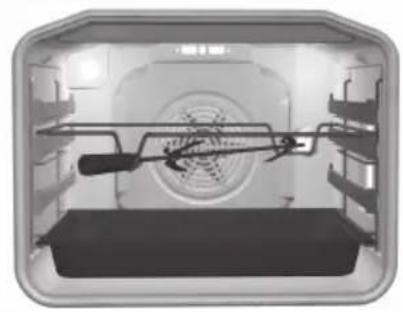
- The rotating roast spit set consists of a rotating spit with a detachable handle and two forks with screws for fixing the meat chunk.
- When using the roast spit, fi rst insert the special support frame into the third guide from the bottom. Spit the seasoned meat and stick the support forks into the meat chunk from each side to fi rmly fi x it. Then, tighten the screws on the forks.
• Install the handle on the front part of the roast spit. Stick the pointed part of the spit into the opening on the right side of the back oven door, which is protected by a rotating shutter. Place the front part of the spit into the lowest part of the support frame until it snaps into place. - Insert a deep tray, which will serve as a drip tray in this case, one level lower than the deep tray to prevent the fat and juices dripping from the meat from accumulating on the oven bottom.
- Activate the spit roast by selecting the operation mode "Large grill"
- Before closing the oven door, detach the spit handle.
- The infra heater operation is controlled by a thermostat; also, it only works when the door is closed.
Cooking table - Large grill
| Type of food Weight | (g) | Guide level (from bot- tom) | Temperature (°C) | Temperature (°C) | Cooking time (min) |
| Meat and sausages | |||||
| 4 beef loin chops, rare 180g/pc | 4 | Level | -14-16 | ||
| 4 beef loin chops, medium “ 4 | \ | -16-20 | |||
| 4 beef loin chops, well done “ | 4 | \ | - | 18-21 | |
| 4 pork neck chops “ 4 | \ | -19-23 | |||
| 4 cutlets “ 4 | \ | -20-24 | |||
| 4 veal steaks | “ 4 | \ | -19-22 | ||
| 6 lamb cutlets | 100g/pc | 4 | \ | -15-19 | |
| 8 grill sausages | 100g/pc | 4 | \ | - | 11-14 |
| 3 pcs of meatloaf | 200g/pc | 4 | \ | - | 9-15 |
| 1/2 chicken | 600g | 2 | - | 180-190 25 | ( 1.side) 20 (2. side) |
| Fish | |||||
| Salmon slices | 600 | 3 | \ | -19-22 | |
| 4 trout | 200g/pc | 2 | - | 170-180 | 45-50 |
| Toasted bread | |||||
| 6 slices white bread | / | 4 | \ | - | 1,5-3 |
| 4 slices of mixed flour bread | / | 4 | \ | - | 2-3 |
| Toasted sandwich | / | 4 | \ | -3,5-7 | |
| Meat / poultry* | |||||
| Duck* | 2000 | 2 | 210 | 150-170 | 80-100 |
| Chicken* | 1500 | 2 | 210-220 | 160-170 | 60-85 |
| Pork roast | 1500 | 2 | - | 150-160 | 90-120 |
| Pork shoulder | 1500 | 2 | - | 150-160 | 120-160 |
| Pork joint | 1000 | 2 | - | 150-160 | 120-140 |
| Roastbeef / beef loin | 1500 | 2 | - | 170-180 | 40-80 |
| Vegetables au gratin ** | |||||
| Cauliflower, kale | 750 | 2 | - | 210-230 | 15-25 |
| Asparagus | 750 | 2 | - | 210-230 | 15-25 |
Note: the guide level refers to the grid on which you place the meat; in the section meat/poultry, the guide level refers to the deep tray, while with chicken, it refers to the grid. When cooking meat in a tray, make sure there is enough liquid in the tray to prevent the meat from burning; approximately halfway through the cooking progress, turn the chunk of meat around. When grilling meat on the grid, insert the deep tray into the first or second guide; this way, it will serve as a drip tray (see tips on grilling meat).
Recommendation: Dry the trout with a paper towel. Put some parsley, salt, and garlic into the fish abdomen, oil it from the outside, and place it on the grid. Do not turn during grilling.
* This type of meat can also be prepared on a roast spit (see instructions for spit roasting).
** Vegetables are first partly cooked and covered in béchamel sauce and grated cheese. Use the smaller glass baking tray and place it on the grid.
Cooking table - grill
| Food type Weight (g) Guide level | (from bot- tom) | Temperature (°C) | Temperature (°C) | Cooking time (min.) | |
| Meat and sausages | |||||
| 2 beef loin stakes, well done 180g/pc 4 | Level | - 18-21 | |||
| 2 cutlets 4 | ; | - 20-22 | |||
| 2 pork neck steaks 180g/pc 4 | ; | 18-22 | |||
| 4 grill sausages 100g/pc 4 | ; | - 11-14 | |||
| 4 toasted sandwiches 4 | ; | - | 5 | ||
| Toast - browning | 4 | ; | 3-4 | ||
| 3 trout - on the grid | 200g/pc | 2 | - | 160-170 | 40-50 |
| Chicken - on the grid | 1500g | 2 | - | 160-170 | 60-80 |
| Pork shoulder - deep tray | 1500g | 2 | - | 150-160 | 120-160 |
Preservation
natural_image
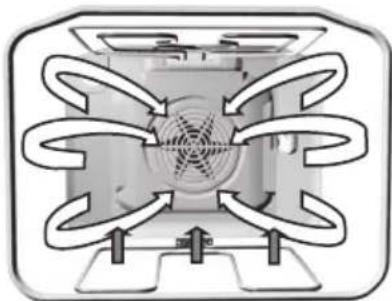
Pure diagram of a symmetrical mechanical or electrical component with radial arrows, no text or symbols present.For food preservation, use the lower heater + fan operating mode.
Prepare the food to be preserved and the jars as usually. Use conventional jars with a rubber sealing and glass cover. Do not use jars with threaded or metal covers and metal cans / tins. Preferably, the jars should be of the same size, filled with the same type of food, and tightly sealed. Up to six one-liter jars can be placed into the oven simultaneously.
- Only use fresh food.
- Pour approximately one liter of hot water (about 70°C) into the deep baking tray to provide the required humidity level in the oven. Place the jars into the oven in such way that they are not in contact with the walls and each other (see figure). Rubber seals should be wetted before use.
- Insert the deep tray with the jars into the second guide level from bottom up. During preservation, observe the jars; cook until the contents of the jars starts to boil - bubbles appear in the first jar. Pleas note the cooking times from the preservation table below.
Preservation table
| Food to be preserved Quantity | T=170-180°C, until boiling / bubbling (min.) | After appearance of bubbles | Standing time (in the oven (min) | |
| Fruit | ||||
| Strawberries 6x1 liter approx. | 40-55 turn off | 25 | ||
| Stone fruit 6x1 liter approx. | 40-55 turn off | 30 | ||
| Apple puree 6x1 liter approx. | 40-55 turn off | 35 | ||
| Vegetables | ||||
| Sour gherkin 6x1 liter approx. | 40 do 55 turn | off 30 | ||
| Beans, carrots | 6x1 liter approx. | 40 do 55 Set to 120°C, 60 min | 30 | |
Durations: given in the chart are approximate only. Actual time may vary de to differences in room temperature, number of jars, quantity and temperature of the fruit an vegetables to be preserved, etc. Before turning off the oven (for fruit) or setting a lower temperature (for some types of vegetables), make sure there are actually visible bubbles in the jars. Important: Observe carefully when the bubbles appear in the first jar.
Defrosting
natural_image
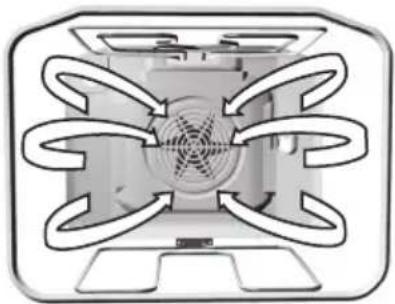
Diagram of a refrigerator interior with airflow arrows indicating circulation (no text or labels)- Air circulating in the oven may speed up the process of defrosting frozen food. To do this, set the oven to "Defrosting" mode.

If the temperature setting button is accidentally activated, the oven control lamp will light up, but the heaters will not be activated.
- Food appropriate for defrosting includes cakes with heavy cream or butter-based fllling, other cakes and pastry, bread, buns, and deep-frozen fruit.
- For reasons of hygiene, meat and poultry should not be defrosted in an oven.
If possible, turn the food around or mix several times to make sure they are defrosted evenly.
CLEANING AND MAINTENANCE
Do not use a steam cleaner or a high-pressure steam cleaner to clean the appliance. Before you start cleaning the appliance, disconnect it from the power mains and let it cool down.
Appliance housing front
Clean the surfaces with liquid non-abrasive detergents intended for smooth surfaces, and a soft cloth. Apply the detergent on the cloth and wipe off the dirt; then, rinse with water. Do not apply the detergent directly on the surfaces. Do not use aggressive or abrasive cleaners, sharp objects or steel wool, as these will scratch the appliance.
Aluminum surfaces
Aluminum surfaces should be cleaned with non-abrasive liquid detergents intended for such materials. Apply the detergent on a wet cloth and clean the surface; then, rinse the surface with water. Do not apply the cleaner directly on the aluminum surface. Do not use abrasive cleaners or abrasive sponges. The surface should not come into contact with oven cleaning sprays.
Stainless steel front panels
(only with some models)
Clean the surface with a mild cleaner (soapsuds) and a soft sponge that will not scratch the material. Do not use abrasive or solvent-based cleaners. If these instructions are ignored, the housing surface can be damaged.
Lacquer-coated and plastic surfaces
(only with some models)
Clean the buttons / knobs and the door handle with a soft cloth and liquid detergents intended for cleaning smooth lacquer-coated surfaces. You may also use the cleaners made especially for this type of surfaces; in this case, follow the manufacturer's instructions.
WARNING: The above surfaces should never come into contact with oven cleaning sprays, as these will permanently damage the aluminum parts.
Cleaning
Oven
- The oven can be cleaned in conventional manner (with detergents, oven spray), but only when there is vey dirty and when the stains are particularly stubborn.
- For regular cleaning of your oven (after each use), the following procedure is recommended: rotate the operation mode selection knob to the position 📄. Set the temperature selection knob / dial to 70°C. Pour 0.6 l of water into a glass or shallow baking dish and insert it into the lower guide. After thirty minutes, the food residues on the enamel will have softened, allowing you to wipe them with a dap cloth.
When dealing with stubborn stains, please not the following:
The oven should be cooled down before each cleaning process.
- Clean the oven and accessories after each use to prevent the dirt from being burnt onto the oven.
- The easiest way to remove grease is by using warm soapsuds while the oven is still warm.
- In case of particularly stubborn dirt, use the conventional oven cleaners. Then, rinse the oven thoroughly with clean water to remove all residues of the cleaner.
- Never use aggressive cleaners such as steel wool, abrasive dishwashing sponges, stain removers, etc.
- Lacquer-coated, stainless steel, and zinc-coated surfaces, as well as aluminum parts, should never come into contact with oven cleaning sprays, as these may cause damage and discoloration. The same applies for the thermostat sensor (if the cooker features a timer with a probe) and the heaters accessible at the upper part.
- When purchasing and dispensing detergents, consider the environment and observe the instructions provided by respective cleaning agent manufacturers.
Practical tip
- When cooking larger fatty chunks of meat, we recommend wrapping them in aluminum foil of a suitable cooking bag, to prevent the grease from being spattered on the oven interior walls.
- When grilling meat on the grid, place a drip tray underneath.
Maintenance (depending on the model)
text_image
Diagram showing a hand holding a ladder-like structure with numbered arrows indicating steps 1 and 2.Cleaning the oven interior ceiling (only with some models)
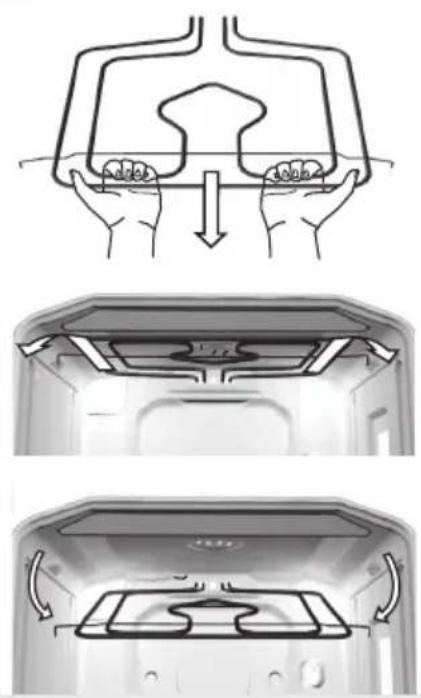
- To facilitate cleaning of the oven interior upper wall, some appliances feature a foldable upper infra heater.
- Before lowering the heater, the cooker must be disconnected from the power mains by removing the fuse or tripping the main switch.
- The heater should be cooled down; otherwise there is a risk of burning!
- Do not use the heater when it is lowered!
Before cleaning the oven, remove the baking trays, the grid, and the guides. Then, pull the horizontal heater towards yourself. Pull the heater until the crossbar is released from the supports on the left and right side of the oven (see figure). After cleaning, replace the heater following the same procedure; the crossbar must be reinserted into the two support brackets.
Accessories
Wash the accessories (baking trays, grid, etc.) with hot water and some conventional detergent.
Special enamel coating
The oven, interior side of the door, and baking trays, are covered with special enamel that has a smooth and resistant surface. This special layer enables easier cleaning at room temperature.
Removing the telescopic pull-out guides
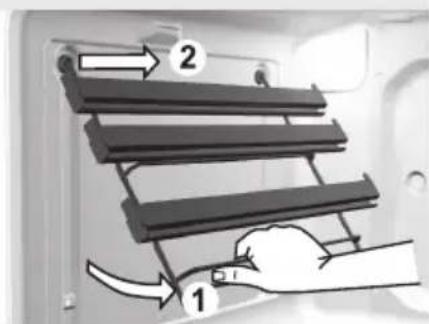
To facilitate cleaning of the oven interior side walls, the telescopic pull-out guides can be removed
- Hold the guide rack by its lower end and rotate it inwards; then, remove them from the holes on the upper side.
- Clean the racks with telescopic guides only with conventional cleaners.
- Do not wash the telescopic pull-out guides in a dishwasher.

Do not attempt to grease the telescopic retractable guides.
After cleaning, simply replace the guide rack by following the procedure in reverse order.
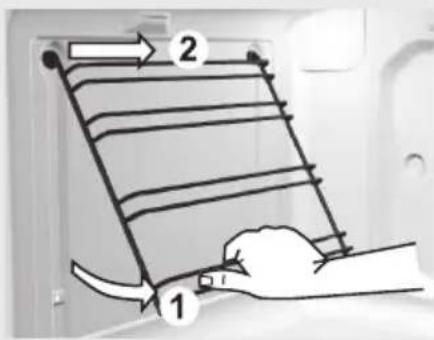
text_image
Diagram showing a hand holding a ladder with labeled parts and directional arrows indicating movement or force.Removing wire guide racks
To facilitate cleaning of the oven interior side walls, the wire guide rack can be removed.
- Hold the guide rack by its lower end and rotate it inwards; then, remove them from the holes on the upper side.
- Clean the guide racks guides only with conventional cleaners.
• After cleaning, simply re-hang the guide rack in the holes provided and pull the downwards.
REMOVING INSIDE DOOR GLASS - APPLIES TO PREMIUM FULL-GLASS DOOR
Door glass can also be cleaned from the interior side; however, door has to be removed first (see section on removing and replacing the oven door).
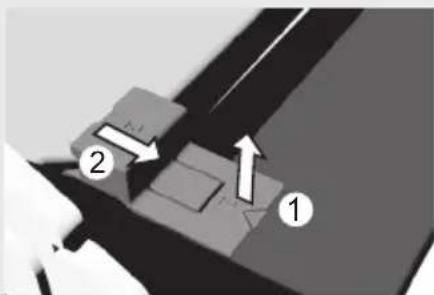
natural_image
Mechanical assembly diagram showing two components labeled 1 and 2 with directional arrows (no text or symbols beyond labels)fi gure 1
- Slightly lift the supports on the left and right side of the door (marking 1 on the support) and pull them away from the glass (marking 2 on the support) (see Figure 1).
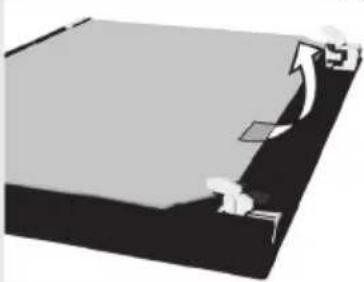
natural_image
Illustration of a person sitting on a desk with an arrow indicating upward motion (no text or symbols)fi gure 2
- Hold the door glass by the lower edge, slightly lift it so that it is no longer attached to the support, and remove it (Figure 2).
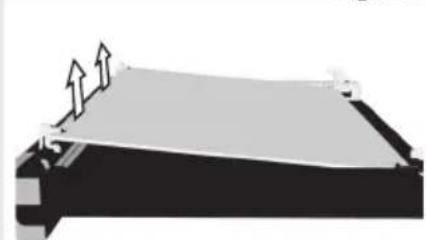
natural_image
Pure diagram of a mechanical component with no text, numbers, or symbols visiblefi gure 3
- To remove the third inside glass (only with some models), lift and remove it. Also remove the rubbers on the glass (Figure 3).
natural_image
Abstract 3D diagram with arrows and geometric shapes, no readable text or symbolsfi gure 4
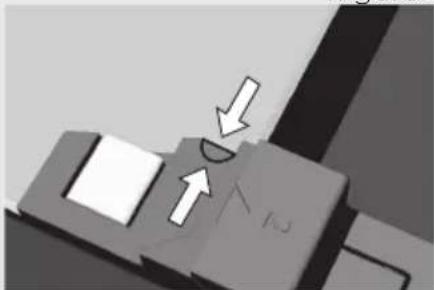
• To replace the door, observe the reverse order. Note: To replace the glass, make sure the markings (crescent) on the door and the glass are aligned (Figure 4).
REMOVING AND REPLACING THE OVEN DOOR WITH A SINGLE-AXIS HINGE (depending on the model)
a) Conventional closing
b) Soft closing system (GentleClose) – the system absorbs the shock from door closing. It allows simple, quiet, and smooth closing. A gentle push (to a 15^ angle relative to the closed door position) is enough for the door to close automatically and softly.

If the force applied to close the door is too strong, the effect of the GentleClose system is reduced or the system will be bypassed for safety.
natural_image
Mechanical component with a curved arrow indicating rotational motion (no text or symbols)fi gure 1
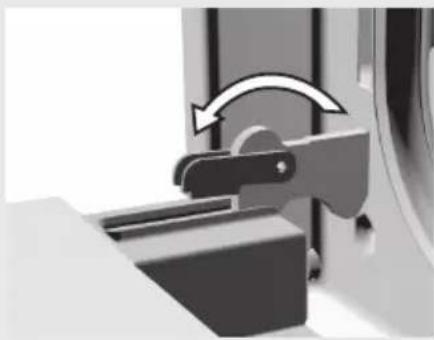
- Fully open the oven door and rotate the stoppers all the way back – applies to conventional door closing (Figure 1).
natural_image
Mechanical component with directional arrow indicating motion (no text or symbols)fi gure 2
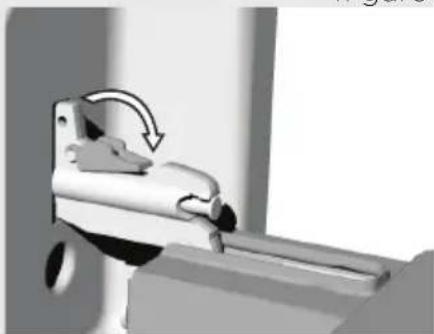
- If the appliance is fitted with the GentleClose system, flip the door latches back to a 90° angle (Figure 2).
text_image
1 2fi gure 3
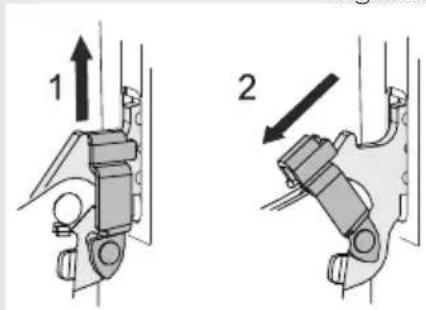
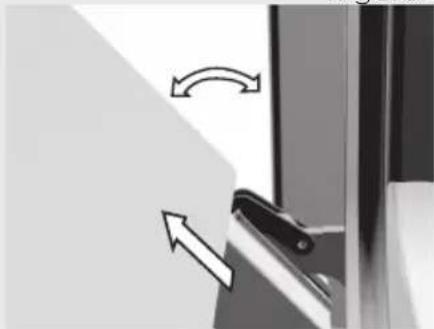
- If the appliance is fitted with the GentleClose system, slightly lift the door latches and pull them towards you.
natural_image
Close-up of a door handle with directional arrows indicating movement (no text or symbols)- Slowly close the door until the latches are aligned with the slots. Slightly lift the door and pull it out from both hinge slots on the appliance.
- Then, completely open the door and rotate the attachment clips back to their initial position. Slowly close the door and check, if they close properly. If the door does not open or close correctly, make sure whether the hinge notches are correctly placed in their seat hinges.
Replacing appliance parts
natural_image
Interior view of a kitchen appliance with a magnified inset showing a circular component (no text or symbols visible)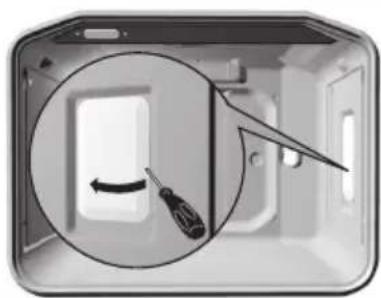
natural_image
Interior view of a modern kitchen appliance with a screwdriver inside, showing a circular diagram highlighting the interior (no text or symbols)Attention
Always make sure the hinge attachment clips are firmly seated in their supports when installing the door. If this is not the case, the main hinge that is operated by a strong spring may be released any time while installing or removing the door. Risk of physical injury.
The oven lamp base and socket are under voltage. There is a risk of electric shock!
Before replacing the oven lighting bulb, disconnect the appliance from the power mains by removing the fuses or tripping the main network switch.
Oven bulb
(only with some models)
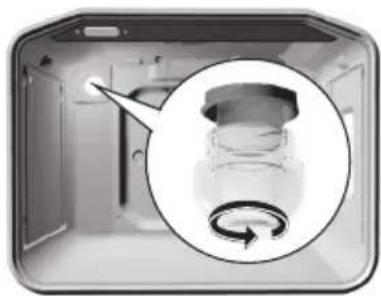
Oven bulb is considered a replacement ware part and is not covered by the warranty. Replace the bulb with a new one with the following specifications: socket E 14, 230 V, 25 W, 300°C.
- Unscrew the glass cover in the counterclockwise direction, replace the bulb, and replace the cover.
Bulb lamps used in this appliance are special purpose lamps selected for household appliances use only. The are not suitable for household room illumination.
SPECIAL WARNINGS AND ERROR REPORTING
During the warranty period, any repairs may only be performed by service technicians authorized by the appliance manufacturer.
Before starting the repair, the appliance must be disconnected from the power mains by removing the fuse or by removing the mains cord from the wall outlet.
Unauthorized tampering and repairs may cause the risk of electric shock and short circuit; therefore, do not attempt them yourselves. Leave such tasks to an expert or an authorized service technician.
In case of minor faults or problems with the appliance operation, check the following instructions to see whether you can eliminate the causes by yourselves.
Important
A visit by a service technician during the warranty period will be charged if the appliance is not functioning because of improper use. Store these instructions in a place where they are always readily accessible; if pas the appliance on to another person, the instructions should also be included.
Following is some advice on rectifying some common problems.
| Sensors do not respond, the display has frozen | · Disconnect the cooker from the power network for a few minutes (remove the fuse or trip the main switch); then, reconnect it to the power network and turn on the oven |
| The main fuse is tripped repetitively | · Call a service technician! |
| Oven interior lighting does not work | · The process of replacing the bulb is described in the section “Appliance part replacement”. |
| The oven does not heat up... | · Was the temperature and operating mode selected appropriately? · Is the oven door closed? |
| The pastry is not cooked thoroughly... | · Have you removed the grease fi iter? · Did you observe the instructions and tips from the section “Baking pastry”? · Did you follow the instructions in the baking table closely? |
| The program timer shows extraordinary fi gures or is turned on and off uncontrolled | · In case of faulty operation of the program timer, disconnect the cooker from the power mains for a few minutes (remove the fuse or trip the main switch); then, reconnect it to the mains and set the time of day. |
| Program timer display is blinking | There was a power supply failure, or your cooker was just connected to the power mains. All set times have been deleted.Set the time of day to enable operation of the appliance.After the end of program timer controlled operation (automatic operation), the oven goes off , the time of day is displayed, and an audible signal is emitted for a certain period of time. Take the dish out of the oven, return the operation mode selection knob and the temperature knob/dial back to the starting position. Select the “Manual mode” function to be able to use the oven in the conventional way (without the program timer). |
| Operation control lamp is not lit... | Did you activate all necessary controls?Did the main fuse in your home network trip?Are the temperature knob /dial and the operating mode selection knob set properly? |
If the problem persists despite observing the instructions above, call an authorized service technician. Elimination of any errors or warranty claims that resulted from improper connection or use of the appliance is not covered by our warranty. In such cases, the costs of repair are borne by the user.
INSTRUCTIONS FOR INSTALLATION AND CONNECTION
Important warnings
- The appliance may only be connected by a qualified expert.
- The appliance should be fitted with a device that disconnects it from all poles of the home network (an omnipolar switch), with at least 3 mm of distance between the contacts in open position. LS-switches or fuses are appropriate.
- To connect the appliance, use the rubber mains cords (type HO5RR-F with the green/yellow earth wire), PVC insulated (type HO5VV-F with the green/yellow earth wire), or other equivalent or superior cables.
- Veneer, glue, or plastic fi nish of the furniture next to which the cooker is installed, should be treated heat resistant ( >75^ ). If the veneers are not high temperature resistant, they may be deformed.
- Packaging (plastic foil, polystyrene, etc.) must be kept out of reach of children, as it can be a source or threat to them. Small parts can be swallowed by the children, and the foils are hazardous because of the risk of suffocation.
Installation
natural_image
Technical line drawing of a mechanical assembly with a screwdriver inserted, showing no text or symbols- Veneer or other fi nish of the furniture the appliance is being built into should be processed with heat-resistant glue (100°C); otherwise, high temperatures may cause them to deform.
- Before installing the appliance, remove the back wall from the piece of kitchen furniture the appliance is being built into, along the entire length of the cutout.
- The installation cutout should be dimensioned as indicated in the figure.
- The bottom panel of the piece of kitchen furniture (max. 530 mm) should always be shorter than the side walls to enable adequate air circulation.
- Level the piece of furniture the appliance was built into with a spirit level.
- The piece of kitchen furniture the appliance is built into must be secured against movement, e.g. attached to the adjacent pieces of kitchen furniture.
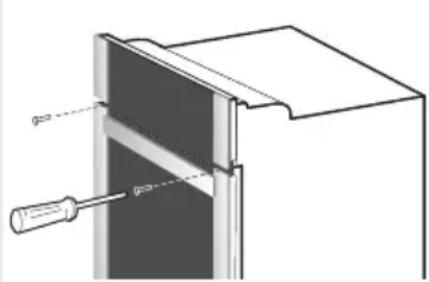
- Push the appliance into the kitchen furniture element enough that the guides for the screws that are inserted in the oven frame holes are placed against the kitchen element side walls.
- When attaching the appliance, make sure the screws are not fastened too strongly as this may damage the furniture or the appliance enamel coating.
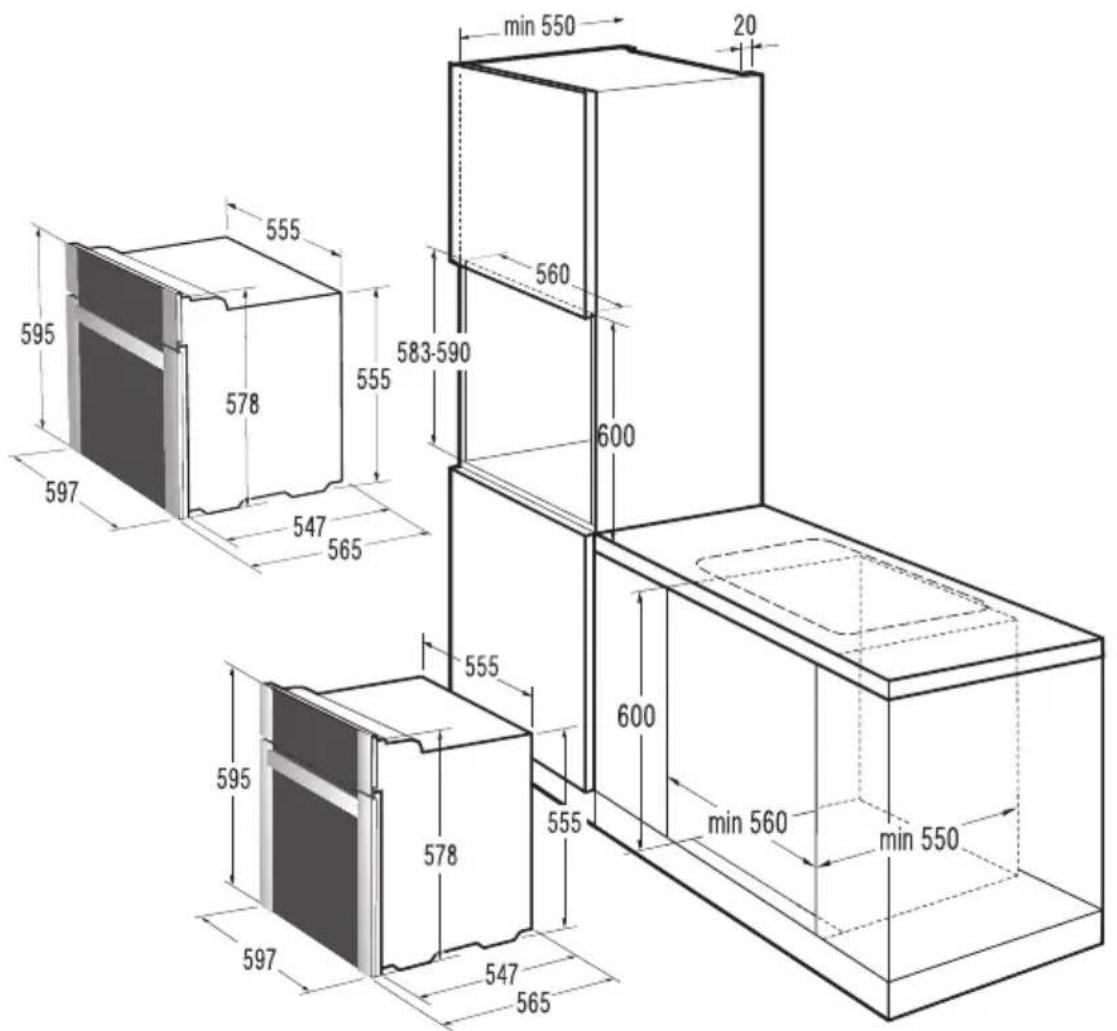
text_image
min 550 20 560 583-590 600 555 578 595 597 547 565 595 578 555 600 min 560 min 550 597 547 565Electrical connection
The appliance may only be connected to the power mains by an authorized service technician or a registered electrician! Incorrect connection may result in damage to or destruction of respective parts of the appliance; in such cases, the warranty is void.
The appliances are suitable for photovoltaic electrical power under the condition that electrical voltage will be 220VAC - 240VAC with semi tonic frequency 50Hz in order the appliance to operate properly (alternative a generator can be used with the same technical characteristic).
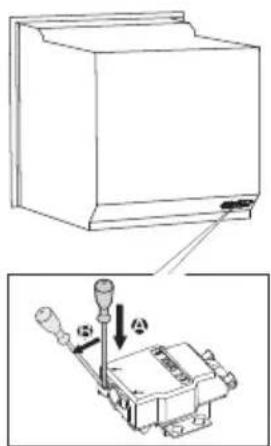
- Open the connection clip using a screwdriver, as indicated on the figure on the cover.
- The voltage (230V against N) in your home network must be checked by an expert using appropriate equipment!
- The connection bridges must be placed in compliance with the network connection!
- Before connection, make sure the voltage on the rating plate is consistent with the actual network voltage.
- The length of the power cord should be at least 1.5 meters;
thus, the appliance can be connected before it is pushed to the wall.
- The length of the power cord should be adjusted in such way that in case of pulling load on the cable, the ground wire is strained later than the voltage wires.
Procedure
- Use a screwdriver to open the cover of the connection terminal on the back of the appliance. Release the two clips as indicated on the cover of the connection terminal.
- The mains cord must be inserted into the strain release device which protects the cable from being pulled out. If the strain release device is not installed yet, install it in such way that it gets stuck in the connection terminal housing at one end.
- Then, connect the appliance according to the instructions indicated on the figures. If network voltage is different, the connection bridges should be replaced.
- Firmly fasten the strain release device and close the cover.
Lead colors
L1 = external leads under voltage. Normally, the lead colors are black, black, brown.
N = neutral lead, normally blue.
Make sure the N-lead is connected correctly!
PE = protection, or earth (ground) lead, normally green-yellow.
text_image
Technical diagram showing a device with a switch and a close-up of its internal components, labeled with Chinese characters.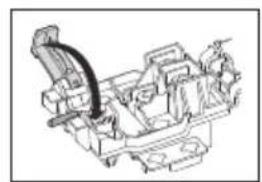
natural_image
Technical line drawing of a mechanical assembly with no visible text or symbols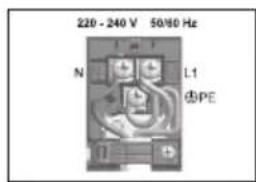
text_image
220 - 240 V 50/60 Hz N L1 PE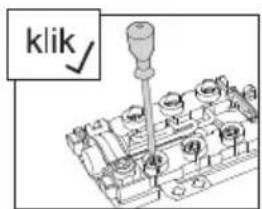
text_image
klik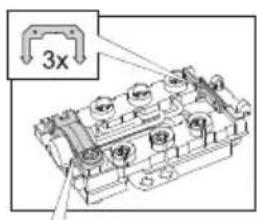
text_image
3x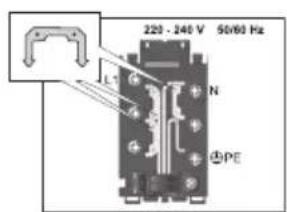
text_image
220 - 240 V 50/60 Hz L N ④PE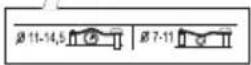
TECHNICAL CHARACTERISTICS
Rating plate

Instructions for use of the appliance can also be found on our website at www.gorenje.com / http://www.gorenje.com /
www.gorenje.com
Classico
Cooking with passion.