BSPORT-10-N-R-V-A - Smartwatch BRIGMTON - Free user manual and instructions
Find the device manual for free BSPORT-10-N-R-V-A BRIGMTON in PDF.


User questions about BSPORT-10-N-R-V-A BRIGMTON
0 question about this device. Answer the ones you know or ask your own.
Ask a new question about this device
Download the instructions for your Smartwatch in PDF format for free! Find your manual BSPORT-10-N-R-V-A - BRIGMTON and take your electronic device back in hand. On this page are published all the documents necessary for the use of your device. BSPORT-10-N-R-V-A by BRIGMTON.
USER MANUAL BSPORT-10-N-R-V-A BRIGMTON
natural_image
Abstract curved shape with a white ring and black outline, no text or symbols present.BRIGMTON
surfing technology
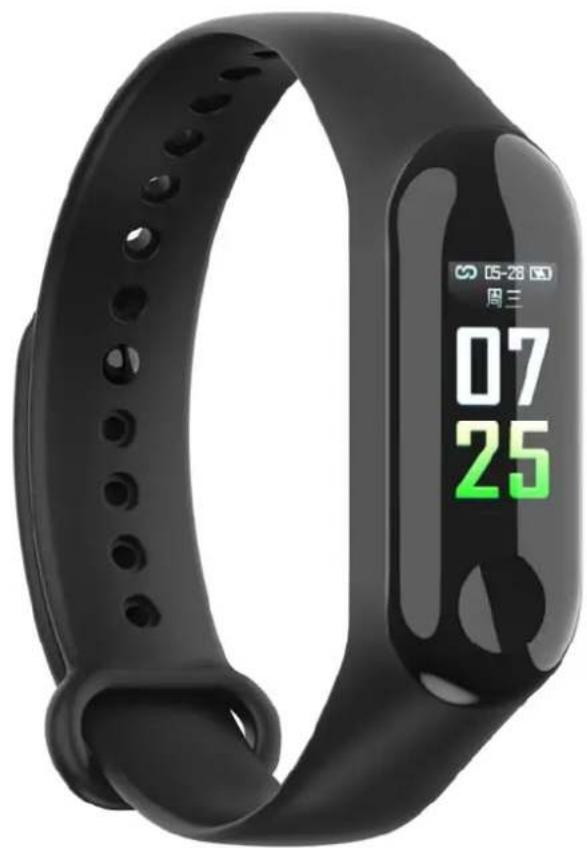
natural_image
Abstract curved shape with a white ring and black outline, no text or symbols present.BRIGMTON
surfing technology
INSTRUCTION MANUAL
SPORT BRACELET - BLUETOOTH
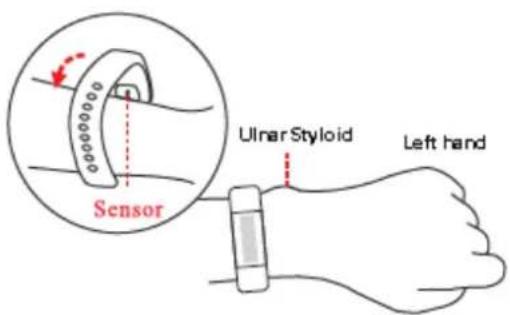
The sensor should be in contact with the skin when measurements are taken. Always keep the sensor part clean.
Adjust the bracelet as indicated:
Charging the battery: Make sure the bracelet has enough battery the first time you use it. If you can not turn it on, charge the bracelet To charge, remove the body of the bracelet and connect it to a USB port.
On / off: While off, press and hold the function area for 4 seconds to start the device with vibration.
On: On the power off page, press and hold the function key for more than 3 seconds to enter the power-off interface, and with a short touch to select power OFF, the system will turn off if no operation is performed within 3 seconds.
1) In the on status, briefly touch the function key to illuminate the screen to the default page with date and time information.
2) On the default date / time page, briefly touch the function key to change the band to different pages. The screen will turn off if no operation is performed in 5 second.
3) On the heart rate / blood pressure page, long press the function key to start the measurement. The result will be displayed in 50 s, and then the screen will automatically turn off.
System requirements: Android 5.0 and higher; iOS9.0 and higher; Support Bluetooth 4.0.
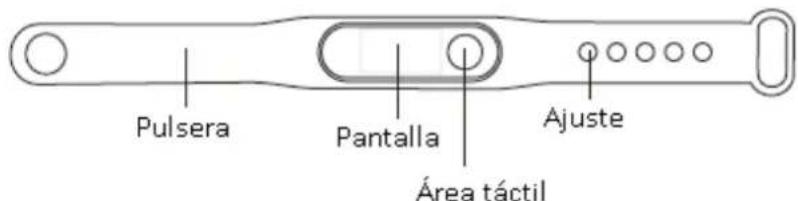
Charge the battery completely before first use. Take out the center part of the bracelet and connect to a USB socket.
Press and hold the button to turn on. In the initial screen of the watch if you keep pressing you can change the style of the watch.
HOW TO USE
APPLICATION
Scan the code and download the Flagfit 2.0 application:
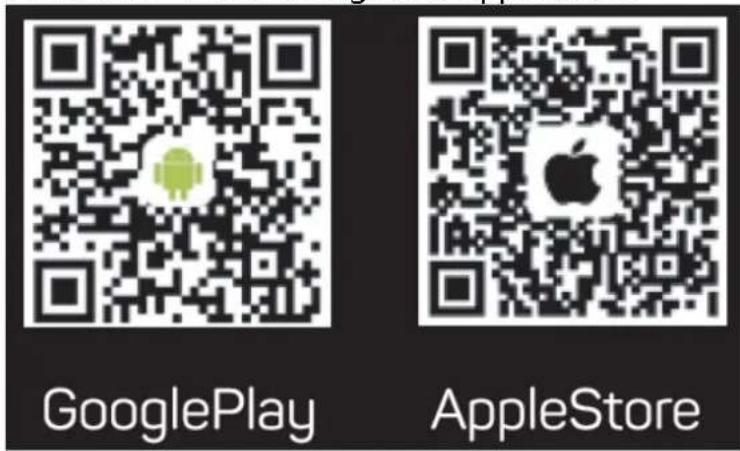
Before using for the first time, pair the bracelet and your phone. Open the application and look for your bracelet. It will automatically pass the information every time it is connected. Configure the parameters requested in the application.
Once you connect the wristband to your phone through the application, select your language and the wristband will auto configure in your language.
Information: Please, establish personal information in the application. Settings: personal settings, you can set the gender - age - height - weight to ensure the accuracy of the calculation of distance and calories. You can also set your daily exercise and sleep goals and monitor daily completion.
NOTIFICATIONS
Incoming call: In the connected state, if the incoming call reminder feature is enabled, the wristband will vibrate when there is an incoming call and the name or number of the incoming call will be displayed. (You must activate this permission on your phone) Notification by SMS: In the connected state, if the SMS notification function is enabled, the wristband will vibrate when an SMS arrives. Other notifications: In the connected state, if you activate this function, the wristband will vibrate when there are notifications of WhatsApp, Facebook and others on your phone. (You must activate this permission on your phone)
Vibration reminder: If activated, the wristband will vibrate when there is a call, information or other reminder. If it is deactivated, there will be only a reminder on the screen without vibration, so as not to disturb it.
Sedentary alert: You can activate / deactivate this function. You can set the reminder interval in the profile, so it will remind you if you remain seated for a long time during that interval.
Tips for Android phone users: The reminder feature must be set to allow the application to run in the background; It is recommended to add the bracelet and application in devices and applications and enable all functions for them. The correct functioning of the bracelet depends on this configuration.
FUNCTIONS
Pressing once will enter the "Step" step menu. If you hold down you can see steps, (Step), Kilometers (km), Calories (Kcal) and battery (Battery.
BPM: Keeping pressed will measure your pulsations. To measure stop press and hold again.
mmHG: Keeping pressed will measure blood pressure. To measure stop hold down again.
Motion: You can choose the sport between walking (step), jumping (skip), sit-ups (squats). Once chosen, press and hold to confirm.
Return: Press and hold on this screen to return to the previous screen.
More: Press and hold to enter and you can access to:
About: Pressing and holding will show the device version. Press and hold to exit.
Theme: Select the desired home screen by pressing and holding again. Shut: Off. Press and hold and choose YES or NO, to turn off. Sleep mode: The wristband will automatically control your sleep state during night; It will detect your sleep state with deep sleep / light sleep / awake and will calculate the quality of your sleep. The result can be consulted in application.
Note: the bracelet will only follow this when you wear it while you sleep.
CONFIGURATION
Alarm: In the connected state, you can set 3 different alarms and synchronize them to the wristband. You can also activate alarm without connection.
Searching: This feature alerts you when you leave your smartphone.
Selfie: While connected, go to "Shake to take selfie" in the application,
move the bracelet, and the application will take pictures automatically after 3 seconds of countdown.
"Features can change without notice"
BRIGMTON
surfing technology
IMPORTED
FERSON ELECTRÓNICA, S.A.
CIF: A-41111881
SANTA CLARA DE CUBA 12
SEVILLA
ESPAÑA
DECLARATION OF CONFORMITY
Ferson Electrónica, S.A. declares under our responsibility that the equipment meets the requirements indicated in the following directives:
ECM DIRECTIVES
EN55032-2015
EN55024:2010/A1:2015
EN61000-3-2:2014
EN61000-3-3: 2013
EN50581:2012
EN62321: 2008
EN14582: 2007
IEC62321-4-5:2013
EPA3540C:1996
EPA8270D: 2007
EN14372:2004
Description of apparatus:
Model BRIGMTON BSPORT-BB
Wireless device

BRIGMTON
surfing technology