
KX-MB1666CN - Printer PANASONIC - Free user manual and instructions
Find the device manual for free KX-MB1666CN PANASONIC in PDF.


| Product Type | Multifunction Printer (Print, Copy, Scan, Fax) |
| Brand | Panasonic |
| Model | KX-MB1666CN |
| Print Technology | Laser (Monochrome) |
| Paper Sizes Supported | A4 (210 × 297 mm), Letter (216 × 279 mm), Legal (216 × 356 mm), B5 (JIS) (182 × 257 mm), B5 (ISO) (176 × 250 mm) |
| Paper Input Capacity | Approx. 250 sheets (standard tray) + manual feed slot |
| Connectivity | USB 2.0, LAN (Ethernet), Telephone line (for fax) |
| Scan Modes | TIFF, JPEG, BMP, PDF |
| Fax Capabilities | Yes (integrated telephone interface) |
| Display Language | English selectable (feature #110) |
| Toner Cartridge | Replaceable (model varies) |
| Drum Unit | Replaceable (included in starter set) |
| Power Supply | AC 220–240 V, 50/60 Hz |
| Energy Consumption | Approx. 500 W (printing), 5.5 W (standby) |
| Dimensions (W × D × H) | Approx. 430 × 445 × 300 mm |
| Weight | Approx. 12 kg |
| Maintenance | Clean white plate, glass, feeder rollers; avoid touching fuser unit |
| Safety Notes | Do not touch fuser area (hot); do not drop paper tray; do not copy illegal documents |
| Supported OS | Windows, macOS (driver required) |
Frequently Asked Questions - KX-MB1666CN PANASONIC
User questions about KX-MB1666CN PANASONIC
0 question about this device. Answer the ones you know or ask your own.
Ask a new question about this device
Download the instructions for your Printer in PDF format for free! Find your manual KX-MB1666CN - PANASONIC and take your electronic device back in hand. On this page are published all the documents necessary for the use of your device. KX-MB1666CN by PANASONIC.
USER MANUAL KX-MB1666CN PANASONIC
Model
KX-MB1663CN KX-MB1665CN KX-MB1666CN KX-MB1667CN KX-MB1678CN KX-MB1679CN
You can select English for the display and report (feature #110, page 51).
Best Usage Tips
Daily Maintenance
Illegal Copying
- Copying certain documents is illegal.

⑦ Paper tray *2
⑧ Handset

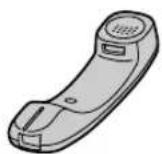
⑨ Handset cord

① Paper output
* This image shows model KX-MB1666 KX-MB1667 KX-MB1678 KX-MB1679.
2 Remove the drum unit (①) preinstalled in the unit.
- Hold the drum unit by its center handle.

3 Remove the protective paper (①) from the drum unit.

6 Close the front cover.

When to Add Toner/When to Replace the Drum
When to Add Toner
① [EXT. INTERFACE] connector
2 Fan the recording paper before loading to avoid paper jams.

1. Introduction and Installation
3 Load the recording paper with the print side facing down (①).
Important:
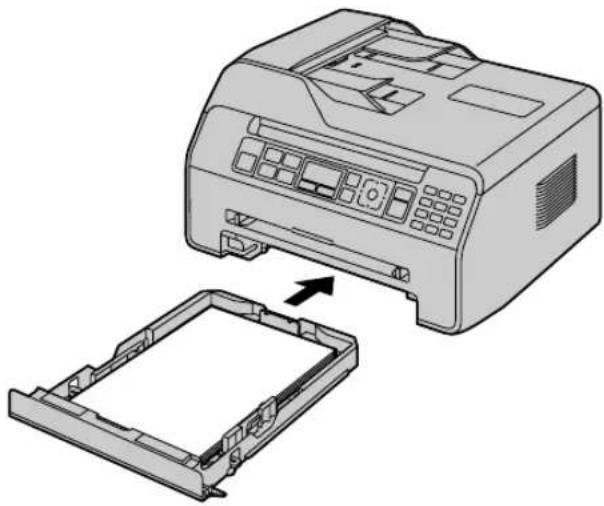
5 Insert the paper tray into the main unit.
Note:
Paper Tray Precautions
- Do not drop the paper tray.

Note:
- To print from the manual paper tray:
2 Install the receiving document support.

Note:
4 KX-MB1663 KX-MB1665:
Go to step 5.
KX-MB1666 KX-MB1667 KX-MB1678
KX-MB1679, USB connection:
KX-MB1666 KX-MB1667 KX-MB1678
KX-MB1679, LAN connection:
| 扫描方式 | TIFF JPEG BMP PDF | |
| “阅览器”*1 | ● ● ● ● | |
| “文件”*1 | ● ● ● ● | |
| “电子邮件”*1 | ● ● - ● | |
| “OCR”*1 | ● ● ● - | |
| “电子邮件地址”*2*3 | ● ● - ● | |
| “FTP 服务器”*2*3 | ● ● - ● | |
| “SMB 文件夹”*2*3 | ● ● - ● |
KX-MB1666 KX-MB1667 KX-MB1678 KX-MB1679
Case 1:
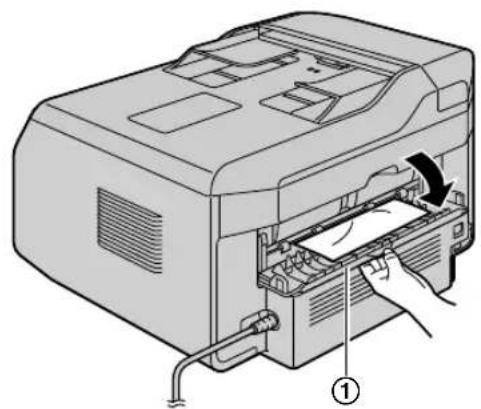
When the recording paper is jammed inside the rear cover:
- Open the rear cover (①).

Caution:
- The fusing unit (②) becomes hot. Do not touch.
Note:
- The area near the rear cover (③) also becomes warm.
11. Paper Jam
- Push the green lever (①) upward to its original position.

- Close the back cover.

- Open and close the front cover to clear the error message.
Case 2:
When the recording paper is jammed inside the front cover:
- Open the front cover (①).


- Close the front cover.

3 Insert the paper tray into the machine.
Note:
Note:
- Be careful not to damage the transparent plastic sheet (①).

2 Carefully remove the jammed document (①).
When the document is jammed near the document entrance:
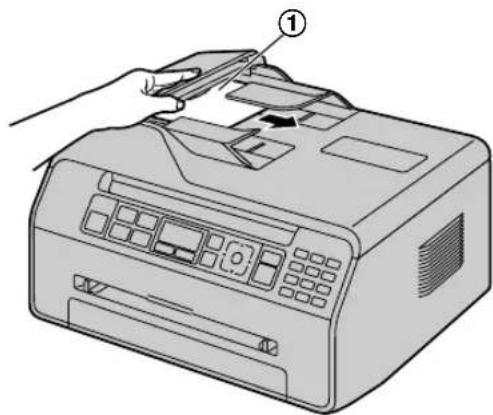
When the document is jammed near the document exit:

3 Close the ADF cover.

[Stop]
- Press [Stop] to clear this message.
12.1 Cleaning the white platen and glass
Note:
- Be careful not to damage the transparent plastic sheet (①).
3 Close the document cover.

12.2 Cleaning the ADF rollers
4 Close the ADF cover.

5 Reconnect the power cord.
13.1 Reference lists and reports
You can print the following lists and reports for your reference.
- "Installation Settings List"
- "Phone Number List"
- "Communication Report"
- "Multi-station transmission programming table" *1
- "Printer test"
- "Caller ID table"
- "Email address list" *1
- "FTP server list" *1
- "SMB folder table" *1
- "WLAN status list" *2
- "Department print count"
WPA/WPA2-PSK (TKIP/AES)
Open system (WEP64/WEP128)
WPS:
Note:
- The images and diagrams used in this manual are simplified.
Paper specifications
Plain paper/Thin paper/Thick paper sizes:
A4: 210 mm × 297 mm
Letter: 216 mm × 279 mm
Legal: 216 mm × 356 mm *1
B5(JIS): 182 mm × 257 mm *1
B5(ISO): 176 mm × 250 mm*1
Example 2
Notes:
Copyright 1989, 1991, 1992 by Carnegie Mellon University
Derivative Work - 1996, 1998-2000
Copyright 1996, 1998-2000 The Regents of the University of California
All Rights Reserved
Permission to use, copy, modify and distribute this software and its documentation for any purpose and without fee is hereby granted, provided that the above copyright notice appears in all copies and that both that copyright notice and this permission notice appear in supporting documentation, and that the name of CMU and The Regents of the University of California not be used in advertising or publicity pertaining to distribution of the software without specific written permission.
CMU AND THE REGENTS OF THE UNIVERSITY OF CALIFORNIA DISCLAIM ALL WARRANTIES WITH REGARD TO THIS SOFTWARE, INCLUDING ALL IMPLIED WARRANTIES OF MERCHANTABILITY AND FITNESS. IN NO EVENT SHALL CMU OR THE REGENTS OF THE UNIVERSITY OF CALIFORNIA BE LIABLE FOR ANY SPECIAL, INDIRECT OR CONSEQUENTIAL DAMAGES OR ANY DAMAGES WHATSOEVER RESULTING FROM THE LOSS OF USE, DATA OR PROFITS, WHETHER IN AN ACTION OF CONTRACT, NEGLIGENCE OR OTHER TORTIOUS ACTION, ARISING OUT OF OR IN CONNECTION WITH THE USE OR PERFORMANCE OF THIS SOFTWARE.
---- Part 2: Networks Associates Technology, Inc copyright notice (BSD) ----
Copyright (c) 2001-2003, Networks Associates Technology, Inc All rights reserved.
Redistribution and use in source and binary forms, with or without modification, are permitted provided that the following conditions are met:
* Redistributions of source code must retain the above copyright notice, this list of conditions and the following disclaimer. * Redistributions in binary form must reproduce the above copyright notice, this list of conditions and the following disclaimer in the documentation and/or other materials provided with the distribution. * Neither the name of the Networks Associates Technology, Inc nor the names of its contributors may be used to endorse or promote products derived from this software without specific prior written permission.
THIS SOFTWARE IS PROVIDED BY THE COPYRIGHT HOLDERS AND CONTRIBUTORS ``AS IS'' AND ANY EXPRESS OR IMPLIED WARRANTIES, INCLUDING, BUT NOT LIMITED TO, THE IMPLIED WARRANTIES OF MERCHANTABILITY AND FITNESS FOR A PARTICULAR PURPOSE ARE DISCLAIMED. IN NO EVENT SHALL THE COPYRIGHT HOLDERS OR CONTRIBUTORS BE LIABLE FOR ANY DIRECT, INDIRECT, INCIDENTAL, SPECIAL, EXEMPLARY, OR CONSEQUENTIAL DAMAGES (INCLUDING, BUT NOT LIMITED TO, PROCUREMENT OF SUBSTITUTE GOODS OR SERVICES; LOSS OF USE, DATA, OR PROFITS; OR BUSINESS INTERRUPTION) HOWEVER CAUSED AND ON ANY THEORY OF LIABILITY, WHETHER IN CONTRACT, STRICT LIABILITY, OR TORT (INCLUDING NEGLIGENCE OR OTHERWISE) ARISING IN ANY WAY OUT OF THE USE OF THIS SOFTWARE, EVEN IF ADVISED OF THE POSSIBILITY OF SUCH DAMAGE.
---- Part 3: Cambridge Broadband Ltd. copyright notice (BSD) ----
Portions of this code are copyright (c) 2001-2003, Cambridge Broadband Ltd.
All rights reserved.
Redistribution and use in source and binary forms, with or without modification, are permitted provided that the following conditions are met:
* Redistributions of source code must retain the above copyright notice, this list of conditions and the following disclaimer. * Redistributions in binary form must reproduce the above copyright notice, this list of conditions and the following disclaimer in the documentation and/or other materials provided with the distribution. * The name of Cambridge Broadband Ltd. may not be used to endorse or promote products derived from this software without specific prior written permission.
THIS SOFTWARE IS PROVIDED BY THE COPYRIGHT HOLDER ``AS IS'' AND ANY EXPRESS OR IMPLIED WARRANTIES, INCLUDING, BUT NOT LIMITED TO, THE IMPLIED WARRANTIES OF MERCHANTABILITY AND FITNESS FOR A PARTICULAR PURPOSE ARE DISCLAIMED. IN NO EVENT SHALL THE COPYRIGHT HOLDER BE LIABLE FOR ANY DIRECT, INDIRECT, INCIDENTAL, SPECIAL, EXEMPLARY, OR CONSEQUENTIAL DAMAGES (INCLUDING, BUT NOT LIMITED TO, PROCUREMENT OF SUBSTITUTE GOODS OR SERVICES; LOSS OF USE, DATA, OR PROFITS; OR BUSINESS INTERRUPTION) HOWEVER CAUSED AND ON ANY THEORY OF LIABILITY, WHETHER IN CONTRACT, STRICT LIABILITY, OR TORT (INCLUDING NEGLIGENCE OR OTHERWISE) ARISING IN ANY WAY OUT OF THE USE OF THIS SOFTWARE, EVEN IF ADVISED OF THE POSSIBILITY OF SUCH DAMAGE.
---- Part 4: Sun Microsystems, Inc. copyright notice (BSD) ----
Copyright © 2003 Sun Microsystems, Inc., 4150 Network Circle, Santa Clara, California 95054, U.S.A. All rights reserved.
Use is subject to licence terms below.
This distribution may include materials developed by third parties.
Sun, Sun Microsystems, the Sun logo and Solaris are trademarks or registered trademarks of Sun Microsystems, Inc. in the U.S. and other countries.
Redistribution and use in source and binary forms, with or without modification, are permitted provided that the following conditions are met:
* Redistributions of source code must retain the above copyright notice, this list of conditions and the following disclaimer. * Redistributions in binary form must reproduce the above copyright notice, this list of conditions and the following disclaimer in the documentation and/or other materials provided with the distribution. * Neither the name of the Sun Microsystems, Inc. nor the names of its contributors may be used to endorse or promote products derived from this software without specific prior written permission.
THIS SOFTWARE IS PROVIDED BY THE COPYRIGHT HOLDERS AND CONTRIBUTORS ``AS IS'' AND ANY EXPRESS OR IMPLIED WARRANTIES, INCLUDING, BUT NOT LIMITED TO, THE IMPLIED WARRANTIES OF MERCHANTABILITY AND FITNESS FOR A PARTICULAR PURPOSE ARE DISCLAIMED. IN NO EVENT SHALL THE COPYRIGHT HOLDERS OR CONTRIBUTORS BE LIABLE
FOR ANY DIRECT, INDIRECT, INCIDENTAL, SPECIAL, EXEMPLARY, OR CONSEQUENTIAL DAMAGES (INCLUDING, BUT NOT LIMITED TO, PROCUREMENT OF SUBSTITUTE GOODS OR SERVICES; LOSS OF USE, DATA, OR PROFITS; OR BUSINESS INTERRUPTION) HOWEVER CAUSED AND ON ANY THEORY OF LIABILITY, WHETHER IN CONTRACT, STRICT LIABILITY, OF TORT (INCLUDING NEGLIGENCE OR OTHERWISE) ARISING IN ANY WAY OUT OF THE USE OF THIS SOFTWARE, EVEN IF ADVISED OF THE POSSIBILITY OF SUCH DAMAGE.
Copyright 1988, 1989, 1990 by Carnegie Mellon University
Copyright 1989 TGV, Incorporated
All Rights Reserved
Permission to use, copy, modify, and distribute this software and its documentation for any purpose and without fee is hereby granted, provided that the above copyright notice appear in all copies and that both that copyright notice and this permission notice appear in supporting documentation, and that the name of CMU and TGV not be used in advertising or publicity pertaining to distribution of the software without specific, written prior permission.
CMU AND TGV DISCLAIMS ALL WARRANTIES WITH REGARD TO THIS SOFTWARE, INCLUDING ALL IMPLIED WARRANTIES OF MERCHANTABILITY AND FITNESS, IN NO EVENT SHALL CMU OR TGV BE LIABLE FOR ANY SPECIAL, INDIRECT OR CONSEQUENTIAL DAMAGES OR ANY DAMAGES WHATSOEVER RESULTING FROM LOSS OF USE, DATA OR PROFITS, WHETHER IN AN ACTION OF CONTRACT, NEGLIGENCE OR OTHER TORTIOUS ACTION, ARISING OUT OF OR IN CONNECTION WITH THE USE OR PERFORMANCE OF THIS SOFTWARE.
All rights reserved.
Redistribution and use in source and binary forms, with or without modification, are permitted provided that the following conditions are met:
- Redistributions of source code must retain the above copyright notice, this list of conditions and the following disclaimer.
- Redistributions in binary form must reproduce the above copyright notice, this list of conditions and the following disclaimer in the documentation and/or other materials provided with the distribution. THIS SOFTWARE IS PROVIDED BY THE AUTHOR AND CONTRIBUTORS ``AS IS'' AND ANY EXPRESS OR IMPLIED WARRANTIES, INCLUDING, BUT NOT LIMITED TO, THE IMPLIED WARRANTIES OF MERCHANTABILITY AND FITNESS FOR A PARTICULAR PURPOSE ARE DISCLAIMED. IN NO EVENT SHALL THE AUTHOR OR CONTRIBUTORS BE LIABLE FOR ANY DIRECT, INDIRECT, INCIDENTAL, SPECIAL, EXEMPLARY, OR CONSEQUENTIAL DAMAGES (INCLUDING, BUT NOT LIMITED TO, PROCUREMENT OF SUBSTITUTE GOODS OR SERVICES; LOSS OF USE, DATA, OR PROFITS; OR BUSINESS INTERRUPTION) HOWEVER CAUSED AND ON ANY THEORY OF LIABILITY, WHETHER IN CONTRACT, STRICT LIABILITY, OR TORT (INCLUDING NEGLIGENCE OR OTHERWISE) ARISING IN ANY WAY OUT OF THE USE OF THIS SOFTWARE, EVEN IF ADVISED OF THE POSSIBILITY OF SUCH DAMAGE.
The OpenSSL toolkit stays under a dual licence, i.e. both the conditions of the OpenSSL Licence and the original SSLeay licence apply to the toolkit. See below for the actual licence texts. Actually both licences are BSD-style Open Source licences. In case of any licence issues related to OpenSSL please contact openssl-core@openssl.org.
OpenSSL Licence
* Copyright (c) 1998-2000 The OpenSSL Project. All rights reserved. * Redistribution and use in source and binary forms, with or without * modification, are permitted provided that the following conditions * are met: * 1. Redistributions of source code must retain the above copyright * notice, this list of conditions and the following disclaimer. * 2. Redistributions in binary form must reproduce the above copyright * notice, this list of conditions and the following disclaimer in * the documentation and/or other materials provided with the * distribution. * 3. All advertising materials mentioning features or use of this * software must display the following acknowledgment: * "This product includes software developed by the OpenSSL Project * for use in the OpenSSL Toolkit. (http://www.openssl.org/)" * 4. The names "OpenSSL Toolkit" and "OpenSSL Project" must not be used to * endorse or promote products derived from this software without * prior written permission. For written permission, please contact * openssl-core@openssl.org. * 5. Products derived from this software may not be called "OpenSSL" * nor may "OpenSSL" appear in their names without prior written * permission of the OpenSSL Project. * 6. Redistributions of any form whatsoever must retain the following * acknowledgment: * "This product includes software developed by the OpenSSL Project * for use in the OpenSSL Toolkit (http://www.openssl.org/)"
* THIS SOFTWARE IS PROVIDED BY THE OpenSSL PROJECT "AS IS" AND ANY
* EXPRESSED OR IMPLIED WARRANTIES, INCLUDING, BUT NOT LIMITED TO, THE
* IMPLIED WARRANTIES OF MERCHANTABILITY AND FITNESS FOR A PARTICULAR
* PURPOSE ARE DISCLAIMED. IN NO EVENT SHALL THE OpenSSL PROJECT OR
* ITS CONTRIBUTORS BE LIABLE FOR ANY DIRECT, INDIRECT, INCIDENTAL,
* SPECIAL, EXEMPLARY, OR CONSEQUENTIAL DAMAGES (INCLUDING, BUT
* NOT LIMITED TO, PROCUREMENT OF SUBSTITUTE GOODS OR SERVICES;
* LOSS OF USE, DATA, OR PROFITS; OR BUSINESS INTERRUPTION)
* HOWEVER CAUSED AND ON ANY THEORY OF LIABILITY, WHETHER IN CONTRACT,
* STRICT LIABILITY, OR TORT (INCLUDING NEGLIGENCE OR OTHERWISE)
* ARISING IN ANY WAY OUT OF THE USE OF THIS SOFTWARE, EVEN IF ADVISED
* OF THE POSSIBILITY OF SUCH DAMAGE.
* This product includes cryptographic software written by Eric Young
* (eay@cryptsoft.com). This product includes software written by Tim
* Hudson (tjh@cryptsoft.com).
*
*/
Original SSLeay License
/* Copyright (C) 1995-1998 Eric Young (eay@cryptsoft.com)
* All rights reserved.
*
* This package is an SSL implementation written
* by Eric Young (eay@cryptsoft.com).
* The implementation was written so as to conform with Netscapes SSL.
*
* This library is free for commercial and non-commercial use as long as
* the following conditions are aheared to. The following conditions
* apply to all code found in this distribution, be it the RC4, RSA,
* Ihash, DES, etc., code; not just the SSL code. The SSL documentation
* included with this distribution is covered by the same copyright terms
* except that the holder is Tim Hudson (tjh@cryptsoft.com).
*
* Copyright remains Eric Young's, and as such any Copyright notices in
* the code are not to be removed.
* If this package is used in a product, Eric Young should be given attribution
* as the author of the parts of the library used.
* This can be in the form of a textual message at program startup or
* in documentation (online or textual) provided with the package.
*
* Redistribution and use in source and binary forms, with or without
* modification, are permitted provided that the following conditions
* are met:
* 1. Redistributions of source code must retain the copyright
* notice, this list of conditions and the following disclaimer.
* 2. Redistributions in binary form must reproduce the above copyright
* notice, this list of conditions and the following disclaimer in the
* documentation and/or other materials provided with the distribution.
* 3. All advertising materials mentioning features or use of this software
* must display the following acknowledgement:
* "This product includes cryptographic software written by
* Eric Young (eay@cryptsoft.com)"
* The word 'cryptographic' can be left out if the rouines from the library
* being used are not cryptographic related :-).
* 4. If you include any Windows specific code (or a derivative thereof) from * the apps directory (application code) you must include an acknowledgement: * "This product includes software written by Tim Hudson (tjh@cryptsoft.com)" * * THIS SOFTWARE IS PROVIDED BY ERIC YOUNG "AS IS" AND * ANY EXPRESS OR IMPLIED WARRANTIES, INCLUDING, BUT NOT LIMITED TO, THE * IMPLIED WARRANTIES OF MERCHANTABILITY AND FITNESS FOR A PARTICULAR PURPOSE * ARE DISCLAIMED. IN NO EVENT SHALL THE AUTHOR OR CONTRIBUTORS BE LIABLE * FOR ANY DIRECT, INDIRECT, INCIDENTAL, SPECIAL, EXEMPLARY, OR CONSEQUENTIAL * DAMAGES (INCLUDING, BUT NOT LIMITED TO, PROCUREMENT OF SUBSTITUTE GOODS * OR SERVICES; LOSS OF USE, DATA, OR PROFITS; OR BUSINESS INTERRUPTION) * HOWEVER CAUSED AND ON ANY THEORY OF LIABILITY, WHETHER IN CONTRACT, STRICT * LIABILITY, OR TORT (INCLUDING NEGLIGENCE OR OTHERWISE) ARISING IN ANY WAY * OUT OF THE USE OF THIS SOFTWARE, EVEN IF ADVISED OF THE POSSIBILITY OF * SUCH DAMAGE. * * The licence and distribution terms for any publicly available version or * derivative of this code cannot be changed. i.e. this code cannot simply be * copied and put under another distribution licence * [including the GNU Public Licence.] */
JPEG
- BEST USAGE TIPS
- DAILY MAINTENANCE
- ILLEGAL COPYING
- INTRODUCTION AND INSTALLATION
- PAPER TRAY PRECAUTIONS
- NOTE
- PAPER JAM
- CLOSE THE ADF COVER
- CLEANING THE WHITE PLATEN AND GLASS
- CLEANING THE ADF ROLLERS
- REFERENCE LISTS AND REPORTS
- PAPER SPECIFICATIONS
- EXAMPLE
- NOTES
- ALL RIGHTS RESERVED
- OPENSSL LICENCE
- JPEG
Brand : PANASONIC
Model : KX-MB1666CN
Category : Printer