Free Spirit - Tripod Digital Juice - Free user manual and instructions
Find the device manual for free Free Spirit Digital Juice in PDF.


User questions about Free Spirit Digital Juice
0 question about this device. Answer the ones you know or ask your own.
Ask a new question about this device
Download the instructions for your Tripod in PDF format for free! Find your manual Free Spirit - Digital Juice and take your electronic device back in hand. On this page are published all the documents necessary for the use of your device. Free Spirit by Digital Juice.
USER MANUAL Free Spirit Digital Juice
natural_image
Black and red photo camera setup with adjustable boom and base mount (no text or symbols visible)
natural_image
Two people cycling on a forest path, one riding a bicycle and the other walking with a tool (no visible text or symbols)
natural_image
Three people outdoors in a garden setting, one holding flowers and another recording with a camera (no visible text or symbols)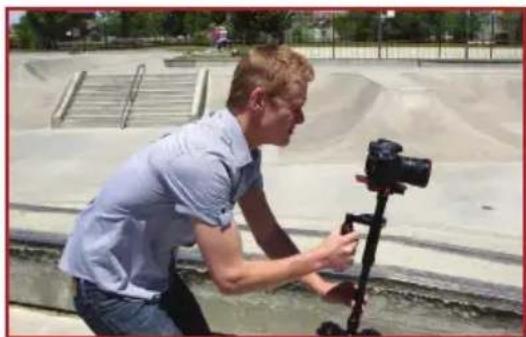
natural_image
Man using a camera on a tripod outdoors near a paved area with sandbags and railings (no visible text or symbols)USER'S GUIDE
TABLE OF CONTENTS
About the Free Spirit Handheld Camera Stabilizer 2
Free Spirit Component Parts 3
Free Spirit Key Features 4
Using the Free Spirit Camera Stabilizer 5
Attaching your camera to the Free Spirit 5
Achieving balance with your camera 6
Horizontal Balance 6
Vertical Balance 8
Handling the Free Spirit 9
Shooting with the Free Spirit 9
Cautions & Warnings 11
Specifications 11
Return Policy & Limited Warranty 13
About the Free Spirit Handheld Camera Stabilizer
The Digital Juice Free Spirit Camera Stabilizer is an affordable, lightweight, handheld camera stabilizing system designed to allow you to walk, run, climb stairs or move over rough terrain without camera shake or instability. Using this one piece of gear you can get beautiful and stable moving shots with a very high production value. And, since it weighs less than 3 pounds, it won't break your back when you need to hold both Free Spirit and camera for extended periods of time. You can easily get smooth tilts and pans, even jib or crane-like booms and fluid dolly-style maneuvers with the device because of its offset-gimbaled handle grip, horizontal yoke, telescoping center post and adjustable built-in quick-release camera plate. With the right lens and the right balance, the shots you can get with the Free Spirit are limitless.
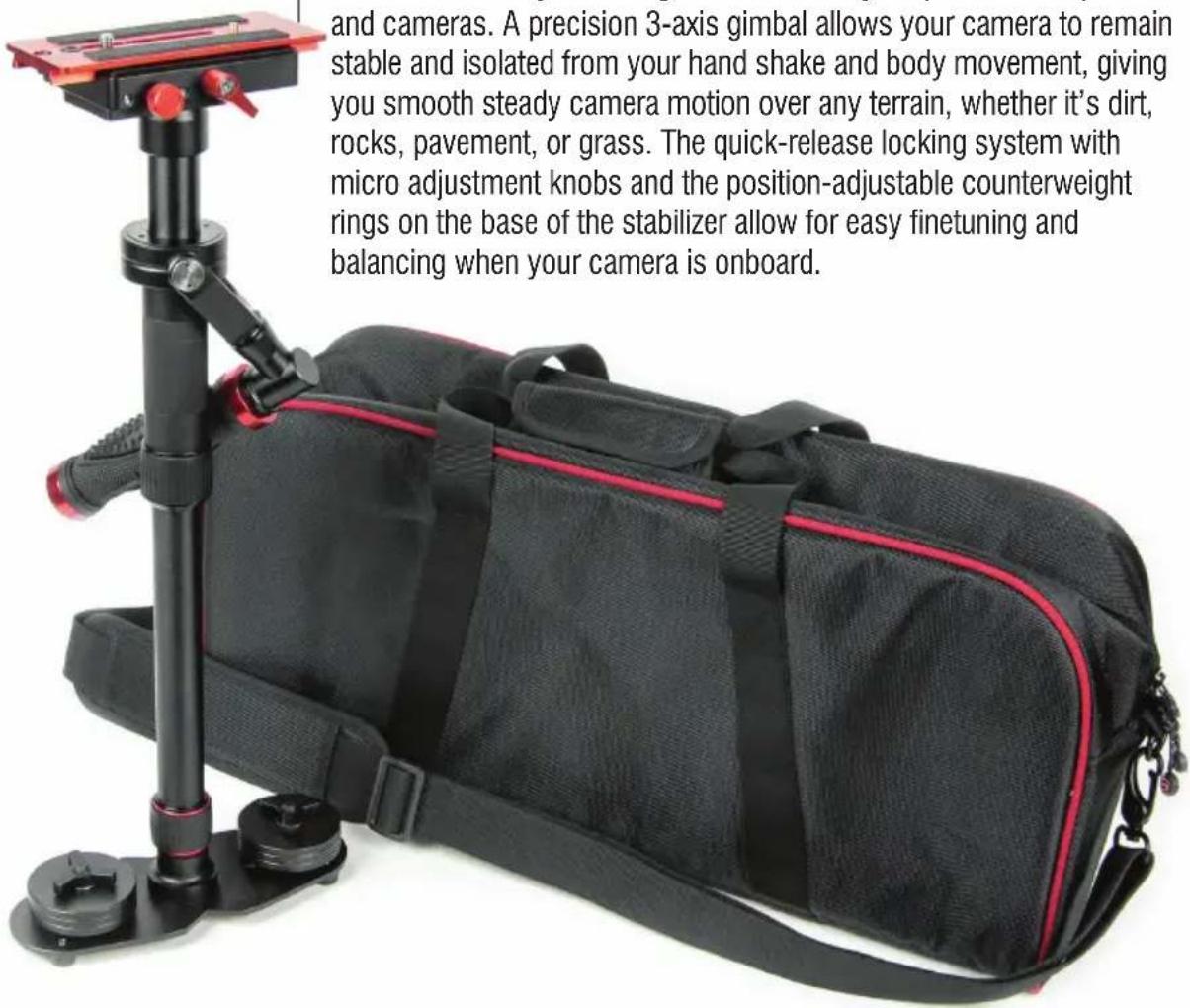
The Free Spirit unit collapses to 18.5 inches and extends to just over 30 inches. It can help you shoot continuous shots which range freely in any direction you can move, while still producing stable, dynamic imagery. You can use just about any professional camcorder, SLR or DSLR camera weighing up to 8 pounds with the Free Spirit. Its bidirectional, adjustable baseplate includes 3/8" and 1/4"-20 adapters that allow for easy mounting of a wide variety of quick release plates and cameras. A precision 3-axis gimbal allows your camera to remain stable and isolated from your hand shake and body movement, giving you smooth steady camera motion over any terrain, whether it's dirt, rocks, pavement, or grass. The quick-release locking system with micro adjustment knobs and the position-adjustable counterweight rings on the base of the stabilizer allow for easy finetuning and balancing when your camera is onboard.
text_image
and cameras. A precision 3-axis gimbal allows your camera to remain stable and isolated from your hand shake and body movement, giving you smooth steady camera motion over any terrain, whether it's dirt, rocks, pavement, or grass. The quick-release locking system with micro adjustment knobs and the position-adjustable counterweight rings on the base of the stabilizer allow for easy finetuning and balancing when your camera is onboard.
text_image
Diagram of a black handheld device with numbered parts and red directional arrows indicating motion or assembly.Free Spirit Component Parts
Quick release camera base plate (1)
Center telescoping support column (2)
Offset gimbaled handle grip and horizontal yoke assembly (3)
Handle assembly up/down adjustment and locking ring (4)
Soft rubber, textured handle grip (5)
Telescoping center column length adjustment and locking ring (6)
Counterweight base plate (7)
Six 3-ounce counter-weight rings (8)
Counterweight stack tie-down screw (9)
Free Spirit Key Features
natural_image
Hand holding a black spray gun with red hose, spraying green leafy plants in background (no text or symbols visible)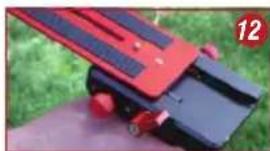
natural_image
Close-up of a red and black robotic device with green grass background (no visible text or symbols)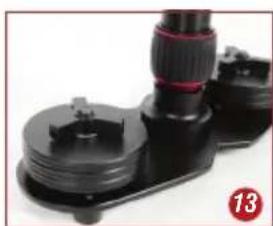
natural_image
Close-up of a black mechanical device with a red clamp and circular badge (no visible text or symbols)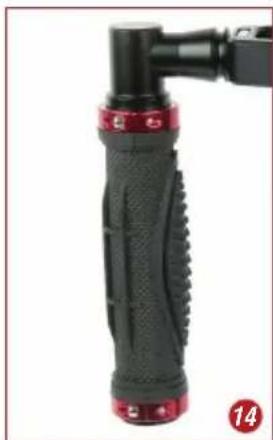
natural_image
Close-up of a black and red mechanical grip with a handle, no visible text or symbols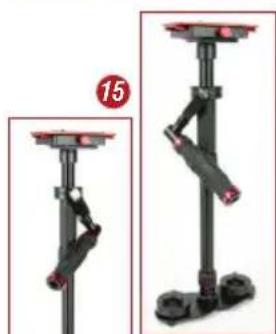
natural_image
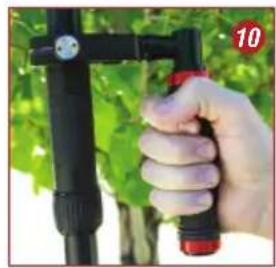
Mechanical assembly diagram showing two stages of a vertical support with red and black components, no text or symbols present.- The three-axis offset gimbaled handle-grip, enclosed bearing assembly and horizontal yoke of the Free Spirit stabilizer (10) allow your hand to move freely in every dimension, independently from the stable camera and telescoping center post. This eliminates the shake and instability inherent in handheld camera shots, while allowing the freedom of constant smooth motion on three axes which you can't get from a typical jib or dolly setup.

natural_image
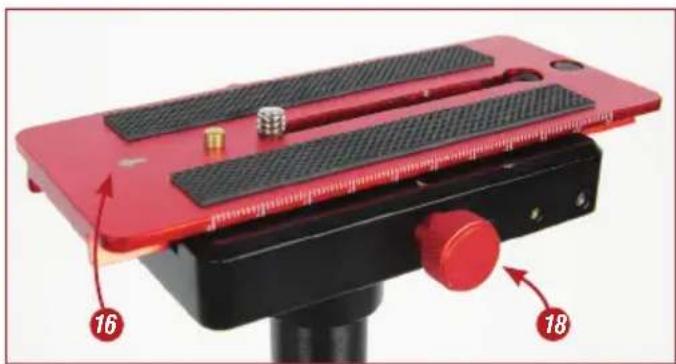
Red plastic electronic device with black and metallic screws, no visible text or symbols- The adjustable, built-in quick-release camera-mounting platform (11) includes 3/8" and 1/4"-20 adapters, allowing you to quickly and easily attach, remove or swap in just about any compact professional camcorder, SLR or DSLR camera weighing under 8 pounds. The bidirectional base plate has a finetuning system that can be adjusted freely in any direction. The marks on the edge of the plate can help you record the position of the plate for dynamic balance with different setups. Pulling the adjusting knob on the side of the plate separates the quick-release plate from the base (12).
- The counterweight plate at the bottom of the unit (13) helps you finetune your camera's dynamic balance and inertia using the provided position-adjustable stacks of counterweight rings.
- The soft rubber, textured handle grip (14) makes the Free Spirit stabilizer comfortable and easy to hold and operate.
- The telescoping central post (15) allows you to adjust the height of the Free Spirit for shooting at a higher angle. The unit collapses to 18.5 inches and extends to just over 30 inches.
- Precision enclosed bearings and lightweight all-aluminum precision CNC construction ensure you have a quality product that will give you years of use. The included durable nylon carry bag keeps the Free Spirit clean and protected for storage and when travelling from location to location.
natural_image
Man holding a selfie stick outdoors on grass, no visible text or symbolsAttaching your camera to the Free Spirit
- Remove the quick release plate from the top of the Free Spirit. To do this, position the unit with arrow on top of quick release plate (16) facing away from you, then loosen the quick release lever knob on the right side (17) and pull on the red back-to-front fine adjustment screw (18) on the left side of the quick release plate unit. This will release the lock on the sliding plate and you can slide it off the top of the Free Spirit in the direction of the arrow.
- Find the threaded hole on the bottom of camera, and determine the correct mounting screw to use with it. The Free Spirit quick release plate features dual 1/4"-20 and 3/8" removable camera mounting screws, so install whichever of these you need for your camera through the bottom of the quick release plate's long slot (19).
- Screw the quick release plate onto the bottom of your camera.
- Slide the camera onto the top of the Free Spirit by aligning the quick release plate with its base and sliding it into place (20).
natural_image
Red and black electronic device with adjustment knobs and a knob, labeled 16 and 18 (no text or symbols on the device itself)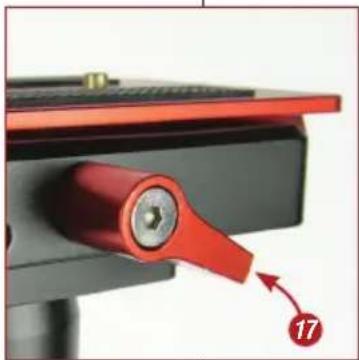
natural_image
Close-up of a red mechanical lever handle with a numbered callout (17) pointing to a component, no visible text or symbols on the lever itself.
natural_image
Close-up of a red and black handheld device with adjustment knobs, held outdoors on grass (no visible text or symbols)
natural_image
Black LUMIX DSLR camera mounted on a red stand, outdoors with blurred green foliage background (no text or symbols visible)Using the Free Spirit Camera Stabilizer
Using the Free Spirit Camera Stabilizer (continued)
NOTE:
When checking horizontal balance, you should make sure that you lift the Free Spirit from a flat and level surface, such as a table, and allow it to hang freely as you hold it. If it is balanced properly on its horizontal axis, it will be level and upright, with the center shaft in a perfect vertical position. If it tilts to the front, then you need to shift the center of gravity backwards. If it is tilting to the back, then you need to shift the center of gravity forwards. If the unit leans to the right, you will need to adjust the plate and camera to the left using the left-to-right adjustment knob on the mounting plate. If the unit leans to the left, you will need to adjust the plate and camera to the right using the left-to-right adjustment knob on the mounting plate.
Achieving balance with your camera on the Free Spirit Camera Stabilizer
You've got all of the control that you could want for front to back and left to right adjustments to be able to really finetune the center of gravity of your Free Spirit/camera setup—both by moving the camera quick-release plate on the top of the unit in fine increments and by adjusting the amount and position of the counterweights on the base. Before you begin the finetuning/balancing process, make sure that your camera is set exactly how you need it for shooting: remove the lens cap, install the battery, attach the appropriate lens, and flip out the camera LCD screen if you will be using it. You don't want to make all of your tweaks and adjustments and then have to change something and start from the beginning to tweak it again.
Horizontal Balance
The goal in achieving correct horizontal balance is that the camera should remain level during operation, unless you are intentionally applying a pan, tilt or roll type of hand pressure to the Free Spirit unit. In other words, if the Free Spirit is horizontally balanced correctly, then the camera should remain level, and the center post should remain vertical. The Free Spirit should always return to this level and vertical position after you release any pan, tilt, or roll pressure on the center shaft of the unit. To achieve horizontal balance you will need to make sure your camera's center of gravity is aligned properly with the center of the Free Spirit unit.
-
First assess and adjust the position of attachment of your camera on the quick release plate. Depending on what lenses or accessories you have attached to your camera you may need to shift the attachment point away from the center of plate.
-
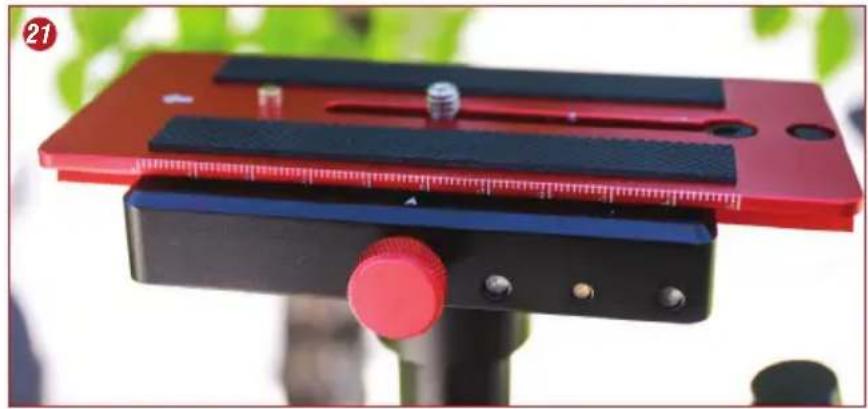
Once the quick release plate and camera are attached to the Free Spirit, adjust camera position from front to back by turning the front-to-back adjustment knob on the left side of the mounting plate (21). Once you have reached a good front to back equilibrium, you can lock down the position using the red lever knob on the right side of the mounting plate.
-
Make finetuning adjustments of camera position from left to right by turning the left-to-right adjustment knob on the right side of the mounting plate (22).
-
After adjusting side-to-side balance, you may need to go back and readjust front-to-back balance to obtain a fine balance of the overall setup. You can use either your naked eye or a bubble level to judge for correct horizontal balance.
-
Another way to finetune horizontal balance is to move the position of the counterweight ring stacks on the base plate at the base of the unit (23). There are slots on the base plate on which the weight stacks can move inwards and outwards from the main shaft. Moving the counterweights away from the center on the base plate will also increase panning stability. Make sure to lock the counterweights back down after you move them.
natural_image
Close-up of a red and black adjustable clamp device with adjustment knobs, mounted on a black stand (no visible text or symbols)
natural_image
Close-up of a hand adjusting a red-handled camera mount on a tripod, with green foliage in the background (no text or symbols visible)
natural_image
Hand holding a black mechanical device with three spools and a red ring, outdoors with greenery background (no text or symbols visible)Using the Free Spirit Camera Stabilizer (continued)
NOTE:
Horizontal balance will get less sensitive as you increase weight at the bottom of the unit and then more sensitive as the unit achieves vertical balance.
Using the Free Spirit Camera Stabilizer (continued)
Achieving balance with your camera on the Free Spirit Camera Stabilizer (continued)
Vertical Balance
Once your Free Spirit is horizontally balanced, its vertical balance can be tested and properly adjusted. As with horizontal balance, the objective in obtaining correct vertical balance is to get the camera and Free Spirit unit to remain level during operation, unless you are intentionally applying a pan, tilt or roll type of hand pressure.
Most importantly, the Free Spirit's center shaft should remain vertical when you are walking, running, or turning while using it. In other words, if the Free Spirit is vertically balanced correctly, then the camera should remain level, and the center post should remain vertical. The Free Spirit should always return to this level and vertical position after you release any pan, tilt, or roll pressure on the center shaft of the unit.
If the Free Spirit is not vertically balanced properly, it will swing like a pendulum when you walk, run or turn. if the vertical balance is set correctly you will be able to move around quickly, as well as start or stop suddenly, while the center shaft of the unit remains vertical.
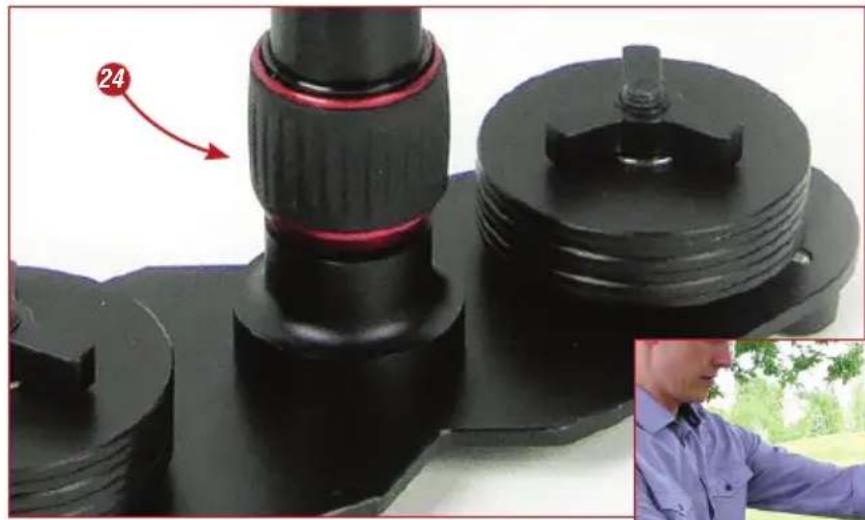
- The best way to adjust vertical balance is to telescope the center shaft in or out from the counterweight base plate. To do this, loosen the red-ringed height adjustment ring (24) on the center column and slide the shaft up or down as required. Then, re-tighten the adjustment ring to hold the column at this length (25).
- Another way to adjust the Free Spirit's vertical balance is to add or subtract counterweight discs on the bottom base plate of the unit (26). To do this, you would remove the tie-down screw at the top of the weight stacks on both sides of the base plate, and then slide on or off one or more weight rings on each side.
- To test for vertical balance you can hold the Free Spirit by the handle with one hand and lift the base plate up until the center column is horizontal to the ground with the other hand. Then, release the baseplate and count how long the unit takes to drop and first return to a vertical position. You want to count only until it passes the vertical position the first time, not the subsequent swings back and forth until it comes to rest. Before you achieve balance, this time will likely be very fast, a second or less. The ideal time on a perfectly balanced unit will be two to three seconds.
- You can also test vertical balance by moving quickly forward carrying the unit and stopping quickly. If the Free Spirit swings like a pendulum away from the upright position, then it is not yet balanced properly.
- Until you can perform these vertical balance tests successfully, you will need to make finetuning adjustments as outlined in Steps 1 and 2 above.
natural_image
Close-up of a mechanical component with black and red parts, no visible text or symbolsUsing the Free Spirit Camera Stabilizer (continued)

natural_image
Close-up of a hand adjusting a black mechanical device with a red accent, showing a small inset image of a person holding a tool (no text or symbols visible)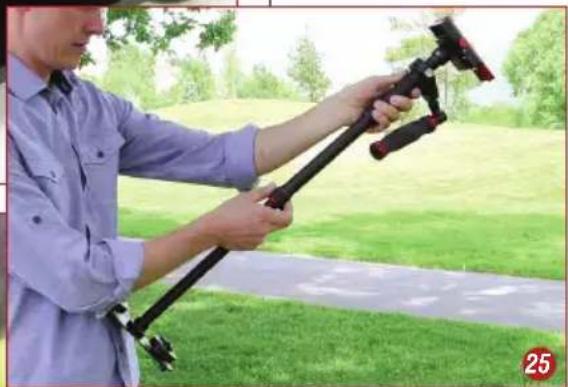
natural_image
Person using a black tripod-mounted device outdoors on grass, no visible text or symbolsHandling the Free Spirit Camera Stabilizer
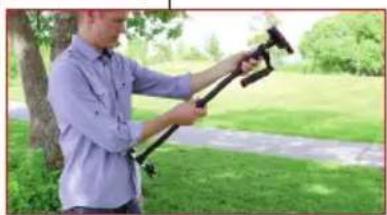
The Free Spirit Camera Stabilizer is designed to work properly only when using two hands to control it—one hand to hold the unit and the other to guide it. Without a guiding hand, the camera can drift away from its originally balanced position and you won't be able to control the direction it is shooting. With a second hand, you can gently guide the camera in the direction you wish to shoot and aim the camera properly for tilting and panning shots.
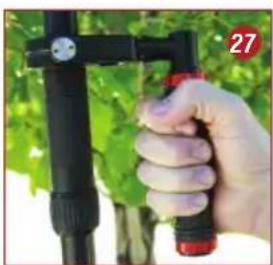
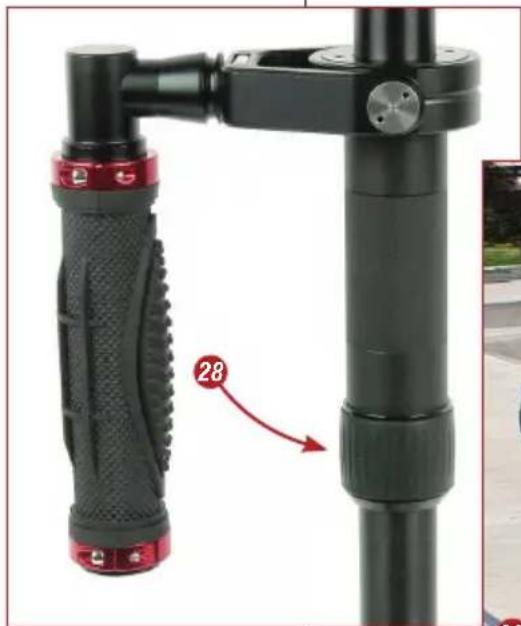
When holding the Free Spirit you should hold the handle firmly in the center of the rubberized handle grip (27). The handle and gimbal unit can slide up and down on the center column, depending on where you want to hold it. If you will be aiming the camera up, down or sideways, you may want to lower the position of the assembly to avoid hitting your hand or knuckles on the camera or attached accessories. To adjust the position, just twist the black rubber adjustment ring to loosen it, slide the handle assembly up or down
(continued on page 10)
natural_image
Hand holding a black spray gun with red handle, outdoors near green vine (no text or symbols visible)Using the Free Spirit Camera Stabilizer (continued)
NOTE:
Make sure neither hand touches the gimbal assembly, yoke or top camera mounting plate during shooting as this can cause unstable shots.
Handling the Free Spirit Camera Stabilizer (continued)
and re-tighten the black rubber ring (28) at the new position. You can also hold the Free Spirit's handle from behind the bar or in front of the bar depending on whatever is most comfortable for you.
When you use your second hand to guide the Free Spirit, you will want to gently hold onto either the area just below the handle and yoke assembly or the area on the center column just above the counterweight base plate, using thumb and forefinger and not the entire hand. These two areas offer the easiest control of the unit in use. Where you hold will depend on the kind of shots you are taking. Usually you will want to use the area just below the handle assembly, because it will allow you to subtly aim the camera without disturbing its upright position and you will get the smoothest shots when walking or running like this. For unconventional shots, where you are aiming the camera up, down, or at an angle, guiding the Free Spirit from the area above the base plate will give you a greater degree of control (29).
natural_image
Close-up of a black and red adjustable camera grip with a red arrow pointing to a specific component (no text or symbols visible)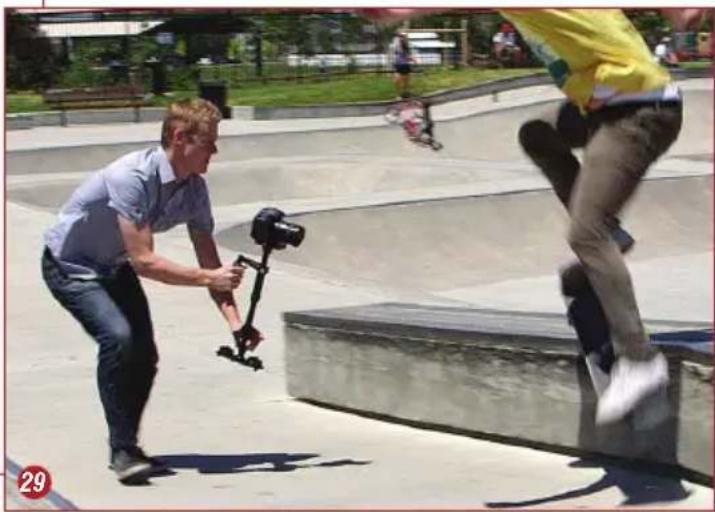
natural_image
Outdoor skateboarding scene with a man using a camera on a ramp, another person in yellow shirt nearby (no visible text or symbols)Shooting with the Free Spirit Camera Stabilizer
When operating a handheld camera stabilizer like the Free Spirit, you cannot use the eyecup on the viewfinder without restricting the unit's ability to stabilize and eliminate camera shake. However, there are a few ways you can more accurately frame your shots.
- If your camera has a flip out LCD monitor then you can view your shots on that while capturing footage.
- You can attach an LCD color video monitor to the accessory shoe on top of your camera.
-
You can watch the little monitor inside your camera viewfinder from several inches away with the magnifying eyecup removed.
-
You can rely on your own sight and judgment of what the camera is shooting. This is easier to do if you camera is set up with a wide angle lens so that you don't miss any of the action. Also, using a wide aperture setting will give you a wider depth of field so that the precision of your focus is not as important. Estimate the distance that you want to be from your subject and set the focus there, and then try to stay as close as possible to that distance from the subject while taking your tracking shots. With the aperture high it will not be as critical if you move in and out a little bit from the subject as you shoot.
-
When handling and operating your stabilizer, always avoid violent motion as it could cause damage to the unit or cause your camera to come loose from the mounting plate.
- The Free Spirit does not work underwater and is not waterproof, so you should avoid direct exposure to rain or water. It is also not sand-proof, so avoid getting dirt or sand on it as this could interfere with the smooth operation of the unit.
- Be very careful when using the Free Spirit at night or in low light conditions. It is easy to focus so much on what you are shooting that you don't notice obstacles in your path. Plan your shots before shooting, so that you do not trip or fall over, or into, something along the way such as traffic or a water fountain. Be extra cautious when shooting on stairs or rugged terrain, whether in daylight or at night.
- If you plan to store your Free Spirit for an extended period of time, store it upright in a dry or low humidity area whenever possible to alleviate stress on the system. If this is not possible, place it in an airtight plastic container or bag.
- Do not use solvents or harsh cleaners of any kind on the Free Spirit unit. If it becomes dirty, use only a damp cloth or sponge with water to gently rub clean.
Load Capacity: Designed for compact, low-profile cameras weighing up to 8 pounds
Dimensions: Free Spirit Height:18.5"/47cm in shortest mode, 30.5"/77.5cm in longest mode; Camera Quick Release Plate: 5.5" x 2.375" x 1.125/14cm x 6cm x 3cm; Counterweight Base Platform Dimensions: 7.75" x 3.25/19.7cm x 8.25cm; Central Support Post: 1"/2.54cm diameter
Weight: Free Spirit Camera Stabilizer: 3.2lbs/1.45kg without Counter Weights; Each Counterweight Disc: 3.5 oz/99g; 6 Counterweight Discs: 21 oz/595g
Using the Free Spirit Camera Stabilizer (continued)
Cautions & Warnings
Specifications
Free Spirit Return Policy & Limited Warranty
Unless otherwise noted this warranty agreement is the only warranty agreement between the parties. This agreement states the limits and association of risk between the two parties. By use of the Product and accessories the customer acknowledges understanding of this warranty and agreement and binding to the terms contained within.
Return Policy
• 30-day money back excluding shipping.
• A receipt dated within 30 days of purchase.
- All returns must be new, unused, and contain all original packaging, labels and accessories.
- The original product must be returned inside your shipping box.
- DJ suggests using a carrier that provides tracking and insurance. DJ is not responsible for lost shipments.
Warranty
Digital Juice, Inc. warrants all Digital Juice products purchased new by original owner to be free from defects in the material and workmanship under normal use for a period of 12 months from the date of purchase. Warranty is void when misuse or neglect is the cause. THIS WARRANTY IS VALID ONLY IN THE UNITED STATES AND CANADA.
Legal Indemnification
No other express warranty or guaranty, except as mentioned above, given by any person or entity with respect to Digital Juice products shall bind Digital Juice, Inc. This warranty supersedes all other warranties expressed or implied. NO IMPLIED WARRANTIES, INCLUDING ANY IMPLIED WARRANTY OF MERCHANTABILITY OR FITNESS FOR A PARTICULAR PURPOSE APPLY TO DIGITAL JUICE PRODUCTS AND ARE HEREBY DISCLAIMED.
In the event of a possible warranty claim, the defective product must be returned to Digital Juice, Inc (hereafter “Digital Juice”). If proven to be defective upon inspection, it will be exchanged for a new or comparable rebuilt product, as determined by Digital Juice and shipped back to the original purchaser. All shipping costs are the responsibility of the customer. Warranty replacement shall not extend the original warranty period of the defective Digital Juice Product.
The customer's remedies with respect to defective Digital Juice Product and accessories shall be exclusively limited to the repair or replacement remedy as above provided and in no event shall Digital Juice be liable for loss of profits, revenues, savings, inconvenience, associated costs, expense for equipment or service, use of capital, facilities, services, storage charges, damage to property, or any other special, incidental or consequential damages caused by the use or misuse of, or inability to use, the Digital Juice Product or accessories, regardless of the legal theory on which the claim is based, and even if Digital Juice has been advised of such damages. In no event shall recovery of any kind against Digital Juice be greater in amount than the purchase price of the Digital Juice product sold by Digital Juice and causing the alleged damage.
Without limiting the foregoing, the purchaser assumes all risk and liability for loss, damage or injury to persons, animals or property arising out of use or misuse of, or inability to use, the Digital Juice Product and accessories. Digital Juice is not liable for third party claims. This limited warranty shall not extend to anyone other than the original purchaser of the Digital Juice product, or the person for whom it was purchased as a gift, and states your exclusive remedy. In no event shall Digital Juice be liable for incidental or consequential damages to the full extent such may be disclaimed by law.
Unless otherwise noted this warranty agreement is the only warranty agreement between the parties. This agreement states the limits and association of risk between the two parties. By use of the Product and accessories the customer acknowledges understanding of this warranty and agreement and binding to the terms contained within.
Free Spirit Return Policy & Limited Warranty
natural_image
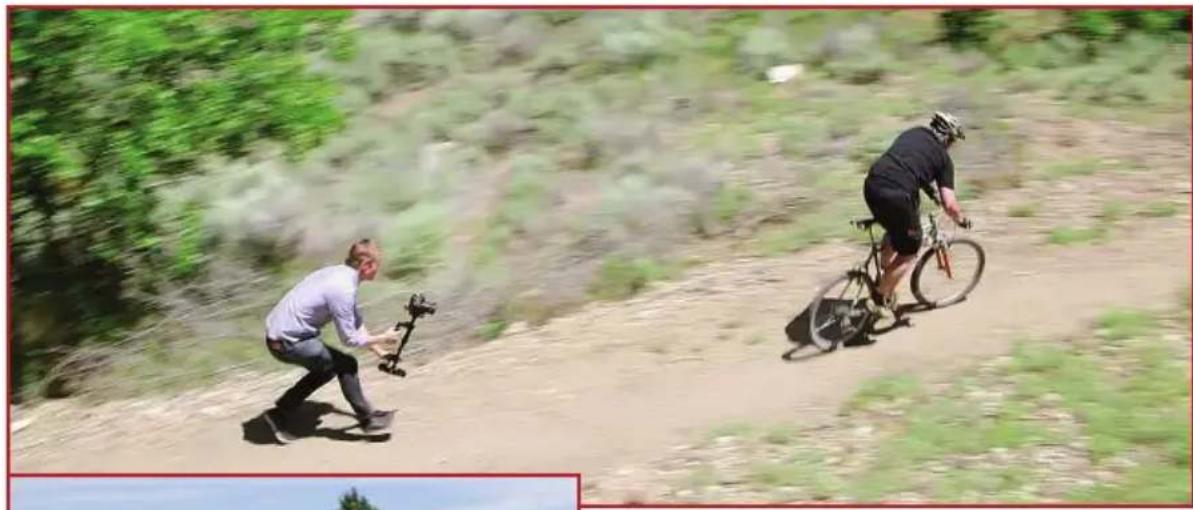
Two men riding a dirt path on a hillside, one using a camera to catch the other (no visible text or symbols)
natural_image
Two people performing a skateboarding trick outdoors, one jumping with a camera and the other swinging on a ramp (no visible text or symbols)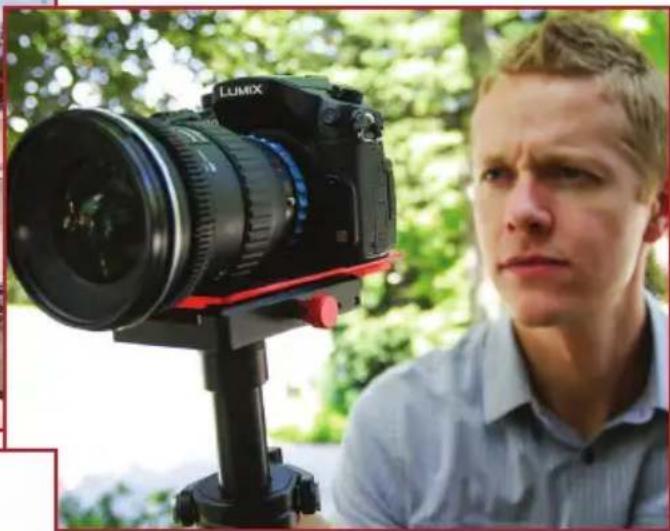
natural_image
Man in a studio setting with a LUMIX DSLR camera on a tripod, surrounded by greenery (no visible text or symbols)