
MiniBurst PRO - Lighting Digital Juice - Free user manual and instructions
Find the device manual for free MiniBurst PRO Digital Juice in PDF.


| Type | 3-Point LED Lighting System |
| Model | MiniBurst PRO |
| Components | 1x MiniBurst 256, 2x MiniBurst 504, 3x light stands, 3x hotshoe swivel mounts, 3x mini ball heads, filters, batteries, chargers, carry case |
| LED Count | 504 (MiniBurst 504), 256 (MiniBurst 256) |
| Luminous Flux | MiniBurst 504: >3000 LM, MiniBurst 256: 1050 LM |
| Color Temperature | MiniBurst 504: 5500K±200, MiniBurst 256: 5600K |
| Color Rendering Index (CRI) | MiniBurst 504: >90, MiniBurst 256: >85 |
| Beam Angle | 60° Flood |
| Power Sources | AC adapter or rechargeable Li-ion battery (MiniBurst 504: 18V 4.5A adapter or 14.8V 2600mAh battery; MiniBurst 256: 12V adapter or 7.4V 6000mAh NP-F type battery) |
| Battery Charging Time | MiniBurst 504: approx. 3 hours (integrated charger); MiniBurst 256: 4-6 hours (external charger) |
| Dimmer Range | 10%-100% (MiniBurst 256), 1%-100% (MiniBurst 504) |
| Display | OLED (MiniBurst 504) showing battery level and dimmer setting |
| Dimensions (HxWxD) | MiniBurst 504: 4.625" x 8.875" x 1.625" (117.5 x 225.4 x 41.3 mm); MiniBurst 256: 2.75" x 8.87" x 1.81" (70 x 225 x 46 mm) |
| Weight (with battery) | MiniBurst 504: 1.9 lbs (850.5 g); MiniBurst 256: 1.4 lbs (635 g) |
| Construction | Aluminum |
| LED Life | MiniBurst 504: >50,000 hours; MiniBurst 256: >20,000 hours |
| Mounting | 1/4"-20 threaded holes (top and bottom), compatible with hotshoe swivel mounts, mini ball heads, etc. |
| Filters Included | Diffusion and warming filters (2 sets for 504, 1 set for 256) with magnetic snap-on or slide-in attachment |
| Light Stands | 3x 6 ft aluminum stands, max weight capacity 12 lbs each |
| Carry Case | Deluxe carry bag with padded grip handle and shoulder strap |
| Operating Temperature | 32°F - 95°F (0°C - 35°C) |
| Warranty | 12 months limited (US and Canada) |
Frequently Asked Questions - MiniBurst PRO Digital Juice
User questions about MiniBurst PRO Digital Juice
0 question about this device. Answer the ones you know or ask your own.
Ask a new question about this device
Download the instructions for your Lighting in PDF format for free! Find your manual MiniBurst PRO - Digital Juice and take your electronic device back in hand. On this page are published all the documents necessary for the use of your device. MiniBurst PRO by Digital Juice.
USER MANUAL MiniBurst PRO Digital Juice
natural_image
Three black tripod-mounted lighting equipment with grid screens, arranged in a triangular pattern (no text or symbols visible)
MINIBURST / PRO 3-POINT LED LIGHTING SYSTEM
USER'S GUIDE
TABLE OF CONTENTS
About The MiniBurst PRO 3-Point LED Lighting System 2
Package Contents
MiniBurst 256 Controllers & Connectors 5
MiniBurst 504 Controllers & Connectors 6
Charging the Batteries 7
Operating Your MiniBurst PRO Lighting System 8
Technical Data/Specifications 9
Troubleshooting
Cleaning Instructions
Replacement Parts & Accessories 10
Safety Precautions & Warnings 11
Return Policy & Limited Warranty 12
9
MiniBurst PRO 3 Point Lighting System Component List
1) Stylish Compact Deluxe Carry Case 2) MiniBurst 504 LED Light Unit (2) 3) MiniBurst 256 LED Light Unit (x1) 4) Hotshoe Swivel Mount (x3) 5) Mini Ball Head (x3) 6) Soft cloth carry bag for Mini Ball Head (x3) 7) 18V 4.5A AC power supply adapter and power cord for MiniBurst 504 (x2) 8) 12v AC Power Supply Adapter for MiniBurst 256 9) Diffusion & Warming Filter Sets for MiniBurst 504 (x2) 10) Diffusion & Warming Filter Set for MiniBurst 256 (x1) 11) 2600mAh 14.8V Li-ion Battery Pack for MiniBurst 504 (x4) 12) 7.4v NP-type Rechargeable Lithium-Ion Battery (6000mAh) for MiniBurst 256 (x1) 13) Battery Charging Kit for MiniBurst 256 including Battery Dock, AC Power Cord and 12v DC Adapter (x1) 14) 6' light stand (x3); 15) Soft cloth carry bag for light stand (x3)

natural_image
Product photo of a red and black light bulb device with multiple small lighting modules and connectors (no visible text or symbols)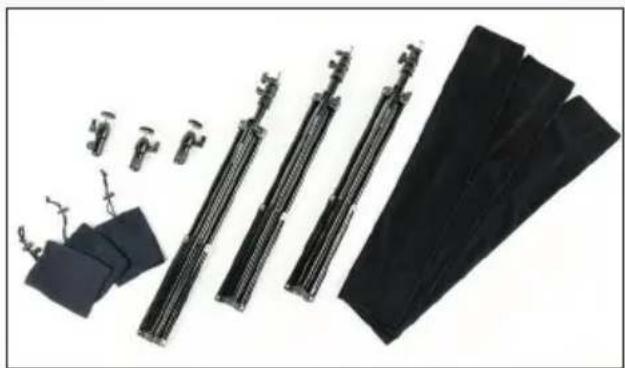
natural_image
Exploded view of mechanical components including clamps, springs, and sheets of black fabric (no text or symbols visible)About the MiniBurst PRO 3-Point LED Lighting System
Congratulations on your purchase of the Digital Juice MiniBurst PRO 3-Point Lighting System. The three LED lights in this compact kit deliver the equivalent of 1000W of hotlight power while still providing the bright long-lasting lighting you need in a complete portable lighting solution for your next photo or video project. This versatile cool-running lighting system works perfectly for everything from talking head interviews and product shots in confined spaces to larger scale productions in a studio environment.
The MiniBurst PRO 3-Point Lighting System includes 1 MiniBurst 256 and 2 MiniBurst 504 LED light fixtures, along with compatible power supply adapters, batteries, battery charger (MiniBurst 256), diffusion/warming filters, hotshoe mounts and mini ball heads. Three lightweight light stands are also provided, as is an attractive compact deluxe carry bag for easy transport and storage of lights and stands when not in use.
These high-output portable LED lights with 400W (MiniBurst 504) and 200W (MiniBurst 256) hotlight equivalent output are Daylight (5600K) balanced and powered by long-lasting rechargeable lithium-ion batteries. They can run for hours on one charge without losing their cool or be powered directly from an electrical outlet with the provided AC power supply adapters. Each light also features a built-in dimmer knob while the two MiniBurst 504 lights have an OLED-readout that displays battery charge and dimmer setting.
Please read these instructions carefully before using the product. Follow the procedures described, in order to optimize the lifespan and functionality of the components.
Check to see that the following components are included in the packaging:
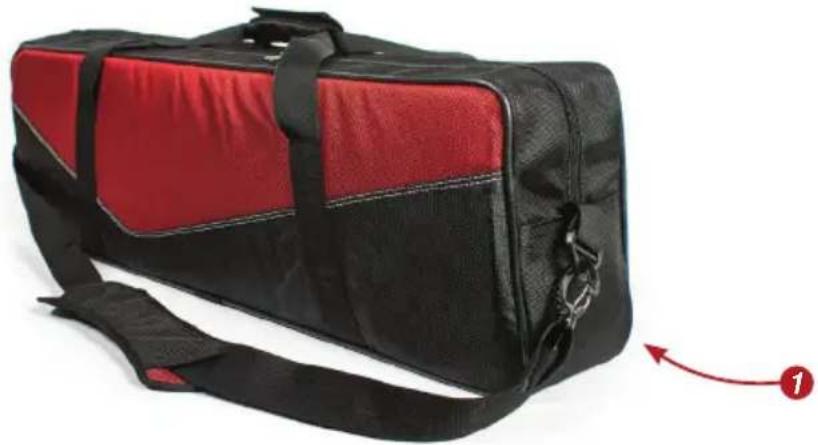
a. Stylish Compact Deluxe Carry Bag:
The MiniBurst PRO 3-Point Lighting System includes a stylish deluxe carry bag (1) with integrated padded grip handle, detachable padded shoulder strap and one large zippered compartment with soft repositionable foam padding to hold and protect the 3 lights and 3 stands, as well as all accessories.
natural_image
Black and red athletic bag with black straps and a red arrow pointing to the side (no text or symbols visible)Package Contents

natural_image
Exterior view of four black battery packs with visible labels and certification marks (no readable text beyond labels)b. Four 2600mAh 14.8V Li-ion Battery Packs for MiniBurst 504 (2) and one 7.4v NP-F type (6000mAh) rechargeable Lithium Ion battery for MiniBurst 256 (3)
c. Two AC (18V 4.5A) Power Supply Adapters (4) with power cords for MiniBurst 504 and one 12v AC power supply adapter for MiniBurst 256 (5)

natural_image
Black rectangular electronic device with two black cables, one connected to a plug and the other tied with a 5-pin cable (no visible text or symbols)
natural_image
Electric charger with black cable and connector, no visible text or symbolsd. 3 Mini Ball Head Adapters:
The mini ball head adapters (7) allow for easy mounting and adjustment of the MiniBurst lights on the included light stands. Each mini ball head is contained in a soft cloth bag (8) to protect it and keep it clean during transport and storage.

natural_image
Black rectangular electronic device with two coiled cables, no visible text or symbols

natural_image
Electric vehicle charging device with coiled cable and power plug, labeled with number 9 (no text or symbols on main subject)e. Battery Charger Kit for the Mini-Burst 256 with Battery Dock, A/C power cord & 12V DC adapter (9)
f. 3 Hotshoe Swivel Mounts (10) which allow for easy mounting of the Digital Juice MiniBurst LED Lights to the shoe mount on most still and video cameras.
Package Contents (continued)
MiniBurst 504 lights can be plugged directly into a standard AC outlet using the included 18v AC Adapter to power the unit for longer shoots. The integrated battery charging system means there is no need for a separate charger—the battery automatically charges in around 3 hours when AC power is connected to the light (6).

natural_image
Close-up of a hand holding a cable with a connector, no visible text or symbols
natural_image
Close-up of a black mechanical clamp or bracket device with a red circular badge labeled '10' (no visible text or symbols on the device itself)Package Contents (continued)
natural_image
Close-up of a yellow and black electronic device with a grid-patterned screen, no visible text or symbols
natural_image
Exterior view of a black rectangular LED array light fixture (no text or symbols visible)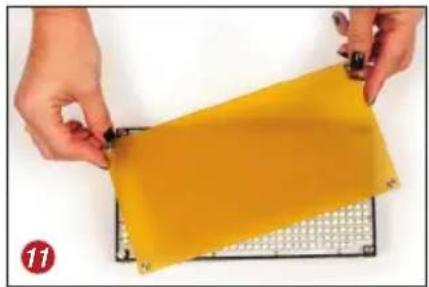
natural_image
Close-up of hands holding a yellow rectangular object on a metal rack (no text or symbols visible)
natural_image
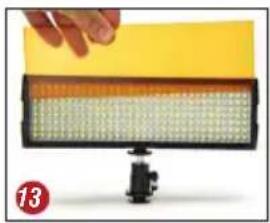
Close-up of hands holding a white sheet with a red circular mark nearby (no text or symbols visible)f. 1 Diffusion and 1 Warming Color Filter for each MiniBurst light (2 sets for MiniBurst 504 and 1 set for MiniBurst 256): These filters help you match tungsten light sources and diffuse light when necessary. They easily mount to the lights via magnetic snap-on posts on the MiniBurst 504 (11, 12) or by sliding into a bracket on the front of the light on the MiniBurst 256 (13, 14). Warming filters (11, 13) are used to match the daylight balanced LED to warmer tungsten fixtures, while diffusion filters (12, 14) help to soften and spread the light.

natural_image
Three black-and-white photoelectric light fixtures with grid-patterned panels, labeled 15 and 16 (no text or symbols on main components)
natural_image
Close-up of a firearm component with metallic handle and black body (no visible text or symbols)g. 1 MiniBurst 256 (15) & 2 MiniBurst 504 (16) LED Light Fixtures:
Each daylight-balanced LED light features either 256 or 504 cool-running, yet powerful, 5mm bulbs that produce flicker-free illumination at any shutter angle.

natural_image
Close-up of hands assembling a black mechanical component (no visible text or symbols)h. 3 6-ft Light Stands:
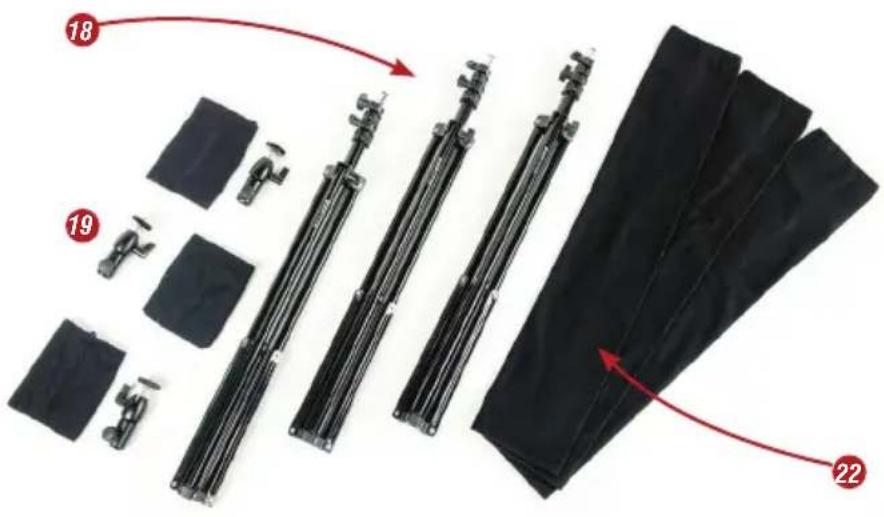
With a max height of 6 ft and a max weight capacity of 12 lbs, the 3 provided aluminum light stands (18) are both portable and durable enough for most shooting environments. Mounting a MiniBurst light fixture to a light stand is as easy as attaching the LED fixture to the included mini ball head (19), sliding the receiving end of the ball head onto the mounting stud on the stand and tightening the knob (20). The stand can then be adjusted to the required height (21). Each stand is provided with its own soft cloth carry bag (22) to keep it clean and protect it during transport and storage.
a. Power Switch (23): Turns the LED light on and off.
b. DC Power In (24): The 12v AC power supply adapter (5) connects here.
c. Dimmer Knob (25): Adjusts light output infinitely from 10%-100%.
d. Standard 1/4"-20 Mounting & Accessory holes (26, 27):
There are two 14 "-20 mounting holes, one on the top of the light and one on the bottom. These holes allow for the lights to be mounted to a variety of industry-standard mounting platforms such as articulating arms, shoe mounts, mini clamps, tripods & more (28).
e. Battery Plate (29): This is where the included 7.4v NP-F type (6000mAh) battery is mounted (30). The battery plate will also receive a number of compatible 7.4v rechargeable Li-Ion camera batteries, besides the one provided.

Package Contents (continued)

natural_image
Close-up of hands adjusting a black cylindrical component with a small protrusion (no text or symbols visible)MiniBurst 256
Controllers & Connectors

natural_image
Close-up of a black electronic device with a red circular marker labeled '24' pointing to a component (no readable text or symbols beyond the number)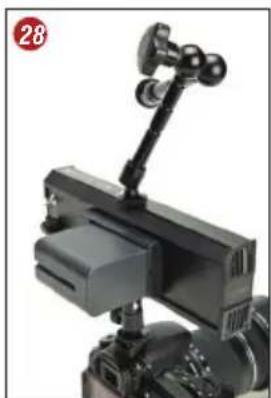
natural_image
Close-up of a black mechanical device with a mounted bracket and a circular badge showing number 28 (no visible text or symbols on the device itself)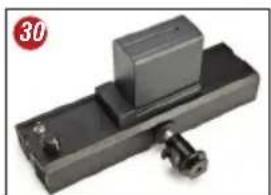
natural_image
Mechanical component with a rectangular block mounted on a black base, featuring a bolt and a red circular badge labeled '30' in the corner (no text or symbols on the object itself)MiniBurst 504 Controllers & Connectors
a. Power Switch & Dimmer Knob (31):
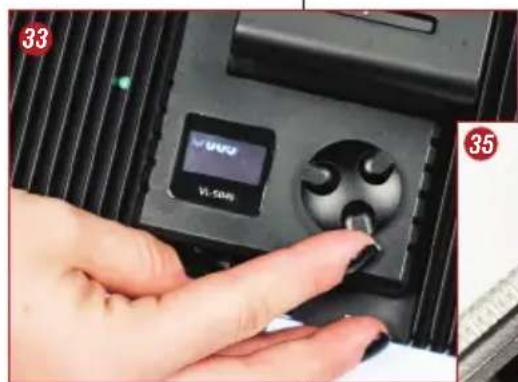
When pushed, this knob turns the LED light on. When turned, this knob adjusts the light output infinitely from 1% to 100% with no shift in color temperature. The exact dimming percentage is displayed in the OLED display on the back of the light (32). Pressing and holding the knob for 3 seconds turns the light unit off.
b. OLED Display (32, 33):
Displays the available charge left on your battery so you do not get caught with a dead battery in the middle of a shoot. It also displays the dimmer's intensity setting so you can easily and consistently return to it after each take.
c. DC Power In (34, 35):
The 18v AC power supply adapter (4) connects to this port.
d. Standard 14 "-20 Mounting & Accessory hole (36, 37):
The 14 "-20 mounting hole on the bottom of the light allows for the lights to be attached to the included hotshoe swivel mount or mini ball-head light stand mount for use with a variety of industry-standard mounting platforms such as articulating arms, shoe mounts, mini clamps, tripods, light stands & more.


natural_image
Close-up of a hand holding a black USB cable inserted into a mechanical component (no visible text or symbols)
natural_image
Close-up of a black mechanical component with a metal clamp and adjustment knob (no visible text or symbols)
natural_image
Close-up of hands installing a black electronic device with a display and control knob (no text or symbols visible)e. Battery Plate & Integrated Charging System (38): This is where the provided 2600mAh Lithium-ION rechargeable batteries are mounted (39), for portable use and for charging when the unit is connected to a power outlet. The battery release button (40) allows you to easily remove and replace the battery.
The batteries supplied with the Digital Juice MiniBurst PRO 3-Point LED Lighting System are not completely charged on delivery. Batteries should be charged for 4-6 hours before first use. There may be an additional burn-in period before rapid charging takes place.
For the MiniBurst 504 lights:
a. Plug one of the 2600mAh 14.8V Li-ion Battery Packs (2) into the battery plate (38) on back of the MiniBurst 504 light.
b. Attach the provided 18V DC adapter (4) to the light (34, 35) and plug it into an available electrical outlet.
c. With the light powered on, you can follow the charging progress by looking at the OLED display on the back of the light, which displays the current battery charge state (41).
For the MiniBurst 256 light:
a. Plug battery pack (3) into the charger unit (42).
b. Plug the charger into the electrical outlet using the AC power cord or to a 12-volt power source with the 12V DC adapter. Both cables are provided in the MiniBurst 256 Battery Charger Kit (9).
c. While charging, the light on the charging unit will show red. When the battery is fully charged, the light will be green and the charger will switch into maintenance mode.

MiniBurst 504 Controllers & Connectors (continued)
Charging the Batteries
NOTE: The MiniBurst 504 lights do not need to be powered ON for the battery to charge. When light power is turned OFF, the unit is in Standby mode. If light is not to be used for a long time, please remove battery from the device.

natural_image
Close-up of a black battery charger with a circular display and indicator lights (no readable text or symbols)Operating Your MiniBurst PRO Lighting System
natural_image
Close-up of a mechanical component with visible numbers 504 and 43, no readable text or symbols beyond the number.
natural_image
Close-up of a yellow-orange plastic component with white spherical particles, no visible text or symbolsa. Attach LED light fixtures to desired mounting locations using either the included hotshoe swivel mounts, mini ball-head light stand mounts or any other 14 "-20 mounting accessory.
Caution: When attaching any 14 "-20 threaded stud to the mounting and accessory holes on the MiniBurst lights (26, 27, 36), do not use excessive force, pliers or any other tools, as there is a limited depth available to accept the 14 "-20 threaded stud and you could cause damage to your light which would void your warranty.
b. On the MiniBurst 504 lights, attach one of the included 2600mAh 14.8V Li-ion rechargeable battery packs (2) to the battery plate (38, 39) on the back of the light or plug the included 18V DC adapter (4) into the DC Power In (34, 35) on the bottom of the light to power it.
c. On the MiniBurst 256 light, attach the included 7.4v NP-F type (6000mAh) battery (3) to the battery plate (29, 30) on the light. Alternatively, you could plug the included 12v AC power supply adapter (5) into the DC Power In (24) on the side of the light to power it.
d. On the MiniBurst 504 lights, power the lights ON by pressing the power switch/dimmer knob (31). On the MiniBurst 256, power the light ON with the power switch (23).
e. On the MiniBurst 504, turn the power switch/dimmer knob to control the intensity of the light. Turning the dimmer knob in a clockwise direction will increase the intensity and turning it counterclockwise will decrease the intensity of its output. The OLED display to the left of the power/dimmer knob displays the dimmer's intensity setting (32, 33, 41) so you can easily and consistently return to it after each take.
f. On the MiniBurst 256, the dimmer knob (25) can be used to control the intensity of the light. Turning the dimmer knob in a clockwise direction will increase the intensity and turning it counter-clockwise will decrease the intensity of its output.
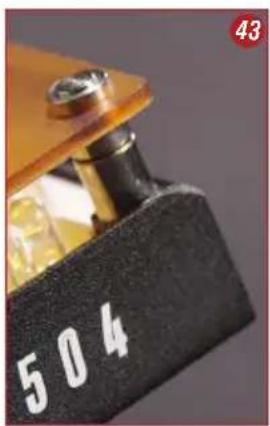
g. Install Warming (11, 13) or Diffusion (12, 14) filters if needed. These filters easily mount to the lights via magnetic snap-on posts on the MiniBurst 504 lights (11, 12, 43) or by sliding into a bracket on the front of the light on the MiniBurst 256 (13, 14, 44) Warming filters are used to match daylight balanced LED lights to warmer tungsten fixtures, while diffusion filters help to soften and spread the light.
| MODEL | 504 | 256 | |
| Luminous Flux | >3000 LM | 1050 LM | |
| LED Size | 5 mm | 5 mm | |
| # LEDs | 504 | 256 | |
| Life Span | >50,000h | >20,000h | |
| Color Temp. | 5500k±200 | 5600k | |
| Color Rendering Index | >90 | >85 | |
| Beam Angle | 60° Flood 60° | ||
| Stackable | No | Yes | |
| Battery Type | 2600mAh 14.8V Li-ion | 7.4v 6000mAh Li-ion | |
| Operating Voltage | 13-18 V DC | 6-10 V DC | |
| Construction | Aluminum | Aluminum | |
| Size HxWxD | 4.625" x 8.875" x 1.625" | 2.75" x 8.87" x 1.81" | |
| 117.5 x 225.4 x 41.3mm | 70 x 225 x 46mm | ||
| Weight (Battery Excluded) | 24 oz/680.4g | 12.8 oz/363g | |
| Weight (Battery Included) | 1.9 lbs/850.5g | 1.4 lbs/635g | |
PROBLEM
The unit is turned on, but the LED lights do not light up.
SOLUTIONS
- Make sure the light is properly connected to the battery or AC adapter.
- Charge the battery.
PROBLEM
Power to the battery being charged on the integrated charging sytstem is interrupted before end of charge cycle (such as due to a power outage).
SOLUTION
• As soon as power has been been restored, charge cycle will start again.
Care should be taken when cleaning your Digital Juice MiniBurst lights. Use a dry microfiber cleaning cloth to wipe dust from the housing and the LED lights. If your lights become excessively dirty, you can use a lightly moistened microfiber cleaning cloth to wipe the aluminum housing, after first ensuring that the lights are disconnected from any power source. Use of any chemical cleaning solution or detergent on the MiniBurst lights or accessories is not recommended.
Technical Data/Specifications
Troubleshooting
Cleaning Instructions
Replacement Parts & Accessories
The Digital Juice MiniBurst PRO 3-Point Lighting System is designed to be maintenance free and there are no user-serviceable parts on the light fixtures or accessories. If your lights become broken or damaged, please do not attempt to replace or repair the housing or any of the internal parts.
Replacement batteries, as well as several mounting accessories compatible for use with the MiniBurst lights are available on the website at gear.digitaljuice.com. These include:
- The 7" & 11" DJ Gear Articulating Arms with Shoe Adapter (45, 46)
- 2600mAh 14.8V (47) and 7.4v NP-F type (6000mAh) (48) Li-ion rechargeable battery packs
• The DJ Gear Suction Mount Series Articulating Arm (49) and Suction Mount Series Baby Pin (50)

natural_image
Black mechanical component with three arms and connectors, no visible text or symbols
natural_image
Hand holding a small white object next to a black laboratory brush head (no text or symbols visible)

natural_image
Black adjustable arm-mounted device with a red arrow pointing to the top-left corner (no text or symbols visible)
natural_image
Close-up of a person using a camera lens and smartphone to adjust the camera (no visible text or symbols)a. To avoid the risk of permanent eye damage, do not look directly into the lights or aim the lights directly into another person's eyes.
b. Lights and batteries must be used exclusively for the purpose described.
c. Under no circumstances should you open the housing of lights, batteries or power supplies. Never take the devices apart or undertake modifications. Misuse of batteries can cause them to become hot, explode, or ignite and may cause serious injury. Make sure that the following safety precautions are expressly followed:
- Never open the light units.
- Never make any changes/modifications to the batteries or lights.
- Do not expose batteries or lights to fire or severe heat (over 158°F or 70°C).
- Do not short circuit (do not connect via a conductor or reverse polarity).
- Protect from fluids and damp environments.
- Do not use the devices if damaged.
- Maintain storage and operational temperature of 32^ - 95^ (0^ - 35^) .
d. Do not use lights or power supply units if housing or plugs are damaged.
e. If you determine that a light unit or battery is excessively hot, emits an odor, or changes color or shape, turn it off immediately and disconnect from any power source. The device should not be used again and should be immediately returned to Digital Juice.
f. Do not store within reach of children.
g. Use only the supplied AC adapters or Lithium-ION rechargeable battery packs to power your lights. Normal SONY F series batteries on the market can NOT be used interchangeably with the provided 2600mAh Lithium-ION rechargeable battery packs.
h. The Lithium-Ion batteries provided in this kit should be used ONLY with their compatible MiniBurst light units. Please do not try to use the battery packs on other devices, to avoid damage to the other devices.
g. This product should not be treated as household waste. It is made of recyclable materials and should be disposed of in accordance with local and state regulations.
h. The shipped version of this device complies with the requirements of ECC directives 89/336/ECC and 73/23/ECC.
i. When lights are attached to a power source via the supplied AC adapters, please remove the battery pack from the device except when you are charging batteries on the integrated battery charging system on the MiniBurst 504 lights. Also remove battery pack from light if it is not to be used for a long time.
Safety Precautions & Warnings
WARNING:
The battery packs for the MiniBurst 504 lights are not interchangeable with the ones for the MiniBurst 256 lights and vice versa.
Please do not try to use the 2600mAh 14.8v Lithium-ion rechargeable battery packs on the MiniBurst 256 or the 7.4v NP-F type (6000mAh) battery packs on the MiniBurst 504.
The supplied battery charging kit is only for the MiniBurst 256 7.4v NP-F type (6000mAh) batteries and the integrated charger on the back of the MiniBurst 504 is only for the supplied 2600mAh 14.8V batteries.
MiniBurst PRO 3-Point LED Lighting System Return Policy & Limited Warranty
Unless otherwise noted this warranty agreement is the only warranty agreement between the parties. This agreement states the limits and association of risk between the two parties. By use of the Product and accessories the customer acknowledges understanding of this warranty and agreement and binding to the terms contained within.
RETURN POLICY
• 30-day money back guaranty, excluding shipping.
• A receipt dated within 30 days of purchase is required.
- All returns must be new, unused and contain all original packaging, labels and accessories.
- The original product must be returned inside your shipping box.
- DJ suggests using a carrier that provides tracking and insurance. DJ is not responsible for lost shipments.
WARRANTY
Digital Juice, Inc. warrants all Digital Juice products purchased new by original owner to be free from defects in the material and workmanship under normal use for a period of 12 months from the date of purchase. Warranty is void when misuse or neglect is the cause. THIS WARRANTY IS VALID ONLY IN THE UNITED STATES AND CANADA.
LEGAL INDEMNIFICATION
No other express warranty or guaranty, except as mentioned above, given by any person or entity with respect to Digital Juice products shall bind Digital Juice, Inc. This warranty supersedes all other warranties expressed or implied. NO IMPLIED WARRANTIES, INCLUDING ANY IMPLIED WARRANTY OF MERCHANTABILITY OR FITNESS FOR A PARTICULAR PURPOSE APPLY TO DIGITAL JUICE PRODUCTS AND ARE HEREBY DISCLAIMED.
In the event of a possible warranty claim, the defective product must be returned to Digital Juice, Inc (hereafter “Digital Juice”). If proven to be defective upon inspection, it will be exchanged for a new or comparable rebuilt product, as determined by Digital Juice and shipped back to the original purchaser. All shipping costs are the responsibility of the customer. Warranty replacement shall not extend the original warranty period of the defective Digital Juice Product.
The customer's remedies with respect to defective Digital Juice Product and accessories shall be exclusively limited to the repair or replacement remedy as above provided and in no event shall Digital Juice be liable for loss of profits, revenues, savings, inconvenience, associated costs, expense for equipment or service, use of capital, facilities, services, storage charges, damage to property, or any other special, incidental or consequential damages caused by the use or misuse of, or inability to use, the Digital Juice Product or accessories, regardless of the legal theory on which the claim is based, and even if Digital Juice has been advised of such damages. In no event shall recovery of any kind against Digital Juice be greater in amount than the purchase price of the Digital Juice product sold by Digital Juice and causing the alleged damage.
Without limiting the foregoing, the purchaser assumes all risk and liability for loss, damage or injury to persons, animals or property arising out of use or misuse of, or inability to use, the Digital Juice Product and accessories. Digital Juice is not liable for third party claims. This limited warranty shall not extend to anyone other than the original purchaser of the Digital Juice product, or the person for whom it was purchased as a gift, and states your exclusive remedy. In no event shall Digital Juice be liable for incidental or consequential damages to the full extent such may be disclaimed by law.
Unless otherwise noted this warranty agreement is the only warranty agreement between the parties. This agreement states the limits and association of risk between the two parties. By use of the Product and accessories the customer acknowledges understanding of this warranty and agreement and binding to the terms contained within.
MiniBurst PRO 3-Point LED Lighting System Return Policy & Limited Warranty (continued)

natural_image
Two bright LED-lit studio lighting fixtures with adjustable stand lights against a black background (no text or symbols visible)
- MINIBURST / PRO 3-POINT LED LIGHTING SYSTEM
- TABLE OF CONTENTS
- About The MiniBurst PRO 3-Point LED Lighting System 2
- MiniBurst PRO 3 Point Lighting System Component List
- About the MiniBurst PRO 3-Point LED Lighting System
- a. Stylish Compact Deluxe Carry Bag:
- Package Contents
- Package Contents (continued)
- MiniBurst 504 Controllers & Connectors
- MiniBurst 504 Controllers & Connectors (continued)
- Charging the Batteries
- Operating Your MiniBurst PRO Lighting System
- PROBLEM
- SOLUTIONS
- SOLUTION
- Technical Data/Specifications
- Troubleshooting
- Cleaning Instructions
- Replacement Parts & Accessories
- Safety Precautions & Warnings
- WARNING:
- MiniBurst PRO 3-Point LED Lighting System Return Policy & Limited Warranty
- RETURN POLICY
- WARRANTY
- LEGAL INDEMNIFICATION
Brand : Digital Juice
Model : MiniBurst PRO
Category : Lighting