Rugo Go Anywhere - Kit de flash FoxFury - Free user manual and instructions
Find the device manual for free Rugo Go Anywhere FoxFury in PDF.


User questions about Rugo Go Anywhere FoxFury
0 question about this device. Answer the ones you know or ask your own.
Ask a new question about this device
Download the instructions for your Kit de flash in PDF format for free! Find your manual Rugo Go Anywhere - FoxFury and take your electronic device back in hand. On this page are published all the documents necessary for the use of your device. Rugo Go Anywhere by FoxFury.
USER MANUAL Rugo Go Anywhere FoxFury
natural_image
Technical line drawing of a mechanical housing or enclosure with internal components (no text or symbols)RUGO™
700-300
TABLE OF CONTENTS
| INTRODUCTION |
| Reference Guide 3 |
| Overview 4 |
| Physical Characteristics 4 |
POWER PACK
| Charging the Power Pack 5 |
| Reassembling the RugoTM after Charging 6 |
| Power Pack Life 6 |
| Operational Modes 6 |
TRI-LENS™
| Using the Tri-LensTM | 7 |
| Removing the Tri-LensTM | 7 |
REMOVING/CHANGING MOUNTS
| Removing the Standard Mount 8 |
| Removing the 1⁄4"-20 & Cold-Shoe Mount 8 |
MOUNTING TO DEVICES
| GoPro ^® | 9 |
| DSLR | 9 |
| Tripod/Puck Adaptor 9 | |
MAINTENANCE
| Replacing the Seal | 10 |
| Removing the Guard | 10 |
| WARNINGS/WARRANTY | 4, 12-13 |
| CARE/CLEANING | 12 |
| CONTACT FOXFURY | 13 |
RUGO™ REFERENCE GUIDE

text_image
FULL ASSEMBLY 1/4"-20 MOUNT POWER/MODE SWITCH CHARGE INDICATOR THUMBSCREWS GUARDS TRI-LENS™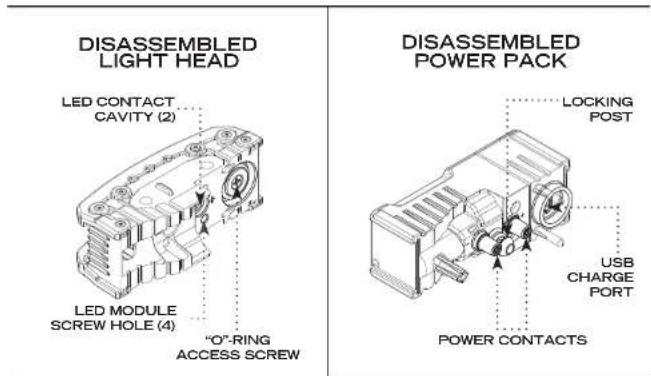
text_image
DISASSEMBLED LIGHT HEAD LED CONTACT CAVITY (2) LED MODULE SCREW HOLE (4) "O"-RING ACCESS SCREW DISASSEMBLED POWER PACK LOCKING POST USB CHARGE PORT POWER CONTACTS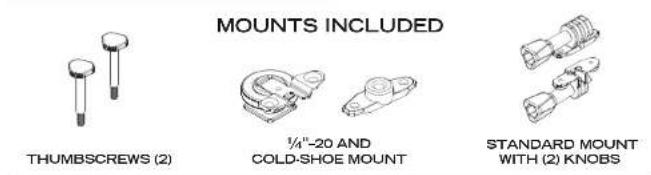
text_image
MOUNTS INCLUDED THUMBSCREWS (2) 1/4"-20 AND COLD-SHOE MOUNT STANDARD MOUNT WITH (2) KNOBSOVERVIEW
The Rugo™ is a compact and powerful LED Light which has the ability to be mounted to the GoPro®, a DSLR, a drone, a tripod and many other devices. Having four different intensities (70-700 Lumens) with three interchangeable lens settings (Tri-Lens™), makes it a powerful tool for action sports as well as photography and filming. A Charge Indicator and Quick Swap™ Power Pack makes the Rugo™ patents pending, one of a kind.
IMPORTANT!
Please fully charge the Power Pack before using the Rugo" for the first time.
PHYSICAL CHARACTERISTICS
Please read below before using your Rugo™ as it relays beneficial operating and safety information.
| RUGOTM | |
| DIMENSIONS 2 | 9" x 1.0" x 2.0" (74 x 25 x 50mm) |
| WEIGHT | 5.6 oz (158g) with Power Pack and Light Head2.6 oz (73g) Power Pack |
WARNINGS
When used for extended periods of time the Rugo™ will become HOT to the touch.
Do not stare into the LEDs for long periods of time or from a close range (less than 2 ft).
This product is designed as an auxiliary lighting tool to be used with photo, video, and film.
DO NOT use the Rugo® as a primary light source for activities.
While using any FoxFury product, please operate at safe speeds.
Be sure to rinse the Rugo® with fresh water immediately after use in the ocean or a pool.
It is the responsibility of drone/UAV users to follow the FAA laws and regulations and/or the laws and regulations applicable to the flight location.
1 Press and hold the Power Pack Release Lever located on the Light Head portion of the Rugo".
2 While maintaining pressure on the Power Pack Release Lever, pull the Light Head and the Power Pack apart.
If unable to pull apart easily (due to resistance of the internal rubber gasket), try moving the Power Pack back and forth while pulling apart.
NOTE: Once apart, be sure to keep both ends dry and away from water, moisture and dust. While the Power Pack and Light Head are separated, the unit DOES NOT maintain its waterproof rating.
3 Insert the provided Micro USB Cable into the Power Pack—respect the orientation/alignment. Then, insert the opposite end, USB (Type A) into a USB compatible power source or into the included AC/DC Adaptor. (Input: 100V-240VAC 50/60 Hz, Output: 5V DC 1000mAh).
The Charge Indicator will be solid red while charging. Once fully charged, it will turn green.
Charging time will be approximately 2.5 hours.
After the Power Pack is charged, disconnect it from USB Cable.
**PLEASE NOTE: The Rugo" in steps 1-3 is shown with no mounts and is flipped to show the Power Pack Release Lever.
REASSEMBLING THE RUGO™ AFTER CHARGING
1 Install the Power Pack to the Light Head—confirm position of alignment posts to their respected cavities.
2 Push both halves together. A 'click' should be heard as they become locked together.
Test the light to make sure that the Power Pack is properly connected to the Light Head by pressing the Power/Mode Switch.
POWER PACK LIFE
| MODE DURATION | LUMENS | |
| HIGH 1hr 700 | ||
| MEDIUM 1.5hrs 400 | ||
| LOW 3.5hrs 200 | ||
| DIM 6.75hrs 70 |
*Power Pack life may vary according to age and ambient conditions.
OPERATIONAL MODES
ON/DIM mode: Press the Power/Mode Switch once.
LOW mode: From DIM mode, press the Power/Mode Switch once.
MEDIUM mode: From LOW mode, press the Power/Mode Switch once.
HIGH mode: From MEDIUM mode, press and hold the Power/Mode Switch once.
OFF: From ANY mode, press and hold the Power/Mode Switch for 2 sec.
LOW POWER INDICATOR: At a low level, the Charge Indicator will flash for approximately 0.5-1.0 sec. It is suggested that you then charge or replace the Power Pack with a fully charged one. If on a higher mode and you need to continue using the light, it is suggested that you adjust the mode to a lower setting.
NOTE: The light does not retain the mode in memory. Once you turn the light ON, you will have to re-select the mode you desire.
USING THE TRI-LENS™
The Rugo™ Tri-Lens™ has three (3) beam emission angles which can be used for many different applications by simply sliding from left to right and vise-versa.

REMOVING THE TRI-LENS™
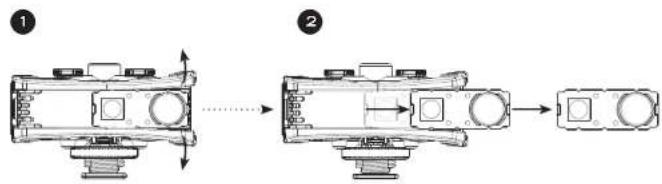
1 Push the Tri-Lens™ to either the right or left side until it won't go any further. Use your fingers to slightly pull the Guards away from the unit, while pushing the Tri-Lens® with your thumb. This will help the Tri-Lens™ to overcome the ridge, (located at the end of the Guard) and will allow it to be easily released.
2 Once the Tri-Lens ^™ overcomes the ridge, pull it free from the Light Head.
FOR RE-INSTALLATION: Line up the Tri-Lens with the ridge. Then push it back into position on the Light Head.
REMOVING/CHANGING MOUNTS
STANDARD MOUNT
flowchart
graph TD
    A["1: Display module"] --> B["2: Component with cylindrical ports"]
    B --> C["3: Assembly with mechanical parts and a separate component"]
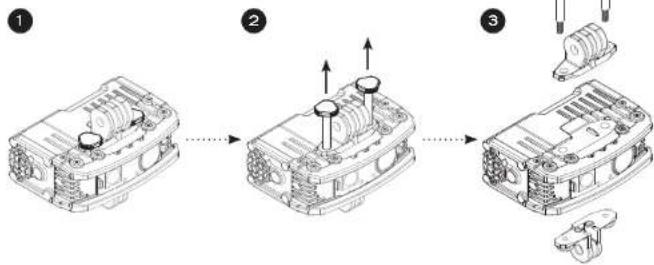
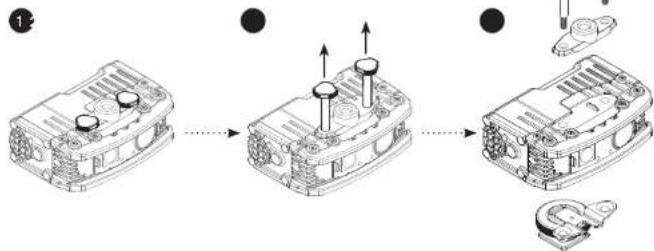
1 Start with the Rugo™ positioned so that the Thumbscrews are on top.
2 Twist each Thumbscrew counter-clockwise until they become loose. They should then be ready to pull out completely.
3 Once Thumbscrews are removed, the Standard Mount can then be disengaged from the Rugo™ completely.
1/4'' -20 AND COLD-SHOE MOUNT
flowchart
graph TD
    A["Device with two switches"] --> B["Internal component with cylindrical ports"]
    B --> C["Final assembly with battery housing"]
1 Start with the Rugo™ positioned so that the Thumbscrews are on top.
2 Twist each Thumbscrew counter-clockwise until they become loose. They should then be ready to pull out completely.
3 Once Thumbscrews are removed, the 14 ' -20 or Cold-shoe mount can then be disengaged from the Rugo™ completely.
MOUNTING TO DEVICES
ACTION CAM
The Rugo™ can be mounted to an Action Cam via the removable Standard Mount. Line up the mounts on the Rugo™ with the mounts on the Action Cam and then tighten the Mount Knobs.
NOTE: Orientation of Knobs should match as shown below.

natural_image
Technical line drawings of mechanical components including connectors, gears, and a control unit (no text or symbols)CAMERA
The Rugo™ can be mounted to a DSLR camera via the removable Cold-shoe Mount. Simply slide the mount onto the camera flash attachment and twist the Locking Ring until securely fastened.

natural_image
Three technical line drawings of mechanical components: a clamp, a housing, and a camera (no text or symbols)TRIPOD OR PUCK ADAPTOR
The Rugo" can be mounted to most tripods or to the Puck Adaptor (purchased separately) via the provided ¼"-20 Mount. Twist the threaded hole of the Rugo" ¼"-20 Mount onto the screw of the tripod or Puck Adaptor. Then, twist the Rugo" and Puck Adaptor until it is securely fastened.

natural_image
Four technical line drawings of mechanical components: a clamp, a cylindrical part, a camera on a tripod, and a tripod-mounted sensor (no text or symbols)MAINTENANCE
REPLACING THE O-RING (P/N 51-112)
flowchart
graph TD
    A["1: Box with internal components"] --> B["2: Valve with central hub"]
    B --> C["3: Container with O-ring and Retaining Tab"]
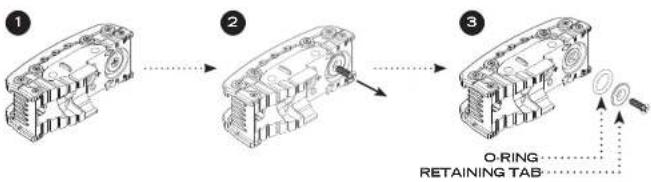
1 Separate the Power Pack from the Light Head (follow steps 1-2 in the "Charging the Power Pack" section on page 5).
2 Using a #2 Phillips head screwdriver (not included) remove the screw from the Light Head (reference "Disassembled Light Head" diagram on page 3).
3 The Retaining Tab and O-Ring can now be removed.
If the O-Ring does not fall out on its own when unscrewed, it may need to be pulled out.
Examine the O-Ring for cracks. If cracks are found, a replacement will be needed to ensure the Rugo™ waterproof rating.
FOR RE-INSTALLATION, follow the above listed steps in reverse order. NOTE: The O-Ring can be lubricated with a non-silicone based grease.
REMOVING THE GUARDS (P/N 51-905)
flowchart
graph LR
    A["Raw Material Input"] --> B["Assembly"]
    B --> C["Product Output"]
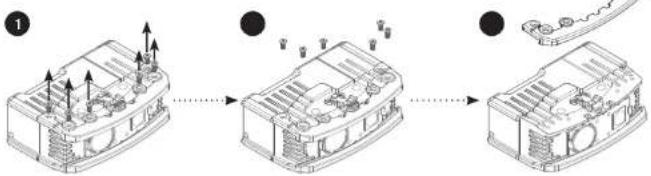
1 Use a size T6 Star-Tip (TORX) driver or bit (not included) to take out the screws on the top and bottom of the Rugo™.
2 Once screws are loose, remove them and then lift up on the Guard to remove it.
3 Repeat steps 1-2 to remove the Guard on the opposite side of the Rugo™. FOR RE-INSTALLATION, make sure to tighten the screws until they are snug.
NOTES
WARRANTY AND OTHER INFORMATION
PRODUCT DURABILITY


CE
PRODUCT NAME: Rugo® MODEL NUMBER: 700-300 ADAPTOR INPUT: AC 100-240V, 50/60 Hz
CARE/CLEANING
Your FoxFury product is a professional tool. Regular maintenance and care of your light will maximize performance for you. As needed, wash your FoxFury product using a soft washcloth, clean water and a mild soap. Be sure that both the Light Head and Power Pack are reassembled securely before washing. When done, pat dry with a damp cloth.
AVAILABLE ACCESSORIES
Puck Adaptor, P/N 85-045
Tripo-Scope ^® M1, P/N 650-100
Rugo Quick Swap™ Power Pack
P/N N50-200
Rugo Standard Mount
P/N N50-132
Rugo ¼"-20 and Cold Shoe Mount P/N N50-133
Handlebar/Drone Mount
P/N 85-026
WARNINGS
FoxFury, LLC is not responsible for the incorrect use of any FoxFury Lighting product.
When used for extended periods of time the Rugo™ will become HOT to the touch. Please use care when operating.
◆ Lights are strong enough to cause damage to the human eye.
not stare into LEDs for long periods of time or from a close range (less than 2 ft).
FoxFury, LLC is not responsible for any injury or damage caused during the use of this product.
Page of this product must be supervised by an adult when it is being used by a minor.
Any FoxFury product should be operated at speeds safe enough to maneuver around surrounding obstacles.
not use under the influence of drugs or alcohol.
LIMITED WARRANTY
FoxFury, LLC ("FoxFury") warrants to the purchaser of this product ("Buyer") that for a period of TWO YEARS following purchase, this product will be free from defects in material and workmanship and will function in substantial compliance with FoxFury's written specifications for this product as specified in the instruction manual or on FoxFury's website located at www.FoxFury.com. Buyer's exclusive remedy shall, in any case, be limited, at FoxFury's election, to: A) repair or replacement of the defective product; or B) refund of the purchase price for this product.
THE FOREGOING WARRANTY IS THE ONLY WARRANTY MADE BY
FOXFURY WITH RESPECT TO THIS PRODUCT. TO THE EXTENT ALLOWED BY APPLICABLE LAW, THERE ARE NO REPRESENTATIONS OR WARRANTIES OF ANY KIND BY THE FOXFURY, EXPRESS OR IMPLIED, WITH RESPECT TO THE CONDITION OR PERFORMANCE OF THIS PRODUCT, INCLUDING, BUT NOT LIMITED TO, MERCHANTABILITY OR FITNESS FOR A PARTICULAR PURPOSE.
THIS LIMITED WARRANTY SHALL NOT APPLY IF THIS PRODUCT IS NOT STORED, HANDLED, INSTALLED OR USED IN STRICT ACCORDANCE WITH MANUFACTURER'S SPECIFICATIONS AND INSTRUCTION MANUALS, OR WHICH HAS BEEN SUBJECT TO MISUSE, ALTERATION, NEGLIGENCE OR ACCIDENT.
- The damaged part or product must be returned to FoxFury PRIOR TO any repair or replacement. Shipping costs are the responsibility of the claimant.
- You must obtain a return authorization (RMA) number from FoxFury prior to returning products. FoxFury is not responsible for any damage incurred while in transit.
- Buyer will be required to show proof of purchase—NO EXCEPTIONS.
- Any modifications to light, cable or battery pack automatically voids all warranties on this product.
All warranty inquiries should be directed to FoxFury's Customer Service Department at Service@FoxFury.com to handle all warranty/repair-related inquiries.
TO THE EXTENT ALLOWED BY APPLICABLE LAW: (A) IN NO EVENT, WHETHER DUE TO BREACH OF WARRANTY HEREUNDER OR ANY
OTHER CAUSE WHATSOEVER, SHALL FOXFURY BE LIABLE FOR OR OBLIGATED IN ANY MANNER TO PAY CONSEQUENTIAL, INCIDENTAL OR INDIRECT DAMAGES, INCLUDING, BUT NOT LIMITED TO, LOSS OF PROFITS, COST OF SUBSTITUTE PRODUCTS AND PERSONAL INJURY OR PROPERTY DAMAGE, WHETHER SUCH CLAIM IS BASED ON CONTRACT OR TORT OR ANY OTHER THEORY OF LAW, AND (B) FOXFURY'S ONLY DUTIES IN CONNECTION WITH THE SALE OF THIS PRODUCT SHALL BE TO HONOR THE LIMITED WARRANTY SET FORTH HEREIN. TO THE EXTENT THAT THIS LIMITED WARRANTY IS INCONSISTENT WITH APPLICABLE LAW, THIS STATEMENT SHALL BE DEEMED MODIFIED TO BE CONSISTENT WITH SUCH APPLICABLE LAW.
CONTACT FOXFURY
FoxFury, LLC
Oceanside, CA 92056 USA
Toll-Free: 844-FOXFURY
Tel: 760.945.4231
Fax: 760.433.3650
Email: Service@FoxFury.com
Web: FoxFury.com
All FoxFury products are designed in Oceanside, CA. All FoxFury products are manufactured with the highest quality USA and foreign parts. Products are assembled in either FoxFury's controlled plant in Asia or the USA, under strict quality control.