LED308II - Kit de flash GODOX - Free user manual and instructions
Find the device manual for free LED308II GODOX in PDF.


User questions about LED308II GODOX
0 question about this device. Answer the ones you know or ask your own.
Ask a new question about this device
Download the instructions for your Kit de flash in PDF format for free! Find your manual LED308II - GODOX and take your electronic device back in hand. On this page are published all the documents necessary for the use of your device. LED308II by GODOX.
USER MANUAL LED308II GODOX
natural_image
Top-down view of a rectangular light fixture with textured base and side connectors (no visible text or symbols)深圳市神牛摄影器材有限公司
GODOX Photo Equipment Co., Ltd.
Add: Building 2, Yaochuan Industrial Zone, Tangwei Community, Fuhai Street, Bao'an District,
Shenzhen, China Tel: +86-755-29609320(8062) Fax: +86-755-25723423
E-mail: godox@godox.com
godox.com
Made in China

CE RoHS

说明手册
INSTRUCTION MANUAL
一、前言
感谢您购买神牛产品!
natural_image
Close-up of a electronic device with a cylindrical component and control buttons (no visible text or symbols)- 锂电池供电
natural_image
Close-up of a camera setup with mounted equipment and a tripod-mounted display (no visible text or symbols)natural_image
Close-up of a black mechanical device with three bolts and a handle, mounted on a stand (no visible text or symbols)natural_image
Close-up of a hand holding a small object with textured surface, possibly a mechanical or electronic component (no visible text or symbols)natural_image
Close-up of a mechanical testing device with a metallic component inserted (no visible text or symbols)- 灯架使用
natural_image
Top-down view of a studio lighting setup with a rectangular frame and adjustable stand (no text or symbols visible)LED摄影灯

手柄

微型底座
八、产品参数 Foreword:
Thank you for purchasing this Godox Product!
This LED video light is excellent for macrophotography, product shooting, photojournalistic and video recording, etc. The lightweight and portable light provides high brightness and accurate color temperature. Three types are available: LED308W II White Version (5600K), LED308Y II Yellow Version (3300K), and LED308C II Changeable Version (3300\~5600K).
Features:
• 308-LED-bulbs panel is lithium-ion or DC powered
- Wireless 433MHz grouping system (6 groups & 16 channels)
- Wirelessly adjust brightness or color temperature
• Large-sized LCD panel. Settings auto saved. Quickly change panel angle
• Fits almost any cameras and camcorders
| Type | Model |
| White Version(Color Temperature 5600K) | LED308W II |
| Yellow Version(Color Temperature 3300K) | LED308Y II |
| Changeable Version (Color Temperature 3300K~5600K) | LED308C II |
Warning:
▲ Always keep this product dry. Do not use in rain or in damp conditions.
Do not disassemble. Should repairs become necessary, this product must be sent to an authorized maintenance center.
▲ Keep out of reach of children.
As this product do not have waterproof function, please take measures of waterproof in rainy or damp environment.
Do not use or store the product if the ambient temperature reads over 50°C.
Do not use the flash unit in the presence of flammable gases, chemicals and other similar materials. In certain circumstance, these materials may be sensitive to the strong light emitting from this flash unit and fire or electromagnetic interference may result.
▲ Observe precautions when handling batteries
- Do not put batteries into a fire or apply direct heat to them.
- Batteries are prone to leakage when fully discharged. To avoid damage to the product, be sure to remove batteries when the product is not used for a long time or when batteries run out of charge.
- Should liquid from the batteries come into contact with skin or clothing, rinse immediately with fresh water.
Parts
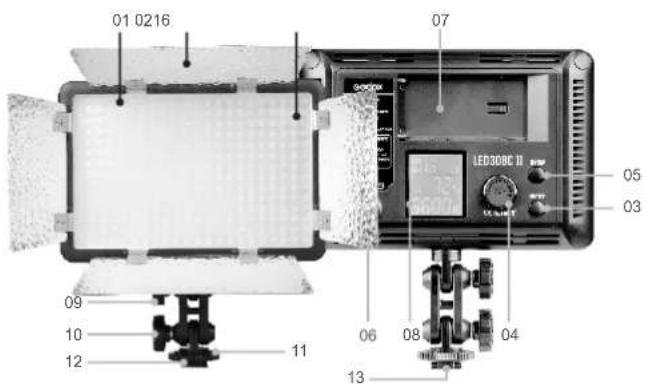
text_image
01 0216 07 LED308C II 05 03 09 10 12 11 06 08 04 13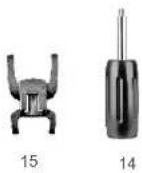
- 308 LED Beads
- Color Filters
- Power Switch
- Select Dial + SET Button
- CH/GRP Button
- DC Power Jack
- Lithium Battery
Compartment - LCD Panel (White in Blue)
- Angle Adjusting Knob A
- Angle Adjusting Knob B
- Locking Ring
- Camera Hotshoe Connection
- 1/4" Bracket Mounting Hole
- Handle
- Mini Stand
- Reflector
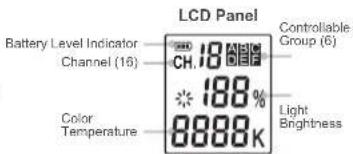
text_image
LCD Panel Battery Level Indicator Channel (16) CH: 18 188% Color Temperature 8888K Controllable Group (6) Light BrightnessPower Management
1. Power Supply
Two power supply modes are available:
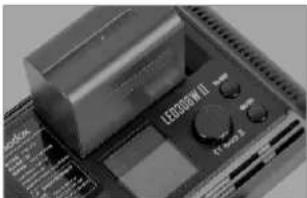
natural_image
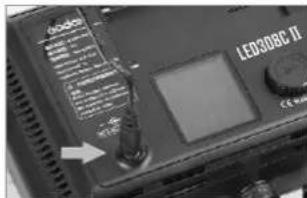
Close-up of a electronic device with a cylindrical component and control buttons (no visible text or symbols)• Using lithium battery: This light uses SONY NP-F970 model lithium battery
text_image
LED80BC II- Using DC power jack: This light can be powered by DC power supply. Use a 6.5\~12V adapter (purchased separately) to connect the light with the DC power supply.
Note:
- When using lithium battery, the Battery Level Indicator is displayed on the LCD panel. When the indicator blinks, the lithium battery power is low. Please recharge it immediately before usage in order to avoid forceful auto off.
- When using DC power supply, the indicator is not displayed when the voltage is over 10V.
2. Installing Lithium Battery
• Turn the Power Switch (03) off.
- Target the socket of the lithium battery towards the "+" "-" contacts of the Battery Compartment (07). Push the battery in until it locks.
• Power the light on.
• After using the light, please power it off.

text_image
LEDORC II LEDORC IIUsing the Video Light
natural_image
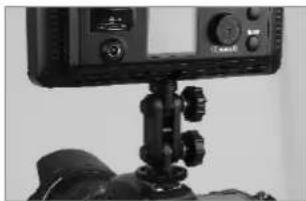
Close-up of a camera setup with mounted sensors and a display unit (no visible text or symbols)1. On the Camera
- Screw the Locking Ring (11) to the highest point and insert the Camera Hotshoe Connection (12) horizontally into the hotshoe of a camera or a camcorder.
- Tighten the Locking Ring (11).
natural_image
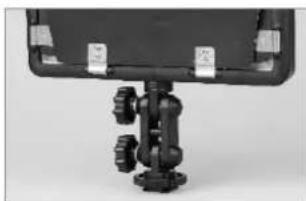
Close-up of a mechanical device with mounting flanges and a curved top panel (no visible text or symbols)3. On the Mini Stand
- Screw the Locking Ring (11) to the highest point and insert the Camera Hotshoe Connection (12) horizontally into the hotshoe of the mini stand.
• Tighten the Locking Ring (11).
natural_image
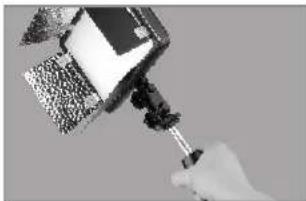
Hand holding a small object with granular texture, possibly a tool or device (no visible text or symbols)2. By the Handle
- Screw the Locking Ring (11) to the highest point and install the handle onto the 1/4"Bracket Mounting Hole (13).
• Tighten the Locking Ring (11).

natural_image
Close-up of a mechanical device with a metallic fitting and black components (no visible text or symbols)4. On the Light Stand
- Screw the Locking Ring (11) to the highest point and install the light stand onto the 1/4"Bracket Mounting Hole (13).
• Tighten the Locking Ring (11).
Note: If your camcorder has no hotshoe connection, you are advised to purchase a connecting bracket for camcorder. The video light has a 1/4" Bracket Mounting Hole as your camcorder does. Therefore, you can easily connect both the light and the camcorder to the bracket.
Operation
1. Before Usage
- Insert the lithium battery or connect the light with the DC power supply.
- Switch the power on, the video light giving out light.
• LCD panel shows the information.
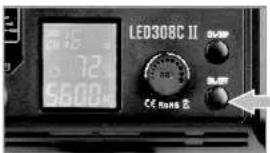
text_image
LED308C II 72 5600 CE 50Hz E2. Light Brightness/Color Temperature Adjustment
Adjusting Light Brightness
- Turn the select dial to adjust the light brightness.
The light brightness adjustable range changes at different color temperature with different models.
| Model | Color Temperature | Light Brightness Range |
| LED308Y II | 3300K | 10%~100% |
| LED308W II | 5600K | |
| LED308C II | 3300K/5600K | 10%~100% |
| 3400K~5500K | 25%~100% |
Adjusting Color Temperature
- Press the SET button once and the color temperature icon blinks.
Turn the select dial to adjust color temperature.
Color temperature range:
| White VersionLED308W II | Yellow VersionLED308Y II | Changeable VersionLED308C II |
| 5600K | 3300K | 3300K~5600K |
NOTE: Color temperature of LED 308W II or LED 308Y II is invariable. The LCD panel only shows 5600K or 3300K.
3. Wireless Remote Control
With 433 MHz wireless system, this product has remote grouping and control function. Up to 6 groups of LED light can be controlled. 16 channels are available with strong anti-interference capability.
Please set the channels and groups of LED video light to the same as those of remote control before usage.
Adjusting Channel/Group of the LED Video Light
- Press the CH/GRP button and the group icon blinks. Turn the select dial to choose a group ID (A to F).
- Press the CH/GRP button twice and the channel icon blinks. Turn the select dial to choose a channel ID (1 to 16).
Adjusting Channel/Group of the Remote Control
- Press the CH/GRP button and the group icon blinks. Press the "+" button to choose a group ID (A to F).
- Press the CH/GRP button twice and the channel icon blinks. Press the "+" -" button to choose a channel ID (1 to 16).
Adjusting Light Brightness/Color Temperature with the Remote Control
- Press the "+" - "button to adjust the light brightness.
- Press the SET button of the remote control once and the color temperature icon blinks. Press the "+" -" button to adjust the color temperature.
Note: The wireless signal can be received only when the LED light is power on. Remote control purchased separately.
Other Operation Tips:
- Pressing the ON/OFF button on the remote control can only turn on/off all the LED groups instead of powering it on or off. When received the "OFF" command from the remote control, LED video light stop lighting up and LCD panel gets dark with "OFF" displayed. If this continues for four hours without any other operation, the LED video light will auto power off and the remote control will not work.
- Pressing the "SET" button on the remote control for 2 seconds can only turn on/off the current LED group instead of powering it on or off.
- The remote control will auto power off after four hours of idle operation.
Tips of Using Remote Control:
(1) When using the White Version LED308W II, please set the color temperature of the remote control as 5600K constantly;
(2) When using the Yellow Version LED308Y II, please set the color temperature of the remote control as 3300K constantly;
(3) Please remove the battery if the light will not be used for an extended period of time.
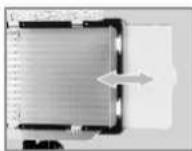
4. Replacing A Color Filter
- Pinch the edge of the color filter (02) and pull it out.
- Insert a new color filter in and push it to the left.
Then the color filter is securely in position.
What's in the Box of LED 308 II?
| NO. | Included Item | LED308W II | LED308Y II | LED308C II |
| 1 | LED Video Light | 1 PC | 1 PC | 1 PC |
| 2 | Handle | 1 PC | 1 PC | 1 PC |
| 3 | Mini Stand | 1 PC | 1 PC | 1 PC |
| 4 | Diffusion Filter | 1 PC | 1 PC | 1 PC |
| 5 | Yellow Filter | 1 PC | NO | NO |
| 6 | Blue Filter | 1 PC | 1 PC | NO |
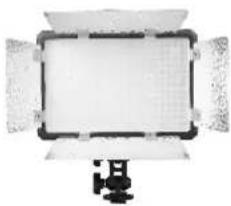
natural_image
Top-down view of a flat-screen studio lighting fixture with adjustable screen and stand (no text or symbols visible)LED Video Light
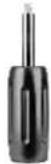
Handle

Mini Stand
Technical Data:
| LED 308 IIVideo Light | White VersionLED308W II | Yellow VersionLED308Y II | Changeable VersionLED308C II |
| Lithium Battery | 7.4V Lithium Battery(SONY NP-F970 model lithium battery)(sold separately) | ||
| DC Power Supply | 6.5~12V | ||
| Channel | 16 | ||
| Group | 6 groups(A, B, C, D, E, F) | ||
| Power | Max.21W | ||
| Color Temperature | 5600K±300K | 3300K±300K | 3300K~5600K ±300K |
| Brightness(LUX) | 860 (1m) | 860 (1m) | 860(1m/4100K) |
| 430(1m/3300K) | |||
| 430(1m/5600K) | |||
| Light BrightnessRange | 10%~100% | 10%~100% | 3300K/5600K : 10%~100% |
| 3400K~5500K : 25%~100% | |||
| LED Beads Quantity | 308 | 308 | 5600K : 154 |
| 3300K : 154 | |||
| Operation Temperature | -10~50 °C | ||
| Dimension | 180mm*185mm*40mm(not with the Handle) | ||
| Net Weight | 400g | ||
* Product design and specifications are subject to change without notice.
FCC Statement
This device complies with part 15 of the FCC Rules. Operation is subject to the following two conditions: (1) This device may not cause harmful interference, and (2) this device must accept any interference received, including interference that may cause undesired operation.
Note: This equipment has been tested and found to comply with the limits for a Class B digital device, pursuant to part 15 of the FCC Rules. These limits are designed to provide reasonable protection against harmful interference in a residential installation. This equipment generates uses and can radiate radio frequency energy and, if not installed and used in accordance with the instructions, may cause harmful interference to radio communications. However, there is no guarantee that interference will not occur in a particular installation. If this equipment does cause harmful interference to radio or television reception, which can be determined by turning the equipment off and on, the user is encouraged to try to correct the interference by one or more of the following measures:
- Reorient or relocate the receiving antenna.
- Increase the separation between the equipment and receiver.
- Connect the equipment into an outlet on a circuit different from that to which the receiver is connected.
- Consult the dealer or an experienced radio/TV technician for help.
产品保修
Dear customers, as this warranty card is an important certificate to apply for our maintenance service, please fill in the following form in coordination with the seller and safekeep it. Thank you!
| Product Information | Model | Product Code Number |
| Customer Information | Name | Contact Number |
| Address | ||
| Seller Information | Name | |
| Contact Number | ||
| Address | ||
| Date of Sale | ||
| Note: | ||
Note: This form shall be sealed by the seller.
Applicable Products
The document applies to the products listed on the Product Maintenance Information (see below for further information). Other products or accessories (e.g. promotional items, giveaways and additional accessories attached, etc.) are not included in this warranty scope.
Warranty Period
The warranty period of products and accessories is implemented according to the relevant Product Maintenance Information. The warranty period is calculated from the day(purchase date) when the product is bought for the first time. And the purchase date is considered as the date registered onthe warranty card when buying the product.
How to Get the Maintenance Service
If maintenance service is needed, you can directly contact the product distributor or authorized service institutions. You can also contact the Godox after-sale service call and we will offer you service. When applying for maintenance service, you should provide valid warranty card. If you cannot provide valid warranty card, we may offer you maintenance service once confirmed that the product or accessory is involved in the maintenance scope, but that shall not be considered as our obligation.
Inapplicable Cases
The guarantee and service offered by this document are not applicable in the following cases: ①. The product or accessory has expired its warranty period; ②. Breakage or damage caused by inappropriate usage, maintenance or preservation, such as improper packing, improper usage, improper plugging in/out external equipment, falling off or squeezing by external force, contacting or exposing to the improper temperature, solvent, acid, base, flooding and damp environments, etc.; ③. Breakage or damage caused by non-authorized institution or staff in the process of installation, maintenance, alternation, addition and detachment; ④. The original identifying information of product or accessory is modified, alternated, or removed; ⑤. No valid warranty card; ⑥. Breakage or damage caused by using illegally authorized, nonstandard or non-public released software; ⑦. Breakage or damage caused by force majeure or accident; ⑧. Breakage or damage that could not be attributed to the product itself. Once met these situations above, you should seek solutions from the related responsible parties and Godix assumes no responsibility. The damage caused by parts, accessories and software that beyond the warranty period or scope is not included in our maintenance scope. The normal discoloration, abrasion and consumption are not the breakage within the maintenance scope.
Maintenance and Service Support Information
The warranty period and service types of products are implemented according to the following Product Maintenance Information:
| Product Type | Name | Maintenance Period(month) | Warranty Service Type |
| Parts | Circuit Board | 12 | Customer sends the product to designated site |
| Battery | 3 | Customer sends the product to designated site | |
| Electrical parts e.g.battery charger, power cord, sync cable, etc. | 12 | Customer sends the product to designated site | |
| Other Items | Flash tube, modeling lamp, lamp body, lamp cover, lockingdevice, package, etc. | No | Without warranty |
Godox After-sale Service Call 0755-29609320-8062