DX-1546 - Battery charger Watson - Free user manual and instructions
Find the device manual for free DX-1546 Watson in PDF.


| Product Type | Battery charger for digital camera and camcorder batteries |
| Brand | Watson |
| Model | DX-1546 |
| Compatible Battery Types | Rechargeable lithium-ion batteries only |
| Number of Charging Slots | 2 (independent simultaneous charging) |
| AC Input | 100-240 V, 50-60 Hz |
| DC Input | 12 V DC, 3 A |
| Battery Output | 3.5-8.8 V DC, 2 A max |
| USB Output | 5 V DC, 2 A |
| AC Cable Length | 59 in (150 cm) |
| DC Cable Length | 50 in (127 cm) |
| Display | LCD showing charging status and voltage per battery |
| Test Button | Check charge state or voltage without power |
| Interchangeable Plates | Yes (available separately) |
| Overheating Protection | Yes, automatic shut-off |
| Short-Circuit Protection | Yes |
| Surge Protection | Yes |
| Operating Temperature | 32°F to 104°F (0°C to 40°C) |
| Dimensions (H × W × D) | 1.75 × 4.9 × 4.5 in (4.4 × 12.4 × 11.4 cm) |
| Weight | 10.75 oz (305 g) without plates; 11.8 oz (335 g) with plates |
| Certifications | FCC, CE |
| Warranty | One-year limited warranty |
| Cleaning Instructions | Unplug and clean with a soft, dry cloth |
| Safety Features | Overheating detection, short-circuit protection, surge protection |
Frequently Asked Questions - DX-1546 Watson
User questions about DX-1546 Watson
0 question about this device. Answer the ones you know or ask your own.
Ask a new question about this device
Download the instructions for your Battery charger in PDF format for free! Find your manual DX-1546 - Watson and take your electronic device back in hand. On this page are published all the documents necessary for the use of your device. DX-1546 by Watson.
USER MANUAL DX-1546 Watson
for Digital Camera and Camcorder Batteries
Owner's Manual
SAFETY WARNINGS
- Do not charge any battery other than rechargeable lithium-ion batteries. Other types of batteries can burst, causing personal injury and damage.
- Do not disassemble the charger. Take the charger to a qualified service technician when service or repair is required. Improper use may result in the risk of electric shock or fire.
- The charger, adapters, and batteries may feel warm during the charging process. This is normal.
- Do not operate the charger if it has received a sharp blow or has been dropped or damaged in any way.
• Never expose the charger to rain or moisture.
- Do not use an extension cord when using the charger. This can result in fire or electric shock.
- Never use the charger as a DC power source for any electrical equipment.
• Always unplug the charger from the AC outlet before handling the batteries.
- Unplug the charger from the AC outlet before attempting cleaning, and clean with only a soft and dry cloth.
- Do not use any attachment not recommended or sold by Watson, as this could result in the risk of fire, electric shock, or injury.
OVERVIEW
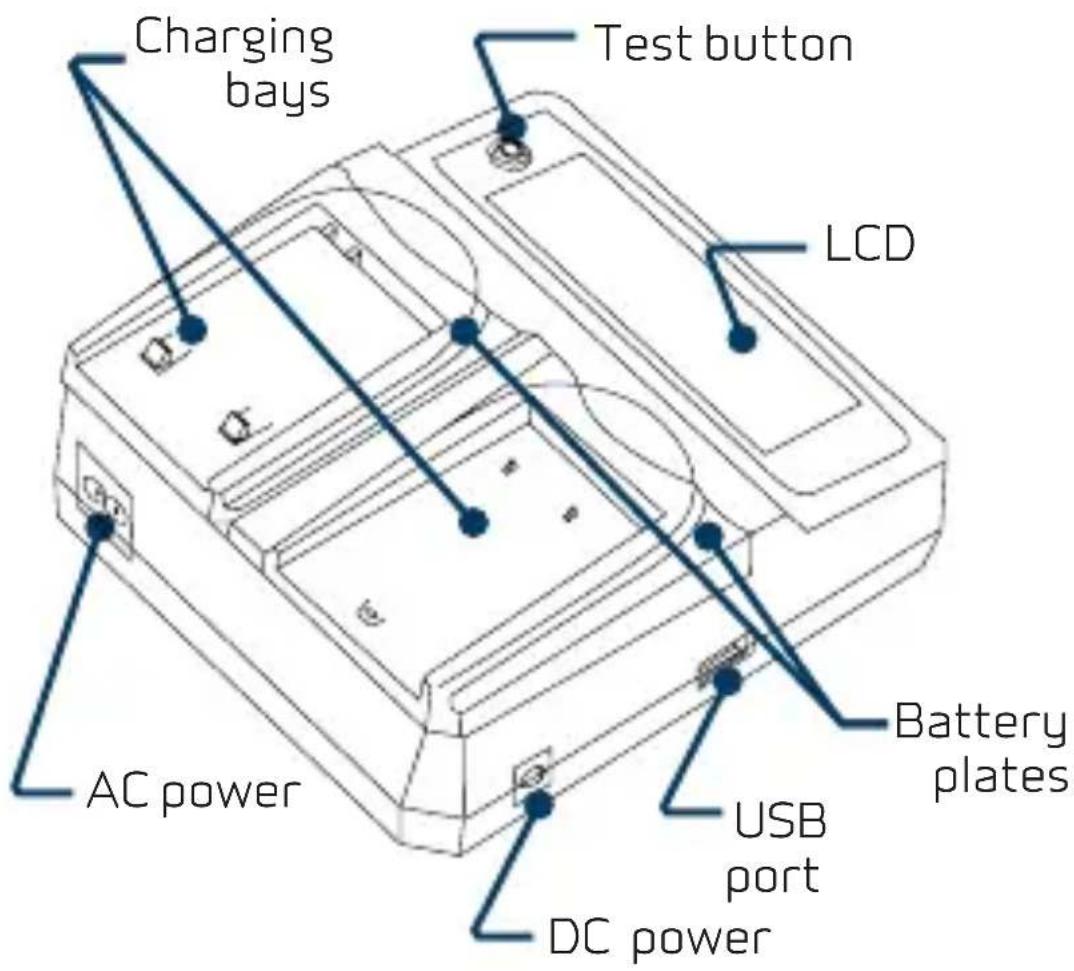
other
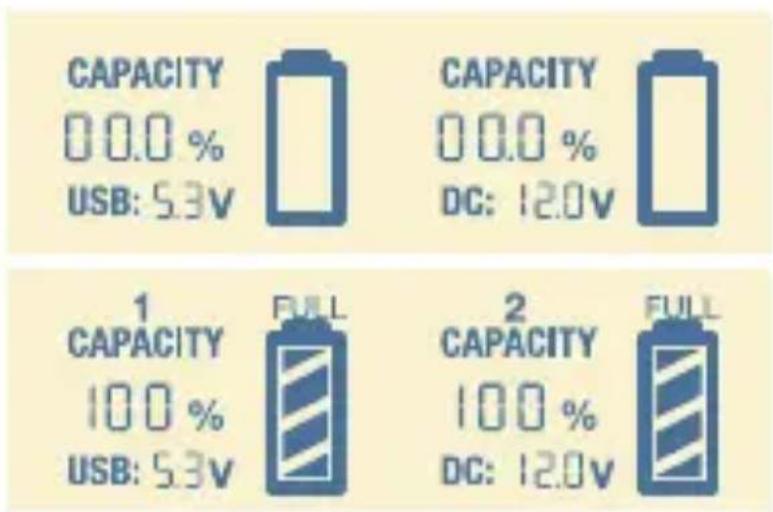
| Category | Capacity (%) | DC (V) | | -------- | ------------ | ------ | | 1 | 100 | 5.3 | | 2 | 100 | 12.0 |LCD
When you first insert the batteries, the display will show 0% capacity. Please wait a few moments as the charger scans the batteries and updates the status.
Once the battery has completed charging, the display will show FULL above the battery icon.
Note: It is normal for the batteries to become warm during charging.
USB PORT
Use the Watson Duo Charger to power your USB devices with up to 5 V and 2 A output. This is ideal to connect your mobile phone while you're charging your camera and camcorder batteries.
TEST BUTTON
You can test the charge state of your batteries, even when the Duo Charger is unplugged.
-
Slide a battery into the charging plate, and press the test button.
-
Press the test button again to display the battery's voltage. After five seconds, the display will revert to showing the charge state.
FEATURES:
- Independent, simultaneous charging for two lithium-ion rechargeable batteries.
- LCD displays the charging status and voltage for each battery.
- Interchangeable battery charging plates accept a variety of batteries. (Battery plates available separately.)
• USB charging for mobile electronics like phones and small tablets.
• Overheating detection minimizes possible high temperatures and automatically shuts off the charger. - Short-circuit protection prevents the charger and batteries from receiving excessive amounts of current.
- Surge-protection circuits guard the charger from overcurrent or defective and shorted batteries.
• Universal 100-240 V AC and 12 V DC power are perfect for traveling and charging anywhere.
SPECIFICATIONS:
| Input power | 100-240 V AC, 50-60 Hz12 V DC, 3 A |
| Output 3.5-8.8 V DC, 2 A (max) | |
| USB output | 5 V DC, 2 A |
| Cable length | AC cable: 59 in. (150 cm)DC cable: 50 in. (127 cm) |
| Operating temperature | 32°F to 104°F (0°C to 40°C) |
| Dimensions(H × W × D) | 1.75 × 4.9 × 4.5 in.(4.4 × 12.4 × 11.4 cm) |
| Weight | 10.75 oz. (305 g) without plates11.8 oz. (335 g) with plates |
| Certifications FCC, CE | |
ONE-YEAR LIMITED WARRANTY
This Watson product is warranted to the original purchaser to be free from defects in materials and workmanship under normal consumer use for a period of one (1) year from the original purchase date or thirty (30) days after replacement, whichever occurs later. The warranty provider's responsibility with respect to this limited warranty shall be limited solely to repair or replacement, at the provider's discretion, of any product that fails during normal use of this product in its intended manner and in its intended environment. Inoperability of the product or part(s) shall be determined by the warranty provider. If the product has been discontinued, the warranty provider reserves the right to replace it with a model of equivalent quality and function. This warranty does not cover damage or defect caused by misuse, neglect, accident, alteration, abuse, improper installation or maintenance. EXCEPT AS PROVIDED HEREIN, THE WARRANTY PROVIDER MAKES NEITHER ANY EXPRESS WARRANTIES NOR ANY IMPLIED WARRANTIES, INCLUDING BUT NOT LIMITED TO ANY IMPLIED WARRANTY OF MERCHANTABILITY OR FITNESS FOR A PARTICULAR PURPOSE. This warranty provides you with specific legal rights, and you may also have additional rights that vary from state to state. To obtain warranty coverage, contact the Watson Customer Service Department to obtain a return merchandise authorization ("RMA") number, and return the defective product to Watson along with the RMA number and proof of purchase. Shipment of the defective product is at the purchaser's own risk and expense. For more information or to arrange service, visit www.poweredbywatson.com or call Customer Service at 212-594-2353.
Product warranty provided by the Gradus Group.
www.gradusgroup.com
Watson is a registered trademark of the Gradus Group.
© 2020 Gradus Group LLC. All Rights Reserved.

WATSON
A Gradus Group Brand
Brand : Watson
Model : DX-1546
Category : Battery charger