SY-XK5 - Speaker Sytech - Free user manual and instructions
Find the device manual for free SY-XK5 Sytech in PDF.


User questions about SY-XK5 Sytech
0 question about this device. Answer the ones you know or ask your own.
Ask a new question about this device
Download the instructions for your Speaker in PDF format for free! Find your manual SY-XK5 - Sytech and take your electronic device back in hand. On this page are published all the documents necessary for the use of your device. SY-XK5 by Sytech.
USER MANUAL SY-XK5 Sytech
natural_image
Black SYTECH microphone with blue base and control buttons (no visible text or symbols on body)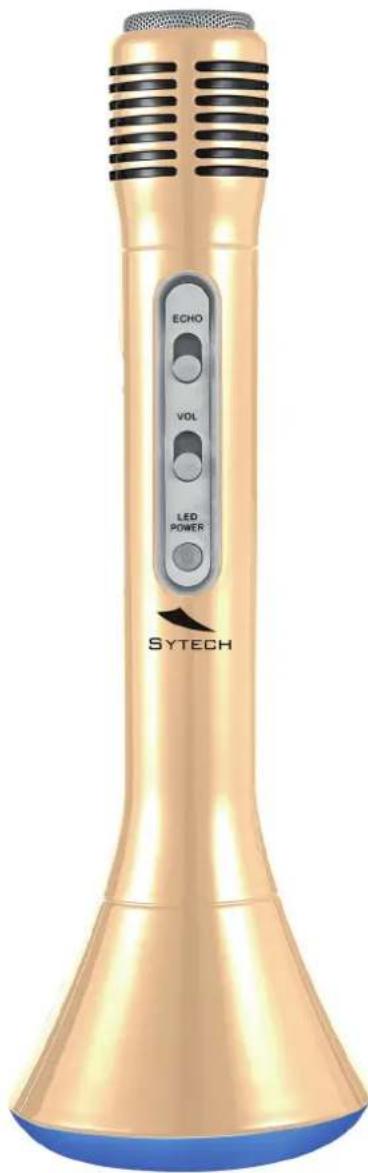
KARAOKE MICROPHONE
SY·XK5
Welcome
Thank you for purchasing the new Portable Wireless Karaoke Speaker SY-XK5.
Please read this manual carefully before operating your product and pay close attention to the precautions, which are mentioned below. Store this user manual in a safe place for future reference
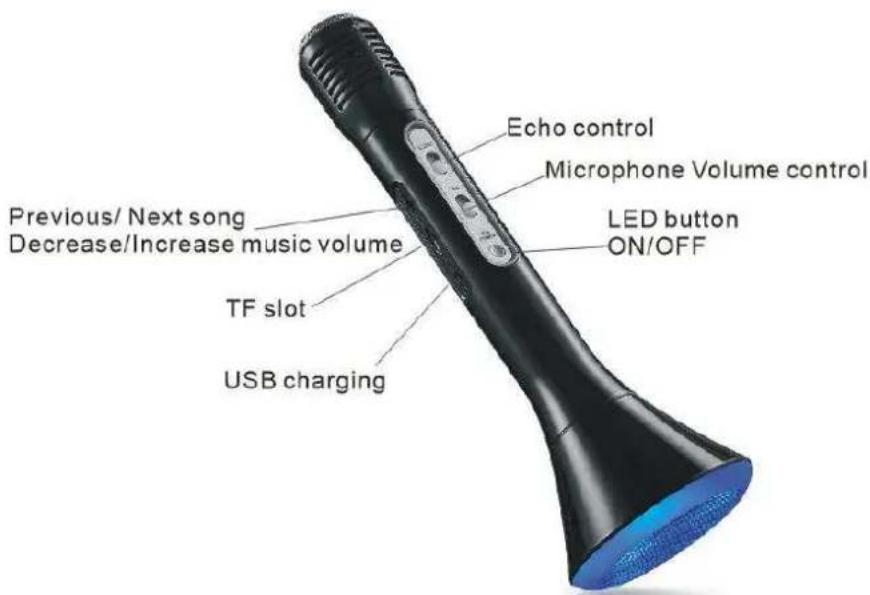
Parts of the Microphone speaker
Functions
a. Press the knob downwards to play the next song and long press o increase the volume.
b. Short press the knob upwards to play the previous song and press and hold the knob to decrease the volume.
c. Click the knob inwards to play or pause the music.
d. Slide the Echo key upwards to increase the echo effect.
Slide the Echo key downwards to decrease the echo effect.
e. Slide the Volume key upwards to increase the microphone volume.
Slide the Volume key downwards to decrease the microphone volume.
Charging the Microphone
a. Please fully charge the battery before using the device for the first time.
b. Connect one end of the USB cable to the unit and the other end to a PC in order to start the charging process.
c. The Red LED will turn on indicating that the unit is now charging. Once the light goes off, this means that the unit is completely charged and ready to use.
Power button functions
a. Press and hold the power On/Off button for a few seconds to turn the device ON or OFF
b. Once the device is on, press and hold the power button for a few seconds to enter into Bluetooth mode.
c. Short press the power Button to change the colors of the LED lamp.
Bluetooth connection
a. Long press the power button to on the device. The LED indicator will turn on and a sound is heard confirming the microphone is set into Bluetooth pairing mode.
b. Turn on the Bluetooth on your Smartphone or Tablet and start to search for the Microphone. Once SY-XK5 appears on your phone or tablet, click on it to pair your device with the microphone.
c. The microphone will emit a sound, confirming the pairing process has been established.
d. In the case you are asked to enter a password, simply enter '0000' and click ok.
Bluetooth Paring and connection
a. If the Microphone speaker has been connected previously via Bluetooth to any device, it will connect with the last Bluetooth device automatically once it is turned on.
b. In the case the Microphone has never been connected via Bluetooth before, the unit will enter into pairing mode. Pair the microphone with your device.
c. Your Microphone can only be connected to one device at a time.
d. At the same time your smartphone or tablet will not be able to connect to your microphone if it is already paired with another device. You will need to un-pair your device in order to connect it to the microphone.
Music playback from TF card
Power on the Microphone and insert a TF card (Micro SD) making sure the memory card contains MP3 files. Make sure to insert the memory card carefully and in the correct position. The music will start to play automatically.
LED Lamp
a. Turn on the speaker and short press the power button to activate the LED lamp.
b. Short press the power button to change the LED lamp to different colors.
c. Short press the power button six times to activate the LED lamp as to the rhythm of the music.
Start singing
- Set the microphone into Bluetooth pairing mode and connect it to your Smartphone or tablet.
- Once paired, adjust the volume levels of the music and microphone. It is recommendable to set the echo level to half in order to enjoy a karaoke sound effect.
- Open the app, which will be used to sing on your Smartphone or Tablet.
- Below is a list of the recommended Karaoke apps for downloading on your Smartphone or Tablet.
ANDROID:
- Red Karaoke
- Karaoke Tube
• The Voice: On stage
IOS
Yokee: Sing like a star Sing! Karaoke by Smule Red Karaoke
Note:
Sytech is not responsible for the third party applications that may not be fully compatible with the Karaoke Microphone.
Note:
Please set the volume of the Mic at "0" in the case you only wish to listen to music. This is to avoid any interference.
Recording the music with cell phone
- Start your karaoke application on your phone or tablet and follow the instructions of the APP.
Note:
The recording function will only be available if the application downloaded contains the Record function.
Note:
Adjustments of the sound quality and the recording path needs to be adjusted on the application downloaded.
Specification
Bluetooth version: V2.0
Supported profiles: A2DP-AVRCP
Operating Frequency Range: 2.4GHz-2.48GHz
Bluetooth transmission distance: 10 meters
Audio formats supported: MP3
Speaker driver: Mono 40mm 4Ohm
Speaker output power: 3Watts
Frequency Response: 100Hz-10 KHz
Signal-to-Noise Ratio: ≥85dB
Distortion: ≤0.5%
Working voltage: DC3.7V
Charging voltage: DC5V-1A
Battery capacity: 1200mAh
Playing time: 4 hours
Product size: 258*80*80mm
Weight: 245g
Declaration of Conformity
Manufacturer Name: Satyatrade S. L.
Manufacturing country: China
Description: Karaoke Microphone
Sytech® SY-XK5 complies with the following directives:
EMC Standard: Directive 2014/30/EU
R&TTE Standard: Directive 2014/53/EU
Signed: Ajeet Nebhwani Utamchandani
Sole Administrator

CE

RoHS
