RT18EKRXW00 - Washing machine Roper - Free user manual and instructions
Find the device manual for free RT18EKRXW00 Roper in PDF.


User questions about RT18EKRXW00 Roper
0 question about this device. Answer the ones you know or ask your own.
Ask a new question about this device
Download the instructions for your Washing machine in PDF format for free! Find your manual RT18EKRXW00 - Roper and take your electronic device back in hand. On this page are published all the documents necessary for the use of your device. RT18EKRXW00 by Roper.
USER MANUAL RT18EKRXW00 Roper
text_image
Table of Contents .... 2 (complete) A Note to You.... 2 Refrigerator Safety .... 3 Parts and Features .... 4 Before Using Your Refrigerator.... 5 Using Your Refrigerator.... 7 Caring for Your Refrigerator.... 15 Food Storage Guide.... 19 Troubleshooting.... 21 Requesting Assistance or Service.... 22 Index.... 23 Warranty.... 24 1-800-44-ROPER Call us with questions or comments.NO-FROST REFRIGERATOR-FREEZER
Part no. 218504800/4343263
MODELS RT18DK RT18EK
Table of Contents
A Note to You....2
Refrigerator Safety 3
Parts and Features 4
Before Using Your Refrigerator .... 5
Cleaning your refrigerator 5
Plugging it in 5
Installing it properly 6
Leveling it 6
Using Your Refrigerator 7
Setting the controls 7
Changing the control settings ....8
Adjusting the refrigerator shelves......8
Removing the meat drawer and cover 9
Removing the crispers and crisper cover ....9
Using the ice cube trays.... 10
Using the optional automatic ice maker 10
Changing the light bulb 11
Understanding the sounds you may hear .... 12
Saving energy 12
Reversing the door swing 13
Caring for Your Refrigerator 15
Cleaning your refrigerator 15
Vacation and moving care 17
Power interruptions 18
Food Storage Guide 19
Storing fresh food.... 19
Storing frozen food 20
Troubleshooting 21
Requesting Assistance or Service ..... 22
Index 23
Warranty 24
A Note to You
Thank you for buying a Roper® appliance.
Roper appliances give you all the functionality of name brand appliances at a value price. To ensure you enjoy years of trouble-free operation, we developed this Use and Care Guide. It contains valuable information about how to operate and maintain your appliance properly and safely. Please read it carefully. Also, please complete and mail the Ownership Registration Card provided with your appliance. This card helps us notify you about any new information on your appliance.
Please record your model's information.
Whenever you call to request service on your appliance, you need to know your complete model number and serial number.
You can find this information on the model and serial number label (see diagrams on page 4 for location of label).
Please also record the purchase date of your appliance and your dealer's name, address, and telephone number.
Model Number
Serial Number
Purchase Date ____
Dealer Name ____
Dealer Address
Dealer Phone
Keep this book and the sales slip together in a safe place for future reference. CALL 1-800-447-6
Refrigerator Safety
Your safety is important to us.
This guide contains statements under warning symbols. Please pay special attention to these symbols and follow any instructions given. Here is a brief explanation of the use of the symbol.
WARNING
This symbol alerts you to such dangers as personal injury, burns, fire, and electrical shock.
IMPORTANT SAFETY INSTRUCTIONS
WARNING
To reduce the risk of fire, electrical shock, or injury when using your refrigerator, follow these basic precautions:
- Read all instructions before using the refrigerator.
-
Child entrapment and suffocation are not problems of the past. Junked or abandoned refrigerators are still dangerous ... even if they will "just sit in the garage a few days."
If you are getting rid of your old refrigerator, do it safely. Please read the enclosed safety booklet from the Association of Home Appliance Manufacturers. Help prevent accidents. -
Never allow children to operate, play with, or crawl inside the refrigerator.
- Never clean refrigerator parts with flammable fluids. The fumes can create a fire hazard or explosion.
• FOR YOUR SAFETY •
DO NOT STORE OR USE GASOLINE OR OTHER FLAMMABLE VAPORS AND LIQUIDS IN THE VICINITY OF THIS OR ANY OTHER APPLIANCE. THE FUMES CAN CREATE A FIRE HAZARD OR EXPLOSION.
- SAVE THESE INSTRUCTIONS -
Help us help you
Please:
• Install and level the refrigerator on a floor that will hold the weight and in an area suitable for its size and use.
- Do not install the refrigerator near an oven, radiator, or other heat source.
- Do not use the refrigerator in an area where the room temperature will fall below 55°F (13°C).
- Keep the refrigerator out of the weather.
- Connect the refrigerator only to the proper kind of outlet, with the correct electrical supply and grounding. (Refer to the Electrical Requirements and Grounding Instructions Sheet.)
- Do not load the refrigerator with food before it has time to get properly cold.
- Use the refrigerator only for the uses described in this manual.
• Properly maintain the refrigerator. - Be sure the refrigerator is not used by anyone unable to operate it properly.
Parts and Features
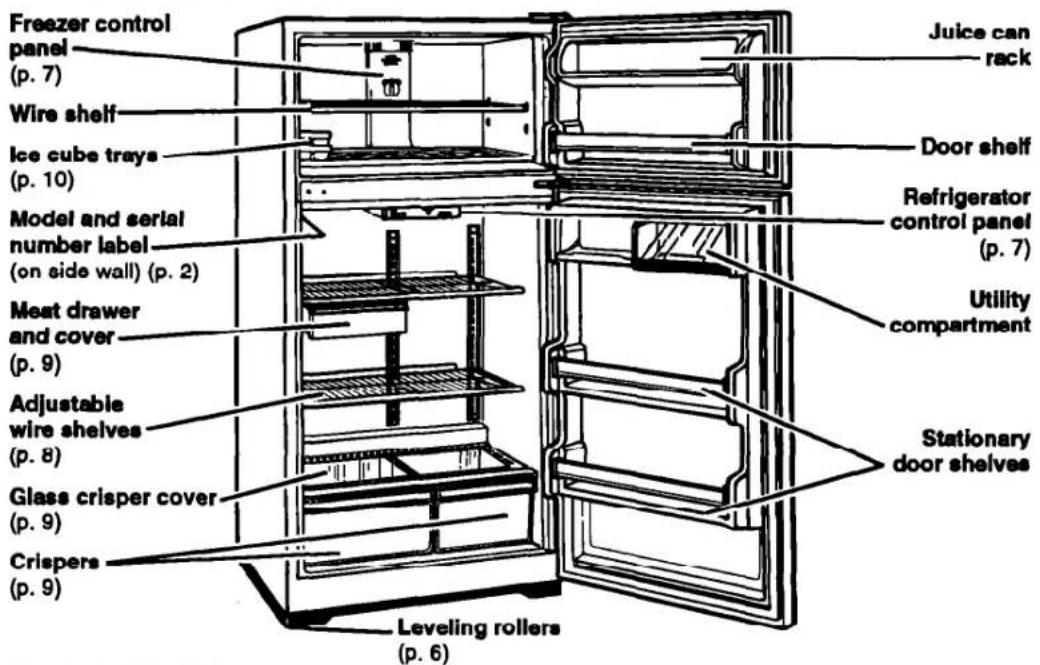
Below are illustrations of your appliance with the parts and features called out. To help you find information on specific parts or features faster, page references are included.
Model RT18DK
text_image
Freezer control panel (p. 7) Wire shelf Ice cube trays (p. 10) Model and serial number label (on side wall) (p. 2) Meat drawer and cover (p. 9) Adjustable wire shelves (p. 8) Glass crisper cover (p. 9) Crispers (p. 9) Leveling rollers (p. 6) Juice can rack Door shelf Refrigerator control panel (p. 7) Utility compartment Stationary door shelvesModel RT18EK
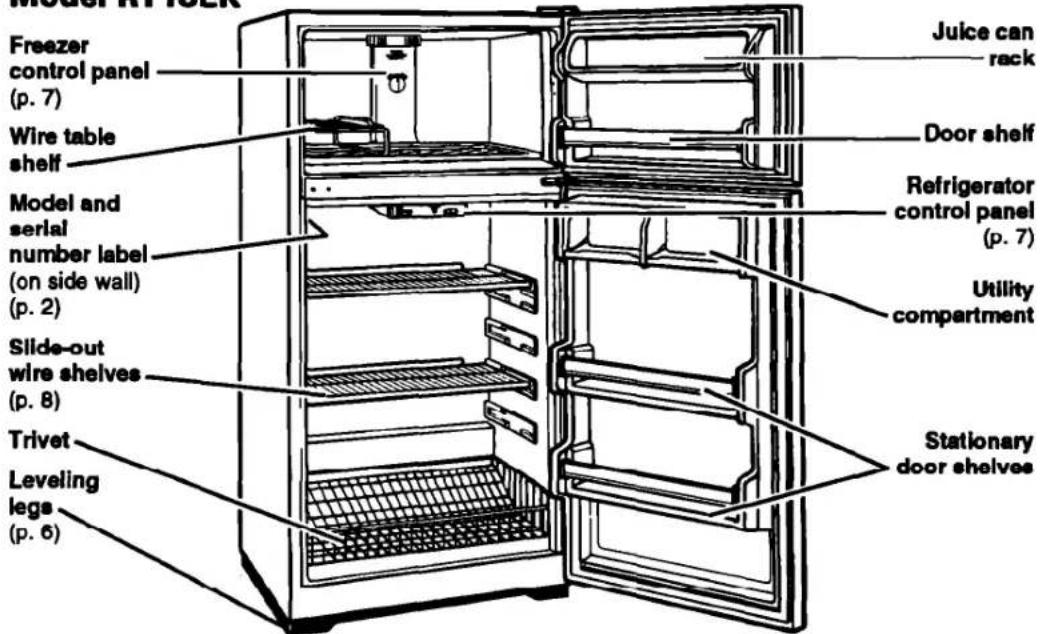
text_image
Model 41.22K Freezer control panel (p. 7) Wire table shelf Model and serial number label (on side wall) (p. 2) Slide-out wire shelves (p. 8) Trivet Leveling legs (p. 6) Juice can rack Door shelf Refrigerator control panel (p. 7) Utility compartment Stationary door shelvesCALL 1-800-447-6737
WITH QUESTIONS OR COMMENTS
Before Using Your Refrigerator
It is important to prepare your refrigerator for use. This section tells you how to clean it, connect it to a power source, install it, and level it.
Cleaning your refrigerator
Removing packaging materials
Remove tape and any inside labels (except the model and serial number label) before using the refrigerator.
To remove any remaining glue:
- Rub briskly with thumb to make a ball, then remove.
OR
- Soak area with liquid hand-dishwashing detergent before removing glue as described above. Do not use sharp instruments, rubbing alcohol, flammable fluids, or abrasive cleaners. These can damage the material. See "Important Safety Instructions" on page 3.
NOTE: Do not remove any permanent instruction labels inside your refrigerator. Do not remove the Tech Sheet fastened under the refrigerator at the front.
Cleaning it before use
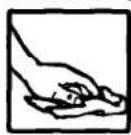
After removing all packaging materials, clean your refrigerator before using it, if necessary. See cleaning instructions on pages 15-16.
Plugging it in
Recommended Grounding Method
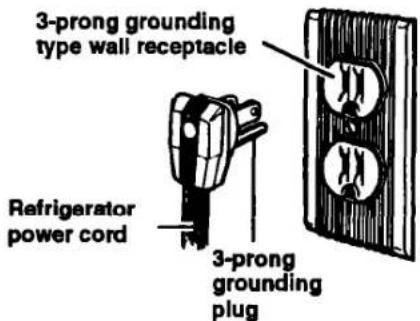
A 115 Volt, 60 Hz., AC only 15 or 20 ampere fused and properly grounded electrical supply is required. It is recommended that a separate circuit serving only this appliance be provided. Use a receptacle which cannot be turned off with a switch or pull chain. Do not use an extension cord.
See Electrical Requirements and Grounding Instructions Sheet in your Literature Package.
text_image
3-prong grounding type wall receptacle Refrigerator power cord 3-prong grounding plugInstalling it properly
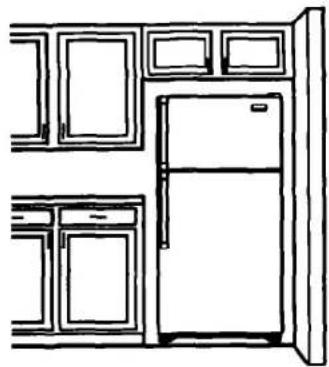
- Allow 12 inch (1.25 cm) air space on each side of the refrigerator for ease of installation.
- Allow 1 inch (2.5 cm) air space behind and 3 inches (7.5 cm) air space above the refrigerator for proper circulation.
- If installing the refrigerator with the hinge side against a wall, you might want to leave extra space so the door can be opened wider.
- Make sure the floor below the refrigerator is level and strong enough to support a fully-loaded refrigerator.
natural_image
Line drawing of a kitchen interior with refrigerator, oven, and cabinet (no text or symbols)Leveling it
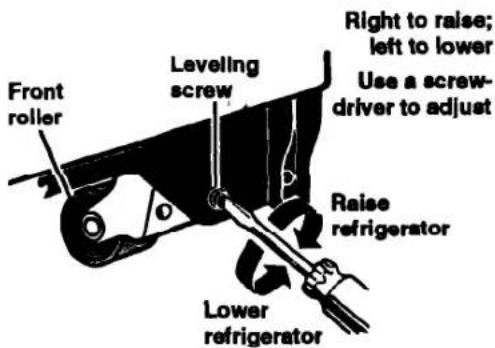
Model RT18DK
Your refrigerator has 2 front leveling screws – one on the right and one on the left. To adjust one or both of these, follow the directions below.
- Open refrigerator door.
- To raise front, turn screw clockwise.
- To lower front, turn screw counterclockwise.
- Check with level.
- Close refrigerator door.
Model RT18EK
Your refrigerator has 2 front leveling legs - one on the right and one on the left. To adjust one or both of these, follow the directions below.
- Open the refrigerator door.
- Tilt refrigerator back slightly.
- Turn leveling leg to adjust height.
- Replace refrigerator on floor.
- Check with level.
- Close refrigerator door.
text_image
Front roller Leveling screw Right to raise; left to lower Use a screw-driver to adjust Raise refrigerator Lower refrigerator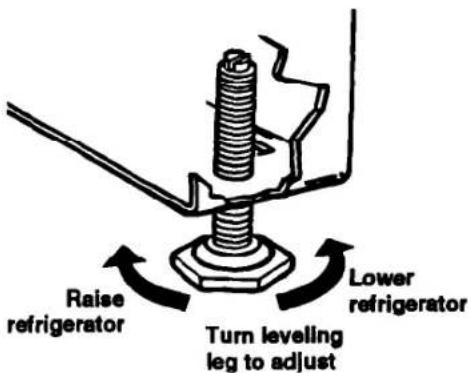
text_image
Raise refrigerator Lower refrigerator Turn leveling leg to adjustUsing Your Refrigerator
To obtain the best possible results from your refrigerator, it is important that you operate it properly. This sections tells you how to set the controls, remove and adjust some of the features in your refrigerator, how to save energy, and how to reverse the door swing.
Setting the controls
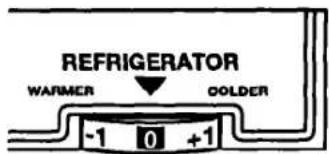
Refrigerator control
The Refrigerator Control is in the refrigerator. When you plug in the refrigerator for the first time:
- Set the Refrigerator Control to 0 (mid setting).
text_image
REFRIGERATOR WARMER OOLDER -1 0 +1Freezer control
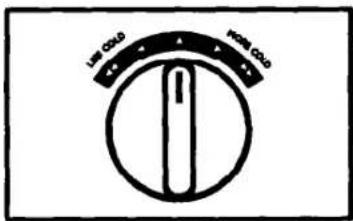
The Freezer Control is in the freezer. When you plug in the refrigerator for the first time:
- Set the Freezer Control halfway between LESS COLD and MORE COLD.
text_image
Low Cold High ColdEconomy control
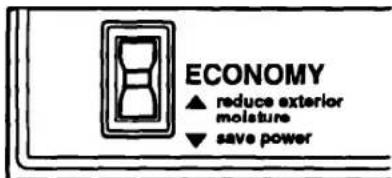
The Economy Control operates electric heaters around the door openings. These heaters help keep moisture from forming on the outside of the refrigerator.
- Use the reduce exterior moisture setting if moisture forms on cabinet.
- Use the save power setting when humidity is low.
text_image
ECONOMY ▲ reduce exterior moisture ▼ save powerChanging the control settings
If you need to adjust the temperature in either compartment, keep these things in mind:
- Adjusting the Refrigerator Control or the Freezer Control changes the temperature in BOTH compartments.
- Setting the Refrigerator Control to OFF stops cooling in BOTH compartments.
Adjusting the refrigerator shelves
Adjust the shelves to match the way you use your refrigerator.
Model RT18DK
To remove shelves:
- Remove items from shelf.
- Tilt shelf up at front.
- Lift back of shelf.
- Pull shelf straight out.
To replace shelves:
- Guide the rear shelf hooks into the slots in the shelf supports on cabinet wall.
- Tilt shelf up at front until hooks drop into slots. Lower front of shelf to level position.
Model RT18EK
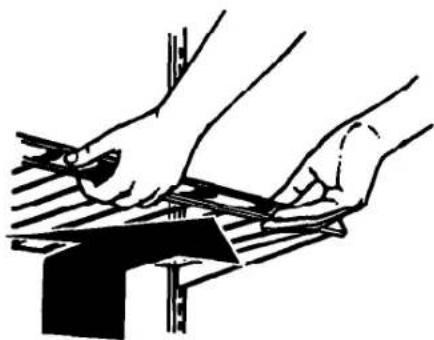
To remove the shelves:
- Remove items from the shelf.
- Slide shelf straight out to the stop.
- Lift the front slightly.
- Slide shelf out the rest of the way.
To replace the shelves:
- Fit back of shelf between desired pair of shelf guides.
- Lift the front slightly.
- Slide shelf in until it clears all stops.
- Lower shelf to level position.
natural_image
Illustration of two hands using a tool on a metal surface (no text or symbols)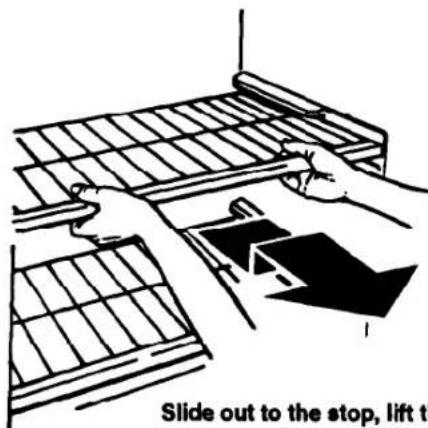
text_image
Slide out to the stop, lift theSlide out to the stop, lift the front, and slide out the rest of the way.
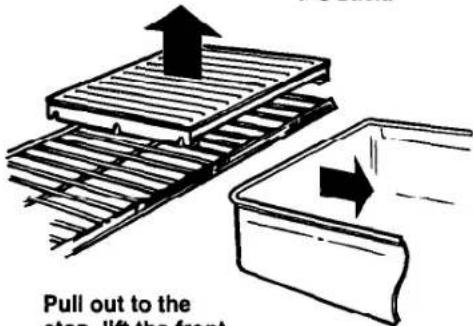
Removing the meat drawer and cover
(Model RT18DK only)
Remove the meat drawer and cover for easier cleaning.
To remove the meat drawer:
- Slide meat drawer out to the stop.
- Lift the front slightly.
- Slide meat drawer out the rest of the way.
- Replace in reverse order.
To remove the cover:
- Remove the meat drawer.
- Tilt front of cover up.
- Pull cover up and out.
To replace the cover:
- Flt bottom notches of cover over rear and center cross bars of shelf.
- Lower cover into place.
- Replace the meat drawer.
Lift the front, then the back.
text_image
Pull out to the step lift the frontPull out to the stop, lift the front, and pull again.
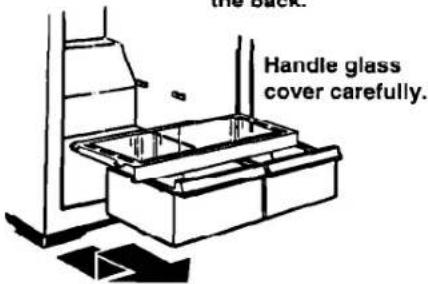
Removing the crispers and crisper cover
(Model RT18DK only)
Use your crispers to store fruit and vegetables.
To remove the crispers:
- Slide crisper out to the stop.
- Lift the front.
- Slide out the rest of the way.
- Replace in reverse order.
To remove the cover:
- Lift the front, then the back.
- Pull cover up and out of cabinet.
To replace the cover:
- Fit rear cover notches into nubs on rear of refrigerator walls.
- Lower front of cover into place.
Lift the front, then the back.
text_image
Handle glass cover carefully.Pull out to the stop, lift the front, and pull again.
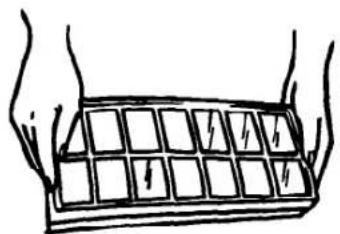
Using the ice cube trays
If cubes are not used, they may shrink. The moving cold air starts a slow evaporation. The longer you store cubes, the smaller they get.
To remove ice:
- Hold tray at both ends.
- Twist slightly.
natural_image
Illustration of two hands holding a grid with arrows indicating direction (no text or symbols)Using the optional automatic ice maker
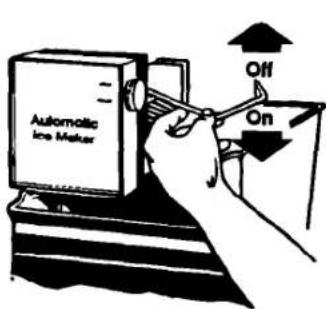
If your refrigerator has an automatic ice maker, or if you plan to add one later (Kit No. FRKIT94), here are a few things you will want to know.
• The ON/OFF lever is a wire signal arm.
DOWN to make ice automatically
UP to shut off the ice maker
IMPORTANT: Do not turn on the ice maker until it is connected to the water supply. Instructions for ice maker water supply hookup are attached to the back of the refrigerator cabinet.
• The dial or lever on the side of the ice maker changes the size of the cubes.
- You may hear water running when the ice maker is working. You'll hear ice falling into the bin. Don't let these sounds bother you.
- If you remove the ice bin, raise the signal arm to shut off the ice maker. When you replace the bin, push it in all the way and lower the ice maker signal arm to the ON position.
- Good water quality is important for good ice quality. Try to avoid connecting the ice maker to a softened water supply. Water softener chemicals (such as salt from a malfunctioning softener) can damage the ice maker mold and lead to poor ice quality. If a softened water supply cannot be avoided, make sure the water softener is operating properly and is well maintained.
text_image
Automatic Ice Maker Off OnUP to stop ice maker.
DOWN to start ice maker.
Solving common ice maker problems
| PROBLEM | POSSIBLE CAUSE/SOLUTION |
| Ice crescents attached at corners | This is normal. They break apart easily. Shake bin occasionally to keep cubes separated. |
| Ice maker will not operate or ice is not made fast enough | ON/OFF lever is in the OFF (up) position. Lower lever to the ON (down) position.Freezer is not cold enough. Adjust temperature controls and wait 24 hours. (See “Changing the control settings” on page 8.) |
| Off-taste or odor in ice | New plumbing connections can cause discolored or off-flavored ice. Discard the first few batches of ice.Cubes are stored too long. Throw them away and make a new supply.Foods in freezer are not wrapped properly. See “Food Storage Guide” on pages 19 and 20.Freezer and ice bin need to be cleaned. See pages 15 and 16. |
Changing the light bulb
WARNING
Electrical Shock Hazard
Before removing a light bulb, either unplug the refrigerator or disconnect the electricity leading to the refrigerator at the main power supply.
Failure to do so could result in electrical shock or personal injury.
To change the refrigerator light:
- Disconnect refrigerator from power supply.
- Reach behind Control Panel to bulb.
- Replace bulb with a 40-watt appliance bulb.
- Reconnect refrigerator to power supply.
NOTE: All appliance bulbs will not fit in your refrigerator. Be sure to replace a bulb with one of the same size and shape.
Understanding the sounds you may hear
Your new refrigerator may make sounds that your old one didn't. Because the sounds are new to you, you might be concerned about them. Don't be. Most of the new sounds are normal. Hard surfaces like the floor, walls, and cabinets can make the sounds seem louder.
The following describes the kinds of sounds that might be new to you, and what may be making them.
Slight hum, soft hiss
You may hear the refrigerator's fan motor and moving air.
Clicking or snapping sounds
The thermostat makes a definite click when the refrigerator stops running. It also makes a sound when the refrigerator starts. The defrost timer will click when the defrost cycle starts.
Water sounds
When the refrigerator stops running, you may hear gurgling in the tubing for a few minutes after it stops. You may also hear defrost water running into the defrost water pan.
Ice maker sounds
- trickling water
- thud (clatter of ice)
You may hear buzzing (from the water valve), trickling water, and the clatter of ice dumped into the bin.
Running sounds
Your refrigerator has a high-efficiency compressor and motor. It will run longer than older designs. It may even seem to run most of the time.
Saving energy
You can help your refrigerator use less electricity.
- Check door gaskets for a tight seal. Level the cabinet to be sure of a good seal.
- Clean the condenser coils regularly.
-
Open the door as few times as possible. Think about what you need before you open the door. Get everything out at one time. Keep food organized so you won't have to search for what you want. Close door as soon as food is removed.
-
Go ahead and fill up the refrigerator, but don't overcrowd it so air movement is blocked.
- It is a waste of electricity to set the refrigerator and freezer to temperatures colder than they need to be. If ice cream is firm in the freezer and drinks are as cold as your family likes them, that's cold enough.
- Make sure your refrigerator is not next to a heat source such as a range, water heater, furnace, radiator, or in direct sunlight.
Reversing the door swing
If you wish to reverse the swing of the doors, follow the steps below.
NOTE: If removing doors to move refrigerator through a doorway, and not reversing the door swing, it may not be necessary to remove the bottom hinge.
TOOLS REQUIRED:
• Phillips™ head screwdriver
- Socket wrench set or adjustable wrench
- Putty knife
To reverse the door swing:
- Remove the top hinge assembly as shown. Keep all parts together. After removing top hinge assembly, lift freezer door up off center hinge.
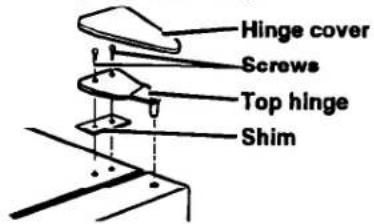
text_image
Hinge cover Screws Top hinge Shim- Remove the center hinge assembly as shown. Outer most screw is left in place. Remove door stop from bottom of door. Keep all parts together.
After removing the center hinge assembly, lift refrigerator door up off bottom hinge.
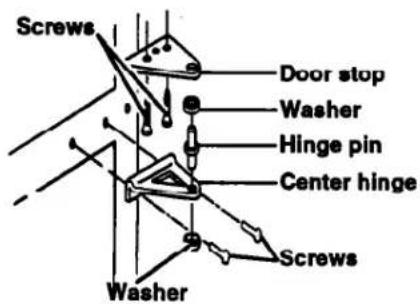
text_image
Screws Door stop Washer Hinge pin Center hinge Screws Washer- Remove the bottom hinge assembly as shown. Remove door stop from bottom of door. Keep all parts together.
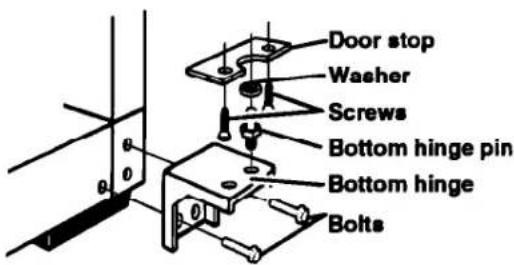
text_image
Door stop Washer Screws Bottom hinge pin Bottom hinge Bolts- Remove cabinet screws from the center hinge holes and reinstall in opposite side holes.
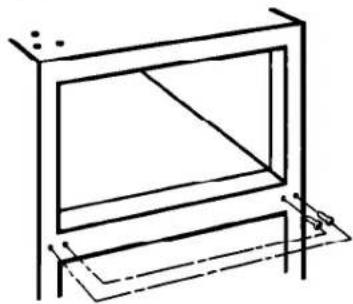
natural_image
Simple line drawing of a rectangular frame with a diagonal line through the center, no text or symbols present.USING YOUR REFRIGERATOR
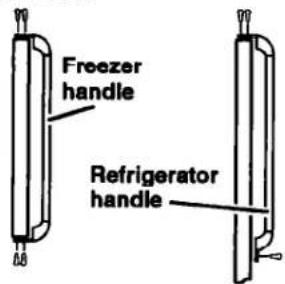
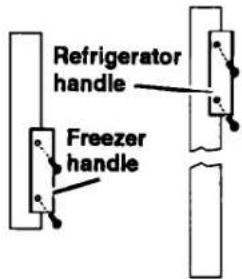
- Remove both handle assemblies as shown. Keep all parts together.
Remove hole plugs from opposite side of doors. Reinstall handles on new side. Seal all original holes with hole plugs from new side.
MODEL RT18DK
text_image
Freezer handle Refrigerator handleMODEL RT18EK
text_image
Refrigerator handle Freezer handle- Using a putty knife, remove the black plug from the front of the cabinet base (new hinge side) and reinstall it in the old set of lower hinge holes.
- Reinstall the bottom hinge assembly in the new side. Do not tighten the screws. The hinge must remain loose against the cabinet for easier alignment.
- Lift the refrigerator door up onto the bottom hinge assembly. Hold door in place while reinstalling center hinge assembly.
-
Level refrigerator door while holding door against front of cabinet. After leveling, tighten bottom and center hinge screws.
-
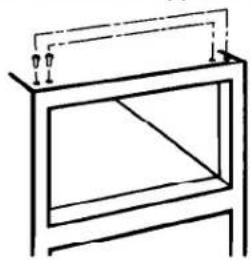
Remove screws (or plugs) from the hinge holes in the top of the cabinet and reinstall them in the opposite side.
natural_image
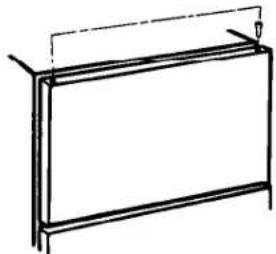
Simple line drawing of a cabinet or enclosure frame with no text, numbers, or symbols- Remove plug from upper bearing of freezer door and reinstall on opposite side.
natural_image
Simple line drawing of a rectangular frame with vertical supports and a horizontal beam (no text or symbols)- Lift freezer door up onto the center hinge assembly. Reinstall top hinge assembly while holding door in place. Do not tighten the screws.
- Align the doors so they are parallel to each other. Adjust doors to cabinet so the gasket seals but does not bind.
- Tighten all hinge screws.
Caring for Your Refrigerator
Your refrigerator is built to give you many years of dependable service. However, there are a few things you can do to help extend its product life. This section tells you how to clean your refrigerator and what to do when going on vacation, moving, or during a power outage.
Cleaning your refrigerator
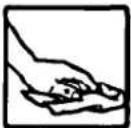
Both the refrigerator and freezer sections defrost automatically. However, clean both about once a month to help prevent odors from building up. Wipe up spills
right away.
To clean your refrigerator, unplug it, take out all removable parts, and clean the refrigerator according to the following directions.
WARNING
Personal Injury Hazard
Refrigeration system tubes are near the defrost pan and can become hot. Clean defrost pan carefully.
Failure to do so could result in personal injury.
| PART | WHAT TO USE | HOW TO CLEAN |
| Removable parts (shelves, crisper, etc.) | Sponge or cloth with mild detergent and warm water | • Hand wash, rinse, and dry thoroughly. |
| Outside | Sponge, cloth, or paper towel with mild detergent, warm water, and an appliance wax (or good auto paste wax) | • Wash outside of cabinet. Do not use abrasive or harsh cleaners.• Wipe and dry thoroughly.• Wax painted metal surfaces at least twice a year. Apply wax with a clean, soft cloth. Waxing painted metal surfaces provides rust protection.Do not wax plastic parts. |
| Inside walls (allow freezer to warm up so cloth won't stick) | Sponge, soft cloth, or paper towel with baking soda or mild detergent and warm water | • Wash with mixture of warm water and– mild detergent, or– baking soda (2 tablespoons [26 g] to 1 quart [.95 L] of water).• Wipe and dry thoroughly. |
CARING FOR YOUR REFRIGERATOR
| PART | WHAT TO USE | HOW TO CLEAN |
| Door liners and gaskets | Sponge, soft cloth, or paper towel with mild detergent and warm water | Wash, wipe, and dry thoroughly.DO NOT USE cleaning waxes, concentrated detergents, bleaches, or cleaners containing petroleum on plastic parts. |
| Plastic parts (covers and panels) | Soft, clean sponge or soft, clean cloth with mild detergent and warm water | Wash, rinse or wipe, and dry thoroughly.DO NOT USE paper towels, window sprays, scouring cleansers, or flammable fluids. These can scratch or damage material. See “Important Safety Instructions” on page 3. |
| Defrost pan (behind refrigerator on top of compressor) | Sponge or cloth with mild detergent and warm water | Roll refrigerator out away from the wall.Wash defrost pan. Do not remove defrost pan to clean.Wipe and dry thoroughly.Roll refrigerator back into place.Level refrigerator. |
| Condenser coils (on back of cabinet) | Vacuum cleaner with extended narrow attachment | Roll refrigerator out away from the wall.Vacuum coils at least once every other month.Roll refrigerator back into place.Level refrigerator. |
| Floor under refrigerator | Floor cleaners | Roll refrigerator out only as far as the water supply line allows.Clean floor.Roll refrigerator back into place.Check to see if the refrigerator is level. |
Vacation and moving care
Long vacations
If you will be gone a month or more:
- Remove all food from the refrigerator.
-
If your refrigerator has an automatic ice maker:
-
Turn off the water supply to the ice maker at least one day ahead of time.
-
When the last load of ice drops, turn off the ice maker. Make sure all ice is dispensed out of the ice maker mechanism.
-
Unplug the refrigerator.
- Clean it, rinse well, and dry.
- Tape rubber or wood blocks to the tops of both doors to prop them open far enough for air to get in. This stops odor and mold from building up.
WARNING
Personal Injury Hazard
Do not allow children to climb on, play near, or climb inside the refrigerator when the doors are blocked open.
They may become injured or trapped.
To restart refrigerator, see "Using Your Refrigerator" on page 7.
Short vacations
No need to shut off the refrigerator if you will be away for less than four weeks.
- Use up any perishables.
- Freeze other items.
-
If your refrigerator has an automatic ice maker:
-
Raise the signal arm to the OFF (up) position.
- Shut off the water supply to the ice maker.
- Empty the ice bin.
Moving
When you are moving the refrigerator to a new home:
-
If your refrigerator has an automatic ice maker:
-
Turn off the water supply to the ice maker at least one day ahead of time.
-
Disconnect the water line.
• After the last load of ice drops, lift the signal arm to the OFF (up) position. -
Remove all food from the refrigerator.
-
Pack all frozen food in dry ice.
- Unplug the refrigerator.
- Clean it thoroughly. Rinse well and dry.
- Take out all removable parts, wrap them well, and tape them together so they don't shift and rattle.
- Screw in the leveling rollers.
- Tape the doors shut and tape the power supply cord to the cabinet.
When you get to your new home, put everything back and refer to page 5. Also, if your refrigerator has an automatic ice maker, remember to reconnect the water supply line.
Power interruptions
If electricity goes off, call the power company. Ask how long power will be off.
- If service will be interrupted 24 hours or less, keep both doors closed. This helps foods stay frozen.
- If service will be interrupted longer than 24 hours:
(a) Remove all frozen food and store in a frozen food locker.
OR
(b) Place 2 lbs. (0.9 kg) of dry ice in freezer for every cubic foot of freezer space. This will keep food frozen for 2 to 4 days. Wear gloves to protect your hands from dry ice burns.
OR
(c) If neither a food locker or dry ice is available, use or can perishable food at once.
- A full freezer stays cold longer than a partly filled one. A freezer full of meat stays cold longer than a freezer full of baked goods. If food contains ice crystals, it may be safely refrozen, although the quality and flavor may be affected. If the condition of the food is poor, or if you feel it is unsafe, dispose of it.
Questions ?
Call our toll-free number, 1-800-44-ROPER.
Food Storage Guide
There is a correct way to package and store refrigerated or frozen food. To keep food fresher, longer, take the time to study these recommended steps.
Storing fresh food
Wrap or store food in the refrigerator in air-tight and moisture-proof material. This prevents food odor and taste transfer throughout the refrigerator. For dated products, check code date to ensure freshness.
Leafy vegetables
Remove store wrapping and trim or tear off bruised and discolored areas. Wash in cold water and drain. Place in plastic bag or plastic container and store in crisper.
Vegetables with skins (carrots, peppers)
Store in crisper, plastic bags, or plastic container.
Fruit
Wash, let dry, and store in refrigerator in plastic bags or crisper. Do not wash or hull berries until they are ready to use. Sort and keep berries in their original container in a crisper, or store in a loosely closed paper bag on a refrigerator shelf.
Eggs
Store without washing in the original carton on interior shelf.
Milk
Wipe milk cartons. For best storage, place milk on interior shelf.
Butter or margarine
Keep opened butter in covered dish or closed compartment. When storing an extra supply, wrap in freezer packaging and freeze.
Cheese
Store in the original wrapping until you are ready to use it. Once opened, rewrap tightly in plastic wrap or aluminum foil.
Leftovers
Cover leftovers with plastic wrap or aluminum foil. Plastic containers with tight lids can also be used.
Meat
Store most meat in original wrapping as long as it is airtight and moisture-proof. Rewrap if necessary. See the following chart for storage times.
| TYPE | APPROXIMATE TIME(DAYS)* |
| Chicken | 1 to 2 |
| Ground beef | 1 to 2 |
| Steaks and roasts | 3 to 5 |
| Cured meats | 7 to 10 |
| Bacon | 5 to 7 |
| Cold cuts | 3 to 5 |
| Variety meats | 1 to 2 |
* When storing meat longer than the times given, follow the directions for freezing.
NOTE: Use fresh fish and shellfish the same day as purchased.
Storing frozen food
The freezer section is designed for storage of commercially frozen food and for freezing food at home.
NOTE: For further information about preparing food for freezing or food storage times, contact your local Cooperative Extension Service or check a freezer guide or reliable cookbook.
Packaging
The secret of successful freezing is in the packaging. The way you close and seal the package must not allow air or moisture in or out. Packaging done in any other way could cause food odor and taste transfer throughout the refrigerator and drying of frozen food.
Packaging recommended for use:
• Rigid plastic containers with tight-fitting lids
• Straight-sided canning/freezing jars
• Heavy-duty aluminum foil
- Plastic-coated paper
• Non-permeable plastic wraps (made from a saran film)
Follow package or container instructions for proper freezing methods.
Do not use:
- Bread wrappers
• Non-polyethylene plastic containers - Containers without tight lids
- Wax paper
• Wax-coated freezer wrap - Thin, semi-permeable wrap
The use of these wrappings could cause food odor, taste transfer, and drying of frozen food.
Freezing
Do not expect your freezer to quick-freeze any large quantity of food. Put no more unfrozen food into the freezer than will freeze within 24 hours (no more than 2 to 3 pounds of food per cubic foot of freezer space). Leave enough space for air to circulate around packages. Be careful to leave enough room at the front so the door can close tightly.
Storage times will vary according to the quality of the food, the type of packaging or wrap used (airtight and moisture-proof), and the storage temperature, which should be 0°F (-17.8°C).
Troubleshooting
Listed in the chart below are the most common problems consumers run into with their refrigerator. Please read through this chart before calling for service. It could save you the cost of a service call.
| PROBLEM | CHECK THE FOLLOWING |
| Your refrigerator will not operate | Is the power supply cord firmly plugged into a live circuit with proper voltage?Has a household fuse or circuit breaker blown/tripped?Is the Refrigerator Control set to the OFF position? |
| The lights do not work | Is the power supply cord firmly plugged Into a live circuit with proper voltage?Has a household fuse or circuit breaker blown/tripped?Is a bulb burned out? |
| The optional ice maker does not work | Is the freezer cold enough to make ice? It could take overnight for the freezer to reach the proper temperature.Is the ON/OFF lever in the ON (down) position? (See page 10.)Is the water valve turned on?Does the water line have a clog or leak? |
| You hear unfamiliar sounds or a rattling/Jingling noise | Is something on top of or behind the refrigerator?Some new sounds are normal. See “Understanding the sounds you may hear” on page 12. |
| There is water in the defrost pan | This is normal on hot, muggy days. Make sure the refrigerator is level so the pan does not overflow. |
| The motor seems to run too much | Are the condenser coils dirty?Has the door been opened often? Has a large amount of food been added at one time? The motor naturally runs longer if these things happen.Is the room hot? If the room is too warm, the motor runs longer to keep the unit cool. |
Requesting Assistance or Service
Before calling for assistance or service, please check "Troubleshooting" on page 21. It may save you the cost of a service call. If you still need help, follow the instructions below.
1. If you need assistance\* ...
Call our toll-free telephone number. Dial free from anywhere in the U.S.A.: 1-800-44-ROPER (1-800-447-6737)
and talk with one of our trained consultants.
The consultant can instruct you in how to obtain satisfactory operation from your appliance or, if service is necessary, recommend a qualified service company in your area.
If you prefer, write to:
Mr. William Clark
Consumer Assistance Representative
Whirlpool Corporation
2000 N State Route 63
Benton Harbor, MI 49022-2692
Please include a daytime phone number in your correspondence.
2. If you need service\* ...
Contact the dealer from whom you purchased the appliance or the authorized servicer in your area. For help finding an authorized servicer in your
area, call our toll-free number in Step 1.
3. If you need FSP® replacement parts ...
FSP is a registered trademark of Whirlpool Corporation for quality parts. Look for this symbol of quality whenever you need a replacement part for your Roper® appliance. FSP replacement parts will fit right and work right, because they are made to the same exacting specifications used to build every new Roper appliance.
To locate FSP replacement parts in your area, refer to Step 2 or call our toll-free telephone number in Step 1.
4. If you are not satisfied with how the problem was solved ...
- Contact the Major Appliance Consumer Action Panel (MACAP). MACAP is a group of independent consumer experts that voices consumer views at the highest levels of the major appliance industry.
- Contact MACAP only when the dealer, authorized servicer, and Whirlpool have failed to resolve your problem.
Major Appliance Consumer Action Panel 20 North Wacker Drive Chicago, IL 60606
• MACAP will in turn inform us of your action.
*When asking for help or service:
Please provide a detailed description of the problem, your appliance's complete model and serial numbers, and the purchase date. (See page 2.) This information will help us respond properly to your request.
Index
This index is alphabetical. Look for the word or phrase you are interested in, then look for the page number.
TOPIC PAGE
CARE
Moving 17
Power interruptions 18
Vacation 17
CLEANING 5,15-16
CONTROLS
Changing settings 8
Setting 7
CRISPERS
Cover 9
Removing 9
ELECTRICAL NEEDS 5
FEATURES/PARTS 4
FOOD STORAGE
Fresh 19
Frozen 20
ICE MAKER
Common problems 11
Using 10
TOPIC PAGE
LIGHT BULB
Changing 11
PARTS/FEATURES 4
RESPONSIBILITIES
Owner 3
SAFETY 3
SERVICE
Parts 22
Requesting 22
SHELVES
Refrigerator, removing 8
SOUNDS
Normal 12
TROUBLESHOOTING 21
WARRANTY 24
ROPER®
Refrigerator Warranty
| LENGTH OF WARRANTY | WE WILL PAY FOR |
| FULL ONE-YEARWARRANTY(from date of purchase) | FSP® replacement parts and repair labor to correct defects in materials or workmanship. Service must be provided by an authorized Roper service company. |
| FULL FIVE-YEARWARRANTY(from date of purchase) | FSP replacement parts and repair labor for the sealed refrigeration system (compressor, evaporator, condenser, drier, or connecting tubing) which we find to be defective in materials or workmanship. Service must be provided by an authorized Roper service company. |
| WE WILL NOT PAY FOR | |
| A. Service calls to:1. Correct the installation of your refrigerator.2. Instruct you how to use your refrigerator.3. Replace house fuses or correct house wiring or plumbing.4. Replace light bulbs.B. Repairs when your refrigerator is used in other than normal, single-family household use.C. Pickup and delivery. Your refrigerator is designed to be repaired in the home.D. Damage to your refrigerator caused by accident, misuse, fire, flood, acts of God, or use of products not approved by Whirlpool.E. Repairs to parts or systems caused by unauthorized modifications made to the appliance.5/93 | |
This Roper appliance is warranted by Whirlpool Corporation. Under no circumstances shall it be liable under this warranty for incidental or consequential damages and all implied warranties are limited to the same time period stated in the express warranties for Roper Brand Appliances. Some states do not allow the exclusion or limitation of incidental or consequential damages, or limitation of implied warranties, so these exclusions or limitations may not apply to you.
This warranty gives you specific legal rights, and you may have other rights which vary from state to state.
Outside the United States, a different warranty may apply. For details, please contact your authorized Roper distributor or military exchange.
If you need service, first see the "Requesting Assistance or Service" section of this book. After checking "Requesting Assistance or Service," additional help can be found by calling our toll-free telephone number, 1-800-44-ROPER (1-800-447-6737), from anywhere in the U.S.A.

Printed on recycled paper -
10% post-consumer waste
50% recovered materials