BBOARD-64BT-P - Electric scooter BRIGMTON - Free user manual and instructions
Find the device manual for free BBOARD-64BT-P BRIGMTON in PDF.


User questions about BBOARD-64BT-P BRIGMTON
0 question about this device. Answer the ones you know or ask your own.
Ask a new question about this device
Download the instructions for your Electric scooter in PDF format for free! Find your manual BBOARD-64BT-P - BRIGMTON and take your electronic device back in hand. On this page are published all the documents necessary for the use of your device. BBOARD-64BT-P by BRIGMTON.
USER MANUAL BBOARD-64BT-P BRIGMTON
natural_image
Abstract black circular logo with curved lines and a jagged tail (no text or symbols)BRIGMTON
surfing technology

natural_image
Black BRIGMTON electric scooter with dual side wheels and front-mounted head (no visible text or symbols on body)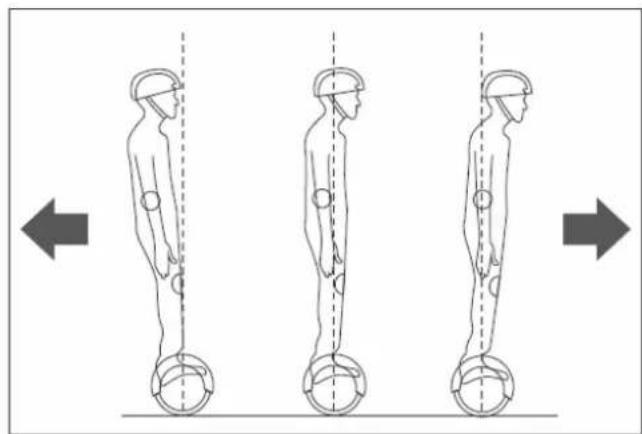
natural_image
Three sequential illustrations of human figure standing with hands on legs, showing vertical posture and movement directions (no text or symbols)natural_image
Black four-wheeled bicycle with hourglass-shaped design and two curved arrows indicating rotation or change (no text or symbols)natural_image
Close-up of a transparent plastic component with curved and flat surfaces, no visible text or symbolsALCANCE Y VELOCIDAD
natural_image
Top-down view of a black electric scooter with two wheels and front wheel (no visible text or symbols)MANTENIMIENTO
natural_image
Abstract black circular logo design with curved lines and a jagged edge (no text or symbols)BRIGMTON
surfing technology

natural_image
Black BRIGMTON electric scooter with dual wheels and front-mounted head (no visible text or symbols on body)INSTRUCTION MANUAL
SMART SCOOTER BT APK SPEAKER
BBOARD 64BT (N-A-R-P)
IMPORTANT
- If it is charged at higher or lower temperatures, there is a risk of reduced battery performance and potential risk of product damage and personal injury.
- Store the product at temperatures between 5 °C and 30 °C. (The optimum storage temperature is 25 °C)
- Charge and store the product in an open, dry area, away from flammable materials.
- Do not store the product in direct sunlight or near flames.
- If the product is left to other people, for example, during a holiday period, it should be partially charged (20-50% load). Not fully charged.
- When shipped from the factory, the product is often only partially charged. Keep the product in a partially charged state until it is to be used.
Use for adults or children is ALWAYS recommended under adult supervision.
A learning process is required for the use of this device. Just as the learning process to drive a bicycle or a motorcycle requires practice, the use of the electric scooter needs practice before making any moves, turns or raising the speed. Using it without a proper learning process can lead to injury.
It should be noted that the speed achieved can vary depending on the weight of the driver, type of ground, temperature, driving style, etc.
ALWAYS wear protections such as helmet, knee pads, elbow pads and protective gloves.
- We do not recommend using the device on public roads.
- Do not use the device on rainy days, in addition to the risk of water damage to electronic equipment.
- Check the legal regulations on the use of these devices in your country.
Our company can not be held responsible for an improper use of the device. We recommend that you carry out the learning process before using the device.
PREPARATION
Fully charge the battery before use.
Weight supported: The device allows a maximum weight. Overcoming it involves:
- Putting the driver at risk
- Damage to the device due to overload (these damages are not covered by the guarantee).
Respect the maximum and minimum load:
Maximum: 120 Kg.
Minimum: 20 Kg.
FUNCTIONS
IDENTIFICATION OF THE PARTS
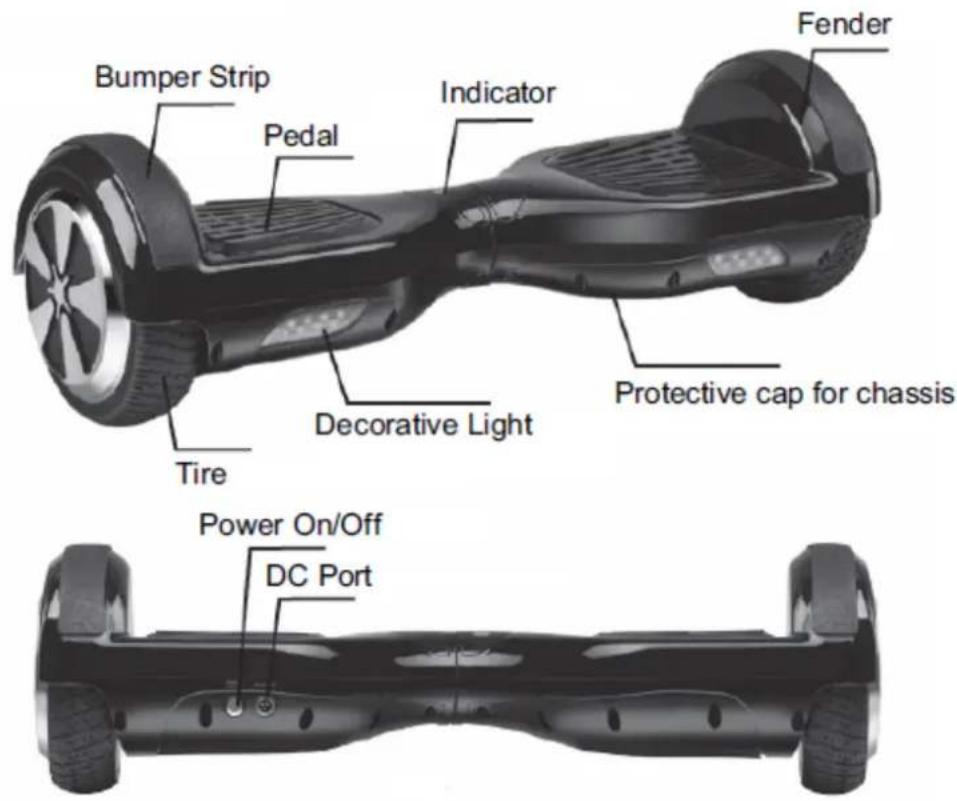
SENSOR CALIBRATION
If the scooter is deflected left or right when you roll the scooter, you can calibrate it. For them follow the following steps:
1: Stop the scooter. Place it on level ground.
2: Press the Power button for more than 10 seconds until you see the light blinking 5 times.
3: Turn off the scooter.
4: Turn it on again and the calibration will be done.
GENERAL OPERATION
The scooter's propulsion system consists of dynamic balancing, using an internal gyroscope and acceleration sensors.
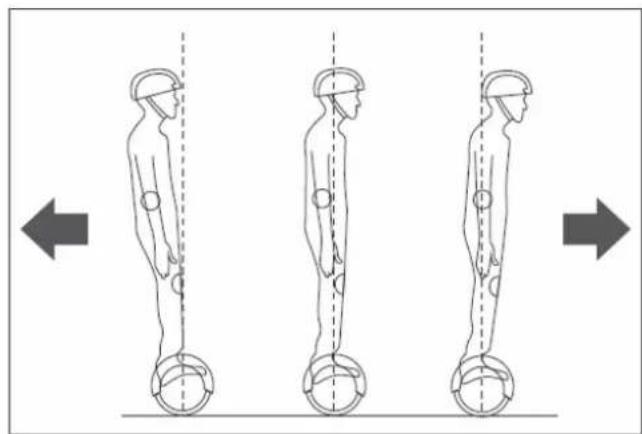
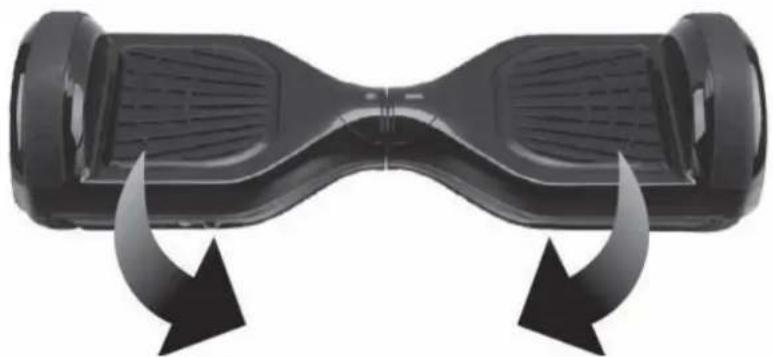
It is controlled by altering the center of gravity of the same so that the servo control of each motor acts when tilting each of the parts, forward or backward. To advance, tilt the two parts forward. To tilt back both sides back. To turn in the same place incline one part forward and one back. Each part has an independent motor that allows to describe turns or changes of direction.
natural_image
Three sequential illustrations of human figure standing with hands on legs, showing posture changes (no text or symbols)- Press the power button.
- Place the scooter on a flat surface and observe the safety measures described at the beginning of protection, weight, etc.
- Raise one foot to one of the parts (with which you feel most comfortable) and the system goes into self-balancing, raise the other foot and try to maintain balance.
- Perform movement control forwards and backwards, remembering that the movement of the body should not be abrupt.
5: Check the left and right steering by turning each part of the scooter.
natural_image
Black four-wheeled bicycle with hourglass-shaped design and bidirectional arrow arrows indicating motion (no text or symbols)6: To get off, wait until the scooter is in the balanced position. Lower one foot back and then the other.
IMPORTANT: Never drive violently when driving fast. Never drive sideways or turn on a slope.
IT WILL NOT WORK:
- If the system detects an error during operation, the scooter will warn you in different ways such as not allowing driving, an alarm warning light will sound, or an intermittent alarm beep, etc.
- When riding the scooter if the platform moves forward or back more than 10 degrees the scooter will not work.
- If the battery charge is too low.
- During charging.
- During operation, if it is overturned, its operation will be stopped.
- Over-speed.
- If the tire is stuck: Two seconds later the scooter will go into off mode.
- Overuse, for example, by continued use when climbing a steep slope, etc.
NOTE: When the scooter enters a stop state, the system will automatically lock the motor. It can be unlocked when the power button is pressed. When the battery is exhausted or the system is turned off by safety shutdown, please do not continue driving the scooter; Otherwise, the scooter will not be able to balance due to lack of battery. Under these conditions, the driver is likely to be injured. If the battery reaches the minimum, continued driving of the scooter will adversely affect the battery life.
RECOMMENDATIONS
Before driving the scooter, please make sure you are familiar with driving skills. Always practice with someone who can help you up and down.
- Wear casual (but not loose) clothing and flat shoes to maintain the flexibility of the body.
- Please use it in open spaces.
- Make sure the surface is level.
- When driving on different terrain, you should slow down.
- The scooter is designed for a smooth track. Slow down if you drive the scooter over an uneven surface.
FUNCTIONS
PEDAL SENSOR: The scooter has sensors under the pedal; When the operator presses on the pedal, the scooter will automatically adjust it to an equilibrium model. When driving, you must make sure that the pedal is fully depressed; Please do not step on other components outside the pedal. Do not place objects on the pedals to make the scooter run on its own; Can increase the possibility of collision and cause personal injury and damages to the same scooter.
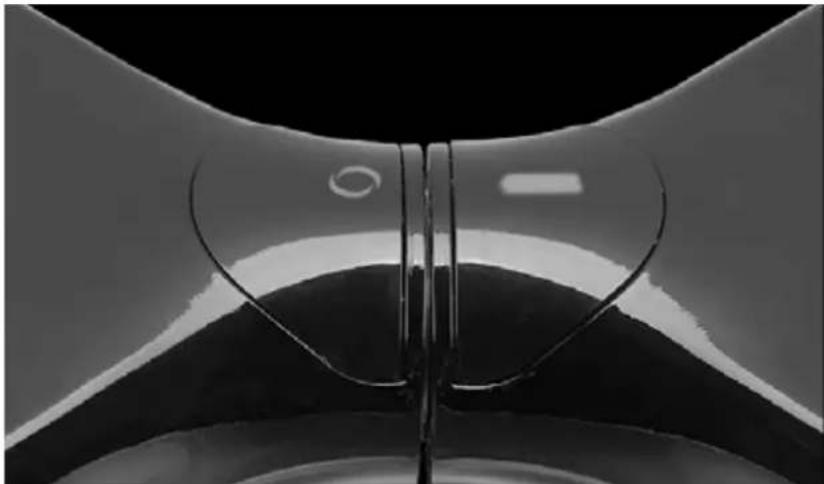
BATTERY AND INDICATORS: The indicator is located in the middle of the scooter. It is used to obtain information about the operation.
- Green if the battery has enough charge to drive.
- Red indicates that the battery is discharged. When the battery is exhausted you will not be able to drive the skateboard, it will go out without further indications and then you will lose your balance. You risk being injured if you try to continue driving.
- Operation indicator: When the pedal is activated, the operation indicator lights up and the system enters the operating condition; When the system detects an error, the indicator will change to red.
natural_image
Close-up of a transparent plastic component with curved and flat surfaces, no visible text or symbolsSCOPE AND SPEED
- Topography: On level tracks, the range will increase; On irregular tracks, will decrease.
- Weight: The weight of the operator can influence the driving distance.
- Temperature: Extreme temperatures will decrease the driving distance.
- Maintenance: If the scooter is properly charged and the battery is kept in good condition, it will maximize the driving distance.
- Speed and style of driving: Maintaining a constant speed will increase the driving distance; On the other hand, starting, stops, accelerations, frequent decelerations will decrease the distance.
- The maximum speed of the scooter balance is 15km / h nominal but depends on the conditions of battery charge, condition / angle of the surface, wind direction and the weight of the driver. If the battery is fully charged, the surface is very level or with a regular downward angle, there is back wind and the driver does not weigh much, the maximum speed can exceed 15km / h.
- When approaching its maximum speed, the balance scooter gives a warning signal and the speed must be reduced.
- We recommend driving the scooter balance at speeds that are comfortable for you and do not drive the scooter balance at speeds exceeding 15km/h.
- At the permitted speed, the electric scooter can balance well by itself.
SAFE DRIVING
- When driving the scooter, make sure that all safety measures are taken. Must wear helmet, knee pads, elbow pads and other protective equipment.
- The driver must not wear loose or hanging clothes, laces, etc. That can get caught in the wheels.
- The scooter is for personal entertainment only. Driving on public roads is not recommended.
- The driving of the scooter is not permitted on motor vehicle lanes.
- Do not allow children, elderly or pregnant women to drive the scooter.
- Those with a reduced balancing ability should not drive the scooter.
- Do not drive the scooter under the influence of alcoholic beverages or any other substance.
- Do not carry items while driving.
- Please be aware of the objects in front of you; Maintaining a good vision will help you to drive the scooter safely.
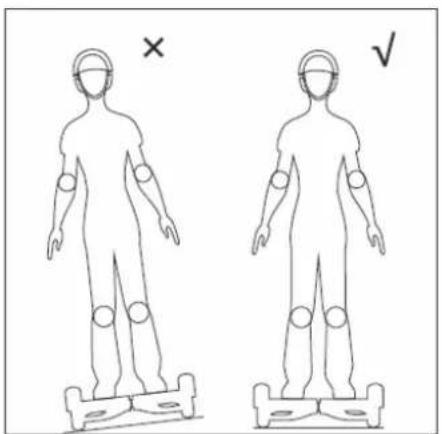
- Relax your legs while driving; The knees should be slightly bent and this can help maintain balance when you are on uneven ground.
- In the process of driving, make sure that the feet are always on the pedals.
- The scooter can only carry one person.
- Do not start or stop suddenly.
- Avoid driving on steep slopes.
- Do not drive the scooter against a fixed object (for example, with a wall or other structure).
- Do not drive in dark or dimly lit places.
- It is your own responsibility for any accident or damage it may cause.
- Make sure that the speed of the vehicle is safe for you and others and is ready to stop at any time while it is running.
- When driving the scooter, please stay at a distance from others to avoid collisions.
- When turning, you should use the center of gravity of your body; The violent shift of the center of gravity can cause damage or fall off the scooter.
- Do not drive it backwards for long distances, do not drive backwards at high speeds, do not rotate at high speeds and do not drive too fast.
- Do not drive it when it rains or expose the scooter to other humidity conditions. You should only drive in dry weather.
- Avoid driving with obstacles and avoid snow, ice, and poorly adhering surfaces.
- Avoid driving on articles made of fabric, on small branches or stones.
- Avoid driving in confined spaces or where there is an obstacle.
- Jumping to get on or off the scooter can cause and cause damage that is not covered by the warranty, risk of personal injury. Personal injury or abuses related to "reckless driving" will not be covered by the company and will void the warranty.
BATTERY CHARGE
When you find that the battery indicator is red and blinking, it indicates that the battery is low in charge. It is recommended that you stop driving.
When power is low, there is not enough power for your normal drive, and the system will automatically tilt the platform base to stop its use by the operator. It is very easy to fall if you insist on driving at that time and will negatively affect the battery life. Do not use the scooter in the following cases:
- It expels a bad odor or excessive heat.
- Leaks any substance.
- It is forbidden to disassemble the battery.
- Do not touch any substance that comes out of the battery.
- Do not let children or animals touch the battery.
- Batteries contain dangerous substances inside. It is forbidden to open the battery and attach objects to it.
- Use only the charger that is attached.
- Do not overload lithium batteries. The battery pack consists of lithium batteries.
BLUETOOTH
SPEAKERS
You can listen to music through the Scooter's speakers by turning on the Scooter, activating the Bluetooth on your device, and synchronizing with the Scooter.
APK
Use the application to get information about your Scooter, activate functions, check the information log, etc.
Select Android or IOS once check the QR code:

Please refer to the application usage.
IMPORTANT:
Do not ride the Scooter while it is charging!
- During charging, the LED light of the battery charger will be red.
- When finished charging, the LED light of the battery charger will be green.
- When charging is complete, disconnect the battery charger from the mains and the Balance Scooter.
Steps for loading:
- Make sure that the scooter, charger and DC power supply of the balance scooter remain dry.
- Use ONLY the charger that is attached. Use of any other charger may damage the product or create other potential hazards.
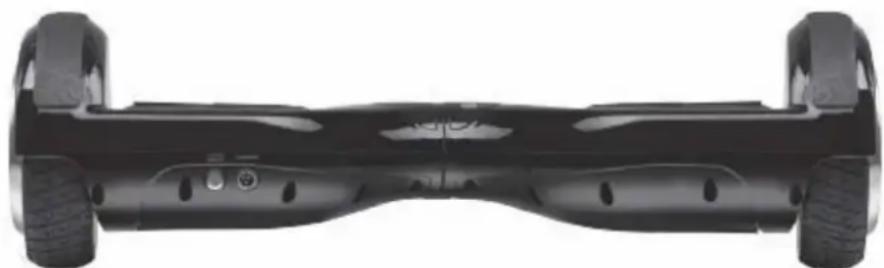
- Plug the power adapter into the power port on the back of the scooter and into a standard power outlet. - Make sure that the green indicator on the adapter lights up.
- When the red indicator on the charger lights, this indicates that it is charging properly; Otherwise check if the line is connected properly.
- When the indicator light on the charger changes from red to green, this indicates that the battery is fully charged. In this case, please stop loading it. Overcharging will affect battery life.
- Charging can take up to 3 hours. Do not charge the battery for more than 3 hours. Disconnect the charger from the balance scooter board and the power outlet after 3 hours. Overcharging will reduce battery life.
- Do not charge the product for long periods of time.
- Never charge the product without supervision.
- The product should only be charged at temperatures between 0 ^ and +45 ^ .
- If it is charged at higher or lower temperatures, there is a risk of reduced battery performance and potential risk of product damage and personal injury.
- Charge and store the product in an open, dry area away from flammable materials.
- Do not charge in sunlight or near flames.
- Do not charge the product immediately after use. Allow product to cool for one hour before charging.
- If the product is left to other people, for example, during a holiday period, it should be partially charged (20-50% load). Not fully charged.
- When shipped from the factory, the product is often only partially charged. Keep the product in a partially charged state until it is to be used.
natural_image
Top-down view of a black electric scooter with two wheels and rear suspension (no visible text or symbols)MAINTENANCE
The scooter must be serviced. This chapter mainly describes relevant steps and important operation reminders for maintenance. Please make sure that the power and the charging socket are disconnected before performing the following operations. It should not be operated when the battery is being charged.
CLEANING
- Make sure that the power and the charging jack are disconnected.
- Clean the scooter case with a soft cloth.
NOTE: Make sure that no water or other liquids enter the balance scooter's internal components as this may permanently damage the scooter's electronics / batteries. There is a risk of personal injury.
STORAGE
- If the storage temperature is below 0 ^ , please do not charge the scooter. You can place it in a warm environment ( 5-30 ^ ) for charging.
- You can cover the scooter in order to avoid dust.
- Store the scooter inside by placing it in a dry and suitable place.
- Never load the product without supervision.
- The product should only be charged at temperatures between 0 °C and +45 °C .
- If charging at higher or lower temperatures, there is a risk that battery performance will be reduced and there is a potential risk of product damage and personal injury.
- Load and store the product in an open and dry area, away from flammable materials.
- Do not load it in sunlight or near live flames.
- Do not load the product immediately after use. Allow the product to cool for one hour before loading it.
- If the product is left to other people, for example, during a holiday period, it must be partially charged (20-50% load). Not fully charged
- When shipped from the factory, the product has often only been partially loaded. Keep the product partially charged until it is used.
- The skate must be cooled for at least 1 hour before packing.
- It should not be left outside in a hot car in the sun.
- When loading, do not drive the skate!
- Always keep the protective cap connected to the DC connector!
- Just remove the plug when loading the skate!
- After charging is complete, remove the DC plug and reconnect it to the protective plug on the DC connector.
"Features can change without notice"
BRIGMTON
surfing technology
IMPORTED
FERSON ELECTRÓNICA, S.A.
CIF: A-41111881
SANTA CLARA DE CUBA 12
TEL/FAX: 954256645/954256822
SEVILLA
ESPAÑA
Ferson Electrónica, S.A. declares under our responsibility that the equipment meets the requirements indicated in the following directives:
DIRECTIVAS EMC
EN 60204-1:2006+A1:2009
EN ISO 12100:2010
EN 60335-1: 2012 + A11:2014
EN 71-1-2014
EN 71-2-2011+A1:2014
EN 71-3-2013+A1:2014
2011/65/EU
2016/42/EC