
99-7325S - Automotive Wiring Metra - Free user manual and instructions
Find the device manual for free 99-7325S Metra in PDF.


| Product Type | Dash installation kit for aftermarket radios |
| Brand | Metra |
| Model | 99-7325S |
| Compatible Vehicles | Hyundai Santa Fe 2007-2012 (excluding factory NAV models) |
| Radio Provisions | DIN radio with pocket, ISO radio with pocket |
| Kit Components | Radio housing, ISO brackets, trim plate |
| Material | ABS plastic |
| Dimensions (approx.) | 7 x 5 x 3 inches |
| Weight (approx.) | 0.5 lb |
| Power Requirement | None (passive kit) |
| Installation Tools | Panel removal tool, Phillips screwdriver, socket wrench |
| Required Wiring Harness (sold separately) | 70-7302 (2007-2009) or 70-7303 (2009-up Hyundai/Kia) |
| Required Antenna Adapter (sold separately) | 40-KI11 (2009-up Hyundai Santa Fe) |
| Installation Notes | Disconnect negative battery terminal before installation; reassemble in reverse order |
| Maintenance | Wipe with a soft, damp cloth; avoid harsh chemicals |
| Safety Information | Ensure all accessories and air bag indicators are connected before reconnecting battery |
| Spare Parts & Repairability | Contact Metra for replacement parts; repair not recommended |
| Certification | MECP recommended installation |
| Warranty | Limited lifetime warranty (check with retailer) |
Frequently Asked Questions - 99-7325S Metra
User questions about 99-7325S Metra
0 question about this device. Answer the ones you know or ask your own.
Ask a new question about this device
Download the instructions for your Automotive Wiring in PDF format for free! Find your manual 99-7325S - Metra and take your electronic device back in hand. On this page are published all the documents necessary for the use of your device. 99-7325S by Metra.
USER MANUAL 99-7325S Metra
INSTALLATION INSTRUCTIONS FOR PART 99-7325
APPLICATIONS
Hyundai Santa Fe 2007-2012
(not for factory equipped NAV models)
99-7325
KIT FEATURES
• DIN radio provision with pocket
• ISO radio provision with pocket
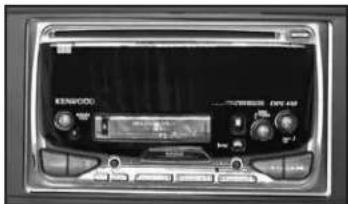
KIT COMPONENTS
• A) Radio housing • B) ISO brackets • C) Trim plate
A
B

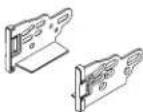
C

WIRING & ANTENNA CONNECTIONS (sold separately)
Wiring Harness: • 70-7302 - Hyundai harness 2007-2009 • 70-7303 - Hyundai/Kia harness 2009-up
Antenna Adapter: • 40-KI11 - Hyundai Santa Fe adapter 2009-up
TOOLS REQUIRED
- Panel removal tool - Phillips screwdriver - Socket wrench
Table of Contents
Dash Disassembly
— Hyundai Santa Fe 2007-2012 .... 2
Kit Assembly
- DIN radio provision with pocket 3
- ISO radio provision with pocket .... 3
CAUTION: Metra recommends disconnecting the negative battery terminal before beginning any installation. All accessories, switches, and especially air bag indicator lights must be plugged in before reconnecting the battery or cycling the ignition.
NOTE: Refer to the instructions included with the aftermarket radio.

Dash Disassembly 99-7325
Hyundai Santa Fe 2007-2012
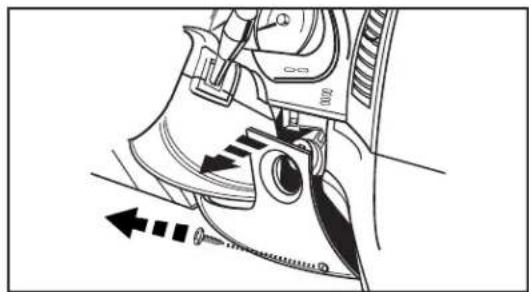
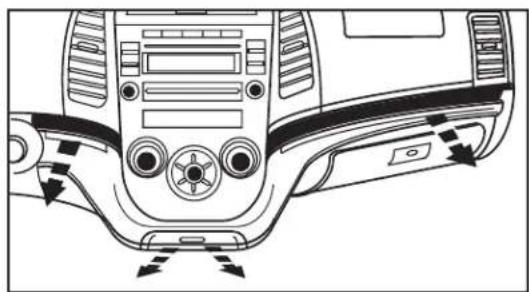
- Remove (1) Phillips screw from the right side of the panel below the steering column then unclip and let right side of panel hang. (Figure A)
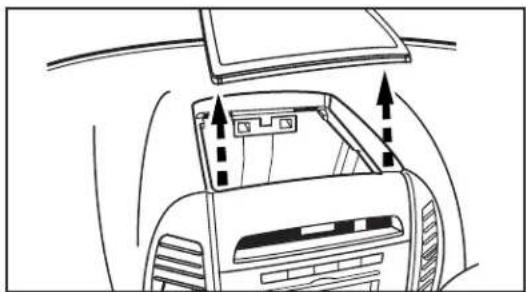
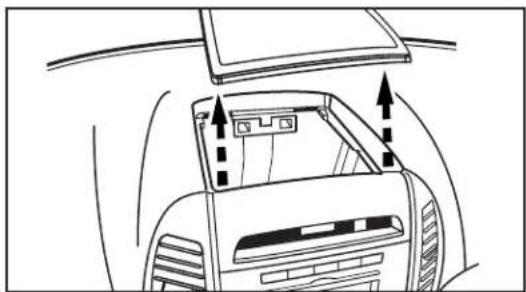
- Unclip and remove the cover above the clock on top of panel surrounding the radio. (Figure B)
- Unclip and remove the panel extending across the dash below the a/c control and above the glove box including the ash tray. (Figure C)
- Remove (2) Phillips screws then unclip and remove the panel surrounding the radio including the A/C vents. (Figure D)
- Remove (4) Phillips screws securing the radio. Unplug and remove radio.
Continue to kit assembly
natural_image
Technical diagram of a mechanical device with directional arrows indicating motion or force (no text or symbols present)(Figure A) (Figure B)
natural_image
Line drawing of a car interior showing dashboard and rearview components with directional arrows (no text or symbols)
natural_image
Top-down diagram of a car dashboard and steering wheel (no text or symbols)(Figure C) (Figure D)

Kit Assembly 99-7325
DIN radio provision with pocket
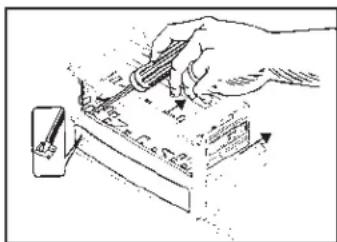
- Snap the Double DIN brackets to the outside edge of the Double DIN trim plate. (Figure A)
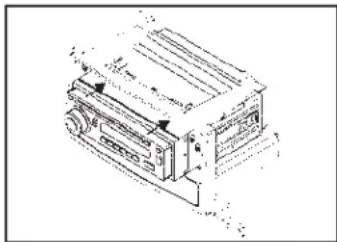
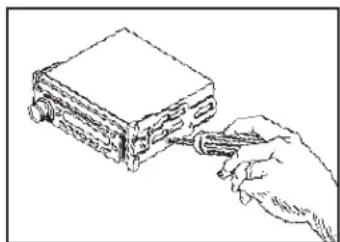
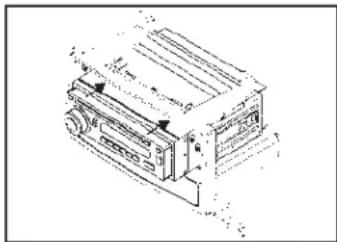
- Slide the Double DIN radio into the bracket/trim plate assembly and secure the radio to the assembly using the screws supplied with the radio. (Figure B)
- Locate the factory wiring harness in the dash. Metra recommends using the proper mating adapter from Metra or AXXESS. Re-connect the negative battery terminal and test the unit for proper operation.
- Reassemble dash in reverse order of disassembly.
natural_image
Illustration of a hand using a tool to write on a document with arrows indicating motion (no text or symbols present)(Figure A) (Figure A)
natural_image
Technical line drawing of a mechanical device with no visible text or symbols(Figure B)
ISO radio provision with pocket
- Snap the Double DIN brackets to the outside edge of the Double DIN trim plate. (Figura A)
- Slide the stacked ISO units into the bracket/trim plate assembly and secure the units to the assembly using the screws supplied with the units. (Figura B)
- Locate the factory wiring harness in the dash. Metra recommends using the proper mating adapter from Metra or AXXESS. Re-connect the negative battery terminal and test the unit for proper operation.
- Reassemble dash in reverse order of disassembly.
natural_image
Line drawing of a hand using a tool to adjust or install a device into a rectangular block (no text or symbols)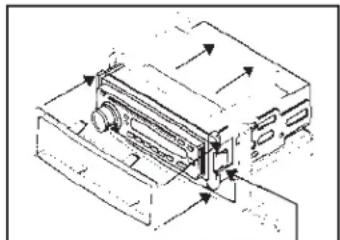
natural_image
Technical line drawing of a mechanical device with directional arrows indicating movement (no text or symbols)(Figure B)
Right side clip

INSTALLATION INSTRUCTIONS FOR PART 99-7325


KNOWLEDGE IS POWER
Enhance your installation and fabrication skills by enrolling in the most recognized and repurposed.
enrolling in the most recognized and resp. mobile electronics school in our industry.
Log onto www.installerinstitute.com or call
800-354-6782 for more information and take steps toward a better tomorrow.
Metra recommends MECP
certified technicians

natural_image
Technical diagram of a mechanical device with directional arrows indicating motion or force (no text or symbols present)(Figura A) (Figura B)
natural_image
Line drawing of a car interior showing dashboard and rearview components with directional arrows (no text or symbols)

natural_image
Top-down diagram of a car dashboard and steering wheel (no text or symbols)(Figura C) (Figura D)

Ensamble del kit 99-7325
natural_image
Illustration of a hand using a tool to write on a document with arrows indicating motion (no text or symbols present)(Figura A) (Figura A)
natural_image
Technical line drawing of a mechanical device with no visible text or symbols(Figura B)
natural_image
Line drawing of a hand using a tool to adjust or install a device into a rectangular block (no text or symbols)
natural_image
Technical line drawing of a mechanical device with directional arrows indicating movement (no text or symbols)(Figura B)
lado derecho, clip

Móvil (Mobile Electronics
Certification Program, MECP).
Brand : Metra
Model : 99-7325S
Category : Automotive Wiring