ROCOOK ADVANCED KIT - Stove CATA - Free user manual and instructions
Find the device manual for free ROCOOK ADVANCED KIT CATA in PDF.


User questions about ROCOOK ADVANCED KIT CATA
0 question about this device. Answer the ones you know or ask your own.
Ask a new question about this device
Download the instructions for your Stove in PDF format for free! Find your manual ROCOOK ADVANCED KIT - CATA and take your electronic device back in hand. On this page are published all the documents necessary for the use of your device. ROCOOK ADVANCED KIT by CATA.
USER MANUAL ROCOOK ADVANCED KIT CATA
Instruction manual and guarantee

ROCOOK
BY EL CELLER DE CAN ROCA
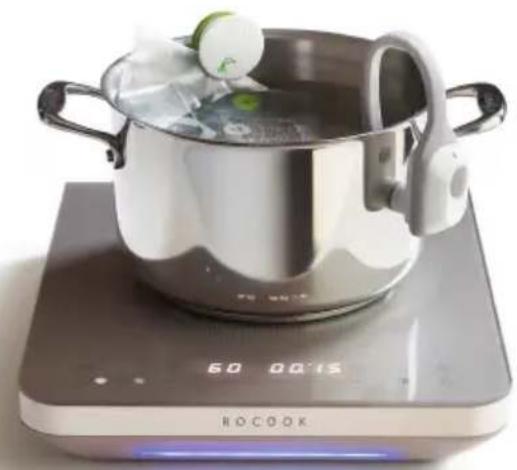
natural_image
A cooking pot on a digital kitchen scale with a digital display showing 60,000°C (no text or symbols on the pot itself)Instruction manual
Using the Manual
Congratulations on your purchase of ROCOOK Induction.
Before the first use, please read this user manual and pay special attention to safety warnings.
We recommend you to keep the manual for consultation and we hope you enjoy the experience of cooking at low temperatures.
natural_image
Interior kitchen scene with shelves of pastel jars, a green plate with leafy greens, a bowl of fresh salad, and a cooking pot on a wooden table (no visible text or symbols)
natural_image
Modern kitchen interior with stainless steel sink, glassware, and a wooden tray (no visible text or symbols)SAFETY INSTRUCTIONS
The ROCOOK Induction meets all requirements for electrical safety and electromagnetic compatibility of appliances required by directives and regulations.
- THE MAINTENANCE OF THE APPLIANCE MUST BE PERFORMED BY QUALIFIED PERSONNEL. THE REPAIR BY UNQUALIFIED PERSONNEL CAN CAUSE PERSONAL INJURY AND SERIOUS DAMAGE TO THE DEVICE. CONTACT OFFICIAL ASSISTANCE CENTRE IN CASE OF BREAKDOWN. NOT FOLLOWING THESE INSTRUCTIONS MAY VOID THE WARRANTY OF USE.
IF THE POWER CORD IS DAMAGED, IT MUST BE REPLACED BY THE MANUFACTURER, BY AN AUTHORIZED SERVICE CENTRE OR BY A QUALIFIED ELECTRICIAN IN ORDER TO PREVENT ALL KINDS OF RISKS.
- DO NOT USE EXTENSION FOR THE POWER CABLE.
- DO NOT INSTALL THE UNIT IN EXCESSIVELY HUMID, POSSIBLE OIL VAPOURS OR DUST. AVOID EXCESSIVE EXPOSURE TO DIRECT SUNLI-
GHT OR RAIN. DO NOT INSTA- LL OUTDOORS.
- THE APPLIANCE IS NOT INTENDED FOR INSTALLATION IN YOUR CAR, CARAVAN OR SIMILAR.
- CHILDREN UNDER 8 SHOULD STAY AWAY UNLESS THEY ARE UNDER CONSTANT ADULT SUPERVISION.
- THIS APPLIANCE CAN BE USED BY CHILDREN UNDER 8 YEARS OLD AND PEOPLE WITH REDUCED PHYSICAL, SENSORY OR MENTAL ABILITIES OR LACK OF EXPERIENCE AND KNOWLEDGE IF THEY HAVE BEEN GIVEN SUPERVISION OR APPROPRIATE INSTRUCTION REGARDING THE USAGE OF THE DEVICE IN A SAFE WAY AND THEY UNDERSTAND THE DANGERS THAT INVOLVES.
- CHILDREN SHOULD NOT PLAY WITH THE APPLIANCE.
- THE CLEANING AND MAINTENANCE BY THE USER SHOULD NOT BE PERFORMED BY CHILDREN WITHOUT SUPERVISION.
THIS PRODUCT IS DESIGNED FOR DOMESTIC USE AND NON-INTENSIVE PROFES-SIONAL USE.
- IT CAN BE USED IN FARMS, KITCHENS IN OFFICES OR SHOPS, IN HOTELS; MOTELS AND SIMILAR RESIDENTIAL APARTMENTS.
-
BE AWARE THAT COOKING WITH GREASE OR OIL CAN PROVE DANGEROUS, CAU-SING OVERHEATING AND/OR FIRE. ALWAYS COOK WITH ANOTHER PERSON PRESENT. WITHOUT A PERSON BEING PRESENT BECAUSE THEY COULD OVERHEAT AND CAU-SE A FIRE.
-
THE COOKING PROC MUST BE MONITORED. A COOKING PROCESS OF SHORT DURATION MUST BE MONITORED CONTINUALLY.
- DO NOT ATTEMPT TO EXTINGUISH THE FLAMES WITH WATER. UNPLUG THE DEVICE AND USE A FIREPROOF BLANKET OR A CLOTH.
- DO NOT USE EITHER THE PROBE OR THE TEMPERATURE SENSOR COOKTOPS OTHER THAN ROCOOK AND DO NOT PLACE THEM INSIDE THE CONTAINER IN CASE OF COOKING POWER LEVELS. IN THIS INSTANCE, THE TEMPERATURE COULD EXCEED THE ESTABLISHED LIMITS
AND DAMAGE THE SENSOR AND TEMPERATURE PROBE.
- TO CLEAN THE COUNTER-TOP DO NOT USE ANY STEAM CLEANER, NOR GASOLINE, ALCOHOL OR THINNER.
- METALLIC OBJECTS SUCH AS KNIVES, FORKS, SPOONS AND LIDS SHOULD NOT BE PLACED ON THE ROCOOK SURFACE TO PREVENT THE HEATING.
- IF THE SURFACE OF THE HOB BREAKS, DISCONNECT THE DEVICE FROM THE NETWORK IMMEDIATELY TO AVOID THE
ESPOSSIBILITY OF SUFFERING ELECTRIC SHOCK.
- DO NOT USE THE CONTAINER'S DETECTOR TO SHUT DOWN THE DEVICE. USE THE PROPER KEY.
- THIS APPLIANCE IS NOT DESIGNED TO WORK BY MEANS OF AN EXTERNAL TIMER OR SEPARATE REMOTE CONTROL SYSTEM, HOWEVER WE CAN COMMUNICATE WITH ROCOOK THROUGH AN APP THAT ALLOWS US TO ENTER RECIPES IN THE ROCOOK. THESE CAN BE EXECUTED BY PRESSING THE PLAY BUTTON ON THE ROCOOK. THE APP ALSO ALLOWS YOU TO MONITOR THE USE BUT IN NO CASE TO REMOTELY MO-
DIFY THE OPERATION WITHOUT VALIDATION ON RO-COOK CONTROL ITSELF.
- DO NOT DISCONNECT THE MACHINE BY PULLING THE CABLE. IT IS BETTER TO PULL THE PLUG.
- USE ONLY THE TOP PROTECTORS DESIGNED BY THE MANUFACTURER OF THE COOKING APPLIANCE OR INDICATED BY THE MANUFACTURER IN THE INSTRUCTIONS FOR PROPER USE OR THE PROTECTORS COUNTER INCORPORATED IN THE APPARATUS. THE USE OF IMPROPER PROTECTORS CAN CAUSE ACCIDENTS.
ELECTRICAL SAFETY
- If the device is damaged, broken or has a malfunction, turn off the ROCOOK, unplug it and call the official assistance centre.
- Do not use a transformer.
- Unplug the appliance if it is not used for long periods of time.
- Unplug the device during thunderstorms.
INSTALLATION SAFETY
- The installation position must
be set up to ensure the appliance can easily be unplugged.
- Do not install the unit near heat sources or flammable materials.
- Do not install the appliance enclosure where there can be potential gas leaks.
- Install the unit on a flat surface that can support the weight of the device. If indications are not respected the operation of apparatus can produce vibration or noise.
- Do not place the unit on surfaces with little stability, fragile or glass.
SAFETY DURING USE
- Pay special attention when connecting any device to nearby outlets. Cables and plugs of the ROCOOK and other appliances must never touch the cooking surfaces or containers.
- Clean the hotplate after use.
- Do not place combustible substances on the hob.
- Do not use aluminum foil sheets or support wrapped with aluminum products directly on the cooking plate.
-
Danger of fire: Do not store items on the cooking surfaces.
-
Do not use this product to heat the air.
- Do not use it for drying clothes or other items.
- The appliance and its accessible parts may become hot during operation.
- Users with pacemakers must respect a minimum distance between the chest area and the cooker while it is running. (In case of doubt, consult the pacemaker manufacturer or your doctor).
- Do not unplug the device during operation.
- Do not fill the pan or sauce- pan in use until the limits to prevent spillage of liquid du- ring cooking.
- Do not use pots or pans whose base protrudes from RO-COOK Induction or cover the control area.
- Place pots or pans always well centered on the cooking zone and never focused on one of the edges since they could overturn the machine and pour the contents of the pot.
- If external substances enter inside the ROCOOK, unplug it and contact the technical assistance official centre.
- Do not use the probe temperature at temperatures above 130°. The plastic may de-
grade if you use for lengthy periods of times above this recommended temperature.
- Danger: when removing the pot inside the sensor or the temperature probe, these can burn.
- Caution: When we are using the temperature sensor, the level of the liquid medium must not exceed the line marked as MAX.

text_image
max- During operation keep away the material that can be magnetized as credit cards, disks, calculators, etc.
- In traditional cooking with power levels, when food may stick to the bottom of the container, start at a minimum power and increase while stirring frequently.
- Care should be taken not to touch the heating elements.
- Do not handle flammable materials near the appliance.
- Do not insert any objects into the air vents of the appliance.
- Do not use airtight containers because they may explode.
-
Unplug the appliance if any liquid enters in it.
-
If the appliance produces a strange noise, or smell of smoke, disconnect the plug and contact the authorized service.
- After use, turn off the corresponding device and do not rely on the cookware detector.
- Do not try to extinguish a fire with water, unplug the appliance and then cover the flames e.g. with a lid or a sheet.
SAFETY DURING CLEANING
- Unplug the device prior to cleaning and follow the instructions in this manual.
- Clean the cooking surface often to remove grease, oil and other liquids.
- Do not use sponges or abrasive pads; try to avoid using harsh chemical detergents or stain removers.
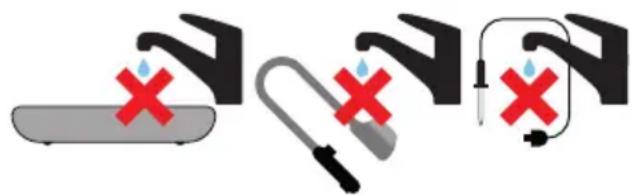
- Do not immerse the ROCOOK, the temperature sensor or temperature probe connections in liquid in any case.
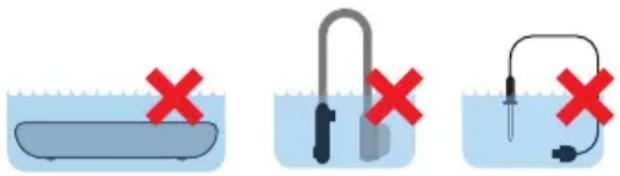
text_image
Diagram showing three experimental setups with red X marks indicating failure or absence of a procedure.- Do not put the ROCOOK, the temperature sensor or micro USB cable probe directly under the tap connection
text_image
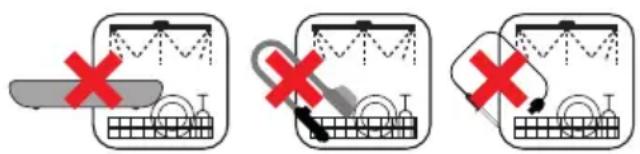
Diagram showing three different methods of removing a device, marked with red X symbols indicating removal or rejection.- The ROCOOK, the sensor and temperature probe cannot be washed in the dishwasher.
text_image
Diagram showing three steps of a mechanical or electrical process with red X marks indicating failure or rejection.- Do not use sprays on the device or its vents
- Be careful not to drop water on it or not to allow the entry of liquids into the micro USB connections of the sensor and temperature probe.

text_image
Two safety symbols: a syringe with red X mark and water droplets, and a plug with red X mark and connected plug.The manufacturer declines any responsibility in case of any damage to property or people deriving from failure to follow safety rules or in the event of incorrect installation and improper use.
Index
1 Installation
2 ROCOOK Induction. Devices, components and parts.
3 Before the first use
4 Cooking containers (pots and pans)
5 Use. Operation
5.1 Cooking with temperature control
5.1.1 Cooking with medium temperature + time
5.1.2 Cooking with medium temperature + core temperature
5.2 Traditional cooking with power levels
5.3 Functions and indicators
5.4 Temperature sensor. Load and operation
5.5 APP. Application for mobile phones and tablets.
6 Maintenance and cleaning.
7 Frequently Asked Questions and Troubleshooting
8 Guarantee and assistance
9 Technical data
1- Installation
Do not place or use the ROCOOK on an inclined or uneven surface, Similarly, do not place on a surface that – if subject to temperature variations – could easily break.
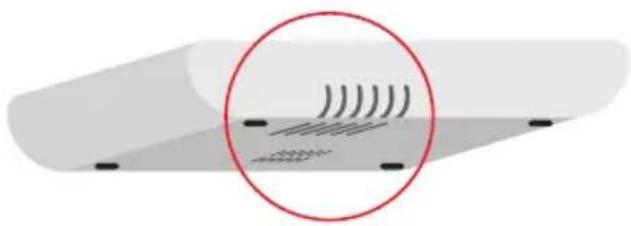
Do not obstruct the air inlet which is located at the bottom of the ROCOOK nor the output which can be found on the back of the appliance. Do not block these openings for ventilation with any object.
natural_image
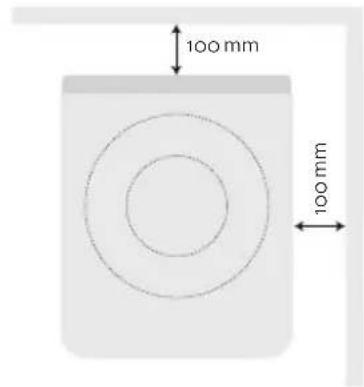
Diagram showing wave interference pattern with concentric circles and no text or symbolsRespect the security dimensions described in figure.
text_image
100 mm 100 mm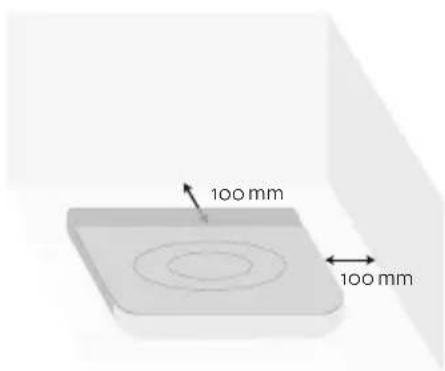
text_image
100 mm 100 mmBefore making the electrical connection, check that the nominal voltage corresponds to the installation as indicated in the nameplate ROCOOK located at the bottom.
2- ROCOOK Induction: Devices, parts and equipment parts.
natural_image
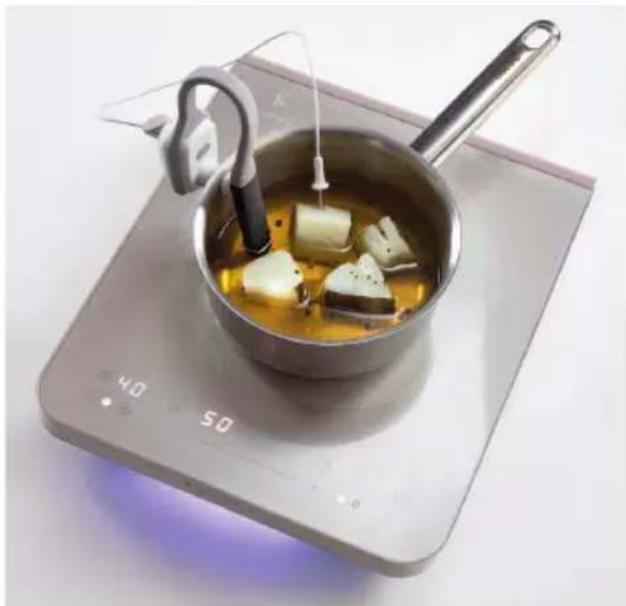
A cooking pot with tofu cubes being heated by a stand, placed on an induction cooktop (no text or symbols visible)ROCOOK Induction is a portable induction plate with precise control of cooking temperature, which works with the same utensils (pots and pans) than those used today for induction plates and has the following parts and associated devices:
- 23 cm diameter cooking zone.
Power 1500 W with booster 2000W.
text_image
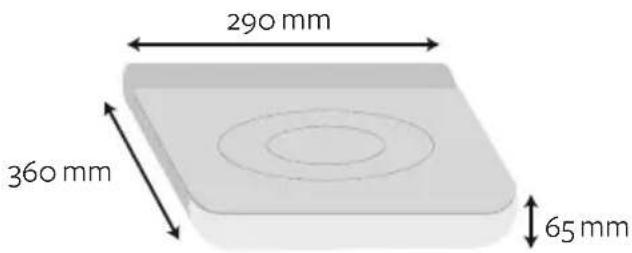
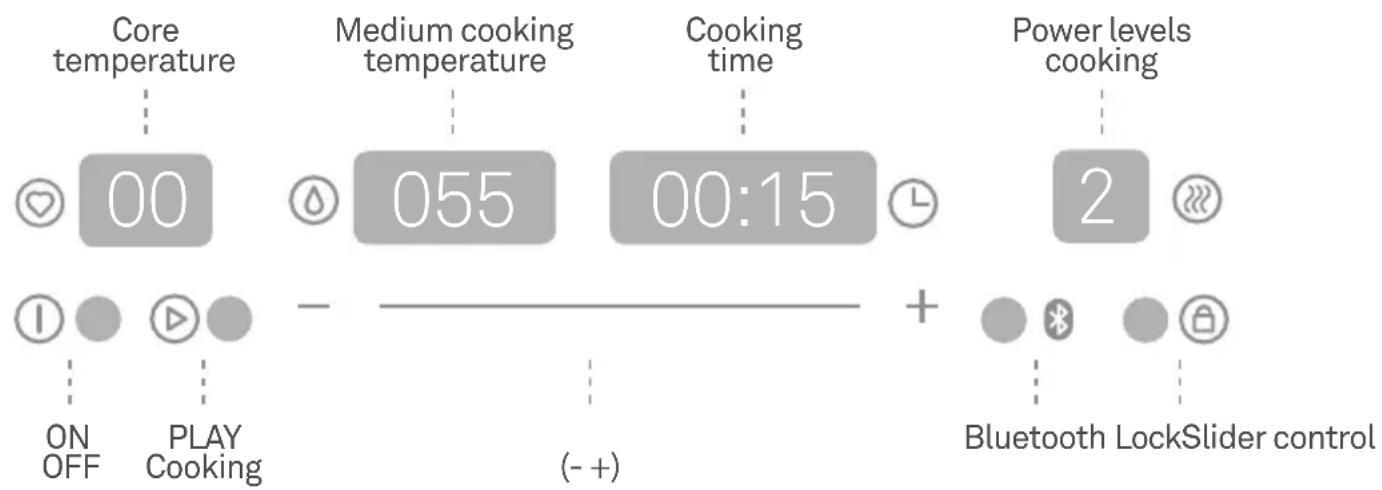
290 mm 360 mm 65 mm- Touch control panel slider for easy handling and keys + / - for precise adjustment.
flowchart
graph LR
    A["Core temperature"] --> B["00"]
    C["Medium cooking temperature"] --> D["055"]
    E["Cooking time"] --> F["00:15"]
    G["Power levels cooking"] --> H["2"]
    I["ON OFF"] --> J["PLAY Cooking"]
    K["(- +)"] --> L["+"]
    M["Bluetooth LockSlider control"] --> N["+"]
① ON / OFF button to turn on and off ROCOOK Induction.
Core temperature button and display. Used to set the temperature in the inner part of the food in case of using the core probe (optional).
Medium cooking temperature button and display. For setting a constant temperature inside the cooking container.
Time button and display. To program the total cooking time at a given temperature of the cooking system.
Play button and indicator. Start a cooking process once the temperature and time entered. The standby indicator flashes and is fixed in cooking.
Power levels button and indicator. In case of traditional cooking, it allows cooking with 9 power levels.
Bluetooth indicator. It indicates the matching of the ROCOOK with the temperature sensor of the cooking system.
Lock button and indicator. It allows you to control blocking, so the device cannot be manipulated unintentionally or for children's safety reasons. When you press the lock key for 1 second, the control is locked, the status of all parameters before the lock are maintained and all keys remain disabled except the ON / OFF key and the lock key (press again 1 second to unlock).
Plus / Minus key and slide sensor. It allows you to introduce temperatures and times quickly and accurately.
- Signaling of cooking phase display

Fixed purple light. Standby

Intermittent blue light. Waiting for manual operation

Fixed green light. Cooking finished

Fixed red light. Error
- USB port. It allows charging battery temperature sensor using the USB charging cable.
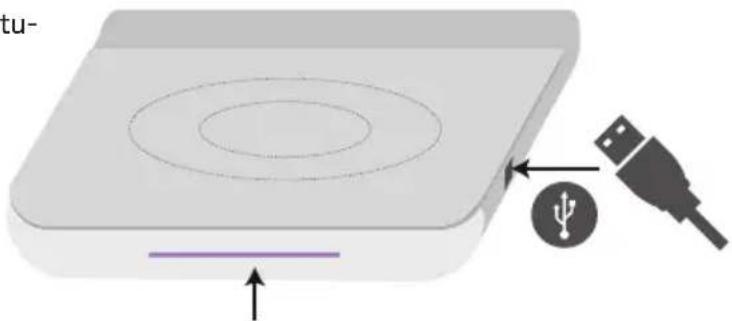
natural_image
3D diagram of a device with concentric circular layers and an external USB plug, showing no text or symbols.Signaling of cooking phase display
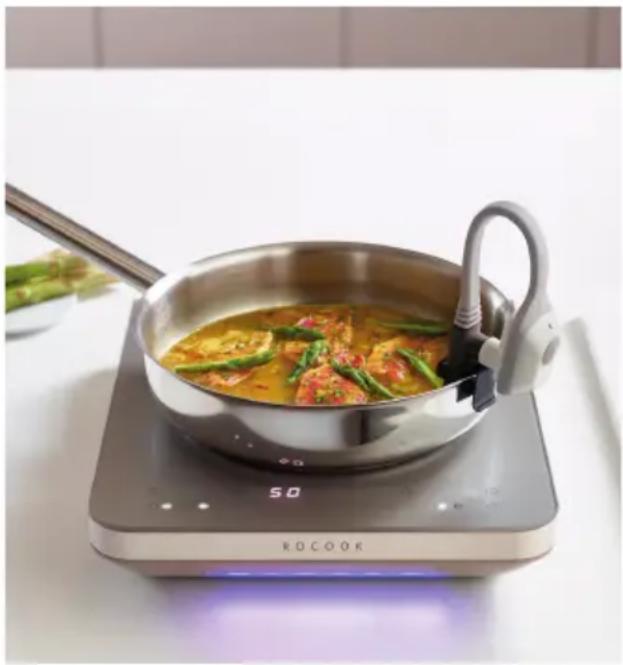
- Cooking medium temperature sensor, for temperature control of the cooking liquid medium (water, broth, oil, sauces...) contained inside the container. It should be placed in the pot or pan and ensure that the sensor tip is within the liquid medium. It has a Mini-USB port where you can connect both the temperature sensor and the USB cable to charge the battery which has a total duration of 30 hours when fully charged.

Loading port. It allows the sensor to charge the battery using the USB port of ROCOOK Induction or an external universal charger. It is recommended to fully charge it the first time it is used.

ON/OFF button. It allows you to turn on or off the sensor.

Indication LED. It allows you to know the status of the battery.
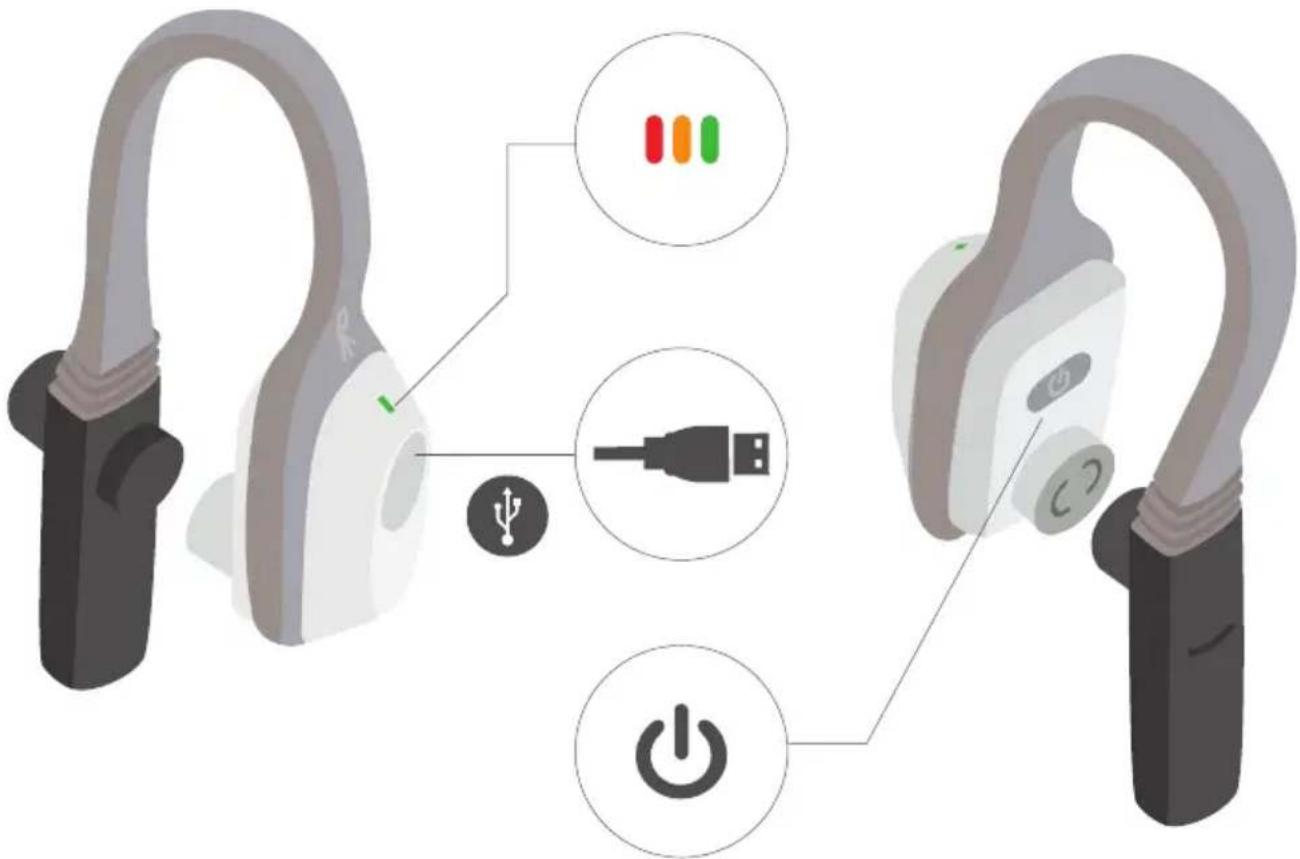
text_image
Diagram showing two earbuds connected to a power button and a USB port, with colored indicator lights indicating ports.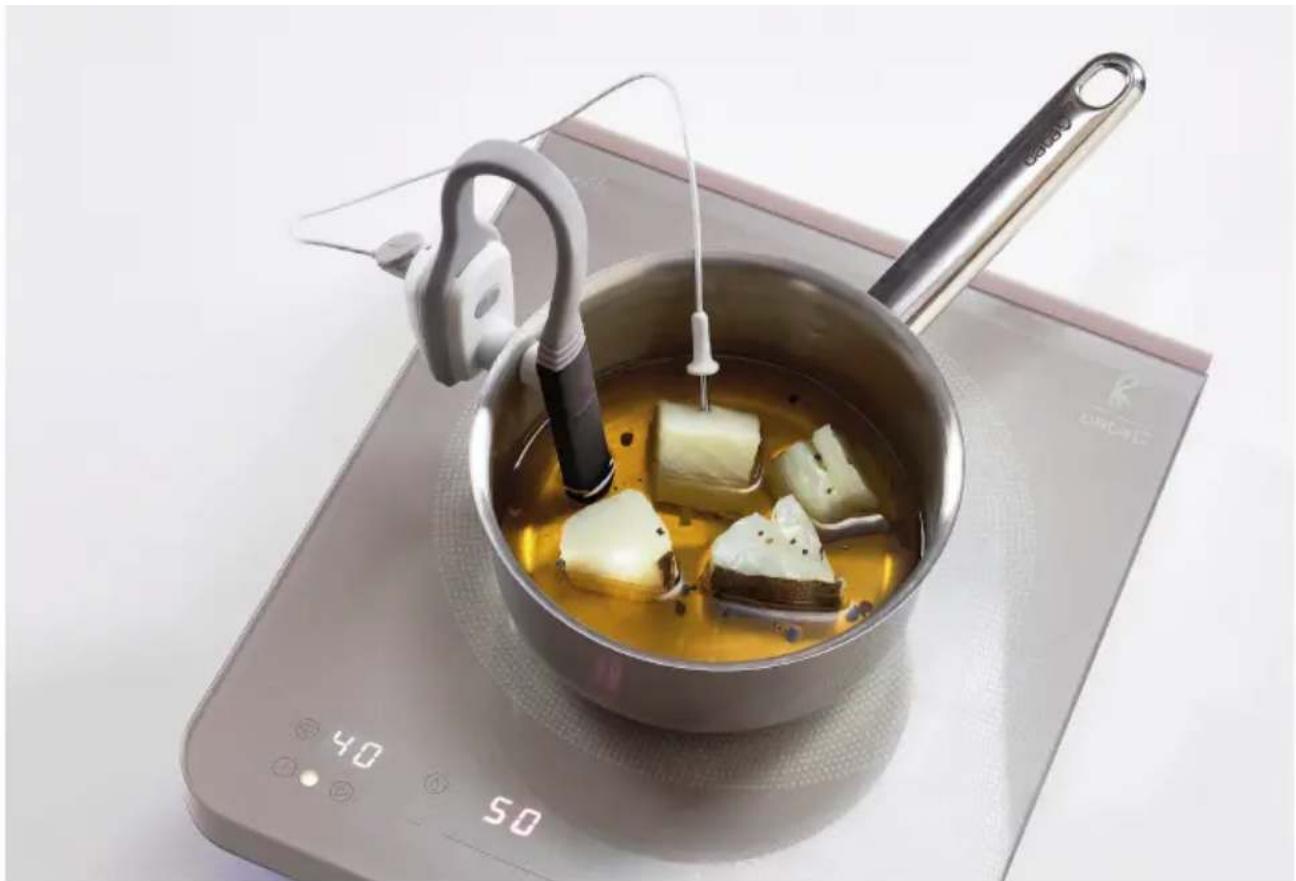
natural_image
A cooking pot with tofu being heated by a stand mixer, placed on an induction cooktop (no text or symbols visible)- Core temperature probe of the food (optional accessory). It is used to control the temperature in the inner part (core) of the food. To use it, you must connect to the Mini-USB port located on the temperature sensor.

natural_image
Simple diagram of a medical device with a needle and catheter inside a circle (no text or symbols)- Tongs for pans. It allows you to set the temperature sensor in pans or saucepans.
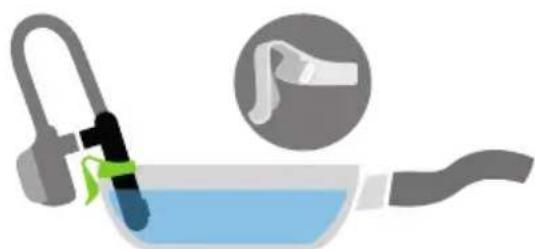
natural_image
Illustration of a kitchen sink with a hand holding a tool, accompanied by an inset showing the handle (no text or symbols)- Power cable.
- USB charging cable. It allows you to charge the battery of the temperature sensor through the ROCOOK USB port or through a mobile external universal charger.

- Bag
(optional accessory).
To properly store the temperature sensor, the probe and cables.
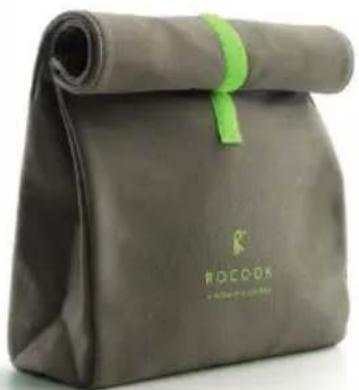
natural_image
Folded gray fabric bag with green ribbon and 'ROCCON' branding (no additional text or symbols visible)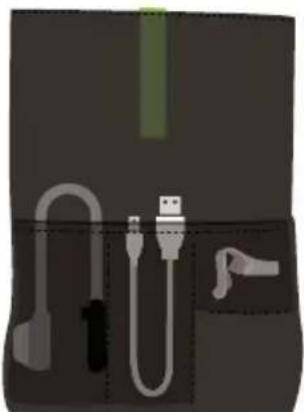
natural_image
Illustration of medical or laboratory equipment components including tubing, connector, and clamp (no text or symbols)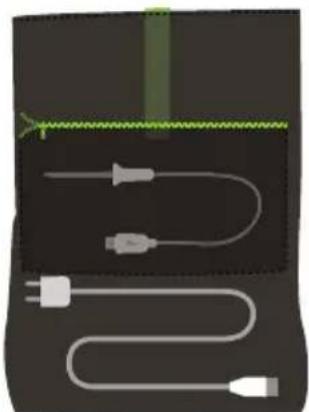
natural_image
Diagram of a medical or electrical device with two white cables and a green mesh trace (no text or symbols)Optimal placement of accessories inside the bag
3- Before the first use
Carefully unpack the ROCOOK Induction and devices. Place the device on a flat surface and with sufficient distance to adjacent walls.
First connect the ROCOOK power plug and then to the network connection.
Fully charge the battery temperature sensor using the ROCOOK Induction power point or an external universal adapter. You can use the mobile phone, tablet or other devices charger, as long as the charger does not exceed 5V and 1000mmA.
Enjoy the ROCOOK experience!
4- Cooking containers (not included):
The ROCOOK Induction works with all kinds of pots/pans/saucepans suitable for induction with a diameter of 130 mm base minimum and a maximum of 260 mm.
Pots and pans declared suitable for induction cooking with a thick flat bottom are preferred. If approaching a magnet to the bottom of a container remains attracted, this pot may be suitable for induction cooking.
Do not use containers that exceed the limits of the hob nor that clog the control display area. They should be always placed in the centre of the cooking zone.
The following containers are not suitable: glass, ceramics, clay, aluminum, copper or nonmagnetic stainless that has no disseminator basis.
If you want to use a special pot as pressure cooker or wok, carefully read the manufacturer's instructions.
5-Usage. Operation.
The ROCOOK Induction allows you to cook in two main ways:
- Cooking with temperature control, it allows you to cook with a precise and constant temperature. In this case we need to use the temperature sensor to control the temperature of the cooking medium.
- Traditional cooking with power levels, it is the same way inductions works nowadays, we do not need any accessory in this case.
5.1 Cooking with temperature control
We control the cooking medium temperature to cook food for a specific period of time.
5.1.1 Cooking with temperature as a medium + time.
natural_image
Exterior view of a modern office building (no signage)The steps to follow are:
1- Press the ON / OFF button. When turning ROCOOK on, the cooking status LED will be lit in purple.

2- Turn on the temperature sensor by pressing the ON / OFF button located on the sensor itself. The sensor's LED flashes in green until ROCOOK and the sensor become linked with each other, at that moment the LED will be fixed (green, orange or red depending on battery level) and the Bluetooth LED will light in the display of temperature. If it does not work because the battery's sensor is depleted, connect the sensor cable to the USB jack and repeat.
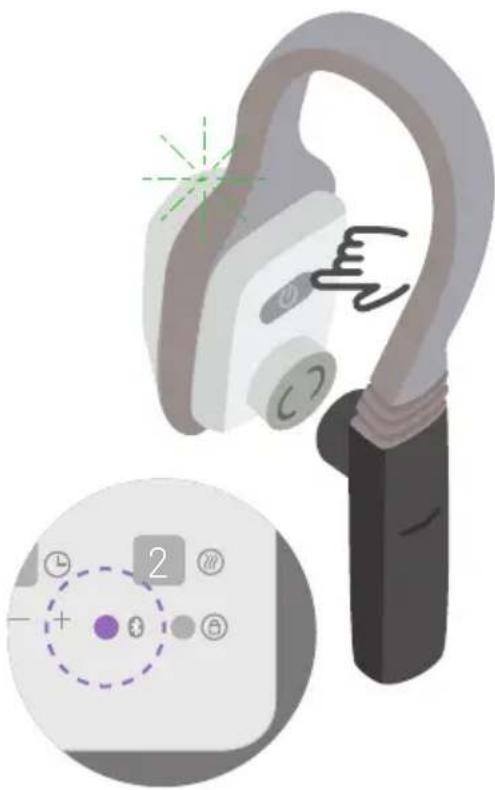
natural_image
Illustration of a handheld device with a close-up of its control panel showing a numeric keypad and indicator lights (no text or symbols present)3- Place the temperature sensor in the container. The sensor contains two magnets that allow us to fix this sensor to the pot.
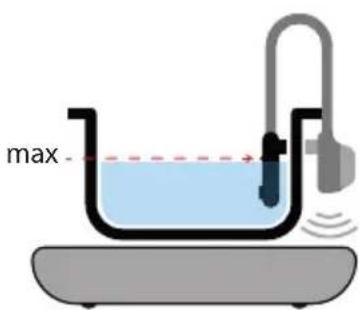
text_image
maxIf cooking with water, we recommend using hot water to reduce the cooking time.
4- Select the desired temperature of the liquid
medium with which we want to cook. The ROCOOK allows you to program from 20 to 180°. In case the temperature sensor was at a temperature above 20° it will allow you to program from that temperature up to 180°.

5- Select the time during which you want to cook. You can select from 1 minute up to 48 hours.
Depending on the temperature level that we select the maximum time is lower, for example, at 180^ we can program a maximum of 1 hour. See timesheets in Chapter 9 Technical Data.

6- Press PLAY. The ROCOOK LED turns blue fixed and the liquid medium heating cycle starts in order to reach the desired temperature.
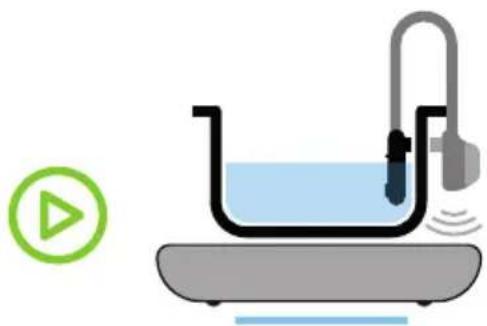
natural_image
Illustration of a laboratory apparatus with a blue liquid, a U-shaped tube, and a pipette connected to a plate (no text or symbols)7- When the liquid medium reaches the selected temperature, the ROCOOK warns us with a flashing blue LED on the cooking status bar, and an intermittent beep. It's time to introduce food into the liquid medium.
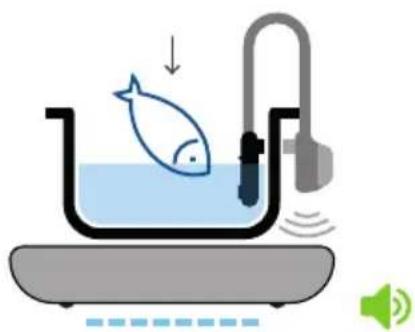
natural_image
Illustration of a fish being heated by a water dispenser, with sound waves and speaker icon (no text or symbols)8- Press PLAY to start the cooking process. The temperature of the liquid medium will be maintained at the previously selected temperature for the time entered in the time display. The ROCOOK LED remains on fixed blue.
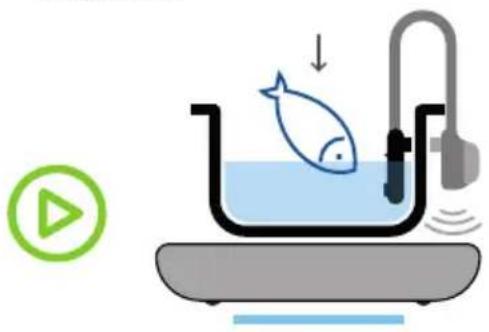
natural_image
Illustration of a fish inside a basin with a water tank and control device, accompanied by a play button icon (no text or symbols)9- When the cooking is done ROCOOK will warn you with a beep, with the end message and the green LED on, then remove the food and serve it.
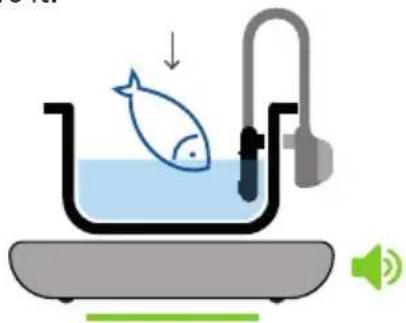
natural_image
Illustration of a fish inside a bathtub with a speaker, showing water level and sound waves (no text or symbols)5.1.2 Cooking with temperature medium + core temperature
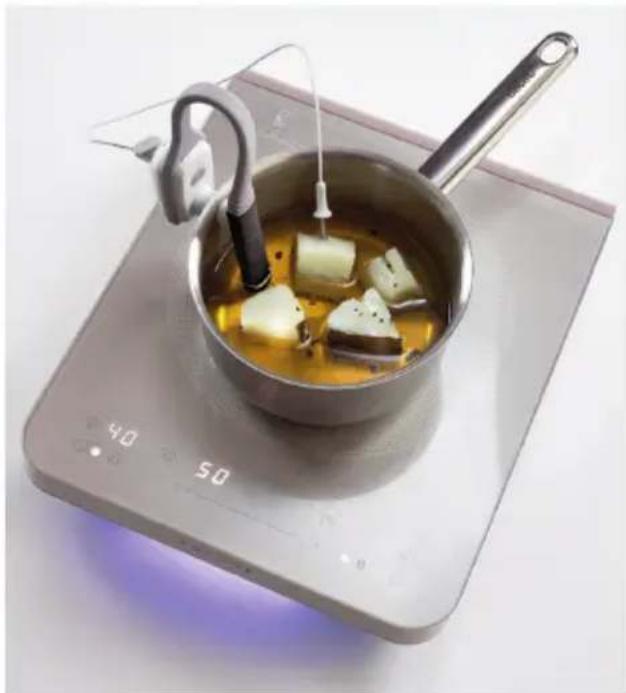
natural_image
A cooking pot with tofu being heated by a stand, placed on an induction cooktop (no text or symbols visible)This option needs the optional core temperature probe and it is the most advanced control mode.
It allows you to control the end of cooking through the core probe so that the ROCOOK cooks until the core of the food reaches the temperature that we have pre-established.
The steps to follow are:
1- Press the ON / OFF button. When you turn the ROCOOK on, the LED will be lit in purple in the cooking status bar.

2- Turn on the temperature sensor by pressing the ON / OFF button located on the sensor itself. The sensor LED flashes in green until ROCOOK and sensor become linked with each other, at that moment the LED will be fixed (green, orange or red depending on battery level) and the Bluetooth LED will light up in the display of temperature.
If it does not work because the sensor's battery is depleted, connect the sensor cable to the USB jack and repeat the operation.
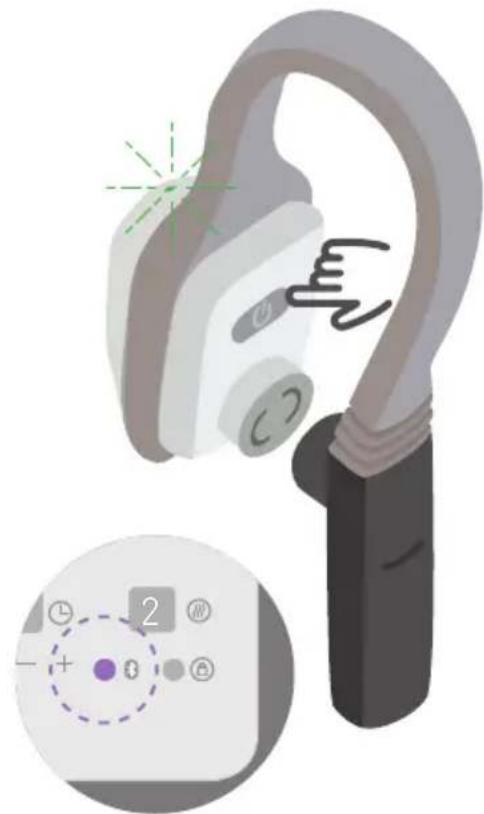
natural_image
Illustration of a handheld ear with a close-up of its control panel showing dial and indicator lights (no text or symbols)3- Place the temperature sensor in the container, which will be with the selected medium.
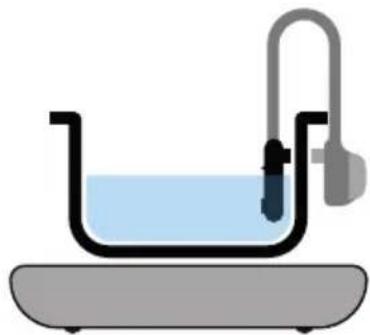
natural_image
Simple line drawing of a laboratory apparatus with a U-shaped tube submerged in liquid and connected to a stand (no text or symbols)4- Select the desired temperature of the liquid medium with which you want to cook (as in the previous case 20-180°).

5- Select the core temperature at which you want to reach the desired cooking point for your food. The ROCOOK allows you to program a minimum core temperature of 40^ and a maximum of 85^ .

6- Press PLAY to start heating the liquid medium to the desired temperature. The status LED of the cooking bar lights blue fixed.
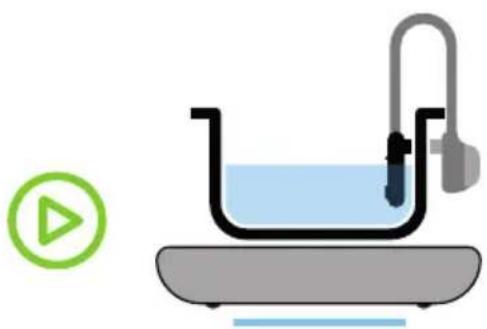
natural_image
Illustration of a laboratory setup with a beaker, tubing, and a play button (no text or symbols)7- When the liquid medium reaches the selected temperature, the ROCOOK warns you with a flashing blue LED on the cooking status bar, and an intermittent beep. It is time to connect the core probe in the temperatu-
re sensor, to poke the core probe in the food and insert the food into the liquid medium.
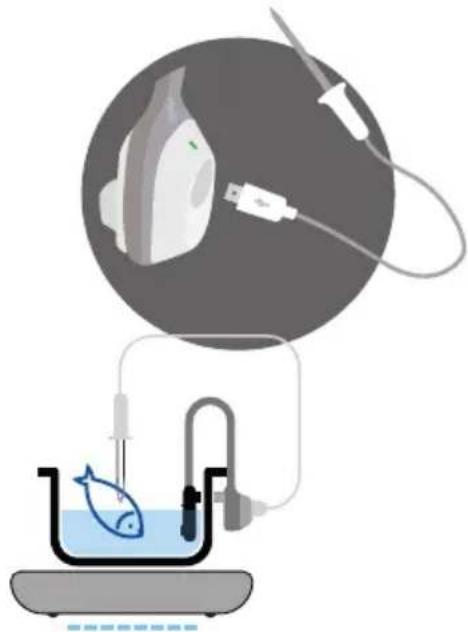
natural_image
Illustration of a scientific apparatus with a circular device and connected tubing, featuring a fish in a beaker (no text or symbols)8- Press PLAY to start the cooking process. The temperature of the liquid medium will be kept at the previously selected temperature until the inner part of the food (poked with the probe) reaches the core temperature that we have previously scheduled.
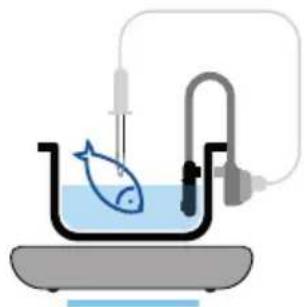
natural_image
Simple laboratory setup with a fish in a beaker connected to a U-shaped tube and a pressure gauge (no text or labels)9- When the ROCOOK is done it will warn you with a beep, with the final message and the green LED on, remove the food and serve it.
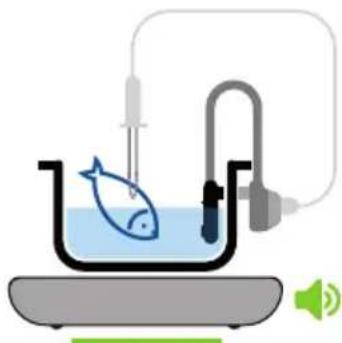
natural_image
Illustration of a fish in a container connected to a U-shaped tube with a speaker, no text or symbols present.5.2-Traditional cooking with power levels
The ROCOOK also allows you to cook with power levels (traditional), selecting the desired power. Power levels range from 0 to 9 / P
-The steps to follow are:
1- Press the ON / OFF button. When you turn ROCOOK on, the LED bar from the cooking status will be lit in purple.

2- Press the Traditional cooking by levels button.

3- Select the desired power using the slider or the + or - buttons (it will remain active after 3 seconds).

text_image
- 0 9/P ← → + 2 ⏻4- Place the container on the ROCOOK to start the cooking process. the LED bar from the cooking status will be lit in fixed blue.
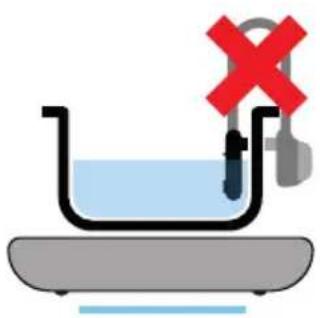
natural_image
Illustration of a laboratory setup with a beaker, a test tube, and a red X symbol (no text or labels)Once you have selected a power level if we want to change this level to increase or decrease the power, press the Traditional cooking by levels button again.
The Traditional Cooking option also allows you the opportunity to work with a timer that, at the end of established time, it will turn the hob off.
The steps to follow are:
1- Once we have selected the power level, you must press the button and select the desired time using the slider or + or -.

2- Once the selected time is over, the ROCOOK will stop and emit an intermittent beep and the LED on the cooking status bar will be lit in fixed green and the digits of the displays that we used, will flash indicating that the cooking process is over.
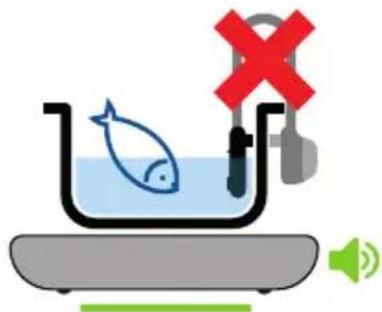
natural_image
Illustration of a fish in a basin with a red 'X' symbol and speaker icon (no text or symbols)- Booster level (P)
From the power level 9, you can access the Booster level by pressing the + key. This level is displayed with a 'P' on the power display and provides extra power that can reach up to 2000W.
There is also direct access to Booster level (P) from level 0, by pressing the - key.
While the power selection is on, the display stops flashing and the decimal point remains flashing. 3 seconds after the last keystroke, the selected power value is set, the decimal point disappears and the inductor starts.
The use of this function is limited to a maximum of 10 minutes. After this time, the power level will automatically drop to level 9. After these 10 minutes, you can activate the booster function again if you have not exceeded the temperature limit.
NOTES:
- The power density obtained with the booster function can be excessive for heating oil or frying. The base of the container may suffer overheating.
- Not all containers are suitable to maximize the power of the booster function (due to its magnetic and electrical characteristics).
5.3 Functions and additional indicators
- Residual heat
If, with the focal point off, the glass temperature exceeds the threshold of 50 (due to residual heat), the digit furthest to the right on the Temperature medium display shows the warning 'H' symbol to warn of danger of burning.
- Detection of containers
If, with the focal point running, the system detects that there is no container or it is not adequate enough, the digit furthest to the right on the Temperature medium display shows the 'U' symbol (alternately with the temperature value that is showing, or permanently if there was none).
The focal point turns off automatically after 10 minutes if it does not recognize any suitable container.
- Protection against accidental activation of the keys
If any key is held down for more than 10 seconds, the device automatically turns off.
- Safety auto-disconnection
Although safety regulations do not require this, there are two tables that limit the maximum operating time of the cooking zone. After this time, the cooking zone will automati-
cally turn off and 3 short beeps will be issued (as when the OFF button is pressed).
In case of conflict with the value of the timer that had been selected, automatic disconnection times have priority of this section.
The value of this time limit depends on the power level or temperature selected according to the following tables:
| Power Time off Level | (hours) |
| 1 | 6 |
| 2 | 6 |
| 3 | 5 |
| 4 | 5 |
| 5 | 4 |
| 6 | 1,5 |
| 7 | 1,5 |
| 8 | 1,5 |
| 9 | 1,5 |
| P 10 min |
| Medium Temperature (°C) | Time off (hours) |
| 20-65 | 48 |
| >65-85 | 36 |
| >85-90 | 10 |
| >90-100 | 6 |
| >100-180 | 1 |
5.4 Cooking medium temperature sensor operation
The cooking medium temperature sensor is a temperature measuring device that connects to ROCOOK via BlueTooth and sends the temperature of the liquid medium to ROCOOK so you can adjust the power in order to keep it stable
- To match the sensor with the ROCOOK turn the temperature sensor on by pressing the ON / OFF button located on the sensor itself. The sensor LED flashes in green until the ROCOOK and sensor become linked with each other, at that moment the LED will remain fixed (green, orange or red depending on battery level) and the Bluetooth LED will light in the display of temperature. If it does not work because the sensor's battery is depleted, connect the sensor cable to the USB jack and repeat it.
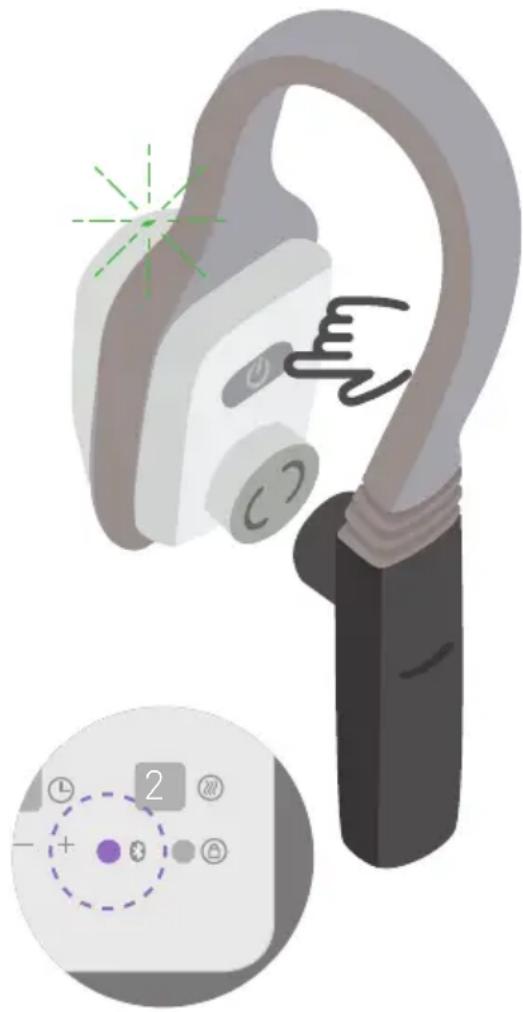
natural_image
Illustration of a handheld ear with a close-up of its control panel showing dial and indicator lights (no text or symbols)- In order to unlink the sensor in case you want to use it with another ROCOOK, you can press the ON/OFF button for more than 3 seconds which will turn it off and unlink it from the first ROCOOK. The sensor LED will be lit in red and ROCOOK Bluetooth indicator will turn off.
Battery state during usage:
-During usage the sensor's LED will always be off as long as the battery is greater than 15% . A quick press of the ON / OFF button has the effect of reporting the battery level:
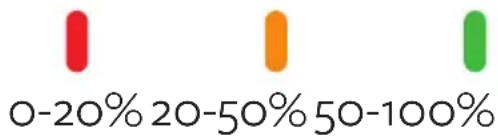
bar
| Range (%) | Color | |---|---| | 0-20 | Red | | 20-50 | Orange | | 50-100 | Green |Red between 0 and 20
Orange between 20 and 50
(minimum 4 hours' usage)
Green between 50 and 100
(24 hours' minimum usage)
- If during usage of the battery happens to have a level lower than 15% the LED will flash to indicate that you should charge it. When the level becomes less than 2% the sensor automatically shuts down.
Battery state during charging:
Less than 20% of battery: fixed red LED.
Battery between 20% and 90%: fixed orange LED.
Battery above 90%: fixed green LED.

text_image
<20% 20-90%>90%To charge the sensor
The charging function will always be disabled as long as the ON button is deactivated (turn off, standby or standby + lock modes) in order to obey the European standards ErP which limit the standby consumption to <0.5W. Whenever the key is turned ON, the charger will be enabled.
With the ROCOOK on connect the sensor to the USB port with the USB charging cable and start charging the battery. If you press the ON/OFF button the sensor will be decoupled with ROCOOK and it will display the Char message until the charging is complete.
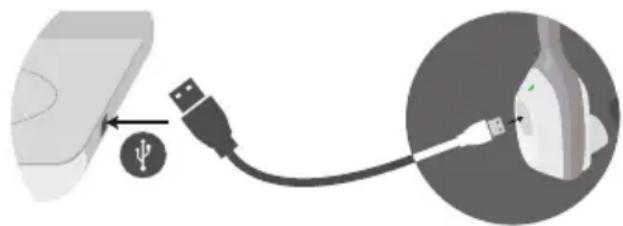
natural_image
Diagram showing USB cable connecting a device to a device with a USB symbol (no text or labels)5.5 APP. App for mobile phones and tablets.
The ROCOOK app is an application (available for Android and iOS) to delve into the world of gourmet cuisine in a comfortable and intuitive way, allowing users to discover recipes, send them from the application to the ROCOOK, control the process and finally taste the result. A fast and dynamic solution to get to slow cook. Many applications are built to monopolize the time of each user. This app is designed to save time and facilitate the cooking process. This is a completely new design that not only provides information but also guidance and possibility to cook the recipes. The app includes a record of gourmet recipes with ingredients and steps.
6- Maintenance and cleaning
ROCOOK Induction:
Clean the glass using a special liquid for glass ceramic or stainless steel plates, then a damp cloth to remove detergent residue and dry with a paper towel or dry cloth.
In case of stubborn dirt, use a suitable scraper for the glass-ceramic crystals. In some cases, do the operation when the glass surface is still slightly warm.
Do not use sponges or abrasive pads. Avoid using harsh chemical detergents or stain removers, too.
Clean ROCOOK surface with a damp cloth, and dry it with a paper towel or dry cloth without leaving any residue.
Never immerse the ROCOOK in liquid or put it directly under the tap.
The ROCOOK cannot be washed in the dishwasher. It should be washed with a damp cloth and mild soap or use specific products for the glass ceramic.
From the application itself the exact time and temperature can be accurately controlled to get the best result. It also has a section to learn where it indicates different options for cooking meat, fish, vegetables and other foods. Every detail is designed to optimize and facilitate the development, always seeking the pleasure of cooking the most simple, convenient and accurate way.
More information: www.ROCOOK.com
Temperature sensor (medium):
Clean the area of the sensor using a suitable sponge and the common liquid for cleaning the dishes and the removal of fat, limescale and other debris. Carefully clean the metal sensor of the end.
For part of the sensor body where they lodge electronics and connections, carefully clean with a damp cloth avoiding liquids may enter inside.
Temperature sensor (heart):
Clean the area of the sensor using a suitable sponge and the common liquid for cleaning the dishes and the removal of fat, lime and other debris. Carefully clean the metal sensor.
Avoid wetting the end with the micro USB connection since the entry of water in that area could prevent proper connection and subsequent use.
The sensor and temperature probe cannot be washed in the dishwasher. It should be washed with soap and water.
7- Frequently Asked Questions and Troubleshooting
Please, follow these instructions if small errors or warning messages appear on your ROCOOK. Do not try to make other repairs if these instructions are of no help.
If you check an error, unplug the ROCOOK for about 15-20 seconds and plug it back. Use ROCOOK again checking if the problem persists.
- What do I do if the ROCOOK does not turn on?
Make sure the power cord is correctly inserted and pressed into the ROCOOK socket and the wall outlet.
Make sure there is power at the outlet by connecting another device and checking if it works. Be careful that the glass surface is completely clean and dry.
Be sure not to have activated the security lock, if so, keep it pressed to turn it off.
- What do I do if the ROCOOK LED flashes in red and blue appears on the display?
Press the ON/OFF button sensor to match with ELR. If that does not work plug it into the USB port and try it again.
- What do I do if when I press the button on the temperature sensor the LED is not lit?
The most likely thing is that it has run out of battery, plug it into the USB port and press the button to match the plate and start charging automatically. Char has to be shown on the ROCOOK display.
- What is the battery life?
The battery lasts for 30 hours with a continuous use. While paused or turned off, it can last a total of one week. If you do not use frequently ROCOOK it is convenient that at the beginning of the usage you plug the sensor directly to the USB port to start charging at the same time that you start the cooking process.
- Is it normal that I hear a noise when using some pots?
Some containers can emit a beep when used with ferritic ROCOOK due to the composition of the container, it does not correspond to a malfunctioning of the devices and there is no influence on their good performance which is normal and have no fault.
Additionally, ROCOOK Induction has an internal fan to ensure that the temperature of the internal parts is always within proper limits. The functioning is not continued and the noise is absolutely normal.
- What do I do if ROCOOK fan continues to operate after use?
Sometimes after prolonged usage the RO-COOK fan runs after the end of cooking to keep the internal parts at reduced temperature, this situation is absolutely normal. Keep ROCOOK plugged until the fan turns off.
| Message Reason Solution | ||
| Sens1 | The ROCOOK detects that there has been an anomaly in cooking, it may be that you extracted the temperature sensor from the cooking medium, that we have left us without liquid and the sensor has been exposed.The error may appear as a warning and ROCOOK can turn off the device and avoid overheating safety. | Restarting the ROCOOK and cooking, respect the rules and sequence of usage.If the problem persists, take note of the circumstances in which the problem occurs and call the technical service. |
| Sens2 | Temperature sensor failure. | Properly clean the sensor, charge the battery and start the operation again. If the problem persists, call the technical service. |
| Sens3 | The ROCOOK does not detect variation in core probe temperature. | Ensure that the core probe is properly positioned and the ROCOOK is properly programmed. |
| Sens4 / Red LED ROCOOK | Failure of the temperature sensor (core). | Make sure the temperature probe is properly connected to temperature sensor and it has a charge sensor.Start cooking again, if the problem persists call the technical service |
| Sens5 | The temperature sensor is hotter than the set temperature. The sensor could be misplaced. | Check position of temperature sensor, ensure the battery is charging, check the medium temperature programmed. Start cooking again. |
| U | The pot or cooking container is not detected. Verfy that the pot or pan is suitable for induction and has a minimum diameter of 13 cm at the base. | |
| Batt | Sensor battery is not sufficient to complete the cooking cycle introduced | Connect the sensor to the USB port to charge the battery and start cooking with the connected sensor |
| Lo Batt | The sensor battery is running out of battery and will stop working. | While using it and without moving it from its position, plug it into the USB port for charging. |
| Char | The sensor is charging. Leave the sensor connected until the message disappears at which the charging will be completed. | |
| Blu1 / LED Red ROCOOK | The ROCOOK does not detect the temperature sensor. | Press the ON/OFF button temperature sensor to couple it with the plate until the sensor LED stops flashing and the ROCOOK display LED lights with a bluetooth symbol.If this does not work, connect the temperature sensor cable to the USB port and repeat the operation. |
| H It indicates that the cooking zone is hot as a Safety Warning. | We can continue cooking with ROCOOK but do not store or place flammable objects on the surface until the H disappears. | |
8- Guarantee and assistance.
Before heading to the repair shop for repair see chapter FAQ and troubleshooting.
If the problem persists note the specific problem and the conditions in which it appears. Note the date of manufacture on the data plate located on the bottom of the device and call the technical service.
The repair of the device must only be performed by a qualified technician.
THE MANUFACTURER guarantees the conformity of this product for a period of 2 years for a domestic use and one year for professional use, counting from the date of invoice, ticket purchase or delivery note (in cases of distance selling) where it is duly noted the apparatus acquired.
This guarantee covers both material and labor, and if applicable the displacement of the closer technical staff of the Official Service (except in the case of products that by its small size and mobility should be carried by the user to the Official Technical Service).
In case of failure of the product, for the application of this warranty, the consumer should contact the distributor.
The manufacturer may exercise their right to decision to repair or replace the defective product when the cost of one of the two options considered disproportionate. If repair or replacement is not possible or inappropriate, the consumer may opt for a price reduction or purchase cancellation (as specified in Articles 120 et seq of the RD 1/2007 and the Article 12 of Law 7/1996).
EXCLUSION CLAUSES
This guarantee does not apply in the following assumptions:
- Failure of the reflected indications in the manual.
- Tampering of the appliance by an unauthorized person.
- Lack of cleaning or maintenance periodic operations of the product.
- Breakdowns or damage caused by chemical effects or electrochemical water or the inappropriate contact with substances, outside the provisions of the instruction manual.
- Incidents resulting from a physical disruption, not attributable to a manufacturing defect (glass, plastics, and accessories).
This guarantee does not affect the rights of the consumer in accordance with the provisions of Royal Decree 1/2007 of 16 November.
The symbol on the product or its packaging indicates that this product can not be treated as household waste. This product should be delivered to the point of collection of electrical and electronic equipment for recycling. By ensuring that this product is disposed correctly, you will help to prevent potential negative consequences for the environment and public health, which could occur if this product is not handled appropriately. To get more detailed information about recycling this product, contact your local city office, your service household waste or the shop where you purchased the product.
9-Technical data.
- Dimensions of the device:
290 mm width
360 mm deep
65 mm height - Weight: 3,7 kg.
- Voltage and net frequency:
220 / 240 V - 50/60Hz - 2000W high power
- Temperature sensor: Minimum programmable liquid medium temperature 20^ / Maximum programmable liquid medium temperature 180^ .
- Core probe: Minimum programmable core probe temperature 40^ / Minimum programmable core probe temperature 85^ .
- Time setting. Maximum programmable cooking time versus temperature:
| Medium Temperature (°C) | Time off (hours) |
| 20-65 | 48 |
| >65-85 | 36 |
| >85-90 | 10 |
| >90-100 | 6 |
| >100-180 | 1 |
- Maximum amount of cooking liquid medium admitted 20 liters. Minimum height of liquid 2 cm/Maximum liquid height 35 cm.
- Communication temperature sensor
-ROCOOK- App via Bluetooth Smart. - Battery Life 30 hours when fully charged.
- Designed according to standards:
IEC 60335-1; IEC 60335-2-9; Ecodesign 66/2014; EMC Electromagnetic compatibility certificate.
cataC
ROC00K@cnagroup.es
Tel. +34 938 594 100
Ter, 2 · 08570
Torelló · Barcelona · España
ES B62734983
www.cata.es