HLG0375N - AV Decoder HELGI - Free user manual and instructions
Find the device manual for free HLG0375N HELGI in PDF.


| Product Type | AV Decoder |
| Brand | HELGI |
| Model | HLG0375N |
| Dimensions (L x W x H) | 150 x 100 x 30 mm |
| Weight | 200 g |
| Power Supply | DC 5V 1A |
| Power Consumption | 5 W (max) |
| Video Output | HDMI 1.4 |
| Video Formats Supported | MPEG-2, MPEG-4, H.264, H.265, VP9 |
| Audio Output | HDMI, Optical (SPDIF), Analog L/R |
| Audio Formats Supported | MP3, AAC, AC3, DTS |
| Input Interfaces | USB 2.0, Ethernet RJ45 |
| Network | 10/100M Ethernet, Wi-Fi 802.11 b/g/n |
| Operating System | Embedded Linux |
| Cleaning Instructions | Wipe with a soft, dry cloth. Do not use liquids. |
| Safety Precautions | Keep away from water and heat sources. Use only provided power adapter. |
| Spare Parts Availability | Remote control and power adapter available separately. |
| Repairability Index | 5.0 / 10 (moderate) |
| Warranty | 1 year limited warranty |
Frequently Asked Questions - HLG0375N HELGI
User questions about HLG0375N HELGI
0 question about this device. Answer the ones you know or ask your own.
Ask a new question about this device
Download the instructions for your AV Decoder in PDF format for free! Find your manual HLG0375N - HELGI and take your electronic device back in hand. On this page are published all the documents necessary for the use of your device. HLG0375N by HELGI.
USER MANUAL HLG0375N HELGI
Thank you for purchasing this product. For optimum performance and safety, please read the instructions carefully and keep the manual for future reference.
Important safety notice
Please read below safety instructions carefully before installation and operation:
* Please pay attention to all the warnings and hints on this device.
* Do not expose this unit to rain, moisture and liquid.
* Do not put any stuff into the device.
* Do not repair or open this device without professional people's guidance.
* Make sure good ventilation openings to avoid product overheating damage.
* Shut off power and make sure environment is safe before installation.
* Do not plug-in/out the connected cables when it is in using.
* Make sure the specification matched if using 3 ^rd party DC adapters.
1. Introduction
This HDBaseT single network cable extender transmits HDMI signal up to
70 meters over cat6 fluently and clearly. It is lossless in signal and supports 3D,
24bits deep color, 4Kx2K, CEC and HDCP.
2. Features
Apply HDBaseT extend technology
Uncompressed HDMI video signal
Support full HD 1080p@60Hz, 3D, 4Kx2K
Extend 1080p signal over cat6a up to 70 meters
Support bi-directional IR pass back
support HDCP, CEC, 24 deep color
Support uncompressed LPCM audio and compressed DTS-HD, Dolby True HD Can be powered by network cable. It only needs to input 12V power for either transmitter or receiver for normal working.
3. Package contents
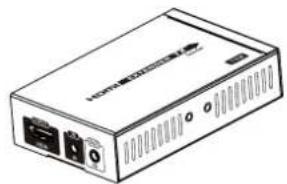
natural_image
Line drawing of a wireless device with ports and ventilation slots (no text or symbols)HDMI to HDBaseT TX sender*1pcs
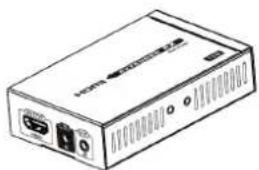
natural_image
Line drawing of a portable electronic device with ports and ventilation slots (no text or symbols)HDBaseT to HDMI RX receiver*1pcs
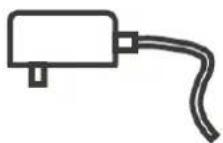
DC12V/2A *1pcs
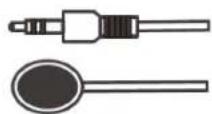
IR blaster extension cable*1pcs
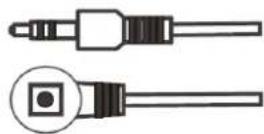
IR receiver extension cable*1pcs
User manual*1pcs
4. Installation Requirements
-
HDMI source devices: with HDMI OUTPUT interface, DVD, PS3, STB, PC etc.
-
Display devices: With HDMI INPUT port, SDTV, HDTV, projector
-
Network cables: UTP/STP Cat5e/Cat6/Cat6A/Cat7 network cables, which following the standard of IEEE-568B.
5. Panel description
5.1 HDMI to HDBaseT TX Sender
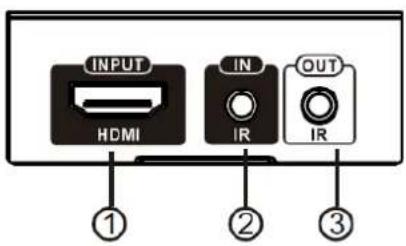
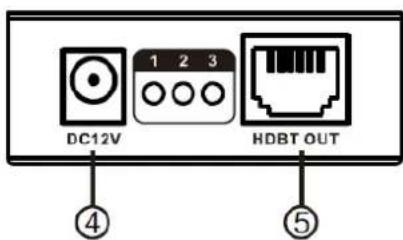
① HDMI IN:HDMI signal input to connect with HDMI source device.
② IR IN:IR signal input to connect with IR receiver extension cable.
③ IR OUT:IR signal output to connect with IR blaster extension cable.
④ DC12V:Power input
⑤ HDBT OUT:HDBaseT signal output
5.2 HDBaseT to HDMI RX Receiver
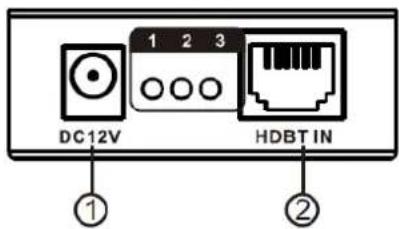
① DC12V:Power input
② HDBT IN:HDBaseT signal input
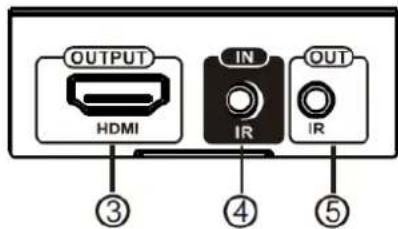
③ HDMI OUT:HDMI signal output to connect with HDMI display device.
④ IR IN:IR signal input to connect with IR receiver extension cable.
⑤ IR OUT:IR signal output to connect with IR blaster extension cable.
5.3 LED indicators working status
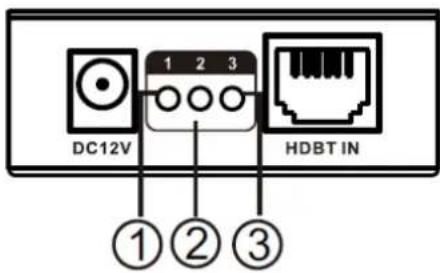
① It is lighting on with power on.
② When the sender connect the receiver working normal, the No2 lamp flashing status, and when input signal transmission normal the lighting keeps on.
③ It is lighting on when RX's HDMI OUT connects with HDMI display device and has HDMI signal output.
6. Installation procedures
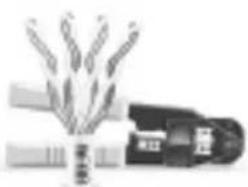
6.1 To make a Cat5e/6 network cable Follow the standard of IEEE-568B
1.white and orange
-
orange
-
white and green
-
blue
-
white and blue
-
green
-
white and brown
-
brown
natural_image
Illustration of a hand holding a small object with no visible text or symbols6.2 Connections
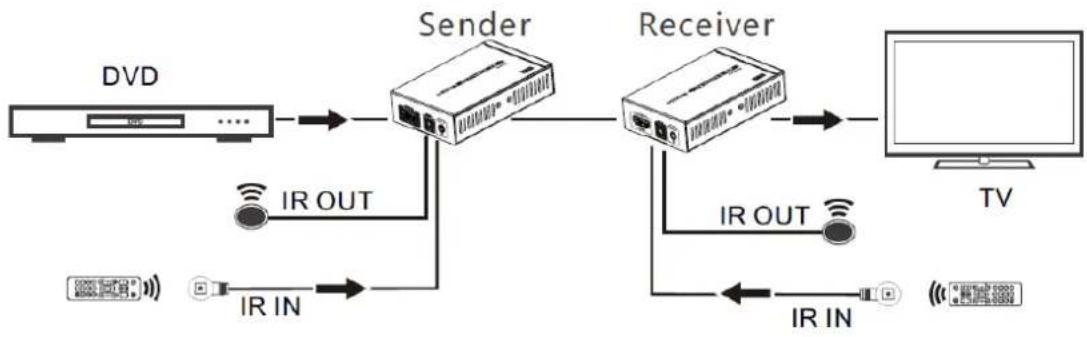
flowchart
graph LR
    A[" DVD "] --> B[" Sender "]
    B --> C[" Receiver "]
    C --> D[" TV "]
    B -->|IR OUT| E[" IR IN "]
    B -->|IR IN| F[" IR IN "]
    E --> G[" I "]
    F --> H[" I "]
6.3 Bi-directional IR pass back
1) It supports bi-directional IR pass back. User can control DVD at TX end and control TV at RX end.
2) If control at RX end, please connect IR blaster extension cable with IR OUT of TX and connect IR receiver extension cable with IR IN of RX. If control at TX end, please connect IR receiver extension cable with IR IN of TX and connect IR blaster extension cable with IR OUT of RX.
7. FAQ
Q: No image output?
A: Check the led indicator status to make sure all connections are good and stable.
Q: Signal led "3" is flashing but no image output?
A: Check if the HDMI display device has been switched to the right HDMI input channel.
Q: Signal led "2" is flashing but "3" light is off?
A: Check whether the TX's HDMI IN has signal input and make sure RX's HDMI OUT is well connected with HDMI display.
8. Specification
| Items | Specifications | ||
| HDMI signal | Compatible with HDCP, support CEC and 24bits deep color | ||
| Resolution Supported | 480i@60Hz, 480p@60Hz, 576i@50Hz, 576p@50Hz, 720p@50/60Hz, 1080i@50/60Hz, 1080p@50/60Hz, 3D, 4Kx2K@24/25/30/60Hz | ||
| Audio | LPCM ,DTS-HD, Dolby True HD | ||
| Network cable | CAT5E, CAT6, CAT6A, CAT7 | ||
| Transmission length | CAT5E | 60m | UP to 1080p@60Hz 36bpp |
| 35m | 1080p@60Hz 48bpp, 1080p@60Hz 3D, 4Kx2K@30Hz/60Hz | ||
| CAT6 | 70m | UP to 1080p@60Hz 36bpp | |
| 40m | 1080p@60Hz 48bpp, 1080p@60Hz 3D, 4Kx2K@30Hz/60Hz | ||
| Infrared back | Support 20~60kHz wide frequency devices and Bi-directional IR transmission | ||
| Power supply | DC12V/2A *1pcs | ||
| Power consumption | <8W | ||
| Product dimension | 98.5(L)x66.5(W)x23(H)mm *2pcs | ||
| Enclosure material | Metal | ||
| Weight | TX:79g RX:107g | ||
| Color | Black | ||
Disclaimer
* The product name and brand name may be registered trademark of related manufacturers.TM and ® may be omitted on the user manual. The pictures on the user manual are just for reference, and there may be some slight difference with the real products.
We reserve the rights to make changes without further notice to a productor system described herein to improve reliability, function or design.
- Important safety notice
- Introduction
- Features
- Package contents
- Installation Requirements
- Panel description
- HDBaseT to HDMI RX Receiver
- LED indicators working status
- Installation procedures
- To make a Cat5e/6 network cable Follow the standard of IEEE-568B
- Connections
- Bi-directional IR pass back
- FAQ
- Specification
- Disclaimer
Brand : HELGI
Model : HLG0375N
Category : AV Decoder