USER MANUAL HTP-073 PIONEER
Thank you for buying this PIONEER product. Please read through these operating instructions so you will know how to operate your model properly. After you have finished reading the instructions, put them away in a safe place for future reference.
These operating instructions have been written for joint use with the S-22W-P and S-11A-P models. Please consult those portions of the manual indicated for your model.
WARNING:
Do not climb or sit on this unit. Be especially careful when children are around. The unit may be damaged, or may fall over causing injury.

If you want to dispose this product, do not mix it with general household waste. There is a separate collection system for used electronic products in accordance with legislation that requires proper treatment, recovery and recycling.
Private households in the member states of the EU, in Switzerland and Norway may return their used electronic products free of charge to designated collection facilities or to a retailer (if you purchase a similar new one).
For countries not mentioned above, please contact your local authorities for the correct method of disposal.
By doing so you will ensure that your disposed product undergoes the necessary treatment, recovery and recycling and thus prevent potential negative effects on the environment and human health.
K058b_A1_En
Contents
Features......3
Accessory Items ....3
Installation....3
Connections and Use ...... 6
Specifications......8
Troubleshooting 9
Features
S-22W-P
- Compact Design and Deep Bass Sound
• Phase Control Technology
S-11A-P
- Round shape enclosure
• Phase Control Technology
Accessory Items
S-22W-P
- Speaker cord (4 m) x 1
S-11A-P
- Speaker cord (4 m) x 3
- Speaker cord (10 m) x 2
• Non-Skid Pads x 20
- Brackets for wall mounting x 4
- Screw (M5) x 4
WARNING
Store small parts out of the reach of children and infants. If accidentally swallowed, contact a doctor immediately.
D41-6-4_A1_En
Installation
Speaker installation
- As shown in the accompanying illustration, when surround speakers are installed to the rear of the listening position, you can enjoy genuine 5.1 channel surround sound.
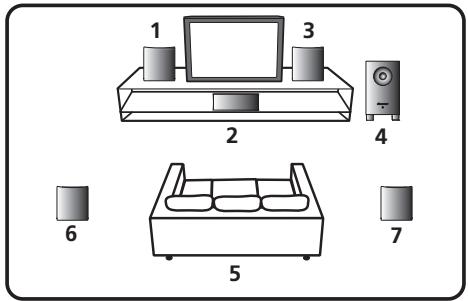
1 Front left speaker
2 Center speaker
3 Front right speaker
4 Subwoofer
5 Listening position
6 Surround left speaker
7 Surround right speaker
- The subwoofer and other speakers in this system cannot be used nearby a CRT-based TV or color monitor. When using this kind of CRT-based TV or color monitor, install the speakers away from the display device. Any other device liable to be influenced by magnetism (floppy disk drive, cassette tape recorder, video tape player, etc.) should also be kept at a distance from the subwoofer and other speakers.
Subwoofer (S-22W-P)
- When moving the subwoofer, avoid touching the bottom surface, since the speaker unit is located there.
- Orient the subwoofer's front face pointing toward the listening position.
- The subwoofer plays back the bass in monaural, making use of the fact that the human ear is not very sensitive to the direction of low-pitched sound. Because of this, the subwoofer can be installed almost anywhere. If it is installed too far away, however, the sound from the other speakers may become unnatural. The degree of bass effect can be adjusted by moving the unit farther from or closer to the wall.
Satellite speakers (S-11A-P)
- Labels located on the rear of each speaker indicate whether they are designed for front or surround use.
- Speakers installed to the right and left should be separated by about 1.8 m to 2.7 m distance. They should be installed at equal distances from the television, and at equal heights from the floor.
- Optional speaker stands can be purchased to facilitate optimal mounting of the surround speakers at or slightly above the listener's ear height.
- The surround effect will be diminished if the surround speakers are mounted at extreme distances from the listener's position.

CAUTION
- Install the center speaker below the TV so that the sound of the center channel is localized at the TV screen.
- Do not place the center speaker on top of the TV, the speaker may fall from the TV due to external shocks such as earthquakes, endangering those nearby or damaging the speaker.
Installation precautions
- Do not place heavy or large objects on top of the speaker. Doing so could provoke the speaker to fall, causing damages or bodily injury.
- Do not place the speaker on an unstable surface, as doing so may cause the speaker to fall and cause damage or bodily injury.
- Switch off and unplug your AV equipment and consult the instructions when connecting up components. Make sure you use the correct connecting cables.
- Do not sit or stand on the speaker, or let children play on the speaker. Doing so could provoke the speaker to fall, causing damages or bodily injury.
- Be careful to make sure children not to put their hands or any objects into the speaker duct*.
*Speaker duct: A hole for plentiful bass sound on speaker cabinet (enclosure).
- Place the center speaker at a safe distance from the child's reach.
Otherwise it may result in the speaker falling down and causing personal injury and/or property damage.
- Install the subwoofer in a well-ventilated location where it will not be exposed to high temperatures and high humidity.
- Do not place the subwoofer near stoves or other heating equipment or at locations exposed to direct sunlight, as these can have an adverse effect on the cabinet and internal components. Also, do not install the unit where there is too much dust or high humidity, as these can cause malfunctioning or breakdowns. (Avoid cooking tables and other locations where the unit would be exposed to heat, steam and soot.)
- Keep the subwoofer away from devices such as cassette decks which are sensitive to magnetic fields.
- Do not place cups, glasses, or other containers with fluids on top of the units, since the units may be damaged if the liquid spills.
- The installation location selected should have a sturdy floor surface. Mounting the subwoofer on a long-pile carpet should be avoided, since the carpet may touch the driver's diaphragm, causing distorted sound.
- Please install the subwoofer away from the antenna cable of the receiver, as noise can be caused with installation close to the antenna cable. In such a case, use the
subwoofer at a position away from the antenna and the antenna cable, or when playback of extra bass is not required, switch off the power for the subwoofer.
- The front grilles on front/center/surround speakers cannot be removed. Do not try to forcibly remove them since doing so may damage the grille.
- When mounting front speakers or surround speakers on a wall surface, make sure that the wall you intend to mount the speakers on is strong enough to support them. When attaching the speakers to brackets, always use the furnished brackets for wall mounting.
- Do not attach center speaker and subwoofer to the wall or ceiling, as they may cause injury in the event of a fall.
- Do not connect the supplied subwoofer to any amplifier other than the one supplied with this system. Connection to any other amplifier may result in malfunction or fire.
- The S-11A-P incorporates autoregression technology to protect the speakers. If the speakers stop emitting noise when receiving too large a signal, turn the volume down on the receiver and wait a few seconds. The protection feature disables itself automatically.
Pioneer is not responsible for any accidents or damage that result from improper installation, misuse or modification of the product, or natural disasters.
Maintenance of external surfaces:
- Clean the surface by wiping with a soft, dry cloth.
- When the surfaces are very dirty, wipe with a soft cloth dipped in some neutral cleanser diluted five or six times with water, and wrung out well, and then wipe again with a dry cloth. Do not use furniture wax or cleaners.
- Never use thinners, benzine, insecticide sprays and other chemicals on or near this unit, since these will corrode the surfaces.
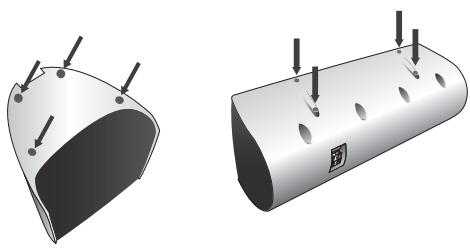
Affixing Non-Skid Pads
Apply the accessory non-skid pads to the bottom surfaces of the front/center/surround speakers
natural_image
Two 3D illustrations of a curved mechanical component with mounting holes and arrows indicating features (no text or symbols)
Effective Combination of Subwoofer and Satellite Speakers
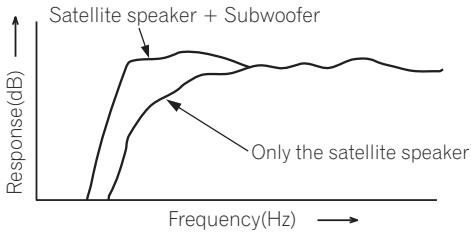
- When the subwoofer is combined with satellite speakers in a total system, the sound characteristics produced are like those shown in the accompanying graph, depicting the enhancement of the bass frequencies.
This is particularly effective for reproducing ground rumbles and other deep sound effects found in movies.
line
| Frequency(Hz) | Response(dB) - Satellite speaker + Subwoofer | Response(dB) - Only the satellite speaker |
| ------------- | -------------------------------------------- | ---------------------------------------- |
| 0 | 0 | 0 |
| 100 | ~10 | ~5 |
| 200 | ~8 | ~7 |
| 300 | ~7 | ~8 |
| 400 | ~6 | ~9 |
| 500 | ~5 | ~10 |
| 600 | ~4 | ~10 |
| 700 | ~3 | ~10 |
| 800 | ~2 | ~10 |
| 900 | ~1 | ~10 |
| 1000 | ~0.5 | ~10 |
Connections and Use
Connection
Before making or changing the connections, switch off the power and disconnect the power cord from the AC outlet.
Connecting the speakers
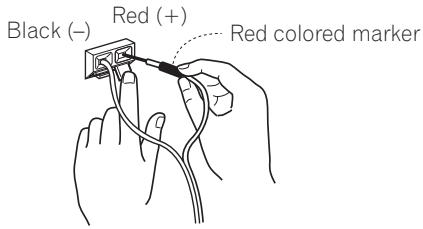
To get the best out of your speakers it is important that you connect them properly to your receiver. Each speaker connection consists of a positive (+) and a negative (−) terminal. These should be matched between the receiver and the speaker.
1 Attach one end of the supplied speaker cord to the rear of the each speaker.
- Connect the wire with the colored marker to the red (+) terminal; the plain wire to the black (−) terminal. Press down the spring-loaded tab and insert the wire, as shown below. Release the tab to secure the wire.
2 Connect the other end of each speaker cord to your receiver.
- To connect, insert the colored wire into the matching positive (colored) terminal and the other wire into the negative (black) terminal. See also the Operating Instructions that came with your receiver.

CAUTION
- These speaker terminals carry HAZARDOUS LIVE voltage. To prevent the risk of electric shock when connecting or disconnecting the speaker cords, disconnect the power cord before touching any uninsulated parts.
- After connecting the plugs, pull lightly on the cords to make sure that the ends of the cords are securely connected to the terminals. Poor connections can create noise and interruptions in the sound.
- If the cords' wires happen to be pushed out of the terminals, allowing the wires to come into contact with each other, it places an excessive additional load on the receiver. This may cause the amp to stop functioning, and may even damage the receiver.
- When using a set of speakers connected to an receiver, you won't be able to obtain the normal stereo effect if the polarity (+, −) of one of the speakers (left or right) is reversed.
Operation
- Set the receiver's cross-over frequency at 200 Hz.
Making amplifier settings
Before connecting the speakers, please read the operating instructions supplied with your amplifier to select the speaker setting of amplifier:
- Front / Center / Surround speakers: SMALL
Wall-mounting the front and surround speaker system (S-11A-P)
Attaching the brackets
- When attaching the speakers to brackets, always use the furnished brackets for wall mounting.
- Make sure to tighten the supplied screw as securely as possible when attaching the bracket to the back of the speaker.
- Do not attach brackets to center speaker or subwoofer.

CAUTION
- Use the M5 metric thread screw. Do not use inch thread screw.
Before mounting
- Remember that the speaker system is heavy and that its weight could cause the wood screws to work loose, or the wall material to fail to support it, resulting in the speaker falling. Make sure that the wall on which you intend to mount the speakers is strong enough to support them. Do not mount on plywood or soft surface walls.
- Mounting screws are not supplied. Use screws suitable for the wall material and support the weight of the speaker. If you are unsure of the qualities and strength of the walls, consult a professional for advice.
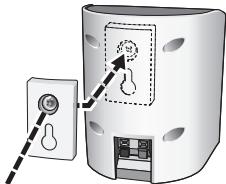
Screw (supplied)
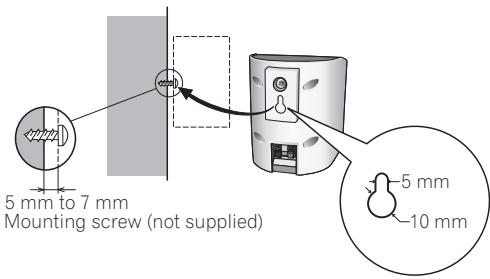
Specifications
S-22W-P
Cabinet...... Bass-reflex, floor type
Speaker....16 cm cone type
Nominal impedance 6 Ω
Outline Dimension....230 mm (W) x 418 mm (H) x 358 mm (D)
Weight (without package)....5.1 kg
S-11A-P
Front speakers / Surround speakers
Enclosure
Front speakers ....Closed-box bookshelf type
Surround speakers .... Closed-box bookshelf type
System 7.7 cm 1-way system
Speaker 7.7 cm cone type
Nominal impedance....6 Ω
Dimensions 106 mm (W) x 116 mm (H) x 106 mm (D)
Weight
Front speakers ....0.6 kg
Surround speakers 0.6 kg
Center speaker
Enclosure...... Closed-box bookshelf type
System 7.7 cm 1-way system
Speaker 7.7 cm cone type
Nominal impedance 6 Ω
Dimensions 270 mm (W) x 100 mm (H) x 106 mm (D)
Weight....0.8 kg
Specifications and design subject to possible modification without notice, due to improvements.
Troubleshooting
Incorrect operations are often mistaken for trouble and malfunctions. If you think that there is something wrong with this component, check the points below. Sometimes the trouble may lie in another component. Investigate the other components and electrical appliances being used. If the trouble cannot be rectified even after exercising the checks listed below, ask your nearest PIONEER authorized service center or your dealer to carry out repair work.
| Symptom | Cause | Remedy |
| No sound. | Incorrect connection of speaker wire.Receiver is off.Volume control is at zero. | Connect correctly.Turn on receiver.Slowly turn up volume. |
| Sound is distorted. | Extreme signal condition. | Turn down the receiver's output level (volume, bass control, bass boost) to lower the level. |
| Speakers stop producing sound suddenly.(S-11A-P) | An excessively large signal was input, resulting in the operation of the automatic protection circuit. | Turn the volume down to resume normal speaker output. |
| Much noise when listening to AM or FM broadcasts.(S-22W-P) | The AM loop antenna or the FM indoor antenna is close to this unit. | Increase the distance between the AM or FM antenna (for indoor use) and this unit. |
http://www.pioneer.co.uk http://www.pioneer.eu
© 2013 PIONEER CORPORATION.
All rights reserved.
PIONEER CORPORATION
1-1, Shin-ogura, Saiwai-ku, Kawasaki-shi, Kanagawa 212-0031, Japan
PIONEER ELECTRONICS (USA) INC.
P.O. BOX 1540, Long Beach, California 90801-1540, U.S.A. TEL: (800) 421-1404
PIONEER ELECTRONICS OF CANADA, INC.
340 Ferrier Street, Unit 2, Markham, Ontario L3R 2Z5, Canada TEL: 1-877-283-5901, 905-479-4411
PIONEER EUROPE NV
Haven 1087, Keetberglaan 1, B-9120 Melsele, Belgium TEL: 03/570.05.11
PIONEER ELECTRONICS ASIACENTRE PTE. LTD.
253 Alexandra Road, #04-01, Singapore 159936 TEL: 65-6472-7555
PIONEER ELECTRONICS AUSTRALIA PTY. LTD.
5 Arco Lane, Heatherton, Victoria, 3202, Australia, TEL: (03) 9586-6300
PIONEER ELECTRONICS DE MEXICO S.A. DE C.V.
Blvd.Manuel Avila Camacho 138 10 piso Col.Lomas de Chapultepec, Mexico, D.F. 11000 TEL: 55-9178-4270
K002_B3_En



