NO4SBB2D-PM-A - Measurement Neutrik - Free user manual and instructions
Find the device manual for free NO4SBB2D-PM-A Neutrik in PDF.


User questions about NO4SBB2D-PM-A Neutrik
0 question about this device. Answer the ones you know or ask your own.
Ask a new question about this device
Download the instructions for your Measurement in PDF format for free! Find your manual NO4SBB2D-PM-A - Neutrik and take your electronic device back in hand. On this page are published all the documents necessary for the use of your device. NO4SBB2D-PM-A by Neutrik.
USER MANUAL NO4SBB2D-PM-A Neutrik
natural_image
Green circular logo with white stylized 'T' and 'C' design (no text or symbols)opticalICON | powerMONITOR
User Manual

text_image
optoticBookweaver (Drawing Instruction) • 1.000 GB • 2.000 GB • 3.000 GB • 4.000 GB • 5.000 GB • 6.000 GB • 7.000 GB • 8.000 GB • 9.000 GB • 10.000 GB • 11.000 GB • 12.000 GB • 13.000 GB • 14.000 GB • 15.000 GB • 16.000 GB • 17.000 GB • 18.000 GB • 19.000 GB • 20.000 GB • 21.000 GB • 22.000 GB • 23.000 GB • 24.000 GB • 25.000 GB • 26.000 GB • 27.000 GB • 28.000 GB • 29.000 GB • 30.000 GB • 31.000 GB • 32.000 GB • 33.000 GB • 34.000 GB • 35.000 GB • 36.000 GB • 37.000 GB • 38.000 GB • 39.000 GB • 40.000 GB • 41.000 GB • 42.000 GB • 43.000 GB • 44.000 GB • 45.000 GB • 46.000 GB • 47.000 GB • 48.000 GB • 49.000 GB • 50.000 GB • 51.000 GB • 52.000 GB • 53.000 GB • 54.000 GB • 55.000 GB • 56.000 GB • 57.000 GB • 58.000 GB • 59.000 GB • 60.000 GB • 61.000 GB • 62.000 GB • 63.000 GB • 64.000 GB • 65.000 GB • 66.000 GB • 67.000 GB • 68.000 GB • 69.000 GB • 70.000 GB • 71.000 GB • 72.000 GB • 73.000 GB • 74.000 GB • 75.000 GB • 76.000 GB • 77.000 GB • 78.000 GB • 79.000 GB • 80.000 GBNEUTRIK®
version 2.1
opticalCON powerMONITOR User Manual
This user manual is a publication of NEUTRIK AG.
This user manual represents the technical status at the time of printing. The product information, specifications, and all technical data contained within this user manual are not contractually binding.
NEUTRIK AG reserves the right to make changes at any time to the technology and / or configuration without announcement. NEUTRIK AG is not to be held liable for statements and declarations given in this user manual.
NEUTRIK AG explicitly exonerates itself from all liability for mistakes in this user manual
The user manual or instruction manual for an intentional or unintentional radiator shall caution the user that changes or modifications not expressly approved by the party responsible for compliance could void the user's authority to operate the equipment.
opticalCON powerMONITOR
1. Warning & Important Notice
This equipment is intended for use in professional applications, where adequate safety mechanisms are being implemented. Review the following safety precautions to avoid injury and prevent damage.



CAUTION: Dispose
Production of this product required the extraction and use of natural resources. The equipment may contain substances that could be harmful to the environment or human health if improperly handled at the product's end of life. In order to avoid release of such substances into the environment and to reduce the use of natural resource, we encourage you to recycle this product in an appropriate system that will ensure that most of the materials are reused or recycled appropriately.
CAUTION: Transport
For transportation protect powerMONITOR from rain and handle it carefully.
CAUTION: Voltage
Use dedicated power adapter: Before connecting make sure that voltage rating and polarity is correct
CAUTION: Battery
- Avoid short circuits
- Operate and charge the battery between 0°C and +45°C.
- Do not heat the battery above 60°C.
- Do not dispose of the battery by burning.
- Do not solder directly to the battery.
- Do not disassemble the battery.
- Do not insert the battery in reverse polarity.
The Li-Io battery has a potential for fire or burning.
CAUTION: Laser Handling Precautions
Laser light can damage your eyes. Laser light is invisible. Viewing it directly does not cause pain. The iris of the eye will not close involuntarily when viewing a bright light, consequently, serious damage to the retina of the eye is possible. Never look into the end of a fiber which may have a laser coupled to it. DO NOT use magnifiers in the presence of laser radiation. Diffused laser light can cause eye damage if focused with optical instruments. Should accidental exposure to laser light be suspected

opticalCON powerMONITOR
Content
- Warning & Important Notice....3
- Specifications....5
- Design & Dimensions 6
4 Fiber Wiring 7 - Keys & Connectors 8
- Getting Started....8
- Software Menu Structure 10
- Channel Reset / Threshold Selection ...... 11
8.1 Change Channel Designation....12 - Mode - Wavelength Selection (Single-mode).... 13
9.1 Mode - Wavelength Selection (Multimode) 14
10 Battery Status / Instant Charging.... 15
11 Power Control Selection 16
12 Appendix – Change Rechargeable Batteries.... 17
12.1 Appendix System Monitoring.... 18
12.2 Appendix – External Alarm Signal 20
13 Warranty 21

opticalCON powerMONITOR
2. Specifications
| Power supply: | 5V DC external |
| Rechargeable batteries: | 2x 1.5V AA |
| Battery lifetime: | 72 h |
| Max. current: | 250 mA |
| Power adapter: | 110 VAC – 220VAC |
| Temperature range: | 0^ – 70^ |
| Housing: | steel, gal/black painted |
| Connectivity: | opticalCON; LC |
| Return loss: | >50 dB |
| Insertion loss: | <0.5 dB |
| Factory calibration: | -5 dBm (+/- 0.1) |
| -12 dBm (+/- 0.3) | |
| -24 dBm (+/- 0.5) |
| Area of operation: | SM: +3 dBm to -30 dBm |
| Wavelengths: | single-mode: 1310/1550 nm multimode: 850/1300 nm |
| Internal fiber: | single-mode: 9/125 um multimode: 50/125 um |
| Protection class: | IP 40 |
| Vibration: | IEC 60068 |
| Shock: | IEC 60068 |
| Signal smoothing: | 1s |
| FCC: | FCC / 47CFR Port 5 (Subpast B, Class B, digital Device) |

opticalCON powerMONITOR
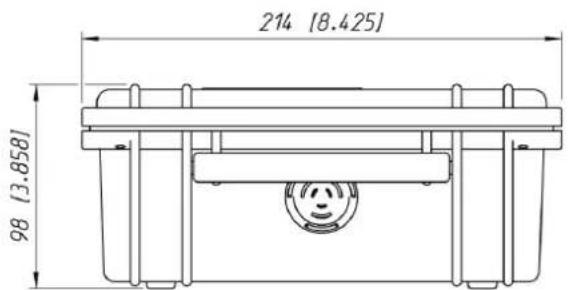
3. Design & Dimensions
Dimensions [mm / inch]
text_image
214 [8.425] 98 [3.858]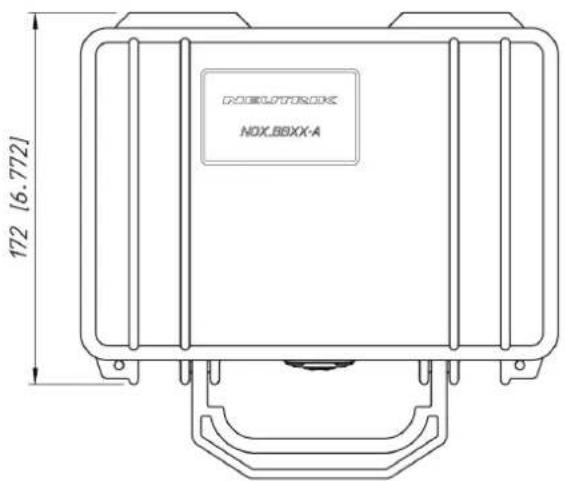
text_image
DOGLOPTOROX NOX.BBXX-A 172 [6.772]
opticalCON powerMONITOR
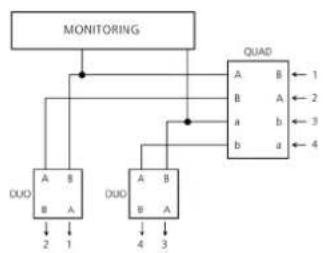
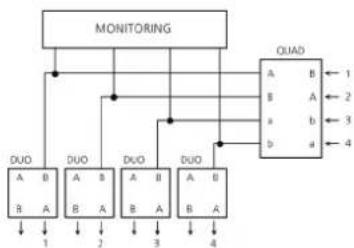
4 Fiber Wiring
flowchart
graph TD
    A["MONITORING"] --> B["DUD"]
    A --> C["DUD"]
    B --> D["QUAD"]
    C --> D
    D --> E["1"]
    D --> F["2"]
    D --> G["3"]
    D --> H["4"]
    B --> I["A B"]
    C --> J["A B"]
    D --> K["B A"]
    E --> L["B A"]
    F --> M["B A"]
    G --> N["B A"]
    H --> O["B A"]
2 fiber channels on port B are constantly monitored. Other 2 channels are connected straight through to each opticalCON DUO chassis.
Effected Products: NO4SBB2D-PM-A NO4SABB2D-PM-A NO4MBB2D-PM-A
flowchart
graph TD
    A["MONITORING"] --> B["DUD A B"]
    A --> C["DUD B A"]
    A --> D["DUD A B"]
    A --> E["DUD B A"]
    A --> F["DUD A B"]
    G["QUAD"] --> H["A B ← 1"]
    G --> I["B A ← 2"]
    G --> J["a b ← 3"]
    G --> K["b a ← 4"]
    B --> L["1"]
    C --> M["2"]
    D --> N["3"]
    E --> O["4"]
4 fiber channels are constantly monitored. Each single channel is connected to position B of the opticalCON DUO chassis.
Effected Products: NO4SBB4D-PM-A NO4SABB4D-PM-A NO4MBB4D-PM-A

opticalCON powerMONITOR
5. Keys & Connectors

text_image
Diagram of a device rear panel with labeled buttons and indicators, showing numbered parts for identification.| No | Function |
| 1 | Fiber output - opticalCON |
| 2 | Fiber input - opticalCON |
| 3 | External power supply - (5V DC) |

text_image
opticalCON CH1 ≠ -14.1 dBm Thr=0 Δ1.3 dBm powerMONITOR □□□□□III INFO SET control panel ① ② ③ ④ ⑤ ⑥ ⑦ ⑧ ⑨ ⑩| No | Function |
| 1 | Power ON / OFF button |
| 2 | UP botton ▲ |
| 3 | Down button ▼ |
| 4 | INFO / SET button |
| 5 | Relative attenuation |
| 6 | Absolute attenuation |
| 7 | Charging character |
| 8 | Chosen channel |
| 9 | Alarm LED (red light) |
| 10 | Threshold level |

opticalCON powerMONITOR
6. Getting Started
Connect the opticalCON cable of the source (e.g. DVI extender, CCU, etc.) to the input port and the opticalCON cable of the load (e.g. camera, stage box, video wall, etc.) to the output port.
If required plug the external power supply NOPS-1RU-PM to the power socket. Optionally the breakout box can be powered with internal rechargeable batteries (included).

Attention:
Charge battery for initial operation

text_image
Power Supply NOPS-1RU-PM 110V - 220V AC| No | Function |
| 1 | Fiber input - opticalCON |
| 2 | Fiber output - opticalCON or LC |
| 3 | Power supply +5V DC |
| 4 | Monitoring unit |

opticalCON powerMONITOR
7. Software Menu Structure
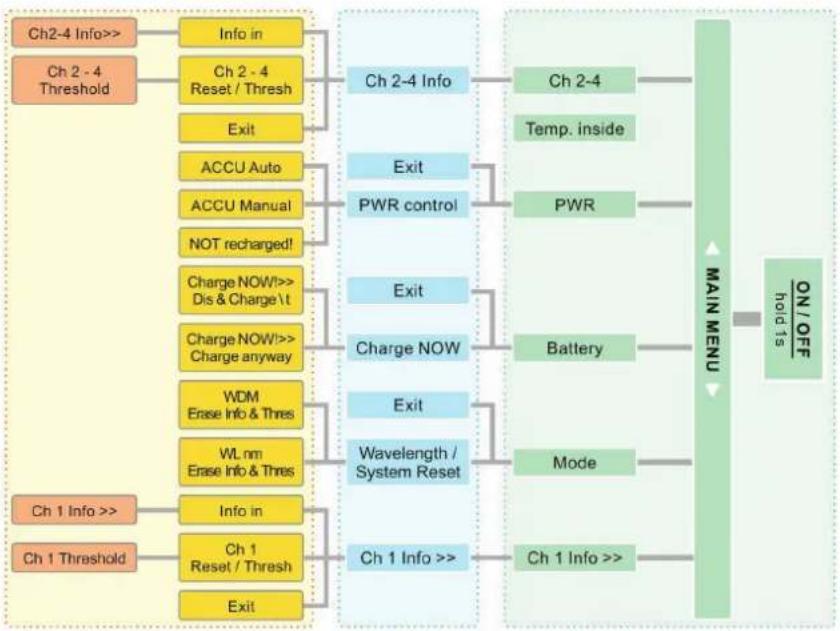
flowchart
graph TD
    A["Ch2-4 Info>>"] --> B["Info in"]
    C["Ch 2-4 Threshold"] --> D["Ch 2-4 Reset / Thresh"]
    D --> E["Exit"]
    E --> F["ACCU Auto"]
    F --> G["ACCU Manual"]
    G --> H["NOT recharged!"]
    H --> I["Charge NOW!>> Dis & Charge \t"]
    I --> J["Charge NOW!>> Charge anyway"]
    J --> K["WDM Erase Info & Thres"]
    K --> L["WL nm Erase Info & Thres"]
    L --> M["Ch 1 Info >>"]
    N["Ch 1 Threshold"] --> O["Ch 1 Reset / Thresh"]
    O --> P["Exit"]
    P --> Q["Ch 1 Info >>"]
    R["Ch 2-4 Info"] --> S["Ch 2-4 Info"]
    T["PWR control"] --> U["Exit"]
    V["Battery"] --> W["Charge NOW"]
    X["Mode"] --> Y["Wavelength / System Reset"]
    Z["Ch 1 Info >>"] --> AA["Info in"]
    AB["Ch 1 Info >>"] --> AC["Ch 1 Info >>"]
    AD["Temp. inside"] --> AE["PWR"]
    AF["ON/OFF hold is"] --> AG["/MAIN MENU"]

Attention:
The WDM modus in the Wavelength section is available only in single-mode operation.
When the powerMONITOR is turned on, an internal test starts and checks the proper functionality of the alarm and LED.

opticalCON powerMONITOR
8. Channel Reset / Threshold Selection
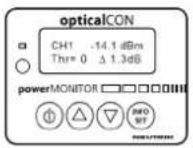
Ch1 Reset / Thresh
-
Select "Channel Menu" using △ or ▽.
-
To enter "Ch1 menu" push INFO SET twice. This will reset the relative attenuation.
Ch1 Threshold >>3
- Select the current threshold level (dB) by pushing △ or ▽ and finally INFO SET to save.
Ch1 -14.1 dBm Thr=3 3.3 dB
- The lower line indicates the chosen threshold and the relative attenuation ( dB )
Ch1 -14.1 dBm
Pls. note: To switch OFF the alarm push 3 times.

opticalCON powerMONITOR
8.1 Change Channel Designation
Ch1 -30.1 dBm Thr=0 1.3dB
-
Select "Channel Menu" using or △ ▽
-
To enter "Ch1 info" - menu press twice.
Ch1 Info in
- To change the channel designation press or ▽ till display indicates "Ch1 info" - menu and confirm with . INFO SET
Ch1 Info >> CAMERA
-
Change the displayed symbol by using △ or ▽ and select character with INFO SET
-
Repeat step 3 and 4 for additional characters.
- To save move the cursor to the right end of the display.
Ch1 info: CAMERA
- Check the entry by pushing INFO SET (returns to main info after 10 seconds)

opticalCON powerMONITOR
9. Mode - Wavelength Selection (Single-mode)
Set the wavelength according to your application: 1310 / 1550 nm or WDM for single-mode
MODE: SM 1310
- Select the "Wavelength Menu"
using


- Push INFO SET twice to modify the settings.
WL nm >> SM 1550 Erase Info&Thres
- Hit △ or ▽ to switch between the wavelengths and WDM section.
SM: 1310 / 1550 nm / WDM MM: 850 / 1300 nm
WDM Erase Info&Thres
- Push INFO SET to save the settings. Now the powerMONITOR restarts.
WDM section only works in single-mode Operations.
PIs. note: A modification of the wavelength selection will reset all settings to factory default.

opticalCON powerMONITOR
9.1 Mode - Wavelength Selection (Multimode)
Adjust the settings according to the used wavelength and type of light source (LED, VCSEL)
Mode: MM850 VCSEL
WL >> MM850 VCSEL Erase Info & Thres
- Select the "Wavelength Menu"
using or △ ▽
-
Push INFO SET twice to modify the settings.
-
Hit △ or ▽ to switch between the following wavelengths and types of light source.
| Symbol | Description |
| MM850 LED | 850 nm, multimode, LED light source |
| MM850 VCSEL | 850 nm, multimode, VCSEL light source |
| SM1300 LED | 1300 nm, multimode, LED light source |
| SM 1300 VCSEL | 1300 nm, multimode, VCSEL light source |
- Push INFO SET to save the settings. Now the powerMONITOR restarts.

opticalCON powerMONITOR
10 Battery Status / Instant Charging
Battery: 2.61 V †! □□□□□
-
Select "Battery Menu" using Ⓓ or ▽.
-
Press . INFO SET
Charge NOW! >> Charge anyway
-
Press △ or ▽ to switch between the two charging modes.
-
To set a mode press .
| Mode | Function |
| Dis - Charge \ &Charge anyway | Discharges battery before recharging (gently)Starts battery charging immediately |

Attention:
If the battery status is undercutting a defined voltage level, an alarm sounds.

opticalCON powerMONITOR
11 Power Control Selection
PWR: EXTERNAL NOT recharge! ¢
- Press △ or ▽ till the "power control" - menu is displayed.
If there is an external power supply plugged in, the first line of the display indicates EXTERNAL.
The second line shows the current battery mode.
-
Hit INFO SET
-
To switch between the battery mode press △ or ▽ and confirm with INFO SET
Internal PWR >> NOT recharge! ¢
| Mode | Function |
| ACCU Auto \ & τ | Depending on the battery status the powerMONITOR starts to discharge/charge automatically (gently). Only works with rechargeable batteries. |
| ACCU Manual τ | Charging starts immediately without checking the battery status. |
| NOT recharge! φ | No charging. |

Attention:
The battery can only be charged by using an external power supply! (NOPS-1RU-PM)

opticalCON powerMONITOR
12 Appendix – Change Rechargeable Batteries

natural_image
Line drawing of an open toolbox with internal compartments and hanging particles (no text or symbols)- Remove 12 screws with a hex key and take out the metal plate

- Untighten the distance bolt and replace the rechargeable battery (2x1.5V AA).
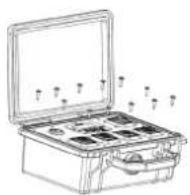
- Attach the metal plate by tightening the 12 screws.

Attention: Do not jam the fibers or damage the print circuit board (PCB).

opticalCON powerMONITOR
12.1 Appendix System Monitoring
a) System monitoring with known output power
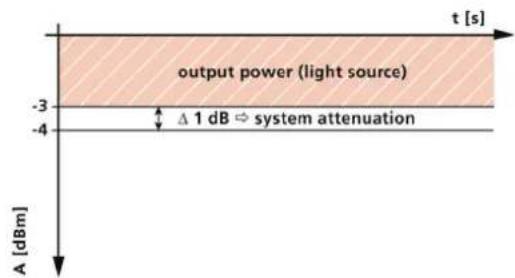
The powerMONITOR measures the deviation of the signal power at the end of the system as reference to the typical fiber output power from the light source (e.g. DVI converter, SFP transceiver, etc.) according the device specifications.
At the example below a light source with constant output power (-3dBm) is connected with an opticalCON cable to the powerMONTIOR. The monitor unit shows a received power on -4 dBm which means the deviation is 1 dB in reference to the output power of -3 dBm. The relative deviation is the system attenuation caused by the opticalCON cable on this example.

text_image
powerMONITOR e.g. NO4SBB1-4PM equipment fiber output power: -3 dBm| Fiber output power | -3 dBm |
| - Received power (absolute value): | -4 dBm |
line
| t [s] | A [dBm] | |-------|---------| | -3 | -3 | | -4 | -3 |System attenuation (relative value dB ): 1 dB

opticalCON powerMONITOR
... Appendix – System Monitoring
b) System monitoring with unknown output power
To determine the attenuation of a system, connect a light source with defined output power like Neutrik's measurement KIT (CAS-FOMD ^1 ) with help of a LC patch cable and the used opticalCON cable (e.g. NKO4S-R-0-50 ^1 ) and powerMONITOR. In the example below the output power from the light source is -5dBm. The powerMONITOR shows on the display -6 dBm which is a 1 dB insertion loss deviation ( ).

natural_image
Diagram of an electronic device with connectors and ports, no visible text or symbols
text_image
output power light source Δ 1 dB Ω system attenuation -6 -5 A [dBm] t [s]CAS-FOMD
Second connect the light source with unknown output power with the powerMONITOR. The measured values are the output power reduced through the system insertion loss from the opticalCON cable.

text_image
light source (unknown output power)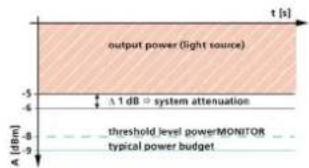
text_image
output power (light source) Δ 1 dB ▼ system attenuation threshold level power/MONITOR typical power budget A [dBm] t [s]Set the threshold level according the known power budget from the system. Consider that insertion loss caused by cable bending and fiber contamination requires additional headroom to the power budget limit. If no power budget is known use typical attenuation values from the table below
| Fiber Type | Single-mode | Multimode |
| Power budget | -9 dB | -7 dB |

opticalCON powerMONITOR
12.2 Appendix – External Alarm Signal
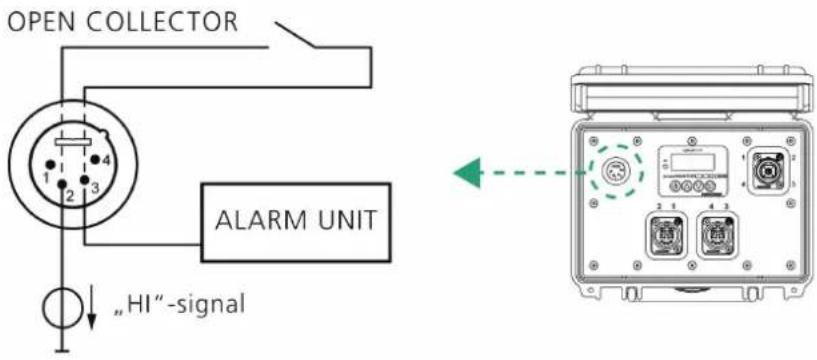
With help of a custom cable (not included) there is the option to connect an external alarm unit (e.g. lamp) with the powerMONITOR. Pin 2 and 3 from the power supply (see section 5) are connected to an internal, normally open solid state relay. If the alarm starts the relay closes the internal circuit and the signal from pin 2 reaches the output pin 3.
| Relay parameter | Value |
| Max. voltage | 30 Vp |
| Max. current | 1.2 Adc |
text_image
OPEN COLLECTOR 1 2 3 4 ALARM UNIT „HI“-signal
opticalCON powerMONITOR
13 Warranty
Neutrik AG warrants that the product will be free from defects in materials and workmanship for a period of 2 years from the date of original purchase from an authorized Neutrik distributor. If the product proves defective during this warranty period, Neutrik AG, at its option, either will repair the defective product without charge for parts and labour, or will provide a replacement in exchange for the defective product. Parts, modules and replacement products used by Neutrik AG for warranty work may be new or reconditioned to like new performance. All replaced parts, modules and products become the property of Neutrik AG.
In order to obtain service under this warranty, Customer must notify Neutrik AG of the defect before the expiration of the warranty period and make suitable arrangements for the performance of service. Customer shall be responsible for packaging and shipping the defective product to the headquarters. This warranty shall not apply to any defect, failure or damage caused by improper use or improper or inadequate maintenance and care. Neutrik AG shall not be obligated to furnish service under this warranty a) to repair damage resulting from attempts by personnel other than Neutrik AG representatives to install, repair or service the product; b) to repair damage resulting from improper use or connection to incompatible equipment; c) to repair any damage or malfunction caused by the use of non - Neutrik AG supplies; or d) to service a product that has been modified or integrated with other products when the effect of such modification or integration increases the time or difficulty of servicing the product.
THIS WARRANTY IS GIVEN BY NEUTRIK AG WITH RESPECT TO THE PRODUCT IN LIEU OF ANY OTHER WARRANTIES, EXPRESS OR IMPLIED. NEUTRIK AG AND ITS VENDORS DISCLAIM ANY IMPLIED WARRANTIES OF MERCHANTABILITY OR FITNESS FOR A PARTICULAR PURPOSE. NEUTRIK AG RESPONSIBILITY TO REPLAIR OR REPLACE DEFECTIVE PRODUCTS IS THE SOLE AND EXCLUSIVE REMEDY PROVIDED TO THE CUSTOMER FOR BREACH OF THIS WARRANTY. NEUTRIK AG AND ITS VENDORS WILL NOT BE LIABLE FOR ANY INDIRECT, SPECIAL, INCIDENTAL, OR CONSEQUENTIAL DAMAGES IRRESPECTIVE OF WHETHER NEUTRIK AG OR THE VENDOR HAS ADVANCE NOTICE OF THE POSSIBILITY OF SUCH DAMAGES.
opticalCON powerMONITOR
opticalCON powerMONITOR
Liechtenstein (Headquarters)
Neutrik Hong Kong LTD., Suite 18, 7th Floor Shatin
Galleria
Fotan, Shatin
T +852 2687 6055, neutrik@neutrik.com.hk
Associated companies:
Germany /Netherlands / Denmark / Austria
Neutrik USA Inc., 4115 Taggart Creek Road, Charlotte,
North Carolina, 28208
T +1 704 972 30 50, info@neutrikusa.com
China
Ningbo Neutrik Trading Co., Ltd., Shiqi Street, Yinxian
Road West
Fengjia Village, Yinzhou Area, Ningbo, Zhejiang, 315153
T +86 574 88250488 800, neutrik@neutrik.com.cn
Contrik AG
Steinackerstrasse 35, 8902 Urdorf, Switzerland
T +41 44 736 50 10, contrik@contrik.ch
Great Britain
Neutrik (UK) Ltd., Westridge Business Park, Cothey Way
Ryde, Isle of Wight PO33 1 QT
T +44 1983 811 441, sales@neutrik.co.uk
Japan
Neutrik Limited, Yusen-Higashinihonbashi-Ekimae
Bldg., 3-7-19
Higashinihonbashi, Chuo-ku, Tokyo 103
T +81 3 3663 47 33, mail@neutrik.co.jp
India
Neutrik India Pvt. Ltd., Level 3, Neo Vikram, New Link
Road.
Above Audi Show Room, Andheri West, Mumbai,
400058
T +91 982 05 43 424, anklesaria@neutrik.com
H. Adam GmbH