NS1D41P - Projector Chief - Free user manual and instructions
Find the device manual for free NS1D41P Chief in PDF.


User questions about NS1D41P Chief
0 question about this device. Answer the ones you know or ask your own.
Ask a new question about this device
Download the instructions for your Projector in PDF format for free! Find your manual NS1D41P - Chief and take your electronic device back in hand. On this page are published all the documents necessary for the use of your device. NS1D41P by Chief.
USER MANUAL NS1D41P Chief
INSTALLATION INSTRUCTIONS

S1 Racks Doors
DISCLAIMER
Milestone AV Technologies and its affiliated corporations and subsidiaries (collectively "Milestone"), intend to make this manual accurate and complete. However, Milestone makes no claim that the information contained herein covers all details, conditions or variations, nor does it provide for every possible contingency in connection with the installation or use of this product. The information contained in this document is subject to change without notice or obligation of any kind. Milestone makes no representation of warranty, expressed or implied, regarding the information contained herein. Milestone assumes no responsibility for accuracy, completeness or sufficiency of the information contained in this document.
Chief® is a registered trademark of Milestone AV Technologies. All rights reserved.

IMPORTANT WARNINGS AND
CAUTIONS!

WARNING: A WARNING alerts you to the possibility of serious injury or death if you do not follow the instructions.

CAUTION: A CAUTION alerts you to the possibility of damage or destruction of equipment if you do not follow the corresponding instructions.

WARNING: Failure to read, thoroughly understand, and follow all instructions can result in serious personal injury, damage to equipment, or voiding of factory warranty! It is the installer's responsibility to make sure all components are properly assembled and installed using the instructions provided.
LEGEND
 | Tighten Fastener |
| Apretar elemento de fijación | |
| Befestigungsteil festziehen | |
| Apertar fixador | |
| Serrare il fissaggio | |
| Bevestiging vastdraaien | |
| Serrez les fixations | |
 | Loosen Fastener |
| Aflojar elemento de fijación | |
| Befestigungsteil lösen | |
| Desapertar fixador | |
| Allentare il fissaggio | |
| Bevestiging losdraaien | |
| Desserrez les fixations | |
 | Open-Ended Wrench |
| Llave de boca | |
| Gabelschlüssel | |
| Chave de bocas | |
| Chiave a punte aperte | |
| Steeksleutel | |
| Clé à fourche | |
 | Phillips Screwdriver |
| Destornillador Phillips | |
| Kreuzschlitzschraubendreher | |
| Chave de fendas Phillips | |
| Cacciavite a stella | |
| Kruiskopschroevendraaier | |
| Tournevis à pointe cruciforme |
TOOLS REQUIRED FOR INSTALLATION

7/16"

2
PARTS

A (1) [Door]

natural_image
3D rendering of a rectangular metal panel with a central handle and mounting holes (no text or symbols)[Plexiglass]
OR
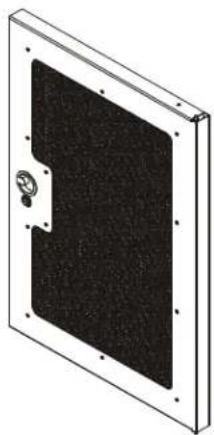
natural_image
Exterior view of a rectangular panel with a black cover and mounting holes (no text or symbols)[Perforated] [Solid]
(NS1D12F shown)

natural_image
Simple line drawing of a rectangular panel with a circular button and label 'OR' on the side (no text or symbols on the panel itself)(NS1D12S shown)
(NS1D12P shown)
text_image
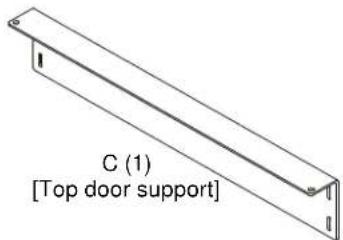
C (1) [Top door support]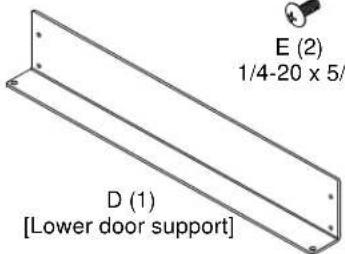
text_image
E (2) 1/4-20 x 5/ D (1) [Lower door support]
F (2)
1/4-20
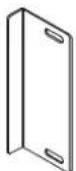
B (1)
[Door catch]
INSTALLATION
IMPORTANT ! : If installing doors and side panels (not included) on an S1 rack, the doors must be installed before installing the side panels.
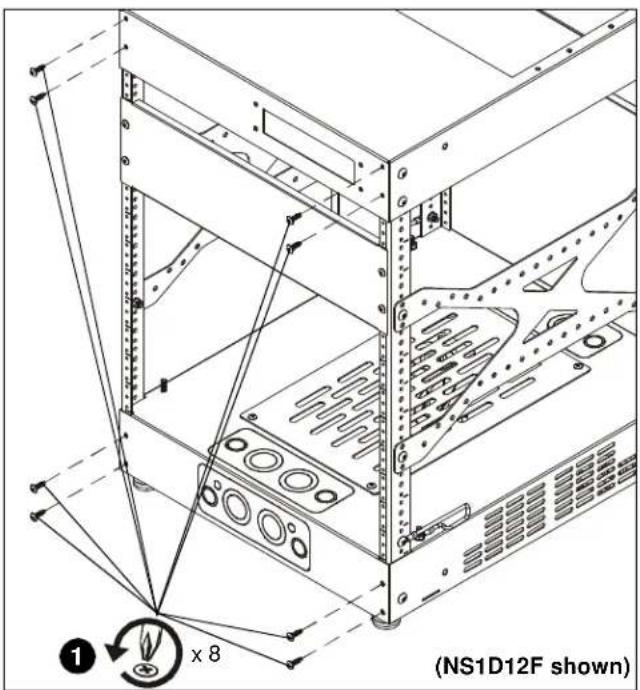
- Remove and save four screws from both top and bottom of rack front. (See Figure 1)
text_image
(NS1D12F shown) ① x 8Figure 1
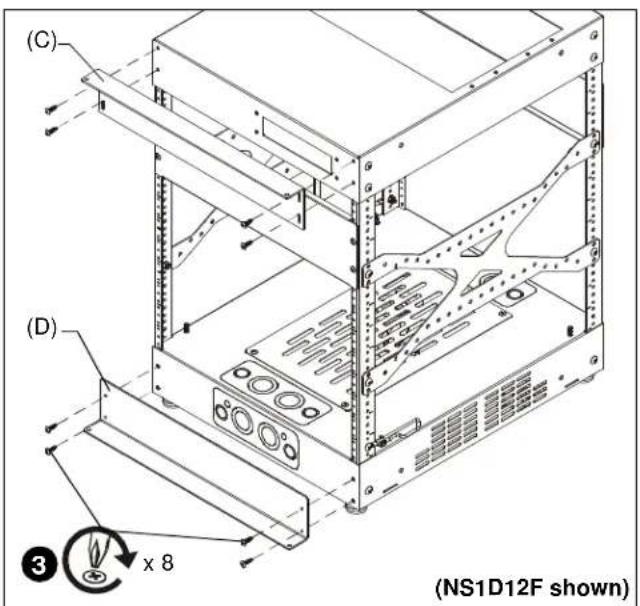
- Add top door support (C) and lower door support (D) to rack front. (See Figure 4)
- Attach door supports using eight screws removed in Step 1.
text_image
(C) (D) 3 x 8 (NS1D12F shown)Figure 2
IMPORTANT ! : If the door is to be attached with the pulling handle on the right side, the two nuts and grounding wire already installed on the door must be removed and reinstalled on the opposite end of the door before the door is installed. The grounding wire should be on the BOTTOM of the installed door. (See Figure 3)

text_image
Move to grounding screw Move two nuts and grounding wire NOTE: Door will be flipped before installation.Figure 3
- Rotate two spring handles (one at bottom and one at top) on inside of door. (See Figure 4)

text_image
(View from back of door) Upper spring handle Lower spring handle ⑤ ④Figure 4
- Pull down on upper spring handle, and push up on lower spring handle.
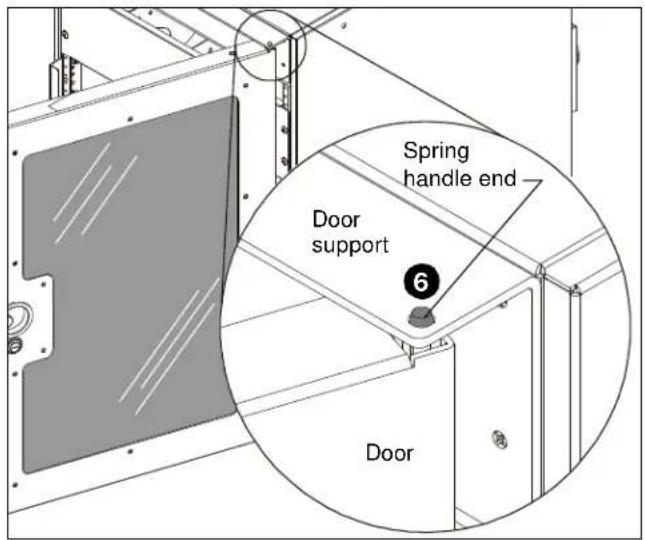
- Insert door into rack, aligning the spring handle ends with the holes in the door support at top and bottom of rack. (See Figure 5)
text_image
Spring handle end Door support 6 DoorFigure 5
- Push spring handle end into door supports, and re-latch spring handle.
- Determine location for door catch (B) by matching up handle cut-out in door with correct position on rack. (See Figure 6)

natural_image
Technical line drawing of a server rack cabinet with mounting holes and a numbered component (no text or symbols)Figure 6
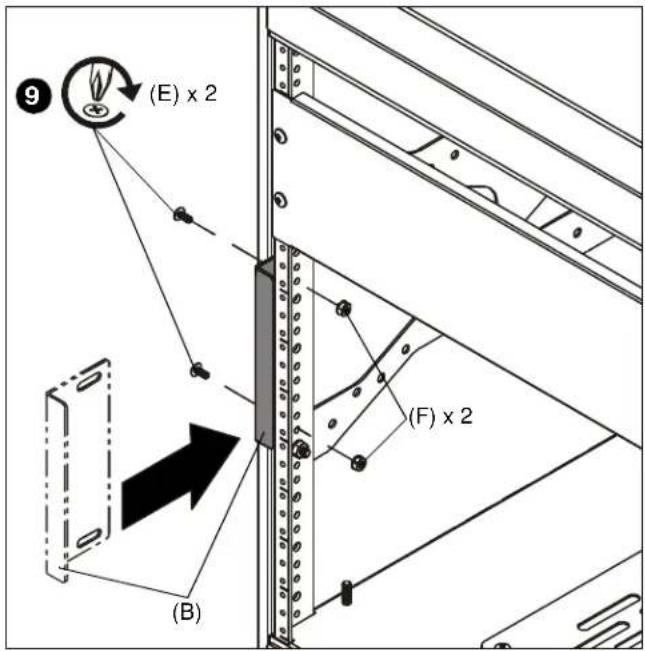
9. Add door catch (B) to rack rail using two 1/4-20 x 5/8" screws (E) and two 1/4-20 lock nuts (F). (See Figure 7)
text_image
(E) x 2 (B) (F) x 2Figure 7
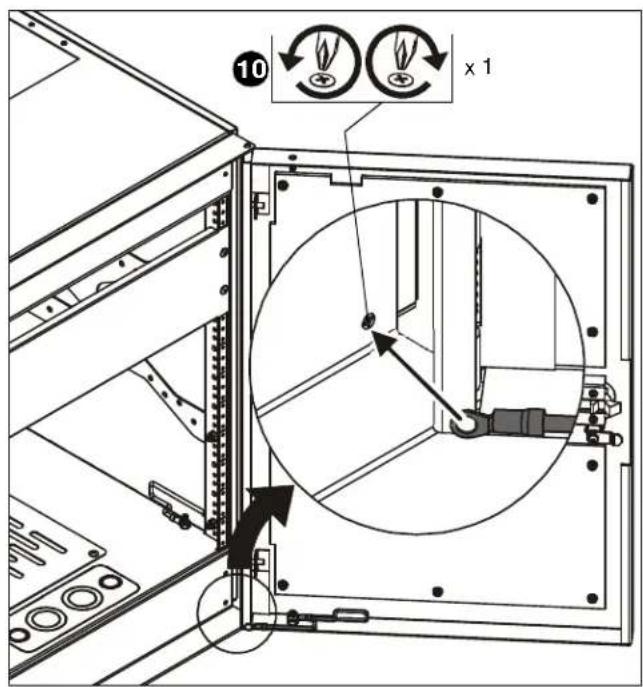
10. Loosen screw in lower door support, attach door grounding wire, and tighten screw to finish connection. (See Figure 8)
text_image
⑩ x 1Figure 8

text_image
(inside view of door) Location of grounding lugs Grounding screw and nut installed at factory Earthing symbol IEC 60417 No. 5019 affixed adjacent to grounding terminal.Figure 9

DANGER: IMPROPER WIRING CAN LEAD TO DEATH OR SEVERE PERSONAL INJURY! Grounding must be installed by qualified personnel using a UL Recognized No. 12AWG Green and Yellow grounding wire connected to grounding lug on rack.
NS1D12-20-28-36-41
Installation Instructions