LTSC30WH/SM - Monitor stand Ergotron - Free user manual and instructions
Find the device manual for free LTSC30WH/SM Ergotron in PDF.


User questions about LTSC30WH/SM Ergotron
0 question about this device. Answer the ones you know or ask your own.
Ask a new question about this device
Download the instructions for your Monitor stand in PDF format for free! Find your manual LTSC30WH/SM - Ergotron and take your electronic device back in hand. On this page are published all the documents necessary for the use of your device. LTSC30WH/SM by Ergotron.
USER MANUAL LTSC30WH/SM Ergotron
This unit has been tested to Underwriters Laboratories U.S. and Canadian (Bi-National) Standard for Safety of Informational Technology Equipment, Including Electrical Business Equipment, CAN/CSA C22.2 No. 950-95 * UL 1950, Third Edition, including revisions through revision date March 1, 1998, which are based on the Fourth Amendment to IEC 950, Second Edition.
This owners manual contains a list of items that we would like you to be aware of to promote safety in the use of our product in your work place and/or learning environment.
natural_image
Line drawing of a DTSC20xx/xx industrial cart with wheels and internal compartments (no text or symbols)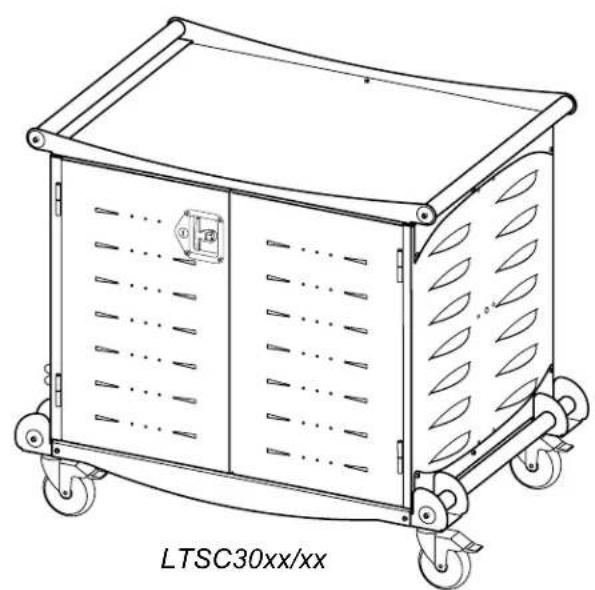
natural_image
Line drawing of a mechanical device labeled 'LTSC30xx/xx' with wheels and internal compartments (no text or symbols on the device itself)Before Using
Please read these operating instructions carefully. It contains important advice concerning the use, and safety of your Laptop Storage Cart. Keep these operating instructions in a safe place and pass them on to any subsequent user. This storage cart must only be used for its intended purpose in accordance with these operating instructions.
Please pay attention to the safeguards.
SAVE THIS OWNERS MANUAL!
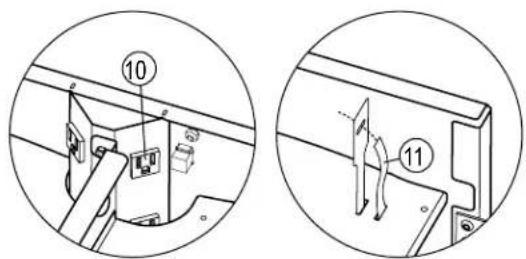
DETAIL VIEW OF INTERNAL POWER
RECEPTACLES & CABLE TIES
Components at a Glance
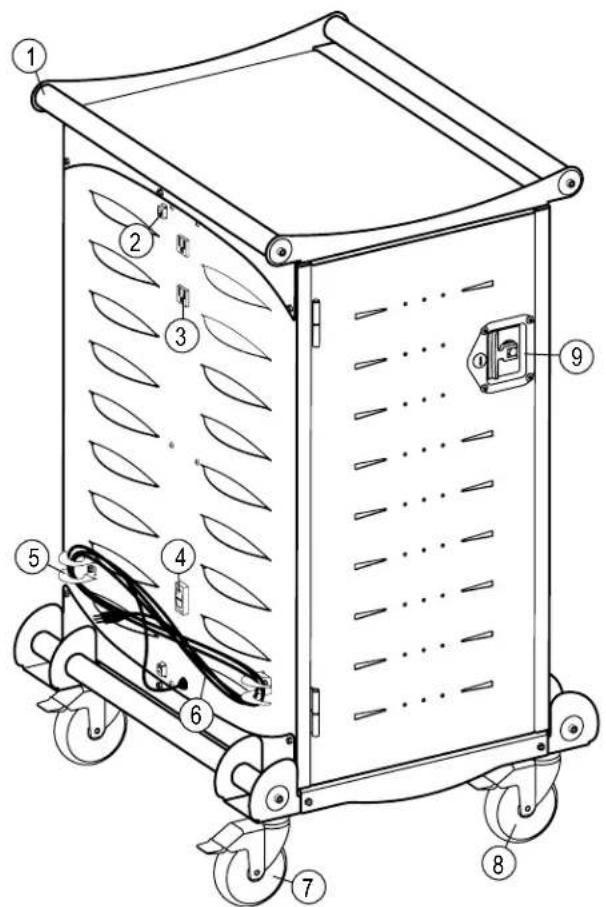
1 - Handles
2 - Network Connections
3 – External Power Receptacles
4 - Control Switch
5 - Cord Wrap Claws
6 - Power Cord
7 - Total Lock Casters (black tab)
8 – Directional Lock Casters (green or gray tab)
9 - Two Point Locking Door Latch
10 – Internal Power Receptacles
11 – Cable Ties & Slots for Wire Management
Important Safeguards
When using electrical devices, basic safety precautions should always be followed. READ ALL INSTRUCTIONS:
- The Control Switch must be in the OFF position before plugging the cart into a wall outlet and before plugging any equipment into the cart..
- This Storage Cart must only be connected to a 120 volt a.c. 15 or 20 amp power supply.
- Electrical devices are not toys. Children are often unaware of the hazards associated with electrical devices and the storage cabinet must therefore always be used by adults or with adult supervision.
• The unit is not designed for outdoor use.
- Liquids should not be stored in, set on or placed inside this unit.
- Never unplug this product from the outlet when your hands are wet or by pulling the power cord.
- Never pull the storage cabinet by the power cord.
- Do not pull or jam the power cord against sharp edges. Do not leave the power cord hanging and do not crush or drag the power cord while transporting the storage cart.
- Do not use an extension cord in conjunction with this product.
- Do not plug the unit in if the switch, receptacle(s) or power cord has been damaged. All electrical components on this product must be repaired by a qualified electrician.
- Inadequate repair can create significant hazards to users and is not covered by the warranty.
- Ergotron cannot accept any liability for damage if the Storage Cart is misused, incorrectly operated or inadequately repaired. Under these circumstances the warranty will be void.
Product Specifications
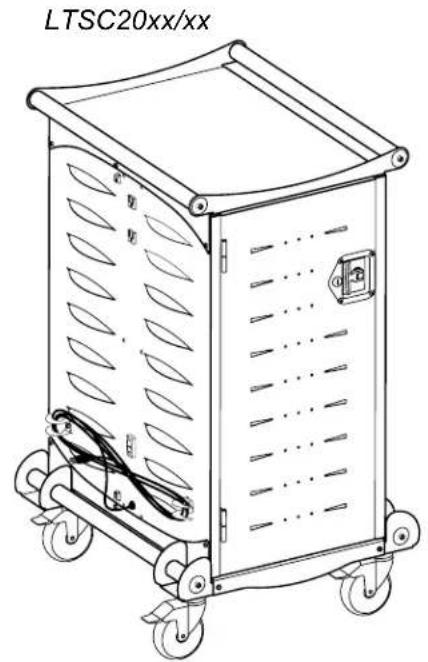
The Carts are designed to securely store, transport and charge laptop computers. The LTSC20 has 20 separate storage bays with a 120V receptacle in each bay. The maximum electrical output for each Cart is rated at 12amps.
The LTSC30 has 30 separate storage bays with a 120 V receptacle in each bay. The maximum electrical output for each Cart is rated at 12amps.
Before You Use the Storage Cart
- A receptacle shall be installed near the Laptop Storage Cart and shall be easily accessible.
- For your safety have a qualified electrician test the circuit you will be plugging in the unit. The circuit should be checked for ground integrity to verify that it will handle up to 12A draw and that appropriate branch circuit protection is in place.
- The Cart's ground prong must be present for safe operation. If the plug is damaged or if the ground prong has been removed it should be replaced by a qualified electrician.
- The Storage Cart should only be used for the storage, transport, and charging of laptop computers.
- The use of the Cart including plugging or unplugging laptop computers, plugging or unplugging the Storage Cart, operating the control switch, engaging or releasing the directional and total lock casters must be done with adult supervision. The Cart can be very heavy when fully loaded and should be moved by persons physically able to do so.
- The cable ties are provided to secure charging cords to the shelves using the two rectangular cut-outs.
Loading Your Laptops into the Cart
- Open a Door by pulling the T-handle out from the recessed area. Turn it clockwise 90 degrees and open.
- Locate the external control switch near the bottom of the unit on the outside. Push the switch to the middle "OFF" position. When in the middle position, power is cut off from both internal and external receptacles. To eliminate any arcing, the switch should be in the off position when devices are being plugged in or removed from the storage bays and prior to plugging the storage cart into a wall receptacle.
- Load one laptop into each storage bay. Make sure the power switch is in the middle "OFF" position and then plug them into the 120 V receptacle in each bay. Repeat the loading on other side of the cart if necessary.
To Charge Your Laptops
- Locate the external control switch near the bottom of the unit. Move the switch to the middle "OFF" position.
- Plug in the 12' power cord for the cart into a suitable receptacle.
- Push the switch into the down "INSIDE" to direct power inside the enclosure and charge the laptops. External outlets will not receive power when the switch is in the down position.
To Use the Outside Electrical Receptacles
The storage cart has two 120 V convenience outlets located on the outside of the unit. The maximum electrical output for the combined external receptacles is 12 A.
- Locate the external control switch near the bottom of the unit. Move the switch to the middle "OFF" position.
- Plug in the 12' power cord for the cart into a suitable receptacle. Plug in your other hardware such as printers and overhead projectors to use the Cart as a lecture station.
- Push the external control switch to the up "EXTERNAL" position. You will feel a positive engagement of the switch indicating power to the external receptacles. In this position the internal receptacles are disabled and no charging to stored computers will occur.
Overload Protection (30 Unit Model)
Charging 30 laptop computers at one time combined with the power demands of existing laptop battery technology can overload a typical 15 amp circuit. Anthro's 30 Unit Laptop Storage Cart is equipped with a built-in timing device that automatically switches the AC power supply from one side of the Cart to the other.
How It Works:
When the Cart's external control switch is set to internal power (to charge the laptops), the timer module will provide power to the Primary Panel (the side of the cart with the power cord) for the amount of time indicated on the Timer Adjustment (shown right). When that time expires, the cart will provide power to the Secondary Panel (the other side of the cart) until the time expires. The cart will continue to alternate sides until the external control switch is changed or the cart is unplugged. Every time power is turned off and then restored to the cart, power goes to the Primary Panel first.
The timer is factory-set on a 25-minute cycle. Laptops and equipment with fully depleted batteries will require more than one cycle to fully charge.
When the cart's external control switch is set to external power, the cart provides power to the two external receptacles located above the power cord.
Circuit Breaker:
There are two circuit breakers on the LTSC30. One is on the timer module and the other is on the power inlet module located underneath the cart. If there is no power to internal and external outlets, check to see if the circuit breaker on the power inlet module is tripped. If there is power to the external outlets but not to the internal outlets, check to see if the circuit breaker located on the timer module is tripped.
Adjusting the Timer:
Use a flat head screwdriver no wider than 1/8" to make this adjustment.
The 25 minute cycle should be optimum for most applications and we don't recommend adjustment. If adjustment is required, it can be done by a qualified maintenance person following these provided instructions. The timer range is from 15 to 120 minutes.
- Using a flat head screwdriver, gently turn the timer dial counterclockwise until it stops at position 0.
- Adjust the dial clockwise to the desired setting. Position 1 provides approximately 25-35 minute cycles.
- The timer key to the left of the dial indicates the cycle length for each setting.
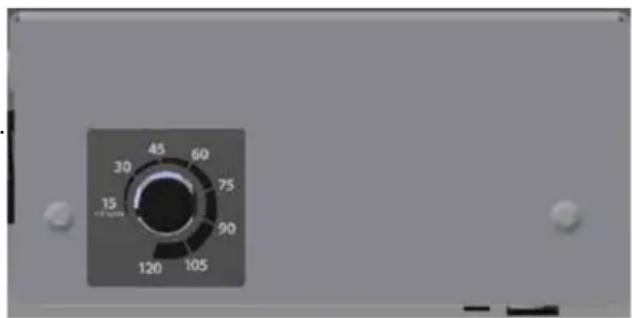
Timer Module
Moving Your Cart
- Your Cart comes equipped with two directional casters (they have a green tab) and two locking casters (they have a black tab). To successfully steer your Cart, make sure the black tabs on the locking casters are in an upright unlocked position. Push the green tabs on the directional casters to the down position.
- Make sure the T-handle on the door is recessed so it does not stick out or catch on door frames and corners.
- When you reach your desired location, push all the tabs on the Casters to the down locked position.
Lock Your Cart
Your Cart comes equipped with a two point keyed locking system on the Doors and two Keys (one is a duplicate).
- Shut the Door and turn the T-Handle 90 degrees.
- Recess the T-Handle.
- Insert one of the Keys and turn 180 degrees counter clockwise.
- Repeat for other Door if necessary.
FCC Statement
This equipment has been tested and found to comply with the limits for a Class A digital device, pursuant to part 15 of the FCC Rules. These limits are designed to provide reasonable protection against harmful interference when the
equipment is operated in a commercial environment. This equipment generates, uses, and can radiate radio frequency
energy and, if not installed and used in accordance with the instruction manual, may cause harmful interference to radio
communications. Operation of this equipment in a residential area is likely to cause harmful interference in which case the
user will be required to correct the interference at his own expense.
CAN ICES-3(A)/NMB-3(A).
Changes or modifications not expressly approved by Ergotron could void the user's authority to operate the equipment.
Trouble Shooting Questions
• How do I know if my computers will draw more than the allowed current?
Our testing indicated it won't but you can contact the computer manufacturer to learn the draw of your computers or have a licensed electrician measure the current draw if you have concerns.
- The unit sparks when I plug it into the wall. Is it defective?
No. Make sure the control switch is in the off position prior to plugging it in.
- The 30 unit Cart appears to have room for 32 computers. Can I add two more computers?
No. The LTSC30 has 32 shelves but only 30 power receptacles. The bottom shelves can be used for storage, but not for charging.
• What are the data ports used for?
If you use a wireless network hub you can set the hub on the top of the Cart and connect your local area network (LAN) cable to the RJ45 jack at the bottom of the cart and connect the wireless hub to the port located at the top of the cart.
- Someone tried to break into the cart and damaged a door. Can it be replaced?
Yes, please contact Customer Care.
- My computers didn't charge overnight. What is wrong?
Make sure the Cart is plugged in. Make sure the control switch is pushed to the lower position marked "Internal Power On".
- When I plug in the Cart it trips the circuit breaker. What is wrong?
The Cart is designed to run on a 15 amp circuit. If you have other equipment or appliances plugged into the same circuit you may be overloading it. Have a qualified electrician check the circuit to make sure there is adequate power available.
• My Cart was damaged during shipment. What should I do?
Please contact Customer Care.
• I have a 30-unit cart; how do I know which side is being charged?
Check the indicator lights to see where the power is being directed. Indicator lights are located on the outside left and right side panels.
• I have a 30-unit cart; how do I know if both sides of the cart are working correctly?
Watch the indicator lights to see if they light up during a charging cycle.
• How do I find the cart's serial number?
Position the cart so you're standing in front of the doors and the power cord is on the right. Open the door(s). The serial number label is located on the base shelf in front of you.
For Warranty visit: www.ergotron.com/warranty
For Service visit: www.ergotron.com
For local customer care phone numbers visit: http://contact.ergotron.com
Americas Sales and Corporate Headquarters
1181 Trapp Rd.
St. Paul, MN USA
1-800-325-3841
www.ergotron.com
sales@ergotron.com
ERGOTRON®

While Ergotron, Inc. makes every effort to provide accurate and complete information on the installation and use of its products, it will not be held liable for any editorial errors or omissions (including those made in the process of translation from English to another language), or for incidental, special or consequential damages of any nature resulting from furnishing this instruction and performance of equipment in connection with this instruction. Ergotron, Inc. reserves the right to make changes in the product design and/or product documentation without notification to its users. For the most current product information, or to know if this document is available in languages other than those herein, please contact Ergotron. No part of this publication may be reproduced, stored in a retrieval system, or transmitted in any form or by any means, electronic, mechanical, photocopying, recording or otherwise without the prior written consent of Ergotron, Inc., 1181 Trapp Road, Eagan, Minnesota, SS121, USA Patents Pending and Patented U.S. & Foreign. Ergotron is a registered trademark of Ergotron, Inc.
© 2016 Ergotron, Inc. All rights reserved.
All trademarks are the property of their respective companies. Anthro is a registered trademark and brand of Ergotron Inc.
Anthro-DNA is a trademark of Ergotron Inc.